

Microsoft’s Roadmap ID 564970 lists an improved PDF preview experience for Outlook on iOS as rolling out with a July 2026 General Availability target. The narrowly scoped update adds support for Microsoft Information Protection label-protected PDF attachments in Outlook’s PDF previewer, along with a built-in navigation toolbar. Microsoft lists the feature for Worldwide Standard Multi-Tenant, GCC, GCC High, and DoD environments.
The change should not be read as a broad redesign of Microsoft’s security model or as confirmation that the feature is already available on every eligible device. It is a roadmap-based, forward-looking availability item focused on one practical workflow: opening and navigating an MIP-label protected PDF within Outlook for iOS.
Roadmap ID 564970 describes an improved PDF previewer in Outlook for iOS that supports PDFs protected by Microsoft Information Protection labels. It also identifies a built-in toolbar intended to make navigation easier.
That scope is important. Microsoft is not announcing a new classification system, a new form of PDF encryption, or a general overhaul of protected-document controls. The roadmap item concerns Outlook, iOS, the application’s PDF preview experience, and PDFs protected through MIP labels.
For users, the visible change should be straightforward: an authorized recipient using Outlook for iOS should be able to preview a supported MIP-label protected PDF and navigate it with the built-in controls provided by the improved viewer. Whether a specific user is authorized remains a separate question from whether the application can preview the protected format.
For administrators, the announcement is primarily a compatibility and validation item. Organizations that already exchange MIP-label protected PDFs should determine whether the new preview experience works as expected in their own environment when it becomes available through their normal Outlook deployment process.
The inclusion of the navigation toolbar is also part of the stated feature, not an unrelated interface change. A PDF previewer must do more than render the first page to be useful. Users need a practical way to move through the document, especially on a smaller screen. Microsoft’s roadmap description connects support for protected PDFs with that in-viewer navigation experience.
What the roadmap entry does not establish is equally important. The supplied material does not describe a new tenant setting, a dedicated administrator switch, a published Outlook settings path, or a change to the underlying permissions associated with a protected file. It also does not document every action that may or may not be available after a PDF opens.
The shared target does not necessarily mean every tenant, account, or device will show the new experience at the same moment. A roadmap status of “rolling out” describes Microsoft’s planned or progressing release process; it should not be treated as proof that deployment is complete or currently observable in every listed environment.
Administrators should therefore avoid announcing a single guaranteed activation date for all users based only on the roadmap month. July 2026 is the General Availability target shown for Roadmap ID 564970. It is not a promise that every eligible iPhone will receive the capability on July 1, nor does the roadmap entry supplied here identify a tenant-by-tenant schedule.
The government cloud listings are nevertheless useful because they establish the stated delivery scope. Microsoft has included GCC, GCC High, and DoD alongside Worldwide Standard Multi-Tenant rather than listing only the commercial environment. Organizations in those clouds should still perform their own validation instead of assuming that identical roadmap targets guarantee identical timing for every user.
Nothing in the supplied roadmap material establishes a larger redesign of Microsoft 365 information protection. The feature should not be presented as changing how organizations create labels, decide who may access protected content, or define their broader document-handling policies. It is a client-side viewing capability for a specified protected format.
Preview support should also not be confused with permission. A compatible viewer does not mean every recipient can read every protected PDF. A useful validation plan must distinguish between two separate outcomes:
The roadmap entry does not specify all supported or prohibited actions after a document opens. It should not be used by itself to make firm claims about copying, printing, sharing, exporting, downloading, screen capture, opening the attachment in another application, or transferring it to another device. Those behaviors require separate testing and, where necessary, separate Microsoft documentation.
The update is also limited to Outlook on iOS in the supplied material. It should not be generalized to Outlook on Android, Outlook for Windows, Outlook on the web, Apple’s native Mail application, or third-party PDF viewers without separate evidence for those products.
Users may use “protected PDF” as a general phrase for several technically different file types. A PDF might require a conventional password, use certificate-based controls, rely on a third-party encryption product, or participate in another rights-management system. Roadmap ID 564970 does not say that Outlook for iOS’s improved previewer will support every PDF that a user happens to describe as encrypted or protected.
The practical warning is therefore one of scope rather than a claim about confirmed incompatibility: support for MIP-label protected PDFs does not necessarily mean support for password-protected, certificate-secured, or third-party-encrypted PDFs. Those other file types may behave differently and should not be included in a success announcement unless they have been independently tested or documented.
This distinction is likely to matter during troubleshooting. A user may report only that an attachment “will not open,” without knowing how the sender protected it. Before treating that report as a failure of Roadmap ID 564970, the support team should determine whether the file is actually a known MIP-label protected PDF and whether the test account is expected to have access.
Administrators can reduce ambiguity by maintaining a controlled test document. That file should have a known MIP label, known intended recipients, and a documented expected result for both authorized and unauthorized accounts. Testing with a known file is more useful than drawing conclusions from an arbitrary production attachment whose protection method and recipient permissions have not been confirmed.
Those are plausible implications, not established outcomes promised by the roadmap entry. Microsoft’s supplied description does not say that the feature will reduce exports, application switching, requests for unprotected copies, help-desk volume, or policy exceptions. Each organization’s results will depend on how often its users receive MIP-label protected PDFs and what their current mobile experience looks like.
The built-in toolbar may also make longer documents easier to review within the previewer. Again, the appropriate conclusion is limited: Microsoft is adding navigation controls as part of the improved preview experience. The roadmap does not provide a detailed list of toolbar functions, usability metrics, or evidence that users will complete every document workflow without leaving Outlook.
The safest editorial framing is that Microsoft is improving the supported reading path. The update may remove one point of friction for organizations that already use MIP-label protected PDFs, but it does not resolve every possible protected-document scenario.
This is why administrators should validate outcomes rather than infer them from the roadmap title. A successful test should answer whether the supported file opens for the right account, remains unavailable to the wrong account, displays correctly, and can be navigated using the new viewer controls. Broader conclusions should be reserved for behaviors that the organization directly observes or that Microsoft separately documents.
July 2026 — Microsoft lists this month as the General Availability target for Worldwide Standard Multi-Tenant, GCC, GCC High, and DoD.
During deployment — Administrators should monitor the roadmap and their normal Outlook for iOS release process, then begin controlled validation when the relevant application experience reaches their test devices.
After validation — Help-desk and user guidance can be updated with the organization’s observed results, including the exact test file, account conditions, application build, cloud environment, and expected authorized and unauthorized outcomes.
The timeline intentionally avoids presenting the roadmap target as a completed release. It also avoids assigning a universal day within July 2026, because the supplied material provides a target month rather than a guaranteed date for every tenant and device.
Microsoft has not provided a tenant toggle or a published Outlook settings path in the supplied material. Administrators should not tell users to enable a specific switch unless Microsoft later documents one. They should instead use their existing application deployment and test processes.
If the test does not produce the expected behavior, administrators should record the result and compare it with the feature’s roadmap status and their application deployment records. The roadmap entry alone does not establish a definitive cause for a failed test. It does not specify whether a particular failure results from staged availability, the tested file, the account, the application environment, or another dependency.
Support teams should also avoid using the presence or absence of one visual element as the only acceptance criterion. The navigation toolbar is part of the feature description and can be included in validation, but the core test remains whether the known MIP-label protected PDF produces the expected authorized and unauthorized outcomes.
Organizations should avoid describing the feature as “all encrypted PDFs now open in Outlook,” because the supplied information does not support that conclusion. They should also avoid saying that Outlook for iOS is receiving a new security architecture, that existing protection policies are changing, or that users will no longer need any other PDF application.
A user-facing notice can explain that availability may not appear everywhere at once and that access still depends on whether the recipient is authorized for the document. It should direct users to the help desk if a known MIP-label protected PDF does not behave as expected, while warning that password-protected or third-party-encrypted PDFs may fall outside the announced scope.
Help-desk documentation should collect facts before proposing causes:
The same restraint applies to licensing and tenant configuration. Those subjects may be relevant to an organization’s broader MIP deployment, but the supplied material does not provide enough information to make specific entitlement or configuration claims for this feature.
That makes the feature worth tracking, especially for organizations whose users regularly receive MIP-label protected PDFs on iPhones. Its importance should remain proportional to its verified scope. It is an improvement to Outlook’s PDF preview experience, not a replacement for information-protection planning and not a guarantee about every protected PDF format or downstream document action.
The likely benefit is a smoother approved reading path for authorized users. Any reduction in application switching, requests for alternative copies, or support demand should be treated as a potential operational result to measure—not as an outcome already established by Microsoft’s roadmap description.
Administrators do not need to speculate. They can track Roadmap ID 564970, move an updated Outlook for iOS release through their existing deployment process, test a known MIP-label protected PDF with both an authorized and unauthorized account, and document exactly what happens.
As Microsoft approaches the listed July 2026 GA target, that controlled validation will provide a more reliable readiness signal than the roadmap status alone. If the feature performs as described, users gain a more complete way to open and navigate supported protected PDFs without leaving Outlook’s preview experience. If it does not, administrators will have a documented test case that clearly separates the known file, expected authorization, application environment, and observed result—creating a practical basis for support without overstating what the roadmap entry promises.
The change should not be read as a broad redesign of Microsoft’s security model or as confirmation that the feature is already available on every eligible device. It is a roadmap-based, forward-looking availability item focused on one practical workflow: opening and navigating an MIP-label protected PDF within Outlook for iOS.
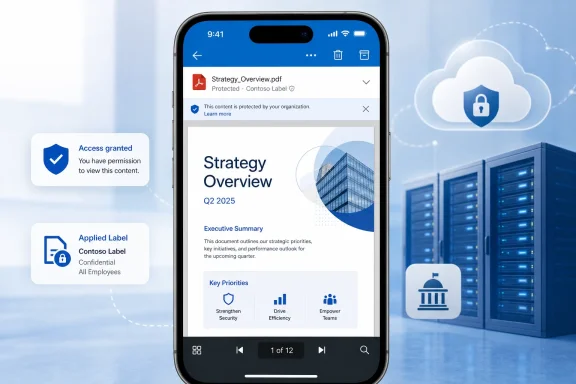 Microsoft Is Closing a Specific Mobile Preview Gap
Roadmap ID 564970 describes an improved PDF previewer in Outlook for iOS that supports PDFs protected by Microsoft Information Protection labels. It also identifies a built-in toolbar intended to make navigation easier.That scope is important. Microsoft is not announcing a new classification system, a new form of PDF encryption, or a general overhaul of protected-document controls. The roadmap item concerns Outlook, iOS, the application’s PDF preview experience, and PDFs protected through MIP labels.
For users, the visible change should be straightforward: an authorized recipient using Outlook for iOS should be able to preview a supported MIP-label protected PDF and navigate it with the built-in controls provided by the improved viewer. Whether a specific user is authorized remains a separate question from whether the application can preview the protected format.
For administrators, the announcement is primarily a compatibility and validation item. Organizations that already exchange MIP-label protected PDFs should determine whether the new preview experience works as expected in their own environment when it becomes available through their normal Outlook deployment process.
The inclusion of the navigation toolbar is also part of the stated feature, not an unrelated interface change. A PDF previewer must do more than render the first page to be useful. Users need a practical way to move through the document, especially on a smaller screen. Microsoft’s roadmap description connects support for protected PDFs with that in-viewer navigation experience.
What the roadmap entry does not establish is equally important. The supplied material does not describe a new tenant setting, a dedicated administrator switch, a published Outlook settings path, or a change to the underlying permissions associated with a protected file. It also does not document every action that may or may not be available after a PDF opens.
Who Microsoft Lists for the July 2026 Target
Microsoft lists the feature in the General Availability release phase for Outlook on iOS, with July 2026 as the target month. The roadmap scope covers the worldwide standard multi-tenant environment and three U.S. government cloud environments.| Cloud instance | Product | Platform | Release phase | Target |
|---|---|---|---|---|
| Worldwide Standard Multi-Tenant | Outlook | iOS | General Availability | July 2026 |
| GCC | Outlook | iOS | General Availability | July 2026 |
| GCC High | Outlook | iOS | General Availability | July 2026 |
| DoD | Outlook | iOS | General Availability | July 2026 |
Administrators should therefore avoid announcing a single guaranteed activation date for all users based only on the roadmap month. July 2026 is the General Availability target shown for Roadmap ID 564970. It is not a promise that every eligible iPhone will receive the capability on July 1, nor does the roadmap entry supplied here identify a tenant-by-tenant schedule.
The government cloud listings are nevertheless useful because they establish the stated delivery scope. Microsoft has included GCC, GCC High, and DoD alongside Worldwide Standard Multi-Tenant rather than listing only the commercial environment. Organizations in those clouds should still perform their own validation instead of assuming that identical roadmap targets guarantee identical timing for every user.
What Is—and Is Not—Changing
The verified change can be summarized in two parts:- Outlook for iOS’s PDF previewer is gaining support for MIP-label protected PDFs.
- The previewer is gaining a built-in navigation toolbar.
Nothing in the supplied roadmap material establishes a larger redesign of Microsoft 365 information protection. The feature should not be presented as changing how organizations create labels, decide who may access protected content, or define their broader document-handling policies. It is a client-side viewing capability for a specified protected format.
Preview support should also not be confused with permission. A compatible viewer does not mean every recipient can read every protected PDF. A useful validation plan must distinguish between two separate outcomes:
- An authorized account can open the known protected test file.
- An unauthorized account remains unable to access that file.
The roadmap entry does not specify all supported or prohibited actions after a document opens. It should not be used by itself to make firm claims about copying, printing, sharing, exporting, downloading, screen capture, opening the attachment in another application, or transferring it to another device. Those behaviors require separate testing and, where necessary, separate Microsoft documentation.
The update is also limited to Outlook on iOS in the supplied material. It should not be generalized to Outlook on Android, Outlook for Windows, Outlook on the web, Apple’s native Mail application, or third-party PDF viewers without separate evidence for those products.
Scope Caution: “Protected PDF” Can Mean Different Things
Support teams should preserve the roadmap’s precise wording: MIP-label protected PDFs.Users may use “protected PDF” as a general phrase for several technically different file types. A PDF might require a conventional password, use certificate-based controls, rely on a third-party encryption product, or participate in another rights-management system. Roadmap ID 564970 does not say that Outlook for iOS’s improved previewer will support every PDF that a user happens to describe as encrypted or protected.
The practical warning is therefore one of scope rather than a claim about confirmed incompatibility: support for MIP-label protected PDFs does not necessarily mean support for password-protected, certificate-secured, or third-party-encrypted PDFs. Those other file types may behave differently and should not be included in a success announcement unless they have been independently tested or documented.
This distinction is likely to matter during troubleshooting. A user may report only that an attachment “will not open,” without knowing how the sender protected it. Before treating that report as a failure of Roadmap ID 564970, the support team should determine whether the file is actually a known MIP-label protected PDF and whether the test account is expected to have access.
Administrators can reduce ambiguity by maintaining a controlled test document. That file should have a known MIP label, known intended recipients, and a documented expected result for both authorized and unauthorized accounts. Testing with a known file is more useful than drawing conclusions from an arbitrary production attachment whose protection method and recipient permissions have not been confirmed.
Likely Operational Implications
The feature’s likely value is operational rather than architectural. If an authorized user can open and navigate a supported protected PDF directly in Outlook for iOS, the approved mobile workflow may become more convenient. That could reduce the incentive to seek an alternative copy or switch to another application solely to read the document.Those are plausible implications, not established outcomes promised by the roadmap entry. Microsoft’s supplied description does not say that the feature will reduce exports, application switching, requests for unprotected copies, help-desk volume, or policy exceptions. Each organization’s results will depend on how often its users receive MIP-label protected PDFs and what their current mobile experience looks like.
The built-in toolbar may also make longer documents easier to review within the previewer. Again, the appropriate conclusion is limited: Microsoft is adding navigation controls as part of the improved preview experience. The roadmap does not provide a detailed list of toolbar functions, usability metrics, or evidence that users will complete every document workflow without leaving Outlook.
The safest editorial framing is that Microsoft is improving the supported reading path. The update may remove one point of friction for organizations that already use MIP-label protected PDFs, but it does not resolve every possible protected-document scenario.
This is why administrators should validate outcomes rather than infer them from the roadmap title. A successful test should answer whether the supported file opens for the right account, remains unavailable to the wrong account, displays correctly, and can be navigated using the new viewer controls. Broader conclusions should be reserved for behaviors that the organization directly observes or that Microsoft separately documents.
Roadmap and Validation Timeline
The supplied roadmap information supports a concise timeline rather than a detailed deployment history.Timeline
Roadmap listing — Microsoft identifies the feature under Roadmap ID 564970 and describes it as an improved Outlook for iOS PDF previewer for MIP-label protected PDFs, including a built-in navigation toolbar.July 2026 — Microsoft lists this month as the General Availability target for Worldwide Standard Multi-Tenant, GCC, GCC High, and DoD.
During deployment — Administrators should monitor the roadmap and their normal Outlook for iOS release process, then begin controlled validation when the relevant application experience reaches their test devices.
After validation — Help-desk and user guidance can be updated with the organization’s observed results, including the exact test file, account conditions, application build, cloud environment, and expected authorized and unauthorized outcomes.
The timeline intentionally avoids presenting the roadmap target as a completed release. It also avoids assigning a universal day within July 2026, because the supplied material provides a target month rather than a guaranteed date for every tenant and device.
What Admins Should Do
No broad migration project is justified by the supplied roadmap entry. The practical task is to track, deploy, test, and document a narrow Outlook for iOS capability.Microsoft has not provided a tenant toggle or a published Outlook settings path in the supplied material. Administrators should not tell users to enable a specific switch unless Microsoft later documents one. They should instead use their existing application deployment and test processes.
Admin validation checklist
- Track Roadmap ID 564970. Record it in the change-management system used by the Microsoft 365, messaging, mobility, or security teams.
- Monitor the July 2026 GA target. Treat the month as a roadmap target, not as proof that every tenant and device has received the feature.
- Update Outlook for iOS through the existing deployment process. Use the organization’s established test, approval, and application-distribution workflow rather than inventing a separate installation procedure for this feature.
- Prepare a known MIP-protected PDF. Use a controlled test file whose protection method, label, intended recipients, and expected results are documented.
- Test an authorized account. Confirm that the account expected to have access can preview the known PDF in Outlook for iOS and use the built-in navigation toolbar.
- Test an unauthorized account. Confirm that an account not intended to access the file does not gain access merely because Outlook supports the protected format.
- Record the test context. Document the cloud environment, device model, iOS version, Outlook version, account used, file tested, date, visible interface, and observed result.
- Keep the scope precise. Describe the validated result as support for the tested MIP-label protected PDF, not as universal support for every encrypted or protected PDF.
- Update help-desk scripts. Instruct support staff to identify the file’s protection method and the user’s expected authorization before classifying a report as a viewer failure.
- Avoid unsupported troubleshooting claims. Do not state that a failed preview is caused by licensing, enrollment, label configuration, a specific protection type, network changes, attachment handoff behavior, or another condition unless separate evidence supports that diagnosis.
If the test does not produce the expected behavior, administrators should record the result and compare it with the feature’s roadmap status and their application deployment records. The roadmap entry alone does not establish a definitive cause for a failed test. It does not specify whether a particular failure results from staged availability, the tested file, the account, the application environment, or another dependency.
Support teams should also avoid using the presence or absence of one visual element as the only acceptance criterion. The navigation toolbar is part of the feature description and can be included in validation, but the core test remains whether the known MIP-label protected PDF produces the expected authorized and unauthorized outcomes.
How to Communicate the Change
Internal announcements should be brief and exact. A suitable description would be:That wording preserves the roadmap basis, the platform, the supported file scope, the toolbar, and the target date without implying that deployment is already complete.Microsoft’s Roadmap ID 564970 lists improved support for MIP-label protected PDFs in Outlook for iOS, including a built-in navigation toolbar, with a July 2026 General Availability target.
Organizations should avoid describing the feature as “all encrypted PDFs now open in Outlook,” because the supplied information does not support that conclusion. They should also avoid saying that Outlook for iOS is receiving a new security architecture, that existing protection policies are changing, or that users will no longer need any other PDF application.
A user-facing notice can explain that availability may not appear everywhere at once and that access still depends on whether the recipient is authorized for the document. It should direct users to the help desk if a known MIP-label protected PDF does not behave as expected, while warning that password-protected or third-party-encrypted PDFs may fall outside the announced scope.
Help-desk documentation should collect facts before proposing causes:
- Is the attachment a known MIP-label protected PDF?
- Is the account expected to be authorized or denied?
- Is the test being performed in Outlook on iOS?
- What Outlook and iOS versions are recorded on the device?
- Is the improved preview interface, including its navigation controls, visible?
- Does the same controlled test produce the organization’s documented expected result?
The same restraint applies to licensing and tenant configuration. Those subjects may be relevant to an organization’s broader MIP deployment, but the supplied material does not provide enough information to make specific entitlement or configuration claims for this feature.
A Small, Testable Outlook Improvement
Roadmap ID 564970 addresses a simple reader question: can Outlook for iOS preview a PDF protected with a Microsoft Information Protection label and provide usable controls for navigating it? Microsoft’s roadmap says that capability is rolling out with a July 2026 General Availability target across Worldwide Standard Multi-Tenant, GCC, GCC High, and DoD.That makes the feature worth tracking, especially for organizations whose users regularly receive MIP-label protected PDFs on iPhones. Its importance should remain proportional to its verified scope. It is an improvement to Outlook’s PDF preview experience, not a replacement for information-protection planning and not a guarantee about every protected PDF format or downstream document action.
The likely benefit is a smoother approved reading path for authorized users. Any reduction in application switching, requests for alternative copies, or support demand should be treated as a potential operational result to measure—not as an outcome already established by Microsoft’s roadmap description.
Administrators do not need to speculate. They can track Roadmap ID 564970, move an updated Outlook for iOS release through their existing deployment process, test a known MIP-label protected PDF with both an authorized and unauthorized account, and document exactly what happens.
As Microsoft approaches the listed July 2026 GA target, that controlled validation will provide a more reliable readiness signal than the roadmap status alone. If the feature performs as described, users gain a more complete way to open and navigate supported protected PDFs without leaving Outlook’s preview experience. If it does not, administrators will have a documented test case that clearly separates the known file, expected authorization, application environment, and observed result—creating a practical basis for support without overstating what the roadmap entry promises.