

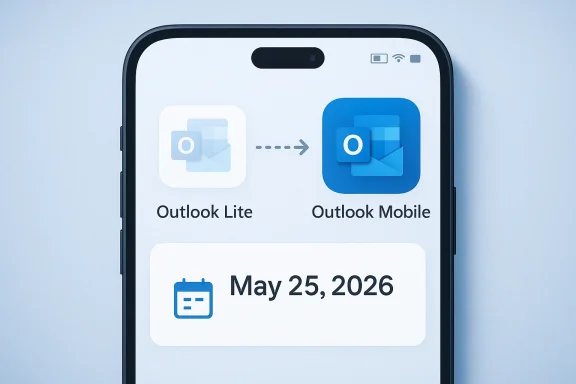
That design philosotlook Lite launched in 2022. It was especially relevant in emerging markets and on hand-me-down devices, where a large, feature-rich mail client could feel cumbersome. A 5MB app is not just a technical curiosity in those contexts; it can be the difference between an email client that feels usable and one that gets abandoned. Microsoft clearly understood that the “best” app is sometimes the one that respects the limits of the device it runs on.
The retirement is not abrupt, which tellscrosoft prefers to end products. New installations were blocked starting October 6, 2025, and existing users were given a runway before the final cutoff on May 25, 2026. That staged approach gives the company time to steer users toward Outlook Mobile while reducing the odds of a sudden support crisis. It also signals that Microsoft no longer sees Outlook Lite as a growth product, but as a temporary bridge on the way out.
That broader consolidation mindset is familiar to Windows and Mhe company has been steadily trimming overlapping experiences across its ecosystem, preferring one official route over multiple parallel paths. From an engineering and support standpoint, that can improve consistency. From a user standpoint, especially for those who deliberately chose the lighter path, it often feels like a loss of flexibility. Outlook Lite is just the latest example of that trade-off.
The timing matters, too. Microsoft’s support page says the app will be retired starthile the final retirement date is May 25, 2026. A phased shutdown is a classic Microsoft move: warn early, block new adoption first, then remove functionality later. That structure lowers immediate backlash, but it also makes the end of support more inevitable, because users are no longer being offered a real future with the app.
What Microsoft Is Actually Retiring
The phrase “retiring an app” can be misleading, because it sounds softer than it often is. In this case, Microsoft’s guidance makes clear that Outlook Lite will be retired in stages and that the mailbox experience will eventually stop functioning. The shell of the app may still launch, but the core reason for using it — accessing email — will be gone. That is a much harder cutoff than a routine feature deprecation.
The important dates
The key dates are easy to confuse, so they deserve to be separated plainly. Microsoft stopped new installs on October 6, 2025. The full retirement date is May 25, 2026, when existing users will lose the practical ability to use the app as a mailbox client.
- October 6, 2025: new installs blocked
- May 25, 2026: full retirement date
- Interim period: existing users can continue temporarily
- Final state: app may open, but mailbox use ends
- Recommended replacement: Outlook Mobile
That timeline tells us Microsoft is managing the migration, not debating whether it should happen. The company is already done with the product category, and the remaining months are simply a transition window. For users, that means the question is no longer if they should move, but when they will be forced to.
Why “retired” does not mean “gone”
Many users hear retirement and assume the app will disappear from their phone immediately. That is not what Microsoft is saying. Instead, the app is being allowed to age out, with functionality removed after the deadline rather than the icon vanishing on day one. That can create a false sense of safety for people who glance at the app and assume it still works because it still opens.
The practical risk is simple: people delay action because the problem does not look urgent until the app stops behaving like an email client. This is why Microsoft’s warning period matters. Email is too central to daily life for a “wait and see” approach to be harmless. A few weeks of procrastination can become a very annoying migration on the wrong morning.
The support message behind the decision
Microsoft’s support wording recommends switching to Outlook Mobile for a “secure and feature-rich email experience.” That phrasing is doing a lot of work. It suggests the company now believes the main Outlook app has matured enough to absorb Lite users, and that maintaining a separate stripped-down client is no longer worth the overhead.
- Microsoft wants a single mobile email path
- Outlook Mobile is now the official replacement
- Lite is being treated as temporary legacy software
- The retirement is about consolidation, not just maintenance
- Security and support simplicity are part of the rationale
That is not a surprising business conclusion, but it is a meaningful one. It shows Microsoft is prioritizing product coherence over preserving a niche option for users whose hardware or usage patterns are less forgiving.
Why Outlook Lite Existed in the First Place
Outlook Lite was built for a world that still exists, even if premium-device markets sometimes forget it does. Many Android users are on older phones, entry-level hardware, or networks where app size and background activity genuinely matter. In those environments, a mail client that is small and fast is not a luxury — it is a necessity.
A product shaped by constraint
The Lite app’s entire selling point was that it did less, and that was the point. It stripped away enough to remain usable on weak hardware and unreliable connections. For people with very limited storage or modest RAM, this kind of softwbecause it does not demand more than the device can comfortably give.
That also made it more than just a duplicate of Outlook Mobile. In a narrow sense, yes, both apps handled email. But in a real-world sense, they served different kinds of users. Outlook Lite existed for the person who needed basic access with minimal friction, not for the power user juggling calnd advanced synchronization needs.
The niche Microsoft is abandoning
The biggest strategic question is whether the Lite audience is too small to matter. Microsoft seems to have answered yes. That is understandable, but it is also the sort of choice that can quietly alienate the very users who were most appreciative of the company’s flexibility. Lserve people who are easy to overlook: students with older phones, workers using hand-me-down devices, or users in regions where mobile data remains expensive.
- Older Android hardware
- Low-storage devices
- Users on slower or expensive networks
- People who prefer simple apps
- Users who do not need advanced Outlook features
- Budget-conscious buyers and emerging-market users
Those users may not generate headlines, but they are real, and they are often loyal. A small app can create disproportely because it acknowledges that not everyone lives in the top tier of the hardware market. Losing that option may not trigger public outrage, but it can still create lasting resentment.
The burden of maintaining “Lite”
From Microsoft’s point of view, every separate app creates engineering and support overhead. There are separate bug paths, separate documentation updates, separate security reviews, and separate onboarding questions. A lightweight app becomes increasingly hard to defend when the main app becomes more capable and the overla
That is the paradox of lite products. If they stay too minimal, users wonder why they exist at all. If they become more capable, they start to resemble the main app, and the case for keeping them separate weakens. Microsoft appears to have decided that Outlook Lite crossed that line.
Why Microsoft Wants One Mobile Outlook
Microsoft’s support and product messaging points Outlook Mobile is now the company’s preferred mobile email experience. That decision is about more than app design. It is about platform discipline, support clarity, and the ability to keep one mobile client aligned with Microsoft 365 identity, security, and feature development.
One official app means fewer choices and less confusion. For average users, that is often a net win. They no longer have to decide whether they should install the “main” Outlook app or the Lite variant, and that reduces the chance of ending up on the wrong path. In software ecosystems as large as Microsoft’s, clarity is often underrated.
Microsoft’s mobile Outlook page presents the app as a unified place for email, calendar, files, contacts, and productivity features. That is a very different pitch from Lite’s narrowly focused utility model. The company is clearly betting that a single, more capable client is better for its brand than a split strategy that forces users to make trade-offs up front.
Simplicity for IT teams
The enterprise logic is even stronger. IT departments generally prefer fewer mobile clients because fewer clients mean fewer policy combinations, fewer support tickets, and fewer edge cases around authentication. Microsoft’s own guidance for Outlook Mobile with Intune reflects the company’s preference for a more managed, standardized mobile environment.
A single official path also makes internal documentation cleaner. Help desks can explain one app instead of two, and security teams can focus on one supported client instead of maintaining exceptions for a stripped-down side product. That is why retirements like this are often celebrated in admin circles even while ordinary users grumble.
The security angle
Microsoft is also making a security argument, whether explicitly or indirectly. Fewer mobile apps means fewer codebases to secure and fewer account flows to keep compatible. The company’s support messaging frames Outlook Mobile as the more secure, feature-rich choice, which is a subtle way of saying Lite no longer meets Microsoft’s preferred standard for the future.
- One app to secure
- One support model to maintain
- One onboarding path to document
- One place for future feature investment
- One user experience to optimize
- One identity and policy story to tell
That is a compelling internal argument, even if it does not fully address the needs of users on older devices. Microsoft is choosing coherence over customization, and that is a familiar trade-off in modern platform strategy.
What This Means for Android Users
For most Android users, this retirement will barely register. If you already use Outlook Mobile, the change is just another product cleanup item from Microsoft. But for users who specifically chose Outlook Lite because they wanted a smaller, less demanding app, this is a genuine disruption.
The users most likely to feel it
The people most affected are the ones with the least forgiving hardware. Budget Android phones, older handsets, and devices with little storage tend to expose differences in performance that premium useose phones, “heavier” is not an abstract complaint. It can mean slower launches, more background activity, and a worse everyday experience.
A richer interface and more features are only upgrades if the device can handle them comfortably. For someone using an older phone, the full Outlook app may be functional but still feel like over had value: not because it was cooler, but because it was appropriate.
Why some users may simply leave
The most likely consumer response is not a loud protest. It is silent churn. Users who find Outlook Mobile too heavy, too busy, or too demanding may quietly switch to another email client rather than fight the replacement. That kind of departure is hard to quantify, which makes it easy for Mice the damage.
- Some users will move to Outlook Mobile
- Some will switch to Gmail or another client
- Some will tolerate the heavier app
- Some will keep using Lite until it stops working
- Some will feel forced into a choice they did not want
- Some will never complain publicly, but will still leave
That gradual drift matters because it means the retirement may not appear costly on paper even if it feels costly in the real world. Microsoft can improve average supportability while still losing a small, loyal audience that mattered more than the download stats suggest.
The user experience gap
The deeper issue is psychological. People who choose Lite usually do not just want nt control, simplicity, and less clutter. Being pushed toward the full app can feel like losing a deliberate compromise, even if the migration is technically easy. That emotional friction often lasts longer than the technical inconvenience.
Microsoft can argue that Outlook Mobile is the better product. But “better” is contextual. For a phone with limited resources, better may mean lighter, faster, and less demanding — not richer or more integrated. That is the part of the market Microsoft is choosing to leave behind.
Enterprise and IT Implicationsetirement is less about one Android app and more about standardization. Microsoft is making a cleaner support story for itself, but organizations still need to account for users who relied on Outlook Lite because it fit their devices better than the full app. That creates a classic enterprise tension: simplicity at the policy level, complexity in the field.
What admins Outlook standard is easier to document, train on, and support. Help desks do not have to explain the difference between Lite and the full app anymore, and that alone reduces confusion. Microsoft’s own guidance implies that no major admin action is required, but it also recommends inting internal documentation.
That sounds routine, but it matters. Most enterprise support problems are not dramatic failures; they are small misunderstandings that scale into ticket volume. Reducing ambiguity at the app level can have a real operational payoff.
Where the pain shows up
The hard part is device reality. Many organizations still have frontline workers, contractors, or temporary staff using older Atlook Lite was the most practical email app for those devices, moving everyone to Outlook Mobile may expose battery issues, compatibility quirks, or performance concerns that the main office never sees.
- Audit which users still rely on Outlook Lite
- Test Outlook Mobile on older supported Android phones
- Confirm sign-in and mailbox behavior after migration
- Update inscripts
- Prepare support teams for user confusion
- Watch for silent adoption of third-party mail apps
That checklist is simple, but it captures the hidden cost of retirement work. The product change itself may be small, yet the migre real planning, especially in mixed-device fleets.
Compliance and governance
There is also a governance story underneath the UI story. Microsoft’s own internal retirement rationale, as reflected in coverage of the message-center guidance, points to the fact that Outlook Lite lacks some compliance capabilities associated with the fuller mobile environment. That makes consolify for organizations that care about policy enforcement and data protection.
In that sense, Microsoft can argue this is not just a simplification move but a control move. It is narrowing the number of ways email can be accessed on mobile while increasing the likelihood that users land in the more fully managed client. That may be good for security teams, even if it is less comfortable for users on older devices.
The Broader Microsoft Pattern
Outlook Lite’s retirement is not happening a larger pattern across Microsoft’s product portfolio: overlap gets removed, adjacent experiences get merged, and the company increasingly prefers one sanctioned path over multiple alternatives. That is visible across desktop software, mobile apps, and service transitions.
Why Microsoft keeps doing this
The appeal is obvious. Fewer overlapping products mean lower support overhead, clearer branding, and a more unified ronvest in one experience instead of splitting engineering attention across variants that exist for historical reasons. That often improves reliability, even if it narrows the range of acceptable user preferences.
This is how big platforms mature. At first, they allow many paths because the ecosystem is still evolving. Later, they prune ththe cost of maintaining them starts to outweigh the value of keeping them alive. Outlook Lite is what that pruning looks like in the mobile mail world.
The trade-off Microsoft accepts
The downside is not theoretical. Every removed option is one less way for users to fit Microsoft’s ecosystem to their device, region, or working style. That can be harmless for mainstream ur a great deal for edge cases, and edge cases are where loyalty is often won or lost.
- More coherence for Microsoft
- Less flexibility for users
- Stronger security story
- Smaller support surface
- Better feature rollout discipline
- More pressure on low-end hardware users
The company seems willing to accept that trade-off because the strategic benefits are easier to measure than thdard platform behavior, but it still carries a quiet cost in user trust.
Consolidation as a branding strategy
There is also a branding benefit in cutting down similar product names. “Outlook Lite” and “Outlook Mobile” are close enough that many casual users would never know which one they were s eliminating Lite, Microsoft makes it easier to explain what the official Android app is supposed to be. That simplicity has value in its own right.
Still, branding clarity does not erase the practical inconvenience for users who wanted a smaller app. Microsoft may be reducing confusion, but it is also reducing choice. That is the ent, and it is why the move can feel efficient to the company and disappointing to the user at the same time.
Strengths and Opportunities
Microsoft’s decision has real advantages, even if the loss of Outlook Lite stings some users. A single, better-supported mobile Outlook experience can simplify support, improve security consistency, and make it easier for the company to invest in the ll actually see. If Microsoft executes well, Outlook Mobile could become a stronger default choice on Android than the split app model ever allowed.
- Cleaner mobile portfolio
- Easier onboarding for new users
- Better support consistency
- More predictable security management
- Stronger feature parity over time
- Less documentation fragmentation
- Lower engineering duplication
The opportunity i. Microsoft can use the consolidation to sharpen Outlook Mobile’s performance and polish, especially if it wants to avoid the obvious criticism that it is forcing Lite users into a heavier app. If the replacement is fast enough on older hardware, the transition will look far wiser in hindsight.
Risks and Cosk is that Microsoft may be underestimating how useful “Lite” really was. On low-end phones, even a reasonably optimized full-feature app can feel heavier than users want, and that can make the replacement feel like a downgrade in daily life. In other words, feature richness on paper does not always translate into better usability in practice.
- Loss of a genuinely lightweight option
- Possible performance issues on older phones
- More migration work for users and IT teams
- Silent churn to third-party mail apps
- Frustration among simplicity-focused users
- Perception that Microsoft is reducing choice too aggressively
There is also a trust problem. Each retirement teaches users that even useful convenience features can disappear once Microsoft decides the portfolio needs tidying up. That may not spark outrage today, but it can create hesitation tomorrow when the company asks people to adopt another niche tool or app.
Looking Ahead
The immediate question is whether Outlook Mobile can genuinely absorb Lite users without feeling bloated. Microsoft clearly believes the answer is yes, and its support messaging suggests the company has already moved on from treating Lite as a separate lane with a future of its own. If the main app performs well on older Android devices, this retirement will look like a tidy consolidation rather than a user-hostile removal.
The second question is whether this becomes a template for other niche Microsoft mobile apps. The company has shown a strong preference for pruning overlap and focusing on fewer supported paths, so Outlook Lite may be more symptom than exception. If that pattern continues, Android users should expect more of Microsoft’s mobile offerings to become more unified, less optional, and more tightly managed over time.
- Watch whether Microsoft adds lighter performance options to Outlook Mobile
- Monitor complaints from older Android hardware users
- Track whether enterprise admins revise mobile policies quickly
- Look for any future retirement notices in other Microsoft mobile apps
- Pay attention to adoption patterngions
Microsoft is making a clear bet that one modern mobile Outlook is better than two overlapping ones. That may be true for the majority, and it may even be the right call for security and support. But for the users who built their routines around the promise of something smaller, simpler, and more forgiving, May 25, 2026 will feel less like an upgrade date and more like the moment Microsoft closed a door it should have kept open a little longer.