

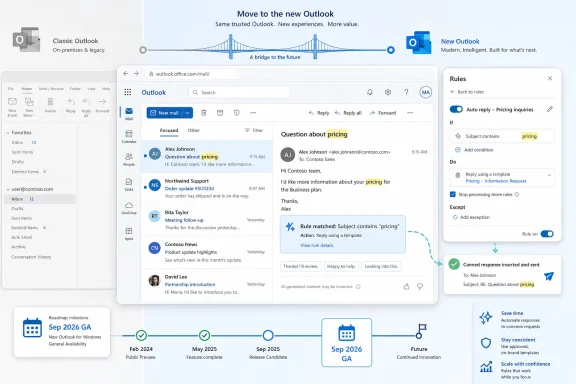
Microsoft added Outlook “Reply with a Template in Rules” to the Microsoft 365 Roadmap on July 7, 2026, listing it as an Outlook web feature in development for worldwide General Availability in September 2026. The feature sounds small because it is small; it also lands directly on one of the more irritating fault lines in the new Outlook transition. For years, Microsoft has asked users to accept a web-powered Outlook future while classic Outlook kept many of the automation knobs power users actually depended on. This roadmap item is a reminder that the migration is not just about interface polish or Copilot sparkle, but about whether the new Outlook can finally inherit the boring machinery that made Outlook indispensable.
The new feature, described in Microsoft’s own roadmap language, lets users create a rule that automatically replies to incoming messages with a template they have already set up. Users choose the rule conditions, select the template, and Outlook sends the response without making them type the same canned answer again. Microsoft lists the product as Outlook, the platform as web, the cloud instance as Worldwide standard multi-tenant, and the release ring as General Availability.
That platform detail matters. This is not merely a checkbox returning to classic Win32 Outlook. It is a feature aimed at the web-backed Outlook experience that also underpins the new Outlook for Windows, the client Microsoft has been nudging users toward for years.
The old Outlook could already do versions of this through rules and Outlook template files. Microsoft’s own support material for classic Outlook has long documented a rule action for replying with a specific template, and Microsoft Learn has described using an email template and Rules Wizard to emulate an out-of-office style response. But that history is also the problem: what existed in classic Outlook has not always existed cleanly, or at all, in Outlook on the web and the new Outlook.
This roadmap item is therefore less about inventing a new productivity trick than about closing a capability gap. And in the new Outlook era, closing gaps is not maintenance work. It is the product strategy.
But Outlook is not a lightweight mail viewer. It is a workflow engine for people who process hundreds of messages, run shared mailboxes, triage service requests, manage approvals, and automate predictable responses. The users most likely to notice missing features are not nostalgia addicts; they are the ones who turned Outlook into a local business process platform.
“Reply with a template” sits squarely in that category. It is not glamorous, and it will not headline a Microsoft keynote. Yet it solves a real class of work: send an intake acknowledgment when a mailbox receives a certain subject line, respond consistently to common requests, or route routine correspondence with a controlled message rather than a hastily typed reply.
The Microsoft 365 Roadmap entry also arrives against a backdrop of public user frustration. Microsoft Q&A threads and community discussions have repeatedly pointed out that Outlook on the web and new Outlook did not support the same rule actions available in classic Outlook, including template-based replies. Microsoft’s own support page comparing rule features has listed “Reply with specific template” as available in classic Outlook and not supported in newer Outlook experiences.
That makes this feature a useful case study in Microsoft’s Outlook problem. The company does not merely need the new client to be modern. It needs it to be boringly complete.
This is not the same thing as a proper ticketing system, a CRM workflow, or a Power Automate flow. But that is exactly why people use it. Outlook rules are close to the user, require little administrative ceremony, and can be set up by the person who understands the mailbox’s daily reality.
The attraction is consistency. A rule-based template response reduces the drift that happens when ten people answer the same request ten different ways. It also reduces the cognitive load of routine inbox work, especially in departments where email remains the front door for requests that should probably have been handled through a form years ago.
That said, template replies also create risk when treated casually. An automatic response sent to the wrong sender, under the wrong condition, or with stale language can be worse than no response at all. A polished canned reply has the authority of policy even when it was built by one overworked mailbox owner on a Friday afternoon.
This is where Microsoft’s implementation details will matter. The roadmap text confirms the broad capability but not the guardrails: whether replies are rate-limited, how templates are stored, whether admins can govern the feature, whether it works with shared mailboxes, and how it behaves when multiple rules match a message.
The web platform promises something better: automation that lives with the mailbox rather than with a particular PC. If Microsoft implements this as a cloud-side rule action, it could make template replies more reliable for modern work patterns, where users move between laptops, browsers, mobile devices, and shared mailboxes. That would make this more than a feature parity checkbox.
But Microsoft has not yet said enough to assume that outcome. The roadmap lists the platform as web, which strongly suggests the feature belongs to the Outlook web/new Outlook rules experience, but it does not spell out the execution model. Administrators will want to know whether the reply fires in Exchange Online independently of the client, or whether there are still client/session limitations hiding behind the UI.
That distinction is not academic. A server-side reply rule is infrastructure. A client-dependent reply rule is a convenience with a failure mode. Many organizations have learned that difference the hard way with legacy Outlook automations.
Microsoft’s broader product direction points toward cloud-side behavior. Outlook on the web, new Outlook, Exchange Online, and Microsoft 365 policy controls all pull in that direction. Still, the responsible reading of the roadmap is to say that Microsoft has announced the user-facing capability, not the full architecture.
That is its strength. Many workplace email tasks do not need a model to infer intent. They need a rule to match known conditions and send approved language. A template is not creative, and that is precisely why it is useful.
There is an important philosophical difference here. Copilot tries to help users decide what to say or do. A template rule executes what the organization has already decided. In regulated, support-heavy, or customer-facing settings, that distinction matters.
The best version of Outlook is not one where every workflow becomes an AI prompt. It is one where deterministic automation, human judgment, and AI assistance occupy the right layers. Template replies belong in the deterministic layer, and Microsoft’s decision to bring them into modern Outlook acknowledges that old-fashioned rules still have work to do.
A feature like this helps because it addresses a concrete missing behavior. It tells users that Microsoft is not only chasing a cleaner interface or Copilot integration, but also paying down the practical debt of the migration. That matters to IT departments deciding when to stop blocking or delaying the switch.
Still, Microsoft should not mistake feature-by-feature restoration for a complete trust strategy. Outlook users need clear migration guidance, admin controls, and predictable parity timelines. If the answer to every missing classic Outlook feature is “wait for a roadmap item,” organizations will keep treating classic Outlook as the safe default.
The roadmap timing also leaves room for slippage. Microsoft lists General Availability for September 2026, but roadmap dates are planning targets, not contractual commitments. Admins should treat the month as a signal of intent rather than a deployment guarantee.
Auto-replies can leak information, create mail loops, annoy external senders, or send outdated compliance language. They can also collide with transport rules, shared mailbox practices, retention policies, and customer support workflows. A feature that saves one user ten minutes can create a headache if rolled out without controls.
The admin questions practically write themselves. Can tenant admins disable or restrict template replies? Can the feature be limited to internal recipients? Does it respect existing automatic reply safeguards? Are replies logged in Sent Items? Can eDiscovery capture the exact template that was sent? How does it behave with distribution groups, aliases, and shared mailboxes?
Microsoft’s roadmap entry does not answer those questions, and that is normal for this stage. But for IT pros, those details will determine whether this is a welcomed parity feature or another capability that has to be explained, governed, and occasionally cleaned up.
The safest assumption is that organizations should test it like any other mail automation feature. That means piloting with low-risk mailboxes, checking message trace behavior, confirming audit visibility, and documenting who owns each template.
Microsoft has Outlook on the web, new Outlook for Windows, classic Outlook for Windows, Outlook for Mac, and mobile Outlook, each with overlapping but not identical capabilities. A feature can be “Outlook” and “web” and still be relevant to a Windows desktop app because the desktop app is effectively a packaged modern Outlook experience. That architecture may be rational inside Microsoft, but it is not always clear at the point of adoption.
This matters because users do not buy architecture. They ask whether the thing on their taskbar can do the thing their old Outlook did. If the answer is buried in platform distinctions, the migration feels more confusing than it needs to be.
The roadmap entry is at least explicit about its scope: Outlook, web, worldwide standard multi-tenant, General Availability. But Microsoft would help customers by being equally explicit about what that means for new Outlook for Windows at release. If the feature appears simultaneously in the Windows client because it is web-backed, say that plainly. If there are staging differences, say that too.
Outlook’s future may be unified under the hood, but its users still live in product names.
But local power came with local fragility. Template files could be misplaced. Client-only rules could fail when Outlook was closed. Workflows were often invisible to admins until they broke. The result was a peculiar form of enterprise shadow automation: useful enough to depend on, informal enough to be dangerous.
The modern Outlook version has a chance to improve on that bargain. If templates are stored in the mailbox or cloud service, if rules execute reliably in Exchange Online, and if admins can observe or govern the behavior, Microsoft can deliver not just parity but a better version of the old capability.
That is the optimistic reading. The pessimistic reading is that Microsoft may reproduce the surface behavior while leaving important edge cases unresolved. Outlook users have enough institutional memory to know that both outcomes are possible.
The difference will show up in the first wave of deployment. If users can create reliable replies from Outlook on the web and new Outlook without arcane template-file handling, the feature will feel modern. If they run into limitations around attachments, formatting, shared mailboxes, or external recipients, the forum threads will write themselves.
The date also reflects Microsoft’s incremental approach to Outlook modernization. Rather than waiting for a single grand “new Outlook is complete” moment, the company is shipping missing pieces into the web-backed experience over time. That is realistic product management, but it can be frustrating for customers who experience the transition as a long period of almost-but-not-quite parity.
Admins should also watch whether the feature appears first in Targeted Release or preview environments before broad General Availability. The roadmap says the release ring is General Availability, but Microsoft often stages features across tenants. The first reports from production tenants will tell us more than the roadmap card.
For WindowsForum readers, the practical advice is simple: if your current template-reply workflow depends on classic Outlook, do not rip it out yet. Track the rollout, test the new implementation, and confirm that your specific use case survives the move.
The most concrete points are straightforward:
 Microsoft Is Rebuilding the Unsexy Parts of Outlook, One Missing Rule at a Time
The new feature, described in Microsoft’s own roadmap language, lets users create a rule that automatically replies to incoming messages with a template they have already set up. Users choose the rule conditions, select the template, and Outlook sends the response without making them type the same canned answer again. Microsoft lists the product as Outlook, the platform as web, the cloud instance as Worldwide standard multi-tenant, and the release ring as General Availability.That platform detail matters. This is not merely a checkbox returning to classic Win32 Outlook. It is a feature aimed at the web-backed Outlook experience that also underpins the new Outlook for Windows, the client Microsoft has been nudging users toward for years.
The old Outlook could already do versions of this through rules and Outlook template files. Microsoft’s own support material for classic Outlook has long documented a rule action for replying with a specific template, and Microsoft Learn has described using an email template and Rules Wizard to emulate an out-of-office style response. But that history is also the problem: what existed in classic Outlook has not always existed cleanly, or at all, in Outlook on the web and the new Outlook.
This roadmap item is therefore less about inventing a new productivity trick than about closing a capability gap. And in the new Outlook era, closing gaps is not maintenance work. It is the product strategy.
The New Outlook’s Biggest Rival Is Still Classic Outlook
Microsoft has spent years pitching the new Outlook as a more consistent, modern client across Windows, web, and eventually the broader Microsoft 365 ecosystem. That vision has technical logic. A shared web architecture means faster deployment, less client-specific fragmentation, and a UI that can carry new cloud-connected features without waiting for the old desktop codebase to absorb them.But Outlook is not a lightweight mail viewer. It is a workflow engine for people who process hundreds of messages, run shared mailboxes, triage service requests, manage approvals, and automate predictable responses. The users most likely to notice missing features are not nostalgia addicts; they are the ones who turned Outlook into a local business process platform.
“Reply with a template” sits squarely in that category. It is not glamorous, and it will not headline a Microsoft keynote. Yet it solves a real class of work: send an intake acknowledgment when a mailbox receives a certain subject line, respond consistently to common requests, or route routine correspondence with a controlled message rather than a hastily typed reply.
The Microsoft 365 Roadmap entry also arrives against a backdrop of public user frustration. Microsoft Q&A threads and community discussions have repeatedly pointed out that Outlook on the web and new Outlook did not support the same rule actions available in classic Outlook, including template-based replies. Microsoft’s own support page comparing rule features has listed “Reply with specific template” as available in classic Outlook and not supported in newer Outlook experiences.
That makes this feature a useful case study in Microsoft’s Outlook problem. The company does not merely need the new client to be modern. It needs it to be boringly complete.
Templates Are a Small Feature With Outsized Operational Weight
For an individual user, a template reply rule is a convenience. For an organization, it can become a lightweight automation layer. A hiring mailbox can acknowledge applications. A facilities mailbox can respond to room-booking requests. A support alias can send standardized instructions when a known keyword appears in the subject line.This is not the same thing as a proper ticketing system, a CRM workflow, or a Power Automate flow. But that is exactly why people use it. Outlook rules are close to the user, require little administrative ceremony, and can be set up by the person who understands the mailbox’s daily reality.
The attraction is consistency. A rule-based template response reduces the drift that happens when ten people answer the same request ten different ways. It also reduces the cognitive load of routine inbox work, especially in departments where email remains the front door for requests that should probably have been handled through a form years ago.
That said, template replies also create risk when treated casually. An automatic response sent to the wrong sender, under the wrong condition, or with stale language can be worse than no response at all. A polished canned reply has the authority of policy even when it was built by one overworked mailbox owner on a Friday afternoon.
This is where Microsoft’s implementation details will matter. The roadmap text confirms the broad capability but not the guardrails: whether replies are rate-limited, how templates are stored, whether admins can govern the feature, whether it works with shared mailboxes, and how it behaves when multiple rules match a message.
Server-Side Automation Is the Real Prize
Classic Outlook’s old template-reply pattern often depended on the desktop client and local template files. That model was powerful but fragile. It worked well when Outlook was open, configured correctly, and tied to a machine that behaved like a semi-permanent workstation.The web platform promises something better: automation that lives with the mailbox rather than with a particular PC. If Microsoft implements this as a cloud-side rule action, it could make template replies more reliable for modern work patterns, where users move between laptops, browsers, mobile devices, and shared mailboxes. That would make this more than a feature parity checkbox.
But Microsoft has not yet said enough to assume that outcome. The roadmap lists the platform as web, which strongly suggests the feature belongs to the Outlook web/new Outlook rules experience, but it does not spell out the execution model. Administrators will want to know whether the reply fires in Exchange Online independently of the client, or whether there are still client/session limitations hiding behind the UI.
That distinction is not academic. A server-side reply rule is infrastructure. A client-dependent reply rule is a convenience with a failure mode. Many organizations have learned that difference the hard way with legacy Outlook automations.
Microsoft’s broader product direction points toward cloud-side behavior. Outlook on the web, new Outlook, Exchange Online, and Microsoft 365 policy controls all pull in that direction. Still, the responsible reading of the roadmap is to say that Microsoft has announced the user-facing capability, not the full architecture.
The Feature Lands in the Shadow of Copilot, but It Solves a Different Problem
Microsoft’s current productivity narrative is dominated by Copilot: natural-language assistance, summarization, meeting follow-ups, and agentic workflows that promise to do more work across Microsoft 365. Against that backdrop, a rule that replies with a template looks almost quaint. It is deterministic, narrow, and decidedly not AI.That is its strength. Many workplace email tasks do not need a model to infer intent. They need a rule to match known conditions and send approved language. A template is not creative, and that is precisely why it is useful.
There is an important philosophical difference here. Copilot tries to help users decide what to say or do. A template rule executes what the organization has already decided. In regulated, support-heavy, or customer-facing settings, that distinction matters.
The best version of Outlook is not one where every workflow becomes an AI prompt. It is one where deterministic automation, human judgment, and AI assistance occupy the right layers. Template replies belong in the deterministic layer, and Microsoft’s decision to bring them into modern Outlook acknowledges that old-fashioned rules still have work to do.
New Outlook Needs Trust More Than Novelty
The new Outlook for Windows has faced skepticism because users often evaluate it not by what it gains, but by what they lose. Missing PST support, add-in differences, offline behavior, account support gaps, and rule limitations have all shaped the perception that the new client is not yet a drop-in replacement for classic Outlook. Microsoft has been closing those gaps, but trust returns slowly.A feature like this helps because it addresses a concrete missing behavior. It tells users that Microsoft is not only chasing a cleaner interface or Copilot integration, but also paying down the practical debt of the migration. That matters to IT departments deciding when to stop blocking or delaying the switch.
Still, Microsoft should not mistake feature-by-feature restoration for a complete trust strategy. Outlook users need clear migration guidance, admin controls, and predictable parity timelines. If the answer to every missing classic Outlook feature is “wait for a roadmap item,” organizations will keep treating classic Outlook as the safe default.
The roadmap timing also leaves room for slippage. Microsoft lists General Availability for September 2026, but roadmap dates are planning targets, not contractual commitments. Admins should treat the month as a signal of intent rather than a deployment guarantee.
Administrators Will Read the Fine Print Before They Celebrate
For home users and small teams, the value proposition is obvious. Set a rule, choose a template, and stop rewriting the same reply. For administrators, the first question is not whether the feature is convenient, but whether it is governable.Auto-replies can leak information, create mail loops, annoy external senders, or send outdated compliance language. They can also collide with transport rules, shared mailbox practices, retention policies, and customer support workflows. A feature that saves one user ten minutes can create a headache if rolled out without controls.
The admin questions practically write themselves. Can tenant admins disable or restrict template replies? Can the feature be limited to internal recipients? Does it respect existing automatic reply safeguards? Are replies logged in Sent Items? Can eDiscovery capture the exact template that was sent? How does it behave with distribution groups, aliases, and shared mailboxes?
Microsoft’s roadmap entry does not answer those questions, and that is normal for this stage. But for IT pros, those details will determine whether this is a welcomed parity feature or another capability that has to be explained, governed, and occasionally cleaned up.
The safest assumption is that organizations should test it like any other mail automation feature. That means piloting with low-risk mailboxes, checking message trace behavior, confirming audit visibility, and documenting who owns each template.
The Roadmap Also Exposes Microsoft’s Awkward Outlook Naming Problem
The hashtag attached to the announcement, “new Outlook for Windows,” is revealing because the roadmap platform says web. That is not necessarily a contradiction; the new Outlook for Windows is fundamentally tied to the Outlook on the web architecture. But for users, the naming is still messy.Microsoft has Outlook on the web, new Outlook for Windows, classic Outlook for Windows, Outlook for Mac, and mobile Outlook, each with overlapping but not identical capabilities. A feature can be “Outlook” and “web” and still be relevant to a Windows desktop app because the desktop app is effectively a packaged modern Outlook experience. That architecture may be rational inside Microsoft, but it is not always clear at the point of adoption.
This matters because users do not buy architecture. They ask whether the thing on their taskbar can do the thing their old Outlook did. If the answer is buried in platform distinctions, the migration feels more confusing than it needs to be.
The roadmap entry is at least explicit about its scope: Outlook, web, worldwide standard multi-tenant, General Availability. But Microsoft would help customers by being equally explicit about what that means for new Outlook for Windows at release. If the feature appears simultaneously in the Windows client because it is web-backed, say that plainly. If there are staging differences, say that too.
Outlook’s future may be unified under the hood, but its users still live in product names.
The Classic Feature Was Powerful Because It Was Local; the Modern Version Must Be Powerful Because It Is Managed
There is a temptation to romanticize classic Outlook’s automation model. It gave power users tools, and many of those tools were wonderfully direct. Save a template, build a rule, and bend your mailbox to your workflow.But local power came with local fragility. Template files could be misplaced. Client-only rules could fail when Outlook was closed. Workflows were often invisible to admins until they broke. The result was a peculiar form of enterprise shadow automation: useful enough to depend on, informal enough to be dangerous.
The modern Outlook version has a chance to improve on that bargain. If templates are stored in the mailbox or cloud service, if rules execute reliably in Exchange Online, and if admins can observe or govern the behavior, Microsoft can deliver not just parity but a better version of the old capability.
That is the optimistic reading. The pessimistic reading is that Microsoft may reproduce the surface behavior while leaving important edge cases unresolved. Outlook users have enough institutional memory to know that both outcomes are possible.
The difference will show up in the first wave of deployment. If users can create reliable replies from Outlook on the web and new Outlook without arcane template-file handling, the feature will feel modern. If they run into limitations around attachments, formatting, shared mailboxes, or external recipients, the forum threads will write themselves.
The September 2026 Date Sets a Practical Planning Window
A September 2026 General Availability target gives organizations a rough planning window. It is late enough that nobody should design a production workflow around the feature today, but close enough that IT teams evaluating the new Outlook can add it to their parity watchlist. For some departments, this single rule action may be one of the blockers keeping classic Outlook in service.The date also reflects Microsoft’s incremental approach to Outlook modernization. Rather than waiting for a single grand “new Outlook is complete” moment, the company is shipping missing pieces into the web-backed experience over time. That is realistic product management, but it can be frustrating for customers who experience the transition as a long period of almost-but-not-quite parity.
Admins should also watch whether the feature appears first in Targeted Release or preview environments before broad General Availability. The roadmap says the release ring is General Availability, but Microsoft often stages features across tenants. The first reports from production tenants will tell us more than the roadmap card.
For WindowsForum readers, the practical advice is simple: if your current template-reply workflow depends on classic Outlook, do not rip it out yet. Track the rollout, test the new implementation, and confirm that your specific use case survives the move.
The Small Rule That Says Where Outlook Is Headed
This feature is minor in scope but unusually clear in what it reveals about Microsoft’s Outlook strategy. The company is trying to make the new Outlook good enough for the messy middle of real email work, not just for reading messages and accepting calendar invites. That means rebuilding the little automations that accumulated in classic Outlook over decades.The most concrete points are straightforward:
- Microsoft added Roadmap ID 567318 on July 7, 2026, with General Availability planned for September 2026.
- The feature is listed for Outlook on the web in the worldwide standard multi-tenant Microsoft 365 cloud.
- Users will be able to create rules that automatically reply to matching incoming messages using a selected template.
- The capability addresses a long-standing gap between classic Outlook rules and the newer Outlook web-backed experience.
- Administrators should test governance, logging, shared mailbox behavior, and external-recipient safeguards before relying on it broadly.
- The feature is best understood as part of Microsoft’s slow parity campaign for the new Outlook, not as a standalone productivity revolution.
References
- Primary source: Microsoft 365 Roadmap
Published: 2026-07-07T23:01:01.6729014Z
Loading…
www.microsoft.com - Official source: support.microsoft.com
Use rules to create an out of office message in Outlook | Microsoft Support
Describes how to define rules for automatic forwarding and redirection.support.microsoft.com - Official source: learn.microsoft.com
Emulate Out of Office Assistant in Outlook | Microsoft Learn
Describes how to emulate the Out of Office Assistant in Microsoft Outlook.learn.microsoft.com - Related coverage: dir.md

Outlook Out of Office via Rules: Step-by-Step Setup (Works Without Auto Replies)
No Automatic Replies in Outlook? Learn how to create out-of-office messages using rules, templates, and smart conditions. Full guide with fixes.
dir.md
- Related coverage: choc.org