

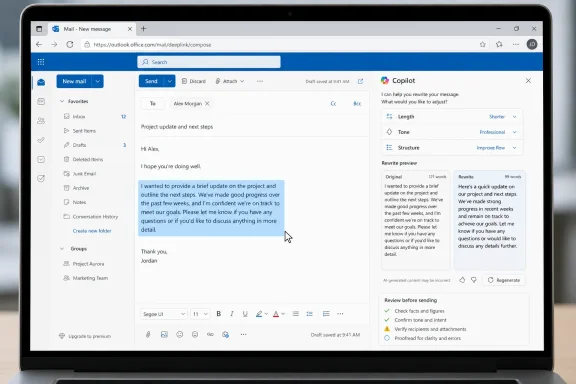
Microsoft is rolling out Outlook’s Co-Authoring Highlight and Rewrite feature for Outlook on the web in July 2026 for Worldwide standard multi-tenant customers in General Availability. The feature lets users select part of an email draft and ask Copilot to help rewrite that selected text by changing its length, tone, or structure.
That is the whole verified change, and it is enough to matter. This is not a new promise that Copilot will write every message, manage the mailbox, work the same way in every Outlook client, or replace the sender’s judgment. It is a targeted drafting feature inside Outlook on the web: highlight part of a draft, ask Copilot to improve it, and review the result before sending.
For Windows users, Outlook users, and Microsoft 365 admins, the practical takeaway is straightforward: AI-assisted editing is moving closer to the exact place where business email is written. The useful question is not whether this is a dramatic reinvention of email. It is whether users can now fix weak, wordy, awkward, or poorly structured passages without leaving the compose window.
Microsoft’s roadmap entry for Outlook: Co-Authoring Highlight and Rewrite is concise. It says users can collaborate with Copilot to improve email drafts by selecting a section of the draft and asking for changes such as length, tone, or structure. The item is Roadmap ID 564605, listed for Outlook on the web, Worldwide standard multi-tenant cloud, General Availability, with a July 2026 rollout and a current status of Rolling out. Microsoft created the roadmap item on May 26, 2026, and updated it on July 8, 2026.
That tells us the core workflow: the user is already in a draft, selects a section, and asks Copilot to rewrite that selected passage. The selection is the important part. This is not described as a full-message generation feature. It is described as a co-authoring and rewrite experience for a portion of text the user chooses.
That makes the feature useful in the ordinary moments where email quality usually breaks down. A reply may be accurate but too long. A request may be clear to the sender but not to the recipient. A paragraph may carry the right information but sound too abrupt. A status update may contain the right facts but need a cleaner structure. Co-Authoring Highlight and Rewrite is aimed at that kind of last-mile editing.
The feature also keeps the user in the drafting flow. Instead of moving text somewhere else, asking for a rewrite, copying the result back, and then checking whether the message still reads naturally, the user can work on the selected section inside Outlook on the web. That does not remove the need to review the output. It simply makes the revision loop more direct.
This is the best way to understand the feature: Copilot is being placed closer to the cursor. The user remains responsible for the message, but Copilot can help revise a highlighted passage when the wording needs work.
In a normal editor, selecting text tells the application where formatting should apply. In this Outlook feature, selecting text tells Copilot what part of the draft the user wants help with. The highlighted passage becomes the working area: this paragraph, this sentence, this closing, this explanation, or this request.
That matters because a full email draft often contains several different kinds of content. One part may include factual details. Another may include a deadline. Another may include a sensitive commitment. Another may simply need to sound more polished. A selected rewrite tool gives the user a way to improve one portion without asking Copilot to rework the whole message.
The roadmap does not say exactly what the interface will look like. It does not specify whether the command appears in a floating menu, toolbar, right-click menu, Copilot entry point, or another control. It does not describe every available rewrite option. The verified examples are length, tone, and structure.
Those examples are enough to set expectations. Users should treat this as an editorial tool. It can help make a passage shorter, longer, more direct, less abrupt, better organized, or easier to read. It should not be treated as proof that a statement is correct, approved, compliant, or ready to send.
That distinction is important. Rewriting is not validation. If Copilot improves the style of a passage, the sender still has to confirm that the meaning survived the edit.
The user selects part of a draft. Copilot helps change that selected section. The user reviews the result.
That makes Co-Authoring Highlight and Rewrite different from a broad blank-page drafting experience. The value is not that Copilot starts the email for the user. The value is that it can help repair the parts of an email the user has already identified as needing work.
That distinction matters in real use. A manager may want to keep the substance of a message but make one paragraph less abrupt. A project lead may want to shorten a long update while keeping the action items intact. A support worker may want to restructure an explanation so the next step is clearer. A colleague may want a closing line to sound warmer without rewriting the entire email.
Selected text becomes the boundary between assistance and overreach. That boundary is not perfect, and users should not treat it as a guarantee. But it gives the sender a practical way to constrain the edit. A smaller target is easier to inspect than a fully rewritten message.
That is why this feature could be more useful than a flashier AI demo. Email work is repetitive, and small improvements add up. If a user can quickly improve two or three sentences in several messages each day, the feature can save time without changing the basic responsibility of writing: the sender still owns what gets sent.
The listed product is Outlook. The listed platform is Web. The listed cloud instance is Worldwide standard multi-tenant. The listed release phase is General Availability. The rollout date is July 2026. The current status is Rolling out. The roadmap item was created on May 26, 2026, and updated on July 8, 2026.
That does not prove that the same feature is available in every Outlook client. It does not prove parity with Outlook desktop, new Outlook for Windows, Outlook for Mac, or mobile apps. It does not prove that every user in every tenant will see it at the same time. It simply tells us the verified scope of this roadmap item.
For Windows users, that still matters. Many people move between Outlook on the web and Windows-based Outlook experiences without thinking much about which client they are using. But for support teams and admins, the distinction is important. If a user asks where this feature is, the first question should be whether they are using Outlook on the web.
The second question should be whether the feature has reached the user’s environment. The roadmap status is Rolling out, and the General Availability timing is July 2026. That should be communicated as a rollout window, not as a promise that every eligible user will see the feature on a specific day.
The article should not stretch beyond that. The roadmap does not provide licensing details for this specific item. It does not list admin toggles for this particular rewrite command. It does not define language coverage. It does not say that the experience is identical across all client surfaces. Those are operational questions organizations should verify in their own Microsoft 365 environment rather than assume from the roadmap entry.
July 2026 — Microsoft listed the feature for General Availability in Outlook on the web for Worldwide standard multi-tenant customers.
July 8, 2026 — Microsoft updated the roadmap item and listed the status as Rolling out.
That is the complete timeline supported by the verified roadmap fields. Anything more specific would be an assumption unless Microsoft provides additional deployment detail elsewhere.
Without an inline rewrite tool, a user who wants help with a difficult sentence may be tempted to move the text into another place, rewrite it manually, or abandon the improvement because the message is “good enough.” Co-Authoring Highlight and Rewrite gives the user a more direct option inside Outlook on the web. Select the part that needs work, ask Copilot to revise it, then decide whether the revised version is better.
The most useful cases are likely to be ordinary ones:
The best use pattern is also straightforward:
A rewrite can improve tone while weakening precision. It can make a paragraph shorter while removing a caveat. It can make a request sound more confident while changing the implied commitment. It can restructure a passage while moving an important detail into a less visible position.
Users should treat every Copilot rewrite as draft text, not final text. Before sending, they should verify five things.
First, verify meaning. Does the rewritten passage still say the same thing? If the original said “we can review this next week,” the rewrite should not imply that the team has already committed to completing it next week.
Second, verify facts. Names, dates, times, amounts, product names, case numbers, project labels, and deadlines should be checked carefully. A rewrite tool may make text cleaner, but the sender remains responsible for accuracy.
Third, verify tone. A warmer rewrite may be helpful, but it should not become overly familiar. A more formal rewrite may be appropriate, but it should not sound cold or evasive. Tone should match the relationship and the business context.
Fourth, verify structure. If Copilot reorganizes a paragraph, the action item should still be obvious. The recipient should know what is being asked, who owns the next step, and when a response is needed.
Fifth, verify obligations. This is especially important in messages involving pricing, delivery dates, personnel matters, support commitments, legal review, or customer expectations. A polished rewrite can accidentally sound more definitive than the sender intended.
This is the practical training point for users: Copilot can help with wording, but it does not take responsibility for the email. The person who sends the message still owns the message.
The verified roadmap entry does not provide a detailed admin-control model for this specific feature. It does not state a licensing prerequisite. It does not describe a tenant setting for enabling or disabling only Co-Authoring Highlight and Rewrite. It does not define audit behavior. It simply says the feature is rolling out for Outlook on the web in the Worldwide standard multi-tenant cloud.
That means admins should avoid overclaiming what they can control until they verify it in their own tenant. But they can still prepare useful guidance.
The most important preparation is user education. If users see a Copilot rewrite option after selecting draft text, they should know what it is for and what it is not for. It is for improving wording, length, tone, and structure. It is not a substitute for factual review, legal approval, customer commitment review, or managerial judgment.
A precise internal description might read:
“Outlook on the web is rolling out a Copilot-assisted Co-Authoring Highlight and Rewrite feature in July 2026 for Worldwide standard multi-tenant customers. When available, users can select part of an email draft and ask Copilot to help change the selected text’s length, tone, or structure. Users should review the rewritten text before sending.”
That description avoids several common support traps. It does not promise that every Outlook client has the same feature. It does not promise that every user will see it immediately. It does not claim a specific license requirement that is not present in the verified roadmap facts. It does not claim a particular admin toggle. It does not add unsupported language coverage or compliance statements.
It also sets the right user expectation. The feature is not “Copilot will write your email.” It is “Copilot can help rewrite the selected part of your draft.”
That difference will reduce confusion. If a user expects a full autonomous assistant, this feature may look small. If a user understands it as an inline editing tool, it becomes easier to see the value.
Email is full of small constraints. The sender may need to be polite without making a promise. A team lead may need to be brief without hiding a risk. A support worker may need to be clear without oversimplifying. A manager may need to sound empathetic without changing the substance of a decision.
A selected rewrite tool can help because it lets the user focus Copilot on the rough part of the message. The sender does not have to hand over the entire email. They can isolate the passage that needs work and preserve the rest.
That makes the feature especially useful for revision, not replacement. The best starting point is still the user’s own intent. Copilot can help express that intent more clearly, but the sender should not rely on it to decide what the message should mean.
The roadmap’s examples — length, tone, and structure — are editorial categories. They are about presentation and readability. They do not imply that Copilot has verified the content. Users should keep that boundary in mind.
If they ask for a shorter version, they should check what was removed. If they ask for a friendlier tone, they should check whether it became too casual. If they ask for a more formal tone, they should check whether it became stiff or vague. If they ask for a better structure, they should check whether the most important point is still easy to find.
The feature can help people write better email. It cannot remove the need to read the email before sending it.
That is a sensible place for AI assistance. The compose window is where business writing actually happens. Users do not always need a full draft. Often, they need one paragraph to be shorter, one sentence to be calmer, or one request to be clearer.
The feature also fits how people already edit. Most users know how to highlight text. They understand the idea of applying an action to a selection. That makes the workflow easier to explain than a more abstract prompt-based system. The user does not have to describe the entire email context. The selected passage supplies the immediate target.
Still, organizations should avoid making the feature sound more capable than the roadmap says it is. The verified facts do not say Copilot will understand every business context. They do not say it will preserve every nuance. They do not say it will detect every risky commitment. They do not say it will be available in every Outlook experience.
The feature should be introduced as a drafting aid for selected text in Outlook on the web. That is clear, accurate, and useful.
It does not answer every operational question an admin or user may ask.
It does not specify the exact UI entry point. It does not list all rewrite commands. It does not describe whether this particular function can be managed separately from other Copilot experiences. It does not state client-surface parity. It does not provide language details. It does not describe support for specialized clouds outside the listed Worldwide standard multi-tenant cloud.
Those omissions should not be filled in with assumptions. Roadmap entries are useful signals, not full deployment guides. The right response is to keep communications narrow until the feature is visible and tested.
For admins, that means checking Outlook on the web directly, documenting what users actually see, and updating internal guidance if the experience changes. For users, it means understanding the feature as an available editing option when it appears, not as a guaranteed capability in every Outlook environment.
This is especially important because Copilot branding can be confusing. Users may not distinguish between different Copilot surfaces, account types, clients, or feature sets. If they hear “Outlook is getting Copilot rewrite,” they may assume every Outlook app they use will behave the same way. The roadmap does not support that conclusion.
The clearest support answer is the narrow one: this roadmap item is for Outlook on the web, Worldwide standard multi-tenant, General Availability, rolling out in July 2026.
Users should not highlight an entire sensitive message and ask for a vague improvement. They should highlight the exact passage that needs help. A short, specific instruction is more likely to produce a useful result and easier to review afterward.
Good requests might include:
This is the habit organizations should encourage: use Copilot to speed up revision, not to bypass review.
That guidance is simple enough to put in a short internal announcement, help article, or training note. It is also specific to the feature. It tells users where they will see it, how to use it, and what to verify.
Its importance is more practical than that. It places Copilot into one of the most common editing patterns in email: select a weak passage and improve it.
That is likely where many users will get the most everyday value from AI in Outlook. Not from generating perfect messages from scratch, but from making imperfect human drafts easier to send. A shorter paragraph here, a clearer ask there, a less abrupt sentence before a customer reply — those are small changes, but they are exactly the kind of changes people make all day.
The feature also reinforces a useful model for AI-assisted writing. The user supplies the judgment. Copilot supplies revision help. The sender reviews the output. The message remains the sender’s responsibility.
That is the right level of expectation for this rollout. Outlook on the web is getting Copilot-assisted highlight-and-rewrite for selected draft text, rolling out in July 2026 in Worldwide standard multi-tenant General Availability. Users should use it to improve length, tone, and structure. Admins should describe it narrowly, test what appears in their environment, and train users to review every rewritten passage before sending.
If Microsoft gets the experience right, the feature will not feel dramatic. It will feel like a useful editing option appearing exactly where the awkward sentence already is.
That is the whole verified change, and it is enough to matter. This is not a new promise that Copilot will write every message, manage the mailbox, work the same way in every Outlook client, or replace the sender’s judgment. It is a targeted drafting feature inside Outlook on the web: highlight part of a draft, ask Copilot to improve it, and review the result before sending.
For Windows users, Outlook users, and Microsoft 365 admins, the practical takeaway is straightforward: AI-assisted editing is moving closer to the exact place where business email is written. The useful question is not whether this is a dramatic reinvention of email. It is whether users can now fix weak, wordy, awkward, or poorly structured passages without leaving the compose window.
 Outlook’s New Copilot Trick Is Not Writing the Email — It Is Staying in the Draft
Microsoft’s roadmap entry for Outlook: Co-Authoring Highlight and Rewrite is concise. It says users can collaborate with Copilot to improve email drafts by selecting a section of the draft and asking for changes such as length, tone, or structure. The item is Roadmap ID 564605, listed for Outlook on the web, Worldwide standard multi-tenant cloud, General Availability, with a July 2026 rollout and a current status of Rolling out. Microsoft created the roadmap item on May 26, 2026, and updated it on July 8, 2026.That tells us the core workflow: the user is already in a draft, selects a section, and asks Copilot to rewrite that selected passage. The selection is the important part. This is not described as a full-message generation feature. It is described as a co-authoring and rewrite experience for a portion of text the user chooses.
That makes the feature useful in the ordinary moments where email quality usually breaks down. A reply may be accurate but too long. A request may be clear to the sender but not to the recipient. A paragraph may carry the right information but sound too abrupt. A status update may contain the right facts but need a cleaner structure. Co-Authoring Highlight and Rewrite is aimed at that kind of last-mile editing.
The feature also keeps the user in the drafting flow. Instead of moving text somewhere else, asking for a rewrite, copying the result back, and then checking whether the message still reads naturally, the user can work on the selected section inside Outlook on the web. That does not remove the need to review the output. It simply makes the revision loop more direct.
This is the best way to understand the feature: Copilot is being placed closer to the cursor. The user remains responsible for the message, but Copilot can help revise a highlighted passage when the wording needs work.
Microsoft Is Making Selected Text the Unit of AI Editing
The most revealing phrase in the roadmap entry is “select a section.” That phrase defines the scope of the feature.In a normal editor, selecting text tells the application where formatting should apply. In this Outlook feature, selecting text tells Copilot what part of the draft the user wants help with. The highlighted passage becomes the working area: this paragraph, this sentence, this closing, this explanation, or this request.
That matters because a full email draft often contains several different kinds of content. One part may include factual details. Another may include a deadline. Another may include a sensitive commitment. Another may simply need to sound more polished. A selected rewrite tool gives the user a way to improve one portion without asking Copilot to rework the whole message.
The roadmap does not say exactly what the interface will look like. It does not specify whether the command appears in a floating menu, toolbar, right-click menu, Copilot entry point, or another control. It does not describe every available rewrite option. The verified examples are length, tone, and structure.
Those examples are enough to set expectations. Users should treat this as an editorial tool. It can help make a passage shorter, longer, more direct, less abrupt, better organized, or easier to read. It should not be treated as proof that a statement is correct, approved, compliant, or ready to send.
That distinction is important. Rewriting is not validation. If Copilot improves the style of a passage, the sender still has to confirm that the meaning survived the edit.
The Difference Between Drafting and Co-Authoring Is Control
There is an easy mistake to make with this rollout: assuming it is just another way to have Copilot write an email. The roadmap description points to something narrower and more controlled.The user selects part of a draft. Copilot helps change that selected section. The user reviews the result.
That makes Co-Authoring Highlight and Rewrite different from a broad blank-page drafting experience. The value is not that Copilot starts the email for the user. The value is that it can help repair the parts of an email the user has already identified as needing work.
| Outlook Copilot experience | User action | Editing scope | Practical consequence |
|---|---|---|---|
| Broad drafting assistance | Ask Copilot to help create or revise a message | Potentially large portions of the draft | Useful when the sender needs help getting started or reshaping a message |
| Co-Authoring Highlight and Rewrite | Select part of a draft and ask Copilot to change length, tone, or structure | The highlighted section | Useful when the sender wants to preserve most of the message while improving a specific passage |
Selected text becomes the boundary between assistance and overreach. That boundary is not perfect, and users should not treat it as a guarantee. But it gives the sender a practical way to constrain the edit. A smaller target is easier to inspect than a fully rewritten message.
That is why this feature could be more useful than a flashier AI demo. Email work is repetitive, and small improvements add up. If a user can quickly improve two or three sentences in several messages each day, the feature can save time without changing the basic responsibility of writing: the sender still owns what gets sent.
Roadmap ID 564605 Is a Web-First Product Note
The verified roadmap entry is explicitly for Outlook on the web. That should be read carefully.The listed product is Outlook. The listed platform is Web. The listed cloud instance is Worldwide standard multi-tenant. The listed release phase is General Availability. The rollout date is July 2026. The current status is Rolling out. The roadmap item was created on May 26, 2026, and updated on July 8, 2026.
That does not prove that the same feature is available in every Outlook client. It does not prove parity with Outlook desktop, new Outlook for Windows, Outlook for Mac, or mobile apps. It does not prove that every user in every tenant will see it at the same time. It simply tells us the verified scope of this roadmap item.
For Windows users, that still matters. Many people move between Outlook on the web and Windows-based Outlook experiences without thinking much about which client they are using. But for support teams and admins, the distinction is important. If a user asks where this feature is, the first question should be whether they are using Outlook on the web.
The second question should be whether the feature has reached the user’s environment. The roadmap status is Rolling out, and the General Availability timing is July 2026. That should be communicated as a rollout window, not as a promise that every eligible user will see the feature on a specific day.
The article should not stretch beyond that. The roadmap does not provide licensing details for this specific item. It does not list admin toggles for this particular rewrite command. It does not define language coverage. It does not say that the experience is identical across all client surfaces. Those are operational questions organizations should verify in their own Microsoft 365 environment rather than assume from the roadmap entry.
Timeline
May 26, 2026 — Microsoft created Roadmap ID 564605 for Outlook: Co-Authoring Highlight and Rewrite.July 2026 — Microsoft listed the feature for General Availability in Outlook on the web for Worldwide standard multi-tenant customers.
July 8, 2026 — Microsoft updated the roadmap item and listed the status as Rolling out.
That is the complete timeline supported by the verified roadmap fields. Anything more specific would be an assumption unless Microsoft provides additional deployment detail elsewhere.
The User Benefit Is a Faster Revision Loop
The immediate user benefit is simple: fewer interruptions while editing an email.Without an inline rewrite tool, a user who wants help with a difficult sentence may be tempted to move the text into another place, rewrite it manually, or abandon the improvement because the message is “good enough.” Co-Authoring Highlight and Rewrite gives the user a more direct option inside Outlook on the web. Select the part that needs work, ask Copilot to revise it, then decide whether the revised version is better.
The most useful cases are likely to be ordinary ones:
- A paragraph is too long and needs to be shortened.
- A request is buried and needs a clearer structure.
- A sentence sounds too sharp and needs a different tone.
- A status update has the right information but needs to be easier to read.
- A closing line feels too cold or too casual for the recipient.
- A draft contains a good idea but needs smoother wording before it is sent.
The best use pattern is also straightforward:
- Write the draft in your own words.
- Highlight only the section that needs help.
- Ask Copilot for the specific kind of change you want, such as shorter, clearer, more formal, more concise, or better structured.
- Compare the rewrite against your original meaning.
- Check names, dates, numbers, commitments, and action items.
- Send only after the revised passage still says what you intend.
What Users Should Verify After a Rewrite
The feature is useful because it changes words. That is also why users need to inspect the result.A rewrite can improve tone while weakening precision. It can make a paragraph shorter while removing a caveat. It can make a request sound more confident while changing the implied commitment. It can restructure a passage while moving an important detail into a less visible position.
Users should treat every Copilot rewrite as draft text, not final text. Before sending, they should verify five things.
First, verify meaning. Does the rewritten passage still say the same thing? If the original said “we can review this next week,” the rewrite should not imply that the team has already committed to completing it next week.
Second, verify facts. Names, dates, times, amounts, product names, case numbers, project labels, and deadlines should be checked carefully. A rewrite tool may make text cleaner, but the sender remains responsible for accuracy.
Third, verify tone. A warmer rewrite may be helpful, but it should not become overly familiar. A more formal rewrite may be appropriate, but it should not sound cold or evasive. Tone should match the relationship and the business context.
Fourth, verify structure. If Copilot reorganizes a paragraph, the action item should still be obvious. The recipient should know what is being asked, who owns the next step, and when a response is needed.
Fifth, verify obligations. This is especially important in messages involving pricing, delivery dates, personnel matters, support commitments, legal review, or customer expectations. A polished rewrite can accidentally sound more definitive than the sender intended.
This is the practical training point for users: Copilot can help with wording, but it does not take responsibility for the email. The person who sends the message still owns the message.
The Admin Problem Is Now a Practical Training Problem
For administrators, the rollout should be treated less like a dramatic platform shift and more like a user-behavior change in a high-volume workflow.The verified roadmap entry does not provide a detailed admin-control model for this specific feature. It does not state a licensing prerequisite. It does not describe a tenant setting for enabling or disabling only Co-Authoring Highlight and Rewrite. It does not define audit behavior. It simply says the feature is rolling out for Outlook on the web in the Worldwide standard multi-tenant cloud.
That means admins should avoid overclaiming what they can control until they verify it in their own tenant. But they can still prepare useful guidance.
The most important preparation is user education. If users see a Copilot rewrite option after selecting draft text, they should know what it is for and what it is not for. It is for improving wording, length, tone, and structure. It is not a substitute for factual review, legal approval, customer commitment review, or managerial judgment.
Action checklist for admins
- Confirm whether the feature is visible in Outlook on the web for the users or pilot group you support.
- Document the user-facing workflow in plain language: select part of a draft, choose the Copilot rewrite option when available, request a change, and review the result.
- Avoid promising availability in Outlook clients or clouds not listed in the roadmap item.
- Tell help-desk teams to ask users which Outlook client they are using before troubleshooting.
- Create a short internal note showing acceptable uses, such as shortening a paragraph or softening tone.
- Include examples of risky uses, such as rewriting contractual language, HR language, pricing commitments, or incident communications without careful review.
- Remind users to verify facts, dates, names, numbers, action items, and obligations after every rewrite.
- Watch Roadmap ID 564605 for changes to status, timing, or scope.
Availability Should Be Described Narrowly
The safest way to communicate this feature is to use the roadmap language and stop there.A precise internal description might read:
“Outlook on the web is rolling out a Copilot-assisted Co-Authoring Highlight and Rewrite feature in July 2026 for Worldwide standard multi-tenant customers. When available, users can select part of an email draft and ask Copilot to help change the selected text’s length, tone, or structure. Users should review the rewritten text before sending.”
That description avoids several common support traps. It does not promise that every Outlook client has the same feature. It does not promise that every user will see it immediately. It does not claim a specific license requirement that is not present in the verified roadmap facts. It does not claim a particular admin toggle. It does not add unsupported language coverage or compliance statements.
It also sets the right user expectation. The feature is not “Copilot will write your email.” It is “Copilot can help rewrite the selected part of your draft.”
That difference will reduce confusion. If a user expects a full autonomous assistant, this feature may look small. If a user understands it as an inline editing tool, it becomes easier to see the value.
The Writing Quality Question Is Really a Workflow Question
The public debate around AI writing often focuses on whether the prose sounds good. In Outlook, the better question is whether the rewrite improves the workflow without making the message less trustworthy.Email is full of small constraints. The sender may need to be polite without making a promise. A team lead may need to be brief without hiding a risk. A support worker may need to be clear without oversimplifying. A manager may need to sound empathetic without changing the substance of a decision.
A selected rewrite tool can help because it lets the user focus Copilot on the rough part of the message. The sender does not have to hand over the entire email. They can isolate the passage that needs work and preserve the rest.
That makes the feature especially useful for revision, not replacement. The best starting point is still the user’s own intent. Copilot can help express that intent more clearly, but the sender should not rely on it to decide what the message should mean.
The roadmap’s examples — length, tone, and structure — are editorial categories. They are about presentation and readability. They do not imply that Copilot has verified the content. Users should keep that boundary in mind.
If they ask for a shorter version, they should check what was removed. If they ask for a friendlier tone, they should check whether it became too casual. If they ask for a more formal tone, they should check whether it became stiff or vague. If they ask for a better structure, they should check whether the most important point is still easy to find.
The feature can help people write better email. It cannot remove the need to read the email before sending it.
What This Means for Outlook on the Web
For Outlook on the web, Co-Authoring Highlight and Rewrite is a focused quality-of-life addition. It brings Copilot into a common editing motion: select text, improve text, review text.That is a sensible place for AI assistance. The compose window is where business writing actually happens. Users do not always need a full draft. Often, they need one paragraph to be shorter, one sentence to be calmer, or one request to be clearer.
The feature also fits how people already edit. Most users know how to highlight text. They understand the idea of applying an action to a selection. That makes the workflow easier to explain than a more abstract prompt-based system. The user does not have to describe the entire email context. The selected passage supplies the immediate target.
Still, organizations should avoid making the feature sound more capable than the roadmap says it is. The verified facts do not say Copilot will understand every business context. They do not say it will preserve every nuance. They do not say it will detect every risky commitment. They do not say it will be available in every Outlook experience.
The feature should be introduced as a drafting aid for selected text in Outlook on the web. That is clear, accurate, and useful.
Microsoft’s Roadmap Language Leaves Some Important Things Unsaid
The roadmap entry answers the basic product questions: what, where, when, status, cloud instance, and release phase.It does not answer every operational question an admin or user may ask.
It does not specify the exact UI entry point. It does not list all rewrite commands. It does not describe whether this particular function can be managed separately from other Copilot experiences. It does not state client-surface parity. It does not provide language details. It does not describe support for specialized clouds outside the listed Worldwide standard multi-tenant cloud.
Those omissions should not be filled in with assumptions. Roadmap entries are useful signals, not full deployment guides. The right response is to keep communications narrow until the feature is visible and tested.
For admins, that means checking Outlook on the web directly, documenting what users actually see, and updating internal guidance if the experience changes. For users, it means understanding the feature as an available editing option when it appears, not as a guaranteed capability in every Outlook environment.
This is especially important because Copilot branding can be confusing. Users may not distinguish between different Copilot surfaces, account types, clients, or feature sets. If they hear “Outlook is getting Copilot rewrite,” they may assume every Outlook app they use will behave the same way. The roadmap does not support that conclusion.
The clearest support answer is the narrow one: this roadmap item is for Outlook on the web, Worldwide standard multi-tenant, General Availability, rolling out in July 2026.
The Right Way to Use Highlight and Rewrite
The most effective use of Co-Authoring Highlight and Rewrite will be deliberate and limited.Users should not highlight an entire sensitive message and ask for a vague improvement. They should highlight the exact passage that needs help. A short, specific instruction is more likely to produce a useful result and easier to review afterward.
Good requests might include:
- Make this paragraph shorter.
- Make this sound more neutral.
- Make the request clearer.
- Reorganize this so the action item comes first.
- Make this sound more professional.
- Reduce repetition without changing the meaning.
This is the habit organizations should encourage: use Copilot to speed up revision, not to bypass review.
That guidance is simple enough to put in a short internal announcement, help article, or training note. It is also specific to the feature. It tells users where they will see it, how to use it, and what to verify.
Why This Small Feature Matters
Co-Authoring Highlight and Rewrite is not a sweeping Outlook redesign. It is not a full mailbox assistant. It is not a promise that Copilot will handle email on the user’s behalf.Its importance is more practical than that. It places Copilot into one of the most common editing patterns in email: select a weak passage and improve it.
That is likely where many users will get the most everyday value from AI in Outlook. Not from generating perfect messages from scratch, but from making imperfect human drafts easier to send. A shorter paragraph here, a clearer ask there, a less abrupt sentence before a customer reply — those are small changes, but they are exactly the kind of changes people make all day.
The feature also reinforces a useful model for AI-assisted writing. The user supplies the judgment. Copilot supplies revision help. The sender reviews the output. The message remains the sender’s responsibility.
That is the right level of expectation for this rollout. Outlook on the web is getting Copilot-assisted highlight-and-rewrite for selected draft text, rolling out in July 2026 in Worldwide standard multi-tenant General Availability. Users should use it to improve length, tone, and structure. Admins should describe it narrowly, test what appears in their environment, and train users to review every rewritten passage before sending.
If Microsoft gets the experience right, the feature will not feel dramatic. It will feel like a useful editing option appearing exactly where the awkward sentence already is.
References
- Primary source: Microsoft 365 Roadmap
Published: 2026-07-08T23:11:07.7961302Z
Loading…
www.microsoft.com - Official source: support.microsoft.com
Loading…
support.microsoft.com - Official source: techcommunity.microsoft.com
Copilot in Outlook: New agentic experiences for email and calendar | Microsoft Community Hub
In Outlook, Copilot helps you go from intent to execution across email and calendar—without losing context or creating extra steps. Copilot in Outlook is... techcommunity.microsoft.com
- Official source: learn.microsoft.com
Loading…
learn.microsoft.com - Related coverage: copilotworkflows.com
Loading…
copilotworkflows.com - Related coverage: techwisegroup.com
Loading…
techwisegroup.com
- Related coverage: datastudios.org
Loading…
www.datastudios.org - Official source: cdn-dynmedia-1.microsoft.com
</rdf:Alt> </dc:title> <dc:creator> <rdf:Seq> <rdf:li>Ryan Fowles
PDF documentcdn-dynmedia-1.microsoft.com
- Official source: adoption.microsoft.com
- Official source: news.microsoft.com
- Related coverage: rsmus.com
Loading…
rsmus.com - Related coverage: windowscentral.com
Microsoft Teams just made it easier to shut down Copilot and other AI tools | Windows Central
Microsoft simplified the controls for Copilot, Facilitator, and Intelligent Recap, giving licensed meeting organizers a clear way to turn off meeting AI.www.windowscentral.com - Related coverage: productionai.institute
Microsoft 365 Copilot AI Data Use: Training & Privacy | Production AI Institute
Microsoft says files, communications, prompts, responses, and Microsoft Graph data used with Microsoft 365 Copilot are not used to train foundation models. www.productionai.institute
- Related coverage: airiskaware.com
Loading…
airiskaware.com - Related coverage: techradar.com
Microsoft 365 Copilot can be turned into a one-click data theft tool — inbox, OneDrive, and SharePoint data all at risk, so patch now | TechRadar
Varonis found a way to chain three bugs into one exploitwww.techradar.com - Related coverage: tomsguide.com
Gaming Copilot AI under fire, but Microsoft says it’s not training AI models on your data | Tom's Guide
After a Gaming Copilot controversy, Microsoft asserts it's not training AI on your data.www.tomsguide.com - Related coverage: pcgamer.com
Microsoft launches Copilot AI function in Excel, but warns not to use it in 'any task requiring accuracy or reproducibility' | PC Gamer
You can have Copilot generate your formulas in Excel now, but it doesn't sound ready for prime time.www.pcgamer.com - Related coverage: softwerx.com
Microsoft 365 Copilot for Microsoft 365 Risk Assessment QuickStart Aug 2024
PDF documentwww.softwerx.com
- Official source: slmmicrosoftrijk.nl
Loading…
slmmicrosoftrijk.nl - Official source: download.microsoft.com