

Microsoft Outlook may have allowed some POP3 accounts to authenticate over unencrypted connections for years when users selected SSL/TLS but left the incoming server on port 110, according to a June 2026 report sparked by Fedora 43 and Dovecot changes. The claim is narrow, but the implications are not: a security checkbox appears to have functioned less like a guarantee than a hint. If the report holds up across affected versions, this is not merely an Outlook bug; it is a case study in how legacy email survived by making dangerous failure modes feel normal.
The story begins in the least glamorous place in computing: a mail server upgrade. According to the report, customers began complaining that they could no longer retrieve mail after a server-side move from Fedora 42 to Fedora Server 43, a release that brought a newer Dovecot stack and stricter handling of authentication over non-secure connections.
The error was blunt: “Cleartext authentication disallowed on non-secure (SSL/TLS) connections.” In other words, the server was not rejecting mail because of a password problem, mailbox corruption, or a DNS hiccup. It was rejecting a client that appeared to be trying to authenticate without encryption.
That distinction matters because POP3 on port 110 is historically the plain old Post Office Protocol path, while POP3 over implicit SSL/TLS typically lives on port 995. Administrators have spent decades trying to herd users away from plaintext credentials, first through documentation and later through server defaults that simply refuse unsafe behavior.
What made this case interesting was not that an old configuration broke. Old configurations break all the time. The troubling claim is that affected Outlook users reportedly had the SSL/TLS option enabled, yet Outlook still attempted an insecure connection because the account remained configured for port 110.
That is the central accusation in the Marius World post amplified by Tom’s Hardware: Outlook versions at least as old as 2007 and through 2016 reportedly allowed POP3 accounts to remain on port 110 while “SSL/TLS” appeared enabled, without forcing a move to port 995 or producing an unmistakable failure. The behavior is not yet confirmed for Outlook 2019, Microsoft 365 builds, or the newer Outlook client, so the responsible reading is that the known report covers older classic Outlook versions and possibly more.
Even that limited scope is large enough to matter. Outlook 2007 through Outlook 2016 spans an era in which Microsoft Office was the default productivity stack for small businesses, hosting customers, law offices, clinics, schools, accountants, and independent consultants. Those are precisely the environments where POP3 survived long after enterprise messaging moved toward Exchange, IMAP, ActiveSync, and cloud-backed mailboxes.
The most damning part is not that port 110 existed. Backward compatibility required it. The damning part is that, according to the report, Outlook did not make the mismatch impossible, noisy, or even obvious.
That history explains the bug’s plausibility. POP3 on port 110 can support a plaintext session that later upgrades with STLS, while POP3S on 995 begins inside TLS from the start. A client can therefore have multiple legitimate security pathways, but that flexibility places a heavy burden on the UI: if the user selects encryption, the client must either negotiate encryption or refuse to proceed.
The reported Outlook behavior seems to have fallen into the worst middle ground. It allegedly accepted a user-visible secure setting but allowed a non-secure transport to continue when the port selection contradicted the security selection. In a protocol stack, that may look like a configuration ambiguity; at the user layer, it looks like a broken promise.
This is why the “decades-old” framing resonates even before Microsoft has publicly confirmed the issue. Older desktop software often treated port numbers as authoritative and encryption controls as secondary decoration. That made sense when administrators hand-configured everything and users were expected to follow provider instructions exactly. It aged badly in a world where the security state of a connection is supposed to be explicit, enforced, and auditable.
Fedora 43’s move to Dovecot 2.4 appears to have changed the operational baseline enough that unsafe POP3 authentication attempts stopped being tolerated. The resulting breakage annoyed users, but it also exposed a configuration reality that had likely been invisible for years. This is the uncomfortable truth of hardening: when infrastructure finally enforces the policy everyone claimed to support, the first symptom is often a support ticket.
Administrators know this pattern well. Disable TLS 1.0 and an ancient copier stops scanning to email. Enforce modern authentication and a line-of-business tool fails. Turn off plaintext POP3 and suddenly the client that “always worked” is revealed to have been working by ignoring the policy.
That is not an argument against hardening. It is an argument for staged hardening, telemetry, and clear communication. A mail server that rejects unsafe authentication is doing the right thing; the pain comes from how long the unsafe path remained available.
But Microsoft should also not be allowed to hide behind the ambiguity of old software. If classic Outlook versions allowed a visible SSL/TLS setting to coexist with plaintext POP3 authentication, Microsoft needs to say which versions are affected, whether the behavior is by design, whether newer versions still do it, and whether any patch or detection guidance will be offered.
The temptation will be to minimize this as an edge case: POP3, old Office, manual configuration, wrong port, non-default setup. That framing is technically useful and politically convenient. It is also incomplete.
Security bugs in legacy workflows often matter precisely because they live in the non-default corners where small businesses and long-tail hosting customers remain. A Fortune 500 tenant on Exchange Online may never see this. A ten-person office with a POP3 mailbox configured in Outlook 2010 absolutely might.
But the credential risk is only the beginning. POP3 retrieves message contents, which means an unencrypted session can expose stored communications as they are downloaded. Email remains the reset mechanism for countless accounts, so mailbox access can become a pivot into banking, cloud storage, domain registrars, SaaS dashboards, and business systems.
The privacy problem is broader still. A single user’s mailbox contains other people’s data: customers, patients, vendors, employees, and family members. If an organization told those people their data was handled securely while its mail client was pulling messages in plaintext, the exposure is not just technical.
The GDPR angle raised in the original report should be handled carefully. Regulations generally do not say “thou shalt use POP3S on port 995” in that simplistic way. But modern data protection obligations do expect appropriate technical measures, and routinely transmitting personal data or credentials without encryption would be hard to defend in many contexts.
That lowers the blast radius. It does not eliminate it. The reported cases appear to involve users whose accounts were manually configured or migrated across time, leaving POP3 on port 110 while the security UI suggested encryption was enabled.
The long life of Outlook profiles makes this worse. Desktop Office installations are often upgraded in place, preserving account settings that were created years earlier by a local technician, a hosting company script, or a user following an old support article. A bad setting can become institutional memory.
This is where consumer-grade UI expectations collide with enterprise-grade consequences. If a client has enough information to know that encryption is selected and the port is associated with plaintext POP3, it should not silently continue. It should either change the port, negotiate STLS explicitly, or fail with a message that a non-specialist can understand.
That matters for both risk and response. If this is confined to older classic Outlook builds, the remediation conversation is mostly about auditing legacy clients and settings. If it exists in current Microsoft 365 desktop builds, it becomes a live product security issue. If the new Outlook avoids POP3 or handles it differently, Microsoft still has to explain the migration path for users who depend on legacy retrieval.
The uncertainty should not paralyze administrators. They can test. A POP3 account configured for port 110 with SSL/TLS selected should be observed on the wire or in server logs. The server should reject cleartext authentication, and the client should not be trusted simply because its account dialog says encryption is enabled.
For WindowsForum readers, that is the practical line: believe the server logs over the checkbox. User interface state is not evidence of transport security. Negotiated TLS is.
Those providers live with configuration entropy. One customer uses Thunderbird with IMAP, another uses Outlook 2013 with POP3, another uses a phone app, and another has a custom CRM that retrieves mail every five minutes. Turning off plaintext auth is the right security move, but it can generate a wave of tickets that looks, to customers, like the provider broke email.
That is why the Fedora/Dovecot angle is so revealing. Security improvements in open-source infrastructure often surface latent client-side assumptions. The server team tightens a default, and suddenly a decade of “it works” turns into “it was never as secure as you thought.”
Providers should resist the urge to “fix” this by re-enabling plaintext authentication indefinitely. A temporary compatibility window may be necessary in a controlled migration, but making insecure auth available again restores the silent failure mode. The better path is targeted outreach, forced configuration changes, and documentation that says plainly: POP3 with SSL/TLS means port 995 unless your provider explicitly supports and requires STLS on 110.
If the incoming server uses POP3, the secure configuration most users should expect is port 995 with SSL/TLS. If the account is on port 110, the administrator needs to know whether the server supports STLS and whether Outlook is actually negotiating it. Guessing is not good enough.
Server operators should review logs for cleartext authentication attempts and enforce policies that reject them. Client administrators should inventory Outlook versions and mail profiles, particularly in organizations that migrated through multiple Office releases without rebuilding profiles. Users should be told that the presence of a checked SSL/TLS box is not proof that their mail was encrypted.
The uncomfortable part is incident response. If logs show that users authenticated or retrieved mail in plaintext over untrusted networks, organizations may need to assess whether credentials, messages, or personal data were exposed. That is not a fun conversation, but pretending the issue is merely a port-number typo understates the risk.
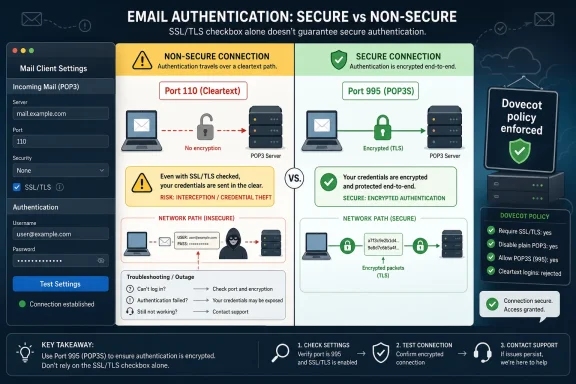 A Server Upgrade Turned a Dormant Client Bug Into an Outage
The story begins in the least glamorous place in computing: a mail server upgrade. According to the report, customers began complaining that they could no longer retrieve mail after a server-side move from Fedora 42 to Fedora Server 43, a release that brought a newer Dovecot stack and stricter handling of authentication over non-secure connections.The error was blunt: “Cleartext authentication disallowed on non-secure (SSL/TLS) connections.” In other words, the server was not rejecting mail because of a password problem, mailbox corruption, or a DNS hiccup. It was rejecting a client that appeared to be trying to authenticate without encryption.
That distinction matters because POP3 on port 110 is historically the plain old Post Office Protocol path, while POP3 over implicit SSL/TLS typically lives on port 995. Administrators have spent decades trying to herd users away from plaintext credentials, first through documentation and later through server defaults that simply refuse unsafe behavior.
What made this case interesting was not that an old configuration broke. Old configurations break all the time. The troubling claim is that affected Outlook users reportedly had the SSL/TLS option enabled, yet Outlook still attempted an insecure connection because the account remained configured for port 110.
The Checkbox Was the Contract, and Outlook May Not Have Honored It
Users do not think in terms of implicit TLS, explicit TLS, STLS, or assigned port numbers. They think in terms of a checkbox that says encryption is on. If a mail client lets that checkbox coexist with a connection path that transmits credentials in the clear, the interface has created a false contract.That is the central accusation in the Marius World post amplified by Tom’s Hardware: Outlook versions at least as old as 2007 and through 2016 reportedly allowed POP3 accounts to remain on port 110 while “SSL/TLS” appeared enabled, without forcing a move to port 995 or producing an unmistakable failure. The behavior is not yet confirmed for Outlook 2019, Microsoft 365 builds, or the newer Outlook client, so the responsible reading is that the known report covers older classic Outlook versions and possibly more.
Even that limited scope is large enough to matter. Outlook 2007 through Outlook 2016 spans an era in which Microsoft Office was the default productivity stack for small businesses, hosting customers, law offices, clinics, schools, accountants, and independent consultants. Those are precisely the environments where POP3 survived long after enterprise messaging moved toward Exchange, IMAP, ActiveSync, and cloud-backed mailboxes.
The most damning part is not that port 110 existed. Backward compatibility required it. The damning part is that, according to the report, Outlook did not make the mismatch impossible, noisy, or even obvious.
Legacy Email Is Where Security Expectations Go to Die
Email is a museum of compromises that still moves money, legal notices, passwords, invoices, and medical correspondence. POP3, IMAP, SMTP submission, implicit TLS, explicit TLS, STARTTLS, app passwords, OAuth, and vendor-specific autodiscovery all sit beside each other because the ecosystem could never afford a clean break.That history explains the bug’s plausibility. POP3 on port 110 can support a plaintext session that later upgrades with STLS, while POP3S on 995 begins inside TLS from the start. A client can therefore have multiple legitimate security pathways, but that flexibility places a heavy burden on the UI: if the user selects encryption, the client must either negotiate encryption or refuse to proceed.
The reported Outlook behavior seems to have fallen into the worst middle ground. It allegedly accepted a user-visible secure setting but allowed a non-secure transport to continue when the port selection contradicted the security selection. In a protocol stack, that may look like a configuration ambiguity; at the user layer, it looks like a broken promise.
This is why the “decades-old” framing resonates even before Microsoft has publicly confirmed the issue. Older desktop software often treated port numbers as authoritative and encryption controls as secondary decoration. That made sense when administrators hand-configured everything and users were expected to follow provider instructions exactly. It aged badly in a world where the security state of a connection is supposed to be explicit, enforced, and auditable.
Fedora and Dovecot Did What Mail Servers Should Have Done Earlier
The accidental hero in this story is not a new endpoint security suite or a clever researcher with a fuzzing rig. It is a server refusing to accept cleartext authentication. That refusal transformed a silent downgrade into a visible outage.Fedora 43’s move to Dovecot 2.4 appears to have changed the operational baseline enough that unsafe POP3 authentication attempts stopped being tolerated. The resulting breakage annoyed users, but it also exposed a configuration reality that had likely been invisible for years. This is the uncomfortable truth of hardening: when infrastructure finally enforces the policy everyone claimed to support, the first symptom is often a support ticket.
Administrators know this pattern well. Disable TLS 1.0 and an ancient copier stops scanning to email. Enforce modern authentication and a line-of-business tool fails. Turn off plaintext POP3 and suddenly the client that “always worked” is revealed to have been working by ignoring the policy.
That is not an argument against hardening. It is an argument for staged hardening, telemetry, and clear communication. A mail server that rejects unsafe authentication is doing the right thing; the pain comes from how long the unsafe path remained available.
Microsoft’s Silence Would Be More Damaging Than the Bug
As of the available reporting, this remains a claim from an IT blogger corroborated by observed server behavior and coverage from Tom’s Hardware, not a Microsoft security advisory. That distinction matters. The industry should not treat every field report as a fully scoped CVE before the vendor responds.But Microsoft should also not be allowed to hide behind the ambiguity of old software. If classic Outlook versions allowed a visible SSL/TLS setting to coexist with plaintext POP3 authentication, Microsoft needs to say which versions are affected, whether the behavior is by design, whether newer versions still do it, and whether any patch or detection guidance will be offered.
The temptation will be to minimize this as an edge case: POP3, old Office, manual configuration, wrong port, non-default setup. That framing is technically useful and politically convenient. It is also incomplete.
Security bugs in legacy workflows often matter precisely because they live in the non-default corners where small businesses and long-tail hosting customers remain. A Fortune 500 tenant on Exchange Online may never see this. A ten-person office with a POP3 mailbox configured in Outlook 2010 absolutely might.
The Real Risk Is Not Just Password Theft
The immediate concern is obvious: if a POP3 client authenticates without TLS, credentials may be exposed to anyone able to observe traffic along the path. That could include a malicious actor on local Wi-Fi, a compromised router, an ISP-level vantage point, or an attacker positioned elsewhere between client and server.But the credential risk is only the beginning. POP3 retrieves message contents, which means an unencrypted session can expose stored communications as they are downloaded. Email remains the reset mechanism for countless accounts, so mailbox access can become a pivot into banking, cloud storage, domain registrars, SaaS dashboards, and business systems.
The privacy problem is broader still. A single user’s mailbox contains other people’s data: customers, patients, vendors, employees, and family members. If an organization told those people their data was handled securely while its mail client was pulling messages in plaintext, the exposure is not just technical.
The GDPR angle raised in the original report should be handled carefully. Regulations generally do not say “thou shalt use POP3S on port 995” in that simplistic way. But modern data protection obligations do expect appropriate technical measures, and routinely transmitting personal data or credentials without encryption would be hard to defend in many contexts.
The Defaults Helped, but Defaults Never Save Everyone
One reason this may not have become a larger scandal sooner is that modern Outlook account setup typically prefers safer defaults. For many providers, autodiscover flows, Microsoft 365 settings, and documented POP configurations point users toward port 995 with SSL/TLS. Microsoft’s own published settings for Outlook.com and Exchange Online POP access use port 995 with SSL/TLS.That lowers the blast radius. It does not eliminate it. The reported cases appear to involve users whose accounts were manually configured or migrated across time, leaving POP3 on port 110 while the security UI suggested encryption was enabled.
The long life of Outlook profiles makes this worse. Desktop Office installations are often upgraded in place, preserving account settings that were created years earlier by a local technician, a hosting company script, or a user following an old support article. A bad setting can become institutional memory.
This is where consumer-grade UI expectations collide with enterprise-grade consequences. If a client has enough information to know that encryption is selected and the port is associated with plaintext POP3, it should not silently continue. It should either change the port, negotiate STLS explicitly, or fail with a message that a non-specialist can understand.
The New Outlook Question Is Still Open
The report’s most important unresolved issue is whether the behavior persists beyond Outlook 2016. Outlook 2019, Outlook 2021, Microsoft 365 Apps, and the new Outlook for Windows are not interchangeable products, even when users casually call them all “Outlook.” They differ in codebase, account setup flow, supported features, and legacy protocol handling.That matters for both risk and response. If this is confined to older classic Outlook builds, the remediation conversation is mostly about auditing legacy clients and settings. If it exists in current Microsoft 365 desktop builds, it becomes a live product security issue. If the new Outlook avoids POP3 or handles it differently, Microsoft still has to explain the migration path for users who depend on legacy retrieval.
The uncertainty should not paralyze administrators. They can test. A POP3 account configured for port 110 with SSL/TLS selected should be observed on the wire or in server logs. The server should reject cleartext authentication, and the client should not be trusted simply because its account dialog says encryption is enabled.
For WindowsForum readers, that is the practical line: believe the server logs over the checkbox. User interface state is not evidence of transport security. Negotiated TLS is.
Hosting Providers Are the Canary in This Particular Mine
The environments most likely to feel this are not pristine Microsoft 365 tenants. They are web hosts, regional ISPs, small managed service providers, and mixed-client organizations that still support POP3 because customers demanded it in 2009 and never stopped.Those providers live with configuration entropy. One customer uses Thunderbird with IMAP, another uses Outlook 2013 with POP3, another uses a phone app, and another has a custom CRM that retrieves mail every five minutes. Turning off plaintext auth is the right security move, but it can generate a wave of tickets that looks, to customers, like the provider broke email.
That is why the Fedora/Dovecot angle is so revealing. Security improvements in open-source infrastructure often surface latent client-side assumptions. The server team tightens a default, and suddenly a decade of “it works” turns into “it was never as secure as you thought.”
Providers should resist the urge to “fix” this by re-enabling plaintext authentication indefinitely. A temporary compatibility window may be necessary in a controlled migration, but making insecure auth available again restores the silent failure mode. The better path is targeted outreach, forced configuration changes, and documentation that says plainly: POP3 with SSL/TLS means port 995 unless your provider explicitly supports and requires STLS on 110.
The Audit Is Boring, Which Is Why It Will Work
The mitigation is not glamorous. It does not require a new EDR subscription or a tabletop exercise. It requires checking mail account settings, especially on old Windows machines running classic Outlook with POP3 accounts.If the incoming server uses POP3, the secure configuration most users should expect is port 995 with SSL/TLS. If the account is on port 110, the administrator needs to know whether the server supports STLS and whether Outlook is actually negotiating it. Guessing is not good enough.
Server operators should review logs for cleartext authentication attempts and enforce policies that reject them. Client administrators should inventory Outlook versions and mail profiles, particularly in organizations that migrated through multiple Office releases without rebuilding profiles. Users should be told that the presence of a checked SSL/TLS box is not proof that their mail was encrypted.
The uncomfortable part is incident response. If logs show that users authenticated or retrieved mail in plaintext over untrusted networks, organizations may need to assess whether credentials, messages, or personal data were exposed. That is not a fun conversation, but pretending the issue is merely a port-number typo understates the risk.
The Port 110 Trap Has a Simple Shape
The practical lessons are specific enough to act on now, even while the broader Outlook version matrix remains unsettled.- Outlook users with POP3 accounts should verify that incoming mail uses port 995 when SSL/TLS is selected.
- Administrators should treat port 110 plus password authentication as unsafe unless explicit TLS negotiation is confirmed in server logs.
- Mail providers should disable cleartext authentication rather than relying on users to notice insecure client behavior.
- Organizations should audit older classic Outlook installations, especially Outlook 2007, 2010, 2013, and 2016 systems with long-lived profiles.
- Anyone discovering plaintext POP3 use should rotate affected mailbox passwords and evaluate whether message contents may have crossed untrusted networks.
- Microsoft should publish a version-by-version statement explaining whether the reported behavior is reproducible, fixed, unsupported, or still present.
References
- Primary source: Tom's Hardware
Published: 2026-06-05T10:40:08.812110
Outlook may have allowed unencrypted connections for decades, report claims — Fedora and Dovecot upgrade reveal protocol downgrade issue present since at least 2007 | Tom's Hardware
Customers have likely been retrieving their emails in plaintext for over a decade, mistakenly believing encryption was enabledwww.tomshardware.com - Related coverage: packages.fedoraproject.org
dovecot-2.4.4-1.fc43 - Fedora Packages
View dovecot-2.4.4-1.fc43 in Fedora 43. dovecot: Secure imap and pop3 serverpackages.fedoraproject.org - Related coverage: docs.fedoraproject.org
- Related coverage: marius.bloggt-in-braunschweig.de
Outlook hat Emailverbindung nicht verschlüsselt - Marius Welt
Fedora Update auf Dovecot 2.4.3 legt 20 Jahre alte Sicherheitslücke in Outlook offen.marius.bloggt-in-braunschweig.de - Related coverage: fedoramagazine.org
Fedora 43 Upgrade revealed 20 years old Outlook Security Bug - Fedora Magazine
Yes, the Fedora 43 upgrade brought an interesting revelation for all Outlook users—one that Microsoft is unlikely to be thrilled about. Outlook was not encrypting email connections, even though SSL/TLS was clearly enabled in the account settings. It looks like, that bug dates back to at least...fedoramagazine.org
- Related coverage: vulners.com
Fedora 43 : dovecot (2025-97d8911108) - vulnerability database | Vulners.com
The remote Fedora 43 host has a package installed that is affected by a vulnerability as referenced in theFEDORA-2025-97d8911108 advisory. fix CVE-2025-30189 Tenable has extracted the preceding description block directly from the Fedora security a...vulners.com
- Related coverage: newreleases.io
dovecot/core 2.4.3 on GitHub
New release dovecot/core version 2.4.3 Release v2.4.3 on GitHub. newreleases.io
- Related coverage: nksistemas.com
Outlook y el Cifrado Olvidado: Cómo Fedora 43 y Dovecot 2.4 Expusieron una Vulnerabilidad de Larga Data | NKSistemas
La reciente actualización a Fedora 43 desveló una preocupante falla de seguridad en Microsoft Outlook. Descubre cómo este cliente de correo ignoraba silenciosamente las configuraciones de cifrado S… nksistemas.com
- Related coverage: mimecastsupport.zendesk.com
Journaling - Non-Secure POP3 Connections - Oct 2022 – Mimecast
Service Update Availability 3rd April - 19th June 2023 ...mimecastsupport.zendesk.com - Related coverage: fedora-messaging.readthedocs.io
- Related coverage: fedorarepository.org
- Related coverage: docs.oracle.com
- Official source: support.microsoft.com
POP, IMAP, and SMTP settings for Outlook.com | Microsoft Support
Learn more about the POP, IMAP, and SMTP settings for Outlooksupport.microsoft.com - Related coverage: internet-security.com
Internet-Security.com TCP port 995 details
 www.internet-security.com
- Related coverage: yuasisu.com
Outlook 2016 メール アカウントの設定方法|株式会社ユアシス
Microsoft Outlook 2016 の新規設定および既存アカウントの確認・変更手順です。www.yuasisu.com - Related coverage: support.tigertech.net
Verifying Outlook 2016 or 2019 POP3 Settings on Windows | Tiger Technologies Support
Explains how to verify that the Outlook 2016 or 2019 mail settings have been entered correctly for a POP3 account. support.tigertech.net
- Related coverage: limilabs.com
Outlook: IMAP, POP3, and SMTP settings | Blog | Limilabs
Outlook.com supports access via POP3 and SMTP protocols. Below you can find the configuration settings for those protocols. All Outlook.com servers (POP3 and SMTP) use implicit SSL (use ConnectSSL method). SMTP server also supports explicit SSL (you can use Connect method and then secure the...www.limilabs.com
- Related coverage: scaledmail.com
Outlook.com SMTP Settings (2026): Host, Port & TLS | ScaledMail
Outlook.com SMTP host: smtp-mail.outlook.com, port 587 (STARTTLS). Copy-paste verified settings for any email client, plus app password setup and sending limits.www.scaledmail.com - Official source: answers.microsoft.com
- Related coverage: serversettings.email

OUTLOOK.COM email server settings - POP and SMTP - ServerSettings.Email
OUTLOOK.COM email server settings - POP and SMTP. Setup your OUTLOOK.COM email account on your Android Phone, iPhone, Apple Mail, eM Client, Entourage, Incredimail, Mailbird lite, Opera, Thunderbird, Outlook 2007,2010,2013 and 2016.
www.serversettings.email
- Related coverage: htcinc.net
</rdf:Alt> </dc:title> <dc:description> <rdf:Alt> <rdf:li xml:lang="x-default"/> </rdf:Alt> </dc:description> <dc:creator> <rdf:Seq> <rdf:li>Hayes,
</rdf:Alt> </dc:description> <dc:creator> <rdf:Seq> <rdf:li>Hayes, Sharonwww.htcinc.net
- Related coverage: jcwifi.com
- Related coverage: cdn.cms42.com
