

Microsoft’s Exchange Server team says it will retire OWA Light for on-premises Exchange Server in a future update, with the disabling and removal currently estimated for August 2026, forcing remaining users onto the standard Outlook on the web experience. This is not a consumer Outlook story and not another round in the confusing “new Outlook for Windows” debate. It is Microsoft closing a legacy web-access path that once solved real browser, bandwidth, and accessibility problems but now represents another surface area to defend. For Exchange administrators, the important part is not nostalgia; it is inventory, policy, documentation, and user migration before the update makes the decision for them.
OWA Light’s retirement is the sort of change that looks minor until it collides with a real organization’s exceptions. The people still using it are unlikely to be the average office worker on a current browser. They are the users with old bookmarks, accessibility flags, locked-down kiosks, unusual browser constraints, thin-bandwidth links, or habits encoded into helpdesk scripts long ago.
That makes this a useful test of how well an Exchange shop knows its own edge cases. Microsoft is giving admins time, a policy switch, and a logon-page control. What it is not giving them is a way to keep the old experience alive indefinitely.
Per Microsoft’s Exchange Server team, OWA Light was “an important compatibility experience when the web needed it.” That wording is doing a lot of work. It acknowledges that OWA Light was not a random legacy indulgence; it existed because the web once made the full Outlook Web App experience hard or impossible for some users.
The original design assumptions were pragmatic. Browser support was inconsistent, connections were slower, and accessibility technologies were not where they are today. A simplified web interface could be the difference between mail access and no mail access, particularly in environments where the full Outlook Web App experience could not run acceptably.
Microsoft’s argument now is that those assumptions have expired. The company says modern Outlook on the web is where it wants to invest, specifically describing the replacement experience as cross-browser, accessible, and security-focused. That is not merely a user-interface statement. It is a maintenance and threat-model statement.
Every extra rendering path in a webmail product has a cost. It needs testing, patching, compatibility decisions, and security review. Microsoft’s Exchange post frames OWA Light as another content-rendering path, control surface, and compatibility layer at a time when web threats have changed significantly. In plainer terms: if Exchange Server has to defend fewer ways to present mail in a browser, Microsoft has fewer legacy seams to harden.
That is the central trade. OWA Light once reduced operational friction for users. Today, Microsoft sees it as increasing engineering and security complexity for everyone.
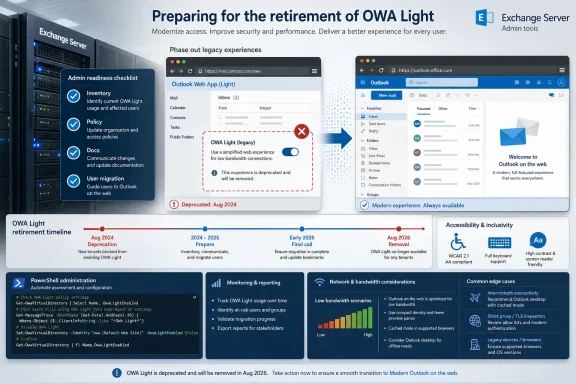
The planned change is simple. In an upcoming Exchange Server update, estimated for August 2026, Microsoft plans to disable and remove the OWA Light experience. After that change is introduced, users will no longer be able to choose OWA Light or be redirected to it. They should use the modern Outlook on the web experience instead.
That sounds clean until you translate it into support reality. A user with a bookmark that forces the light experience may stop arriving where they expect. A helpdesk article that tells users to select OWA Light on the logon page becomes wrong. An accessibility workflow built around the old interface becomes a risk. A browser that only worked because it landed in the simplified interface becomes a procurement or endpoint-management problem.
Microsoft’s own guidance points directly at these forgotten dependencies. Organizations still relying on OWA Light must move users to the standard Outlook on the web experience and review internal guidance, bookmarks, training material, helpdesk scripts, and accessibility workflows that reference OWA Light. That list is revealing because it is not just a technical checklist. It is a map of institutional memory.
The most serious risk is not that Exchange admins cannot run the right PowerShell commands. It is that nobody knows which users, documents, scripts, or support routines still depend on the old behavior until the August 2026 update lands and the helpdesk queue proves it.
Microsoft’s current support documentation for the light version still reflects that world. It describes the light version as what users see when they are using an old browser incompatible with newer Outlook on the web or Outlook Web App experiences. It also presents the light version as a constrained mail interface with fewer messaging options than the standard experience.
That limitation is the other half of the story. OWA Light was useful precisely because it was simpler. But simpler also meant less capable. It was not a parallel modern client; it was a fallback path for an era in which the full web client had heavier assumptions.
Microsoft’s Exchange team is now saying that the fallback path no longer deserves first-class engineering attention. Modern browsers are more consistent, network conditions have improved for many customers, and the security landscape has changed. Even if some of those statements vary by customer and geography, the product direction is clear: Microsoft wants one main Outlook on the web surface to improve, test, and defend.
That direction will frustrate some admins because Exchange Server has historically carried long tails well. On-premises customers often expect continuity, not cloud-speed retirements. But this is not an abrupt cutoff from nowhere. Microsoft says it announced OWA Light’s deprecation in August 2024, and the removal is only now being targeted for a future update estimated in August 2026.
That gives organizations roughly two years from deprecation announcement to expected removal. For a webmail feature used by a dwindling population, that is not reckless. For a government, healthcare, education, or industrial environment with unusual access patterns, it may still feel short if nobody began remediation when deprecation was first announced.
June mitigations — Exchange admins in Microsoft’s comment thread reported that OWA Light became unusable for some users after mitigations, with users unable to disable it themselves.
August 2026 — Microsoft estimates that an upcoming Exchange Server update will disable and remove the OWA Light experience.
The catch, as always, is assignment. Microsoft says administrators should make sure the OWA mailbox policy is assigned to all mailboxes and notes that the assignment can be done with:
That pairing is important. Setting a policy is not the same thing as proving every mailbox is governed by it. In a long-running Exchange organization, it is common to find default policies, departmental exceptions, old test policies, and mailboxes whose settings reflect migrations or one-off troubleshooting from years earlier.
There is also a logon-page control. Microsoft recommends disabling the OWA Light selection menu on the OWA logon page with:
That second switch matters because it removes the user-visible affordance. If your migration plan is to move people away from OWA Light before Microsoft removes it, leaving the choice visible on the logon page invites drift back into the legacy path. It also leaves helpdesk screenshots and user muscle memory alive longer than necessary.
The cleanest approach is therefore not to wait for Microsoft’s future update to do the breaking. Disable OWA Light deliberately, communicate the change, watch for user impact, fix the real blockers, and update the documentation while rollback is still an administrative choice rather than an unavailable product path.
OWA Light historically overlapped with accessibility workflows because simplified interfaces can be easier to navigate for some assistive technologies or user needs. That does not mean OWA Light is now the better accessibility experience. It does mean organizations should not treat this as a purely cosmetic retirement.
The Microsoft comment thread attached to the announcement gives a practical example. One administrator said a couple of users were stuck in light mode and that the browser option to disable it no longer worked. The reported fix was:
Another commenter said their organization disabled OWA Light after June mitigations made it unusable and users could not disable it themselves. That is anecdotal, but it is valuable because it shows the kind of failure mode admins should expect: not a fleetwide catastrophe, but a handful of users trapped in a legacy preference or accessibility-related state that only an administrator can unwind.
This is why the accessibility review belongs in the migration plan, not after the update. If an organization has users flagged for an optimized accessibility experience, or users who have historically selected OWA Light for usability reasons, those people need testing in the standard Outlook on the web experience before Microsoft removes the old path. The goal is not to preserve OWA Light; it is to ensure the replacement actually works for the users who will lose it.
Microsoft’s broader claim may be true: modern Outlook on the web is the right place to focus accessibility work. But accessibility is experienced individually, not architecturally. A product team can retire a legacy accessibility-adjacent path for defensible reasons and still leave admins responsible for the last-mile transition.
The Exchange team says maintaining a separate legacy OWA Light experience increases complexity. It specifically points to each additional content rendering path, control surface, and compatibility layer needing evaluation as Microsoft strengthens defenses against modern web threats. That is not marketing fluff; that is how mature web security programs think.
Exchange Server has spent years under intense scrutiny because mail servers are high-value targets. Even without invoking any particular incident, the security logic is obvious. A webmail interface processes authentication state, mailbox content, attachments, calendar data, address data, and user actions. If there are two materially different ways to render and control that experience, defenders have two paths to audit.
Legacy web UI is especially awkward because it often encodes compatibility decisions from another era. It may contain assumptions about HTML, scripting, user agents, fallback rendering, attachment handling, or controls that made sense when the alternative was excluding users entirely. Over time, those compatibility layers become harder to reason about.
Retiring OWA Light therefore reduces more than visual clutter. It removes an old decision tree from a sensitive application. Microsoft still has to secure Outlook on the web, of course, but reducing a legacy webmail mode is a rational step if the company believes the modern experience can satisfy supported users.
That is the strongest version of Microsoft’s case: not “we prefer the new UI,” but “we should not keep defending an old webmail surface that fewer people need and more people can forget exists.”
Microsoft says “in an upcoming Exchange Server update,” estimated in August 2026, it plans to disable and remove OWA Light. The distinction matters because “estimated” is not a fixed servicing contract, and “future update” is broader than some of the speculation already appearing in admin discussions. In the Microsoft comment thread, one user asked whether the August update would be a particular Subscription Edition cumulative update rather than a security update, and whether older Exchange Server deployments would need to disable OWA Light manually.
That question is exactly where admins should avoid over-reading. The fact table is simple: Microsoft has said future update, estimated August 2026. It has not, in the announcement text provided, made the retirement dependent on a named KB, a specific build number, or a precise update classification. If your operational planning depends on whether this arrives in a cumulative update, a security update, or another Exchange Server servicing vehicle, the answer is: monitor Microsoft’s Exchange release notes and treat the August 2026 estimate as the planning window, not the only trigger for action.
That is also why immediate policy testing is attractive. If you disable OWA Light yourself now, the eventual packaging becomes less dramatic. The Microsoft update then confirms the state you already moved to, instead of becoming the first time users discover the old interface is gone.
The table shows why “just keep both” is not a neutral option. Keeping both means keeping two user paths alive in a product category where every authentication, rendering, and control surface matters. Removing OWA Light may inconvenience edge cases, but from Microsoft’s perspective, it concentrates investment where the company wants the product to go.
For users, the main difference will be that a familiar stripped-down interface disappears. For admins, the main difference is that exceptions once papered over by OWA Light have to be solved directly: browser compatibility, accessibility support, network performance, endpoint policy, and training.
Old helpdesk scripts are a classic problem. A frontline technician may have a step that says, “select the light version” when troubleshooting a browser issue. A training PDF may include screenshots from the OWA Light inbox. A department may have a bookmarked link that routes users into the old interface. An accessibility accommodation document may reference the light experience because that was the workable answer at the time it was written.
Those artifacts often outlive the admins who created them. They also travel into places the Exchange team does not control: intranet pages, onboarding guides, password-reset instructions, departmental runbooks, vendor handoff documents, and email templates.
Microsoft explicitly tells organizations to review internal guidance, bookmarks, training material, helpdesk scripts, and accessibility workflows that reference OWA Light. That is more than housekeeping. If those materials remain unchanged after the removal, the organization will generate avoidable tickets and user distrust. People do not distinguish between “Microsoft retired a legacy interface” and “IT gave me instructions that do not work.”
The best migration plan therefore has a communications track. Tell users who still rely on OWA Light what is changing. Tell the helpdesk what the replacement behavior is. Remove the logon-page choice before the forced removal. Update screenshots. Search the intranet. Review browser guidance. Make the change look intentional.
The worst plan is to silently wait for the Exchange update and then discover that the only person who understood the old workflow retired three years ago.
On Windows desktops, Outlook on the web can function as a fallback when Outlook for Windows is unavailable, when a profile breaks, when a user is on a shared machine, or when remote access is constrained. In on-premises Exchange environments, OWA is often part of the resilience story. If the light version was ever part of that story, even informally, it now needs to be removed from the mental model.
The retirement also intersects with endpoint modernization. If a user needs OWA Light because their browser cannot handle the standard experience, the right answer is probably not to preserve OWA Light. It is to update the browser, replace the endpoint, adjust policy, or provide a supported access path. Microsoft’s support guidance for the light version points users toward updating the browser for the best experience, which is consistent with the Exchange team’s direction.
That may be easy in a corporate laptop fleet and hard in a lab, kiosk, terminal, jump box, factory floor, call center, or shared workstation pool. But that is precisely why the August 2026 estimate should be treated as a deadline for discovery rather than a date to start thinking.
A compatibility feature that nobody notices can still be carrying critical users. The time to find out is when you can still choose your remediation path.
For on-premises Exchange customers, that can feel like a paradox. They run Exchange Server precisely because they need control, continuity, or constraints that cloud-only services do not satisfy. Yet they still inherit Microsoft’s modern security posture and product simplification agenda. OWA Light is a small example, but it points to a larger reality: on-premises does not mean frozen in time.
The Exchange Server team’s language is careful. It is not mocking OWA Light or pretending it was useless. It says OWA Light served customers well for many years. It says the web has changed. It says maintaining the separate experience increases complexity. That is the respectful version of a product funeral.
Administrators should respond in the same spirit. Do not frame this as Microsoft taking away a toy. Frame it as the end of a compatibility contract. If your environment still depends on that contract, identify why and fix the underlying dependency before Microsoft removes the mechanism.
Microsoft’s retirement of OWA Light is not the end of Outlook on the web; it is the end of a web-era compromise that once made Exchange more reachable and now makes it more complicated to defend. The organizations that handle it well will not be the ones with the fanciest Exchange diagrams, but the ones that know which users still depend on yesterday’s exceptions and can move them before the product no longer asks.
OWA Light’s retirement is the sort of change that looks minor until it collides with a real organization’s exceptions. The people still using it are unlikely to be the average office worker on a current browser. They are the users with old bookmarks, accessibility flags, locked-down kiosks, unusual browser constraints, thin-bandwidth links, or habits encoded into helpdesk scripts long ago.
That makes this a useful test of how well an Exchange shop knows its own edge cases. Microsoft is giving admins time, a policy switch, and a logon-page control. What it is not giving them is a way to keep the old experience alive indefinitely.
 Microsoft Is Finally Closing the “Compatibility Experience” Door
Per Microsoft’s Exchange Server team, OWA Light was “an important compatibility experience when the web needed it.” That wording is doing a lot of work. It acknowledges that OWA Light was not a random legacy indulgence; it existed because the web once made the full Outlook Web App experience hard or impossible for some users.The original design assumptions were pragmatic. Browser support was inconsistent, connections were slower, and accessibility technologies were not where they are today. A simplified web interface could be the difference between mail access and no mail access, particularly in environments where the full Outlook Web App experience could not run acceptably.
Microsoft’s argument now is that those assumptions have expired. The company says modern Outlook on the web is where it wants to invest, specifically describing the replacement experience as cross-browser, accessible, and security-focused. That is not merely a user-interface statement. It is a maintenance and threat-model statement.
Every extra rendering path in a webmail product has a cost. It needs testing, patching, compatibility decisions, and security review. Microsoft’s Exchange post frames OWA Light as another content-rendering path, control surface, and compatibility layer at a time when web threats have changed significantly. In plainer terms: if Exchange Server has to defend fewer ways to present mail in a browser, Microsoft has fewer legacy seams to harden.
That is the central trade. OWA Light once reduced operational friction for users. Today, Microsoft sees it as increasing engineering and security complexity for everyone.
The Change Is Narrow, but the Blast Radius Is Organizational
The announcement applies to Exchange Server on-premises. That scope matters because Exchange Server environments are often the places where old assumptions live longest: regulated networks, hybrid leftovers, segmented environments, specialized users, and systems that have survived multiple platform refreshes because they quietly kept working.The planned change is simple. In an upcoming Exchange Server update, estimated for August 2026, Microsoft plans to disable and remove the OWA Light experience. After that change is introduced, users will no longer be able to choose OWA Light or be redirected to it. They should use the modern Outlook on the web experience instead.
That sounds clean until you translate it into support reality. A user with a bookmark that forces the light experience may stop arriving where they expect. A helpdesk article that tells users to select OWA Light on the logon page becomes wrong. An accessibility workflow built around the old interface becomes a risk. A browser that only worked because it landed in the simplified interface becomes a procurement or endpoint-management problem.
Microsoft’s own guidance points directly at these forgotten dependencies. Organizations still relying on OWA Light must move users to the standard Outlook on the web experience and review internal guidance, bookmarks, training material, helpdesk scripts, and accessibility workflows that reference OWA Light. That list is revealing because it is not just a technical checklist. It is a map of institutional memory.
The most serious risk is not that Exchange admins cannot run the right PowerShell commands. It is that nobody knows which users, documents, scripts, or support routines still depend on the old behavior until the August 2026 update lands and the helpdesk queue proves it.
OWA Light Was a Feature of an Older Web, Not Just an Older Outlook
OWA Light belongs to a period when “web application” did not mean what it means now. A browser-based mail client had to contend with stark differences between browsers, operating systems, bandwidth, scripting support, and security models. A lighter interface was not merely a preference; it was a compatibility bridge.Microsoft’s current support documentation for the light version still reflects that world. It describes the light version as what users see when they are using an old browser incompatible with newer Outlook on the web or Outlook Web App experiences. It also presents the light version as a constrained mail interface with fewer messaging options than the standard experience.
That limitation is the other half of the story. OWA Light was useful precisely because it was simpler. But simpler also meant less capable. It was not a parallel modern client; it was a fallback path for an era in which the full web client had heavier assumptions.
Microsoft’s Exchange team is now saying that the fallback path no longer deserves first-class engineering attention. Modern browsers are more consistent, network conditions have improved for many customers, and the security landscape has changed. Even if some of those statements vary by customer and geography, the product direction is clear: Microsoft wants one main Outlook on the web surface to improve, test, and defend.
That direction will frustrate some admins because Exchange Server has historically carried long tails well. On-premises customers often expect continuity, not cloud-speed retirements. But this is not an abrupt cutoff from nowhere. Microsoft says it announced OWA Light’s deprecation in August 2024, and the removal is only now being targeted for a future update estimated in August 2026.
That gives organizations roughly two years from deprecation announcement to expected removal. For a webmail feature used by a dwindling population, that is not reckless. For a government, healthcare, education, or industrial environment with unusual access patterns, it may still feel short if nobody began remediation when deprecation was first announced.
Timeline
August 2024 — Microsoft announced the deprecation of OWA Light.June mitigations — Exchange admins in Microsoft’s comment thread reported that OWA Light became unusable for some users after mitigations, with users unable to disable it themselves.
August 2026 — Microsoft estimates that an upcoming Exchange Server update will disable and remove the OWA Light experience.
The Admin Problem Is Not “Can We Disable It?” but “Who Is Still Using It?”
Microsoft gives administrators a direct way to block OWA Light immediately. The mailbox-policy control is blunt and useful:Set-OwaMailboxPolicy -OwaLightEnabled $falseThe catch, as always, is assignment. Microsoft says administrators should make sure the OWA mailbox policy is assigned to all mailboxes and notes that the assignment can be done with:
Set-CasMailbox -OwaMailboxPolicy <Name>That pairing is important. Setting a policy is not the same thing as proving every mailbox is governed by it. In a long-running Exchange organization, it is common to find default policies, departmental exceptions, old test policies, and mailboxes whose settings reflect migrations or one-off troubleshooting from years earlier.
There is also a logon-page control. Microsoft recommends disabling the OWA Light selection menu on the OWA logon page with:
Set-OwaVirtualDirectory -LogonPageLightSelectionEnabled $falseThat second switch matters because it removes the user-visible affordance. If your migration plan is to move people away from OWA Light before Microsoft removes it, leaving the choice visible on the logon page invites drift back into the legacy path. It also leaves helpdesk screenshots and user muscle memory alive longer than necessary.
The cleanest approach is therefore not to wait for Microsoft’s future update to do the breaking. Disable OWA Light deliberately, communicate the change, watch for user impact, fix the real blockers, and update the documentation while rollback is still an administrative choice rather than an unavailable product path.
Action checklist for admins
- Identify mailboxes and policies that still allow OWA Light, then decide whether any exception is still justified.
- Set or update the OWA mailbox policy with
Set-OwaMailboxPolicy -OwaLightEnabled $false. - Verify the relevant OWA mailbox policy is assigned to all intended mailboxes with
Set-CasMailbox -OwaMailboxPolicy <Name>. - Remove the logon-page option by running
Set-OwaVirtualDirectory -LogonPageLightSelectionEnabled $false. - Review internal guidance, bookmarks, training material, helpdesk scripts, and accessibility workflows that mention OWA Light.
- Test users who were known to rely on accessibility-related settings, old browsers, kiosks, or low-bandwidth access paths.
The Accessibility Angle Is Where the Retirement Gets Sensitive
Microsoft’s replacement pitch leans partly on accessibility. The Exchange team says it wants to invest in a modern Outlook on the web experience that is cross-browser, accessible, and security-focused. That is the right strategic claim, but it does not automatically answer every user-specific case.OWA Light historically overlapped with accessibility workflows because simplified interfaces can be easier to navigate for some assistive technologies or user needs. That does not mean OWA Light is now the better accessibility experience. It does mean organizations should not treat this as a purely cosmetic retirement.
The Microsoft comment thread attached to the announcement gives a practical example. One administrator said a couple of users were stuck in light mode and that the browser option to disable it no longer worked. The reported fix was:
Set-CasMailbox -Identity xxx -IsOptimizedForAccessibility $falseAnother commenter said their organization disabled OWA Light after June mitigations made it unusable and users could not disable it themselves. That is anecdotal, but it is valuable because it shows the kind of failure mode admins should expect: not a fleetwide catastrophe, but a handful of users trapped in a legacy preference or accessibility-related state that only an administrator can unwind.
This is why the accessibility review belongs in the migration plan, not after the update. If an organization has users flagged for an optimized accessibility experience, or users who have historically selected OWA Light for usability reasons, those people need testing in the standard Outlook on the web experience before Microsoft removes the old path. The goal is not to preserve OWA Light; it is to ensure the replacement actually works for the users who will lose it.
Microsoft’s broader claim may be true: modern Outlook on the web is the right place to focus accessibility work. But accessibility is experienced individually, not architecturally. A product team can retire a legacy accessibility-adjacent path for defensible reasons and still leave admins responsible for the last-mile transition.
Microsoft’s Security Argument Is More Convincing Than the Usual “Modern Experience” Pitch
Users are used to hearing vendors say a feature is being retired so the company can “focus” on a modern experience. Sometimes that is a polite way to say the old thing has too few users to justify its cost. In this case, Microsoft’s security argument is unusually concrete.The Exchange team says maintaining a separate legacy OWA Light experience increases complexity. It specifically points to each additional content rendering path, control surface, and compatibility layer needing evaluation as Microsoft strengthens defenses against modern web threats. That is not marketing fluff; that is how mature web security programs think.
Exchange Server has spent years under intense scrutiny because mail servers are high-value targets. Even without invoking any particular incident, the security logic is obvious. A webmail interface processes authentication state, mailbox content, attachments, calendar data, address data, and user actions. If there are two materially different ways to render and control that experience, defenders have two paths to audit.
Legacy web UI is especially awkward because it often encodes compatibility decisions from another era. It may contain assumptions about HTML, scripting, user agents, fallback rendering, attachment handling, or controls that made sense when the alternative was excluding users entirely. Over time, those compatibility layers become harder to reason about.
Retiring OWA Light therefore reduces more than visual clutter. It removes an old decision tree from a sensitive application. Microsoft still has to secure Outlook on the web, of course, but reducing a legacy webmail mode is a rational step if the company believes the modern experience can satisfy supported users.
That is the strongest version of Microsoft’s case: not “we prefer the new UI,” but “we should not keep defending an old webmail surface that fewer people need and more people can forget exists.”
The Reporting Split: “Very Soon” Versus “Future Update”
Neowin’s coverage framed the retirement as Microsoft killing off the original lightweight Outlook Web App experience on Exchange Servers “very soon,” and noted that the change is expected with an Exchange Server update currently scheduled for August 2026. That is a fair news framing for readers tracking Microsoft product removals, but administrators should read Microsoft’s wording more literally.Microsoft says “in an upcoming Exchange Server update,” estimated in August 2026, it plans to disable and remove OWA Light. The distinction matters because “estimated” is not a fixed servicing contract, and “future update” is broader than some of the speculation already appearing in admin discussions. In the Microsoft comment thread, one user asked whether the August update would be a particular Subscription Edition cumulative update rather than a security update, and whether older Exchange Server deployments would need to disable OWA Light manually.
That question is exactly where admins should avoid over-reading. The fact table is simple: Microsoft has said future update, estimated August 2026. It has not, in the announcement text provided, made the retirement dependent on a named KB, a specific build number, or a precise update classification. If your operational planning depends on whether this arrives in a cumulative update, a security update, or another Exchange Server servicing vehicle, the answer is: monitor Microsoft’s Exchange release notes and treat the August 2026 estimate as the planning window, not the only trigger for action.
That is also why immediate policy testing is attractive. If you disable OWA Light yourself now, the eventual packaging becomes less dramatic. The Microsoft update then confirms the state you already moved to, instead of becoming the first time users discover the old interface is gone.
The Table Stakes: OWA Light and Modern Outlook on the Web Are Not Peer Products Anymore
The easiest mistake is to compare OWA Light and modern Outlook on the web as if they were merely two interface themes. They are not. One is a legacy compatibility experience built for old browsers, slow connections, and constrained environments. The other is the standard webmail direction Microsoft intends to improve.| Dimension | OWA Light | Modern Outlook on the web |
|---|---|---|
| Role in Exchange Server | Legacy compatibility experience | Standard replacement experience |
| Original design target | Older browsers, slower connections, simplified access needs | Current browser and web-platform assumptions |
| Interface model | Simplified web interface for environments that could not support the full Outlook Web App experience | Full Outlook on the web experience |
| Microsoft’s stated investment direction | Being disabled and removed in a future update | Ongoing focus for cross-browser, accessible, security-focused work |
| User choice after the change | Users will no longer be able to choose or be redirected to it | Users should use it instead |
| Admin preparation | Disable via policy and remove logon-page selection | Validate users, workflows, and documentation against it |
For users, the main difference will be that a familiar stripped-down interface disappears. For admins, the main difference is that exceptions once papered over by OWA Light have to be solved directly: browser compatibility, accessibility support, network performance, endpoint policy, and training.
The Hidden Dependency Is Documentation, Not PowerShell
The commands Microsoft provides are straightforward. The deeper work is finding the non-code artifacts that still mention OWA Light.Old helpdesk scripts are a classic problem. A frontline technician may have a step that says, “select the light version” when troubleshooting a browser issue. A training PDF may include screenshots from the OWA Light inbox. A department may have a bookmarked link that routes users into the old interface. An accessibility accommodation document may reference the light experience because that was the workable answer at the time it was written.
Those artifacts often outlive the admins who created them. They also travel into places the Exchange team does not control: intranet pages, onboarding guides, password-reset instructions, departmental runbooks, vendor handoff documents, and email templates.
Microsoft explicitly tells organizations to review internal guidance, bookmarks, training material, helpdesk scripts, and accessibility workflows that reference OWA Light. That is more than housekeeping. If those materials remain unchanged after the removal, the organization will generate avoidable tickets and user distrust. People do not distinguish between “Microsoft retired a legacy interface” and “IT gave me instructions that do not work.”
The best migration plan therefore has a communications track. Tell users who still rely on OWA Light what is changing. Tell the helpdesk what the replacement behavior is. Remove the logon-page choice before the forced removal. Update screenshots. Search the intranet. Review browser guidance. Make the change look intentional.
The worst plan is to silently wait for the Exchange update and then discover that the only person who understood the old workflow retired three years ago.
For Windows Users, This Is Another Reminder That “Works in the Browser” Still Has a Support Lifecycle
Many WindowsForum readers will look at this and wonder why a webmail interface retirement deserves much attention. The answer is that browser-based enterprise software often becomes invisible infrastructure. It “just works” until a vendor removes a compatibility bridge that nobody documented.On Windows desktops, Outlook on the web can function as a fallback when Outlook for Windows is unavailable, when a profile breaks, when a user is on a shared machine, or when remote access is constrained. In on-premises Exchange environments, OWA is often part of the resilience story. If the light version was ever part of that story, even informally, it now needs to be removed from the mental model.
The retirement also intersects with endpoint modernization. If a user needs OWA Light because their browser cannot handle the standard experience, the right answer is probably not to preserve OWA Light. It is to update the browser, replace the endpoint, adjust policy, or provide a supported access path. Microsoft’s support guidance for the light version points users toward updating the browser for the best experience, which is consistent with the Exchange team’s direction.
That may be easy in a corporate laptop fleet and hard in a lab, kiosk, terminal, jump box, factory floor, call center, or shared workstation pool. But that is precisely why the August 2026 estimate should be treated as a deadline for discovery rather than a date to start thinking.
A compatibility feature that nobody notices can still be carrying critical users. The time to find out is when you can still choose your remediation path.
Exchange Server’s Long Tail Keeps Getting Shorter
This retirement fits a broader pattern: Microsoft is steadily narrowing the number of legacy paths it has to support across the Outlook and Exchange ecosystem. The details vary by product and deployment model, but the direction is consistent. Older protocols, older clients, older interfaces, and older assumptions face increasing pressure from security, engineering cost, and cloud-era product strategy.For on-premises Exchange customers, that can feel like a paradox. They run Exchange Server precisely because they need control, continuity, or constraints that cloud-only services do not satisfy. Yet they still inherit Microsoft’s modern security posture and product simplification agenda. OWA Light is a small example, but it points to a larger reality: on-premises does not mean frozen in time.
The Exchange Server team’s language is careful. It is not mocking OWA Light or pretending it was useless. It says OWA Light served customers well for many years. It says the web has changed. It says maintaining the separate experience increases complexity. That is the respectful version of a product funeral.
Administrators should respond in the same spirit. Do not frame this as Microsoft taking away a toy. Frame it as the end of a compatibility contract. If your environment still depends on that contract, identify why and fix the underlying dependency before Microsoft removes the mechanism.
What Exchange Shops Should Have Finished Before August 2026
The practical read is that OWA Light’s retirement is not dangerous for most users, but it is highly capable of exposing neglected corners of an Exchange environment. Treat it as a forced audit of webmail access assumptions, not as a UI cleanup.- OWA Light is being retired for Exchange Server on-premises, not as a general consumer Outlook change.
- Microsoft estimates the disabling and removal will arrive in an upcoming Exchange Server update in August 2026.
- Users will no longer be able to choose OWA Light or be redirected to it after the change.
- Admins can block OWA Light now with
Set-OwaMailboxPolicy -OwaLightEnabled $false. - The logon-page selection should also be removed with
Set-OwaVirtualDirectory -LogonPageLightSelectionEnabled $false. - Accessibility workflows, old bookmarks, and helpdesk scripts are the highest-risk hidden dependencies.
Microsoft’s retirement of OWA Light is not the end of Outlook on the web; it is the end of a web-era compromise that once made Exchange more reachable and now makes it more complicated to defend. The organizations that handle it well will not be the ones with the fanciest Exchange diagrams, but the ones that know which users still depend on yesterday’s exceptions and can move them before the product no longer asks.
References
- Primary source: Microsoft Exchange Team Blog
Published: Wed, 08 Jul 2026 13:08:33 GMT
Loading…
techcommunity.microsoft.com - Official source: support.microsoft.com
Loading…
support.microsoft.com - Related coverage: neowin.net
Loading…
www.neowin.net - Official source: learn.microsoft.com
Deprecation of Exchange Web Services in Exchange Online | Microsoft Learn
Learn about deprecation of Exchange Web Services (EWS) in Exchange Onlinelearn.microsoft.com - Official source: microsoft.com
Loading…
www.microsoft.com - Official source: microsoft.github.io
Loading…
microsoft.github.io
- Related coverage: techradar.com
Microsoft starts the countdown for the end of Exchange Web Services | TechRadar
Exchange Web Services will be shut down from April 2027www.techradar.com - Related coverage: windowscentral.com
EWS is shutting down in Microsoft 365 and Exchange Online | Windows Central
It's a drawn-out affair, but that gives users plenty of time to take the necessary migration steps.www.windowscentral.com - Related coverage: tomsguide.com
Do you use Microsoft Exchange? Hackers are actively exploiting a new zero-day flaw | Tom's Guide
Microsoft warns of a new zero-day vulnerability that leaves Exchange open to hackers.www.tomsguide.com - Related coverage: histsyn.com
Loading…
www.histsyn.com - Official source: devblogs.microsoft.com
Retirement of Exchange Web Services in Exchange Online
On October 1, 2026, we will start blocking Exchange Web Service requests from non-Microsoft apps to Exchange Online.devblogs.microsoft.com - Related coverage: messageware.com
Patch Tuesday: Exchange Server Security Updates for June 2026 - Messageware
Microsoft released June 2026 Exchange Server security updates addressing CVE-2026-42897, a critical Outlook Web Access vulnerability.www.messageware.com - Related coverage: media.defense.gov