

Microsoft’s Paint app for Windows 11 has quietly gained a small but meaningful usability tweak: a collapsible toolbar that can be set to automatically hide, giving you more canvas space while you work and restoring the ribbon on demand with a single click.
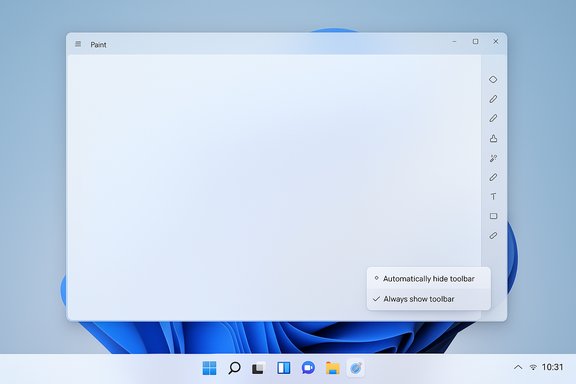
The update arrives as part of Paint version 11.2511.281.0, currently rolling out to Windows Insiders in the Dev and Canary channels. The feature adds a chevron control on the ribbon’s bottom-right that exposes an Automatically hide toolbar option; after enabling it the toolbar collapses, and a temporary Show toolbar button appears for quick access. Returning to the classic always-visible ribbon is as simple as selecting Always show toolbar from that same chevron. This change is modest in scope but practical in effect: it reduces persistent chrome around the canvas, which benefits users on small displays and anyone performing fine-grain edits where every pixel of workspace matters. Multiple independent outlets and community forums have picked up the rollout and reproduced the usage steps, confirming availability to Insiders on the specified channels.
The collapsible toolbar is not a dramatic change to Paint’s feature set; rather, it is a usability improvement that follows other UI polish items (dark mode support, centered canvas, zoom improvements) that Microsoft has shipped through Insider channels while iterating on the app’s design.
From a platform perspective, the approach fits Microsoft’s pattern of shipping iterative improvements to Insiders first, collecting feedback through the Feedback Hub, and then ramping to broader audiences. That staged flighting allows Microsoft to observe real-world usage — for example, whether auto-hide reduces support tickets or causes confusion — before making the change ubiquitous.
Overall, the feature is a pragmatic UI improvement that improves workspace ergonomics while preserving choice. If it proves popular in the Insider rings, expect Microsoft to roll it out more widely in a subsequent servicing wave.
If you want to try it now: update Paint via the Microsoft Store or your Insider servicing channel, look for Paint 11.2511.281.0 or higher, and try the chevron menu to enable Automatically hide toolbar; if you run into issues, file feedback in Feedback Hub under Apps → Paint so Microsoft’s product team can act on real-world usage.
Source: Windows Report Windows 11 Paint App Now Lets You Collapse Toolbar for More Editing Space
 Overview
The update arrives as part of Paint version 11.2511.281.0, currently rolling out to Windows Insiders in the Dev and Canary channels. The feature adds a chevron control on the ribbon’s bottom-right that exposes an Automatically hide toolbar option; after enabling it the toolbar collapses, and a temporary Show toolbar button appears for quick access. Returning to the classic always-visible ribbon is as simple as selecting Always show toolbar from that same chevron. This change is modest in scope but practical in effect: it reduces persistent chrome around the canvas, which benefits users on small displays and anyone performing fine-grain edits where every pixel of workspace matters. Multiple independent outlets and community forums have picked up the rollout and reproduced the usage steps, confirming availability to Insiders on the specified channels. Background: Paint’s ongoing modernization
Microsoft has been steadily evolving Paint from a simple doodle program into a more capable creative surface within Windows 11. Over the past year Paint has gained features such as layers, better brush controls, background removal, and AI-assisted image creation and editing—in short, a collection of workflow and generative features that put it in a new category compared to its traditional legacy role. These broader changes set the context for incremental UX refinements like toolbar auto-hide.The collapsible toolbar is not a dramatic change to Paint’s feature set; rather, it is a usability improvement that follows other UI polish items (dark mode support, centered canvas, zoom improvements) that Microsoft has shipped through Insider channels while iterating on the app’s design.
What exactly changed in Paint (technical specifics)
- Feature: Collapsible (auto-hide) toolbar / ribbon
- Version: Paint 11.2511.281.0 (Insider Dev & Canary channels).
- Controls added:
- A chevron icon (bottom-right of the ribbon) that opens a small menu with:
- Automatically hide toolbar
- Always show toolbar
- When auto-hide is active:
- A Show toolbar button appears to temporarily reveal the ribbon.
- While revealed, a Hide toolbar button (or clicking outside the ribbon) collapses it again.
- Behavior:
- Default remains Always show toolbar, so users who prefer the classic layout are unaffected unless they opt-in.
- The toggle is available in both the ribbon chevron and view options in the app UI.
How to enable and use the collapsible toolbar (quick guide)
- Open the Paint app on a Windows 11 Insider device running the updated Paint package.
- Locate the small chevron control at the bottom-right of the ribbon.
- Click the chevron and choose Automatically hide toolbar. The ribbon will collapse, giving you more canvas.
- When you need the tools, click Show toolbar to reveal the ribbon temporarily. Use the tools you need, then click Hide toolbar or click anywhere outside the ribbon to collapse it again.
- To restore the persistent ribbon, use the chevron and pick Always show toolbar.
Why this matters: practical benefits for creators and casual users
- More usable canvas: On smaller screens or when working at high zoom, removing persistent tool chrome increases the visible working area—valuable for pixel art, photo retouching, and detailed brush work.
- Reduced visual distraction: For users who prefer minimalist interfaces, toggling the toolbar off reduces UI clutter without removing functionality.
- Faster context switching: Temporary show/hide behavior keeps tools just one action away, combining a full-canvas workspace with quick access to controls.
- No configuration overhead: The default remains unchanged and the control is in-app—no system settings, admin rights, or account gating required for this specific feature.
UX analysis: strengths and design considerations
- Sensible defaults: Retaining the classic ribbon as the default preserves muscle memory for legacy users while still offering a new mode for people who want it. That’s a low-friction approach that minimizes backlash.
- Discoverability: Placing the option behind a chevron is consistent with many ribbon-based apps and makes the feature discoverable without being intrusive. Community guides show users find and adopt it easily.
- Temporary reveal model: The presence of a dedicated Show toolbar affordance avoids forcing users to hunt for the ribbon when they need it; that’s a practical compromise between always-on and fully hidden modes.
- Consistency across app ecosystem: Paint’s auto-hide is conceptually aligned with other Windows UI elements that let users hide chrome (taskbar auto-hide, collapsible panes in Office), which reduces cognitive load when switching tools.
Potential risks, limitations and edge cases
While low-risk, this update is not without caveats:- Discoverability for novices: Although the chevron is conventional, some casual users may not notice the control, or they may accidentally enable auto-hide and not know how to re-enable the ribbon. Clear in-app labeling and a small tooltip on first use would mitigate this.
- Temporary-reveal friction: Repeatedly toggling the toolbar during a dense editing session may interrupt flow. Power users who frequently switch tools may prefer keyboard shortcuts or floating palettes; Paint’s current pattern is optimized for occasional reveals rather than constant context switching.
- Accessibility considerations: Collapsing UI can be problematic for users relying on screen readers or large cursors if the temporary show/hide controls are not keyboard-accessible or lack ARIA labels. Microsoft’s inbox-app teams generally follow accessibility guidance, but this specific control should be validated with assistive technologies. If any accessibility issues are found, Insiders should report them via the Feedback Hub.
- Enterprise management: For organizations that standardize UI across machines, a per-user in-app toggle like this may create inconsistency across images. There’s no evidence this toggle is configurable via policy or MDM at the moment, so admins should pilot its behavior if they plan to standardize UIs for training or kiosk scenarios. This is a minor operational consideration rather than a blocker.
Broader implications: Paint’s trajectory and Microsoft’s strategy
This toolbar update is best read as part of a broader trend: Microsoft is deepening Paint’s usability while expanding its functional footprint with generative tools, layers, and smarter brushes. The result is an in-box creative surface that is both friendlier to beginners and more capable for quick, real-world tasks. These incremental UI polish items show Microsoft is thinking about the entire workflow, not just feature checklists.From a platform perspective, the approach fits Microsoft’s pattern of shipping iterative improvements to Insiders first, collecting feedback through the Feedback Hub, and then ramping to broader audiences. That staged flighting allows Microsoft to observe real-world usage — for example, whether auto-hide reduces support tickets or causes confusion — before making the change ubiquitous.
Recommendations for users and administrators
- For Insiders and early adopters:
- Try the feature on a secondary device or a non-critical machine to gauge whether the temporary reveal mode matches your workflow.
- Test keyboard navigation and screen-reader compatibility; file feedback if you encounter accessibility gaps.
- For creative users who rely on keyboard workflows:
- Verify that your most-used tools have keyboard equivalents or consider mapping shortcuts in your workflow if toggling becomes disruptive.
- For IT admins:
- Pilot the updated Paint app in a test ring; confirm whether the setting persists across user profiles and if it’s acceptable for your standardized images. Document any user training or cheat-sheets you’ll need to provide.
What remains unverified / cautionary notes
- Rollout scope and timing: The feature is confirmed for the Dev and Canary Insider channels in the referenced release notes, but availability to Beta or Release Preview channels — and the wider public — will depend on Microsoft’s staged rollout decisions. Users outside Insider channels should not assume immediate availability.
- Policy/MDM controls: There’s no public documentation indicating admin-level policy controls for Paint’s toolbar setting. If enterprise configuration of this behavior is required, administrators should monitor official guidance and submit feedback to Microsoft for management controls.
- Undisclosed accessibility testing: While Paint is an inbox app and generally subject to Microsoft accessibility standards, specific verification of this feature’s behavior with assistive tech across platforms is limited. Report any accessibility issues through Feedback Hub.
Final verdict
This update is an example of effective micro‑UX engineering: small, low-risk, and directly aligned with typical user pain points—especially screen-space constraints on smaller devices. It complements Paint’s broader modernization without forcing users into a new workflow. For Insiders who often need a distraction-free canvas, the collapsible toolbar is a welcome addition. For IT and accessibility-conscious environments, the change is worth testing, documenting, and, where necessary, feeding back to Microsoft.Overall, the feature is a pragmatic UI improvement that improves workspace ergonomics while preserving choice. If it proves popular in the Insider rings, expect Microsoft to roll it out more widely in a subsequent servicing wave.
If you want to try it now: update Paint via the Microsoft Store or your Insider servicing channel, look for Paint 11.2511.281.0 or higher, and try the chevron menu to enable Automatically hide toolbar; if you run into issues, file feedback in Feedback Hub under Apps → Paint so Microsoft’s product team can act on real-world usage.
Source: Windows Report Windows 11 Paint App Now Lets You Collapse Toolbar for More Editing Space
