

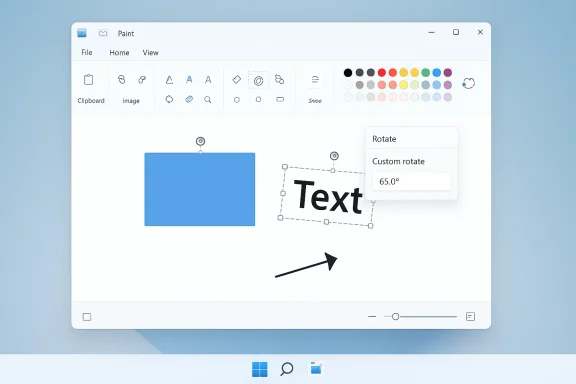
Microsoft’s Paint just gained the one small, stubborn feature that’s stood between it and everyday, no-fuss image editing: freeform rotation of shapes, text, and selections — now rolling to Windows Insiders as part of Paint version 11.2601.391.0. The change is deceptively simple: select an object, drag the rotate handle that appears above it, and the object will rotate to any angle; for exact work there’s also a Custom rotate box where you can type a numeric degree value. This functionality is being flighted with Windows 11 Insider Preview Build 28020.1619 (KB5077230) and is available to testers in the Canary and Dev channels as an app update rather than a platform-only patch.
That apparent smallness is the point. Freeform rotate removes a common friction point that used to force people to switch tools for simple layout tasks — angled callouts, rotated screenshots, slanted labels — and it does so inside an app that Microsoft has quietly remade into a surprisingly capable, lightweight creative surface over the last year. But this isn’t the end of the evolution; it’s a meaningful milestone in a broader modernization effort that added layers, a native .paint project container, on‑canvas opacity controls, a Copilot hub, and even experimental AI features. Taken together, these changes reposition Paint from nostalgic accessory to a practical, low-friction alternative for many everyday workflows — though important technical and workflow limits remain.
Microsoft’s incremental approach to Paint has been steady and strategic: rather than a single, disruptive overhaul, the company has been adding pragmatic features that reduce friction for quick tasks while also building a foundation for more advanced capabilities. Recent insider flights introduced a native .paint project format to preserve layers and edit state across sessions, per-tool opacity sliders for on-canvas brush control, and export improvements — all changes that make iterative, non-linear editing practical without forcing users into heavyweight tools. Freeform rotate plugs directly into that workflow by allowing precise orientation control without leaving the app.
The feature rollout is being delivered as a Paint app package update (Paint v11.2601.391.0) inside the Canary and Dev Insider channels, which means availability depends on both your Insider channel and Microsoft’s controlled feature flighting. If you’re in Canary or Dev and the app version matches, the rotate handle should appear on active objects; if it doesn’t, the feature may still be rolled out gradually to a subset of devices. Testers are encouraged to file feedback in Feedback Hub if behaviour differs from documentation.
Key areas where Paint can now match common Photoshop use cases:
Microsoft’s addition of freeform rotate to Paint is evidence of a pragmatic design choice: invest in removing everyday frictions before chasing headline features. For millions of users who need simple, reliable image editing, that choice matters more than ever. Freeform rotate won’t make Photoshop obsolete, but paired with the other recent upgrades, it strengthens Paint’s claim to be the fast, friendly editor many people turn to first — and increasingly, to keep using.
Source: Windows Central https://www.windowscentral.com/micr...e-preview-announcement-photoshop-replacement/
That apparent smallness is the point. Freeform rotate removes a common friction point that used to force people to switch tools for simple layout tasks — angled callouts, rotated screenshots, slanted labels — and it does so inside an app that Microsoft has quietly remade into a surprisingly capable, lightweight creative surface over the last year. But this isn’t the end of the evolution; it’s a meaningful milestone in a broader modernization effort that added layers, a native .paint project container, on‑canvas opacity controls, a Copilot hub, and even experimental AI features. Taken together, these changes reposition Paint from nostalgic accessory to a practical, low-friction alternative for many everyday workflows — though important technical and workflow limits remain.
 Background / Overview
Microsoft’s incremental approach to Paint has been steady and strategic: rather than a single, disruptive overhaul, the company has been adding pragmatic features that reduce friction for quick tasks while also building a foundation for more advanced capabilities. Recent insider flights introduced a native .paint project format to preserve layers and edit state across sessions, per-tool opacity sliders for on-canvas brush control, and export improvements — all changes that make iterative, non-linear editing practical without forcing users into heavyweight tools. Freeform rotate plugs directly into that workflow by allowing precise orientation control without leaving the app.The feature rollout is being delivered as a Paint app package update (Paint v11.2601.391.0) inside the Canary and Dev Insider channels, which means availability depends on both your Insider channel and Microsoft’s controlled feature flighting. If you’re in Canary or Dev and the app version matches, the rotate handle should appear on active objects; if it doesn’t, the feature may still be rolled out gradually to a subset of devices. Testers are encouraged to file feedback in Feedback Hub if behaviour differs from documentation.
What freeform rotate actually does — and how to use it
Paint’s new freeform rotation covers three interaction paths:- Shapes and vector-like objects: Select a shape (rectangle, ellipse, arrow, etc.), then drag the rotate handle above the selection to rotate freely.
- Text boxes: Text inserted as a text object can be rotated the same way; the text rotates with the box and preserves font and formatting.
- Active raster selections: Use the selection tool to capture part of the canvas (pixel data); the rotate handle appears and lets you rotate that selection before applying it.
Why this matters: practical productivity, not headline AI
At first glance, freeform rotate looks like a minor polish — and it is — but for many users it directly shortens workflows. Teachers preparing slides, office workers annotating screenshots, and anyone who annotates photos or composes quick social graphics now have fewer context switches. The value lies in reducing task friction:- No more exporting an image to a second app just to tilt a callout.
- Combined with layers and .paint project files, you can iterate non-destructively (when you save in the project format).
- Numeric angle entry plus on-canvas handles covers both speed and precision.
How Paint compares to Photoshop — beyond the headline
There’s been a recurring refrain in coverage: “Is Paint a Photoshop replacement?” The short answer is sometimes, for some people, for some tasks. But it’s important to parse the specifics.Key areas where Paint can now match common Photoshop use cases:
- Quick annotations, callouts, and compositing for documentation or social images.
- Simple layer-based composition when using the .paint project workflow.
- Lightweight AI-assisted edits (where Copilot features are enabled) for quick creative experiments.
- Non-destructive editing and history depth: Photoshop’s advanced non-destructive layers, smart objects, adjustment layers, and comprehensive history stack are far more mature.
- Color management and print workflows: Photoshop supports professional color profiles (CMYK handling, soft-proofing), which Paint does not aim to replicate.
- Advanced masking, compositing, and selection tools: Photoshop’s Select Subject, Refine Edge, channel-based selection, and content-aware compositing are still beyond Paint’s scope.
- Extensibility and automation: Actions, scripts, and plugin ecosystems give Photoshop huge power for repetitive tasks or complex pipelines.
- File format interoperability: PSD as an interchange format and industry-standard color, layered formats are still Photoshop’s domain.
Technical realities and caveats you should know
- Rasterization matters
When you rotate a raster selection and save into standard bitmap formats (PNG, JPEG, BMP), the rotation is applied to pixel data and will be saved as rasterized output. That means repeated edit → save → rotate cycles can degrade quality. Use the new .paint project container or retain layered project state to avoid destructive cycles. If you export to flattened bitmaps for final distribution, be mindful of interpolation artifacts at non-90° angles. - Feature gating and rollout
The rotate feature is part of Paint v11.2601.391.0 and is being rolled out to Insiders in Canary and Dev channels; Microsoft uses control feature rollouts, so presence depends on app package and server-side gating. Don’t be surprised if you update but don’t see the feature immediately. - Precision and snapping behavior
The UI provides both freeform drag and numeric input for precision. It’s not yet clear whether shift-constrain (e.g., 15° snap increments) or snap-to-90° behaviours are implemented the same as Office apps; Microsoft’s design guidelines and other recent Paint upgrades suggest sensible defaults, but testers should verify behaviour for their workflows. If your workflow depends on specific snapping, test before committing to the app for repetitive layout tasks. - Project file portability
The .paint format preserves layers and session state, but it’s a Paint-native container; sharing editable projects with collaborators using other editors will require export to a common format (PNG, TIFF, PSD via third-party conversion) unless Microsoft adds cross-app interchange features. For team workflows, decide whether the project file is a final source of truth or an intermediate convenience. - AI features and gating
Some of Paint’s more advanced features (Restyle, generative erase, Image Creator under Copilot) are gated by Copilot+ hardware, account sign-in, or region. Freeform rotate is not an AI feature and is broadly accessible inside the app, but Paint’s expanding feature set includes capabilities with hardware and account prerequisites — be ready for mixed availability depending on device and settings.
A practical checklist: how to try freeform rotate safely
If you want to test freeform rotate right now, follow this sequence to avoid surprises:- Enroll a non-production device or VM in the Windows Insider Program (Canary or Dev channel).
- Update Windows to Build 28020.1619 (KB5077230) and confirm the OS build.
- Open Microsoft Store and ensure Paint is updated to v11.2601.391.0.
- Open Paint, create or import a test image, insert a shape or text box, and verify the rotate handle appears above the object.
- Test numeric rotation via Rotate → Custom rotate for reproducibility.
- Save one copy as a .paint project and another as PNG/JPEG to observe difference in editability and image fidelity.
- File Feedback via Feedback Hub (WIN + F) if UI behaviour or functionality is missing or buggy.
Who benefits most — and who should stay with pro tools
Paint’s upgrade trajectory primarily benefits these groups:- Knowledge workers and educators who need quick, repeatable annotations and minor edits.
- Content creators on tight timelines who prioritize speed over advanced color grading or advanced compositing.
- Students and casual hobbyists who want a modern, capable editor without subscription fees.
- IT departments provisioning low-cost devices for digital signage or simple image editing tasks.
- Professional photo editors and print designers who require CMYK, precise color management, and advanced retouching.
- Teams that depend on PSD interchange, automation, or plugin ecosystems.
- Users requiring advanced compositing, scripting, or non-destructive workflows at scale.
Security, privacy, and enterprise considerations
Microsoft has been explicit about feature gating and telemetry in insider flights, and enterprises should consider the following:- Controlled feature rollouts mean features like freeform rotate will appear first in Insiders and then in broader releases; IT teams should test before wide deployment.
- Copilot-gated features (not freeform rotate itself) may require cloud connectivity, Microsoft account sign-in, or Copilot+ hardware — factors that matter for compliance and offline environments.
- Peripheral and OS-level security changes in the same preview (like Windows Hello ESS for external fingerprint readers) signal Microsoft’s broader push to raise baseline security — but they also require vendor firmware and driver hygiene before enterprise rollouts. Treat preview builds as test beds, not production-ready updates.
Critical analysis: strengths, risks, and what’s next
Strengths- High-impact, low-risk polish: Freeform rotate is precisely the kind of quality-of-life improvement that yields outsized practical gains for users.
- Cumulative product design: When combined with .paint project files, layers, and opacity controls, the feature contributes to a coherent, more capable editing surface.
- Accessible modernization: Microsoft is delivering small wins that widen Paint’s usefulness without forcing a steep learning curve.
- Perception vs. reality: Headlines that claim “Paint will replace Photoshop” overstate the case. For many casual workflows Paint is now good enough, but the app lacks professional-grade features that large segments of creative work depend on.
- Fragmented availability: Controlled rollouts and Copilot gating create an environment where some users get features earlier than others, complicating support and documentation.
- Export and fidelity: Raster-based edits remain subject to interpolation artifacts; teams relying on perfect fidelity should adopt workflows that preserve non-destructive project files until final export.
- Expect more incremental UX wins (snapping, alignment guides, constrained rotation options) and expanded interoperability for the .paint format.
- Microsoft will continue to balance AI-driven features (Restyle, generative tools in Copilot) with dependable, offline-capable quality-of-life improvements.
- Wider rollout into Beta and Release Preview channels will follow telemetry and feedback from Insiders before general availability.
Practical takeaways for readers
- If you’re an Insider: update Paint and try freeform rotate today; test both freeform dragging and Custom rotate for your use cases. Report any bugs in Feedback Hub.
- If you’re a power user or IT admin: evaluate whether Paint’s new capabilities reduce toolchain complexity for certain tasks, but keep Photoshop or equivalent tools for professional-grade color, masks, automation, and print workflows.
- If you depend on lossless iteration: adopt the .paint project container to preserve layers and non-destructive state, and export to raster formats only for delivery.
Microsoft’s addition of freeform rotate to Paint is evidence of a pragmatic design choice: invest in removing everyday frictions before chasing headline features. For millions of users who need simple, reliable image editing, that choice matters more than ever. Freeform rotate won’t make Photoshop obsolete, but paired with the other recent upgrades, it strengthens Paint’s claim to be the fast, friendly editor many people turn to first — and increasingly, to keep using.
Source: Windows Central https://www.windowscentral.com/micr...e-preview-announcement-photoshop-replacement/
