

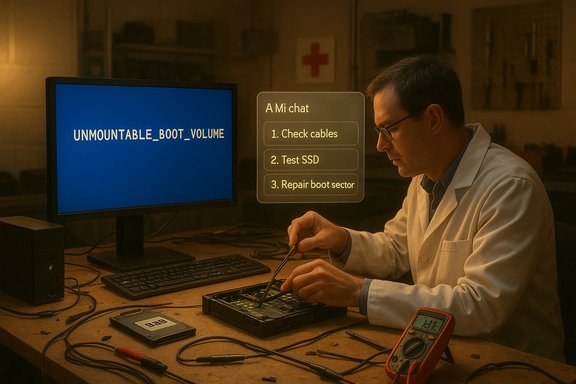
I walked into the PC repair shop expecting a familiar ritual — screens, cables, and a tech who asks if I’ve tried turning it off and on again — and left with a clearer view of what modern PC repair looks like when hardware, firmware, and AI all collide in one little drama. The Odessa American’s “It’s Geek to Me: Visiting the PC ‘Emergency Room’” column captures that experience, weaving a technician’s triage with a journalist’s experiment: when a Windows machine dies after a sudden power cut, what actually fixes it, and where can AI responsibly help?
Background: a short, telling case
The column follows a common but revealing sequence. A power outage forces an abrupt shutdown. The next boot shows a bluescreen stop code — the dreaded UNMOUNTABLE_BOOT_VOLUME — and recovery tools either fail or report the drive as inaccessible. Commands like sfc /scannow, bootrec (fixmbr, fixboot, rebuildbcd) and chkdsk are attempted; they either fail with “device not ready” or report write-protection or “no media.” The evidence, both procedural and practical, points to storage failure — sometimes outright physical failure of an SSD — rather than a simple software corruption. That diagnosis, and the messy, real-world steps the technician takes next, are all laid out in the piece.This column isn’t a how‑to; it’s a field report. It’s a reminder that consumer PCs are now complex systems where storage, firmware, power protection, and layered services (cloud backups, device encryption, account ties) all influence whether a problem is repairable on the spot or requires a full drive replacement and data recovery.
Why this matters right now
The symptom: UNMOUNTABLE_BOOT_VOLUME
The UNMOUNTABLE_BOOT_VOLUME stop code (bug check 0xED) indicates that Windows’ I/O subsystem tried to mount the boot volume and couldn’t. This is a low-level failure: the OS can’t read the disk structures it needs to start. Microsoft’s guidance for this error recommends boot-time repairs — Windows Recovery Environment, CHKDSK /r, and bootrec — but also cautions that the root cause can be hardware failure. When software tools can’t mount the volume, the problem frequently sits below the operating system. That technical meaning explains a recurring pattern in the Odessa American column: recovery utilities report the SSD as missing or write-protected, disk-part tools show “no media,” and the shop technician quickly pivots from software triage to hardware triage (swap cables, connect the drive to a different machine, run vendor diagnostics, and — when necessary — recommend replacement). The piece shows the practical limit of Windows-level tools when the storage medium itself has been compromised.Power loss and modern SSDs: a fragile relationship
The story begins with a simple power cut. That’s not a trivial detail. Sudden power loss can corrupt data in-flight and — in some SSDs — damage internal metadata or mapping tables that are essential to reading the device at all. Enterprise drives include power-loss protection capacitors and firmware sequences to reduce this risk; many consumer SSDs do not. Academic and industry testing has shown that unexpected power removal can trigger shorn writes, metadata corruption, and in extreme cases drives that no longer register on the bus. The practical takeaway is straightforward: a power event can cause disk-level failure, and some consumer SSD designs remain vulnerable.A close reading of the Odessa American piece
What the column describes (summary)
- A standard consumer PC with an SSD for Windows and an HDD for data suffers an abrupt power outage.
- On restart, the machine presents a blue screen with UNMOUNTABLE_BOOT_VOLUME and refuses to boot.
- Built-in Windows recovery tools and command-line repair attempts (sfc, chkdsk, bootrec) either fail or can’t access the SSD.
- The author consults generative AI (ChatGPT) to seek diagnostic leads and receives useful triage steps and preventive advice (particularly to use an Uninterruptible Power Supply or check device-specific diagnostics), but not a definitive cure.
- The machine is ultimately diagnosed as suffering hardware failure, underscoring the limits of software-only repair.
What the column does well
- It accurately captures the technician’s workflow and the emotional stakes: people bringing in a machine with irreplaceable files, the anxiety when the drive is “invisible,” and the quiet, practical decisions a shop must make.
- It conveys the limits of automated Windows repair utilities: they’re necessary first steps, but they’re not a guarantee.
- It introduces AI as a pragmatic assistant rather than a silver bullet: AI can suggest tests, explain errors, and remind users about backups and UPSes, but it cannot cure a physically failed drive. That nuance is important and often missing from breathless coverage of generative tools.
What the column glosses over or understates
- The conclusion that a dead SSD is definitively caused by a single power outage can be tempting but is not foolproof. Firmware bugs, prior write-amplification wear, manufacturing defects, or even a problematic SATA/NVMe controller update can all co‑contribute. The column correctly identifies hardware failure as the final diagnosis in the reported case, but it doesn’t — and reasonably can’t — quantify how often a single power event is the sole cause.
- It mentions using ChatGPT’s advanced reasoning model (o1-preview) via a paid tier; that’s plausible and consistent with how experimenters access higher-capability models, but model names and access tiers change rapidly. Treat the exact model name or access channel as a contextual detail rather than an immutable fact. Independent verification shows that OpenAI has released o1 and o1-preview reasoning models and that access and pricing tiers have shifted as the technology matured.
Technical verification: checking the key claims
The column’s load-bearing technical claims are straightforward to test against authoritative sources. Below are the claims and the verification.- Claim: UNMOUNTABLE_BOOT_VOLUME indicates the OS couldn’t mount a boot volume and often points to disk or file system failure. Verification: Microsoft’s debugger documentation confirms the 0xED bug check means the I/O subsystem failed to mount the boot volume and recommends CHKDSK, bootrec, and hardware diagnostics where necessary.
- Claim: A sudden power loss can convert a recoverable file-system issue into an irrecoverable hardware-level problem on an SSD. Verification: vendor white papers and independent research warn that power-loss events can corrupt mapping tables and metadata and that enterprise-grade power‑loss protection prevents many—but not all—failures. Long-form testing shows some SSDs can be permanently damaged by repeated or poorly handled power faults.
- Claim: AI (ChatGPT) can assist with triage and recommend tests but cannot fix a physically failed device. Verification: multiple practical write-ups and user reports indicate AI provides useful troubleshooting steps (command sequences, diagnostic priorities) but cannot perform hands-on tasks. Further, OpenAI documents and press coverage indicate advanced models (o1 series) are useful for multi-step reasoning and debugging guidance, but not for hardware-level repair.
Strengths and practical lessons for readers
Strengths
- Real-world fidelity: The column doesn’t sanitize the messy flow of decisions that happen in a repair shop. It models how steps are prioritized and when escalation to hardware diagnostics is necessary.
- Balanced portrayal of AI: The piece treats AI as a third-party assistant: helpful for triage, but not a replacement for human hands and hardware diagnostics. That avoids the overhyped “AI will fix everything” narrative.
- Clear practical advice: The recurring recommendation to maintain backups and to invest in simple power protection (like a UPS) is low‑cost, high‑impact guidance. Given SSD vulnerabilities to sudden power loss, a UPS is an inexpensive mitigation compared to professional data recovery.
Actionable steps readers should take now
- Back up critical data immediately (cloud + local images). A good backup strategy eliminates most panic-room visits.
- Add a UPS to desktop systems that host essential files or act as always-on servers. Even basic UPS units prevent the single-event power losses that can cause big headaches.
- Before a repair visit, unplug secondary drives and, if possible, remove the SSD and attach it to another machine to see if it’s detectable — but do this carefully to avoid further damage.
- If a drive fails to mount and vendor diagnostics report errors, budget for drive replacement and professional recovery only if the data is valuable enough to pay the recovery fees.
Risks, caveats, and where the column could have gone further
Overreliance on AI for diagnosis
AI is a strong assistant for triage, but it can hallucinate or conflate commands and outcomes. The courtroom cautionary notes about AI-generated citations echo here: you can use AI to generate a repair checklist, but you must verify every step before running destructive procedures (like running fixboot or rebuilding BCD on a disk with physical errors). The Odessa column sensibly treated AI as an aide, and the lesson is practical: use the AI output as a checklist, not a contract.Unverifiable single-cause assignments
Labeling a single power cut as the cause requires caution. Many SSD failures correlate with power events, but the underlying vulnerability is often a firmware or design choice. The column should be read as a strong anecdotal observation rather than a definitive causal study. Where possible, shops should capture SMART logs, vendor diagnostics, and firmware versions before concluding. Independent research and vendor docs confirm power events can cause catastrophic failure, but they also show variability by drive model and firmware.Data recovery economics and privacy concerns
The column hints at the shock when a customer faces a multi-hundred-dollar recovery estimate. That economic friction is an important policy angle: data‑recovery markets are opaque, expensive, and high‑stakes. Users should encrypt backups and keep a tested recovery plan; shops should offer transparent pricing bands and non-destructive first-pass diagnostics. The article could have pushed further on consumer protections and standardized disclosure of recovery success probabilities.Where AI helps — and how shops should adopt it
AI can accelerate the triage workflow:- Drafting step-by-step checklists for technicians (boot order, SATA/NVMe connection checks, SMART reads).
- Suggesting model‑specific recovery utilities or vendor tools that technicians may not recall offhand.
- Generating customer-facing explanations that demystify steps and quote probable outcomes and cost ranges.
Practical checklist for readers who find themselves in the “PC emergency room”
- Breathe: abrupt failures are stressful; decisions made in haste worsen outcomes.
- Don’t run random recovery utilities without a plan. If the drive contains critical data, a non-destructive imaging attempt is preferable to repeated write operations.
- If you can, prepare:
- Make a note of recent events (power outage, firmware update, driver install).
- Bring the original power adapter and any recent backup devices to the shop.
- Accept realistic options:
- Free or low-cost repair (software fix) — possible when the file system is intact.
- Paid data recovery — expensive, necessary for physical/firmware-level corruption.
- Replace and restore — cheapest when backups are available.
- Invest in prevention:
- Scheduled backups (image + cloud sync).
- A UPS for desktops and always-on devices.
- Firmware and driver updates from trusted vendor pages.
Final analysis: what this column gets right — and why it is useful for Windows users
The Odessa American column offers a useful, grounded snapshot of modern PC repair. It resists sensationalism: it doesn’t portray AI as omnipotent or repairs as trivial. Instead, it shows a pragmatic workflow, where software triage and human expertise jointly determine whether a machine gets saved or replaced. The author’s experiment — consulting advanced AI as part of the diagnostic mix — is an instructive data point: AI helped clarify tests and preventive measures, but it did not negate the need for hands-on hardware checks and vendor diagnostics. That balanced framing is valuable to readers who must choose between DIY fixes, professional repair, or dry-eyed investment in backups.In short: the emergency room for PCs is less dramatic and more procedural than we imagine. The surgeon is usually a technician with a multimeter, a spare cable, and a vendor diagnostic tool — not a magic wand. But a properly used AI assistant, a modest UPS, and a disciplined backup plan materially reduce the chance of becoming a repeat customer in that emergency room.
Appendix — verification notes (key references used to check claims)
- Understanding UNMOUNTABLE_BOOT_VOLUME and recommended recovery steps from Microsoft’s debugger and support guidance.
- Research and vendor white papers showing SSD power‑loss vulnerabilities and the role of power‑loss protection in enterprise and premium client SSDs.
- Industry reporting and OpenAI documentation about advanced reasoning models (o1 series) and access tiers, to contextualize the column’s AI usage.
- The Odessa American column and associated reporting describing the technician’s triage and the author’s AI experiment.
Source: Odessa American IT'S GEEK TO ME: Visiting the PC ‘Emergency Room’ - Odessa American
