

Sofia Lindström’s July 9, 2026 guide argues that a complete PCSX2 setup can take about 45 minutes—or closer to 15 minutes with a working BIOS already available—by installing the free emulator, supplying legally dumped firmware, configuring graphics and controls, and adding self-ripped PlayStation 2 games. The estimate is plausible, but only if “setup” means reaching a stable baseline rather than proving every title, patch, controller, save, and handheld power profile. PCSX2 has become easier; PlayStation 2 emulation has not become uniform.
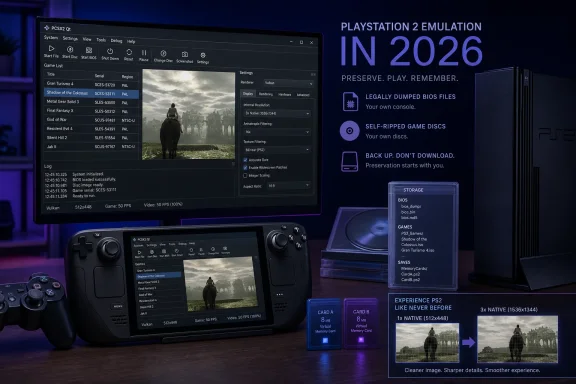
That distinction matters because the modern emulator’s polished Qt interface can make it look like another install-and-play Windows application. Underneath it, PCSX2 is still translating one of gaming’s strangest hardware designs, matching copyrighted firmware to regional software, reconstructing graphics intended for CRT-era displays, and working around assumptions that individual games made about the original console.
The right way to approach PCSX2 in 2026 is therefore not to copy an “ultimate settings” list. It is to establish a conservative global configuration, preserve legally sourced firmware and game images, and make exceptions only for titles that demonstrably need them.
The PlayStation 2 sold more than 155 million units, leaving behind an enormous software library and an equally large population of discs that are now separated from functioning consoles. Original hardware is long out of production, while Sony’s PS2 Classics catalog on PlayStation 4 and PlayStation 5 represents only a curated portion of the system’s history.
PCSX2 fills that preservation gap because it is free, actively developed, and backed by more than two decades of engineering. The official project says more than 2,500 titles have been tested, with most modern builds capable of running a substantial majority of the catalog at full speed on suitable hardware.
The guide centers on PCSX2 2.6.0, released in January 2026. The sensible installation policy, however, is to obtain the current stable build directly from the official PCSX2 distribution channel rather than searching third-party mirrors for that exact package; point releases can supersede the original feature release without changing the broad setup process.
The biggest usability break arrived with version 2.0. PCSX2 replaced its old interface and separate GS, PAD, and SPU2 plugin model with a unified Qt-based application, moving graphics, controllers, audio, per-game overrides, achievements, patches, and library management into a coherent settings system.
That architectural shift is more important than any one speed improvement. Old PCSX2 tutorials often read like maintenance manuals for a small laboratory, with users expected to pick plugins, match versions, copy files into obscure directories, and decide which subsystem was responsible when a game failed. Current PCSX2 behaves more like a modern game launcher, even if the hardware being recreated remains highly unconventional.
The same transition made Vulkan the normal graphics path for many systems. PCSX2 describes Vulkan as fast, accurate, and fully featured, but its official documentation also recommends leaving graphics selection on Automatic when users are unsure and warns that Vulkan can be unstable on some Intel integrated GPUs. That is a more defensible baseline than declaring Vulkan universally superior.
A modern processor is vastly faster in general terms, but emulation is not a direct clock-speed contest. The host system must reproduce several specialized components, preserve their timing relationships, and translate their work into instructions understood by contemporary CPUs and GPUs.
That is why single-core performance remains unusually important and why a powerful graphics card cannot rescue every weak processor. It is also why some games behave differently despite running on the same emulated console: developers exploited the PS2 hardware in different ways, sometimes depending on synchronization, rendering behavior, or exact native-resolution effects that other games never touched.
MTVU exists to move emulation of the second Vector Unit onto another host CPU thread. It is one of the safer performance options because it mirrors the parallelism of the original design more closely than crude cycle manipulation, although any advanced override should still be tested against the affected game.
EE Cycle Rate is more dangerous to treat as a universal accelerator. Changing it alters the effective behavior of the emulated Emotion Engine and can trade one visible slowdown for audio crackling, timing errors, physics problems, or desynchronization. If performance is poor, renderer selection, internal resolution, driver condition, thermal limits, and game-specific compatibility should be investigated before cycle changes.
Lindström estimates that the complete job takes about 45 minutes when BIOS extraction is included and closer to 15 minutes when a working dump is already available. That is best read as an estimate for an experienced user with prepared hardware, not a guarantee for someone who must first configure a console to run the dumping utility, locate compatible removable storage, and diagnose an incomplete transfer.
The distinction is legally and operationally important. Downloading an unidentified BIOS archive may infringe copyright, and it introduces a basic supply-chain problem: the user cannot establish what is inside the archive, whether the firmware was modified, or whether the download includes unrelated executable code.
PCSX2’s official project documentation is explicit that a dump from a legitimately owned console is required. The same preservation principle applies to game images, which should be created from the user’s own discs rather than collected from unverified archives.
Official PCSX2 documentation explains that PS2 DVDs and CDs can be dumped with ordinary optical drives, although CD-based games require more care because their audio-track structure is not represented by a simple DVD-style ISO in the same way. A bad disc image can freeze at loading screens or fail only at a particular scene, creating symptoms easily mistaken for emulator incompatibility.
The BIOS is therefore not a box to check and forget. It is the root of trust for the installation, and the game dump is the root of trust for each title. Troubleshooting becomes much faster when both are known-good before graphics settings are changed.
The more reliable procedure is to let PCSX2 expose or select its own data directory through the setup wizard and settings interface. That avoids assumptions about user-profile locations, capitalization, portable mode, Flatpak sandboxing, or whether a management layer such as EmuDeck has chosen a different directory.
Flatpak is especially prone to path confusion because applications run inside a sandbox. The package identifier is
Once the BIOS files have been placed in the selected directory, PCSX2 should identify the console region and revision. Most regional dumps are roughly 4MB, with
On Linux or Steam Deck,
If PCSX2 does not detect the BIOS, stop there. Recheck the selected directory, permissions, filename extensions, and transfer before touching graphics or CPU settings; no renderer adjustment can repair firmware that the emulator never loaded.
Internal resolution is the setting with the clearest visual and performance trade-off. It determines how far PCSX2 renders above the original game resolution, making geometry and edges appear cleaner while increasing GPU load and sometimes exposing effects that depend on native pixel coordinates.
The following tiers are useful starting points, not promises:
The source recommends a modern quad-core processor with four threads as a minimum and a recent six-core processor with strong single-core clocks as the preferred desktop tier. GPU guidance starts with Vulkan 1.3 or DirectX 11 capability and moves toward a dedicated Vulkan-capable GPU for higher resolutions.
PCSX2’s published documentation is somewhat more nuanced than the guide’s table. It describes several supported graphics APIs and prioritizes stability and accuracy when choosing automatically, while noting that Vulkan needs current drivers and may be troublesome on particular integrated graphics configurations.
That matters to Windows handhelds. PCSX2’s troubleshooting documentation specifically warns that an OpenCL, OpenGL, and Vulkan compatibility package can cause crashes and says some ROG Ally systems have shipped with the problematic component installed. The lesson is not that Vulkan is unreliable; it is that graphics failures can originate in the Windows driver stack rather than the emulator or game.
A Steam Deck’s Zen 2 APU, RDNA 2 integrated graphics, and 16GB of shared memory are generally well matched to PS2 emulation at the device’s 720p-to-800p display range. Pushing 4x or 6x internal resolution on a 7-to-8-inch screen usually spends battery and thermal headroom for little visible gain.
The best Deck profile is therefore deliberately modest: begin at 2x, test demanding scenes, observe frame pacing and audio, and move to 3x only when performance remains stable. A game that needs native resolution is not evidence that the entire installation has failed.
The modern per-game Properties system is the correct answer. It allows a conservative global profile to remain intact while a difficult title receives a lower internal resolution, a hardware fix, a different renderer, or another documented exception.
This is preferable to globally increasing EE Cycle Rate or applying aggressive graphics changes because global fixes create invisible regressions elsewhere. A tweak that rescues one racing game may break animation timing in an RPG that appeared to be working normally.
The official compatibility list should be treated as a deployment database, not an afterthought. With more than 2,500 titles tested, it can reveal known issues, required hardware fixes, and whether a problem has already been isolated to a specific scene or rendering technique.
PCSX2’s GS dump facility also gives technically inclined users a way to turn a vague graphics complaint into useful diagnostic evidence. The official project describes a GS dump as a capture of PS2 graphics data that developers and testers can examine independently of the user’s local graphics configuration.
Lindström’s article discusses an alleged 15% Gran Turismo 4 frame-rate improvement on AMD graphics hardware but correctly notes that the figure is not documented or verified. The defensible claim is narrower: the game can reportedly sustain approximately 50–60 fps under specified settings, including reduced hardware-download and blending demands, but that should not be transformed into a universal vendor-specific benchmark.
Deadzone calibration deserves particular attention with older or inexpensive controllers. Stick drift that appears only in one title is easily misdiagnosed as an emulation problem, especially in games with sensitive camera controls.
Steam Input adds another translation layer on Steam Deck and Windows PCs. It can be useful for custom layouts, but it may also intercept the controller before PCSX2 sees it; if buttons are duplicated, missing, or incorrectly identified, disable Steam Input for that PCSX2 entry and test direct input before remapping everything.
Virtual memory cards are more consequential. The source recommends creating at least two 8MB cards, matching the capacity of standard PS2 cards, so one damaged or overcrowded virtual card does not hold the entire library’s progress.
Cards should be formatted before the first serious session. A game may not provide a clear warning when an unformatted or incompatible card fails to save, making an early test save and reload essential.
Region differences must also be respected. A save created by one regional release may not be recognized by another, even when the game title appears identical, so card and backup names should record the relevant region where multiple editions are used.
Save states are not substitutes for memory cards. PCSX2’s official documentation warns that states are not guaranteed to remain compatible across emulator versions and recommends ordinary in-game memory-card saves for long-term progress.
A good operating rule is simple: a save state is a temporary snapshot, while the virtual memory card is the permanent record. Back up card files outside the active PCSX2 data directory so application damage, accidental deletion, or storage failure does not destroy every campaign at once.
PCSX2 can match community-maintained patches to game identifiers and apply them from the title’s Properties menu. The source illustrates the format with “Example PS2 Game (NTSC-U),” the comment “Widescreen 16:9 patch (community-maintained),” and two EE patch lines beginning
Those example codes should not be reused for a real game. Patches are title- and release-specific, and a code intended for another executable or regional revision can write to the wrong memory location.
Even a correct widescreen patch may leave 2D menus or pre-rendered backgrounds in their original composition. The result can be a wider 3D camera surrounded by interface elements designed for 4:3, which is an honest limitation of modifying old software rather than an emulator defect.
The same restraint applies to texture packs and cheats. Texture replacement can improve presentation without altering game logic, while cheats use a similar patching mechanism but intentionally change behavior. Each should be enabled per title and tested separately so a later crash can be traced to one intervention.
RetroAchievements is the less invasive extension. Stable PCSX2 builds have supported the service since version 2.0.0 through RAIntegration, with the configuration key
That makes efficiency more valuable than maximum image quality. At handheld screen sizes, 2x or 3x internal resolution often captures most of the perceived improvement over original output, while higher multipliers increase GPU use, heat, and battery drain.
Storage planning matters because PCSX2 itself requires only about 200MB, but the library does not. A full single-layer PS2 DVD image can reach about 4.7GB, so a modest collection fits comfortably within a 256GB card or drive while a large archive quickly moves into the 1TB-plus tier.
For Steam Deck, the source recommends either an internal SSD or a UHS-I, A2-rated microSD card. Game loading generally benefits from solid-state storage, but PS2-era data rates mean capacity, reliability, and clean filesystem organization may matter more than chasing desktop-class benchmark numbers.
SteamOS 3.8 or newer is listed as the handheld baseline. The Flatpak installation integrates neatly with Desktop Mode, while launchers such as EmuDeck can manage library entries and front-end presentation; users must nevertheless remember that those layers may select their own BIOS and game directories.
The source also presents an Android beta requiring Android 8.0 or newer, an ARM64 processor, at least 4GB of RAM with 8GB recommended, and Vulkan or OpenGL ES 3.2. However, the official PCSX2 material reviewed for this feature prominently documents Windows, Linux, and macOS distribution without presenting Android as an equivalent desktop-class download path.
That discrepancy calls for caution. Android users should verify that any package comes from a distribution channel explicitly controlled or endorsed by the project rather than assuming that an application carrying the PCSX2 name is official, current, or maintained by the same developers.
AetherSX2, once a prominent Android option and derived from an older PCSX2 codebase, was discontinued by its developer in 2022. Archived builds may still function on legacy devices, but a frozen emulator becomes progressively harder to recommend as Android, graphics drivers, security expectations, and device architectures change.
Original PlayStation 2 hardware still offers perfect compatibility by definition, but aging optical drives, analog video output, old memory cards, and unavailable replacement parts create their own maintenance burden. It remains the collector’s reference point rather than the easiest general-purpose answer.
PS2 Classics on PlayStation 4 and PlayStation 5 offer the opposite compromise: minimal configuration and officially licensed software, but only for games Sony and publishers choose to release. They cannot replace a personal disc library whose less commercially obvious titles may never return.
PCSX2 therefore occupies the practical middle. It demands more initial work than an official store purchase but provides far broader access, better scaling, portable save management, controller flexibility, and a pathway for community fixes.
January 2026 — PCSX2 2.6.0 was released, continuing the project’s Vulkan, compatibility, and unified-interface work.
July 9, 2026 — Sofia Lindström published the 20-minute PCSX2 setup guide, estimating approximately 45 minutes for a full installation or 15 minutes when a working BIOS is already available.
The emulator should instead be deployed from its official distribution channel, with firmware and game-image access governed separately. Portable mode is useful when a self-contained configuration is required, but it also concentrates settings, BIOS data, memory cards, and other user material in one directory that must be protected and backed up.
Driver health belongs in the deployment plan. Windows machines should have current vendor drivers, and all GPUs in dual-graphics laptops may need updates even when only one appears to be active.
Updates should be staged because save states may not survive version changes. Memory cards, configuration files, game databases, and any custom patches should be backed up before a new stable build is rolled out broadly.
An immediate crash can have similar causes, but Windows users should also inspect graphics drivers and overlays. Capture tools, chat overlays, controller wrappers, shell modifications, and compatibility components can fail inside the same process even when PCSX2 itself is functioning correctly.
Audio crackling usually means the emulator is not sustaining real-time execution or that timing has been pushed outside a game’s tolerance. Return EE Cycle Rate to Normal, remove experimental speed changes, reduce internal resolution, and test again.
Poor performance on capable hardware should prompt verification that PCSX2 has not fallen back to software rendering. On Linux,
A graphics glitch appearing only above native resolution is probably an upscaling interaction. Lower that game’s internal resolution, inspect its Hardware Fixes and compatibility information, and use software rendering temporarily to determine whether the problem belongs to the hardware renderer.
A controller that disappears only when launched through Steam points toward Steam Input or profile interception. Test PCSX2 directly, remap only after the device is visible, and avoid changing both the Steam profile and emulator bindings simultaneously.
A widescreen patch that does nothing should be checked at both levels: patches must be enabled globally and for the individual game, and advanced settings may need to be visible before the relevant tab appears. The image must also match the release for which the patch was authored.
Netplay desynchronization is another version-control problem. Both participants need matching PCSX2 versions and BIOS regions, and they should avoid introducing different patches, timing changes, or game images into a synchronized session.
A durable build has a verified BIOS, trustworthy game dumps, a conservative graphics baseline, tested input, at least two formatted virtual memory cards, and per-game exceptions documented only where necessary. It also keeps persistent saves separate from disposable save states.
The source’s 45-minute figure is attainable when the required files and hardware are ready, but a careful first deployment may take longer. That extra time is spent proving provenance, testing saves, checking controller behavior, and avoiding the configuration debt created by copying unexplained settings from another machine.
That distinction matters because the modern emulator’s polished Qt interface can make it look like another install-and-play Windows application. Underneath it, PCSX2 is still translating one of gaming’s strangest hardware designs, matching copyrighted firmware to regional software, reconstructing graphics intended for CRT-era displays, and working around assumptions that individual games made about the original console.
The right way to approach PCSX2 in 2026 is therefore not to copy an “ultimate settings” list. It is to establish a conservative global configuration, preserve legally sourced firmware and game images, and make exceptions only for titles that demonstrably need them.
 PCSX2 2.6 Turns a Once-Arcane Emulator Into a Normal Application
The PlayStation 2 sold more than 155 million units, leaving behind an enormous software library and an equally large population of discs that are now separated from functioning consoles. Original hardware is long out of production, while Sony’s PS2 Classics catalog on PlayStation 4 and PlayStation 5 represents only a curated portion of the system’s history.PCSX2 fills that preservation gap because it is free, actively developed, and backed by more than two decades of engineering. The official project says more than 2,500 titles have been tested, with most modern builds capable of running a substantial majority of the catalog at full speed on suitable hardware.
The guide centers on PCSX2 2.6.0, released in January 2026. The sensible installation policy, however, is to obtain the current stable build directly from the official PCSX2 distribution channel rather than searching third-party mirrors for that exact package; point releases can supersede the original feature release without changing the broad setup process.
The biggest usability break arrived with version 2.0. PCSX2 replaced its old interface and separate GS, PAD, and SPU2 plugin model with a unified Qt-based application, moving graphics, controllers, audio, per-game overrides, achievements, patches, and library management into a coherent settings system.
That architectural shift is more important than any one speed improvement. Old PCSX2 tutorials often read like maintenance manuals for a small laboratory, with users expected to pick plugins, match versions, copy files into obscure directories, and decide which subsystem was responsible when a game failed. Current PCSX2 behaves more like a modern game launcher, even if the hardware being recreated remains highly unconventional.
The same transition made Vulkan the normal graphics path for many systems. PCSX2 describes Vulkan as fast, accurate, and fully featured, but its official documentation also recommends leaving graphics selection on Automatic when users are unsure and warns that Vulkan can be unstable on some Intel integrated GPUs. That is a more defensible baseline than declaring Vulkan universally superior.
The Emotion Engine Still Dictates the Rules
PCSX2’s remaining complexity begins with the PlayStation 2’s Emotion Engine, a custom R5900 core clocked at 294MHz. It is a 128-bit design containing an FPU, two Vector Units called VU0 and VU1, and a Subsystem Interface, all built around the assumptions and performance constraints of Sony’s original console.A modern processor is vastly faster in general terms, but emulation is not a direct clock-speed contest. The host system must reproduce several specialized components, preserve their timing relationships, and translate their work into instructions understood by contemporary CPUs and GPUs.
That is why single-core performance remains unusually important and why a powerful graphics card cannot rescue every weak processor. It is also why some games behave differently despite running on the same emulated console: developers exploited the PS2 hardware in different ways, sometimes depending on synchronization, rendering behavior, or exact native-resolution effects that other games never touched.
MTVU exists to move emulation of the second Vector Unit onto another host CPU thread. It is one of the safer performance options because it mirrors the parallelism of the original design more closely than crude cycle manipulation, although any advanced override should still be tested against the affected game.
EE Cycle Rate is more dangerous to treat as a universal accelerator. Changing it alters the effective behavior of the emulated Emotion Engine and can trade one visible slowdown for audio crackling, timing errors, physics problems, or desynchronization. If performance is poor, renderer selection, internal resolution, driver condition, thermal limits, and game-specific compatibility should be investigated before cycle changes.
The 45-Minute Claim Depends Almost Entirely on the BIOS
The PCSX2 application itself can be installed and opened within minutes. The variable is the BIOS: Sony’s copyrighted console firmware is not bundled with PCSX2, and the project requires a BIOS dumped from a legitimately owned PlayStation 2.Lindström estimates that the complete job takes about 45 minutes when BIOS extraction is included and closer to 15 minutes when a working dump is already available. That is best read as an estimate for an experienced user with prepared hardware, not a guarantee for someone who must first configure a console to run the dumping utility, locate compatible removable storage, and diagnose an incomplete transfer.
The distinction is legally and operationally important. Downloading an unidentified BIOS archive may infringe copyright, and it introduces a basic supply-chain problem: the user cannot establish what is inside the archive, whether the firmware was modified, or whether the download includes unrelated executable code.
PCSX2’s official project documentation is explicit that a dump from a legitimately owned console is required. The same preservation principle applies to game images, which should be created from the user’s own discs rather than collected from unverified archives.
Official PCSX2 documentation explains that PS2 DVDs and CDs can be dumped with ordinary optical drives, although CD-based games require more care because their audio-track structure is not represented by a simple DVD-style ISO in the same way. A bad disc image can freeze at loading screens or fail only at a particular scene, creating symptoms easily mistaken for emulator incompatibility.
The BIOS is therefore not a box to check and forget. It is the root of trust for the installation, and the game dump is the root of trust for each title. Troubleshooting becomes much faster when both are known-good before graphics settings are changed.
Platform Paths Are the First Real Setup Trap
The source material lists%USERPROFILE%DocumentsPCSX2bios as the Windows default BIOS location, ~/.var/app/net.pcsx2.PCSX2/config/pcsx2/bios/ for Linux Flatpak and Steam Deck installations, and .bios for a portable installation. The Windows and portable strings appear to have lost path separators in the published formatting, making them unsafe to copy blindly.The more reliable procedure is to let PCSX2 expose or select its own data directory through the setup wizard and settings interface. That avoids assumptions about user-profile locations, capitalization, portable mode, Flatpak sandboxing, or whether a management layer such as EmuDeck has chosen a different directory.
Flatpak is especially prone to path confusion because applications run inside a sandbox. The package identifier is
net.pcsx2.PCSX2, and the source gives the installation command flatpak install flathub net.pcsx2.PCSX2 followed by flatpak run net.pcsx2.PCSX2 for launch.Once the BIOS files have been placed in the selected directory, PCSX2 should identify the console region and revision. Most regional dumps are roughly 4MB, with
.bin and .nvm among the file types described, but file size alone does not prove integrity.On Linux or Steam Deck,
sha256sum ~/.var/app/net.pcsx2.PCSX2/config/pcsx2/bios/*.bin can produce checksums for comparison with a trusted prior dump. The directory can be inspected with ls -la ~/.var/app/net.pcsx2.PCSX2/config/pcsx2/bios/, which is useful when the graphical file manager has hidden part of the path.If PCSX2 does not detect the BIOS, stop there. Recheck the selected directory, permissions, filename extensions, and transfer before touching graphics or CPU settings; no renderer adjustment can repair firmware that the emulator never loaded.
One Conservative Profile Beats Ten “Best Settings” Videos
A durable PCSX2 setup begins with defaults. Choose Automatic graphics selection if there is uncertainty, use Vulkan when the system supports it reliably, enable MTVU where appropriate, and leave EE Cycle Rate at Normal until a specific game demonstrates a need for intervention.Internal resolution is the setting with the clearest visual and performance trade-off. It determines how far PCSX2 renders above the original game resolution, making geometry and edges appear cleaner while increasing GPU load and sometimes exposing effects that depend on native pixel coordinates.
The following tiers are useful starting points, not promises:
| Hardware tier | Renderer baseline | Internal resolution | EE Cycle Rate | Memory |
|---|---|---|---|---|
| Steam Deck LCD or entry laptop | Vulkan or Automatic | Native to 2x | Normal | 16GB shared on stock Deck |
| Steam Deck OLED or modern handheld | Vulkan or Automatic | 2x to 3x | Normal | 16GB class |
| Mid-range desktop | Vulkan or Automatic | 3x to 4x | Normal or +1 when justified | 16GB recommended |
| High-end desktop | Vulkan or Automatic | 4x to 6x | Normal or +1 when justified | 16GB recommended |
PCSX2’s published documentation is somewhat more nuanced than the guide’s table. It describes several supported graphics APIs and prioritizes stability and accuracy when choosing automatically, while noting that Vulkan needs current drivers and may be troublesome on particular integrated graphics configurations.
That matters to Windows handhelds. PCSX2’s troubleshooting documentation specifically warns that an OpenCL, OpenGL, and Vulkan compatibility package can cause crashes and says some ROG Ally systems have shipped with the problematic component installed. The lesson is not that Vulkan is unreliable; it is that graphics failures can originate in the Windows driver stack rather than the emulator or game.
A Steam Deck’s Zen 2 APU, RDNA 2 integrated graphics, and 16GB of shared memory are generally well matched to PS2 emulation at the device’s 720p-to-800p display range. Pushing 4x or 6x internal resolution on a 7-to-8-inch screen usually spends battery and thermal headroom for little visible gain.
The best Deck profile is therefore deliberately modest: begin at 2x, test demanding scenes, observe frame pacing and audio, and move to 3x only when performance remains stable. A game that needs native resolution is not evidence that the entire installation has failed.
Per-Game Overrides Are the Feature That Makes Modern PCSX2 Work
PS2 titles were not written against a standardized PC graphics abstraction. They were written for one fixed console, and some used that hardware in ways that become fragile when PCSX2 changes resolution, blending, timing, or renderer behavior.The modern per-game Properties system is the correct answer. It allows a conservative global profile to remain intact while a difficult title receives a lower internal resolution, a hardware fix, a different renderer, or another documented exception.
This is preferable to globally increasing EE Cycle Rate or applying aggressive graphics changes because global fixes create invisible regressions elsewhere. A tweak that rescues one racing game may break animation timing in an RPG that appeared to be working normally.
The official compatibility list should be treated as a deployment database, not an afterthought. With more than 2,500 titles tested, it can reveal known issues, required hardware fixes, and whether a problem has already been isolated to a specific scene or rendering technique.
PCSX2’s GS dump facility also gives technically inclined users a way to turn a vague graphics complaint into useful diagnostic evidence. The official project describes a GS dump as a capture of PS2 graphics data that developers and testers can examine independently of the user’s local graphics configuration.
Lindström’s article discusses an alleged 15% Gran Turismo 4 frame-rate improvement on AMD graphics hardware but correctly notes that the figure is not documented or verified. The defensible claim is narrower: the game can reportedly sustain approximately 50–60 fps under specified settings, including reduced hardware-download and blending demands, but that should not be transformed into a universal vendor-specific benchmark.
Controllers and Memory Cards Need More Testing Than Configuration
PCSX2 can map DualShock, DualSense, Xbox-style, Bluetooth, and USB controllers through its unified input system. Automatic mapping is a useful first pass, but every face button, stick, shoulder control, trigger, and analog axis should be tested before a long session begins.Deadzone calibration deserves particular attention with older or inexpensive controllers. Stick drift that appears only in one title is easily misdiagnosed as an emulation problem, especially in games with sensitive camera controls.
Steam Input adds another translation layer on Steam Deck and Windows PCs. It can be useful for custom layouts, but it may also intercept the controller before PCSX2 sees it; if buttons are duplicated, missing, or incorrectly identified, disable Steam Input for that PCSX2 entry and test direct input before remapping everything.
Virtual memory cards are more consequential. The source recommends creating at least two 8MB cards, matching the capacity of standard PS2 cards, so one damaged or overcrowded virtual card does not hold the entire library’s progress.
Cards should be formatted before the first serious session. A game may not provide a clear warning when an unformatted or incompatible card fails to save, making an early test save and reload essential.
Region differences must also be respected. A save created by one regional release may not be recognized by another, even when the game title appears identical, so card and backup names should record the relevant region where multiple editions are used.
Save states are not substitutes for memory cards. PCSX2’s official documentation warns that states are not guaranteed to remain compatible across emulator versions and recommends ordinary in-game memory-card saves for long-term progress.
A good operating rule is simple: a save state is a temporary snapshot, while the virtual memory card is the permanent record. Back up card files outside the active PCSX2 data directory so application damage, accidental deletion, or storage failure does not destroy every campaign at once.
Widescreen Patches Improve the Camera, Not the Original Artwork
Most PlayStation 2 games were designed for 4:3 output. Stretching that image to 16:9 distorts characters, menus, and circles, while proper widescreen patches alter the game’s camera or display logic to expose a wider view.PCSX2 can match community-maintained patches to game identifiers and apply them from the title’s Properties menu. The source illustrates the format with “Example PS2 Game (NTSC-U),” the comment “Widescreen 16:9 patch (community-maintained),” and two EE patch lines beginning
patch=1,EE.Those example codes should not be reused for a real game. Patches are title- and release-specific, and a code intended for another executable or regional revision can write to the wrong memory location.
Even a correct widescreen patch may leave 2D menus or pre-rendered backgrounds in their original composition. The result can be a wider 3D camera surrounded by interface elements designed for 4:3, which is an honest limitation of modifying old software rather than an emulator defect.
The same restraint applies to texture packs and cheats. Texture replacement can improve presentation without altering game logic, while cheats use a similar patching mechanism but intentionally change behavior. Each should be enabled per title and tested separately so a later crash can be traced to one intervention.
RetroAchievements is the less invasive extension. Stable PCSX2 builds have supported the service since version 2.0.0 through RAIntegration, with the configuration key
UseRAIntegration stored under [Achievements]. Recognition can depend on the exact game revision or hash, so an achievement set existing for a title does not guarantee every disc release will match it.Handheld Convenience Creates a New Performance Budget
Steam Deck and ROG Ally-class systems have changed the audience for PCSX2. The emulator is no longer used only at a desk with a large monitor and unlimited wall power; it is now expected to suspend, resume, scale to a small display, coexist with controller-management layers, and operate inside a constrained thermal envelope.That makes efficiency more valuable than maximum image quality. At handheld screen sizes, 2x or 3x internal resolution often captures most of the perceived improvement over original output, while higher multipliers increase GPU use, heat, and battery drain.
Storage planning matters because PCSX2 itself requires only about 200MB, but the library does not. A full single-layer PS2 DVD image can reach about 4.7GB, so a modest collection fits comfortably within a 256GB card or drive while a large archive quickly moves into the 1TB-plus tier.
For Steam Deck, the source recommends either an internal SSD or a UHS-I, A2-rated microSD card. Game loading generally benefits from solid-state storage, but PS2-era data rates mean capacity, reliability, and clean filesystem organization may matter more than chasing desktop-class benchmark numbers.
SteamOS 3.8 or newer is listed as the handheld baseline. The Flatpak installation integrates neatly with Desktop Mode, while launchers such as EmuDeck can manage library entries and front-end presentation; users must nevertheless remember that those layers may select their own BIOS and game directories.
The source also presents an Android beta requiring Android 8.0 or newer, an ARM64 processor, at least 4GB of RAM with 8GB recommended, and Vulkan or OpenGL ES 3.2. However, the official PCSX2 material reviewed for this feature prominently documents Windows, Linux, and macOS distribution without presenting Android as an equivalent desktop-class download path.
That discrepancy calls for caution. Android users should verify that any package comes from a distribution channel explicitly controlled or endorsed by the project rather than assuming that an application carrying the PCSX2 name is official, current, or maintained by the same developers.
AetherSX2’s Exit Shows Why Maintenance Matters
PCSX2’s advantage is not merely that it can start more games. It is that the project continues to receive compatibility work, interface improvements, renderer fixes, per-game patches, documentation updates, and diagnostic tooling.AetherSX2, once a prominent Android option and derived from an older PCSX2 codebase, was discontinued by its developer in 2022. Archived builds may still function on legacy devices, but a frozen emulator becomes progressively harder to recommend as Android, graphics drivers, security expectations, and device architectures change.
Original PlayStation 2 hardware still offers perfect compatibility by definition, but aging optical drives, analog video output, old memory cards, and unavailable replacement parts create their own maintenance burden. It remains the collector’s reference point rather than the easiest general-purpose answer.
PS2 Classics on PlayStation 4 and PlayStation 5 offer the opposite compromise: minimal configuration and officially licensed software, but only for games Sony and publishers choose to release. They cannot replace a personal disc library whose less commercially obvious titles may never return.
PCSX2 therefore occupies the practical middle. It demands more initial work than an official store purchase but provides far broader access, better scaling, portable save management, controller flexibility, and a pathway for community fixes.
Timeline
2022 — AetherSX2 development was discontinued, leaving its Android and archived Windows builds tied to an older codebase.January 2026 — PCSX2 2.6.0 was released, continuing the project’s Vulkan, compatibility, and unified-interface work.
July 9, 2026 — Sofia Lindström published the 20-minute PCSX2 setup guide, estimating approximately 45 minutes for a full installation or 15 minutes when a working BIOS is already available.
Administrators Should Treat an Emulator Like Any Other Managed Runtime
PCSX2 can appear in gaming lounges, preservation labs, educational collections, repair shops, testing environments, and shared Windows or Linux machines. In those settings, copying one user’s portable folder to every system is convenient but can spread undocumented BIOS files, personal credentials, saves, achievement tokens, and unstable per-game changes.The emulator should instead be deployed from its official distribution channel, with firmware and game-image access governed separately. Portable mode is useful when a self-contained configuration is required, but it also concentrates settings, BIOS data, memory cards, and other user material in one directory that must be protected and backed up.
Driver health belongs in the deployment plan. Windows machines should have current vendor drivers, and all GPUs in dual-graphics laptops may need updates even when only one appears to be active.
Updates should be staged because save states may not survive version changes. Memory cards, configuration files, game databases, and any custom patches should be backed up before a new stable build is rolled out broadly.
Action checklist for admins
- Obtain PCSX2 only from the official project, GitHub release channel, Flathub package, or an approved management layer.
- Keep BIOS and game images out of the base application package; document ownership and provenance separately.
- Test the selected stable build against representative games, controllers, renderers, and save files before deployment.
- Back up virtual memory cards and configuration data before updates, and do not treat save states as durable records.
- Confirm Vulkan or other selected graphics APIs are supplied by current vendor drivers rather than conflicting compatibility packages.
- Use per-game overrides for exceptions instead of modifying the shared global profile.
- Restrict write access to shared installations so users cannot silently replace firmware, patches, or executables.
Troubleshooting Works Best When the Variables Are Removed in Order
A black screen at boot should trigger checks of BIOS detection, game region, and disc-image integrity before any graphics experimentation. A partial dump can reach the emulator interface yet still fail once a title begins using firmware services or loading particular sectors.An immediate crash can have similar causes, but Windows users should also inspect graphics drivers and overlays. Capture tools, chat overlays, controller wrappers, shell modifications, and compatibility components can fail inside the same process even when PCSX2 itself is functioning correctly.
Audio crackling usually means the emulator is not sustaining real-time execution or that timing has been pushed outside a game’s tolerance. Return EE Cycle Rate to Normal, remove experimental speed changes, reduce internal resolution, and test again.
Poor performance on capable hardware should prompt verification that PCSX2 has not fallen back to software rendering. On Linux,
vulkaninfo --summary can confirm whether Vulkan is exposed correctly, although PCSX2’s own graphics information remains the more direct indicator of the renderer actually in use.A graphics glitch appearing only above native resolution is probably an upscaling interaction. Lower that game’s internal resolution, inspect its Hardware Fixes and compatibility information, and use software rendering temporarily to determine whether the problem belongs to the hardware renderer.
A controller that disappears only when launched through Steam points toward Steam Input or profile interception. Test PCSX2 directly, remap only after the device is visible, and avoid changing both the Steam profile and emulator bindings simultaneously.
A widescreen patch that does nothing should be checked at both levels: patches must be enabled globally and for the individual game, and advanced settings may need to be visible before the relevant tab appears. The image must also match the release for which the patch was authored.
Netplay desynchronization is another version-control problem. Both participants need matching PCSX2 versions and BIOS regions, and they should avoid introducing different patches, timing changes, or game images into a synchronized session.
The Setup That Survives Its First Update
The most useful outcome is not a screenshot proving that one game reached its title screen. It is a configuration that can be understood, backed up, updated, and repaired six months later.A durable build has a verified BIOS, trustworthy game dumps, a conservative graphics baseline, tested input, at least two formatted virtual memory cards, and per-game exceptions documented only where necessary. It also keeps persistent saves separate from disposable save states.
The source’s 45-minute figure is attainable when the required files and hardware are ready, but a careful first deployment may take longer. That extra time is spent proving provenance, testing saves, checking controller behavior, and avoiding the configuration debt created by copying unexplained settings from another machine.
The configuration worth keeping
The practical conclusions are narrower—and more reliable—than any universal “maximum performance” preset:- Install the current official stable PCSX2 build, using 2.6.0 as the guide’s feature baseline rather than a package to hunt on mirrors.
- Dump the BIOS from legitimately owned hardware and create game images from owned discs.
- Begin with Automatic or Vulkan graphics, a moderate internal resolution, MTVU where appropriate, and Normal EE Cycle Rate.
- Store long-term progress on backed-up 8MB virtual memory cards, not save states.
- Use per-game Properties, compatibility records, and hardware fixes before changing global settings.
- Treat Android packages, third-party mirrors, BIOS archives, and preconfigured bundles as untrusted until their origin is verified.
References
- Primary source: tech-insider.org
Published: 2026-07-09T16:20:07.809632
Loading…
tech-insider.org - Related coverage: pcsx2.net
Loading…
pcsx2.net - Official source: github.com
Loading…
github.com - Related coverage: forums.pcsx2.net
Loading…
forums.pcsx2.net - Related coverage: wiki.pcsx2.net
Loading…
wiki.pcsx2.net - Related coverage: compromath.com
Loading…
compromath.com