

Microsoft has quietly given Windows users a tiny but telling reminder of how platform wars are won: not always by radical reinvention, but by borrowing the right habits from the other side. Scott Hanselman’s PeekDesktop takes a familiar macOS-style desktop interaction and brings it to Windows in a way that feels pragmatic, approachable, and unmistakably strategic. For Mac users considering a move, that kind of detail matters because it reduces friction where people feel it most: everyday muscle memory, not benchmark charts. The broader story here is not just about a convenience app; it is about Microsoft trying to make Windows feel less foreign to people who live in Apple’s ecosystem, while still preserving the openness and flexibility that Windows users expect.
Microsoft has spent years trying to reshape Windows from a merely compatible desktop into a more intentional platform, and the timing matters. Windows 10 reached end of servicing on October 14, 2025, which shifted the company’s attention toward Windows 11 migration, trust, and retention. In that context, even small quality-of-life changes matter because they are part of a broader effort to make Windows feel modern rather than merely familiar. The company’s recent public messaging has emphasized fewer surprises, fewer interruptions, and a more disciplined approach to product design.
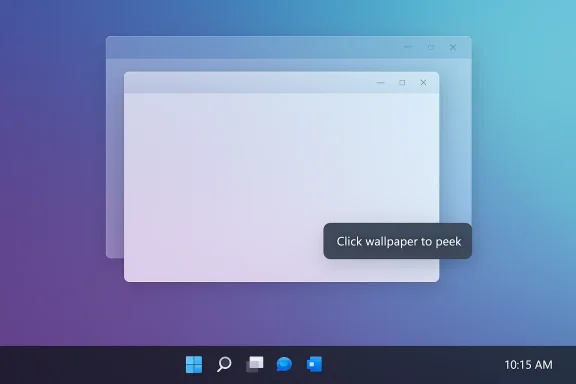
That is why the reaction to PeekDesktop is bigger than the app itself. Microsoft veteran Scott Hanselman, now VP of Developer Community, created the utility to mimic one of macOS Sonoma’s more beloved desktop behaviors: click the wallpaper, clear the clutter, do the task, and click again to restore everything. The feature is simple, but it taps into a powerful truth about operating systems: users remember how a system feels long before they remember how it is marketed. A feature that reduces tiny daily annoyances can be more persuasive than a flashy keynote demo.
Microsoft has also been under pressure from another front: the developer experience. The company has been pushing Windows as an AI-native platform and has tried to simplify the path for app creation with tools like the Windows App Development CLI. But developer mindshare is stubborn. Apple’s vertically integrated ecosystem still offers a sense of coherence that many developers value, especially when they are iterating quickly or building AI workflows. In that light, PeekDesktop is not a gimmick; it is a sign that Microsoft knows the emotional advantages of macOS are real, and that some of them can be contested one UX detail at a time.
There is also a deeper competitive subtext. Windows remains the dominant desktop OS, but dominance is not the same as aspiration. macOS has become synonymous with polish, predictable behavior, and a relatively calm user interface. Windows, by contrast, often has to work harder to prove that it is not asking users to adapt to the machine. That makes every Apple-inspired refinement carry outsized meaning, especially when it comes from a Microsoft insider rather than a third-party tinkerer.
That matters because it turns the desktop into a workspace again, not just a background image. Many users still treat the desktop as a staging area, a temporary holding zone for downloads, installers, screenshots, and files they plan to move elsewhere later. If the desktop is buried under open apps, that workflow becomes awkward. PeekDesktop is essentially a promise that Windows can borrow the convenience of a Mac without surrendering the power-user habits that define the platform.
This is also why the comparison to Win + D is important. Keyboard shortcuts have always been part of Windows’ power-user identity, but they are not always discoverable or comfortable for casual users. PeekDesktop lowers the barrier by turning a shortcut into a visible action. That means users who would never memorize a key combo can still benefit from the same behavior.
Key reasons this matters:
This is why the line from Hanselman about helping Mac users feel comfortable if they switch is so revealing. It frames Windows not as a place to force a new way of working, but as a place where familiar behaviors can survive the move. That is a smarter pitch than asking Apple users to unlearn what they like.
Windows, on the other hand, has historically been the platform of flexibility. That is a strength, but it also creates choice overload. The user often has to assemble the experience from multiple sources: OEM software, Microsoft defaults, third-party utilities, and personal habits. That flexibility can be powerful, but it can also make the platform feel less curated than macOS. In a market where polish matters, curation becomes a competitive feature in itself.
That kind of continuity is critical in consumer switching decisions, but it is even more important in enterprise settings where staff turnover, device procurement, and onboarding all create friction. A feature like PeekDesktop does not solve ecosystem lock-in, but it does soften the edges. That is often how platform migration begins: not with a giant leap, but with the sense that the new environment won’t punish the user for changing sides.
That is why Microsoft’s willingness to adopt Mac-like convenience is notable. It suggests the company understands that the premium market is won by reducing friction, not by demanding loyalty. Users who are comfortable can be persuaded; users who feel constantly managed cannot.
The important point is that Microsoft does not need to become Apple to compete with Apple. It needs to look intentional. That means choosing which ideas to borrow, which behaviors to preserve, and which annoyances to remove. PeekDesktop lands well because it is a concrete example of Microsoft borrowing from the competitor without adopting the competitor’s entire philosophy.
This is also where Microsoft’s internal positioning helps. A utility made by a Microsoft vice president sends a very different message than a random GitHub experiment. It says the company is not just tolerating cross-platform inspiration; it is willing to bless it. That can have a real effect on how enthusiasts, developers, and reviewers talk about the product.
The same logic appears in Microsoft’s broader Windows quality push. It is not enough for the company to ship more AI or more services; it has to make the system feel calmer. That is the real competitive battleground, and it is one Apple has long understood.
But compatibility also creates drag. More device types, more drivers, more OEM layers, and more legacy expectations make it harder for Windows to achieve a uniformly polished feel. That is why a feature like PeekDesktop matters. It shows that Microsoft can improve the experience without trying to solve every compatibility problem at once.
That is where small desktop behaviors become strategic. They reduce the sense that the OS is constantly asking the user to negotiate with it. When an interface supports a simple action cleanly, it reinforces the idea that Windows is a tool, not a hurdle. That perception matters far more than many roadmap slides admit.
Still, that fragmentation is also an opportunity. If Microsoft can establish better defaults and clearer behavioral standards, OEMs can build on top of a stronger baseline instead of compensating for a weak one. PeekDesktop is modest, but it contributes to that same direction of travel.
That is why the phrase “so Mac folks feel comfortable” should not be dismissed as marketing fluff. It points to a real adoption barrier: if people feel cognitively at home on one platform, they are more likely to stay there. Windows has to earn that feeling. It can’t simply claim it because of compatibility or market share.
PeekDesktop is relevant because it reduces a small but repeated pain point. The user doesn’t need to think about window management before doing the task. That is the kind of invisible support that good developer tooling and good consumer UI share. They disappear into the work.
A more comfortable Windows will not erase Apple’s appeal overnight, but it can reduce the number of situations where Mac is the default recommendation. That is a meaningful strategic win because platform preference often starts with subtle conveniences, not dramatic feature comparisons.
This is especially true for users crossing from macOS to Windows. Migration anxiety is often less about missing a major feature and more about worrying that daily tasks will feel awkward. A familiar gesture helps answer that anxiety before it becomes resistance. It is a small piece of UX diplomacy.
That matters in a world where users increasingly move between platforms, devices, and cloud services. Familiarity is no longer just a comfort feature; it is an adoption tool. The more smoothly a system can adapt to the user’s mental model, the less likely the user is to look elsewhere.
The result is a feature that feels both native and strategic. It is native because it works within Windows’ desktop conventions. It is strategic because it helps reduce the psychological distance between Windows and the Apple ecosystem. That combination is rare, and it is why the app has attracted attention.
The gains here are not just aesthetic. Gentler software is easier to recommend, easier to stick with, and easier to defend when users complain. It also creates room for Microsoft to talk about Windows as a platform of choice rather than obligation. That is a much stronger story in both consumer and enterprise settings.
Consumers may not notice every improvement individually, but they notice the cumulative effect. A desktop that behaves predictably makes a machine feel newer for longer. That is the kind of advantage Apple has enjoyed for years, and Microsoft clearly wants a piece of it.
A softer Windows also helps Microsoft’s credibility when it talks about modernization. Enterprises are far more likely to embrace platform changes when they believe the company is listening to pain points rather than simply layering on new ambitions. That is where a small app like PeekDesktop becomes symbolic. It suggests Microsoft can still care about the basics.
The other thing to watch is whether Microsoft’s internal culture keeps backing this direction. When a vice president builds and publicly promotes a feature inspired by macOS, it sends a message that good UX ideas are fair game no matter where they originate. That is healthy. Platforms age badly when they stop learning from their rivals. Windows feels more interesting when it acts like a confident competitor, not a defensive incumbent.
Source: Windows Central "So Mac folks feel comfortable": Microsoft's VP just gave me one more reason to skip Apple's ecosystem
 Background
Microsoft has spent years trying to reshape Windows from a merely compatible desktop into a more intentional platform, and the timing matters. Windows 10 reached end of servicing on October 14, 2025, which shifted the company’s attention toward Windows 11 migration, trust, and retention. In that context, even small quality-of-life changes matter because they are part of a broader effort to make Windows feel modern rather than merely familiar. The company’s recent public messaging has emphasized fewer surprises, fewer interruptions, and a more disciplined approach to product design.That is why the reaction to PeekDesktop is bigger than the app itself. Microsoft veteran Scott Hanselman, now VP of Developer Community, created the utility to mimic one of macOS Sonoma’s more beloved desktop behaviors: click the wallpaper, clear the clutter, do the task, and click again to restore everything. The feature is simple, but it taps into a powerful truth about operating systems: users remember how a system feels long before they remember how it is marketed. A feature that reduces tiny daily annoyances can be more persuasive than a flashy keynote demo.
Microsoft has also been under pressure from another front: the developer experience. The company has been pushing Windows as an AI-native platform and has tried to simplify the path for app creation with tools like the Windows App Development CLI. But developer mindshare is stubborn. Apple’s vertically integrated ecosystem still offers a sense of coherence that many developers value, especially when they are iterating quickly or building AI workflows. In that light, PeekDesktop is not a gimmick; it is a sign that Microsoft knows the emotional advantages of macOS are real, and that some of them can be contested one UX detail at a time.
There is also a deeper competitive subtext. Windows remains the dominant desktop OS, but dominance is not the same as aspiration. macOS has become synonymous with polish, predictable behavior, and a relatively calm user interface. Windows, by contrast, often has to work harder to prove that it is not asking users to adapt to the machine. That makes every Apple-inspired refinement carry outsized meaning, especially when it comes from a Microsoft insider rather than a third-party tinkerer.
Why PeekDesktop Matters
PeekDesktop works because it addresses a problem people encounter constantly but rarely articulate: open windows get in the way of simple desktop tasks. Moving a file, launching a shortcut, emptying the Recycle Bin, or right-clicking something on the desktop should be trivial. Yet on a busy system, those actions often become small friction points. By letting users click the desktop to temporarily clear windows, the app recreates a behavior Mac users already understand while preserving Windows’ underlying multitasking model.That matters because it turns the desktop into a workspace again, not just a background image. Many users still treat the desktop as a staging area, a temporary holding zone for downloads, installers, screenshots, and files they plan to move elsewhere later. If the desktop is buried under open apps, that workflow becomes awkward. PeekDesktop is essentially a promise that Windows can borrow the convenience of a Mac without surrendering the power-user habits that define the platform.
The everyday workflow problem
The most interesting part of this feature is not novelty, but rhythm. A good operating system reduces cognitive load by making small, repetitive tasks disappear into habit. Clicking the desktop to reveal space, drag a file, and click again to restore the layout is exactly the kind of motion users remember with satisfaction. It is not dramatic, but it is sticky in a way many UI improvements are not.This is also why the comparison to Win + D is important. Keyboard shortcuts have always been part of Windows’ power-user identity, but they are not always discoverable or comfortable for casual users. PeekDesktop lowers the barrier by turning a shortcut into a visible action. That means users who would never memorize a key combo can still benefit from the same behavior.
Key reasons this matters:
- It makes the desktop feel immediately usable again.
- It lowers friction for drag-and-drop workflows.
- It creates a more Mac-like sense of spatial control.
- It makes a familiar Windows task feel more intuitive.
- It helps Microsoft compete on comfort, not just compatibility.
A small feature with a large signal
The bigger signal is psychological. Microsoft is effectively acknowledging that comfort is a competitive feature, not a soft luxury. If a familiar interaction from macOS can be reproduced in Windows with minimal compromise, then the platform’s rivalry with Apple becomes less about ideological difference and more about proving which system respects the user’s habits better. That is an important shift in tone.This is why the line from Hanselman about helping Mac users feel comfortable if they switch is so revealing. It frames Windows not as a place to force a new way of working, but as a place where familiar behaviors can survive the move. That is a smarter pitch than asking Apple users to unlearn what they like.
Apple’s Ecosystem Advantage
Apple’s advantage has never been that macOS can do things Windows cannot. It is that Apple makes the experience feel unified. Hardware, software, setup, and daily workflow tend to move in the same direction. For developers and consumers alike, that coherence creates trust, and trust is often more valuable than feature count. That is especially true in premium laptop buying, where people care deeply about how the machine feels after the novelty wears off.Windows, on the other hand, has historically been the platform of flexibility. That is a strength, but it also creates choice overload. The user often has to assemble the experience from multiple sources: OEM software, Microsoft defaults, third-party utilities, and personal habits. That flexibility can be powerful, but it can also make the platform feel less curated than macOS. In a market where polish matters, curation becomes a competitive feature in itself.
Why “feel comfortable” is a strategic phrase
The phrase “feel comfortable” is doing a lot of work here. It is not about raw performance, and it is not about technical superiority. It is about emotional continuity across platforms. If a user can move from a Mac to a Windows machine and still recognize the logic of the desktop, the transition becomes less intimidating and more plausible.That kind of continuity is critical in consumer switching decisions, but it is even more important in enterprise settings where staff turnover, device procurement, and onboarding all create friction. A feature like PeekDesktop does not solve ecosystem lock-in, but it does soften the edges. That is often how platform migration begins: not with a giant leap, but with the sense that the new environment won’t punish the user for changing sides.
The premium laptop perception gap
Apple has long benefited from a reputation for making laptops that feel cohesive. Windows laptops have improved enormously in hardware quality, battery life, and display quality, but hardware alone does not erase software memory. Many users still remember clunky OEM utilities, fragmented drivers, and awkward shell behavior. Even when those issues are less common today, the narrative lingers.That is why Microsoft’s willingness to adopt Mac-like convenience is notable. It suggests the company understands that the premium market is won by reducing friction, not by demanding loyalty. Users who are comfortable can be persuaded; users who feel constantly managed cannot.
- Apple’s strength is coherence.
- Windows’ strength is flexibility.
- The premium market rewards perceived polish.
- Comfort lowers switching resistance.
- Small rituals can shape brand loyalty.
The Windows Response Strategy
Microsoft’s wider Windows strategy now looks less like a pure feature race and more like a trust repair campaign. The company has been talking about reducing clutter, giving users more control over updates, trimming unnecessary Copilot entry points, and making the desktop feel less noisy. PeekDesktop fits that pattern neatly because it presents a human-centered refinement rather than another “next-gen” abstraction.The important point is that Microsoft does not need to become Apple to compete with Apple. It needs to look intentional. That means choosing which ideas to borrow, which behaviors to preserve, and which annoyances to remove. PeekDesktop lands well because it is a concrete example of Microsoft borrowing from the competitor without adopting the competitor’s entire philosophy.
Borrowing without surrendering identity
That distinction matters. Windows becomes weaker when it imitates macOS superficially but loses its own strengths, like broad compatibility, configurability, and software depth. But it becomes stronger when it borrows interaction patterns that users clearly prefer. In other words, the goal is not to make Windows look like macOS; it is to make Windows feel less hostile to people who already know how they want a desktop to behave.This is also where Microsoft’s internal positioning helps. A utility made by a Microsoft vice president sends a very different message than a random GitHub experiment. It says the company is not just tolerating cross-platform inspiration; it is willing to bless it. That can have a real effect on how enthusiasts, developers, and reviewers talk about the product.
Why incremental UX changes matter
Windows has often been criticized for large, visible changes that do not fully solve underlying annoyances. By contrast, tiny behaviors like desktop reveal actions, taskbar control, or fewer update interruptions have a disproportionate effect on user satisfaction. That is because they influence the emotional texture of the operating system. Users may not praise a feature like PeekDesktop at length, but they will remember that the machine was easy to live with.The same logic appears in Microsoft’s broader Windows quality push. It is not enough for the company to ship more AI or more services; it has to make the system feel calmer. That is the real competitive battleground, and it is one Apple has long understood.
- Borrowing useful behavior is not the same as copying identity.
- Small UX wins often outperform flashy features.
- User trust grows through repeated low-friction moments.
- Calm software feels more premium than crowded software.
- Microsoft’s internal endorsement makes these changes more credible.
Compatibility and Ecosystem Friction
Windows still has a major advantage over macOS: compatibility depth. The platform can run older software, support a wide variety of devices, and accommodate workflows that Apple’s tighter ecosystem simply does not prioritize. That freedom remains one of Windows’ strongest reasons for continued dominance. It also means Microsoft cannot win by becoming a locked-down clone of Apple.But compatibility also creates drag. More device types, more drivers, more OEM layers, and more legacy expectations make it harder for Windows to achieve a uniformly polished feel. That is why a feature like PeekDesktop matters. It shows that Microsoft can improve the experience without trying to solve every compatibility problem at once.
The cost of flexibility
Flexibility gives users choice, but choice creates maintenance. A system that can do everything is often harder to make feel elegant. That tradeoff has been at the heart of Windows for decades, and it remains true today. Microsoft’s challenge is not eliminating complexity; it is making complexity less visible in daily use.That is where small desktop behaviors become strategic. They reduce the sense that the OS is constantly asking the user to negotiate with it. When an interface supports a simple action cleanly, it reinforces the idea that Windows is a tool, not a hurdle. That perception matters far more than many roadmap slides admit.
OEM layers and uneven experiences
Another complication is that Windows is not always experienced as a single product. OEM customization, preinstalled utilities, and vendor-specific features can alter the feel of the machine before the user even installs anything. That produces a fragmented impression that Apple largely avoids through tighter hardware control. It also means Microsoft has to compete not just with macOS, but with the version of Windows each manufacturer creates.Still, that fragmentation is also an opportunity. If Microsoft can establish better defaults and clearer behavioral standards, OEMs can build on top of a stronger baseline instead of compensating for a weak one. PeekDesktop is modest, but it contributes to that same direction of travel.
- Windows’ compatibility remains a core strength.
- Flexibility often produces inconsistency.
- OEM variation can muddy the user experience.
- Small defaults shape the perceived quality of the whole system.
- Microsoft’s job is to hide complexity without removing capability.
Developer Mindshare and the Comfort Factor
The larger strategic lesson here is that comfort influences developer choice just as much as consumer choice. Microsoft has been trying to position Windows as a serious platform for modern development, including AI and agent workflows, but Apple still holds a reputation for making that journey easier. Developers value speed, consistency, and fewer surprises, and macOS still tends to deliver those things with less setup overhead.That is why the phrase “so Mac folks feel comfortable” should not be dismissed as marketing fluff. It points to a real adoption barrier: if people feel cognitively at home on one platform, they are more likely to stay there. Windows has to earn that feeling. It can’t simply claim it because of compatibility or market share.
Why setup experience matters so much
The first hour with a machine often determines whether it becomes a daily driver. If everything is smooth, users develop confidence. If the platform immediately fights them, they start building a mental list of reasons to move elsewhere. That first impression matters even more in developer circles, where workflows are repeated constantly and friction compounds quickly.PeekDesktop is relevant because it reduces a small but repeated pain point. The user doesn’t need to think about window management before doing the task. That is the kind of invisible support that good developer tooling and good consumer UI share. They disappear into the work.
Enterprise implications
For enterprises, developer comfort is not a side issue. It affects hiring, onboarding, provisioning, and retention. If technical employees increasingly prefer Mac because it feels smoother, companies have to decide whether to accommodate those preferences or force standardization. That decision has budget and support consequences, and it can shape broader perceptions of the workplace.A more comfortable Windows will not erase Apple’s appeal overnight, but it can reduce the number of situations where Mac is the default recommendation. That is a meaningful strategic win because platform preference often starts with subtle conveniences, not dramatic feature comparisons.
- Developers reward low-friction environments.
- First impressions shape long-term loyalty.
- Comfort can outrank raw flexibility.
- Enterprise decisions often follow developer preferences.
- Small quality wins can influence platform mindshare.
The Power of Familiar Gestures
One reason PeekDesktop feels important is that it turns a visual habit into a platform bridge. The action itself is simple: click the wallpaper, make space, work, click again, restore. But gestures like that become meaningful because they are memory cues. They tell users, “You know what to do here.” That reassurance is one of the most valuable things an operating system can provide.This is especially true for users crossing from macOS to Windows. Migration anxiety is often less about missing a major feature and more about worrying that daily tasks will feel awkward. A familiar gesture helps answer that anxiety before it becomes resistance. It is a small piece of UX diplomacy.
Desktop behavior as a language
Operating systems communicate through behavior. When the desktop responds in a way that matches user expectation, it feels cooperative. When it resists, it feels rigid. PeekDesktop works because it speaks a language many users already understand, even if they have never seen it on Windows before.That matters in a world where users increasingly move between platforms, devices, and cloud services. Familiarity is no longer just a comfort feature; it is an adoption tool. The more smoothly a system can adapt to the user’s mental model, the less likely the user is to look elsewhere.
Why this is more than a Mac clone
Calling PeekDesktop a clone would undersell what it represents. It is better understood as translation. Microsoft is taking a behavior that macOS users appreciate and expressing it in Windows terms. That is a smarter competitive move because it signals confidence rather than insecurity. The company is not pretending Windows lacks identity; it is simply acknowledging that good ideas can cross boundaries.The result is a feature that feels both native and strategic. It is native because it works within Windows’ desktop conventions. It is strategic because it helps reduce the psychological distance between Windows and the Apple ecosystem. That combination is rare, and it is why the app has attracted attention.
- Familiar gestures reduce learning friction.
- Desktop behavior shapes trust.
- Translation is better than imitation.
- Comfort is an adoption lever.
- Small UX habits can influence platform loyalty.
What Microsoft Gains by Making Windows Feel Gentler
PeekDesktop may be a tiny utility, but it fits a much larger philosophy shift inside Microsoft: the idea that Windows should feel gentler, less intrusive, and more respectful of the user’s time. That shift is visible in the company’s broader moves around update control, reduced clutter, and more selective AI exposure. In that sense, the app is not a one-off experiment; it is part of a pattern.The gains here are not just aesthetic. Gentler software is easier to recommend, easier to stick with, and easier to defend when users complain. It also creates room for Microsoft to talk about Windows as a platform of choice rather than obligation. That is a much stronger story in both consumer and enterprise settings.
Consumer appeal
For consumers, gentler behavior means less frustration. Fewer intrusive prompts, more intuitive interactions, and more respect for daily habits all add up to a system that feels more premium. That is important because premium is not just about hardware anymore; it is about the emotional quality of the software experience.Consumers may not notice every improvement individually, but they notice the cumulative effect. A desktop that behaves predictably makes a machine feel newer for longer. That is the kind of advantage Apple has enjoyed for years, and Microsoft clearly wants a piece of it.
Enterprise appeal
For enterprises, gentler software can lower support costs and reduce resistance to change. If users feel less surprised by Windows, IT gets fewer calls, fewer workarounds, and less pushback on policy. That is especially valuable during Windows 11 transition cycles, when organizations are already balancing migration pressure and training overhead.A softer Windows also helps Microsoft’s credibility when it talks about modernization. Enterprises are far more likely to embrace platform changes when they believe the company is listening to pain points rather than simply layering on new ambitions. That is where a small app like PeekDesktop becomes symbolic. It suggests Microsoft can still care about the basics.
- Gentler software feels more premium.
- Predictability lowers support friction.
- User respect builds loyalty.
- Enterprise adoption improves when frustration drops.
- Comfort can be a strategic product feature.
Strengths and Opportunities
Microsoft’s biggest opportunity is not to out-Apple Apple, but to make Windows a more welcoming place for users who already like Apple’s best behaviors. PeekDesktop shows how effective that can be when the change is narrow, practical, and immediately understandable. It also reinforces a broader Windows message: the platform is strongest when it combines openness with just enough polish to make daily use feel easy.- Bridges a familiar macOS workflow into Windows.
- Reduces friction for desktop file management.
- Improves the sense of control over open windows.
- Strengthens Microsoft’s “comfortable transition” narrative.
- Helps Windows appeal to mixed-platform households.
- Supports enterprise users who want fewer workflow disruptions.
- Demonstrates that small UX changes can have strategic value.
Risks and Concerns
The biggest risk is that Microsoft treats tiny comfort wins as substitutes for deeper ecosystem problems. A desktop convenience feature is useful, but it will not by itself solve the long-standing concerns about update trust, platform clutter, developer coherence, or OEM inconsistency. If the broader Windows experience still feels noisy, users may appreciate PeekDesktop while continuing to prefer macOS for the rest of their work.- Users may see the app as a band-aid rather than a solution.
- Emptying the Recycle Bin can be awkward if the feature gets in the way, as testing noted.
- Task Manager and other always-on surfaces may behave inconsistently.
- Mac users may still prefer Apple’s unified hardware-software stack.
- Enterprise buyers may want more predictability than a utility can deliver.
- Microsoft could overestimate the impact of gesture-level polish.
- Third-party tools may still outpace native Windows behavior in flexibility.
Looking Ahead
The real question is whether PeekDesktop becomes a one-off curiosity or part of a broader pattern of Windows becoming more empathetic to how people actually work. If Microsoft continues to favor cleaner interactions, fewer interruptions, and more visible respect for user preference, then the company could slowly change the emotional reputation of Windows without sacrificing its core strengths. That would be a meaningful competitive win, especially as Apple continues to own the premium polish narrative.The other thing to watch is whether Microsoft’s internal culture keeps backing this direction. When a vice president builds and publicly promotes a feature inspired by macOS, it sends a message that good UX ideas are fair game no matter where they originate. That is healthy. Platforms age badly when they stop learning from their rivals. Windows feels more interesting when it acts like a confident competitor, not a defensive incumbent.
- Watch for deeper integration or updates to PeekDesktop.
- Watch whether Microsoft broadens this “comfortable transition” approach.
- Watch if Apple users respond positively to the lower-friction Windows pitch.
- Watch whether Microsoft pairs UX borrowing with stronger reliability work.
- Watch whether more Microsoft leaders endorse small, practical shell improvements.
Source: Windows Central "So Mac folks feel comfortable": Microsoft's VP just gave me one more reason to skip Apple's ecosystem
Last edited:
