

Penpot, an open-source design and prototyping app from Kaleidos, has emerged as a credible Figma alternative for wireframing in 2026 because it runs in the browser, supports self-hosting, uses open web standards, and removes the per-seat subscription pressure from basic design handoff workflows. That is the practical lesson inside Yadullah Abidi’s MakeUseOf piece, but the larger story is not simply that one free app can replace one paid app. It is that wireframing, the supposedly lightweight beginning of product design, has been dragged into the same subscription-and-seat-management machinery that now governs much of modern software. Penpot matters because it asks whether early-stage design really needs to live inside a proprietary platform at all.
Figma’s dominance did not come from nowhere. It solved real problems at exactly the right moment: browser-based collaboration, real-time cursors, shared files, component libraries, developer handoff, and a cloud-first model that made design files feel less like fragile local documents and more like living team spaces. For many designers, it was not merely better than Sketch or Adobe XD; it became the place where product thinking happened.
That victory changed expectations. A modern UI design tool is no longer judged only by whether it can draw rectangles, align text, and export assets. It is judged by whether a product manager can leave a comment, whether a developer can inspect spacing, whether a designer can publish a component, whether a team can brainstorm, and whether the file survives turnover, laptops, and time zones.
The catch is that the same cloud collaboration model that made Figma compelling also made it easier to monetize access in increasingly granular ways. Figma’s current pricing page presents a seat-based world in which “Full,” “Dev,” “Collab,” and other roles are not just permissions but budget events. Figma’s own help materials describe a pricing and billing model updated around the March 2025 renewal cycle, bundling products differently while keeping role-based access central to the business.
That is fine for a mature design organization with administrators, procurement, and enough Figma usage to justify the platform. It is less fine for a developer sketching flows for a side project, a small team trying to avoid SaaS sprawl, or a homelab-minded WindowsForum reader who looks at another recurring monthly bill and wonders how a wireframe became an operating expense.
MakeUseOf’s argument lands because it begins from that irritation. Figma remains powerful, polished, and in many environments still the obvious choice. But if the job is wireframing rather than full-scale design-system governance, paying for the whole machine can feel like renting a data center to run a whiteboard.
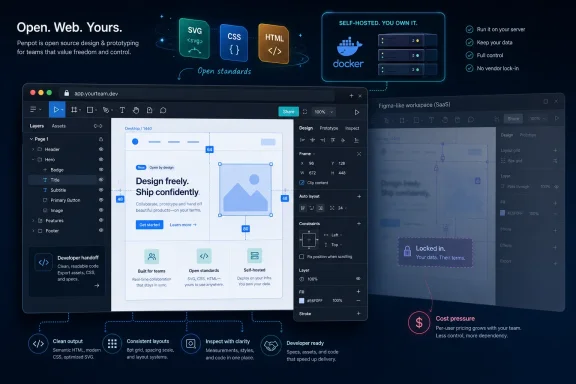
The more interesting description is that Penpot is a design tool built around reversibility. It is open source under the Mozilla Public License 2.0. It can be used through the hosted service or deployed on infrastructure you control. Its own public repository and documentation emphasize open standards such as SVG, CSS, HTML, and JSON rather than a closed file universe.
That matters because design files are increasingly operational artifacts. A wireframe is not just a sketch; it can become a product decision, a support reference, a contract expectation, or the earliest record of why an interface behaves the way it does. When those files live entirely inside a vendor-controlled format and cloud account, the team is accepting more than convenience. It is accepting future migration friction.
Penpot’s SVG-first approach does not magically solve every export, fidelity, or compatibility problem. But it changes the default posture. The design is closer to the web’s native grammar. Layout concepts such as Flexbox and CSS Grid are not merely approximated as designer-facing metaphors; they are treated as part of the underlying collaboration between designer and developer.
For Windows power users and IT administrators, that distinction should sound familiar. It is the same argument that has played out around file formats, virtualization, cloud storage, password managers, note-taking tools, and identity providers. The cheapest platform is not always the one with the lowest bill this month. Sometimes it is the one with the least painful exit.
That puts Penpot in the same mental category as Nextcloud, Gitea, Vaultwarden, Jellyfin, and the other self-hosted tools that have become fixtures in homelabs and small offices. You can run it because you want to save money, but the deeper appeal is control. You decide where the data sits. You decide how it is backed up. You decide whether a vendor billing change affects access to your own work.
This is especially relevant for organizations that are too small to get enterprise-grade leverage from a commercial vendor but too serious to treat design files casually. A small software shop may not have a procurement department, but it may still have client confidentiality obligations. A civic technology group may not have a big budget, but it may still need durable project records. A school, nonprofit, or internal IT team may need collaborative design without turning every participant into another paid SaaS seat.
Self-hosting also sharpens Penpot’s limits. Running your own service means owning updates, security posture, backups, identity integration, and availability. The cost does not disappear; it moves from a subscription line item to operational responsibility. For some teams, that trade is liberating. For others, it is a new burden wearing an open-source T-shirt.
Still, the existence of that choice is the point. Figma’s model is optimized for cloud collaboration as a service. Penpot’s model says collaboration can also be software you operate. In a market trained to think of design tools as rented workspaces, that is a meaningful intervention.
Figma’s Dev Mode exists because developer handoff is a real, expensive problem. Developers need measurements, assets, tokens, CSS-like values, interaction clues, and enough context to avoid re-litigating a design in Slack. A static PNG or PDF is not enough once a product has responsive layouts, design tokens, variants, and reusable components.
But Figma’s business model turns that handoff into an access-management issue. Depending on plan and seat type, organizations have to think carefully about who can inspect, who can edit, who can comment, and what each role costs. Figma has tried to rationalize that model with clearer seat categories, but the basic reality remains: the closer a developer gets to implementation-ready design data, the more likely the organization is to confront licensing questions.
Penpot’s appeal is that it treats handoff less like an upsell and more like the natural consequence of using web-native primitives. If a layout is expressed in concepts developers already use, the inspect panel becomes less of a translation layer and more of a window into the design. Flexbox, grid, spacing, typography, and SVG assets are not exotic design-system abstractions; they are the stuff front-end developers already live with.
That does not mean Penpot will produce perfect production code. No serious team should expect a design tool to replace engineering judgment, accessibility review, state management, responsive testing, or the hard realities of a component framework. The phrase “near production-ready” should be read carefully, because the last 20 percent of implementation is where most of the real product work hides.
Even so, for wireframing and early UI planning, Penpot’s alignment with CSS is valuable. The tool nudges designers toward layouts that behave more like the web and less like decorative artboards. That matters because many product defects begin as beautiful static compositions that collapse the moment they meet real content, localization, user settings, zoom levels, or a narrow viewport.
That is why Penpot can be a better fit for many users even if Figma remains the more powerful product. A wireframe rarely needs the entire machinery of a mature design platform. It needs frames, layout controls, reusable components, comments, basic prototyping, and a way for developers to inspect intent. Penpot checks enough of those boxes that its weaker areas are less painful in this specific use case.
MakeUseOf describes the interface as familiar to anyone coming from Figma: canvas in the middle, layers on the left, properties on the right, toolbar across the top. That familiarity is strategically important. Open-source alternatives often fail not because they lack ideals, but because they ask users to pay a migration tax in muscle memory. Penpot’s interface lowers that tax.
The component system also matters. Wireframes become useful when they can express repetition: navigation bars, cards, modals, filters, sidebars, buttons, empty states, and forms. If every instance is hand-drawn from scratch, the file becomes a sketchpad rather than a design artifact. Reusable components let a wireframe become a rough system instead of a pile of screens.
Real-time collaboration gives Penpot another piece of the modern workflow. The old model of emailing mockups or attaching exported images to tickets is dead for any team that has tasted live collaborative editing. Penpot does not need to match every Figma flourish to be useful; it needs to support enough shared presence that wireframing does not regress to file passing.
Penpot’s ecosystem is smaller. That is not surprising, and it may improve as adoption grows, but it changes the calculus for teams that have built their design operations around Figma’s extensibility. A plugin is not merely a convenience once it becomes part of a release process. It becomes institutional memory with a UI.
Figma’s collaboration layer is also more polished. Live cursors, review workflows, FigJam integration, comments, branching-like practices, workshops, and enterprise administration are all part of why large teams keep paying. Figma’s value is not only in the canvas; it is in the surrounding operating system for design work.
That is where many “Figma replacement” arguments become too simplistic. A solo developer wireframing a dashboard is not the same customer as a Fortune 500 design organization managing hundreds of contributors across multiple brands, accessibility requirements, legal reviews, localization pipelines, and product lines. The former may find Figma excessive. The latter may find Penpot promising but incomplete.
The honest case for Penpot is narrower and stronger. It is not that every Figma team should migrate tomorrow. It is that a large class of Figma usage is lighter than the platform’s commercial gravity suggests. Wireframing, small-team prototyping, internal tools, side projects, and developer-led UI planning are precisely the places where the open-source alternative can win.
That fatigue is especially sharp in creative and developer tools because the user often experiences pricing friction at the moment of curiosity. You want to sketch an idea, invite a developer, export a detail, inspect a frame, or revive an old project. Suddenly the question is not “What should we build?” but “What seat does this person need?”
Figma is hardly alone here. The broader software industry has spent a decade converting occasional, lightweight, and peripheral use into recurring revenue. The result is that teams increasingly audit not just software quality but software permanence. Will this file still be accessible in five years? Will a collaborator trigger a bill? Will a change in pricing break the workflow? Can we leave without re-creating our institutional memory?
Penpot benefits from that mood. Its open-source license is not merely a philosophical badge; it is a product feature in a market where users have learned to distrust the long-term shape of SaaS pricing. The ability to self-host is not merely a deployment option; it is a hedge against future platform behavior.
This is why MakeUseOf’s seemingly personal switch is worth treating as more than one writer’s preference. The consumer tech press often frames open-source alternatives as budget picks, but the real pressure is structural. Users are not only asking whether a tool is cheaper. They are asking whether the tool respects the difference between professional collaboration and perpetual dependency.
This matters in organizations where design decisions outlive tools. A product interface may be redesigned, replatformed, audited, litigated, localized, or rebuilt years after the original design team has moved on. The more proprietary the source artifact, the more the organization depends on continuity of access, licensing, and vendor support.
Figma’s closed format has practical advantages inside Figma’s world. It enables the company to build a tightly integrated experience and evolve features without waiting for standards bodies. Proprietary platforms often move faster precisely because they control the whole stack.
But that speed has a cost. If Figma is the only place where the file fully makes sense, then Figma becomes part of the organization’s memory system. That may be acceptable; many teams make similar tradeoffs with Microsoft 365, Adobe Creative Cloud, Autodesk, Atlassian, and Salesforce. The point is not that proprietary tools are bad. The point is that their convenience should be recognized as a dependency, not mistaken for neutrality.
Penpot’s open-standard posture is therefore especially attractive for teams that treat UI design as part of software engineering rather than a separate creative island. If the final product is the web, then a design tool that speaks more of the web’s language has an architectural elegance that Figma’s cloud polish cannot entirely erase.
Many readers here run Windows desktops, Linux servers, Hyper-V labs, Docker containers, NAS boxes, and hybrid setups that mix local power with cloud convenience. Penpot fits that world neatly because it does not demand a single operating-system identity. It is browser-based, self-hostable, and aligned with the kind of infrastructure tinkering that has become normal for technically literate users.
That makes it attractive for more than ideological reasons. A Windows developer building an internal admin tool can wireframe in Penpot, share with a teammate, inspect CSS-like values, and keep the whole thing running on a local server or inexpensive VPS. A sysadmin modernizing an intranet portal can sketch flows without creating yet another paid design workspace. A student or hobbyist can learn UI design without starting a subscription clock.
There is also a practical continuity with Microsoft’s own current direction. Windows development has become more web-adjacent, more container-aware, and more hybrid. The boundaries between local apps, web apps, PWAs, cloud services, and self-hosted infrastructure are blurrier than ever. Penpot’s browser-first model does not feel alien in that world; it feels like another service in the stack.
The irony is that Figma helped make this model normal. It proved that a serious design tool could live in the browser. Penpot’s challenge is to prove that such a tool does not have to live only inside a commercial cloud.
Penpot does not need to kill Figma to matter. It needs to make Figma less automatic. That is a more realistic and more disruptive outcome. Once teams begin asking whether every design workflow truly belongs in Figma, the incumbent’s gravitational pull weakens.
For many organizations, the answer will still be yes. Figma’s maturity, hiring familiarity, educational footprint, plugin ecosystem, and enterprise features are formidable. Designers know it. Recruiters ask for it. Agencies standardize on it. Clients expect it. Those network effects are not easily displaced by a better licensing story.
But alternatives change behavior even when they do not win the whole market. They give users leverage. They pressure incumbents to justify pricing. They preserve skills and workflows outside one vendor’s walls. They create escape routes for projects that do not need the full enterprise design stack.
That is why Penpot’s best market may be the messy middle: teams too sophisticated for screenshots and too budget-conscious for sprawling seat management. These are the teams that need collaboration but not ceremony, inspectable layouts but not a design-operations department, reusable components but not an enterprise procurement cycle.
In that middle, Penpot’s rough edges are easier to forgive because its core promise is so concrete. You can wireframe, prototype, collaborate, inspect, and keep control of your files without turning every participant into a line item.
If your workflow is mostly wireframes, basic prototypes, developer handoff, and reusable UI patterns, the balance shifts. In that scenario, Figma’s advantages may be real but underused, while its costs and lock-in remain fully present. Paying for unused sophistication is one of the quietest ways software budgets bloat.
The switch also depends on who owns the pain. Designers may value Figma’s polish and ecosystem more than developers do. Developers may value Penpot’s CSS-aligned handoff more than designers do. Finance may care about seats. IT may care about data control. Leadership may care about standardization. The “best” tool is often the one that offends the fewest constraints.
A sensible migration path is therefore not dramatic. Try Penpot on a bounded project: an internal tool, a side product, a redesign exploration, or a new feature wireframe that has not yet entered the main design system. Let developers inspect the output. Let designers test component reuse. Let IT evaluate hosting. Let the team discover whether the gaps are annoying or disqualifying.
That kind of trial respects the truth of both products. Figma is not a scam because it charges for value. Penpot is not a toy because it is free. They are different answers to the same question: who should control the place where product ideas become interface decisions?
 Figma Won the Workflow, Then Made the Workflow Expensive
Figma’s dominance did not come from nowhere. It solved real problems at exactly the right moment: browser-based collaboration, real-time cursors, shared files, component libraries, developer handoff, and a cloud-first model that made design files feel less like fragile local documents and more like living team spaces. For many designers, it was not merely better than Sketch or Adobe XD; it became the place where product thinking happened.That victory changed expectations. A modern UI design tool is no longer judged only by whether it can draw rectangles, align text, and export assets. It is judged by whether a product manager can leave a comment, whether a developer can inspect spacing, whether a designer can publish a component, whether a team can brainstorm, and whether the file survives turnover, laptops, and time zones.
The catch is that the same cloud collaboration model that made Figma compelling also made it easier to monetize access in increasingly granular ways. Figma’s current pricing page presents a seat-based world in which “Full,” “Dev,” “Collab,” and other roles are not just permissions but budget events. Figma’s own help materials describe a pricing and billing model updated around the March 2025 renewal cycle, bundling products differently while keeping role-based access central to the business.
That is fine for a mature design organization with administrators, procurement, and enough Figma usage to justify the platform. It is less fine for a developer sketching flows for a side project, a small team trying to avoid SaaS sprawl, or a homelab-minded WindowsForum reader who looks at another recurring monthly bill and wonders how a wireframe became an operating expense.
MakeUseOf’s argument lands because it begins from that irritation. Figma remains powerful, polished, and in many environments still the obvious choice. But if the job is wireframing rather than full-scale design-system governance, paying for the whole machine can feel like renting a data center to run a whiteboard.
Penpot’s Pitch Is Not Just Free, It Is Reversible
The lazy way to describe Penpot is “free Figma.” That undersells it and overpromises at the same time. Penpot is not a pixel-for-pixel clone of Figma, and anyone expecting the same plugin ecosystem, the same polish, or the same enterprise integrations will quickly run into differences.The more interesting description is that Penpot is a design tool built around reversibility. It is open source under the Mozilla Public License 2.0. It can be used through the hosted service or deployed on infrastructure you control. Its own public repository and documentation emphasize open standards such as SVG, CSS, HTML, and JSON rather than a closed file universe.
That matters because design files are increasingly operational artifacts. A wireframe is not just a sketch; it can become a product decision, a support reference, a contract expectation, or the earliest record of why an interface behaves the way it does. When those files live entirely inside a vendor-controlled format and cloud account, the team is accepting more than convenience. It is accepting future migration friction.
Penpot’s SVG-first approach does not magically solve every export, fidelity, or compatibility problem. But it changes the default posture. The design is closer to the web’s native grammar. Layout concepts such as Flexbox and CSS Grid are not merely approximated as designer-facing metaphors; they are treated as part of the underlying collaboration between designer and developer.
For Windows power users and IT administrators, that distinction should sound familiar. It is the same argument that has played out around file formats, virtualization, cloud storage, password managers, note-taking tools, and identity providers. The cheapest platform is not always the one with the lowest bill this month. Sometimes it is the one with the least painful exit.
Self-Hosting Turns a Design Tool Into Infrastructure
MakeUseOf highlights self-hosting as one of Penpot’s biggest attractions, and that is not just a hobbyist detail. Penpot’s Docker-based deployment model means a team can run the tool on its own server instead of treating design files as yet another dataset living exclusively in someone else’s SaaS tenant. The official setup uses multiple services behind the scenes, including the frontend, backend, exporter, PostgreSQL, and Redis, but Docker Compose makes the stack approachable for people already comfortable with containers.That puts Penpot in the same mental category as Nextcloud, Gitea, Vaultwarden, Jellyfin, and the other self-hosted tools that have become fixtures in homelabs and small offices. You can run it because you want to save money, but the deeper appeal is control. You decide where the data sits. You decide how it is backed up. You decide whether a vendor billing change affects access to your own work.
This is especially relevant for organizations that are too small to get enterprise-grade leverage from a commercial vendor but too serious to treat design files casually. A small software shop may not have a procurement department, but it may still have client confidentiality obligations. A civic technology group may not have a big budget, but it may still need durable project records. A school, nonprofit, or internal IT team may need collaborative design without turning every participant into another paid SaaS seat.
Self-hosting also sharpens Penpot’s limits. Running your own service means owning updates, security posture, backups, identity integration, and availability. The cost does not disappear; it moves from a subscription line item to operational responsibility. For some teams, that trade is liberating. For others, it is a new burden wearing an open-source T-shirt.
Still, the existence of that choice is the point. Figma’s model is optimized for cloud collaboration as a service. Penpot’s model says collaboration can also be software you operate. In a market trained to think of design tools as rented workspaces, that is a meaningful intervention.
Developer Handoff Is Where Penpot Makes Its Strongest Case
The most important detail in Abidi’s MakeUseOf piece is not that Penpot can draw wireframes. Many tools can draw wireframes. The crucial claim is that Penpot’s inspect and handoff workflow is strong enough that a small team does not have to pay extra just so developers can understand what designers meant.Figma’s Dev Mode exists because developer handoff is a real, expensive problem. Developers need measurements, assets, tokens, CSS-like values, interaction clues, and enough context to avoid re-litigating a design in Slack. A static PNG or PDF is not enough once a product has responsive layouts, design tokens, variants, and reusable components.
But Figma’s business model turns that handoff into an access-management issue. Depending on plan and seat type, organizations have to think carefully about who can inspect, who can edit, who can comment, and what each role costs. Figma has tried to rationalize that model with clearer seat categories, but the basic reality remains: the closer a developer gets to implementation-ready design data, the more likely the organization is to confront licensing questions.
Penpot’s appeal is that it treats handoff less like an upsell and more like the natural consequence of using web-native primitives. If a layout is expressed in concepts developers already use, the inspect panel becomes less of a translation layer and more of a window into the design. Flexbox, grid, spacing, typography, and SVG assets are not exotic design-system abstractions; they are the stuff front-end developers already live with.
That does not mean Penpot will produce perfect production code. No serious team should expect a design tool to replace engineering judgment, accessibility review, state management, responsive testing, or the hard realities of a component framework. The phrase “near production-ready” should be read carefully, because the last 20 percent of implementation is where most of the real product work hides.
Even so, for wireframing and early UI planning, Penpot’s alignment with CSS is valuable. The tool nudges designers toward layouts that behave more like the web and less like decorative artboards. That matters because many product defects begin as beautiful static compositions that collapse the moment they meet real content, localization, user settings, zoom levels, or a narrow viewport.
Wireframing Rewards Tools That Get Out of the Way
Wireframing is not supposed to be expensive theater. Its purpose is to make structure, flow, and priority visible before a team spends too much time arguing over color, polish, and implementation detail. The ideal wireframing tool should be fast enough to keep up with thought and constrained enough to prevent premature ornamentation.That is why Penpot can be a better fit for many users even if Figma remains the more powerful product. A wireframe rarely needs the entire machinery of a mature design platform. It needs frames, layout controls, reusable components, comments, basic prototyping, and a way for developers to inspect intent. Penpot checks enough of those boxes that its weaker areas are less painful in this specific use case.
MakeUseOf describes the interface as familiar to anyone coming from Figma: canvas in the middle, layers on the left, properties on the right, toolbar across the top. That familiarity is strategically important. Open-source alternatives often fail not because they lack ideals, but because they ask users to pay a migration tax in muscle memory. Penpot’s interface lowers that tax.
The component system also matters. Wireframes become useful when they can express repetition: navigation bars, cards, modals, filters, sidebars, buttons, empty states, and forms. If every instance is hand-drawn from scratch, the file becomes a sketchpad rather than a design artifact. Reusable components let a wireframe become a rough system instead of a pile of screens.
Real-time collaboration gives Penpot another piece of the modern workflow. The old model of emailing mockups or attaching exported images to tickets is dead for any team that has tasted live collaborative editing. Penpot does not need to match every Figma flourish to be useful; it needs to support enough shared presence that wireframing does not regress to file passing.
The Gaps Are Real, and They Matter More at Scale
Penpot’s strongest advocates sometimes make the mistake of treating “open source” as if it cancels every missing feature. It does not. Figma’s ecosystem is not just a collection of nice-to-have plugins; it is a large, mature marketplace of workflow glue. Teams use plugins for accessibility checks, content generation, design tokens, asset management, QA, diagramming, data population, and integration with broader product systems.Penpot’s ecosystem is smaller. That is not surprising, and it may improve as adoption grows, but it changes the calculus for teams that have built their design operations around Figma’s extensibility. A plugin is not merely a convenience once it becomes part of a release process. It becomes institutional memory with a UI.
Figma’s collaboration layer is also more polished. Live cursors, review workflows, FigJam integration, comments, branching-like practices, workshops, and enterprise administration are all part of why large teams keep paying. Figma’s value is not only in the canvas; it is in the surrounding operating system for design work.
That is where many “Figma replacement” arguments become too simplistic. A solo developer wireframing a dashboard is not the same customer as a Fortune 500 design organization managing hundreds of contributors across multiple brands, accessibility requirements, legal reviews, localization pipelines, and product lines. The former may find Figma excessive. The latter may find Penpot promising but incomplete.
The honest case for Penpot is narrower and stronger. It is not that every Figma team should migrate tomorrow. It is that a large class of Figma usage is lighter than the platform’s commercial gravity suggests. Wireframing, small-team prototyping, internal tools, side projects, and developer-led UI planning are precisely the places where the open-source alternative can win.
The Subscription Fatigue Story Has Finally Reached the Canvas
WindowsForum readers know the pattern. A tool starts as a focused product, becomes indispensable, moves deeper into collaboration, adds cloud services, introduces team administration, and eventually turns into a pricing matrix. None of this is inherently malicious. Cloud software costs money to run, support, secure, and improve. But the cumulative effect is fatigue.That fatigue is especially sharp in creative and developer tools because the user often experiences pricing friction at the moment of curiosity. You want to sketch an idea, invite a developer, export a detail, inspect a frame, or revive an old project. Suddenly the question is not “What should we build?” but “What seat does this person need?”
Figma is hardly alone here. The broader software industry has spent a decade converting occasional, lightweight, and peripheral use into recurring revenue. The result is that teams increasingly audit not just software quality but software permanence. Will this file still be accessible in five years? Will a collaborator trigger a bill? Will a change in pricing break the workflow? Can we leave without re-creating our institutional memory?
Penpot benefits from that mood. Its open-source license is not merely a philosophical badge; it is a product feature in a market where users have learned to distrust the long-term shape of SaaS pricing. The ability to self-host is not merely a deployment option; it is a hedge against future platform behavior.
This is why MakeUseOf’s seemingly personal switch is worth treating as more than one writer’s preference. The consumer tech press often frames open-source alternatives as budget picks, but the real pressure is structural. Users are not only asking whether a tool is cheaper. They are asking whether the tool respects the difference between professional collaboration and perpetual dependency.
Open Standards Are a Design Governance Argument
Penpot’s use of SVG, CSS, and HTML is often described as a technical detail, but it has governance implications. Open standards make artifacts easier to reason about outside the originating application. They reduce the risk that knowledge is trapped in a format only one vendor can meaningfully interpret.This matters in organizations where design decisions outlive tools. A product interface may be redesigned, replatformed, audited, litigated, localized, or rebuilt years after the original design team has moved on. The more proprietary the source artifact, the more the organization depends on continuity of access, licensing, and vendor support.
Figma’s closed format has practical advantages inside Figma’s world. It enables the company to build a tightly integrated experience and evolve features without waiting for standards bodies. Proprietary platforms often move faster precisely because they control the whole stack.
But that speed has a cost. If Figma is the only place where the file fully makes sense, then Figma becomes part of the organization’s memory system. That may be acceptable; many teams make similar tradeoffs with Microsoft 365, Adobe Creative Cloud, Autodesk, Atlassian, and Salesforce. The point is not that proprietary tools are bad. The point is that their convenience should be recognized as a dependency, not mistaken for neutrality.
Penpot’s open-standard posture is therefore especially attractive for teams that treat UI design as part of software engineering rather than a separate creative island. If the final product is the web, then a design tool that speaks more of the web’s language has an architectural elegance that Figma’s cloud polish cannot entirely erase.
The Windows Angle Is Control, Not Nostalgia
For a Windows enthusiast audience, the Penpot story has an old resonance in a new wrapper. This is not a return to boxed software or a rejection of the cloud. It is the revival of a very Windows-era instinct: the machine you control should still matter.Many readers here run Windows desktops, Linux servers, Hyper-V labs, Docker containers, NAS boxes, and hybrid setups that mix local power with cloud convenience. Penpot fits that world neatly because it does not demand a single operating-system identity. It is browser-based, self-hostable, and aligned with the kind of infrastructure tinkering that has become normal for technically literate users.
That makes it attractive for more than ideological reasons. A Windows developer building an internal admin tool can wireframe in Penpot, share with a teammate, inspect CSS-like values, and keep the whole thing running on a local server or inexpensive VPS. A sysadmin modernizing an intranet portal can sketch flows without creating yet another paid design workspace. A student or hobbyist can learn UI design without starting a subscription clock.
There is also a practical continuity with Microsoft’s own current direction. Windows development has become more web-adjacent, more container-aware, and more hybrid. The boundaries between local apps, web apps, PWAs, cloud services, and self-hosted infrastructure are blurrier than ever. Penpot’s browser-first model does not feel alien in that world; it feels like another service in the stack.
The irony is that Figma helped make this model normal. It proved that a serious design tool could live in the browser. Penpot’s challenge is to prove that such a tool does not have to live only inside a commercial cloud.
The Figma Killer Narrative Misses the More Useful Victory
The tech industry loves replacement stories. This app killed that app. This platform made that platform obsolete. This open-source project ended the need for that subscription. Those narratives are emotionally satisfying and usually wrong.Penpot does not need to kill Figma to matter. It needs to make Figma less automatic. That is a more realistic and more disruptive outcome. Once teams begin asking whether every design workflow truly belongs in Figma, the incumbent’s gravitational pull weakens.
For many organizations, the answer will still be yes. Figma’s maturity, hiring familiarity, educational footprint, plugin ecosystem, and enterprise features are formidable. Designers know it. Recruiters ask for it. Agencies standardize on it. Clients expect it. Those network effects are not easily displaced by a better licensing story.
But alternatives change behavior even when they do not win the whole market. They give users leverage. They pressure incumbents to justify pricing. They preserve skills and workflows outside one vendor’s walls. They create escape routes for projects that do not need the full enterprise design stack.
That is why Penpot’s best market may be the messy middle: teams too sophisticated for screenshots and too budget-conscious for sprawling seat management. These are the teams that need collaboration but not ceremony, inspectable layouts but not a design-operations department, reusable components but not an enterprise procurement cycle.
In that middle, Penpot’s rough edges are easier to forgive because its core promise is so concrete. You can wireframe, prototype, collaborate, inspect, and keep control of your files without turning every participant into a line item.
The Penpot Switch Is Really a Test of How Much Figma You Actually Use
The practical decision is not whether Penpot is “better” than Figma. The better question is how much of Figma you actually use. If your team lives in FigJam, depends on plugins, manages a complex design system, coordinates dozens of stakeholders, and treats Figma as a cross-functional product hub, Penpot is unlikely to feel like a drop-in replacement today.If your workflow is mostly wireframes, basic prototypes, developer handoff, and reusable UI patterns, the balance shifts. In that scenario, Figma’s advantages may be real but underused, while its costs and lock-in remain fully present. Paying for unused sophistication is one of the quietest ways software budgets bloat.
The switch also depends on who owns the pain. Designers may value Figma’s polish and ecosystem more than developers do. Developers may value Penpot’s CSS-aligned handoff more than designers do. Finance may care about seats. IT may care about data control. Leadership may care about standardization. The “best” tool is often the one that offends the fewest constraints.
A sensible migration path is therefore not dramatic. Try Penpot on a bounded project: an internal tool, a side product, a redesign exploration, or a new feature wireframe that has not yet entered the main design system. Let developers inspect the output. Let designers test component reuse. Let IT evaluate hosting. Let the team discover whether the gaps are annoying or disqualifying.
That kind of trial respects the truth of both products. Figma is not a scam because it charges for value. Penpot is not a toy because it is free. They are different answers to the same question: who should control the place where product ideas become interface decisions?
The Real Win Is Escaping the Wireframe Tax
Penpot’s rise as a credible wireframing option should push teams to audit the design workflow they have, not the one vendors tell them they need. The concrete lessons are straightforward, and they matter most before another subscription becomes invisible.- Penpot is strongest when the work is wireframing, early prototyping, developer handoff, and small-team collaboration rather than large-scale enterprise design operations.
- Figma remains the safer default for organizations that depend on a mature plugin ecosystem, polished review workflows, FigJam, and advanced administration.
- Self-hosting Penpot can reduce vendor dependency, but it shifts responsibility for uptime, updates, backups, and security to the team running it.
- Penpot’s use of SVG, CSS, HTML, and web layout concepts makes it especially attractive for developer-heavy teams building web interfaces.
- The economic case is not just that Penpot is free, but that it avoids turning lightweight collaborators and occasional handoff needs into recurring seat-management problems.
- The smartest adoption path is a contained pilot project, not a grand migration driven by open-source enthusiasm alone.
References
- Primary source: MakeUseOf
Published: Sun, 05 Jul 2026 14:30:18 GMT
Loading…
www.makeuseof.com - Related coverage: figma.com
Loading…
www.figma.com - Related coverage: help.figma.com
Loading…
help.figma.com - Related coverage: toolpick.dev
Loading…
www.toolpick.dev - Related coverage: costbrief.com
Loading…
costbrief.com - Related coverage: overlayqa.com
Loading…
overlayqa.com