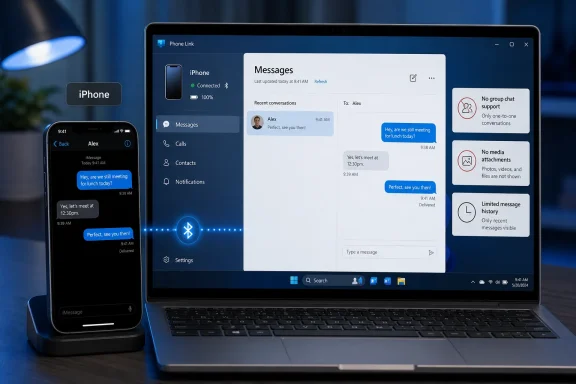
Microsoft’s Phone Link lets Windows 11 users send and receive Apple Messages from an iPhone on a PC today, provided the iPhone is paired over Bluetooth, running a supported iOS version, and granted the right notification, contacts, and messaging permissions. That is a real bridge between two ecosystems that have spent years pretending the other did not exist. It is also a narrow bridge, with missing history, no real group-chat support, and no media attachments. The feature matters less because it “brings iMessage to Windows” than because it shows exactly how much Apple’s platform boundary still defines the experience.
The phrase “iMessage on Windows” sounds like a jailbreak of Apple’s walled garden. In practice, Phone Link is not a Windows iMessage client, not a web version of Messages, and not a peer device registered into Apple’s messaging system in the way a Mac or iPad would be. It is a relay that depends on an iPhone remaining nearby, paired, trusted, and awake enough to pass events across Bluetooth.
That distinction is not pedantic. A Mac signed into the same Apple account becomes a first-class citizen in Apple’s messaging architecture. It can see conversation history, participate in group threads, handle rich media, and preserve the difference between Apple’s blue-bubble iMessage world and carrier-backed SMS, MMS, or RCS. Phone Link, by contrast, gives Windows a window into what the iPhone is willing to expose.
For users, the difference shows up immediately. You can keep a work conversation moving from your Windows desktop without picking up your phone. You can see notifications, reply to recent one-to-one messages, and initiate a basic text exchange from the PC. But you cannot treat the Windows machine as another Apple device, and that is the entire story.
Microsoft deserves credit for shipping something useful inside a hostile boundary. Apple deserves scrutiny for maintaining a boundary that makes the experience worse for mixed-device households. But the practical result is neither triumph nor scandal. It is a compromise product built out of platform politics.
Underneath that wizard is a less elegant reality. The PC is not logging into Apple Messages. It is not joining Apple’s encrypted device graph as a Mac would. It is leaning on Bluetooth pairing and notification permissions to approximate a messaging bridge.
That is why the permission dance matters so much. On the iPhone, users often need to visit Bluetooth settings, select the paired PC, and enable options such as showing message notifications, syncing contacts, or sharing system notifications. Miss one of those toggles and the feature may appear broken even though the pairing technically succeeded.
This is also why troubleshooting tends to feel more like fixing a headset than configuring a messaging client. If Bluetooth breaks, if permissions are revoked, if notification previews are restricted, or if the PC and phone drift out of a reliable connection state, Phone Link loses the thread. The experience is useful when it works, but it is not robust in the way native messaging clients are robust.
For WindowsForum readers, that should sound familiar. Windows has spent decades absorbing other vendors’ hardware and services through compatibility layers, driver models, sync agents, web apps, and protocol hacks. Phone Link for iPhone belongs to that lineage. It is a clever integration that exists because the official path does not.
That changes how the feature should be understood. A proper messaging client is a place you can arrive late and still understand the conversation. Phone Link is closer to a live terminal: it can show recent activity and help you respond while the connection exists, but it does not become the archive of record.
This matters at work. If you step into a conversation that began on your iPhone during a commute, your PC may not have the context. If you pair a new machine, you should not expect years of threads to populate as they would on a Mac. If you close the lid, walk away, or interrupt the Bluetooth session, continuity may be thinner than the marketing suggests.
The limitation also exposes the careful line Microsoft is walking. It can present messages that pass through the connection, but it cannot turn Windows into a fully trusted Apple Messages endpoint. The result is enough to reduce phone-checking during a workday, not enough to replace the iPhone as the source of truth.
That is still valuable. Many users do not need their entire personal message archive on a work PC. In fact, some administrators and privacy-minded users may prefer that Phone Link does not replicate years of messages into Windows. But the tradeoff should be understood as a structural constraint, not a missing polish item.
That is a bigger practical problem than it sounds. For many iPhone users, Messages is not primarily a one-to-one SMS tool; it is the social infrastructure of families, friend groups, school parents, neighborhood threads, and informal work coordination. If the PC cannot participate cleanly in those threads, the feature is automatically demoted.
It also means that the Windows experience is not merely incomplete; it is contextually risky. A user who assumes a reply will land in the same group may find that group semantics are not preserved as expected. Even when Phone Link behaves exactly as designed, the mental model can be wrong because users bring expectations formed by iPhone, iPad, and Mac.
This is where Apple’s platform control becomes visible to ordinary people. A Mac gets the full conversation because Apple designed the ecosystem that way. A Windows PC gets a limited Bluetooth-mediated approximation because Apple has not provided Microsoft with an equivalent sanctioned integration path.
Microsoft can improve messaging around these limitations, and it should. But it cannot wish away the fact that group messaging is one of the places where Apple’s private platform design becomes a user-facing constraint. The feature is most useful precisely when the conversation is least complicated.
That makes the Windows bridge feel old-fashioned. Messaging in 2026 is not just typed sentences. It is screenshots, photos, videos, reactions, location snippets, animated replies, documents, links with previews, and the casual visual language that now carries a large share of personal communication.
The limitation is especially jarring because Phone Link on Android has historically had deeper integration. Microsoft’s Android story, particularly with Samsung devices, has included richer access to photos, notifications, app mirroring, and cross-device workflows. On iPhone, Microsoft is operating at the edge of what Apple permits.
For some users, basic text is enough. If the goal is to reply “yes,” “running late,” or “call me in ten,” the PC bridge does its job. But the moment a conversation becomes visually rich, the iPhone returns to the center of the workflow.
That matters because the feature is being discussed as a way to use iMessage on Windows. A more honest description is that Windows can now participate in a restricted slice of iPhone messaging. That is less exciting, but it is much closer to the truth.
But local relay changes the practical privacy surface. If message content is displayed on a Windows PC, then that PC becomes part of the user’s exposure model. Notifications, lock-screen behavior, work-device monitoring policies, clipboard history, screen recording tools, and local account security all become relevant.
That is not a reason to panic. It is a reason to be precise. Encryption in transit does not guarantee that every endpoint or mirrored display is equally private. Once content is shown on a PC screen, it is subject to the security posture of that PC.
For personal machines, the risk may be small. For managed corporate Windows devices, the calculus is different. Many organizations log endpoint activity, enforce data-loss controls, capture telemetry, or restrict consumer sync features for compliance reasons. Administrators may not want personal Apple Messages flowing through a work desktop, even if those messages are not being permanently synced as a full archive.
Users should therefore treat Phone Link as a convenience with boundaries. It does not turn Windows into a rogue iMessage server. It does turn Windows into another place where personal messages can appear, be noticed, be screenshotted, or be exposed during a meeting.
For IT departments, the question is not whether Phone Link is good or bad. The question is whether consumer messaging belongs on managed PCs by default. The answer will differ sharply between a small business, a school district, a regulated financial firm, and a software company with a bring-your-own-device culture.
The risks are mundane but real. A personal message could appear during a screen share. A user could copy sensitive work text into a personal conversation from the desktop. A regulated employee could conduct business over an unmanaged messaging channel because it is suddenly convenient. A help desk could inherit tickets about iPhone pairing that have nothing to do with the organization’s core systems.
That does not mean Phone Link should be banned everywhere. It means administrators should make an explicit decision. Consumer sync features have a way of becoming infrastructure by accident when vendors ship them as friendly defaults.
Microsoft’s larger Windows strategy is to make the PC the hub of the user’s digital day, whether the phone is Android or iPhone. Enterprise IT’s job is to decide when that hub model supports work and when it quietly routes personal data into places it does not belong.
Phone Link exposes the cost of that control. A Windows user with an iPhone is not asking for something exotic. They are asking to reply to their own messages from their own computer. The fact that this requires a Bluetooth workaround says more about platform strategy than technical impossibility.
Apple would argue, implicitly if not always directly, that deep messaging integration is part of the value of owning Apple hardware. Buy a Mac and the problem disappears. Stay on Windows and you get the mediated version. That is a business model masquerading as simplicity.
Microsoft is hardly a neutral saint in platform history. Windows, Office, Teams, OneDrive, Edge, and Microsoft accounts all have their own gravity wells. But in this specific case, Microsoft’s incentive is openness because Windows must coexist with everything. Apple’s incentive is selectivity because its best experiences help sell more Apple devices.
The loser is the user who lives across ecosystems. And in 2026, that user is not an edge case. Plenty of people prefer iPhones but work on Windows PCs, game on Windows desktops, administer Windows fleets, or live in Microsoft 365 environments. Their lives are mixed even when vendor narratives are not.
That is a meaningful productivity win. Context switching is expensive, and phones are distraction machines. The ability to handle a quick text without unlocking the iPhone can save more attention than the feature’s modest scope implies.
But the feature is not good enough to become the place where users trust all messaging activity. The missing history makes it incomplete. The lack of group support makes it unreliable for common social patterns. The media limitations make it feel dated. The Bluetooth dependency makes it more fragile than cloud-native sync.
This creates a paradox. Phone Link is most appealing to the people who most want their PC to be the center of work. Those same people are likely to notice every missing piece because they spend enough time at the PC to depend on it.
Microsoft should resist the temptation to oversell the feature as iMessage on Windows. The honest pitch is stronger: if you have an iPhone and a Windows 11 PC, Phone Link can reduce the number of times you reach for your phone. That is useful. It is just not the same as ecosystem parity.
That distinction matters because the public conversation often collapses every messaging issue into the green-bubble war. RCS addresses one part of that fight: the quality and capability gap when iPhones and non-Apple phones exchange carrier messages. Phone Link addresses a different problem: whether a Windows PC can act as a convenient interface for messages tied to an iPhone.
Even in a more RCS-capable world, Apple still controls how Messages behaves on iOS and which devices can act as full participants in its ecosystem. Microsoft can build better Windows surfaces. Carriers can modernize messaging transport. Standards bodies can improve interoperability. None of that forces Apple to make Windows equivalent to macOS.
The likely future is therefore incremental, not revolutionary. Phone Link may get better setup flows, clearer error handling, and more polished notification behavior. Microsoft may deepen other iPhone-to-Windows integrations through iCloud, Microsoft 365, Edge, or OneDrive. But unless Apple offers broader APIs or a real Messages client beyond its own platforms, Windows will remain outside the inner circle.
Users should welcome incremental progress without mistaking it for surrender. Apple has not opened iMessage to Windows. Microsoft has found a way to make the iPhone slightly less isolated while it sits next to a PC.
The feature also fits a broader shift in Windows. Microsoft no longer acts as if the PC must own every layer of the user’s digital life. Instead, it wants Windows to be the control plane for services and devices users already have. That means Android phones, iPhones, cloud drives, web apps, Xbox services, AI assistants, and enterprise identity systems all orbiting the desktop.
That strategy is pragmatic. Windows remains dominant in many work and gaming contexts, but the phone won the center of personal computing years ago. Phone Link is Microsoft’s admission that the PC must negotiate with the phone, not pretend to replace it.
For Apple users, the lesson is equally clear. The iPhone works best with Apple hardware by design. If you choose Windows, you can still get useful bridges, but some of them will feel like walking through a side door.
 Microsoft Wins the Headline, Apple Keeps the System
The phrase “iMessage on Windows” sounds like a jailbreak of Apple’s walled garden. In practice, Phone Link is not a Windows iMessage client, not a web version of Messages, and not a peer device registered into Apple’s messaging system in the way a Mac or iPad would be. It is a relay that depends on an iPhone remaining nearby, paired, trusted, and awake enough to pass events across Bluetooth.That distinction is not pedantic. A Mac signed into the same Apple account becomes a first-class citizen in Apple’s messaging architecture. It can see conversation history, participate in group threads, handle rich media, and preserve the difference between Apple’s blue-bubble iMessage world and carrier-backed SMS, MMS, or RCS. Phone Link, by contrast, gives Windows a window into what the iPhone is willing to expose.
For users, the difference shows up immediately. You can keep a work conversation moving from your Windows desktop without picking up your phone. You can see notifications, reply to recent one-to-one messages, and initiate a basic text exchange from the PC. But you cannot treat the Windows machine as another Apple device, and that is the entire story.
Microsoft deserves credit for shipping something useful inside a hostile boundary. Apple deserves scrutiny for maintaining a boundary that makes the experience worse for mixed-device households. But the practical result is neither triumph nor scandal. It is a compromise product built out of platform politics.
The Setup Is Easy Because the Architecture Is Not
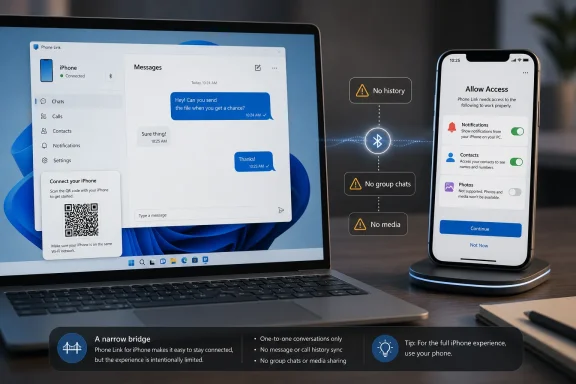
The onboarding flow looks modern enough. Open Phone Link on Windows, choose iPhone, scan a QR code, pair over Bluetooth, install or approve Link to Windows on the iPhone, and grant permissions for notifications, contacts, and system sharing. Microsoft has done the consumer-facing work to make a fragile stack feel like a normal setup wizard.Underneath that wizard is a less elegant reality. The PC is not logging into Apple Messages. It is not joining Apple’s encrypted device graph as a Mac would. It is leaning on Bluetooth pairing and notification permissions to approximate a messaging bridge.
That is why the permission dance matters so much. On the iPhone, users often need to visit Bluetooth settings, select the paired PC, and enable options such as showing message notifications, syncing contacts, or sharing system notifications. Miss one of those toggles and the feature may appear broken even though the pairing technically succeeded.
This is also why troubleshooting tends to feel more like fixing a headset than configuring a messaging client. If Bluetooth breaks, if permissions are revoked, if notification previews are restricted, or if the PC and phone drift out of a reliable connection state, Phone Link loses the thread. The experience is useful when it works, but it is not robust in the way native messaging clients are robust.
For WindowsForum readers, that should sound familiar. Windows has spent decades absorbing other vendors’ hardware and services through compatibility layers, driver models, sync agents, web apps, and protocol hacks. Phone Link for iPhone belongs to that lineage. It is a clever integration that exists because the official path does not.
The Missing Inbox Is the First Sign This Is a Relay
The most important limitation is not the lack of GIFs or the awkwardness around group chats. It is the missing inbox. Phone Link does not provide a complete historical view of your Apple Messages conversations, because Windows is not being granted a full database of your messages.That changes how the feature should be understood. A proper messaging client is a place you can arrive late and still understand the conversation. Phone Link is closer to a live terminal: it can show recent activity and help you respond while the connection exists, but it does not become the archive of record.
This matters at work. If you step into a conversation that began on your iPhone during a commute, your PC may not have the context. If you pair a new machine, you should not expect years of threads to populate as they would on a Mac. If you close the lid, walk away, or interrupt the Bluetooth session, continuity may be thinner than the marketing suggests.
The limitation also exposes the careful line Microsoft is walking. It can present messages that pass through the connection, but it cannot turn Windows into a fully trusted Apple Messages endpoint. The result is enough to reduce phone-checking during a workday, not enough to replace the iPhone as the source of truth.
That is still valuable. Many users do not need their entire personal message archive on a work PC. In fact, some administrators and privacy-minded users may prefer that Phone Link does not replicate years of messages into Windows. But the tradeoff should be understood as a structural constraint, not a missing polish item.
Group Chats Break the Illusion Fast
One-to-one messaging is the happy path. Group messaging is where the illusion starts to collapse. Phone Link for iPhone may show group-message notifications, but it does not support group chats in the way users expect from Apple Messages.That is a bigger practical problem than it sounds. For many iPhone users, Messages is not primarily a one-to-one SMS tool; it is the social infrastructure of families, friend groups, school parents, neighborhood threads, and informal work coordination. If the PC cannot participate cleanly in those threads, the feature is automatically demoted.
It also means that the Windows experience is not merely incomplete; it is contextually risky. A user who assumes a reply will land in the same group may find that group semantics are not preserved as expected. Even when Phone Link behaves exactly as designed, the mental model can be wrong because users bring expectations formed by iPhone, iPad, and Mac.
This is where Apple’s platform control becomes visible to ordinary people. A Mac gets the full conversation because Apple designed the ecosystem that way. A Windows PC gets a limited Bluetooth-mediated approximation because Apple has not provided Microsoft with an equivalent sanctioned integration path.
Microsoft can improve messaging around these limitations, and it should. But it cannot wish away the fact that group messaging is one of the places where Apple’s private platform design becomes a user-facing constraint. The feature is most useful precisely when the conversation is least complicated.
No Photos, No GIFs, No Rich Chat
The absence of attachments is the other everyday limitation that will surprise users. Phone Link for iPhone can handle basic text and emojis, but it does not support sending or receiving images, GIFs, Memojis, or the broader media behaviors people associate with modern chat.That makes the Windows bridge feel old-fashioned. Messaging in 2026 is not just typed sentences. It is screenshots, photos, videos, reactions, location snippets, animated replies, documents, links with previews, and the casual visual language that now carries a large share of personal communication.
The limitation is especially jarring because Phone Link on Android has historically had deeper integration. Microsoft’s Android story, particularly with Samsung devices, has included richer access to photos, notifications, app mirroring, and cross-device workflows. On iPhone, Microsoft is operating at the edge of what Apple permits.
For some users, basic text is enough. If the goal is to reply “yes,” “running late,” or “call me in ten,” the PC bridge does its job. But the moment a conversation becomes visually rich, the iPhone returns to the center of the workflow.
That matters because the feature is being discussed as a way to use iMessage on Windows. A more honest description is that Windows can now participate in a restricted slice of iPhone messaging. That is less exciting, but it is much closer to the truth.
Security Is Not the Same Thing as Completeness
The security story is easy to misunderstand. Phone Link’s use of Bluetooth does not mean Microsoft has broken iMessage encryption or inserted Windows as a new decrypting party inside Apple’s cloud service. Apple’s iMessage system remains end-to-end encrypted between Apple messaging participants, and the iPhone remains the device doing the real messaging work.But local relay changes the practical privacy surface. If message content is displayed on a Windows PC, then that PC becomes part of the user’s exposure model. Notifications, lock-screen behavior, work-device monitoring policies, clipboard history, screen recording tools, and local account security all become relevant.
That is not a reason to panic. It is a reason to be precise. Encryption in transit does not guarantee that every endpoint or mirrored display is equally private. Once content is shown on a PC screen, it is subject to the security posture of that PC.
For personal machines, the risk may be small. For managed corporate Windows devices, the calculus is different. Many organizations log endpoint activity, enforce data-loss controls, capture telemetry, or restrict consumer sync features for compliance reasons. Administrators may not want personal Apple Messages flowing through a work desktop, even if those messages are not being permanently synced as a full archive.
Users should therefore treat Phone Link as a convenience with boundaries. It does not turn Windows into a rogue iMessage server. It does turn Windows into another place where personal messages can appear, be noticed, be screenshotted, or be exposed during a meeting.
The Corporate Desktop Has a New Consumer Leak
Phone Link has always lived in the uneasy space between productivity and personal device sprawl. On Android, the case for it is obvious: fewer context switches, faster replies, better notification triage, and less need to pick up a phone during work. On iPhone, those benefits arrive with more caveats, but the enterprise concern is the same.For IT departments, the question is not whether Phone Link is good or bad. The question is whether consumer messaging belongs on managed PCs by default. The answer will differ sharply between a small business, a school district, a regulated financial firm, and a software company with a bring-your-own-device culture.
The risks are mundane but real. A personal message could appear during a screen share. A user could copy sensitive work text into a personal conversation from the desktop. A regulated employee could conduct business over an unmanaged messaging channel because it is suddenly convenient. A help desk could inherit tickets about iPhone pairing that have nothing to do with the organization’s core systems.
That does not mean Phone Link should be banned everywhere. It means administrators should make an explicit decision. Consumer sync features have a way of becoming infrastructure by accident when vendors ship them as friendly defaults.
Microsoft’s larger Windows strategy is to make the PC the hub of the user’s digital day, whether the phone is Android or iPhone. Enterprise IT’s job is to decide when that hub model supports work and when it quietly routes personal data into places it does not belong.
Apple’s Wall Looks Less Elegant From a Windows Desk
Apple’s ecosystem pitch has always been strongest when every device has an Apple logo. Messages on iPhone, iPad, Mac, Apple Watch, and now other Apple platforms feels coherent because Apple controls the clients, the identity model, the encryption architecture, and the user interface. The magic comes from integration, and the integration comes from control.Phone Link exposes the cost of that control. A Windows user with an iPhone is not asking for something exotic. They are asking to reply to their own messages from their own computer. The fact that this requires a Bluetooth workaround says more about platform strategy than technical impossibility.
Apple would argue, implicitly if not always directly, that deep messaging integration is part of the value of owning Apple hardware. Buy a Mac and the problem disappears. Stay on Windows and you get the mediated version. That is a business model masquerading as simplicity.
Microsoft is hardly a neutral saint in platform history. Windows, Office, Teams, OneDrive, Edge, and Microsoft accounts all have their own gravity wells. But in this specific case, Microsoft’s incentive is openness because Windows must coexist with everything. Apple’s incentive is selectivity because its best experiences help sell more Apple devices.
The loser is the user who lives across ecosystems. And in 2026, that user is not an edge case. Plenty of people prefer iPhones but work on Windows PCs, game on Windows desktops, administer Windows fleets, or live in Microsoft 365 environments. Their lives are mixed even when vendor narratives are not.
This Is Enough for Triage, Not Enough for Trust
The best use case for Phone Link with iPhone is message triage. You are at a Windows laptop, focused on a spreadsheet, remote session, code review, or Teams call, and a message arrives. You glance, reply with a short sentence, and keep working.That is a meaningful productivity win. Context switching is expensive, and phones are distraction machines. The ability to handle a quick text without unlocking the iPhone can save more attention than the feature’s modest scope implies.
But the feature is not good enough to become the place where users trust all messaging activity. The missing history makes it incomplete. The lack of group support makes it unreliable for common social patterns. The media limitations make it feel dated. The Bluetooth dependency makes it more fragile than cloud-native sync.
This creates a paradox. Phone Link is most appealing to the people who most want their PC to be the center of work. Those same people are likely to notice every missing piece because they spend enough time at the PC to depend on it.
Microsoft should resist the temptation to oversell the feature as iMessage on Windows. The honest pitch is stronger: if you have an iPhone and a Windows 11 PC, Phone Link can reduce the number of times you reach for your phone. That is useful. It is just not the same as ecosystem parity.
The RCS Era Will Not Magically Fix This
Apple’s adoption of RCS changed the messaging landscape between iPhone and Android, but it does not automatically solve Windows integration. RCS can improve carrier-based cross-platform messaging, especially compared with old SMS and MMS behavior. It does not make Windows a native Apple Messages client.That distinction matters because the public conversation often collapses every messaging issue into the green-bubble war. RCS addresses one part of that fight: the quality and capability gap when iPhones and non-Apple phones exchange carrier messages. Phone Link addresses a different problem: whether a Windows PC can act as a convenient interface for messages tied to an iPhone.
Even in a more RCS-capable world, Apple still controls how Messages behaves on iOS and which devices can act as full participants in its ecosystem. Microsoft can build better Windows surfaces. Carriers can modernize messaging transport. Standards bodies can improve interoperability. None of that forces Apple to make Windows equivalent to macOS.
The likely future is therefore incremental, not revolutionary. Phone Link may get better setup flows, clearer error handling, and more polished notification behavior. Microsoft may deepen other iPhone-to-Windows integrations through iCloud, Microsoft 365, Edge, or OneDrive. But unless Apple offers broader APIs or a real Messages client beyond its own platforms, Windows will remain outside the inner circle.
Users should welcome incremental progress without mistaking it for surrender. Apple has not opened iMessage to Windows. Microsoft has found a way to make the iPhone slightly less isolated while it sits next to a PC.
The Practical Verdict for Windows Users Is Narrow but Positive
For a Windows user with an iPhone, Phone Link is worth trying because the setup cost is low and the upside is immediate. If it saves a dozen phone pickups during a workday, it has earned its place. Just do not build your communication habits around it without understanding what it cannot do.The feature also fits a broader shift in Windows. Microsoft no longer acts as if the PC must own every layer of the user’s digital life. Instead, it wants Windows to be the control plane for services and devices users already have. That means Android phones, iPhones, cloud drives, web apps, Xbox services, AI assistants, and enterprise identity systems all orbiting the desktop.
That strategy is pragmatic. Windows remains dominant in many work and gaming contexts, but the phone won the center of personal computing years ago. Phone Link is Microsoft’s admission that the PC must negotiate with the phone, not pretend to replace it.
For Apple users, the lesson is equally clear. The iPhone works best with Apple hardware by design. If you choose Windows, you can still get useful bridges, but some of them will feel like walking through a side door.
The Windows-iPhone Truce Comes With Fine Print
The concrete advice is simple: use Phone Link for convenience, not as a complete messaging replacement. It is a useful bridge for basic text replies, but the bridge has weight limits.- Phone Link on Windows can send and receive basic one-to-one messages through a paired iPhone, but the iPhone remains the essential messaging device.
- The setup depends on Bluetooth pairing, Phone Link on the PC, Link to Windows on the iPhone, and the right iOS permissions being enabled.
- Windows does not receive a full Apple Messages inbox, so older conversation history and disconnected-session context may be missing.
- Group chats, images, GIFs, Memojis, and rich attachments remain major weak spots compared with using Messages on Apple hardware.
- Administrators should decide whether personal phone messaging belongs on managed PCs rather than letting the feature become an accidental default.
- The feature is best understood as a triage tool for quick replies during PC work, not as true iMessage parity on Windows.
References
- Primary source: Lifehacker
Published: 2026-06-05T14:10:30.473026
You Can Now Use iMessage on Windows (With Some Serious Limitations)
Phone Link allows you to send and receive Apple Messages on your PC.au.lifehacker.com - Related coverage: macworld.com
Can you get iMessage on Windows? | Macworld
Microsoft's Phone Link app on Windows 11 will let users access iMessage on the iPhone and perform very basic chat functions.www.macworld.com - Related coverage: phonearena.com
Microsoft is testing an app that will allow the iMessage platform to be used on your PC - PhoneArena
Microsoft is testing the use of its Windows Phone Link app as a way to send and receive iMessage content through your PC.www.phonearena.com - Official source: microsoft.com
Use Phone Link to Sync Your Android or iPhone to Your Windows Computer | Microsoft
Sync your smartphone and Windows computer wirelessly using Microsoft Phone Link. Text, call, back up photos, and more no matter if you have an Android or an iPhone.www.microsoft.com
- Related coverage: idownloadblog.com
Microsoft brings iMessage to Windows with notable restrictions
Send and receive iMessage chats and SMS texts on Windows 11, but without blue and green bubbles, messaging history and attachment support. www.idownloadblog.com
- Related coverage: notebookcheck.net
Windows now supports iPhones and iMessage via Phone Link - Notebookcheck News
The latest Windows Insider update brings support for integrating iPhones and iMessage directly into Windows via the Phone Link app. However, there are some major drawbacks, such as a lack of message history and multimedia support. www.notebookcheck.net
- Related coverage: scscc.club