

Microsoft’s Windows 11 Photos app includes Image Creator as an AI feature for Copilot+ PCs, and Paul Thurrott’s July 7, 2026 Windows 11 Field Guide update surfaces it as part of the broader remaking of basic Windows apps into AI front ends. The feature is not just another button in Photos. It is a marker of Microsoft’s bigger bet: the next phase of Windows differentiation will happen less in the shell and more inside the default apps people already open every day.
That makes Image Creator more interesting than its modest placement suggests. Microsoft has spent two years telling users that Copilot+ PCs are a new class of machine, but the sales pitch only works if familiar workflows feel meaningfully different on that hardware. Photos is one of the places where that argument becomes tangible.
For much of the Copilot era, Microsoft’s AI strategy felt bolted onto Windows rather than woven through it. Copilot lived in a sidebar, then an app, then a shifting set of entry points that often seemed more important to Microsoft’s product roadmap than to the user’s actual work. Image Creator in Photos represents a quieter but more consequential approach: put generative AI where the media already is.
Microsoft’s own documentation describes Image Creator and Restyle Image as Copilot+ PC features in the Photos app, designed to let users create new images or reimagine existing ones with AI assistance. Thurrott’s Windows 11 Field Guide treatment places the feature in the practical context most users will encounter: not as an abstract AI platform, but as another capability inside a built-in Windows app.
That distinction matters. A standalone AI image generator asks the user to leave their workflow and go somewhere else. An image tool inside Photos implies that AI is becoming part of image management itself, the same way crop, rotate, enhance, and share became ordinary verbs.
The result is a change in tone. Microsoft is no longer merely saying Windows can talk about your content through Copilot. It is saying Windows can help produce and transform that content inside the system apps that have traditionally been treated as utilities.
That is where Photos becomes strategically useful. Most Windows users do not benchmark NPUs. They do not care whether a model runs on the CPU, GPU, NPU, or in the cloud unless it changes cost, speed, privacy, battery life, or availability. They care whether the PC does something useful without making them install four more apps and sign into three more services.
Microsoft’s Copilot+ feature list has always mixed the impressive with the uneven. Live Captions translation, Windows Studio Effects, Cocreator in Paint, Auto Super Resolution, Recall, Click to Do, and Photos AI features all serve different audiences. Some are obvious demos; others are slow-burn workflow changes.
Image Creator sits somewhere in the middle. It is easy to demo because it produces a visible result. It is also easy to dismiss because AI image generation is no longer novel. The strategic question is not whether Microsoft can generate an image. The question is whether Windows can make image generation feel native, governed, and local enough to justify the Copilot+ label.
The old Windows bundled app philosophy was simple: ship enough to cover common tasks, then let serious users install something better. The new philosophy is more ambitious. Microsoft wants built-in apps to become distribution channels for cloud services, local AI models, Microsoft accounts, content provenance, and Store-delivered updates.
Photos is well suited to that transition because personal images are emotional, plentiful, and frequently under-managed. Users have thousands of screenshots, phone imports, scanned documents, memes, receipts, and family pictures. If AI can help sort, repair, search, erase, upscale, restyle, or generate images there, the value proposition is easier to understand than another generic chatbot prompt box.
The risk is that Photos becomes overloaded. A photo viewer that launches slowly or buries basic tasks under AI affordances will annoy exactly the users Microsoft needs to win over. Windows veterans have long memories of built-in apps becoming heavier as Microsoft chases strategic trends.
But the implementation details complicate the marketing. Microsoft’s Windows AI documentation says image generation support is optimized for Copilot+ PCs and requires NPU-backed hardware. It also notes that some AI models may be optional downloads, potentially several gigabytes in size, delivered through Windows Update and removable later through AI Components settings.
That is a reasonable architecture, but it changes the administrative surface area. A feature that appears to be “in Photos” may depend on OS build, app version, model availability, hardware class, Windows Update state, Microsoft Store delivery, regional availability, and policy. For home users, that becomes confusion. For enterprise IT, it becomes a matrix.
This is the new Windows reality. Features are no longer defined solely by the version number in winver. They are assembled from the OS, inbox apps, Store updates, optional models, account state, cloud policy, hardware capability, and staged rollout flags. Image Creator is not just a feature; it is a reminder that Windows has become a service stack wearing an operating system’s clothes.
That contract has been rewritten. Notepad has tabs and AI-adjacent writing features in some contexts. Paint has layers, background removal, Cocreator, and image generation. Snipping Tool can read text and record video. Photos can erase, restyle, upscale, and create.
This evolution is not inherently bad. In fact, many of these additions are overdue. Users should not need a full Adobe subscription to remove a distracting object from a casual photo, extract text from a screenshot, or create a quick graphic for a school flyer.
The problem is trust. When Microsoft adds power to inbox apps, users ask whether they are receiving a better Windows experience or being nudged deeper into Microsoft’s services. The answer is often both. That duality is why each new AI feature attracts skepticism even when the feature itself is useful.
Paint begins with creation. It is a canvas app, even when the canvas is simple. Photos begins with a library, a memory, or a file the user already has. That makes Photos the more natural home for reimagining, extending, restyling, repairing, and producing variations around personal media.
The difference is subtle but important. A user opening Paint is saying, “I want to make something.” A user opening Photos is more often saying, “I want to do something with this.” Microsoft’s challenge is to make Image Creator fit that second intent rather than turning Photos into another generic prompt box.
If Microsoft gets that right, Photos could become the casual creative hub Windows has lacked since the consumer “Creators Update” era faded. If it gets it wrong, the feature will look like AI wallpaper pasted onto a utility app.
Administrators will want to know whether prompts leave the device, whether generated content is watermarked or provenance-tagged, whether models are local or cloud-backed, whether data is retained, and how the feature can be disabled. They will also care about bandwidth and storage if optional models arrive through Windows Update.
Microsoft has been increasingly explicit about responsible AI, content safety, and provenance in its Windows AI materials. That is welcome, but enterprise buyers will judge the controls more than the language. A feature is manageable only if it can be inventoried, configured, audited, and explained to compliance teams.
There is also a licensing dimension. Copilot+ PC features create a split fleet. Some devices can run the experience; others cannot. In mixed environments, help desks will field the inevitable question: why does Photos have this button on one laptop and not another?
Image Creator in Photos will likely live in that messy space for a while. Copilot+ PC exclusivity is understandable from a performance and positioning standpoint, but it also means many Windows 11 users will read about features they cannot use. That creates a perception gap between “Windows 11 now does this” and “your Windows 11 PC does this.”
Microsoft can manage that gap with clear messaging, but clarity has not always been its strength in the Windows 11 era. Between Moment updates, enablement packages, controlled feature rollouts, Insider channels, Store-delivered app features, and hardware-gated AI capabilities, even technically literate users can struggle to determine what should be available.
This matters because enthusiasm is fragile. AI features that feel magical on a supported machine feel like fragmentation on an unsupported one. The same feature can be both a showcase and a source of resentment.
That middle includes office workers making slide backgrounds, parents making party invitations, students making project visuals, small businesses making social posts, and forum users generating header art. These users do not need layer masks, color-managed workflows, or RAW pipelines. They need fast, acceptable, low-friction output.
In that market, the competition is Canva, Adobe Express, Google Photos, Apple’s system-level intelligence features, web-based AI image tools, and the user’s own decision to do nothing. Windows has a distribution advantage because Photos is already there. But distribution only gets Microsoft the first click.
The second click depends on quality. The third depends on trust. The fourth depends on whether Microsoft can resist turning every useful feature into an upsell path.
That has advantages. It avoids making users understand “AI platforms” before they can benefit from them. It gives Microsoft consistent surfaces for responsible AI warnings, consent prompts, and content credentials. It lets the company update features faster than the underlying OS.
But it also decentralizes the Windows experience. Instead of one Copilot, there are many little copilots. Instead of one AI settings page, there are app-specific affordances, model packages, and feature states. The operating system becomes less a single product than a constellation of AI-enabled endpoints.
That is where WindowsForum readers should pay attention. The future of Windows administration may involve managing not only apps and OS policies, but the AI capabilities that appear inside those apps. Photos Image Creator is a consumer-facing feature, but the pattern behind it is enterprise-relevant.
That is the right lens. The question for Windows 11 in 2026 is not whether Microsoft can announce AI features. It has announced plenty. The question is whether those features become normal enough to be judged by ordinary software standards: speed, reliability, discoverability, reversibility, policy control, and user value.
Image Creator should be evaluated that way. Does it launch quickly? Does it explain what happens locally and what does not? Does it save outputs predictably? Does it avoid polluting the library? Does it respect work and school policy? Does it fail gracefully on unsupported PCs?
Those questions are less glamorous than prompt quality, but they are the difference between a feature users trust and one they try once.
That makes Image Creator more interesting than its modest placement suggests. Microsoft has spent two years telling users that Copilot+ PCs are a new class of machine, but the sales pitch only works if familiar workflows feel meaningfully different on that hardware. Photos is one of the places where that argument becomes tangible.
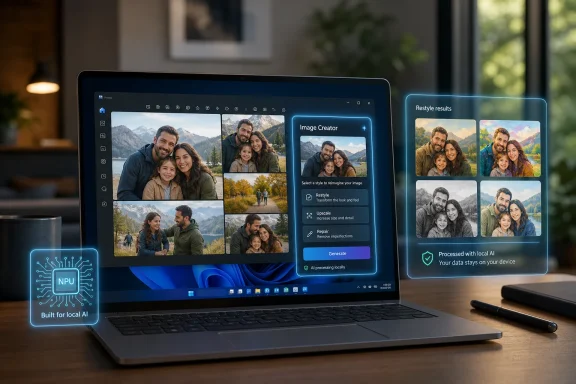 Microsoft Moves AI From the Sidebar Into the Family Photo Album
For much of the Copilot era, Microsoft’s AI strategy felt bolted onto Windows rather than woven through it. Copilot lived in a sidebar, then an app, then a shifting set of entry points that often seemed more important to Microsoft’s product roadmap than to the user’s actual work. Image Creator in Photos represents a quieter but more consequential approach: put generative AI where the media already is.Microsoft’s own documentation describes Image Creator and Restyle Image as Copilot+ PC features in the Photos app, designed to let users create new images or reimagine existing ones with AI assistance. Thurrott’s Windows 11 Field Guide treatment places the feature in the practical context most users will encounter: not as an abstract AI platform, but as another capability inside a built-in Windows app.
That distinction matters. A standalone AI image generator asks the user to leave their workflow and go somewhere else. An image tool inside Photos implies that AI is becoming part of image management itself, the same way crop, rotate, enhance, and share became ordinary verbs.
The result is a change in tone. Microsoft is no longer merely saying Windows can talk about your content through Copilot. It is saying Windows can help produce and transform that content inside the system apps that have traditionally been treated as utilities.
The Copilot+ PC Pitch Needed More Than a Badge
Copilot+ PCs arrived with a hardware definition: a neural processing unit capable of more than 40 TOPS, modern silicon, and a promise of local AI experiences. But hardware categories do not sell themselves. They need daily-use proof.That is where Photos becomes strategically useful. Most Windows users do not benchmark NPUs. They do not care whether a model runs on the CPU, GPU, NPU, or in the cloud unless it changes cost, speed, privacy, battery life, or availability. They care whether the PC does something useful without making them install four more apps and sign into three more services.
Microsoft’s Copilot+ feature list has always mixed the impressive with the uneven. Live Captions translation, Windows Studio Effects, Cocreator in Paint, Auto Super Resolution, Recall, Click to Do, and Photos AI features all serve different audiences. Some are obvious demos; others are slow-burn workflow changes.
Image Creator sits somewhere in the middle. It is easy to demo because it produces a visible result. It is also easy to dismiss because AI image generation is no longer novel. The strategic question is not whether Microsoft can generate an image. The question is whether Windows can make image generation feel native, governed, and local enough to justify the Copilot+ label.
Photos Has Become a Test Lab for the New Windows
The Photos app has had an odd life in modern Windows. It began as a default viewer and library app, then absorbed editing, OneDrive integration, iCloud access, video-adjacent workflows, OCR-like conveniences, background tools, and now AI generation. That accumulation can feel messy, but it also makes Photos a revealing map of Microsoft’s priorities.The old Windows bundled app philosophy was simple: ship enough to cover common tasks, then let serious users install something better. The new philosophy is more ambitious. Microsoft wants built-in apps to become distribution channels for cloud services, local AI models, Microsoft accounts, content provenance, and Store-delivered updates.
Photos is well suited to that transition because personal images are emotional, plentiful, and frequently under-managed. Users have thousands of screenshots, phone imports, scanned documents, memes, receipts, and family pictures. If AI can help sort, repair, search, erase, upscale, restyle, or generate images there, the value proposition is easier to understand than another generic chatbot prompt box.
The risk is that Photos becomes overloaded. A photo viewer that launches slowly or buries basic tasks under AI affordances will annoy exactly the users Microsoft needs to win over. Windows veterans have long memories of built-in apps becoming heavier as Microsoft chases strategic trends.
The Local AI Story Is Powerful, but It Is Not Simple
Microsoft’s most compelling argument for Copilot+ PCs is local execution. In theory, on-device AI means lower latency, better privacy, offline capability, and reduced dependence on metered cloud services. For IT administrators and privacy-conscious users, that is the difference between a feature that might be allowed and one that is dead on arrival.But the implementation details complicate the marketing. Microsoft’s Windows AI documentation says image generation support is optimized for Copilot+ PCs and requires NPU-backed hardware. It also notes that some AI models may be optional downloads, potentially several gigabytes in size, delivered through Windows Update and removable later through AI Components settings.
That is a reasonable architecture, but it changes the administrative surface area. A feature that appears to be “in Photos” may depend on OS build, app version, model availability, hardware class, Windows Update state, Microsoft Store delivery, regional availability, and policy. For home users, that becomes confusion. For enterprise IT, it becomes a matrix.
This is the new Windows reality. Features are no longer defined solely by the version number in winver. They are assembled from the OS, inbox apps, Store updates, optional models, account state, cloud policy, hardware capability, and staged rollout flags. Image Creator is not just a feature; it is a reminder that Windows has become a service stack wearing an operating system’s clothes.
Microsoft Is Rebuilding the Inbox App Contract
The traditional contract of a Windows inbox app was modest. Notepad edited text. Paint drew pixels. Photos opened pictures. Calculator calculated. If a user wanted more, Windows got out of the way.That contract has been rewritten. Notepad has tabs and AI-adjacent writing features in some contexts. Paint has layers, background removal, Cocreator, and image generation. Snipping Tool can read text and record video. Photos can erase, restyle, upscale, and create.
This evolution is not inherently bad. In fact, many of these additions are overdue. Users should not need a full Adobe subscription to remove a distracting object from a casual photo, extract text from a screenshot, or create a quick graphic for a school flyer.
The problem is trust. When Microsoft adds power to inbox apps, users ask whether they are receiving a better Windows experience or being nudged deeper into Microsoft’s services. The answer is often both. That duality is why each new AI feature attracts skepticism even when the feature itself is useful.
Image Creator Makes Sense Because Paint Was Not Enough
Microsoft already has image generation in Paint through Image Creator, and Copilot can generate images through Microsoft’s broader AI services. At first glance, putting similar functionality in Photos risks duplication. But the workflows differ.Paint begins with creation. It is a canvas app, even when the canvas is simple. Photos begins with a library, a memory, or a file the user already has. That makes Photos the more natural home for reimagining, extending, restyling, repairing, and producing variations around personal media.
The difference is subtle but important. A user opening Paint is saying, “I want to make something.” A user opening Photos is more often saying, “I want to do something with this.” Microsoft’s challenge is to make Image Creator fit that second intent rather than turning Photos into another generic prompt box.
If Microsoft gets that right, Photos could become the casual creative hub Windows has lacked since the consumer “Creators Update” era faded. If it gets it wrong, the feature will look like AI wallpaper pasted onto a utility app.
The Enterprise Problem Is Not Art, It Is Governance
For corporate environments, AI image generation inside Photos may sound like a consumer feature. That would be a mistake. Any generative feature in an inbox app raises governance questions, even if the immediate use case is a marketing draft or internal presentation graphic.Administrators will want to know whether prompts leave the device, whether generated content is watermarked or provenance-tagged, whether models are local or cloud-backed, whether data is retained, and how the feature can be disabled. They will also care about bandwidth and storage if optional models arrive through Windows Update.
Microsoft has been increasingly explicit about responsible AI, content safety, and provenance in its Windows AI materials. That is welcome, but enterprise buyers will judge the controls more than the language. A feature is manageable only if it can be inventoried, configured, audited, and explained to compliance teams.
There is also a licensing dimension. Copilot+ PC features create a split fleet. Some devices can run the experience; others cannot. In mixed environments, help desks will field the inevitable question: why does Photos have this button on one laptop and not another?
Windows Enthusiasts Will Notice the Fragmentation First
The Windows enthusiast community is unusually sensitive to feature inconsistency because enthusiasts run multiple machines, Insider builds, Store app updates, and hardware generations. They notice when one device has a feature that another device lacks. They notice when an app update arrives without the model it needs. They notice when a Microsoft support page says a feature exists but the UI disagrees.Image Creator in Photos will likely live in that messy space for a while. Copilot+ PC exclusivity is understandable from a performance and positioning standpoint, but it also means many Windows 11 users will read about features they cannot use. That creates a perception gap between “Windows 11 now does this” and “your Windows 11 PC does this.”
Microsoft can manage that gap with clear messaging, but clarity has not always been its strength in the Windows 11 era. Between Moment updates, enablement packages, controlled feature rollouts, Insider channels, Store-delivered app features, and hardware-gated AI capabilities, even technically literate users can struggle to determine what should be available.
This matters because enthusiasm is fragile. AI features that feel magical on a supported machine feel like fragmentation on an unsupported one. The same feature can be both a showcase and a source of resentment.
The Real Competition Is Not Photoshop
It is tempting to compare Image Creator in Photos with professional creative tools. That is the wrong fight. Microsoft is not trying to beat Photoshop for working photographers, designers, or illustrators. It is trying to capture the enormous middle of casual image work.That middle includes office workers making slide backgrounds, parents making party invitations, students making project visuals, small businesses making social posts, and forum users generating header art. These users do not need layer masks, color-managed workflows, or RAW pipelines. They need fast, acceptable, low-friction output.
In that market, the competition is Canva, Adobe Express, Google Photos, Apple’s system-level intelligence features, web-based AI image tools, and the user’s own decision to do nothing. Windows has a distribution advantage because Photos is already there. But distribution only gets Microsoft the first click.
The second click depends on quality. The third depends on trust. The fourth depends on whether Microsoft can resist turning every useful feature into an upsell path.
The Default App Is Becoming the AI App Store
One of the underappreciated consequences of Windows AI is that default apps are becoming model launchers. Photos is not merely Photos. Paint is not merely Paint. Snipping Tool is not merely Snipping Tool. Each app becomes a place where Microsoft can expose a capability, download a model, apply a policy, and teach the user a new expectation.That has advantages. It avoids making users understand “AI platforms” before they can benefit from them. It gives Microsoft consistent surfaces for responsible AI warnings, consent prompts, and content credentials. It lets the company update features faster than the underlying OS.
But it also decentralizes the Windows experience. Instead of one Copilot, there are many little copilots. Instead of one AI settings page, there are app-specific affordances, model packages, and feature states. The operating system becomes less a single product than a constellation of AI-enabled endpoints.
That is where WindowsForum readers should pay attention. The future of Windows administration may involve managing not only apps and OS policies, but the AI capabilities that appear inside those apps. Photos Image Creator is a consumer-facing feature, but the pattern behind it is enterprise-relevant.
Thurrott’s Field Guide Framing Gets the Scale Right
Paul Thurrott’s Windows 11 Field Guide has always been less about breaking news than about documenting the lived Windows experience. That makes its inclusion of Image Creator useful. It treats the feature as part of the operating system’s everyday surface, not as a keynote spectacle.That is the right lens. The question for Windows 11 in 2026 is not whether Microsoft can announce AI features. It has announced plenty. The question is whether those features become normal enough to be judged by ordinary software standards: speed, reliability, discoverability, reversibility, policy control, and user value.
Image Creator should be evaluated that way. Does it launch quickly? Does it explain what happens locally and what does not? Does it save outputs predictably? Does it avoid polluting the library? Does it respect work and school policy? Does it fail gracefully on unsupported PCs?
Those questions are less glamorous than prompt quality, but they are the difference between a feature users trust and one they try once.
The Button in Photos Carries a Bigger Windows Bet
Microsoft’s Image Creator push in Photos tells us several concrete things about where Windows is heading, and most of them matter beyond image generation.- Microsoft is using built-in apps as the primary delivery surface for Copilot+ PC differentiation.
- Copilot+ exclusivity will continue to create visible differences between otherwise similar Windows 11 installations.
- Optional AI models delivered through Windows Update make storage, bandwidth, and lifecycle management part of the user experience.
- Photos is evolving from a viewer and organizer into a lightweight creative and AI-editing environment.
- Enterprise acceptance will depend less on novelty than on policy controls, provenance, privacy boundaries, and predictable deployment behavior.
- Windows enthusiasts should expect more features whose availability depends on a mix of hardware, app version, region, account state, and staged rollout timing.
References
- Primary source: thurrott.com
Published: 2026-07-07T23:10:15.630540
Loading…
www.thurrott.com - Related coverage: windowscentral.com
Windows 11 version 26H2 is packed with surprising upgrades, and these 7 features might change how you use your PC | Windows Central
The Windows 11 2026 Update isn't about a major redesign. It's about giving users more control, better customization, and smarter everyday features.www.windowscentral.com - Official source: support.microsoft.com
Loading…
support.microsoft.com - Official source: learn.microsoft.com
Photos release notes - Windows Insider Program | Microsoft Learn
Release notes for Photos app updates in Windows Insider builds.learn.microsoft.com - Related coverage: pureinfotech.com
KB5095093 (build 26200.8737) for Windows 11 drops as part of the July 2026 update (preview) - Pureinfotech
KB5095093 for Windows 11 (build 26200.8737) introduces Point-in-time Restore, Widgets changes, and major improvements to File Explorer, Bluetooth, and the system. pureinfotech.com
- Official source: news.microsoft.com
- Official source: cdn-dynmedia-1.microsoft.com