

Since April 2026, O-UNC-066, the extortion actor also known as Pink, has targeted enterprise Microsoft 365 customers with phone-led account takeovers that abuse Microsoft’s passkey enrollment push, steering victims to fake passkey sites while attackers register their own access to live accounts. The uncomfortable lesson is not that passkeys are broken. It is that passkey adoption has become visible enough, urgent enough, and confusing enough for attackers to weaponize the enrollment ceremony itself. Pink is exploiting the messy human middle between “phishing-resistant authentication” as a security architecture and “please follow these steps while I’m on the phone with you” as an employee experience.
The campaign described by Okta Threat Intelligence and later covered by BleepingComputer is a modern cloud-extortion play: no malware detonation, no dramatic ransomware splash screen, no obvious endpoint incident at the start. Instead, O-UNC-066 calls targeted employees, persuades them that they need to register a new Microsoft passkey, and walks them toward a fake Microsoft 365 sign-in flow. The actor’s apparent goal is to take over accounts, steal cloud data, and use that data for extortion.
That distinction matters for Windows and Microsoft 365 administrators because it changes the center of gravity. The endpoint may be perfectly patched. The user may be working from a legitimate device. Microsoft may issue a legitimate multi-factor authentication challenge. The failure happens when a real authentication process is wrapped in a fake story, with the attacker running the live session in parallel.
Okta tracks the actor as O-UNC-066; Palo Alto Networks Unit 42 has associated the Pink name with a data-extortion operation. The targets named in the verified reporting span enterprise Microsoft 365 customers in healthcare, technology, aviation, and automotive. Those are sectors where Microsoft 365 is not merely email; it is document storage, workflow, engineering data, internal chat, calendars, identity, and in many cases the soft underbelly of business operations.
The phishing lure is deliberately timed. Microsoft administrators recently gained the ability to nudge users to enroll in passkeys at sign-in, part of the broader industry move away from passwords and phishable MFA. Pink’s trick is to take that legitimate change and transform it into a plausible helpdesk script: your company is rolling out passkeys; you need to register now; here is the page; I’ll stay with you while you complete it.
The result is a campaign that attacks not the cryptography of passkeys but the deployment path around them. That is a far more common and, for many enterprises, more urgent problem.
Pink’s campaign works because many organizations are not yet in that mature state. Users still have passwords. Users still have MFA methods that can be relayed or coached through a phone call. Administrators are still nudging employees to register passkeys rather than enforcing a completed passwordless end state. That transition period is where the attack lives.
According to Okta’s analysis, the fake site captures the victim’s username and password from the initial bogus Microsoft page. The operator then uses those credentials against the real Microsoft sign-in page. When Microsoft triggers a legitimate multi-factor authentication challenge, the phishing kit operator adapts the fake flow shown to the victim so the phone call and the browser screen remain synchronized.
This is why calling it “fake passkey phishing” can understate the operational cleverness. The attacker is not merely asking for a password and hoping the victim approves a random prompt. The attacker is staging a real-time identity ceremony, using a phishing kit and a human caller as a joint control plane. The user sees what looks like a coherent enrollment process. The attacker sees the live Microsoft authentication process and steers the user through whatever step is needed next.
The passkey comes at the end of that race. While the victim believes they are setting up their own passkey, the attacker is reportedly registering a passkey under the attacker’s control on the legitimate account. If Microsoft later sends the user an automated email confirming a new passkey was added, the victim has already been primed to interpret that message as confirmation of the task they just completed.
That is the campaign’s central deception: the security notification is not suppressed; it is socially pre-explained.
Microsoft’s own documentation says users might see a passkey registration prompt if a registration campaign nudge is enabled, or if an administrator explicitly requires passkey registration through policy. That is normal enterprise hygiene: encourage stronger authentication, reduce password dependence, and make phishing-resistant MFA the default rather than the exception.
But every new user-facing security workflow creates a temporary ambiguity tax. Employees may not know what the genuine prompt looks like. They may not know whether IT is supposed to call them. They may not know whether passkey registration happens in a browser, in Microsoft Authenticator, through Windows Hello, through a platform dialog, or through a corporate portal. Attackers thrive in that gray zone.
Okta’s research points to that timing explicitly: as Microsoft gave administrators more ways to push passkey enrollment, O-UNC-066 used the well-intentioned change as a pretext. The malicious domains contain the word “passkey,” with examples including assignpasskey.com, deploypasskey.com, and passkeyadd.com. A targeted company might see a subdomain constructed around its own name, adding just enough familiarity to lower suspicion during a phone call.
The lesson for administrators is not to disable passkey adoption. It is to stop treating adoption prompts as merely a product configuration problem. A passkey rollout is now a communications event, a helpdesk process, a detection challenge, and a user-training campaign. If employees can be nudged by Microsoft, they can be nudged by an attacker pretending to be Microsoft, IT, or both.
This is not a small UI mistake by the attackers. It is a deliberate distraction. Okta’s analysis describes the seed-phrase step as a kind of sleight of hand: while the victim is busy writing down or verifying words, the operator has time to complete the real account takeover work in the background. The victim is asked to perform a task that feels security-sensitive, which makes the flow seem more official rather than less.
That dynamic is important because users often evaluate legitimacy emotionally rather than technically. A complicated process can feel safer than a simple one. A recovery phrase can feel like “serious security.” A phone caller who patiently waits while the employee writes down words can feel helpful rather than malicious. The more ritualized the experience becomes, the less likely the victim is to interrupt it.
For IT teams, the seed phrase is the cleanest user-facing rule in the entire story: Microsoft Entra passkey registration does not ask users to save a BIP-39 seed phrase. If a user sees a seed phrase, a word list, or a “verify the final word” recovery prompt during Microsoft 365 passkey enrollment, the process should be treated as hostile. That message is simple enough to train, put in rollout emails, and repeat in helpdesk scripts.
It also exposes a broader weakness in passwordless education. Many employees have heard “passkeys are like cryptographic keys” or “passkeys replace passwords,” but they have not seen the real enrollment flow enough times to reject a counterfeit. Attackers do not need users to understand BIP-39. They only need users to believe that unfamiliar security processes are supposed to be unfamiliar.
That matters because enterprise MFA has become fragmented. One victim may see SMS OTP. Another may see a time-based authenticator code. Another may face a push notification with number matching. An automated phishing page that guesses the wrong challenge can break the illusion. An operator-guided kit can adjust the screen to match what the real Microsoft session demands.
This hybrid model—caller plus phishing panel—also reduces the victim’s opportunity to think. The employee is not alone with a suspicious page. They are in a live conversation with someone claiming authority or helpfulness. Silence, delay, and confusion become moments the attacker can manage. If the victim hesitates, the caller can reassure. If the victim sees an MFA prompt, the caller can explain it. If the victim receives a passkey notification later, the caller’s earlier framing has already supplied the answer.
The kit also uses branding to narrow the gap between fake and real. The phishing websites are customized with the victim organization’s branding, while generic styling is pulled from Microsoft’s Content Delivery Network. That combination is effective because modern corporate sign-in pages are themselves composites: Microsoft chrome, tenant branding, redirects, MFA screens, and sometimes third-party identity providers. Employees have been trained by reality to expect complexity.
Okta noted an important limitation: its analysis found the kit did not attempt to handle federation to third-party identity providers such as Okta. That caveat is worth preserving. It does not make the campaign harmless; it means defenders should avoid overgeneralizing the exact flow across every identity architecture. The broader technique—voice-led manipulation of identity enrollment—remains relevant even where the specific kit behavior changes.
Okta reports that O-UNC-066 hosts phishing infrastructure on providers located in Russia and the United States. The use of per-target subdomains gives the campaign a tailored feel without requiring the actor to register a fresh base domain for every victim. A company-specific subdomain under a passkey-themed domain is enough to support the caller’s story.
The campaign’s extortion turn is equally important. On May 31, 2026, the attackers published a leak site to apply public pressure to compromised organizations. That places the activity in the growing category of cloud-data extortion, where the attacker’s leverage comes from stolen information rather than encrypted machines.
For Microsoft 365 tenants, this is especially uncomfortable because the data worth extorting may be spread across Exchange Online, SharePoint, OneDrive, Teams, and connected applications. A single compromised identity can be enough to reach sensitive files, internal threads, customer documents, contract material, or regulated data. The blast radius depends less on whether ransomware runs and more on what that user can already access.
That is why Pink should be understood as an identity and SaaS threat first. The dramatic moment is not code execution. It is a new authenticator being added to a legitimate account after a phone call.
The enrollment gap has three parts. First, the user may not know what a legitimate passkey registration looks like. Second, the organization may not have clearly said whether helpdesk staff will ever call users to initiate registration. Third, detection systems may alert on new passkey creation, but not fast enough or with enough context to stop an extortion actor moving through cloud data.
Microsoft’s own passkey documentation emphasizes that admins can monitor or audit passkey usage with audit logs, sign-in logs, and user notifications. It also notes that passkeys do not automatically expire, making lifecycle hygiene important. In a campaign like Pink’s, that lifecycle begins at creation: who created the passkey, from where, after what sign-in, and following what user interaction?
The answer cannot be “users should be smarter.” The attacker’s script is designed precisely for a world in which Microsoft, security teams, and identity vendors are all telling employees to adopt passkeys. A user who cooperates with a passkey rollout is doing what they have been asked to do. The organization’s job is to make the authentic path unmistakable and the fake path reportable.
That means every passkey deployment needs a negative script as well as a positive one. Not just “here is how to enroll,” but “we will never call you and ask you to enroll while we wait on the phone.” Not just “expect a Microsoft prompt,” but “do not use links sent by callers; start from the known security info page or a managed portal.” Not just “passkeys are phishing resistant,” but “registration can still be socially engineered if you approve the wrong session first.”
That wording is important. Simply allowing passkeys is not the same as enforcing phishing resistance. A tenant that supports passkeys but still permits passwords plus phishable MFA for the same users remains exposed during the transition. Attackers will route around the strongest method and exploit the weakest method still accepted by policy.
For privileged users, executives, finance teams, legal teams, healthcare administrators, engineering leads, and anyone with broad access to SharePoint or OneDrive data, the tolerance for weak fallback methods should be low. If a user can add or reset authenticators after satisfying a phishable factor, the organization has not solved the core problem. It has created a better front door while leaving a side door that can be opened by a phone call.
The helpdesk process deserves equal scrutiny. Many identity incidents begin with “IT called me,” “I called IT,” or “someone said they were from support.” The control here is not merely a training poster. It is a defined verification method that users actually know and helpdesk staff actually follow. Callback through known numbers, ticket verification through a trusted portal, internal code words, manager escalation for sensitive enrollment, and clear “we will not ask” language all matter.
This is also where WindowsForum readers should resist vendor absolutism. Okta FastPass, Microsoft Entra passkeys, smart cards, and hardware-backed authenticators can all raise the bar. None of them eliminate the need for policy discipline, account recovery hardening, and user-verifiable support workflows. The actor is not trying to win a standards debate. It is trying to find the one operational seam where a human can be hurried into approving the wrong thing.
May 31, 2026 — The attackers published a leak site to apply public pressure and support extortion of compromised organizations.
July 6, 2026 — Okta Threat Intelligence published its analysis of vishing actors targeting Microsoft Entra passkey enrollment.
July 8, 2026 — BleepingComputer reported on the campaign for a broader security audience, emphasizing the fake Entra passkey enrollment lure.
If a new passkey is added to an account and the same account begins unusual access to OneDrive or SharePoint, the alert should not wait for a human to connect the dots. If a user who rarely accesses certain repositories suddenly enumerates files, downloads large volumes, or touches sensitive sites after a phone-led enrollment, the tenant should treat that as a possible extortion path. Pink’s model is about speed and pressure; defender workflows that assume a leisurely investigation are misaligned.
Security teams should also look for the story around the event. Did the user receive a call? Did the caller claim to be from IT or Microsoft? Did the user see a seed phrase? Did the user receive an email saying a passkey was added? Did the user think the alert was expected because of a rollout? These are not soft details. They determine whether the organization is seeing an isolated suspicious login or a campaign hitting multiple employees.
The Microsoft 365 ecosystem gives defenders useful telemetry, but only if they have planned what to do with it. Audit logs, sign-in logs, user notifications, authentication method changes, and cloud file activity all become relevant. The trap is assuming that a successful MFA challenge means the event is clean. In this campaign, a legitimate MFA challenge is part of the attacker’s workflow.
For managed service providers and enterprise IT departments, the message is especially sharp. If you are running passkey adoption across many tenants, you need a tenant-by-tenant communications plan and a monitoring plan. Attackers can exploit inconsistency between customers: one client receives real enrollment calls, another receives only email instructions, a third has Microsoft-managed nudges enabled, and a fourth has no idea what users are seeing. That inconsistency is the attacker’s oxygen.
A good rollout message should say where enrollment starts, what devices are supported, whether users should expect a Microsoft prompt, whether IT will ever call, how to verify helpdesk identity, and what emergency phrase means “stop and report.” It should include the simple seed-phrase warning. It should be repeated in the same language by helpdesk, managers, and security teams.
The helpdesk also needs training from the opposite direction. Support personnel should not normalize risky patterns that attackers can mimic. If legitimate staff routinely call users and walk them through authentication changes live, they are teaching users the behavior Pink wants. If exceptions are unavoidable, they need strong verification and careful scoping.
There is a cultural problem here as well. Many organizations reward employees for quickly complying with IT requests and punish them, socially or operationally, for slowing down. Pink’s phone script benefits from that hierarchy. A junior employee who receives a confident call about a security upgrade may fear being the person who blocks compliance. Security leadership has to make refusal legitimate: hanging up and verifying must be praised, not treated as friction.
The irony is that passkeys can make this easier over time. Once users are fully enrolled and weak fallbacks are removed, fewer legitimate workflows should involve typing passwords, relaying codes, or approving unexpected prompts. But during the transition, clarity matters more than slogans. “Passwordless” is not a user instruction. “Never enroll a passkey from a link given to you by a caller” is.
The Windows device is increasingly part of the identity boundary. Users may register passkeys through platform dialogs, use Windows Hello, interact with Microsoft Authenticator, or move between browser sessions and OS-level credential prompts. If employees do not understand which parts of that experience are local and which are web-based, fake browser screens can borrow authority from real platform security concepts.
Device-bound passkeys also raise policy questions. Microsoft’s own guidance distinguishes between synced passkeys for broad user populations and device-bound options for admins and highly privileged users. That distinction should shape rollout strategy. A frontline employee and a global administrator should not necessarily have the same enrollment, recovery, and fallback model.
Windows shops also tend to have long tails: older devices, unmanaged BYOD, partially joined machines, shared workstations, and business units with different support models. Attackers do not need the whole estate to be weak. They need one user with useful access and a believable reason to follow instructions. Any passkey rollout that ignores the messy edges of the Windows fleet is leaving room for imitation.
The other Windows-specific consequence is support volume. As passkeys expand, helpdesk tickets will rise: failed registration, lost devices, changed PINs, Bluetooth restrictions, authenticator issues, and confusion about synced versus device-bound credentials. Attackers can hide in that noise. If the helpdesk is overwhelmed, shortcuts emerge. If shortcuts emerge, Pink’s script gets easier.
The business problem is trust delegation. Users are asked to trust Microsoft prompts, corporate branding, helpdesk callers, MFA notifications, security emails, and new authentication concepts. Pink does not need to forge all of those perfectly. It only needs to arrange them into a believable sequence during a moment of uncertainty.
That is why the attack is so dangerous during a security upgrade. Organizations often assume attackers exploit outdated controls. Here, the attacker exploits the rollout of a better control. The better control is still worth deploying, but the deployment becomes part of the threat model.
The right response is not panic about passkeys. It is operational maturity about passkeys. Strong authenticators, phishing-resistant policy, lifecycle monitoring, helpdesk verification, and clear user communications all have to arrive together. If they arrive separately, the gaps between them become attack paths.
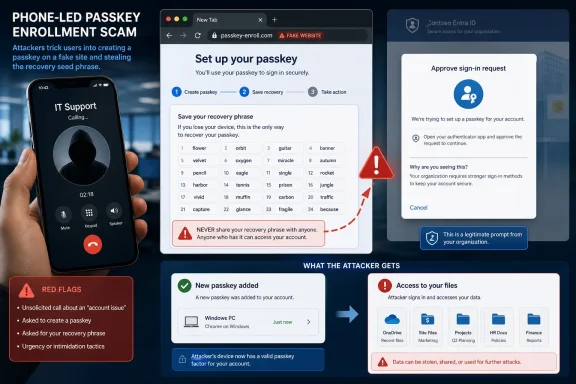 Pink Turns Passwordless Adoption Into a Social-Engineering Script
The campaign described by Okta Threat Intelligence and later covered by BleepingComputer is a modern cloud-extortion play: no malware detonation, no dramatic ransomware splash screen, no obvious endpoint incident at the start. Instead, O-UNC-066 calls targeted employees, persuades them that they need to register a new Microsoft passkey, and walks them toward a fake Microsoft 365 sign-in flow. The actor’s apparent goal is to take over accounts, steal cloud data, and use that data for extortion.That distinction matters for Windows and Microsoft 365 administrators because it changes the center of gravity. The endpoint may be perfectly patched. The user may be working from a legitimate device. Microsoft may issue a legitimate multi-factor authentication challenge. The failure happens when a real authentication process is wrapped in a fake story, with the attacker running the live session in parallel.
Okta tracks the actor as O-UNC-066; Palo Alto Networks Unit 42 has associated the Pink name with a data-extortion operation. The targets named in the verified reporting span enterprise Microsoft 365 customers in healthcare, technology, aviation, and automotive. Those are sectors where Microsoft 365 is not merely email; it is document storage, workflow, engineering data, internal chat, calendars, identity, and in many cases the soft underbelly of business operations.
The phishing lure is deliberately timed. Microsoft administrators recently gained the ability to nudge users to enroll in passkeys at sign-in, part of the broader industry move away from passwords and phishable MFA. Pink’s trick is to take that legitimate change and transform it into a plausible helpdesk script: your company is rolling out passkeys; you need to register now; here is the page; I’ll stay with you while you complete it.
The result is a campaign that attacks not the cryptography of passkeys but the deployment path around them. That is a far more common and, for many enterprises, more urgent problem.
The Attack Does Not Defeat Passkeys; It Gets There First
Passkeys are supposed to make phishing much harder because the private credential is bound to a device or synced through a passkey provider, and the user does not type a reusable secret into a random website. In a mature deployment, passkeys reduce the value of stolen passwords and one-time codes. They are a meaningful security improvement over passwords plus SMS, push approvals, or time-based codes.Pink’s campaign works because many organizations are not yet in that mature state. Users still have passwords. Users still have MFA methods that can be relayed or coached through a phone call. Administrators are still nudging employees to register passkeys rather than enforcing a completed passwordless end state. That transition period is where the attack lives.
According to Okta’s analysis, the fake site captures the victim’s username and password from the initial bogus Microsoft page. The operator then uses those credentials against the real Microsoft sign-in page. When Microsoft triggers a legitimate multi-factor authentication challenge, the phishing kit operator adapts the fake flow shown to the victim so the phone call and the browser screen remain synchronized.
This is why calling it “fake passkey phishing” can understate the operational cleverness. The attacker is not merely asking for a password and hoping the victim approves a random prompt. The attacker is staging a real-time identity ceremony, using a phishing kit and a human caller as a joint control plane. The user sees what looks like a coherent enrollment process. The attacker sees the live Microsoft authentication process and steers the user through whatever step is needed next.
The passkey comes at the end of that race. While the victim believes they are setting up their own passkey, the attacker is reportedly registering a passkey under the attacker’s control on the legitimate account. If Microsoft later sends the user an automated email confirming a new passkey was added, the victim has already been primed to interpret that message as confirmation of the task they just completed.
That is the campaign’s central deception: the security notification is not suppressed; it is socially pre-explained.
Microsoft’s Nudge Became the Perfect Cover Story
Microsoft’s passkey registration campaigns are meant to solve a real adoption problem. Passwordless authentication does not deploy itself. Users have to register devices, understand prompts, and accept new sign-in habits, while administrators need ways to move large populations without manually chasing every holdout.Microsoft’s own documentation says users might see a passkey registration prompt if a registration campaign nudge is enabled, or if an administrator explicitly requires passkey registration through policy. That is normal enterprise hygiene: encourage stronger authentication, reduce password dependence, and make phishing-resistant MFA the default rather than the exception.
But every new user-facing security workflow creates a temporary ambiguity tax. Employees may not know what the genuine prompt looks like. They may not know whether IT is supposed to call them. They may not know whether passkey registration happens in a browser, in Microsoft Authenticator, through Windows Hello, through a platform dialog, or through a corporate portal. Attackers thrive in that gray zone.
Okta’s research points to that timing explicitly: as Microsoft gave administrators more ways to push passkey enrollment, O-UNC-066 used the well-intentioned change as a pretext. The malicious domains contain the word “passkey,” with examples including assignpasskey.com, deploypasskey.com, and passkeyadd.com. A targeted company might see a subdomain constructed around its own name, adding just enough familiarity to lower suspicion during a phone call.
The lesson for administrators is not to disable passkey adoption. It is to stop treating adoption prompts as merely a product configuration problem. A passkey rollout is now a communications event, a helpdesk process, a detection challenge, and a user-training campaign. If employees can be nudged by Microsoft, they can be nudged by an attacker pretending to be Microsoft, IT, or both.
| Step | Legitimate Microsoft Entra passkey registration | Pink fake passkey flow | Practical defender signal |
|---|---|---|---|
| User prompt | Driven by an enabled registration campaign or policy | Introduced during a voice-phishing call | Unexpected phone-led enrollment should be treated as suspicious |
| Authentication | Microsoft issues real MFA before adding a method | Attacker relays credentials and adapts to the real MFA challenge | MFA approval tied to a live caller is high risk |
| Passkey creation | Uses the supported Microsoft Entra passkey process | Shows a bogus passkey registration page | Browser-only “ceremonies” should be verified against official guidance |
| Recovery step | No BIP-39 seed phrase is part of Entra passkey enrollment | Victim is told to save and verify a BIP-39 phrase | Any seed-phrase prompt is a red flag |
| Confirmation | User can audit sign-in methods and receives notifications | Fake success page makes the attacker’s passkey look expected | New passkey alerts need rapid review and escalation |
The BIP-39 Seed Phrase Is the Tell
The strangest detail in the campaign is also the most revealing. The fake website directs the user to a bogus passkey registration page and instructs the victim to save a recovery key from a BIP-39 seed phrase list. That is a familiar pattern in cryptocurrency wallets, where seed phrases are used as human-readable recovery material. It is not part of the Microsoft Entra passkey process.This is not a small UI mistake by the attackers. It is a deliberate distraction. Okta’s analysis describes the seed-phrase step as a kind of sleight of hand: while the victim is busy writing down or verifying words, the operator has time to complete the real account takeover work in the background. The victim is asked to perform a task that feels security-sensitive, which makes the flow seem more official rather than less.
That dynamic is important because users often evaluate legitimacy emotionally rather than technically. A complicated process can feel safer than a simple one. A recovery phrase can feel like “serious security.” A phone caller who patiently waits while the employee writes down words can feel helpful rather than malicious. The more ritualized the experience becomes, the less likely the victim is to interrupt it.
For IT teams, the seed phrase is the cleanest user-facing rule in the entire story: Microsoft Entra passkey registration does not ask users to save a BIP-39 seed phrase. If a user sees a seed phrase, a word list, or a “verify the final word” recovery prompt during Microsoft 365 passkey enrollment, the process should be treated as hostile. That message is simple enough to train, put in rollout emails, and repeat in helpdesk scripts.
It also exposes a broader weakness in passwordless education. Many employees have heard “passkeys are like cryptographic keys” or “passkeys replace passwords,” but they have not seen the real enrollment flow enough times to reject a counterfeit. Attackers do not need users to understand BIP-39. They only need users to believe that unfamiliar security processes are supposed to be unfamiliar.
The Phishing Kit Is Built for a Phone Call, Not a Mass Email Blast
Traditional phishing kits often behave like automated traps. A user clicks, enters credentials, and the kit relays or stores whatever it can. Pink’s reported kit is more interactive. Okta describes a panel-controlled phishing kit that allows an operator to steer the victim through different stages in close to real time.That matters because enterprise MFA has become fragmented. One victim may see SMS OTP. Another may see a time-based authenticator code. Another may face a push notification with number matching. An automated phishing page that guesses the wrong challenge can break the illusion. An operator-guided kit can adjust the screen to match what the real Microsoft session demands.
This hybrid model—caller plus phishing panel—also reduces the victim’s opportunity to think. The employee is not alone with a suspicious page. They are in a live conversation with someone claiming authority or helpfulness. Silence, delay, and confusion become moments the attacker can manage. If the victim hesitates, the caller can reassure. If the victim sees an MFA prompt, the caller can explain it. If the victim receives a passkey notification later, the caller’s earlier framing has already supplied the answer.
The kit also uses branding to narrow the gap between fake and real. The phishing websites are customized with the victim organization’s branding, while generic styling is pulled from Microsoft’s Content Delivery Network. That combination is effective because modern corporate sign-in pages are themselves composites: Microsoft chrome, tenant branding, redirects, MFA screens, and sometimes third-party identity providers. Employees have been trained by reality to expect complexity.
Okta noted an important limitation: its analysis found the kit did not attempt to handle federation to third-party identity providers such as Okta. That caveat is worth preserving. It does not make the campaign harmless; it means defenders should avoid overgeneralizing the exact flow across every identity architecture. The broader technique—voice-led manipulation of identity enrollment—remains relevant even where the specific kit behavior changes.
Pink’s Infrastructure Looks Like Targeted Extortion, Not Spray-and-Pray Phishing
The malicious domains named in the reporting are blunt but effective: assignpasskey.com, deploypasskey.com, and passkeyadd.com. They are not trying to win a domain-branding award. They are trying to look plausible in the half-second a user spends glancing at a link while a confident caller tells them what to do.Okta reports that O-UNC-066 hosts phishing infrastructure on providers located in Russia and the United States. The use of per-target subdomains gives the campaign a tailored feel without requiring the actor to register a fresh base domain for every victim. A company-specific subdomain under a passkey-themed domain is enough to support the caller’s story.
The campaign’s extortion turn is equally important. On May 31, 2026, the attackers published a leak site to apply public pressure to compromised organizations. That places the activity in the growing category of cloud-data extortion, where the attacker’s leverage comes from stolen information rather than encrypted machines.
For Microsoft 365 tenants, this is especially uncomfortable because the data worth extorting may be spread across Exchange Online, SharePoint, OneDrive, Teams, and connected applications. A single compromised identity can be enough to reach sensitive files, internal threads, customer documents, contract material, or regulated data. The blast radius depends less on whether ransomware runs and more on what that user can already access.
That is why Pink should be understood as an identity and SaaS threat first. The dramatic moment is not code execution. It is a new authenticator being added to a legitimate account after a phone call.
The Real Risk Is the Enrollment Gap
Security teams have spent years telling users not to share passwords and not to approve unexpected MFA prompts. Passkey enrollment complicates that message because a legitimate rollout may require users to respond to prompts, approve authentication, and add a new sign-in method. The old advice remains correct but incomplete.The enrollment gap has three parts. First, the user may not know what a legitimate passkey registration looks like. Second, the organization may not have clearly said whether helpdesk staff will ever call users to initiate registration. Third, detection systems may alert on new passkey creation, but not fast enough or with enough context to stop an extortion actor moving through cloud data.
Microsoft’s own passkey documentation emphasizes that admins can monitor or audit passkey usage with audit logs, sign-in logs, and user notifications. It also notes that passkeys do not automatically expire, making lifecycle hygiene important. In a campaign like Pink’s, that lifecycle begins at creation: who created the passkey, from where, after what sign-in, and following what user interaction?
The answer cannot be “users should be smarter.” The attacker’s script is designed precisely for a world in which Microsoft, security teams, and identity vendors are all telling employees to adopt passkeys. A user who cooperates with a passkey rollout is doing what they have been asked to do. The organization’s job is to make the authentic path unmistakable and the fake path reportable.
That means every passkey deployment needs a negative script as well as a positive one. Not just “here is how to enroll,” but “we will never call you and ask you to enroll while we wait on the phone.” Not just “expect a Microsoft prompt,” but “do not use links sent by callers; start from the known security info page or a managed portal.” Not just “passkeys are phishing resistant,” but “registration can still be socially engineered if you approve the wrong session first.”
Strong Authenticators Still Need Strong Policy
Okta’s recommended controls are direct: enroll users in strong authenticators such as Okta FastPass, passkeys, or smart cards, and enforce phishing resistance in policy. It also recommends establishing, communicating, and evangelizing ways for users to verify the identity of helpdesk personnel when those personnel contact them.That wording is important. Simply allowing passkeys is not the same as enforcing phishing resistance. A tenant that supports passkeys but still permits passwords plus phishable MFA for the same users remains exposed during the transition. Attackers will route around the strongest method and exploit the weakest method still accepted by policy.
For privileged users, executives, finance teams, legal teams, healthcare administrators, engineering leads, and anyone with broad access to SharePoint or OneDrive data, the tolerance for weak fallback methods should be low. If a user can add or reset authenticators after satisfying a phishable factor, the organization has not solved the core problem. It has created a better front door while leaving a side door that can be opened by a phone call.
The helpdesk process deserves equal scrutiny. Many identity incidents begin with “IT called me,” “I called IT,” or “someone said they were from support.” The control here is not merely a training poster. It is a defined verification method that users actually know and helpdesk staff actually follow. Callback through known numbers, ticket verification through a trusted portal, internal code words, manager escalation for sensitive enrollment, and clear “we will not ask” language all matter.
This is also where WindowsForum readers should resist vendor absolutism. Okta FastPass, Microsoft Entra passkeys, smart cards, and hardware-backed authenticators can all raise the bar. None of them eliminate the need for policy discipline, account recovery hardening, and user-verifiable support workflows. The actor is not trying to win a standards debate. It is trying to find the one operational seam where a human can be hurried into approving the wrong thing.
Timeline
Since April 2026 — O-UNC-066, also known as Pink, has used voice phishing and a specialized phishing kit against enterprise Microsoft 365 customers.May 31, 2026 — The attackers published a leak site to apply public pressure and support extortion of compromised organizations.
July 6, 2026 — Okta Threat Intelligence published its analysis of vishing actors targeting Microsoft Entra passkey enrollment.
July 8, 2026 — BleepingComputer reported on the campaign for a broader security audience, emphasizing the fake Entra passkey enrollment lure.
Action checklist for admins
- Review Microsoft Entra audit logs for recent passkey additions, especially those following unusual sign-ins or helpdesk-style user reports.
- Tell users plainly that Microsoft Entra passkey enrollment does not use BIP-39 seed phrases or recovery-word verification.
- Block or monitor passkey-themed domains resembling assignpasskey.com, deploypasskey.com, and passkeyadd.com, while assuming new domains will appear.
- Enforce phishing-resistant authentication in policy rather than merely making passkeys available as an optional method.
- Establish a user-verifiable helpdesk contact process and prohibit phone-led authenticator enrollment unless it follows that process.
- Investigate new passkey registration alerts as potential account-takeover events, not just routine enrollment noise.
Detection Has to Follow the Cloud Data, Not Just the Login
The first observable event may be a suspicious sign-in or a new passkey registration. The damaging event may be data access minutes later. That means identity monitoring and data-access monitoring need to be joined, not treated as separate consoles with separate owners.If a new passkey is added to an account and the same account begins unusual access to OneDrive or SharePoint, the alert should not wait for a human to connect the dots. If a user who rarely accesses certain repositories suddenly enumerates files, downloads large volumes, or touches sensitive sites after a phone-led enrollment, the tenant should treat that as a possible extortion path. Pink’s model is about speed and pressure; defender workflows that assume a leisurely investigation are misaligned.
Security teams should also look for the story around the event. Did the user receive a call? Did the caller claim to be from IT or Microsoft? Did the user see a seed phrase? Did the user receive an email saying a passkey was added? Did the user think the alert was expected because of a rollout? These are not soft details. They determine whether the organization is seeing an isolated suspicious login or a campaign hitting multiple employees.
The Microsoft 365 ecosystem gives defenders useful telemetry, but only if they have planned what to do with it. Audit logs, sign-in logs, user notifications, authentication method changes, and cloud file activity all become relevant. The trap is assuming that a successful MFA challenge means the event is clean. In this campaign, a legitimate MFA challenge is part of the attacker’s workflow.
For managed service providers and enterprise IT departments, the message is especially sharp. If you are running passkey adoption across many tenants, you need a tenant-by-tenant communications plan and a monitoring plan. Attackers can exploit inconsistency between customers: one client receives real enrollment calls, another receives only email instructions, a third has Microsoft-managed nudges enabled, and a fourth has no idea what users are seeing. That inconsistency is the attacker’s oxygen.
User Training Must Become Procedural, Not Inspirational
Most security awareness content still leans on vibes: be careful, check links, report suspicious activity, don’t share codes. Those are good instincts, but this campaign requires procedural clarity. Users need to know exactly what will and will not happen during passkey enrollment.A good rollout message should say where enrollment starts, what devices are supported, whether users should expect a Microsoft prompt, whether IT will ever call, how to verify helpdesk identity, and what emergency phrase means “stop and report.” It should include the simple seed-phrase warning. It should be repeated in the same language by helpdesk, managers, and security teams.
The helpdesk also needs training from the opposite direction. Support personnel should not normalize risky patterns that attackers can mimic. If legitimate staff routinely call users and walk them through authentication changes live, they are teaching users the behavior Pink wants. If exceptions are unavoidable, they need strong verification and careful scoping.
There is a cultural problem here as well. Many organizations reward employees for quickly complying with IT requests and punish them, socially or operationally, for slowing down. Pink’s phone script benefits from that hierarchy. A junior employee who receives a confident call about a security upgrade may fear being the person who blocks compliance. Security leadership has to make refusal legitimate: hanging up and verifying must be praised, not treated as friction.
The irony is that passkeys can make this easier over time. Once users are fully enrolled and weak fallbacks are removed, fewer legitimate workflows should involve typing passwords, relaying codes, or approving unexpected prompts. But during the transition, clarity matters more than slogans. “Passwordless” is not a user instruction. “Never enroll a passkey from a link given to you by a caller” is.
Why This Matters for Windows Shops
For Windows administrators, this story lands at the intersection of Microsoft Entra, Windows Hello, Microsoft Authenticator, synced passkeys, device-bound credentials, and legacy MFA cleanup. It is tempting to treat it as a Microsoft 365 cloud issue and leave endpoint teams out of it. That would be a mistake.The Windows device is increasingly part of the identity boundary. Users may register passkeys through platform dialogs, use Windows Hello, interact with Microsoft Authenticator, or move between browser sessions and OS-level credential prompts. If employees do not understand which parts of that experience are local and which are web-based, fake browser screens can borrow authority from real platform security concepts.
Device-bound passkeys also raise policy questions. Microsoft’s own guidance distinguishes between synced passkeys for broad user populations and device-bound options for admins and highly privileged users. That distinction should shape rollout strategy. A frontline employee and a global administrator should not necessarily have the same enrollment, recovery, and fallback model.
Windows shops also tend to have long tails: older devices, unmanaged BYOD, partially joined machines, shared workstations, and business units with different support models. Attackers do not need the whole estate to be weak. They need one user with useful access and a believable reason to follow instructions. Any passkey rollout that ignores the messy edges of the Windows fleet is leaving room for imitation.
The other Windows-specific consequence is support volume. As passkeys expand, helpdesk tickets will rise: failed registration, lost devices, changed PINs, Bluetooth restrictions, authenticator issues, and confusion about synced versus device-bound credentials. Attackers can hide in that noise. If the helpdesk is overwhelmed, shortcuts emerge. If shortcuts emerge, Pink’s script gets easier.
The Phishing Technique Is MITRE T1566, But the Business Problem Is Trust
Okta maps the activity to ATT&CK technique T1566, Phishing. That classification is accurate, but the label can sound too ordinary for what is happening. This is phishing welded to identity enrollment, vishing, cloud extortion, tenant branding, and real-time operator control.The business problem is trust delegation. Users are asked to trust Microsoft prompts, corporate branding, helpdesk callers, MFA notifications, security emails, and new authentication concepts. Pink does not need to forge all of those perfectly. It only needs to arrange them into a believable sequence during a moment of uncertainty.
That is why the attack is so dangerous during a security upgrade. Organizations often assume attackers exploit outdated controls. Here, the attacker exploits the rollout of a better control. The better control is still worth deploying, but the deployment becomes part of the threat model.
The right response is not panic about passkeys. It is operational maturity about passkeys. Strong authenticators, phishing-resistant policy, lifecycle monitoring, helpdesk verification, and clear user communications all have to arrive together. If they arrive separately, the gaps between them become attack paths.
The New Rule for Passkey Rollouts: No Mystery Ceremonies
The concrete lessons from Pink’s campaign are unusually clear: a real Microsoft Entra passkey flow does not need a BIP-39 seed phrase, a phone caller should not be the authority for enrollment, and a new authenticator notification deserves attention even if the user thinks they just completed a legitimate task. The harder lesson is that passwordless rollouts have to be designed as adversarial experiences from day one.- Treat passkey enrollment as a security-sensitive change, not a routine onboarding prompt.
- Remove or restrict phishable fallback methods for high-risk users before attackers exploit them.
- Make helpdesk identity verification a formal workflow, not an informal courtesy.
- Monitor new passkey registrations alongside sign-in anomalies and cloud file activity.
- Teach one memorable red flag: seed phrases do not belong in Microsoft Entra passkey enrollment.
- Assume attackers will copy the language of your rollout emails and the timing of your deployment.
References
- Primary source: cyberpress.org
Published: 2026-07-09T07:42:07.693640
Loading…
cyberpress.org - Related coverage: bleepingcomputer.com
Loading…
www.bleepingcomputer.com - Related coverage: support.okta.com
Okta Support Center (Lightning)
support.okta.com
- Official source: techcommunity.microsoft.com
Loading…
techcommunity.microsoft.com - Official source: learn.microsoft.com
Loading…
learn.microsoft.com - Related coverage: heise.de
Loading…
www.heise.de
- Related coverage: nadcab.com
Loading…
www.nadcab.com - Related coverage: bip39-phrase.com
Loading…
bip39-phrase.com - Official source: microsoft.com
World Passkey Day: Advancing passwordless authentication | Microsoft Security Blog
This World Passkey Day, read how Microsoft is advancing passkey adoption to replace passwords, cut phishing risk, and deliver simpler, more secure sign-ins.www.microsoft.com - Related coverage: techriver.com
- Related coverage: jornada365.cloud
- Official source: cdn-dynmedia-1.microsoft.com
Loading…
cdn-dynmedia-1.microsoft.com - Related coverage: techradar.com
Microsoft finally ends using SMS codes for account sign-in — with passkeys officially taking over | TechRadar
"Passkeys are phishing-resistant and eliminate the risk of fraud," Microsoft said.www.techradar.com - Related coverage: windowscentral.com
Microsoft finally makes passkeys viable thanks to Edge on Windows 11 — you can finally sync them across devices | Windows Central
You'll soon be able to sync passkeys to the cloud using Edge and your Microsoft Account, meaning you'll be able to share them across devices going forward.www.windowscentral.com - Related coverage: laptopmag.com
Microsoft moves to passwordless future for its more than 1 billion users | Laptop Mag
Microsoft users will notice a new way to log into their accounts as the company wants them to stop using passwords.www.laptopmag.com