

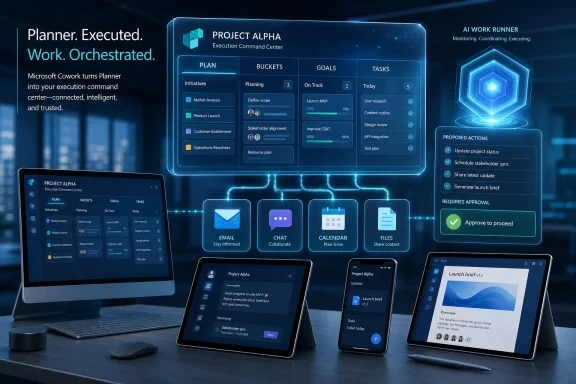
Microsoft added Microsoft 365 Roadmap ID 567315 on July 7, 2026, saying Planner capabilities are in development for Microsoft Cowork, with worldwide general availability planned for August 2026 across desktop, web, Teams, and Surface devices. The promise is straightforward: bring plans, buckets, goals, and tasks into Cowork, then let the agent do the work those tasks imply across Microsoft 365. That makes this less a Planner feature than a test of Microsoft’s bigger Copilot thesis: the AI assistant is no longer supposed to summarize your work; it is supposed to move it forward. The risk is that project management becomes another place where Microsoft blurs the line between useful automation and opaque delegation.
Microsoft’s own roadmap entry frames the feature as a bridge from planning to execution. In Cowork, users will be able to view, create, and update Planner content without switching applications, then ask Cowork to draft emails, schedule meetings, post Teams updates, and work with files before writing progress back to Planner with user approval. Microsoft Learn’s Cowork documentation already describes the product as an agent for multi-step work across Microsoft 365, with approval prompts for sensitive actions such as sending email or posting to Teams. The new Planner integration gives that agent something it badly needs: a structured work ledger.
Planner has always been Microsoft’s middle child of work management. It is not as personal as To Do, not as heavyweight as Project, and not as culturally embedded as Teams. Its value has been practical rather than glamorous: tasks, buckets, assignments, due dates, checklists, labels, and enough shared context for a team to know what is supposed to happen next.
Cowork changes the role of that data. A Planner task is no longer merely a reminder or a card on a board; it becomes a launch point for an agentic workflow. If the task says “follow up with procurement,” Cowork can plausibly infer that it may need to find the relevant email thread, draft a message, identify stakeholders, attach a file, and log the result.
That is why Roadmap ID 567315 matters more than its modest wording suggests. Microsoft is not merely adding another tab or connector. It is making Planner a control surface for an AI system that can act across Outlook, Teams, SharePoint, OneDrive, Calendar, and the rest of Microsoft 365.
The timing is also telling. Cowork has been positioned by Microsoft as the next step beyond Copilot Chat: not an answer box, but a work runner. The Planner integration gives Microsoft a natural place to anchor that ambition because project plans already encode intent, ownership, status, and deadlines. In other words, Planner contains the raw material an execution agent needs to avoid being just another blank prompt box.
Microsoft has tried to solve this before with integrations, tabs, connectors, Power Automate flows, and Teams apps. Those tools helped, but they still assumed that users or administrators would define the workflow in advance. Cowork represents a different bet: let the user describe the outcome in natural language, let the agent assemble the sequence, and require approvals where the sequence crosses a risk boundary.
That makes Planner a sensible proving ground. Tasks are inherently structured but often underspecified. A card might say “prepare customer update,” while the real work lives in emails, meeting notes, files, CRM exports, Teams threads, and hallway knowledge. Cowork’s promise is to traverse that sprawl and then report back to the task system of record.
The difference between integration and agency is important. A traditional Planner integration might let you create a task from a Teams message. Cowork is expected to take a task, reason about the steps needed to complete it, interact with multiple Microsoft 365 surfaces, and then ask permission before taking higher-risk actions. That is a much larger claim, and it carries a much larger administrative burden.
That phrase is doing a lot of work. It is meant to reassure users that Cowork will not silently rewrite project status or impersonate them across Microsoft 365. It also acknowledges the obvious: once an AI agent can send messages, schedule meetings, manipulate files, and update the canonical task board, mistakes become operational events rather than amusing chatbot errors.
The approval model is therefore not a cosmetic detail. It is the thin line between assisted execution and unauthorized action. If Cowork drafts an email to the wrong supplier, posts a premature Teams update, or marks a task complete based on a misunderstanding, the harm is no longer confined to a bad answer in a chat pane.
The harder question is how approval fatigue will play out. If Cowork asks for permission at every meaningful step, users may decide the agent is slower than doing the work themselves. If it learns to skip prompts for similar actions in a conversation, users may approve too broadly. Microsoft has to thread a narrow needle: enough friction to preserve trust, not so much friction that the product becomes theater.
That creates a feedback loop. Work is planned in Planner, executed through Cowork, and then reflected back in the plan. If implemented well, that loop could reduce one of the great annoyances of team work: the gap between what happened and what the project board says happened.
For managers, that is attractive. It means status updates could emerge from actual work artifacts rather than from Friday afternoon archaeology. If Cowork sends the follow-up email, schedules the review, posts the Teams update, and edits the document, it can also propose a Planner update that describes those steps.
For workers, the appeal is more ambiguous. Automated progress logging can save time, but it can also make activity feel more surveilled. Microsoft will need to make clear whether Planner updates are merely user-approved notes or whether organizations can build reporting layers that treat Cowork activity as a productivity signal. In modern Microsoft 365, anything that becomes structured data can become management telemetry.
Cowork integration could pull Planner upward. If Planner becomes the task substrate for agentic execution, it gains strategic importance inside Microsoft 365. Suddenly a Planner card is not just a card; it is a machine-readable instruction, a status checkpoint, and a potential trigger for cross-app work.
But that also raises expectations. Users who tolerate Planner’s limits for basic tracking may become less forgiving if it becomes the front door to AI-driven execution. Dependencies, permissions, recurring work, audit trails, custom fields, reporting, and premium licensing all become more important once the tool is not merely displaying work but helping an agent act on it.
Microsoft’s roadmap entry mentions plans, buckets, goals, and tasks. Those nouns sound simple, but they represent the taxonomy Cowork will have to respect. If Cowork misunderstands a bucket, creates duplicate tasks, updates the wrong plan, or treats aspirational goals as assigned work, the integration will feel less like productivity and more like cleanup.
Microsoft Learn’s Cowork material says the agent operates within existing Microsoft 365 permissions and security boundaries. That is necessary, but it is not sufficient. Permission inheritance tells Cowork what it can access; it does not guarantee that users understand what they are asking it to do or that the agent will choose the least risky path.
Administrators will want to know how Planner actions appear in audit logs, how approval records are retained, what happens when Cowork-generated updates are disputed, and whether sensitivity labels or retention policies constrain files used during task execution. They will also care about network endpoints, Conditional Access, licensing, and whether Cowork can be enabled selectively for departments that are ready for it rather than broadly across a tenant.
The Roadmap entry lists Worldwide Standard Multi-Tenant availability and General Availability as the release ring. That is good news for commercial Microsoft 365 customers outside government clouds, but it also means many organizations may see the feature arrive faster than their governance conversations can mature. “In development” is the stage at which IT should be asking questions, not waiting for the Message Center post that says rollout is imminent.
That is both the magic and the danger. If Cowork can look across relevant files, messages, and calendars, it may understand enough to draft a plausible plan of action. If it overreaches, it may invent structure where none exists or treat stale context as current.
Planner integration makes ambiguity more visible because plans are shared artifacts. A bad draft email is easy to discard. A bad update to a team plan can confuse everyone watching the board. Even with approval, users may not catch subtle errors if Cowork’s summary looks reasonable.
Microsoft’s design challenge is therefore not only accuracy; it is legibility. Users need to see why Cowork is proposing a Planner change, which sources it used, what actions it completed, and what assumptions remain unresolved. An agent that acts without explaining itself will not earn trust in a shared project space.
That matters because Teams is where tasks often begin informally. A manager asks for a follow-up in a channel. A meeting produces action items. A file review generates a decision. Planner is supposed to capture those commitments, but in many organizations the capture is inconsistent.
Cowork could close that gap by turning conversational intent into structured work, then executing against that work. The dream is that a user can move from “we need to send the customer a revised timeline” to a Planner task, a drafted email, a scheduled internal review, and a posted Teams update without leaving the flow.
The web and desktop surfaces matter for deeper work. When Cowork is handling files, longer-running tasks, or scheduled prompts, users may prefer the broader Copilot app experience over a cramped Teams pane. Surface devices are a more curious inclusion, but they fit Microsoft’s broader push to make Copilot a persistent work layer across device categories rather than a feature trapped inside one app.
Third-party work-management tools often win on clarity, customization, and cross-platform polish. Microsoft wins when the organization already lives in Outlook, Teams, SharePoint, OneDrive, and Office documents. Cowork leans into that advantage by making the Microsoft 365 tenant itself the execution environment.
That is a classic Microsoft bundling move, but with an AI twist. The company does not need Planner to be the best standalone project-management product if Cowork makes Planner the most convenient command center for work already happening in Microsoft 365. The value proposition becomes less “our task board is better” and more “our task board can cause things to happen where your people already work.”
This is also where competitors will push back. The more Microsoft ties planning, execution, identity, documents, communications, and AI assistance into one loop, the more customers may worry about lock-in. For some organizations, that lock-in is a feature: fewer vendors, fewer integrations, fewer procurement headaches. For others, it is exactly the kind of platform gravity they have spent years trying to reduce.
That short runway suggests the capability may already be relatively far along internally. It also suggests that Microsoft sees Planner support as a near-term expansion of Cowork rather than a distant architectural project. Still, administrators should not assume every tenant will see the same experience on the first day of August.
The “Worldwide Standard Multi-Tenant” cloud designation is also specific. It does not imply immediate availability in GCC, GCC High, DoD, or sovereign clouds. Government and regulated environments should read the roadmap narrowly until Microsoft publishes separate cloud-specific guidance.
The product labels are equally important. The entry lists Planner and Microsoft Copilot for Microsoft 365. That strongly points to a Copilot licensing dependency rather than a free Planner enhancement for every Microsoft 365 user. Organizations that have not broadly licensed Microsoft 365 Copilot may see the feature as another reason to pilot it, but not as a Planner improvement that arrives evenly across all staff.
Delegation in a workplace is social as well as technical. If Cowork sends a message from a user’s mailbox, schedules a meeting on their calendar, or updates a Planner task assigned to someone else, the action carries workplace meaning. It says something about priority, accountability, and authority.
Microsoft’s approval prompts can confirm consent for a discrete action, but they do not solve every organizational question. Should junior employees be able to use Cowork to post updates in executive-facing channels? Should contractors be able to trigger Planner changes tied to internal milestones? Should Cowork be allowed to update goals as well as tasks?
These are policy questions, not model questions. Microsoft can provide controls, logs, and documentation. Customers will have to decide what kind of delegation culture they are comfortable encoding into software.
The danger is not that the feature will be useless if it falls short of full autonomy. The danger is that Microsoft’s marketing may invite users to expect too much too soon. Office work is full of exceptions, politics, missing context, ambiguous ownership, and stale documents. No integration can make that disappear.
A good first version should be conservative. It should excel at retrieving the right Planner context, proposing obvious next steps, drafting communications, and asking for approval before changing shared state. It should be boringly transparent about what it did and what it could not determine.
The worst first version would be one that appears confident, takes noisy action, and forces teams to audit the agent’s work after the fact. In project management, trust is cumulative. A handful of bad updates can teach a team to ignore the automation entirely.
For sysadmins, that means endpoint readiness is only one part of the story. Identity, Conditional Access, network allowlists, data governance, and user training will matter more than whether the desktop app launches cleanly. Cowork is less like deploying a new Office add-in and more like introducing a delegated actor into an existing productivity estate.
For power users, the interesting question is whether Cowork will make Planner worth using more consistently. Many teams avoid formal task systems because maintaining them feels like work about work. If Cowork reduces that maintenance burden, Planner may become stickier. If it adds another layer of prompts and half-correct updates, users will retreat to chats, spreadsheets, and personal notes.
For security-minded readers, the approval model deserves scrutiny. Microsoft is right to emphasize that sensitive actions require explicit permission, but real-world safety depends on the clarity of the preview, the granularity of the approval, the quality of audit trails, and the user’s ability to understand consequences in the moment.
Microsoft’s own roadmap entry frames the feature as a bridge from planning to execution. In Cowork, users will be able to view, create, and update Planner content without switching applications, then ask Cowork to draft emails, schedule meetings, post Teams updates, and work with files before writing progress back to Planner with user approval. Microsoft Learn’s Cowork documentation already describes the product as an agent for multi-step work across Microsoft 365, with approval prompts for sensitive actions such as sending email or posting to Teams. The new Planner integration gives that agent something it badly needs: a structured work ledger.
 Microsoft Is Turning Planner Into Cowork’s Memory of Work
Planner has always been Microsoft’s middle child of work management. It is not as personal as To Do, not as heavyweight as Project, and not as culturally embedded as Teams. Its value has been practical rather than glamorous: tasks, buckets, assignments, due dates, checklists, labels, and enough shared context for a team to know what is supposed to happen next.Cowork changes the role of that data. A Planner task is no longer merely a reminder or a card on a board; it becomes a launch point for an agentic workflow. If the task says “follow up with procurement,” Cowork can plausibly infer that it may need to find the relevant email thread, draft a message, identify stakeholders, attach a file, and log the result.
That is why Roadmap ID 567315 matters more than its modest wording suggests. Microsoft is not merely adding another tab or connector. It is making Planner a control surface for an AI system that can act across Outlook, Teams, SharePoint, OneDrive, Calendar, and the rest of Microsoft 365.
The timing is also telling. Cowork has been positioned by Microsoft as the next step beyond Copilot Chat: not an answer box, but a work runner. The Planner integration gives Microsoft a natural place to anchor that ambition because project plans already encode intent, ownership, status, and deadlines. In other words, Planner contains the raw material an execution agent needs to avoid being just another blank prompt box.
The Old App-Switching Problem Finally Meets an Agentic Answer
The pitch will sound familiar to anyone who has lived inside Microsoft 365: too much work is not hard because each individual action is complex, but because the actions are scattered. A project manager updates Planner, sends a Teams message, checks a SharePoint file, schedules a meeting, and then returns to Planner to mark progress. The friction is not one dramatic failure; it is a thousand small context switches.Microsoft has tried to solve this before with integrations, tabs, connectors, Power Automate flows, and Teams apps. Those tools helped, but they still assumed that users or administrators would define the workflow in advance. Cowork represents a different bet: let the user describe the outcome in natural language, let the agent assemble the sequence, and require approvals where the sequence crosses a risk boundary.
That makes Planner a sensible proving ground. Tasks are inherently structured but often underspecified. A card might say “prepare customer update,” while the real work lives in emails, meeting notes, files, CRM exports, Teams threads, and hallway knowledge. Cowork’s promise is to traverse that sprawl and then report back to the task system of record.
The difference between integration and agency is important. A traditional Planner integration might let you create a task from a Teams message. Cowork is expected to take a task, reason about the steps needed to complete it, interact with multiple Microsoft 365 surfaces, and then ask permission before taking higher-risk actions. That is a much larger claim, and it carries a much larger administrative burden.
Approval Is the Safety Valve Microsoft Wants Everyone to Notice
Microsoft’s Cowork documentation repeatedly emphasizes control. The agent asks before sensitive actions, shows previews, exposes risk indicators for medium- and high-risk approvals, and allows users to pause, resume, or cancel work. For the Planner integration, the roadmap entry also says Cowork can write progress back to Planner “with your approval.”That phrase is doing a lot of work. It is meant to reassure users that Cowork will not silently rewrite project status or impersonate them across Microsoft 365. It also acknowledges the obvious: once an AI agent can send messages, schedule meetings, manipulate files, and update the canonical task board, mistakes become operational events rather than amusing chatbot errors.
The approval model is therefore not a cosmetic detail. It is the thin line between assisted execution and unauthorized action. If Cowork drafts an email to the wrong supplier, posts a premature Teams update, or marks a task complete based on a misunderstanding, the harm is no longer confined to a bad answer in a chat pane.
The harder question is how approval fatigue will play out. If Cowork asks for permission at every meaningful step, users may decide the agent is slower than doing the work themselves. If it learns to skip prompts for similar actions in a conversation, users may approve too broadly. Microsoft has to thread a narrow needle: enough friction to preserve trust, not so much friction that the product becomes theater.
Planner Gives Cowork a Chain of Accountability
The most interesting part of the feature is not task creation. Microsoft 365 already has plenty of ways to create tasks from conversations, emails, meetings, and notes. The more consequential piece is Cowork writing progress back to Planner.That creates a feedback loop. Work is planned in Planner, executed through Cowork, and then reflected back in the plan. If implemented well, that loop could reduce one of the great annoyances of team work: the gap between what happened and what the project board says happened.
For managers, that is attractive. It means status updates could emerge from actual work artifacts rather than from Friday afternoon archaeology. If Cowork sends the follow-up email, schedules the review, posts the Teams update, and edits the document, it can also propose a Planner update that describes those steps.
For workers, the appeal is more ambiguous. Automated progress logging can save time, but it can also make activity feel more surveilled. Microsoft will need to make clear whether Planner updates are merely user-approved notes or whether organizations can build reporting layers that treat Cowork activity as a productivity signal. In modern Microsoft 365, anything that becomes structured data can become management telemetry.
The Feature Also Exposes Planner’s Identity Crisis
Planner’s long-term challenge is that it sits between lightweight personal task tracking and full project management. Microsoft has spent the last few years consolidating its work-management story, bringing Planner, To Do, Project-style capabilities, and Copilot-branded intelligence into a more unified experience. That consolidation makes sense on paper, but in practice many organizations still treat Planner as a simple kanban board inside Teams.Cowork integration could pull Planner upward. If Planner becomes the task substrate for agentic execution, it gains strategic importance inside Microsoft 365. Suddenly a Planner card is not just a card; it is a machine-readable instruction, a status checkpoint, and a potential trigger for cross-app work.
But that also raises expectations. Users who tolerate Planner’s limits for basic tracking may become less forgiving if it becomes the front door to AI-driven execution. Dependencies, permissions, recurring work, audit trails, custom fields, reporting, and premium licensing all become more important once the tool is not merely displaying work but helping an agent act on it.
Microsoft’s roadmap entry mentions plans, buckets, goals, and tasks. Those nouns sound simple, but they represent the taxonomy Cowork will have to respect. If Cowork misunderstands a bucket, creates duplicate tasks, updates the wrong plan, or treats aspirational goals as assigned work, the integration will feel less like productivity and more like cleanup.
IT Admins Will Read “In Development” Differently Than Users Do
For end users, the headline is convenience. For IT administrators, the headline is surface area. Cowork touches identity, Graph permissions, mail, files, calendar, Teams, approvals, auditability, and now Planner. Each additional capability increases the number of places where policy has to keep up.Microsoft Learn’s Cowork material says the agent operates within existing Microsoft 365 permissions and security boundaries. That is necessary, but it is not sufficient. Permission inheritance tells Cowork what it can access; it does not guarantee that users understand what they are asking it to do or that the agent will choose the least risky path.
Administrators will want to know how Planner actions appear in audit logs, how approval records are retained, what happens when Cowork-generated updates are disputed, and whether sensitivity labels or retention policies constrain files used during task execution. They will also care about network endpoints, Conditional Access, licensing, and whether Cowork can be enabled selectively for departments that are ready for it rather than broadly across a tenant.
The Roadmap entry lists Worldwide Standard Multi-Tenant availability and General Availability as the release ring. That is good news for commercial Microsoft 365 customers outside government clouds, but it also means many organizations may see the feature arrive faster than their governance conversations can mature. “In development” is the stage at which IT should be asking questions, not waiting for the Message Center post that says rollout is imminent.
The User Experience Will Live or Die on Ambiguity
The hardest tasks in office work are rarely described precisely. “Get the Q3 plan ready,” “follow up with legal,” “close out onboarding,” and “prep for the customer meeting” all require judgment. Humans fill in the gaps through context, habit, politics, and memory. Cowork will try to fill them in through Microsoft 365 signals.That is both the magic and the danger. If Cowork can look across relevant files, messages, and calendars, it may understand enough to draft a plausible plan of action. If it overreaches, it may invent structure where none exists or treat stale context as current.
Planner integration makes ambiguity more visible because plans are shared artifacts. A bad draft email is easy to discard. A bad update to a team plan can confuse everyone watching the board. Even with approval, users may not catch subtle errors if Cowork’s summary looks reasonable.
Microsoft’s design challenge is therefore not only accuracy; it is legibility. Users need to see why Cowork is proposing a Planner change, which sources it used, what actions it completed, and what assumptions remain unresolved. An agent that acts without explaining itself will not earn trust in a shared project space.
Teams Is the Natural Front Door, but Not the Whole Story
The roadmap entry lists desktop, web, Teams, and Surface devices. Teams is likely to be where many users first feel the integration, because Planner already has a strong Teams presence and much collaborative work already happens in channels, chats, and meetings.That matters because Teams is where tasks often begin informally. A manager asks for a follow-up in a channel. A meeting produces action items. A file review generates a decision. Planner is supposed to capture those commitments, but in many organizations the capture is inconsistent.
Cowork could close that gap by turning conversational intent into structured work, then executing against that work. The dream is that a user can move from “we need to send the customer a revised timeline” to a Planner task, a drafted email, a scheduled internal review, and a posted Teams update without leaving the flow.
The web and desktop surfaces matter for deeper work. When Cowork is handling files, longer-running tasks, or scheduled prompts, users may prefer the broader Copilot app experience over a cramped Teams pane. Surface devices are a more curious inclusion, but they fit Microsoft’s broader push to make Copilot a persistent work layer across device categories rather than a feature trapped inside one app.
The Competitive Pressure Is Not Just Asana or Trello
It is tempting to view this feature as Microsoft sharpening Planner against Asana, Trello, Monday.com, Smartsheet, or Notion. That comparison is real, but incomplete. Microsoft’s stronger competitive move is not that Planner gets more features; it is that Planner gets to sit inside the same environment where the work actually happens.Third-party work-management tools often win on clarity, customization, and cross-platform polish. Microsoft wins when the organization already lives in Outlook, Teams, SharePoint, OneDrive, and Office documents. Cowork leans into that advantage by making the Microsoft 365 tenant itself the execution environment.
That is a classic Microsoft bundling move, but with an AI twist. The company does not need Planner to be the best standalone project-management product if Cowork makes Planner the most convenient command center for work already happening in Microsoft 365. The value proposition becomes less “our task board is better” and more “our task board can cause things to happen where your people already work.”
This is also where competitors will push back. The more Microsoft ties planning, execution, identity, documents, communications, and AI assistance into one loop, the more customers may worry about lock-in. For some organizations, that lock-in is a feature: fewer vendors, fewer integrations, fewer procurement headaches. For others, it is exactly the kind of platform gravity they have spent years trying to reduce.
The August 2026 Date Is a Target, Not a Guarantee
The Microsoft 365 Roadmap is a planning signal, not a contract. Microsoft’s own roadmap pages generally treat availability dates as estimates, and features can slip, change scope, or roll out gradually by tenant, region, or configuration. The entry for Planner capabilities in Cowork was created and last updated on July 7, 2026, with general availability listed for August 2026.That short runway suggests the capability may already be relatively far along internally. It also suggests that Microsoft sees Planner support as a near-term expansion of Cowork rather than a distant architectural project. Still, administrators should not assume every tenant will see the same experience on the first day of August.
The “Worldwide Standard Multi-Tenant” cloud designation is also specific. It does not imply immediate availability in GCC, GCC High, DoD, or sovereign clouds. Government and regulated environments should read the roadmap narrowly until Microsoft publishes separate cloud-specific guidance.
The product labels are equally important. The entry lists Planner and Microsoft Copilot for Microsoft 365. That strongly points to a Copilot licensing dependency rather than a free Planner enhancement for every Microsoft 365 user. Organizations that have not broadly licensed Microsoft 365 Copilot may see the feature as another reason to pilot it, but not as a Planner improvement that arrives evenly across all staff.
The Real Governance Question Is Who Gets to Delegate
The language of agentic work often focuses on what the AI can do. Enterprises will care just as much about who is allowed to ask it to do those things. A user with access to a plan, a mailbox, files, and a Teams channel may be able to instruct Cowork to coordinate across all of them, but that does not mean every scenario is appropriate.Delegation in a workplace is social as well as technical. If Cowork sends a message from a user’s mailbox, schedules a meeting on their calendar, or updates a Planner task assigned to someone else, the action carries workplace meaning. It says something about priority, accountability, and authority.
Microsoft’s approval prompts can confirm consent for a discrete action, but they do not solve every organizational question. Should junior employees be able to use Cowork to post updates in executive-facing channels? Should contractors be able to trigger Planner changes tied to internal milestones? Should Cowork be allowed to update goals as well as tasks?
These are policy questions, not model questions. Microsoft can provide controls, logs, and documentation. Customers will have to decide what kind of delegation culture they are comfortable encoding into software.
The Smallest Version of This Feature Could Still Be Useful
Even if Cowork’s grander agentic promise proves uneven, a modest Planner integration could still have value. Viewing, creating, and updating plans inside Cowork reduces friction. Drafting status messages from task context is useful. Turning task progress into a proposed Planner update is useful. Scheduling meetings based on plan deadlines is useful.The danger is not that the feature will be useless if it falls short of full autonomy. The danger is that Microsoft’s marketing may invite users to expect too much too soon. Office work is full of exceptions, politics, missing context, ambiguous ownership, and stale documents. No integration can make that disappear.
A good first version should be conservative. It should excel at retrieving the right Planner context, proposing obvious next steps, drafting communications, and asking for approval before changing shared state. It should be boringly transparent about what it did and what it could not determine.
The worst first version would be one that appears confident, takes noisy action, and forces teams to audit the agent’s work after the fact. In project management, trust is cumulative. A handful of bad updates can teach a team to ignore the automation entirely.
Where WindowsForum Readers Should Pay Attention
This feature is not a Windows feature in the narrow sense, but it is very much part of the modern Windows workplace. The Microsoft 365 Copilot desktop app, Teams, Outlook, Planner, and Edge-mediated web experiences increasingly define what a managed Windows endpoint is for. The OS is the access layer; Microsoft 365 is the work layer; Copilot is trying to become the execution layer.For sysadmins, that means endpoint readiness is only one part of the story. Identity, Conditional Access, network allowlists, data governance, and user training will matter more than whether the desktop app launches cleanly. Cowork is less like deploying a new Office add-in and more like introducing a delegated actor into an existing productivity estate.
For power users, the interesting question is whether Cowork will make Planner worth using more consistently. Many teams avoid formal task systems because maintaining them feels like work about work. If Cowork reduces that maintenance burden, Planner may become stickier. If it adds another layer of prompts and half-correct updates, users will retreat to chats, spreadsheets, and personal notes.
For security-minded readers, the approval model deserves scrutiny. Microsoft is right to emphasize that sensitive actions require explicit permission, but real-world safety depends on the clarity of the preview, the granularity of the approval, the quality of audit trails, and the user’s ability to understand consequences in the moment.
The Planner Card Is Becoming a Command Prompt
Microsoft’s August 2026 target for Planner capabilities in Cowork is more than a convenience update; it is a sign that the company wants work-management data to become actionable fuel for Copilot. The practical question for organizations is not whether this sounds efficient, because it does. The practical question is whether they are ready for a project plan that can drive emails, meetings, Teams posts, file work, and status updates through an AI agent.- Microsoft’s Roadmap ID 567315 says Planner capabilities for Cowork are in development, with general availability planned for August 2026 in the Worldwide Standard Multi-Tenant cloud.
- The feature is expected to let users view, create, and update Planner plans, buckets, goals, and tasks directly inside Cowork.
- Cowork’s bigger value is execution: it can help draft and send emails, schedule meetings, post Teams updates, work with files, and propose Planner progress updates for user approval.
- Administrators should evaluate licensing, auditability, approval behavior, Conditional Access, Graph access, and data-governance implications before treating this as a routine Planner enhancement.
- The feature’s success will depend less on whether Cowork can take action and more on whether users can understand, approve, and trust the actions it proposes.
References
- Primary source: Microsoft 365 Roadmap
Published: 2026-07-07T23:01:01.6729014Z
Microsoft 365 Roadmap | Microsoft 365
The Microsoft 365 Roadmap lists updates that are currently planned for applicable subscribers. Check here for more information on the status of new features and updates.www.microsoft.com
- Official source: support.microsoft.com
- Official source: learn.microsoft.com
Copilot Cowork overview | Microsoft Learn
Learn about Microsoft 365 Copilot Cowork, which takes action on your behalf.learn.microsoft.com - Related coverage: windowscentral.com
This is Microsoft's new "Copilot Cowork": An experiment with Anthropic's Claude AI models that plans and delegates your work | Windows Central
Microsoft ships Copilot Cowork to its Frontier program.www.windowscentral.com - Official source: adoption.microsoft.com
Microsoft 365 Copilot Cowork – Microsoft Adoption
Copilot Cowork is an agentic system that plans, executes, and delivers work. It coordinates long-running, multi-step workflows across your apps, files, and data. Powered by Work IQ, it integrates signals from your work graph and applies task-appropriate models to produce context-aware results.www.adoption.microsoft.com - Official source: directionsonmicrosoft.com
Planner - Directions on Microsoft
Planner is a task and project management tool included in most Microsoft 365 suites. Planner provides task, planning, and project management tools. The current iteration of Planner, sometimes called New Planner, delivers the following services: Basic plans provide group plan and task management...www.directionsonmicrosoft.com
- Related coverage: techradar.com
Microsoft makes Copilot Cowork open to everyone, and wants to help you tackle even the trickiest work tasks | TechRadar
Copilot Cowork gets an upgrade as it opens to all userswww.techradar.com - Related coverage: itpro.com
Copilot Cowork is now generally available: Everything you need to know, including pricing, usage limits, and new features | IT Pro
Microsoft has announced that Copilot Cowork is now generally available for users globally, following a beta period via the tech giant’s Frontier program.www.itpro.com - Official source: download.microsoft.com
- Official source: cdn-dynmedia-1.microsoft.com
- Related coverage: axios.com
Microsoft explores DeepSeek for Copilot Cowork
Microsoft will also shift to usage-based pricing for the enterprise agent.www.axios.com
- Related coverage: cincodias.elpais.com
Copilot Pages, nueva herramienta con IA de Microsoft para mejorar la productividad | Pymes | Smartlife | Cinco Días
Esta opción llega como parte de Wave 2 para mejorar la colaboracióncincodias.elpais.com