

Plansom’s new Teams-native agent folds goal-setting, delegation, and real-time progress tracking directly into Microsoft Teams by building on Microsoft’s Foundry SDKs, Azure OpenAI, Copilot Studio, and Model Context Protocol — a move designed to make delegation measurable, visible, and automated without forcing teams to leave the flow of collaboration.
Plansom is an AI-first project and result-management startup that promises to turn strategic objectives into SMART goals, assign ownership, and maintain momentum through automation and conversational, in-app nudges. Microsoft’s startup channel recently described a Teams-native Plansom Agent that leverages Microsoft Foundry and related Azure services to deliver that experience inside Teams. Microsoft’s Azure AI Foundry (now commonly referred to as Microsoft Foundry in docs and marketing) has emerged as a primary platform for building agentic, multi‑agent, and grounded AI applications at scale. Foundry provides SDKs, orchestration primitives, and tool integration patterns intended for enterprise-grade production systems. That platform is explicitly designed to help developers connect models, tools, and data with governance and monitoring controls. Plansom’s choice to run natively inside Teams leans on two separate but complementary engineering strategies: present the UX where employees already work (Teams + Adaptive Cards), and orchestrate intelligence, grounding, and tool access via Microsoft Foundry and the Model Context Protocol (MCP). The pairing aims to reduce friction for adoption while retaining enterprise security controls for data and identity.
Adoption will hinge on trustworthy grounding, conservative notification design, transparent decision rationale, and careful operational controls around identity and data access. For organizations that already run on Microsoft 365 and Azure, the integration path is well‑trodden; for others, the promise is compelling but operationally nontrivial. The Plansom example shows how modern agent patterns can help leaders set goals, assign ownership, and maintain momentum — provided teams invest the necessary governance and monitoring resources to keep the AI useful, accurate, and secure.
Source: Microsoft Plansom uses Microsoft's Foundry SDKs to bring result management into Microsoft Teams - Microsoft for Startups Blog
 Background
Plansom is an AI-first project and result-management startup that promises to turn strategic objectives into SMART goals, assign ownership, and maintain momentum through automation and conversational, in-app nudges. Microsoft’s startup channel recently described a Teams-native Plansom Agent that leverages Microsoft Foundry and related Azure services to deliver that experience inside Teams. Microsoft’s Azure AI Foundry (now commonly referred to as Microsoft Foundry in docs and marketing) has emerged as a primary platform for building agentic, multi‑agent, and grounded AI applications at scale. Foundry provides SDKs, orchestration primitives, and tool integration patterns intended for enterprise-grade production systems. That platform is explicitly designed to help developers connect models, tools, and data with governance and monitoring controls. Plansom’s choice to run natively inside Teams leans on two separate but complementary engineering strategies: present the UX where employees already work (Teams + Adaptive Cards), and orchestrate intelligence, grounding, and tool access via Microsoft Foundry and the Model Context Protocol (MCP). The pairing aims to reduce friction for adoption while retaining enterprise security controls for data and identity. Overview: What the Plansom Agent brings to Teams
- It allows leaders to define SMART goals quickly and translate them into measurable sub‑tasks.
- It provides an AI Coach experience inside Teams chat and channels, with adaptive cards for goal progress, daily updates, and surfaced bottlenecks.
- It automates follow‑up and reporting so ownership is visible and manual status chasing is minimized.
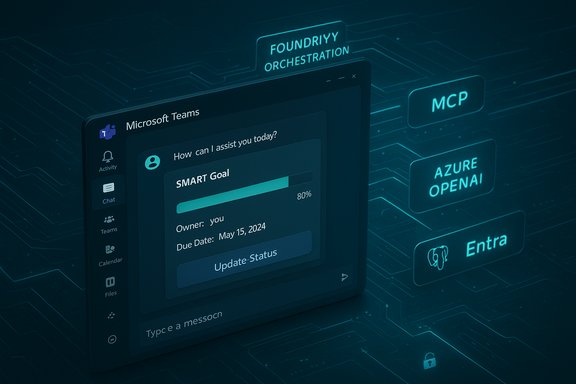
- It uses Microsoft Foundry to orchestrate model calls, tools, and context, while Model Context Protocol (MCP) enables secure connections to live data sources like Azure Database for PostgreSQL.
Technical architecture and integration
Microsoft Foundry: orchestration and SDKs
At the heart of Plansom’s architecture sits Microsoft Foundry, which provides SDKs and endpoints for building agents that combine models, tools, and data sources into orchestrated workflows. Foundry’s SDKs (Python, C#, JavaScript/TypeScript) and the Foundry Agent Service enable multi‑model mixing, tool access, and agent workflows with enterprise monitoring and evaluation features. For builders this reduces the plumbing required to combine LLM calls, tool invocation, and runtime evaluation. Foundry also offers “Foundry IQ” (a knowledge grounding component built on Azure AI Search) and Tool catalogs so agents can be grounded against enterprise knowledge stores and external services in a policy-controlled way — an important capability for a result-management agent that must read plans, project metadata, and operational status.Teams SDK and Adaptive Cards for native UX
Plansom delivers the UI using the Microsoft Teams SDK (formerly Teams AI Library) and Adaptive Cards to render interactive progress summaries, forms, and action buttons inline in Teams chats and channels. The Teams SDK provides helpers for card generation, action handling (Action.Execute, Action.OpenUrl), and features for Agent-to-Agent communications and MCP support. This is the same family of tools Microsoft recommends for building deeply integrated Teams agents. Adaptive Cards let the agent present compact, actionable views — for example a Goal Progress card with a progress bar, owner, due date, and “Update status” button — which improves adoption because the interface feels like native Teams content rather than an external embed.Model Context Protocol (MCP) and live context
Plansom uses Model Context Protocol (MCP) to provide context to the agent at runtime. MCP is an open protocol that Foundry supports to let agents call out to external MCP servers for schema discovery, vector search, and live data queries. With MCP, an agent can ask for the latest project performance metrics, read database rows, or run a grounded query without shipping raw data to third-party endpoints. For Plansom the practical effect is a worker‑safe link between the conversational agent and canonical data sources (project tables, task status, timelines) so responses can be precise, up-to-date, and auditable.Azure Database for PostgreSQL + Microsoft Entra ID
When Plansom needs to read or update master project data it leverages Azure Database for PostgreSQL with Microsoft Entra ID (Azure AD) authentication. This pattern provides token‑based access, managed identities, and the ability to enforce role‑based database access aligned with corporate identity — critical controls for enterprise environments. Microsoft documents a specific PostgreSQL MCP server that runs in Azure Container Apps and bridges Foundry agents to Azure Database for PostgreSQL using Entra tokens.Models and Copilot Studio / Azure OpenAI
Plansom’s agent uses Azure OpenAI model endpoints and is deployable through Copilot Studio for topic/topic orchestration and generative answers. Copilot Studio supports connecting a copilot to Azure OpenAI resources and data sources for grounded responses, which provides the LLM layer with both model power and connection to enterprise content. Azure OpenAI in this configuration lets the agent produce conversational, business‑grade outputs while Copilot Studio manages topic flows and generative answer priorities.What this architecture delivers for teams
Faster goal-setting that’s measurable
Plansom converts broad objectives into SMART goals and breakpoints using LLM-driven planning. That means leaders can go from a strategic sentence to a set of owned, scheduled tasks with measurable success criteria in minutes rather than hours. Because the plan is stored in enterprise-backed data stores and surfaced in Teams, every stakeholder sees ownership and status without chasing updates.Continuous follow-through through automation
Automated nudges, scheduled check-ins, and pre-built reporting remove much of the routine manual follow-up. The agent can post daily updates, ask responsible owners for quick status updates via Adaptive Cards, and create or update tasks in the backend data store — keeping the plan alive without overburdening people. This is the practical advantage of combining messaging UX + automation + grounded data access.Contextual, grounded responses instead of generic replies
Because the system uses MCP to access live schemas and Azure OpenAI to generate responses, the agent’s answers can reference current metrics and rows from the canonical database. That reduces the risk of outdated or hallucinated status reporting and improves trustworthiness in day-to-day use.Strengths: why this is a sensible enterprise pattern
- Built‑in adoption path: by embedding in Microsoft Teams the agent hits users where they already collaborate, lowering training friction and increasing daily exposure. Adaptive Cards deliver concise, actionable UI directly in conversations.
- Enterprise-grounding and identity: relying on Microsoft Entra ID and Azure Database for PostgreSQL ensures tokens, managed identities, and RBAC can be used end-to-end — a must for regulated industries.
- Reusable Foundry orchestration: Foundry gives startups a tested orchestration layer for multi‑agent logic, tool catalogs, and monitoring, which speeds development and makes scaling more predictable.
- Copilot Studio + Azure OpenAI gives direct control over model routing, configuration, and grounding, allowing builders to pick model versions, temperature, and integration patterns appropriate for production.
Risks, limitations, and practical constraints
1) Grounding vs. hallucination — not a solved problem
Even with MCP and database access, agents can produce plausible‑sounding but incorrect summaries unless prompt engineering, RAG configuration, and evaluation checks are tight. Foundry helps with evaluation tools, but organizations still need to implement test suites and guardrails to avoid escalation of errors to decisions.2) Data surface area and exposure
Bridging a conversational agent to a live database increases the attack surface. While Entra tokens and managed identities mitigate many risks, administrators must carefully scope which tables and columns the MCP server can access and implement strict auditing and logging. The MCP server pattern itself is designed to provide isolation, but it still requires secure deployment, header policies, and runtime control.3) Token lifetimes and connectivity semantics
Azure Entra tokens are short‑lived; connectors that rely on tokens must handle renewals robustly. Operational issues can arise if the agent’s tool chain doesn’t gracefully manage token refresh, network blips, or role changes — leading to silent failures in status updates. Microsoft documentation highlights token validity windows and recommends token acquisition immediately before access attempts.4) Compliance and data residency
Even inside Microsoft’s cloud, enterprises have regulatory constraints around data location and retention. Teams‑embedded agents must be vetted for where logs, transcripts, and temporary context are stored. Foundry supports region controls, but legal and compliance teams should require explicit documentation of retention policies, export controls, and audit logs.5) Cost and licensing considerations
Running stateful agents with frequent model calls, Copilot Studio orchestration, and database accesses can incur non-trivial Azure costs at scale. Organizations should model expected monthly token usage, Copilot Studio and Foundry pricing, and downstream storage/ingestion costs before large pilots. Microsoft’s Foundry pages discuss pricing models and the need to account for underlying Azure service consumption.Enterprise deployment checklist (practical steps for IT)
- Identity and access: Configure Microsoft Entra ID roles and managed identities for the Foundry agent and MCP server. Ensure least privilege for DB access and token exchange.
- Data scoping: Define which tables/columns are accessible via MCP and map read/write needs to explicit use cases. Implement schema discovery policies.
- Grounding and evaluation: Set up Foundry evaluation pipelines and RAG/knowledge sources in Foundry IQ to reduce hallucinations. Create test prompts and threshold-based checks.
- Audit, logging, and retention: Ensure all agent interactions, tool calls, and DB transactions are logged centrally and available to compliance teams. Define retention and deletion policies.
- Cost modeling: Estimate monthly model call volumes, Foundry runtime, Copilot Studio transactions, and database egress to avoid surprises. Use Azure cost management to track usage.
UX and adoption: what works and what to watch
Embedding Plansom inside Teams lowers the friction for adoption by removing jumps between apps. Short, frequent interactions (daily cards, quick updates) align with modern collaboration patterns and are more likely to create habit than larger, occasional status meetings. The Teams SDK and Adaptive Cards framework make it straightforward to build such micro‑interactions that feel native and actionable. However, users will quickly lose trust if automated summaries are incorrect or if the agent posts too frequently. Good defaults — a conservative notification cadence, human-in-the-loop confirmation for important updates, and clear undo/overwrite semantics — are essential to maintain usefulness without becoming noise. These are governance and product decisions the vendor must tune during pilot phases.Interoperability: how Plansom fits with broader Microsoft stack
Plansom’s architecture, as described, is designed to interoperate with common Microsoft services:- Identity: Microsoft Entra ID for token-based auth.
- Data: Azure Database for PostgreSQL for canonical project data; Foundry supports connectors and tool catalogs for other stores.
- Models & orchestration: Azure OpenAI and Copilot Studio for model runtime and topic management; Foundry for agent orchestration.
- UX: Microsoft Teams via Teams SDK and Adaptive Cards for native interactive experiences.
A realistic view of impact: where Plansom can move the needle
- Middle managers and team leads typically spend substantial time on status updates and task follow‑ups. A Teams‑embedded agent that reliably converts a vague objective into owned actions and follows up with succinct, accurate prompts could reclaim hours per week for those roles. If the grounding and evaluation practices are rigorous, the agent can act as an operational multiplier rather than a noisy assistant.
- For organizations that already standardize on Teams and Azure, the friction of rolling out a Foundry-backed agent is lower — security and compliance teams will be comfortable vetting a solution that maps to existing Entra roles, region controls, and monitoring. The organizational alignment is a practical prerequisite to successful enterprise adoption.
- Startups and smaller teams can benefit by gaining formalized delegation practices (SMART goals, measurable ownership) without adopting heavyweight PM tools. But smaller organizations should watch cost and scale considerations when model usage increases.
Where to be cautious: open questions for buyers and IT teams
- Which model(s) power the conversational layer in production, and who controls model selection or updates? Knowing whether a vendor uses fixed Azure OpenAI deployments or dynamic Copilot model routing matters for reproducibility and auditing.
- How does the agent explain its decision chain when it converts a high‑level objective into sub‑tasks? Visibility into scoring, heuristics, and rationale matters for users to trust the actions suggested by the agent. Foundry provides evaluation surfaces, but vendors must surface those rationales in the UI.
- What guarantees exist around retention and deletion of conversation transcripts and plan snapshots? Enterprises will require clear SLAs and data handling promises before production rollouts.
- What happens when identity or DB permissions change? Agents that assume persistent access can fail silently; robust error handling and admin alerts are essential. Microsoft’s documentation on Entra token lifetimes and DB access demonstrates these operational realities.
The broader implications for Teams and agent ecosystems
Plansom’s approach exemplifies a broader pattern: startups and ISVs are moving from standalone SaaS to Teams‑embedded agents that combine native messaging UX with enterprise-grade model orchestration. Microsoft’s Foundry, Teams SDK, and Copilot Studio form a layered stack that makes such integrations increasingly straightforward for builders who want to ship grounded, auditable, and manageable AI experiences. This will likely accelerate more specialized agents — for sales ops, legal intake, engineering status, and frontline workflows — that operate inside Teams and use Foundry tooling for safety, instrumentation, and scale. That said, the pace of innovation heightens the need for clear governance and shared operational playbooks. As more agents connect to live sources via MCP, enterprises will need to institutionalize secure MCP deployment patterns, schema scoping, and monitoring to avoid emergent data leakage or compliance gaps.Conclusion
Plansom’s Teams-native agent is a clear example of how startups can leverage Microsoft’s Foundry SDKs, Teams SDK, Copilot Studio, and Azure OpenAI to embed outcome-driven workflows directly into collaboration apps. The combination of native Teams UX, Foundry orchestration, MCP-grounded data access, and Azure Entra‑backed security is a practical blueprint for building useful, enterprise-oriented AI assistants that emphasize measurable results over novelty.Adoption will hinge on trustworthy grounding, conservative notification design, transparent decision rationale, and careful operational controls around identity and data access. For organizations that already run on Microsoft 365 and Azure, the integration path is well‑trodden; for others, the promise is compelling but operationally nontrivial. The Plansom example shows how modern agent patterns can help leaders set goals, assign ownership, and maintain momentum — provided teams invest the necessary governance and monitoring resources to keep the AI useful, accurate, and secure.
Source: Microsoft Plansom uses Microsoft's Foundry SDKs to bring result management into Microsoft Teams - Microsoft for Startups Blog
