

Frosted Glass is rolling out first to Pop!_OS 24.04 LTS, with COSMIC users on other GNU/Linux distributions expected to receive it a few days later. On Pop!_OS, open
The system-interface target includes concrete COSMIC surfaces such as the COSMIC Launcher, application library, workspace overview, login screen, and on-screen controls. System76’s description also refers to windows and dialogs. It is not yet clear from the supplied information whether dialogs are covered automatically by the windows selection or exposed separately, so the four named selectors should not be treated as an exhaustive inventory of every supported surface.
That is the practical news: COSMIC is gaining an optional glass-style appearance without forcing it onto existing desktops, and the rollout is not limited to Pop!_OS once distribution packages catch up.
Frosted Glass is an appearance option rather than a new workflow, window-management mode, or administrative feature. Users choose where it appears and then tune the result with the two available controls.
The confirmed Settings path is:
The rollout begins with Pop!_OS 24.04 LTS. COSMIC users running the desktop on other GNU/Linux distributions are due to follow a few days later, although the exact arrival time may depend on how each distribution packages and delivers COSMIC updates.
Because Frosted Glass starts disabled, installing the relevant update should not by itself replace the current COSMIC appearance. Users who want the existing style can leave the new option untouched.
The supported targets are described through four selectable scopes:
Frosted Glass includes two adjustments:
This comparison is more useful than repeatedly recommending that everyone begin with the smallest surface. The right selection depends on what the user wants Frosted Glass to accomplish.
Someone seeking a restrained desktop accent may prefer panels and applets. Selecting windows makes the appearance a more continuous part of application use. Enabling the system interface carries the design into COSMIC’s navigation and session surfaces, including places where users choose applications, switch workspaces, log in, or interact with on-screen controls.
The categories are not necessarily a complete list of every individual component receiving the style. In particular, the supplied reference to dialogs needs to be checked against the released Settings interface. If dialogs follow the windows scope automatically, selecting windows may affect more than ordinary top-level application frames. If COSMIC exposes dialogs through another control, the published scope list will need to be updated accordingly.
This is significant because visual redesigns can be disruptive even when they add no new workflow. An update that changes contrast, surface separation, or the appearance of frequently used controls can feel larger than its technical scope. COSMIC avoids that immediate transition by making adoption deliberate.
The verified facts establish an inactive default and selectable targets. They do not establish a separate master switch in addition to those target selections. Users should therefore return to the Frosted Glass page and clear or change the relevant selections if they want to remove the effect; the interface should not be described as having a second confirmed global toggle unless the released build visibly provides one.
For Windows users, the closest useful comparison is structural rather than a claim of visual equivalence. Windows has used translucent materials in several generations of its interface, but COSMIC’s implementation should be evaluated on its own controls and supported surfaces. The practical similarities are that the appearance can be optional, can distinguish between parts of the interface, and can be adjusted instead of existing only as a fixed preset.
Glass opacity is the more immediately understandable term: it changes how opaque or transparent the styled surface appears. Frost thickness is a separate property, but the supplied description does not define its underlying rendering behavior in enough technical detail to say exactly how COSMIC calculates or draws it.
The important point is that the two controls are independent. Users are not limited to choosing between “glass on” and “glass off”; they can adjust the presentation after selecting the relevant targets.
A concise configuration matrix illustrates the available design choices without pretending that one preset is universally best:
These are synthesized configurations rather than official System76 presets. They describe the visual reach of each combination, not guaranteed performance, accessibility, or rendering outcomes.
The system-interface option is particularly important because it is more specific than a vague reference to “shared surfaces.” It connects Frosted Glass to identifiable parts of COSMIC:
Several arrangements are possible. Dialogs could inherit the windows selection, they could be grouped under an expanded windows category, or the final interface could expose them in another way. Without a released screenshot or direct confirmation of the selector behavior, publishing “four scopes cover everything” would be too definitive.
The accurate wording is:
That does not prove that COSMIC Frosted Glass reproduces Apple’s implementation, interaction model, rendering technology, supported surfaces, or accessibility behavior. The shared vocabulary describes a design direction, not technical parity.
The same restraint applies to comparisons with Windows Aero or newer Windows materials. Familiar visual themes can help readers understand the intent, but they cannot establish that COSMIC uses the same graphics pipeline or produces the same result.
COSMIC’s distinguishing facts are narrower and more useful: the style is optional, its reach can be selected by interface category, and users can adjust thickness and opacity.
First — Pop!_OS 24.04 LTS: Frosted Glass arrives first for users of System76’s distribution.
A few days later — Other GNU/Linux distributions: COSMIC users on other distributions are expected to receive the feature after the initial Pop!_OS arrival. Packaging schedules may affect the exact time it appears.
After installation — No automatic visual conversion: Frosted Glass remains off unless the user selects targets in COSMIC Settings.
During configuration — Choose the reach: Users can select windows, panels, applets, and the system interface. Dialogs are also supported, although their relationship to the four selectors requires confirmation from the released interface.
During adjustment — Tune two properties: Frost thickness and glass opacity provide the available appearance controls.
Future context — COSMIC 2.0: The referenced COSMIC 2.0 release provides a forward-looking context for the desktop’s continued visual development. It should not be treated as proof that every Frosted Glass behavior, target, or interface decision is fixed for that release unless System76 confirms it.
This timeline captures both the immediate cross-distribution rollout and the larger release context without assigning unsupported dates or version-specific guarantees.
A Windows user evaluating COSMIC can make four substantially different choices:
What COSMIC concretely offers is more disciplined than the broad “glass desktop” label suggests. Users can limit the style to panels, extend it into applets, bring it to major system experiences such as the Launcher and workspace overview, or apply it to windows and supported dialogs. Frost thickness and opacity then provide room to tune the selected presentation.
The rollout detail is equally important. Pop!_OS 24.04 LTS receives Frosted Glass first, but the feature is not being framed as permanently distribution-exclusive. COSMIC users elsewhere in the GNU/Linux ecosystem should expect it a few days later, subject to their distribution’s package delivery.
The remaining question is narrow but worth resolving: whether dialogs are folded into the windows selection or controlled separately. Until that is visible in the shipping interface, the four named scopes should be described as the primary selectors, not necessarily an exhaustive list of every styled surface.
Frosted Glass will not determine COSMIC’s success, and it is not evidence that COSMIC has matched Apple or Windows feature for feature. It is a focused visual option with a sensible default, recognizable targets, and enough scope control to let users decide whether glass belongs at the desktop edge, inside menus, across system navigation, or throughout application work.
COSMIC Settings > Display > Appearance > Style > Frosted Glass. The style is off by default and can be applied selectively to windows, panels, applets, and the system interface, with controls for frost thickness and glass opacity.The system-interface target includes concrete COSMIC surfaces such as the COSMIC Launcher, application library, workspace overview, login screen, and on-screen controls. System76’s description also refers to windows and dialogs. It is not yet clear from the supplied information whether dialogs are covered automatically by the windows selection or exposed separately, so the four named selectors should not be treated as an exhaustive inventory of every supported surface.
That is the practical news: COSMIC is gaining an optional glass-style appearance without forcing it onto existing desktops, and the rollout is not limited to Pop!_OS once distribution packages catch up.
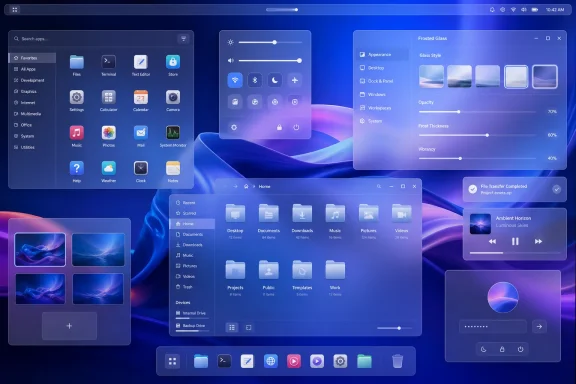 Frosted Glass Arrives as an Optional COSMIC Style
Frosted Glass is an appearance option rather than a new workflow, window-management mode, or administrative feature. Users choose where it appears and then tune the result with the two available controls.The confirmed Settings path is:
COSMIC Settings > Display > Appearance > Style > Frosted GlassThe rollout begins with Pop!_OS 24.04 LTS. COSMIC users running the desktop on other GNU/Linux distributions are due to follow a few days later, although the exact arrival time may depend on how each distribution packages and delivers COSMIC updates.
Because Frosted Glass starts disabled, installing the relevant update should not by itself replace the current COSMIC appearance. Users who want the existing style can leave the new option untouched.
The supported targets are described through four selectable scopes:
- Windows
- Panels
- Applets
- System interface
Frosted Glass includes two adjustments:
- Frost thickness
- Glass opacity
What Each Target Actually Changes
The scope controls matter more than the fashionable “glass” label because they determine how much of the desktop adopts the new look.| Target | Surfaces affected | Likely visual prominence |
|---|---|---|
| Windows | Application windows, with dialogs also identified as supported | Broadest day-to-day change because these surfaces can occupy much of the display |
| Panels | COSMIC desktop panels | Persistent but spatially limited; the effect remains around the desktop edge |
| Applets | Applet pop-ups and their control surfaces | Intermittent; visible mainly while opening menus or controls |
| System interface | COSMIC Launcher, application library, workspace overview, login screen, and on-screen controls | Most noticeable during navigation, session entry, workspace switching, and shell interactions |
Someone seeking a restrained desktop accent may prefer panels and applets. Selecting windows makes the appearance a more continuous part of application use. Enabling the system interface carries the design into COSMIC’s navigation and session surfaces, including places where users choose applications, switch workspaces, log in, or interact with on-screen controls.
The categories are not necessarily a complete list of every individual component receiving the style. In particular, the supplied reference to dialogs needs to be checked against the released Settings interface. If dialogs follow the windows scope automatically, selecting windows may affect more than ordinary top-level application frames. If COSMIC exposes dialogs through another control, the published scope list will need to be updated accordingly.
Concise visual-impact comparison
A useful way to judge the feature is by frequency and screen coverage:- Panels: always visible in many layouts, but limited to a narrow region.
- Applets: smaller and temporary, appearing when the user opens a panel control.
- Windows and dialogs: potentially large and persistent, making Frosted Glass part of normal application work.
- System interface: episodic but prominent, affecting recognizable COSMIC experiences such as the Launcher and workspace overview.
Off by Default Means Existing Desktops Stay Put
The default state is straightforward: Frosted Glass is not automatically enabled.This is significant because visual redesigns can be disruptive even when they add no new workflow. An update that changes contrast, surface separation, or the appearance of frequently used controls can feel larger than its technical scope. COSMIC avoids that immediate transition by making adoption deliberate.
The verified facts establish an inactive default and selectable targets. They do not establish a separate master switch in addition to those target selections. Users should therefore return to the Frosted Glass page and clear or change the relevant selections if they want to remove the effect; the interface should not be described as having a second confirmed global toggle unless the released build visibly provides one.
For Windows users, the closest useful comparison is structural rather than a claim of visual equivalence. Windows has used translucent materials in several generations of its interface, but COSMIC’s implementation should be evaluated on its own controls and supported surfaces. The practical similarities are that the appearance can be optional, can distinguish between parts of the interface, and can be adjusted instead of existing only as a fixed preset.
Thickness and Opacity Provide the Main Tuning
Frosted Glass exposes frost thickness and glass opacity as its two user-facing controls.Glass opacity is the more immediately understandable term: it changes how opaque or transparent the styled surface appears. Frost thickness is a separate property, but the supplied description does not define its underlying rendering behavior in enough technical detail to say exactly how COSMIC calculates or draws it.
The important point is that the two controls are independent. Users are not limited to choosing between “glass on” and “glass off”; they can adjust the presentation after selecting the relevant targets.
A concise configuration matrix illustrates the available design choices without pretending that one preset is universally best:
| Configuration goal | Selected targets | Control direction | Expected emphasis |
|---|---|---|---|
| Minimal accent | Panels | More restrained settings | Adds the style around the desktop perimeter |
| Menu-focused appearance | Panels and applets | Moderate settings | Carries the treatment from the panel into its pop-up controls |
| COSMIC shell identity | Panels, applets, and system interface | Balanced to preserve control visibility | Extends the look into the Launcher, library, overview, login, and on-screen UI |
| Broad glass presentation | Windows plus the desired shell targets | User-selected | Makes the style visible during both application work and desktop navigation |
The system-interface option is particularly important because it is more specific than a vague reference to “shared surfaces.” It connects Frosted Glass to identifiable parts of COSMIC:
- The COSMIC Launcher, where users search for and start applications
- The application library, where installed software is browsed
- The workspace overview, used to inspect and move among workspaces
- The login screen, encountered before entering the desktop session
- On-screen controls, including system-level interface elements presented over the desktop
The Windows-and-Dialogs Detail Needs Careful Wording
The supplied material identifies windows and dialogs as Frosted Glass targets while also presenting windows as one of four selectable scopes. Those statements may be compatible, but they should not be collapsed into an unsupported interface description.Several arrangements are possible. Dialogs could inherit the windows selection, they could be grouped under an expanded windows category, or the final interface could expose them in another way. Without a released screenshot or direct confirmation of the selector behavior, publishing “four scopes cover everything” would be too definitive.
The accurate wording is:
- COSMIC presents windows, panels, applets, and the system interface as the four named selections.
- Dialogs are also described as receiving Frosted Glass.
- The available information does not establish whether dialogs have an independent selector.
Apple’s Liquid Glass Is Context, Not a Parity Claim
Apple’s Liquid Glass design provides timely context for why glass-inspired interfaces are again receiving attention. It may have served as design inspiration or helped renew interest in layered, translucent visual materials across desktop platforms.That does not prove that COSMIC Frosted Glass reproduces Apple’s implementation, interaction model, rendering technology, supported surfaces, or accessibility behavior. The shared vocabulary describes a design direction, not technical parity.
The same restraint applies to comparisons with Windows Aero or newer Windows materials. Familiar visual themes can help readers understand the intent, but they cannot establish that COSMIC uses the same graphics pipeline or produces the same result.
COSMIC’s distinguishing facts are narrower and more useful: the style is optional, its reach can be selected by interface category, and users can adjust thickness and opacity.
First-Look Rollout Timeline
The meaningful timeline begins with availability rather than an invented development chronology.First — Pop!_OS 24.04 LTS: Frosted Glass arrives first for users of System76’s distribution.
A few days later — Other GNU/Linux distributions: COSMIC users on other distributions are expected to receive the feature after the initial Pop!_OS arrival. Packaging schedules may affect the exact time it appears.
After installation — No automatic visual conversion: Frosted Glass remains off unless the user selects targets in COSMIC Settings.
During configuration — Choose the reach: Users can select windows, panels, applets, and the system interface. Dialogs are also supported, although their relationship to the four selectors requires confirmation from the released interface.
During adjustment — Tune two properties: Frost thickness and glass opacity provide the available appearance controls.
Future context — COSMIC 2.0: The referenced COSMIC 2.0 release provides a forward-looking context for the desktop’s continued visual development. It should not be treated as proof that every Frosted Glass behavior, target, or interface decision is fixed for that release unless System76 confirms it.
This timeline captures both the immediate cross-distribution rollout and the larger release context without assigning unsupported dates or version-specific guarantees.
WindowsForum’s Practical Read
For WindowsForum readers, the most interesting aspect is not simply that another desktop has added a glass effect. The useful part is how COSMIC separates the visual reach of the feature.A Windows user evaluating COSMIC can make four substantially different choices:
- Use Frosted Glass as desktop trim.
Select panels and leave application surfaces unchanged. - Carry it into controls and menus.
Add applets so panel interactions use the same visual language. - Make it part of COSMIC navigation.
Select the system interface to include the Launcher, application library, workspace overview, login screen, and on-screen controls. - Make it an application-level material.
Select windows, with the expectation that dialogs may also receive the style depending on how COSMIC groups them.
| Evaluation question | What is currently established |
|---|---|
| Where does it arrive first? | Pop!_OS 24.04 LTS |
| When do other COSMIC distributions receive it? | A few days after the initial Pop!_OS rollout |
| Where is it configured? | COSMIC Settings > Display > Appearance > Style > Frosted Glass |
| Is it enabled automatically? | No, it is off by default |
| What are the named selections? | Windows, panels, applets, and system interface |
| What does system interface include? | Launcher, application library, workspace overview, login screen, and on-screen controls |
| Are dialogs supported? | Yes, but their exact relationship to the four selections needs confirmation |
| What can users adjust? | Frost thickness and glass opacity |
| Is parity with Apple or Windows established? | No; those platforms provide design context only |
A Short Admin Checklist
Frosted Glass is a cosmetic option, so there is little value in turning it into a speculative enterprise-risk discussion. Administrators supporting COSMIC primarily need an accurate help-desk description and a clear understanding of what users may change.- Confirm whether the device is running Pop!_OS 24.04 LTS or a COSMIC package from another GNU/Linux distribution.
- For non-Pop!_OS installations, allow for the stated delay of a few days in cross-distribution availability.
- Direct users to
COSMIC Settings > Display > Appearance > Style > Frosted Glass. - Record that the feature begins off by default.
- Explain the difference between windows, panels, applets, and the system-interface selection.
- Name the system-interface examples rather than describing them vaguely: Launcher, application library, workspace overview, login screen, and on-screen controls.
- Check the released interface to determine whether dialogs inherit the windows selection or have a distinct control.
- Avoid documenting a separate global on/off switch unless one is confirmed in the shipping UI.
- If providing screenshots, capture the same desktop with each scope changed individually so users can see which surfaces are affected.
- Treat frost thickness and glass opacity as appearance controls without attributing undocumented rendering mechanics to them.
A Focused Visual Addition With a Wider Rollout
Frosted Glass gives COSMIC another way to define its appearance as the desktop continues toward the referenced COSMIC 2.0 future. Apple’s Liquid Glass may be part of the wider design climate surrounding the feature, just as Windows’ long history of translucent materials gives WindowsForum readers a familiar point of reference. Neither comparison establishes feature parity.What COSMIC concretely offers is more disciplined than the broad “glass desktop” label suggests. Users can limit the style to panels, extend it into applets, bring it to major system experiences such as the Launcher and workspace overview, or apply it to windows and supported dialogs. Frost thickness and opacity then provide room to tune the selected presentation.
The rollout detail is equally important. Pop!_OS 24.04 LTS receives Frosted Glass first, but the feature is not being framed as permanently distribution-exclusive. COSMIC users elsewhere in the GNU/Linux ecosystem should expect it a few days later, subject to their distribution’s package delivery.
The remaining question is narrow but worth resolving: whether dialogs are folded into the windows selection or controlled separately. Until that is visible in the shipping interface, the four named scopes should be described as the primary selectors, not necessarily an exhaustive list of every styled surface.
Frosted Glass will not determine COSMIC’s success, and it is not evidence that COSMIC has matched Apple or Windows feature for feature. It is a focused visual option with a sensible default, recognizable targets, and enough scope control to let users decide whether glass belongs at the desktop edge, inside menus, across system navigation, or throughout application work.
References
- Primary source: LXer: Linux News
Published: 2026-07-12T02:20:10.379193
Loading…
lxer.com - Related coverage: phoronix.com
Loading…
www.phoronix.com - Related coverage: system76.com
Loading…
system76.com - Related coverage: blog.system76.com
Loading…
blog.system76.com - Official source: github.com
Loading…
github.com - Related coverage: commons.wikimedia.org
Loading…
commons.wikimedia.org
- Related coverage: omgubuntu.co.uk
Loading…
www.omgubuntu.co.uk