

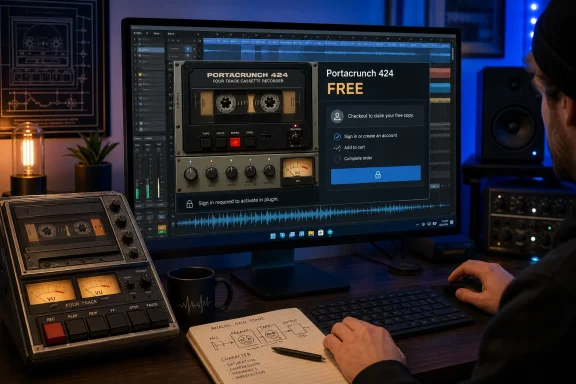
 Schulz Audio Portacrunch 424 Is Free, but You Must Complete Checkout to Keep It
Schulz Audio is giving away Portacrunch 424, a cassette four-track gain-stage effect for Windows and macOS. To claim it, open the Portacrunch 424 page in the Schulz Audio online store, click Buy, sign in to a Schulz Audio account or create one, and complete the checkout showing a FREE total. After installing the software, open Portacrunch 424 and sign in from inside the plugin with the same account to activate it.No Portacrunch expiry is published; Schulz Audio says the free offer may end without notice. Downloading or retaining the installer alone does not secure a license after the promotion ends, so readers interested in the effect should complete the free checkout while it remains available.
Bedroom Producers Blog reported the giveaway and updated its coverage on July 11, 2026.
How to Claim Portacrunch 424
The essential process is short:- Visit the Schulz Audio online store.
- Search for Portacrunch 424 and open its product page.
- Click Buy.
- Sign in to a Schulz Audio account, or create one when prompted.
- Verify that the checkout total is FREE.
- Complete checkout while the offer is still active.
- Download and install Portacrunch 424.
- Open the plugin and sign in from inside it with the same Schulz Audio account to activate it.
No additional confirmation method has been established. Readers therefore should not depend on an assumed account library, user-area listing, email receipt, or other undocumented indicator as a substitute for completing the free checkout and following the activation process presented by the developer.
Claim timeline
| Stage | What to do |
|---|---|
| While the giveaway is available | Complete the FREE checkout using a Schulz Audio account |
| After checkout | Download and install the appropriate version |
| On first use | Sign in from inside Portacrunch 424 with the same account to activate it |
Portacrunch 424 Models a Cassette Four-Track Gain Stage
Schulz Audio presents Portacrunch 424 as a cassette four-track gain-stage effect. According to the developer’s product description, it recreates gain-stage circuitry from a cassette four-track recorder using the company’s True Circuit Simulation technology.The description emphasizes component-level circuit modeling, including elements such as transistors, operational amplifiers, and capacitors. In practical terms, Portacrunch 424 is focused on the electronic character of a recorder’s gain stage rather than being described as a comprehensive cassette-production suite.
That distinction matters because “cassette” plugins can cover several different kinds of processing. Some focus on mechanical instability, tape wear, hiss, dropouts, saturation, or combinations of those effects. Portacrunch 424 has a narrower stated identity: it brings the modeled gain-stage circuitry of a cassette four-track recorder into a software effect.
Schulz Audio does not clearly identify the recorder modeled, so the name should not be treated as confirmation of a Tascam Portastudio 424 emulation.
This does not prevent users from evaluating Portacrunch 424 as a circuit-modeled effect. It simply limits how specifically the modeled hardware can be described. The supported characterization is that Portacrunch 424 models the gain-stage circuitry associated with a cassette four-track recorder.
Windows Install Choice
Schulz Audio lists Portacrunch 424 for 32-bit and 64-bit Windows and provides VST2, VST3, AAX, AU, and standalone versions. Windows users should select the format their host supports rather than installing formats they do not use.Editorial recommendation
For a typical current 64-bit Windows DAW, try VST3 first. Use AAX for Pro Tools. AU is macOS-only. Choose VST2 only when an older host or an existing project specifically requires it, and match the plugin architecture to the host when working with a 32-bit system.
| Environment | Practical choice |
|---|---|
| Most current 64-bit Windows DAWs | 64-bit VST3 |
| Pro Tools on Windows | AAX |
| Older hosts or projects requiring the older format | VST2 |
| A 32-bit Windows host | Matching 32-bit version |
| macOS host using Audio Units | AU |
| Use outside a plugin host | Standalone version |
Compact Windows admin note
For a shared or managed Windows computer, record which Schulz Audio account completed checkout because the same account is used for activation inside Portacrunch 424. Beyond that login requirement, no assumptions should be made here about activation limits, offline authorization, machine transfers, or other licensing arrangements that Schulz Audio has not specified in the supplied information.The Standalone Version Is Also Available
In addition to the listed plugin formats, Schulz Audio provides a standalone version of Portacrunch 424. This may be useful to anyone who wants to open the effect outside a DAW, although the available product facts do not detail its audio-device configuration or routing workflow.The standalone application does not replace the plugin format required by a DAW. A producer who intends to use Portacrunch 424 as an insert within a Windows project still needs a compatible VST2, VST3, or AAX version for that host.
Users interested only in DAW operation do not need to treat the standalone version as part of the essential giveaway process. The key steps remain completing checkout, installing the appropriate plugin format, and signing in from inside the software to activate it.
Account Sign-In Is Required for Activation
The zero-dollar promotion still uses a Schulz Audio account. Readers must sign in or create an account during checkout and then use that account from inside Portacrunch 424 for activation.This account requirement is important for anyone claiming the plugin on behalf of a studio, teaching room, shared workstation, or other managed environment. The person completing checkout should use an account that will remain accessible when the plugin is installed and activated.
The verified process establishes account-based checkout and in-plugin account activation. It does not, by itself, establish how many computers can be activated, whether an offline method exists, how machine replacements are handled, or whether additional authorization options are offered. Anyone who needs those details should consult Schulz Audio’s current terms or contact the developer.
Limitations note
The available information confirms the free checkout process, account sign-in for activation, listed platforms and formats, and Schulz Audio’s description of the modeled circuitry. It does not confirm a specific source recorder, a complete host-by-host compatibility matrix, undocumented account-management features, or broader licensing and activation policies.What the Giveaway Includes
The practical value of the offer can be summarized without turning the claim process into a larger deployment project:- Portacrunch 424 is currently available through a FREE Schulz Audio store checkout.
- A Schulz Audio account is required for checkout.
- The plugin requires an account sign-in from inside the software for activation.
- The developer lists 32-bit and 64-bit Windows support.
- Listed formats include VST2, VST3, AAX, and AU.
- AU is for macOS rather than Windows.
- A standalone version is also listed.
- The effect models gain-stage circuitry from a cassette four-track recorder.
- Schulz Audio has not published a Portacrunch 424 giveaway deadline.
- The developer warns that the free offer can end without notice.
Why Checkout Matters More Than Immediate Installation
A giveaway with no published expiration creates a simple priority: claim first and evaluate later.Readers do not have to decide immediately whether Portacrunch 424 belongs in a particular mix, whether it duplicates another cassette-oriented effect, or whether its circuit character suits their production style. Those judgments can be made after the checkout has been completed.
What cannot safely be deferred is acquisition through the store. Schulz Audio’s warning allows the promotion to end without advance notice, and possessing an installer does not secure a free license after that happens.
That distinction is especially relevant when installers or links are shared by third parties. The software package is not the complete claim process. Readers must use the Schulz Audio store, complete the zero-dollar checkout with an account, and then authenticate inside Portacrunch 424.
The same point applies to anyone planning a later Windows rebuild or studio upgrade. There is no need to install the effect on every machine immediately, but there is a reason to complete the checkout while the product is still being offered for free.
What Windows Producers Can Expect
For Windows producers, the format decision should be uncomplicated. A current 64-bit DAW will generally point toward the 64-bit VST3 version, while Pro Tools users need AAX. VST2 remains relevant when an older host or an existing project requires it.Portacrunch 424 may be of interest to producers who want gain-stage coloration associated with cassette four-track electronics without relying on a broad bundle of cassette effects. Schulz Audio’s description places the focus on modeled circuitry and its components, which gives the plugin a more specific role than a general-purpose “lo-fi” label would suggest.
That does not predetermine how it will sound on every source. Users may find it useful on individual tracks, buses, or other material, but the developer’s circuit-modeling description is not a guarantee of a particular creative result. The free offer makes it possible to test the effect within a compatible setup without paying an initial purchase price.
The absence of a clearly named recorder also means users should judge the plugin on what it does rather than treating the “424” title as proof of an exact hardware recreation. Schulz Audio’s supported claim is about cassette four-track gain-stage circuitry, not a specifically identified Tascam unit or revision.
Portacrunch 424 Is Worth Claiming Before the Offer Disappears
The important news is straightforward: Schulz Audio’s Portacrunch 424 is free through the developer’s store, no expiration date has been published, and the promotion may end without notice.To secure it, find Portacrunch 424 in the Schulz Audio online store, click Buy, sign in or create an account, and complete the checkout showing a FREE total. After installing the software, sign in from inside the plugin with the same account to activate it.
Windows users running a typical current 64-bit DAW should begin with VST3, while Pro Tools users should choose AAX. AU is a macOS format, and VST2 is mainly relevant when a particular host or older project requires it.
Portacrunch 424 is described as a component-level model of cassette four-track gain-stage circuitry built with Schulz Audio’s True Circuit Simulation technology. The precise source recorder is not clearly identified, so the product should be evaluated as the gain-stage effect the developer describes rather than as a confirmed emulation of a particular Portastudio.
Installation can wait, but checkout should not. Because Schulz Audio can withdraw the giveaway without notice, completing the FREE checkout now is the practical way to avoid being left later with an installer but no free license.
References
- Primary source: Bedroom Producers Blog
Published: 2026-07-11T09:10:08.231276
Schulz Audio offers Portacrunch 424 cassette gain-stage plugin for FREE - Bedroom Producers Blog
Developer Schulz Audio is offering Portacrunch 424, a cassette four-track gain-stage effect for macOS and Windows, as a free download. There’s no expiry date listed on the Portacrunch 424 product page, and the summer sale had around 15 hours remaining at the time of writing, but it is...bedroomproducersblog.com - Related coverage: schulz.audio
Schulz Tonebreaker – True Circuit Simulation Blues Overdrive Plugin
Experience authentic British blues overdrive with the Schulz Tonebreaker plugin. Powered by True Circuit Simulation, it offers dynamic response, built-in cabinet and room modeling, and seamless DAW integration.schulz.audio - Related coverage: bonedo.de
JHS Pedals 424 Gain Stage Test - Bonedo
Ein Gitarrenpedal, inspiriert vom Kult-Kassettenrekorder der 90er: Wie nah kommt das JHS 424 dem echten Tascam-Portastudio-Sound? www.bonedo.de
- Related coverage: internettattoo.com
JHS 424 Gain Stage Review: Should You Believe the Hype? — Internet Tattoo
The JHS 424 Gain Stage reimagines the classic Tascam Portastudio sound as a guitar pedal. We dive into how it captures that nostalgic cassette grit, how it fits into modern rigs, and whether it’s worth the hype for lo-fi producers and tone chasers.www.internettattoo.com
- Related coverage: musicradar.com
JHS Pedals 424 Gain Stage review | MusicRadar
The latest from JHS Pedals captures the sound of plugging your guitar into the input stages of a vintage multi-track recorder, aka, the mk.gee approachwww.musicradar.com - Related coverage: worldradiohistory.com