

Analytics Insight’s July 17 roundup of Microsoft Copilot capabilities in Power BI highlights a useful reality for report authors and consumers: Copilot is no longer just a prompt box for summarizing dashboards. Microsoft now positions it across report creation, model documentation, DAX querying, and report consumption.
The practical value is reducing the time spent on first drafts and routine exploration—not replacing validation. Microsoft’s documentation says Copilot can generate different results from the same prompt, so business-critical figures and logic still need review against the semantic model and source data.
Feature limits also matter. Copilot cannot create report pages for real-time streaming models, live connections to Analysis Services, or models with implicit measures disabled. It does not support custom visuals or styling changes, and editing complex visuals can lose detail or formatting. Natural-language data questions also do not currently cover tasks such as forecasting, anomaly detection, or key-influencer analysis.
Microsoft is also steering customers away from the older Power BI Q&A experience, which the company says will be retired in December 2026 in favor of Copilot-based natural-language analysis.
For Windows admins and Power BI owners, the next step is to verify Fabric capacity and tenant settings, then test Copilot against a well-documented nonproduction semantic model before enabling it for wider business use.
The practical value is reducing the time spent on first drafts and routine exploration—not replacing validation. Microsoft’s documentation says Copilot can generate different results from the same prompt, so business-critical figures and logic still need review against the semantic model and source data.
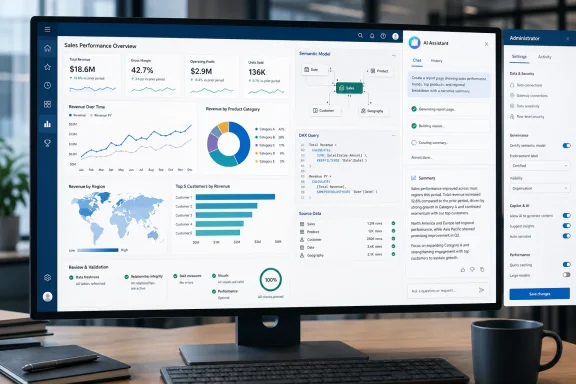 Ten capabilities worth knowing
- Create report pages from natural-language prompts. Describe the analysis or audience, and Copilot can select fields and generate visuals.
- Edit existing report pages. It can add, remove, or change visuals and fields through prompts, with undo and redo support.
- Ask questions of report data. Report viewers can ask for a filtered measure, top categories, or a trend over time without building a visual manually.
- Generate ad hoc visuals from the semantic model. If an answer is not already present in report visuals, Copilot can query the model and return a new visual.
- Produce report and page summaries. Users can request a quick narrative of a report, page, or selected visual from the Copilot pane or report interface.
- Create narrative-summary visuals. Authors can put a Copilot-generated narrative directly on a report page and refine it with prompts.
- Add summaries to scheduled email subscriptions. Standard Power BI subscriptions can include a Copilot-written report or page summary, although the capability remains in preview.
- Write DAX queries. In DAX Query View, Copilot can turn a plain-English request into a query that the author can inspect, retain, and run.
- Summarize semantic models. This is useful when inheriting a dataset or trying to understand its tables, measures, and intended analysis before building a report.
- Generate measure descriptions. Copilot can document semantic-model measures, making published datasets less opaque for downstream report builders.
The catches for admins
Per Microsoft’s documentation, availability is tied to Fabric capacity, tenant settings, permissions, and supported regions. An administrator must enable Copilot in Microsoft Fabric, and Power BI Desktop users need to connect to a supported workspace. Power BI Premium Per User workspaces are not supported for Copilot in Desktop, and older Desktop releases—January 2025 and earlier—do not support the report-view Copilot pane.Feature limits also matter. Copilot cannot create report pages for real-time streaming models, live connections to Analysis Services, or models with implicit measures disabled. It does not support custom visuals or styling changes, and editing complex visuals can lose detail or formatting. Natural-language data questions also do not currently cover tasks such as forecasting, anomaly detection, or key-influencer analysis.
Microsoft is also steering customers away from the older Power BI Q&A experience, which the company says will be retired in December 2026 in favor of Copilot-based natural-language analysis.
For Windows admins and Power BI owners, the next step is to verify Fabric capacity and tenant settings, then test Copilot against a well-documented nonproduction semantic model before enabling it for wider business use.
References
- Primary source: Analytics Insight
Published: 2026-07-17T03:00:00+00:00
Top 10 Microsoft Copilot Features in Power BI You Should Know
Explore Microsoft Copilot in Power BI with artificial intelligence. Learn how Copilot boosts reports, insights, and smarter decisions.www.analyticsinsight.net - Official source: learn.microsoft.com
Create and Edit Power BI Reports with Copilot - Power BI | Microsoft Learn
Learn how to use Copilot in Power BI to quickly create and edit reports with natural language prompts. Save hours building report pages with AI assistance.learn.microsoft.com