

Schneider Electric PowerChute Serial Shutdown versions 1.4 and earlier should be treated as affected, and PowerChute Serial Shutdown 1.5 should be treated as the fixed baseline. The disclosed CVE set is CVE-2026-2399, CVE-2026-2400, CVE-2026-2401, CVE-2026-2402, CVE-2026-2403, CVE-2026-2404, and CVE-2026-2405. CISA’s advisory says successful exploitation could affect file integrity, logs, authentication, availability, credentials, and sensitive information. Schneider Electric’s corresponding CPCERT advisory is SEVD-2026-104-01, “Multiple Vulnerabilities on PowerChute Serial Shutdown.”
For Windows admins, the near-term job is straightforward: find PowerChute Serial Shutdown, confirm whether any installation is version 1.4 or earlier, upgrade affected systems to version 1.5, verify the running service version, and restrict management access to trusted administrative networks and users.
The fixed version is also simple: PowerChute Serial Shutdown 1.5.
CISA’s advisory lists fixed versions for Microsoft Windows, Red Hat Enterprise Linux, and SuSE Linux. For WindowsForum readers, the important point is that Windows installations of PowerChute Serial Shutdown should be brought to version 1.5 if they are still on 1.4 or earlier.
The table is deliberately plain because the remediation path is plain. Administrators do not need to infer a complicated version matrix from the advisory. If PowerChute Serial Shutdown is present and the version is 1.4 or earlier, upgrade it. If it is version 1.5, verify that the running service and application interface reflect that version, then review who can reach the management surface.
The advisory’s impact language is broad enough to justify prompt remediation. CISA says successful exploitation could allow attackers to overwrite critical files, forge or inject malicious log data, gain unauthorized account access, trigger denial-of-service conditions, truncate or alter logging information, reset user credentials, or expose sensitive information.
For Windows teams, the immediate concern is not whether every one of those outcomes applies identically to every host. The concern is whether an affected administrative utility is installed, whether it is reachable by more people or systems than necessary, and whether it has been left at version 1.4 or earlier after version 1.5 became available.
This is the right level of response: identify the product, upgrade the affected version, verify the service, and reduce the management surface.
That makes the Windows workflow less about interpretation and more about execution. The version number is the dividing line. If a Windows host has PowerChute Serial Shutdown 1.4 or earlier, it is in the affected range. If it has version 1.5, it is on the fixed version identified by the advisory, subject to normal verification that the upgrade actually completed and the running service is the expected one.
Do not rely only on memory, asset labels, UPS model names, or old deployment notes. Search for the installed product name. Confirm the installed version. Record the host, owner, and management-access path. If the software is no longer needed, handle removal through the organization’s normal change process. If it is needed, move it to version 1.5 and confirm that access is appropriately limited.
The fixed platforms listed in the advisory include Microsoft Windows, Red Hat Enterprise Linux, and SuSE Linux. That cross-platform footprint is useful context for mixed environments because an organization may have PowerChute Serial Shutdown on more than one operating system. However, Windows admins should not wait for a Linux review to begin the Windows inventory. If Windows hosts are in scope, check them now.
Start with installed-software inventory. On a local Windows system, check Settings > Apps > Installed apps or Control Panel > Programs and Features, then look for PowerChute Serial Shutdown and review the displayed version. In managed environments, use the organization’s endpoint-management, asset-management, or software-inventory platform to search for the same product name at scale.
Where the application interface is available, open PowerChute Serial Shutdown and look for an About, Help > About, product information, or version page. The version shown in the application should match what your installed-software inventory reports. If the installed-apps view and the application interface both show version 1.5 after the upgrade, that is stronger evidence than either view alone.
After upgrading, verify the service state. Confirm that the expected service is running, that the application starts without immediate errors, and that the host still communicates as expected with the UPS or related local configuration. The point is not to invent a disruptive test. The point is to make sure the administrative software you upgraded is actually operating at the expected fixed version.
If your organization uses PowerShell or another local inventory method, keep the query generic and non-disruptive. For example, administrators may check standard installed-application inventory sources or use approved endpoint-management tooling to capture display name, display version, installation path, and publisher fields. Avoid depending on a single local method if your enterprise tooling already provides a safer, scalable inventory source.
For Linux teams, use equivalent procedural checks: package records where applicable, installation metadata, service state, and the product’s own version display if available. The advisory identifies Red Hat Enterprise Linux and SuSE Linux fixed versions, but the administrative goal is the same as on Windows: confirm whether PowerChute Serial Shutdown is present, determine whether it is version 1.4 or earlier, upgrade to 1.5, and verify the running service.
File integrity: CVE-2026-2399 is the most direct file-integrity concern because CISA describes it as improper restriction of file paths that could allow critical system files to be overwritten with unintended data.
Logging integrity: CVE-2026-2404 involves improper output encoding, and CVE-2026-2401 involves CRLF neutralization. CISA’s impact language includes forged or injected malicious log data and truncated or altered logging information.
Authentication: CVE-2026-2402 concerns insufficient limitations on repeated authentication attempts across multiple endpoints, and CISA’s impact language includes unauthorized account access and credential reset.
Sensitive information: CVE-2026-2403 is tied to sensitive information being inserted into log files, and CISA’s impact language includes exposure of sensitive information.
Availability: CVE-2026-2405 concerns uncontrolled resource consumption when certain system operations are triggered excessively, and CISA’s impact language includes denial-of-service conditions.
Input validation: CVE-2026-2400 is associated with improper validation of a specified quantity in input.
This consolidated view is useful because it avoids repeating the same impact themes across the entire article. The important point is not that every organization will see the same consequence from every weakness. The important point is that the affected product version has multiple disclosed vulnerabilities, and version 1.5 is the corrected baseline identified by the advisory.
CISA’s defensive guidance for control-system environments commonly emphasizes minimizing network exposure, avoiding unnecessary internet exposure, placing systems behind firewalls, isolating sensitive control-system assets from broader business networks where appropriate, and using secure remote-access practices. For this advisory, the practical translation is simple: PowerChute management access should be limited to trusted administrative networks, trusted administrative hosts, and trusted users.
That recommendation does not require assuming that a particular organization has a VPN path, jump host, flat network, or remote-access design. It simply means administrators should verify who can reach the management surface and remove access that is not needed.
Ask these questions during the remediation window:
That does not prove that every historical log file is malicious, corrupted, or sensitive. It does mean administrators should be cautious when using logs from affected versions as incident evidence or when sharing them outside the immediate support and security workflow.
After upgrading to version 1.5, consider a focused review of recent PowerChute-related logs if the host was exposed beyond a narrow administrative audience. Look for obvious anomalies such as unusual authentication activity, unexpected service restarts, malformed-looking entries, abrupt formatting changes, or events that do not match known administrative activity. This is procedural advice, not a claim that the advisory requires a specific log-review workflow.
Also be careful about support handling. If logs may contain sensitive information, do not casually paste them into tickets, emails, or shared workspaces without applying your organization’s normal data-handling rules. Keep log review proportional. The presence of these CVEs does not automatically mean a breach occurred, but it does justify treating affected-version logs with care.
Keep this review concrete. Identify who can sign in. Remove accounts that are no longer required. Confirm that administrative access is limited to the right users. If the application supports password or account-policy controls, review them according to the organization’s standards. If access is integrated with a broader administrative model, verify that only the intended administrators are included.
Avoid turning this into speculation about how any particular deployment was configured years ago. The advisory gives enough to act without assuming stale accounts, reused passwords, or weak remote access. The actionable point is that authentication-related weakness is part of the disclosed set, so administrators should both upgrade and confirm that only trusted users can authenticate to the management surface.
For an administrative utility involved in shutdown behavior, availability should be verified after patching. That does not mean staging an unsafe power-loss test on production equipment. It means confirming that the PowerChute service starts cleanly, remains stable after the upgrade, communicates with the expected local configuration, and presents no immediate application or system errors.
If your organization has an approved test plan for UPS-related workflows, use it. If it does not, at least verify configuration integrity, service state, notifications where applicable, and documented shutdown settings. The goal is to avoid a false sense of completion where the installer reports success but the operational behavior that matters to the organization has not been checked.
A good change ticket should therefore include two separate confirmations: the version moved to 1.5, and the post-upgrade service health was validated.
This timeline is intentionally short. The remediation should not become a sprawling project unless the organization discovers a larger asset-management problem. The advisory gives administrators a clear version boundary, so the strongest response is a disciplined upgrade and exposure review.
It does not need unsupported claims that every affected deployment is internet-exposed. It does not need assumptions about specific hospitals, manufacturing plants, transportation offices, remote-access paths, SIEM workflows, or stale local accounts. It does not need a dramatic label implying that PowerChute Serial Shutdown is suddenly a headline-class exploitation event.
The facts are enough. CISA and Schneider Electric identify affected versions, a fixed version, multiple CVEs, and impact categories that include file integrity, logs, authentication, availability, credentials, and sensitive information. That is sufficient to justify action without inventing additional context.
It is also worth keeping the CVSS score in perspective. A 6.1 CVSS v3 score means the issue sits in the middle of many vulnerability queues. But vulnerability management is not just score sorting. Product role, exposure, installed base, administrative access, and operational dependency all matter. If PowerChute Serial Shutdown is present on a Windows host, admins should not wait for the issue to become more dramatic before moving to the fixed version.
Windows administrators should check installed software inventories now, not later. If PowerChute Serial Shutdown appears on a Windows host, verify the version. If it is 1.4 or earlier, upgrade it to 1.5. After the upgrade, verify that the running service reports the expected version and that the application still behaves as intended.
Then review access. PowerChute management should be reachable only by trusted administrative users from trusted administrative networks or hosts. That exposure review should happen even when the upgrade succeeds, because patching and access control solve different parts of the risk.
The direct takeaway for Windows admins is this: if PowerChute Serial Shutdown is present on Windows, treat version 1.5 as the baseline and verify exposure controls immediately.
For Windows admins, the near-term job is straightforward: find PowerChute Serial Shutdown, confirm whether any installation is version 1.4 or earlier, upgrade affected systems to version 1.5, verify the running service version, and restrict management access to trusted administrative networks and users.
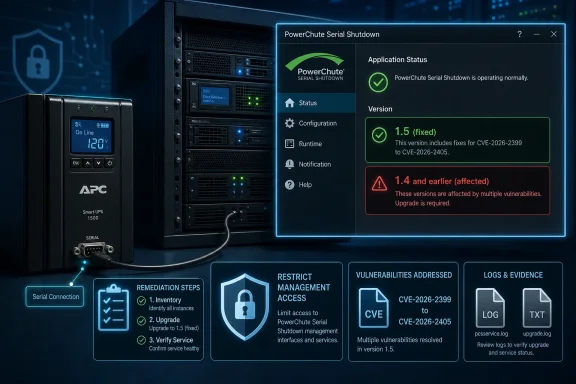 Immediate Remediation Checklist
- Inventory PowerChute Serial Shutdown. Search installed software and asset records for PowerChute Serial Shutdown on Windows and any other managed hosts.
- Confirm whether version 1.4 or earlier is present. CISA identifies PowerChute Serial Shutdown 1.4 and earlier as affected.
- Upgrade affected installations to version 1.5. CISA and Schneider Electric identify PowerChute Serial Shutdown 1.5 as the corrected version.
- Verify the service after the upgrade. Confirm that the installed application and running service report version 1.5, and that expected shutdown-management behavior still works.
- Restrict management access. Limit access to trusted administrative networks, hosts, and users. Do not leave a management interface reachable by users or networks that do not need it.
Affected and Fixed Versions
The affected range is simple: PowerChute Serial Shutdown 1.4 and earlier.The fixed version is also simple: PowerChute Serial Shutdown 1.5.
CISA’s advisory lists fixed versions for Microsoft Windows, Red Hat Enterprise Linux, and SuSE Linux. For WindowsForum readers, the important point is that Windows installations of PowerChute Serial Shutdown should be brought to version 1.5 if they are still on 1.4 or earlier.
| Deployment state | Product/version | Platform status in advisory | Admin interpretation |
|---|---|---|---|
| Affected | PowerChute Serial Shutdown 1.4 and earlier | Affected versions named by CISA | Inventory and upgrade required |
| Fixed | PowerChute Serial Shutdown 1.5 | Microsoft Windows fixed version listed | Update Windows installations to 1.5 |
| Fixed | PowerChute Serial Shutdown 1.5 | Red Hat Enterprise Linux fixed version listed | Update RHEL installations to 1.5 |
| Fixed | PowerChute Serial Shutdown 1.5 | SuSE Linux fixed version listed | Update SuSE installations to 1.5 |
What the CVEs Cover
CISA’s advisory describes a group of vulnerabilities affecting PowerChute Serial Shutdown. Each CVE should be tracked individually in vulnerability-management records rather than summarized as a single generic issue.- CVE-2026-2399 is a path traversal issue tied to improper restriction of file paths, which CISA says could allow critical system files to be overwritten with unintended data.
- CVE-2026-2400 is associated with improper validation of a specified quantity in input.
- CVE-2026-2401 is associated with improper neutralization of carriage-return and line-feed sequences.
- CVE-2026-2402 concerns insufficient limitations on repeated authentication attempts across multiple endpoints.
- CVE-2026-2403 is associated with insertion of sensitive information into log files.
- CVE-2026-2404 concerns improper output encoding, which CISA says may allow crafted input to be reflected in log files in unexpected ways.
- CVE-2026-2405 concerns uncontrolled resource consumption when certain system operations are triggered excessively.
Why This Matters for Windows Administrators
PowerChute Serial Shutdown is not something most admins inspect every week. It may have been installed during a UPS deployment, a server setup, or a hardware-refresh project, then left alone because it kept doing its job. That is exactly why the version check matters.The advisory’s impact language is broad enough to justify prompt remediation. CISA says successful exploitation could allow attackers to overwrite critical files, forge or inject malicious log data, gain unauthorized account access, trigger denial-of-service conditions, truncate or alter logging information, reset user credentials, or expose sensitive information.
For Windows teams, the immediate concern is not whether every one of those outcomes applies identically to every host. The concern is whether an affected administrative utility is installed, whether it is reachable by more people or systems than necessary, and whether it has been left at version 1.4 or earlier after version 1.5 became available.
This is the right level of response: identify the product, upgrade the affected version, verify the service, and reduce the management surface.
The Windows Angle Is Straightforward: Version 1.5 Is the Line
For WindowsForum readers, the most important remediation point is direct: PowerChute Serial Shutdown 1.5 is the fixed version for Microsoft Windows in the advisory.That makes the Windows workflow less about interpretation and more about execution. The version number is the dividing line. If a Windows host has PowerChute Serial Shutdown 1.4 or earlier, it is in the affected range. If it has version 1.5, it is on the fixed version identified by the advisory, subject to normal verification that the upgrade actually completed and the running service is the expected one.
Do not rely only on memory, asset labels, UPS model names, or old deployment notes. Search for the installed product name. Confirm the installed version. Record the host, owner, and management-access path. If the software is no longer needed, handle removal through the organization’s normal change process. If it is needed, move it to version 1.5 and confirm that access is appropriately limited.
The fixed platforms listed in the advisory include Microsoft Windows, Red Hat Enterprise Linux, and SuSE Linux. That cross-platform footprint is useful context for mixed environments because an organization may have PowerChute Serial Shutdown on more than one operating system. However, Windows admins should not wait for a Linux review to begin the Windows inventory. If Windows hosts are in scope, check them now.
Verification Guidance for Windows Teams
The following is practical procedural advice for administrators. It should not be read as a verbatim requirement from the advisory or as proof that every environment exposes the same interface, service names, or inventory fields.Start with installed-software inventory. On a local Windows system, check Settings > Apps > Installed apps or Control Panel > Programs and Features, then look for PowerChute Serial Shutdown and review the displayed version. In managed environments, use the organization’s endpoint-management, asset-management, or software-inventory platform to search for the same product name at scale.
Where the application interface is available, open PowerChute Serial Shutdown and look for an About, Help > About, product information, or version page. The version shown in the application should match what your installed-software inventory reports. If the installed-apps view and the application interface both show version 1.5 after the upgrade, that is stronger evidence than either view alone.
After upgrading, verify the service state. Confirm that the expected service is running, that the application starts without immediate errors, and that the host still communicates as expected with the UPS or related local configuration. The point is not to invent a disruptive test. The point is to make sure the administrative software you upgraded is actually operating at the expected fixed version.
If your organization uses PowerShell or another local inventory method, keep the query generic and non-disruptive. For example, administrators may check standard installed-application inventory sources or use approved endpoint-management tooling to capture display name, display version, installation path, and publisher fields. Avoid depending on a single local method if your enterprise tooling already provides a safer, scalable inventory source.
For Linux teams, use equivalent procedural checks: package records where applicable, installation metadata, service state, and the product’s own version display if available. The advisory identifies Red Hat Enterprise Linux and SuSE Linux fixed versions, but the administrative goal is the same as on Windows: confirm whether PowerChute Serial Shutdown is present, determine whether it is version 1.4 or earlier, upgrade to 1.5, and verify the running service.
Consolidated Vulnerability View
The vulnerabilities described by CISA fall into several administrative risk areas: file handling, logging behavior, authentication limits, input validation, and resource consumption. Those categories help prioritize testing after the upgrade, but they should not replace CVE-level tracking.File integrity: CVE-2026-2399 is the most direct file-integrity concern because CISA describes it as improper restriction of file paths that could allow critical system files to be overwritten with unintended data.
Logging integrity: CVE-2026-2404 involves improper output encoding, and CVE-2026-2401 involves CRLF neutralization. CISA’s impact language includes forged or injected malicious log data and truncated or altered logging information.
Authentication: CVE-2026-2402 concerns insufficient limitations on repeated authentication attempts across multiple endpoints, and CISA’s impact language includes unauthorized account access and credential reset.
Sensitive information: CVE-2026-2403 is tied to sensitive information being inserted into log files, and CISA’s impact language includes exposure of sensitive information.
Availability: CVE-2026-2405 concerns uncontrolled resource consumption when certain system operations are triggered excessively, and CISA’s impact language includes denial-of-service conditions.
Input validation: CVE-2026-2400 is associated with improper validation of a specified quantity in input.
This consolidated view is useful because it avoids repeating the same impact themes across the entire article. The important point is not that every organization will see the same consequence from every weakness. The important point is that the affected product version has multiple disclosed vulnerabilities, and version 1.5 is the corrected baseline identified by the advisory.
Management Exposure Is Part of the Fix
Upgrading to PowerChute Serial Shutdown 1.5 is the primary remediation step. Exposure control is the companion step.CISA’s defensive guidance for control-system environments commonly emphasizes minimizing network exposure, avoiding unnecessary internet exposure, placing systems behind firewalls, isolating sensitive control-system assets from broader business networks where appropriate, and using secure remote-access practices. For this advisory, the practical translation is simple: PowerChute management access should be limited to trusted administrative networks, trusted administrative hosts, and trusted users.
That recommendation does not require assuming that a particular organization has a VPN path, jump host, flat network, or remote-access design. It simply means administrators should verify who can reach the management surface and remove access that is not needed.
Ask these questions during the remediation window:
- Which hosts have PowerChute Serial Shutdown installed?
- Which users are allowed to administer it?
- Which networks can reach any management interface?
- Is access limited to trusted administrative segments or approved management hosts?
- Are there local accounts or application accounts that should be reviewed?
- Is the host firewall consistent with the intended access model?
- Are network firewall rules broader than necessary?
- Does the post-upgrade service listen only where expected?
Logging Issues Should Change How You Review Evidence
Several of the advisory’s described impacts touch logging. CISA’s impact language includes forged or injected malicious log data, truncated or altered logging information, and exposure of sensitive information. CVE-2026-2404 concerns improper output encoding that may allow crafted input to be reflected in log files in unexpected ways. CVE-2026-2403 is tied to sensitive information in log files. CVE-2026-2401 is associated with CRLF sequence handling.That does not prove that every historical log file is malicious, corrupted, or sensitive. It does mean administrators should be cautious when using logs from affected versions as incident evidence or when sharing them outside the immediate support and security workflow.
After upgrading to version 1.5, consider a focused review of recent PowerChute-related logs if the host was exposed beyond a narrow administrative audience. Look for obvious anomalies such as unusual authentication activity, unexpected service restarts, malformed-looking entries, abrupt formatting changes, or events that do not match known administrative activity. This is procedural advice, not a claim that the advisory requires a specific log-review workflow.
Also be careful about support handling. If logs may contain sensitive information, do not casually paste them into tickets, emails, or shared workspaces without applying your organization’s normal data-handling rules. Keep log review proportional. The presence of these CVEs does not automatically mean a breach occurred, but it does justify treating affected-version logs with care.
Authentication Limits Deserve a Basic Account Review
CVE-2026-2402 concerns insufficient limitations on repeated authentication attempts across multiple endpoints. CISA’s impact language includes unauthorized account access and credential reset. That makes account review a sensible part of the remediation, especially where the management surface was reachable by more than a small group of administrators.Keep this review concrete. Identify who can sign in. Remove accounts that are no longer required. Confirm that administrative access is limited to the right users. If the application supports password or account-policy controls, review them according to the organization’s standards. If access is integrated with a broader administrative model, verify that only the intended administrators are included.
Avoid turning this into speculation about how any particular deployment was configured years ago. The advisory gives enough to act without assuming stale accounts, reused passwords, or weak remote access. The actionable point is that authentication-related weakness is part of the disclosed set, so administrators should both upgrade and confirm that only trusted users can authenticate to the management surface.
Availability Issues Need Operational Verification
CVE-2026-2405 concerns uncontrolled resource consumption when certain system operations are triggered excessively. CISA’s impact language includes denial-of-service conditions.For an administrative utility involved in shutdown behavior, availability should be verified after patching. That does not mean staging an unsafe power-loss test on production equipment. It means confirming that the PowerChute service starts cleanly, remains stable after the upgrade, communicates with the expected local configuration, and presents no immediate application or system errors.
If your organization has an approved test plan for UPS-related workflows, use it. If it does not, at least verify configuration integrity, service state, notifications where applicable, and documented shutdown settings. The goal is to avoid a false sense of completion where the installer reports success but the operational behavior that matters to the organization has not been checked.
A good change ticket should therefore include two separate confirmations: the version moved to 1.5, and the post-upgrade service health was validated.
Practical Timeline for Administrators
| Step | Action | Evidence to keep |
|---|---|---|
| 1 | Search for PowerChute Serial Shutdown across Windows and other managed hosts | Asset or software-inventory export |
| 2 | Confirm installed version | Screenshot, inventory record, or endpoint-management result |
| 3 | Classify 1.4 and earlier as affected | Vulnerability-management entry or change ticket |
| 4 | Upgrade affected installations to 1.5 | Installer result, deployment record, or change completion note |
| 5 | Verify application and service version | Post-upgrade inventory result and application version check |
| 6 | Confirm service health | Service status and basic application-function check |
| 7 | Review management exposure | Host firewall, network firewall, and access-control notes |
| 8 | Update documentation | Asset record, runbook, and closure note |
Admin Checklist for Change Records
Use the following checklist in the change ticket or remediation record:- [ ] PowerChute Serial Shutdown inventory completed.
- [ ] Hosts running version 1.4 or earlier identified.
- [ ] Affected hosts scheduled for upgrade.
- [ ] Version 1.5 installer or approved deployment package obtained through the organization’s normal software process.
- [ ] Configuration reviewed or documented before upgrade.
- [ ] Upgrade to version 1.5 completed.
- [ ] Installed version verified after upgrade.
- [ ] Running service verified after upgrade.
- [ ] Management access limited to trusted administrative users.
- [ ] Management access limited to trusted administrative networks or hosts.
- [ ] Basic service health and expected behavior checked.
- [ ] Asset inventory and runbooks updated.
- [ ] Vulnerability-management record closed or exception documented.
What Not to Overstate
There are a few things this advisory does not need.It does not need unsupported claims that every affected deployment is internet-exposed. It does not need assumptions about specific hospitals, manufacturing plants, transportation offices, remote-access paths, SIEM workflows, or stale local accounts. It does not need a dramatic label implying that PowerChute Serial Shutdown is suddenly a headline-class exploitation event.
The facts are enough. CISA and Schneider Electric identify affected versions, a fixed version, multiple CVEs, and impact categories that include file integrity, logs, authentication, availability, credentials, and sensitive information. That is sufficient to justify action without inventing additional context.
It is also worth keeping the CVSS score in perspective. A 6.1 CVSS v3 score means the issue sits in the middle of many vulnerability queues. But vulnerability management is not just score sorting. Product role, exposure, installed base, administrative access, and operational dependency all matter. If PowerChute Serial Shutdown is present on a Windows host, admins should not wait for the issue to become more dramatic before moving to the fixed version.
Bottom Line for WindowsForum Readers
The remediation message is direct: PowerChute Serial Shutdown 1.4 and earlier are affected; PowerChute Serial Shutdown 1.5 is the fixed version; the CVE set is CVE-2026-2399, CVE-2026-2400, CVE-2026-2401, CVE-2026-2402, CVE-2026-2403, CVE-2026-2404, and CVE-2026-2405.Windows administrators should check installed software inventories now, not later. If PowerChute Serial Shutdown appears on a Windows host, verify the version. If it is 1.4 or earlier, upgrade it to 1.5. After the upgrade, verify that the running service reports the expected version and that the application still behaves as intended.
Then review access. PowerChute management should be reachable only by trusted administrative users from trusted administrative networks or hosts. That exposure review should happen even when the upgrade succeeds, because patching and access control solve different parts of the risk.
The direct takeaway for Windows admins is this: if PowerChute Serial Shutdown is present on Windows, treat version 1.5 as the baseline and verify exposure controls immediately.
References
- Primary source: CISA
Published: 2026-07-09T12:00:00+00:00
Loading…
www.cisa.gov - Related coverage: schneider-electric.cn
Loading…
www.schneider-electric.cn - Related coverage: iportal2.schneider-electric.com
Loading…
iportal2.schneider-electric.com - Related coverage: merten.de
Loading…
www.merten.de - Related coverage: cyberleveling.com
Loading…
www.cyberleveling.com - Related coverage: scribd.com
Loading…
www.scribd.com