
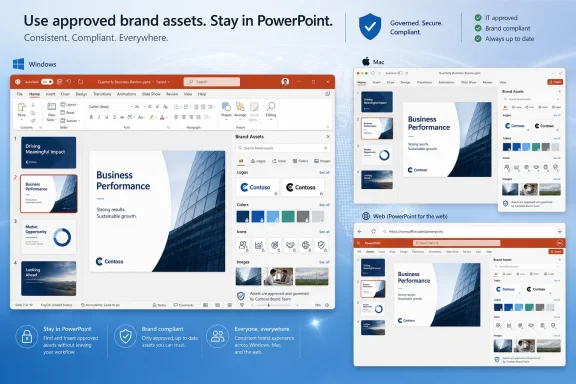
Microsoft added Roadmap ID 566351 on June 25, 2026, promising PowerPoint users on Windows desktop, Mac, and the web direct in-app access to approved brand colors, images, icons, logos, and related assets, with general availability currently scheduled for July 2026. The feature sounds small because the interface change is small: another pane, another picker, another way to avoid hunting through SharePoint folders. But the strategic move is bigger than the UI. Microsoft is trying to turn PowerPoint from a blank canvas into a governed brand endpoint.
That matters because PowerPoint is still where a huge amount of enterprise communication becomes real. Product launches, sales decks, board updates, training materials, partner pitches, customer briefings, and internal strategy narratives all pass through slides before they become action. If Microsoft can make brand compliance the path of least resistance inside PowerPoint, it will have solved one of the most persistent and least glamorous problems in corporate computing: getting ordinary employees to use the right logo, the right colors, the right imagery, and the right visual language without turning every deck into a ticket for the creative team.
For years, brand governance has lived in PDFs, intranet pages, shared folders, design systems, and increasingly sophisticated digital asset management platforms. The problem has never been that companies lack guidelines. The problem is that guidelines sit somewhere else.
PowerPoint, meanwhile, sits exactly where the work happens. A sales manager building a deck at 11 p.m. does not want to search a brand portal, download a logo pack, confirm which shade of blue is still current, and manually apply a palette. A regional marketer adapting a global presentation may not know whether last quarter’s icon set has been retired. A technical lead making a customer-facing architecture deck may simply use whatever old template is already on their desktop.
That is the gap Microsoft is targeting. The new roadmap item promises that users will be able to access brand colors, images, icons, logos, and other assets “right within PowerPoint” to create on-brand presentations. The phrasing is deliberately frictionless. Microsoft is not pitching a new compliance console or a heavy workflow approval system. It is pitching convenience.
That convenience is the governance model. When approved assets appear inside the tool at the moment of creation, the choice architecture changes. Employees no longer have to remember where the latest brand materials live; the application can surface them. The creative team no longer has to rely solely on training and reminders; it can make the compliant option the obvious one.
This is the same pattern Microsoft has been applying across Microsoft 365. Instead of asking users to move into specialized systems, Microsoft increasingly brings specialized controls into Word, Excel, PowerPoint, Teams, Outlook, SharePoint, and Copilot. Security labels, sensitivity markings, retention controls, Loop components, Copilot grounding, and organizational templates all reflect the same thesis: the center of gravity is the productivity app, not the policy document.
Every organization of meaningful size has its own slide-deck archaeology. There are legacy templates with old taglines. There are outdated logos embedded in master slides. There are regional decks with unofficial colors. There are customer-facing presentations using stock art that legal would prefer never existed. There are internal screenshots, copied diagrams, and half-remembered visual conventions drifting from deck to deck like corporate folklore.
Design professionals tend to underestimate how sticky these artifacts become. A mediocre but familiar deck is easier to reuse than a perfect template that requires finding, downloading, and understanding. Once a presentation works for a meeting, it becomes a source file for the next meeting. In that sense, PowerPoint is not just a presentation tool; it is an informal content supply chain.
Microsoft’s new feature is aimed at that supply chain. If brand assets are available from within PowerPoint, the app can interrupt the copy-paste economy that keeps stale materials alive. It cannot stop every bad design decision, but it can reduce the number of times a user reaches for an old folder because the approved asset library feels distant.
The subtlety is important. Microsoft is not saying PowerPoint will make every employee a designer. It is saying PowerPoint can make the approved choice easier than the improvised one. In enterprise software, that is often the difference between a policy that exists and a policy that works.
Roadmap dates are not guarantees, and Microsoft 365 administrators know that better than anyone. Features slide, rings differ, tenants vary, and “general availability” can still mean staged exposure rather than instant universal access. But the timing is still notable because this is not a single-platform convenience. The listed platforms are Desktop, Mac, and Web, and the listed release rings include Current Channel, Targeted Release, and General Availability.
That cross-platform scope is the real promise. Brand governance collapses quickly if it only works in one PowerPoint client. A marketing department may use Macs, sales may live on Windows laptops, executives may review on the web, and agencies may pass around files that touch all three. If the brand experience is inconsistent across clients, users will route around it.
Microsoft has spent years trying to narrow the experiential gap between desktop Office and the web versions of Microsoft 365 apps. PowerPoint remains one of the harder products to equalize because presentations depend on fonts, layout fidelity, media handling, animations, templates, and rendering details. Brand assets add another layer: the picker, permissions, preview behavior, insertion flow, and asset metadata all need to feel coherent across clients.
That is why this roadmap item is more ambitious than it first appears. A color palette surfaced in one client is easy. A governed, recognizable, permission-aware brand asset experience across Windows, macOS, and the browser is a deeper integration challenge.
That matters because a logo library alone is not brand governance. The modern corporate brand is a system: approved color palettes, image styles, illustration direction, iconography, tone, templates, layouts, and usage rules. A slide deck can technically use the correct logo and still feel completely off-brand if the imagery, composition, and color treatment are wrong.
PowerPoint is where that system is most exposed. Word documents can tolerate visual inconsistency. Excel workbooks often get a pass. Teams messages rarely claim to be polished artifacts. But presentations are supposed to represent the organization. They are where brand systems collide with deadline pressure.
By expanding the asset surface inside PowerPoint, Microsoft is acknowledging that “on-brand” is no longer synonymous with “template-based.” Templates help, but they are static starting points. A living brand system needs reusable assets that can be applied as the deck evolves. The deck may begin from a corporate template, but the user still needs icons for a roadmap, product imagery for a launch slide, approved photos for a market overview, and colors that remain consistent when charts and diagrams are created from scratch.
That is the practical appeal. The more brand materials PowerPoint can surface in context, the less the user has to leave the flow of composition. And the less the user leaves PowerPoint, the more Microsoft owns the workflow.
When humans create slides manually, brand drift is annoying but somewhat bounded. When AI systems generate decks at scale, brand drift can become industrialized. A single employee can produce one messy deck. A Copilot-enabled workflow can produce many plausible but visually inconsistent drafts in far less time.
That is not an argument against AI presentation generation. It is an argument that AI generation needs stronger grounding than a prompt. “Make this look like our company” is not a reliable instruction unless the system has access to official source material. Templates are one part of that grounding. Brand kits and asset libraries are another.
Microsoft has already framed Copilot in PowerPoint as a tool that can create presentations from files and use organizational templates. The new roadmap item extends the logic from templates to a broader asset layer. That suggests a future in which Copilot does not merely draft slides, but drafts them using the company’s official visual ingredients.
For IT and brand teams, that is the difference between acceleration and chaos. The nightmare version of AI slide generation is a flood of decks that look polished enough to circulate but wrong enough to damage trust. The better version is a controlled system in which AI can assemble approved materials quickly, while humans still judge message, nuance, and audience fit.
That is where Microsoft’s ecosystem advantage becomes obvious. Many organizations already store brand materials in SharePoint, OneDrive, organizational asset libraries, or connected digital asset management systems. If PowerPoint can surface those assets without forcing companies into a new repository, adoption becomes much easier.
But the administrative burden does not disappear. In fact, better in-app access can expose messy governance. If a company has three active logo folders, five versions of a product icon set, and no clear ownership model, putting that confusion inside PowerPoint only makes the confusion more visible. The application can surface approved assets, but the organization still has to approve them.
Permissions will also matter. Not every brand asset is meant for every employee. Some logos are restricted to partner programs. Some product images are embargoed. Some campaign materials are region-specific. Some photography may have license limits. A mature implementation needs to respect those boundaries without making the experience so complex that users return to old habits.
This is where IT, marketing, legal, and security intersect. Brand assets may not sound like sensitive data, but they can include unreleased products, confidential campaign imagery, customer logos, regulated claims, or region-specific materials. The best version of the feature will make those controls feel native. The worst version will become another place where users see either too much or not enough.
This is a content governance rollout disguised as a productivity feature. The technical enablement may be handled by Microsoft 365, but the success criteria belong partly outside IT. Are the right assets available? Are they named clearly? Are they current? Are there regional variants? Are there old templates that should be retired before the new feature lands? Are users trained to trust the in-app source over the random deck they inherited?
PowerPoint also has a long tail of local behavior. Users keep templates on desktops. Teams maintain their own shared folders. Sales enablement platforms distribute decks. Agencies send files. Executives carry around personal “best of” slide libraries. None of that disappears because Microsoft adds a brand asset picker.
The value of the new feature will depend on whether organizations pair it with cleanup. If old assets remain easier to find than new assets, behavior will not change. If the in-app library is complete, fast, and obviously authoritative, users will migrate because it saves time.
That is the core administrative lesson: brand compliance must feel like convenience. If it feels like bureaucracy, PowerPoint users will outmaneuver it with the same ingenuity they have always used to meet deadlines.
PowerPoint remains dominant in business presentations, but dominance is not the same as affection. Younger teams may prefer web-native design tools. Marketing departments may standardize around dedicated brand platforms. Agencies may live in Adobe and Figma. Startups may build decks in whatever tool produces good-looking output fastest.
Microsoft’s answer is integration. PowerPoint does not have to be the most fashionable design tool if it is the one already installed, governed, connected to identity, aware of organizational assets, and increasingly assisted by Copilot. The brand asset feature strengthens that argument.
It also blurs the boundary between productivity software and design operations. If PowerPoint can access approved assets, respect organizational identity, and generate on-brand drafts with AI assistance, then the business case for moving casual deck creation into a separate design tool weakens. Specialized tools will still matter for professional designers, but Microsoft wants everyday business users to stay inside Microsoft 365.
That is not just product defensiveness. It is platform economics. Every workflow that remains inside Microsoft 365 increases the value of the tenant, the identity layer, the storage layer, the compliance layer, and Copilot. Brand assets may look like decoration, but they are part of a broader retention strategy.
That matters because modern presentation work is often asynchronous and distributed. A deck may be started by one person, revised by another, reviewed in Teams, edited in a browser, polished on a Mac, and presented from a Windows machine. The old model of a single author working in a single desktop file is still common, but it is no longer the only model that matters.
Brand assets need to follow the document through that workflow. If a user inserts an approved icon on the web, the deck should remain faithful on desktop. If another user changes an image on Mac, the same asset library should be available. If a color palette is applied to charts, it should not degrade when opened elsewhere.
The browser also lowers the deployment barrier. Many organizations struggle to control desktop Office update timing, add-ins, and platform parity. Web experiences can reach users more uniformly, especially in managed Microsoft 365 environments. If Microsoft can make the brand experience strong in PowerPoint for the web, it gives organizations a cleaner path to adoption.
For Windows enthusiasts, that may sound like another sign of the desktop app losing special status. But the better interpretation is that PowerPoint’s future is hybrid. The desktop client remains essential for rich editing and performance, while the web client increasingly becomes the common collaboration surface. Brand governance has to work in both worlds.
Brand consistency is a floor, not a ceiling. It helps an organization look coherent, but it does not make the argument sharper. It prevents the wrong logo from appearing on the title slide, but it does not decide whether the product strategy makes sense. It can provide the right icon set, but it cannot automatically know whether the slide needs fewer icons and more clarity.
That distinction will become more important as Copilot-generated presentations improve. The tools can increasingly assemble plausible decks from source documents. They can apply templates, choose layouts, summarize text, and insert visuals. But the craft of deciding what an audience needs to understand — and what should be left out — remains stubbornly human.
Microsoft’s new feature should therefore be judged as infrastructure, not magic. It improves the conditions under which better presentations can be made. It reduces avoidable mistakes. It gives organizations a stronger default. But it does not eliminate the need for editorial judgment, design restraint, or subject-matter expertise.
The best users will treat the brand library as a trusted palette, not a substitute for thinking. The worst users will use approved assets to produce more polished clutter. That is not Microsoft’s problem alone; it is the eternal PowerPoint problem.
The first step is inventory. Which logos are current? Which product images are approved? Which icon sets are still valid? Which templates are obsolete? Which brand colors are official, and are they represented in a way that works for presentation themes, charts, and accessibility requirements?
The second step is ownership. Someone must have authority to publish, retire, and update assets. In many companies, that authority is split awkwardly among marketing, communications, design, IT, and regional teams. PowerPoint will not resolve that politics. It will merely reveal whether the organization has resolved it.
The third step is communication. Users need to understand that the in-app assets are the authoritative source. That message should be practical, not preachy. “Use this because it saves time and keeps your deck current” will work better than “use this because brand compliance is mandatory.”
Finally, organizations should test the experience across platforms. A feature listed for Windows, Mac, and web still deserves validation in the real tenant, with real templates, real permissions, and real user workflows. The moment to discover that a critical asset library is confusing or incomplete is before hundreds of employees start relying on it.
In the governed model, a presentation is connected to identity, storage, policy, AI assistance, compliance, and brand systems. It is not just a file; it is a node in the organization’s information architecture. The deck reflects who made it, what data it uses, which assets it includes, where it is shared, and whether it aligns with approved standards.
That shift mirrors the broader evolution of Microsoft 365. The suite is no longer merely a set of productivity applications. It is a managed workspace where content creation, governance, collaboration, and automation increasingly blend together. Brand assets in PowerPoint are one more sign that the old boundaries are dissolving.
There is a cost to that. Some users will dislike the sense that even creative work is becoming administered. Some teams will worry that centralization will slow experimentation. Some designers will fear that easier access to assets will produce more amateur design, not less.
Those concerns are real, but they miss the baseline. The unmanaged world already exists, and it already produces off-brand, outdated, and inconsistent materials. Microsoft is not replacing a pristine creative process with bureaucracy. It is trying to impose a little order on a workflow that has always been messy.
That matters because PowerPoint is still where a huge amount of enterprise communication becomes real. Product launches, sales decks, board updates, training materials, partner pitches, customer briefings, and internal strategy narratives all pass through slides before they become action. If Microsoft can make brand compliance the path of least resistance inside PowerPoint, it will have solved one of the most persistent and least glamorous problems in corporate computing: getting ordinary employees to use the right logo, the right colors, the right imagery, and the right visual language without turning every deck into a ticket for the creative team.
 Microsoft Is Moving the Brand Police Into the App
For years, brand governance has lived in PDFs, intranet pages, shared folders, design systems, and increasingly sophisticated digital asset management platforms. The problem has never been that companies lack guidelines. The problem is that guidelines sit somewhere else.PowerPoint, meanwhile, sits exactly where the work happens. A sales manager building a deck at 11 p.m. does not want to search a brand portal, download a logo pack, confirm which shade of blue is still current, and manually apply a palette. A regional marketer adapting a global presentation may not know whether last quarter’s icon set has been retired. A technical lead making a customer-facing architecture deck may simply use whatever old template is already on their desktop.
That is the gap Microsoft is targeting. The new roadmap item promises that users will be able to access brand colors, images, icons, logos, and other assets “right within PowerPoint” to create on-brand presentations. The phrasing is deliberately frictionless. Microsoft is not pitching a new compliance console or a heavy workflow approval system. It is pitching convenience.
That convenience is the governance model. When approved assets appear inside the tool at the moment of creation, the choice architecture changes. Employees no longer have to remember where the latest brand materials live; the application can surface them. The creative team no longer has to rely solely on training and reminders; it can make the compliant option the obvious one.
This is the same pattern Microsoft has been applying across Microsoft 365. Instead of asking users to move into specialized systems, Microsoft increasingly brings specialized controls into Word, Excel, PowerPoint, Teams, Outlook, SharePoint, and Copilot. Security labels, sensitivity markings, retention controls, Loop components, Copilot grounding, and organizational templates all reflect the same thesis: the center of gravity is the productivity app, not the policy document.
PowerPoint’s Worst Habit Is Also Its Superpower
PowerPoint’s enduring appeal is that almost anyone can make something that looks plausibly professional in a short amount of time. That same accessibility is why brand teams often regard it with a mix of resignation and fear. The app democratizes communication, but it also democratizes inconsistency.Every organization of meaningful size has its own slide-deck archaeology. There are legacy templates with old taglines. There are outdated logos embedded in master slides. There are regional decks with unofficial colors. There are customer-facing presentations using stock art that legal would prefer never existed. There are internal screenshots, copied diagrams, and half-remembered visual conventions drifting from deck to deck like corporate folklore.
Design professionals tend to underestimate how sticky these artifacts become. A mediocre but familiar deck is easier to reuse than a perfect template that requires finding, downloading, and understanding. Once a presentation works for a meeting, it becomes a source file for the next meeting. In that sense, PowerPoint is not just a presentation tool; it is an informal content supply chain.
Microsoft’s new feature is aimed at that supply chain. If brand assets are available from within PowerPoint, the app can interrupt the copy-paste economy that keeps stale materials alive. It cannot stop every bad design decision, but it can reduce the number of times a user reaches for an old folder because the approved asset library feels distant.
The subtlety is important. Microsoft is not saying PowerPoint will make every employee a designer. It is saying PowerPoint can make the approved choice easier than the improvised one. In enterprise software, that is often the difference between a policy that exists and a policy that works.
July 2026 Is an Aggressive Window for a Governance Feature
The roadmap entry lists the feature as “in development” with general availability set for July 2026. That is a fast turn from creation to broad availability, at least on paper. The item was created and last updated on June 25, 2026, which leaves only a narrow public runway before the planned release month.Roadmap dates are not guarantees, and Microsoft 365 administrators know that better than anyone. Features slide, rings differ, tenants vary, and “general availability” can still mean staged exposure rather than instant universal access. But the timing is still notable because this is not a single-platform convenience. The listed platforms are Desktop, Mac, and Web, and the listed release rings include Current Channel, Targeted Release, and General Availability.
That cross-platform scope is the real promise. Brand governance collapses quickly if it only works in one PowerPoint client. A marketing department may use Macs, sales may live on Windows laptops, executives may review on the web, and agencies may pass around files that touch all three. If the brand experience is inconsistent across clients, users will route around it.
Microsoft has spent years trying to narrow the experiential gap between desktop Office and the web versions of Microsoft 365 apps. PowerPoint remains one of the harder products to equalize because presentations depend on fonts, layout fidelity, media handling, animations, templates, and rendering details. Brand assets add another layer: the picker, permissions, preview behavior, insertion flow, and asset metadata all need to feel coherent across clients.
That is why this roadmap item is more ambitious than it first appears. A color palette surfaced in one client is easy. A governed, recognizable, permission-aware brand asset experience across Windows, macOS, and the browser is a deeper integration challenge.
This Is Really About Brand Kits, Not Just Logos
The roadmap wording is broad: colors, images, icons, logos, and more. That breadth points toward Microsoft’s larger brand-kit strategy inside Microsoft 365 Copilot and the design editor experience. Microsoft has already been building a concept of official brand kits that can centralize visual identity elements and make them available for branded content generation.That matters because a logo library alone is not brand governance. The modern corporate brand is a system: approved color palettes, image styles, illustration direction, iconography, tone, templates, layouts, and usage rules. A slide deck can technically use the correct logo and still feel completely off-brand if the imagery, composition, and color treatment are wrong.
PowerPoint is where that system is most exposed. Word documents can tolerate visual inconsistency. Excel workbooks often get a pass. Teams messages rarely claim to be polished artifacts. But presentations are supposed to represent the organization. They are where brand systems collide with deadline pressure.
By expanding the asset surface inside PowerPoint, Microsoft is acknowledging that “on-brand” is no longer synonymous with “template-based.” Templates help, but they are static starting points. A living brand system needs reusable assets that can be applied as the deck evolves. The deck may begin from a corporate template, but the user still needs icons for a roadmap, product imagery for a launch slide, approved photos for a market overview, and colors that remain consistent when charts and diagrams are created from scratch.
That is the practical appeal. The more brand materials PowerPoint can surface in context, the less the user has to leave the flow of composition. And the less the user leaves PowerPoint, the more Microsoft owns the workflow.
Copilot Raises the Stakes for Brand Control
The roadmap item does not explicitly say this is a Copilot-only feature. But it lands in a Microsoft 365 world where Copilot is steadily becoming the creative and editing layer across Office. That makes brand assets more consequential.When humans create slides manually, brand drift is annoying but somewhat bounded. When AI systems generate decks at scale, brand drift can become industrialized. A single employee can produce one messy deck. A Copilot-enabled workflow can produce many plausible but visually inconsistent drafts in far less time.
That is not an argument against AI presentation generation. It is an argument that AI generation needs stronger grounding than a prompt. “Make this look like our company” is not a reliable instruction unless the system has access to official source material. Templates are one part of that grounding. Brand kits and asset libraries are another.
Microsoft has already framed Copilot in PowerPoint as a tool that can create presentations from files and use organizational templates. The new roadmap item extends the logic from templates to a broader asset layer. That suggests a future in which Copilot does not merely draft slides, but drafts them using the company’s official visual ingredients.
For IT and brand teams, that is the difference between acceleration and chaos. The nightmare version of AI slide generation is a flood of decks that look polished enough to circulate but wrong enough to damage trust. The better version is a controlled system in which AI can assemble approved materials quickly, while humans still judge message, nuance, and audience fit.
The Admin Story Will Decide Whether This Works
The user-facing pitch is simple: assets appear inside PowerPoint. The enterprise reality is more complicated. Someone has to decide which assets are official, where they live, who can use them, when they expire, and how updates propagate.That is where Microsoft’s ecosystem advantage becomes obvious. Many organizations already store brand materials in SharePoint, OneDrive, organizational asset libraries, or connected digital asset management systems. If PowerPoint can surface those assets without forcing companies into a new repository, adoption becomes much easier.
But the administrative burden does not disappear. In fact, better in-app access can expose messy governance. If a company has three active logo folders, five versions of a product icon set, and no clear ownership model, putting that confusion inside PowerPoint only makes the confusion more visible. The application can surface approved assets, but the organization still has to approve them.
Permissions will also matter. Not every brand asset is meant for every employee. Some logos are restricted to partner programs. Some product images are embargoed. Some campaign materials are region-specific. Some photography may have license limits. A mature implementation needs to respect those boundaries without making the experience so complex that users return to old habits.
This is where IT, marketing, legal, and security intersect. Brand assets may not sound like sensitive data, but they can include unreleased products, confidential campaign imagery, customer logos, regulated claims, or region-specific materials. The best version of the feature will make those controls feel native. The worst version will become another place where users see either too much or not enough.
Windows Admins Should Treat This as a Content Governance Rollout
Because the feature is listed for PowerPoint across Desktop, Mac, and Web, it is tempting to treat it as an application enhancement that will simply arrive with the usual Microsoft 365 update cadence. That would be a mistake for larger organizations.This is a content governance rollout disguised as a productivity feature. The technical enablement may be handled by Microsoft 365, but the success criteria belong partly outside IT. Are the right assets available? Are they named clearly? Are they current? Are there regional variants? Are there old templates that should be retired before the new feature lands? Are users trained to trust the in-app source over the random deck they inherited?
PowerPoint also has a long tail of local behavior. Users keep templates on desktops. Teams maintain their own shared folders. Sales enablement platforms distribute decks. Agencies send files. Executives carry around personal “best of” slide libraries. None of that disappears because Microsoft adds a brand asset picker.
The value of the new feature will depend on whether organizations pair it with cleanup. If old assets remain easier to find than new assets, behavior will not change. If the in-app library is complete, fast, and obviously authoritative, users will migrate because it saves time.
That is the core administrative lesson: brand compliance must feel like convenience. If it feels like bureaucracy, PowerPoint users will outmaneuver it with the same ingenuity they have always used to meet deadlines.
Microsoft Is Also Defending PowerPoint’s Creative Turf
There is a competitive angle here that Microsoft is unlikely to shout about. The market for branded business content has become crowded. Canva, Adobe Express, Figma, enterprise DAM platforms, sales enablement tools, and template-management vendors all want a piece of the corporate content workflow. Many of them have built strong arguments around brand kits, controlled templates, and easy design for non-designers.PowerPoint remains dominant in business presentations, but dominance is not the same as affection. Younger teams may prefer web-native design tools. Marketing departments may standardize around dedicated brand platforms. Agencies may live in Adobe and Figma. Startups may build decks in whatever tool produces good-looking output fastest.
Microsoft’s answer is integration. PowerPoint does not have to be the most fashionable design tool if it is the one already installed, governed, connected to identity, aware of organizational assets, and increasingly assisted by Copilot. The brand asset feature strengthens that argument.
It also blurs the boundary between productivity software and design operations. If PowerPoint can access approved assets, respect organizational identity, and generate on-brand drafts with AI assistance, then the business case for moving casual deck creation into a separate design tool weakens. Specialized tools will still matter for professional designers, but Microsoft wants everyday business users to stay inside Microsoft 365.
That is not just product defensiveness. It is platform economics. Every workflow that remains inside Microsoft 365 increases the value of the tenant, the identity layer, the storage layer, the compliance layer, and Copilot. Brand assets may look like decoration, but they are part of a broader retention strategy.
The Web Client Is the Tell
The inclusion of PowerPoint for the web is not incidental. If brand assets were only a desktop feature, the roadmap item would be useful but limited. By including the browser, Microsoft is placing the feature in the collaborative, cross-device, cloud-first version of PowerPoint.That matters because modern presentation work is often asynchronous and distributed. A deck may be started by one person, revised by another, reviewed in Teams, edited in a browser, polished on a Mac, and presented from a Windows machine. The old model of a single author working in a single desktop file is still common, but it is no longer the only model that matters.
Brand assets need to follow the document through that workflow. If a user inserts an approved icon on the web, the deck should remain faithful on desktop. If another user changes an image on Mac, the same asset library should be available. If a color palette is applied to charts, it should not degrade when opened elsewhere.
The browser also lowers the deployment barrier. Many organizations struggle to control desktop Office update timing, add-ins, and platform parity. Web experiences can reach users more uniformly, especially in managed Microsoft 365 environments. If Microsoft can make the brand experience strong in PowerPoint for the web, it gives organizations a cleaner path to adoption.
For Windows enthusiasts, that may sound like another sign of the desktop app losing special status. But the better interpretation is that PowerPoint’s future is hybrid. The desktop client remains essential for rich editing and performance, while the web client increasingly becomes the common collaboration surface. Brand governance has to work in both worlds.
The Feature’s Quiet Limit Is Human Judgment
There is a danger in overselling what brand assets inside PowerPoint can accomplish. Access to approved materials does not guarantee good communication. A deck can be perfectly on-brand and still be confusing, dishonest, overstuffed, or dull.Brand consistency is a floor, not a ceiling. It helps an organization look coherent, but it does not make the argument sharper. It prevents the wrong logo from appearing on the title slide, but it does not decide whether the product strategy makes sense. It can provide the right icon set, but it cannot automatically know whether the slide needs fewer icons and more clarity.
That distinction will become more important as Copilot-generated presentations improve. The tools can increasingly assemble plausible decks from source documents. They can apply templates, choose layouts, summarize text, and insert visuals. But the craft of deciding what an audience needs to understand — and what should be left out — remains stubbornly human.
Microsoft’s new feature should therefore be judged as infrastructure, not magic. It improves the conditions under which better presentations can be made. It reduces avoidable mistakes. It gives organizations a stronger default. But it does not eliminate the need for editorial judgment, design restraint, or subject-matter expertise.
The best users will treat the brand library as a trusted palette, not a substitute for thinking. The worst users will use approved assets to produce more polished clutter. That is not Microsoft’s problem alone; it is the eternal PowerPoint problem.
The July Rollout Should Start Before July
Organizations that care about this feature should not wait for the toggle to appear. The roadmap timing gives IT and brand teams a short but useful preparation window. The work is less about PowerPoint itself than about the quality of the assets PowerPoint will expose.The first step is inventory. Which logos are current? Which product images are approved? Which icon sets are still valid? Which templates are obsolete? Which brand colors are official, and are they represented in a way that works for presentation themes, charts, and accessibility requirements?
The second step is ownership. Someone must have authority to publish, retire, and update assets. In many companies, that authority is split awkwardly among marketing, communications, design, IT, and regional teams. PowerPoint will not resolve that politics. It will merely reveal whether the organization has resolved it.
The third step is communication. Users need to understand that the in-app assets are the authoritative source. That message should be practical, not preachy. “Use this because it saves time and keeps your deck current” will work better than “use this because brand compliance is mandatory.”
Finally, organizations should test the experience across platforms. A feature listed for Windows, Mac, and web still deserves validation in the real tenant, with real templates, real permissions, and real user workflows. The moment to discover that a critical asset library is confusing or incomplete is before hundreds of employees start relying on it.
The Slide Deck Becomes a Governed Endpoint
The most interesting thing about Roadmap ID 566351 is not that PowerPoint will get easier access to logos. It is that Microsoft is treating the presentation as a governed business object. That is a different mental model from the old view of Office files as individual documents created by individual users.In the governed model, a presentation is connected to identity, storage, policy, AI assistance, compliance, and brand systems. It is not just a file; it is a node in the organization’s information architecture. The deck reflects who made it, what data it uses, which assets it includes, where it is shared, and whether it aligns with approved standards.
That shift mirrors the broader evolution of Microsoft 365. The suite is no longer merely a set of productivity applications. It is a managed workspace where content creation, governance, collaboration, and automation increasingly blend together. Brand assets in PowerPoint are one more sign that the old boundaries are dissolving.
There is a cost to that. Some users will dislike the sense that even creative work is becoming administered. Some teams will worry that centralization will slow experimentation. Some designers will fear that easier access to assets will produce more amateur design, not less.
Those concerns are real, but they miss the baseline. The unmanaged world already exists, and it already produces off-brand, outdated, and inconsistent materials. Microsoft is not replacing a pristine creative process with bureaucracy. It is trying to impose a little order on a workflow that has always been messy.
The Logo Drawer Is Becoming Infrastructure
The concrete implications are easy to miss because the feature sounds almost mundane. That is precisely why it is likely to matter. The most successful enterprise features often win by removing a small, repeated annoyance that sits in the path of everyday work.- PowerPoint users should expect a more integrated way to find and apply approved brand materials without leaving the presentation workflow.
- Microsoft 365 administrators should treat the July 2026 rollout as a reason to clean up organizational asset libraries, templates, and permissions.
- Brand and marketing teams should prepare for broader self-service use of official logos, icons, colors, and imagery by non-designers.
- Copilot-generated presentations will become more useful only if the underlying brand assets are current, governed, and accessible.
- The feature’s value will depend less on the picker itself than on whether users trust it as the fastest route to approved content.
- Cross-platform support across desktop, Mac, and web will be essential because presentation work rarely stays inside one client anymore.
References
- Primary source: Microsoft 365 Roadmap
Published: 2026-06-25T23:15:45.5477468Z
Loading…
www.microsoft.com - Official source: support.microsoft.com
Loading…
support.microsoft.com - Official source: techcommunity.microsoft.com
Loading…
techcommunity.microsoft.com - Related coverage: m365admin.handsontek.net
Loading…
m365admin.handsontek.net