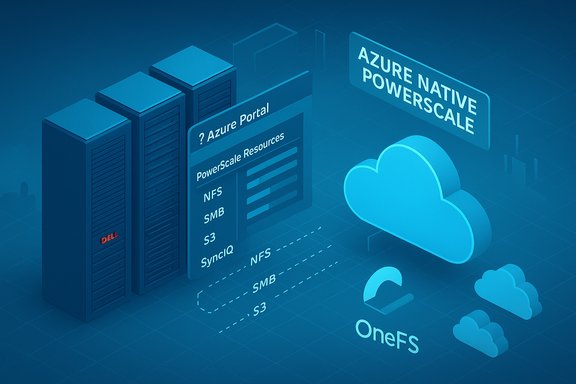
Dell’s move to bring PowerScale directly into the Azure control plane signals a meaningful shift for enterprises that need high-performance file storage in the cloud without giving up the OneFS feature set and operational model they rely on today.
Dell PowerScale for Microsoft Azure is an Azure‑native, co‑developed offering that packages Dell’s OneFS scale‑out filesystem as a transactable resource inside the Azure Portal and Marketplace. It is being presented in two deployment models: a Customer‑Managed model (deploy OneFS on Azure VMs and manage it yourself) and a Dell‑Managed Azure‑native model where Dell provisions and operates the underlying infrastructure while customers consume a managed filesystem from their Azure subscription. This managed path is billed through Azure Marketplace and integrates with Azure role‑based access and monitoring. Dell positions this as an enterprise‑grade solution for throughput‑sensitive workloads — AI/ML training, HPC, Electronic Design Automation (EDA), Media & Entertainment (M&E), and large‑scale analytics — by combining OneFS data services, multi‑protocol access, and dedicated compute SKUs tuned for PowerScale.
However, this is a vendor‑managed evolution in a still‑maturing product landscape. Key vendor claims — notably the up to 4× performance figure and the 8.4 PB single‑namespace number for the managed edition — are powerful marketing points but must be validated and contractually secured. Use the Dell‑Managed offering as a strategic tool to accelerate pilots and AI bursts, but insist on proof‑of‑concepts, written capacity and throughput limits, security attestations, and explicit exit plans before moving mission‑critical production data.
In short: PowerScale for Azure can materially reduce operational friction and deliver high‑performance file storage in the cloud, but prudent procurement and engineering validation are mandatory. When paired with rigorous PoCs, careful contractual terms, and a staged migration plan, it becomes a strong candidate for enterprises scaling data‑intensive workflows into Azure.
Conclusion
Dell PowerScale for Azure is more than another cloud storage SKU — it is an attempt to bring enterprise‑grade file semantics and data services into the Azure user and procurement experience. Its strengths for AI/ML, EDA, M&E, and hybrid DR are real; the path to deriving value runs through careful validation of capacity, performance, security, and exit options. Treat vendor performance and scale claims as starting points for technical verification and contractual negotiation; do that, and PowerScale for Azure can be an effective, high‑performance file storage foundation for enterprise cloud initiatives.
Source: Security Informed https://www.securityinformed.com/ne...azure-co-12610-ga-co-14053-ga.1763532703.html
 Background / Overview
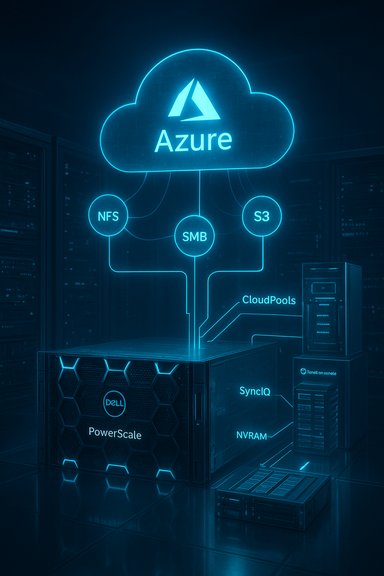
Dell PowerScale for Microsoft Azure is an Azure‑native, co‑developed offering that packages Dell’s OneFS scale‑out filesystem as a transactable resource inside the Azure Portal and Marketplace. It is being presented in two deployment models: a Customer‑Managed model (deploy OneFS on Azure VMs and manage it yourself) and a Dell‑Managed Azure‑native model where Dell provisions and operates the underlying infrastructure while customers consume a managed filesystem from their Azure subscription. This managed path is billed through Azure Marketplace and integrates with Azure role‑based access and monitoring. Dell positions this as an enterprise‑grade solution for throughput‑sensitive workloads — AI/ML training, HPC, Electronic Design Automation (EDA), Media & Entertainment (M&E), and large‑scale analytics — by combining OneFS data services, multi‑protocol access, and dedicated compute SKUs tuned for PowerScale. What PowerScale for Azure delivers: the facts IT teams should know
Native Azure integration and managed operations
- The Dell‑managed edition surfaces PowerScale as an Azure Marketplace resource with integration into Azure Resource Manager, portal visibility, and Marketplace billing. This simplifies procurement and allows use of existing Azure enterprise agreements and consumption commitments.
- The Customer‑Managed edition remains available for teams that require maximum control over configuration, networking, lifecycle management, and data residency.
OneFS capabilities preserved
PowerScale’s OneFS brings enterprise file services to Azure consistent with the on‑prem experience:- Single global namespace with multi‑protocol access (NFS v3/v4, SMB3, S3, HDFS).
- Built‑in data services: snapshots, inline compression, SmartDedupe, SmartLock immutability, SmartConnect load balancing.
- Policy‑driven cloud tiering via CloudPools and asynchronous replication via SyncIQ for hybrid DR and cloud‑burst workflows.
Performance and NVRAM‑enabled compute SKUs
Dell advertises custom NVRAM‑enabled compute SKUs engineered exclusively for PowerScale on Azure and claims up to 4× the performance of its closest competitor for read throughput per namespace. This is presented as an engineering differentiation designed to offer ultra‑low latency and higher throughput for data‑intensive workloads. This is a vendor claim and should be validated in a proof‑of‑concept under your workload profile.Scale and namespace limits — verified vs reported numbers
- Dell’s product documentation and solution briefs for the Customer‑Managed PowerScale on Azure edition state guidance of up to 18 nodes and ~5.6 PiB (pebibytes) of usable cluster capacity for an Azure cluster. That 5.6 PiB guidance is an important planning baseline for self‑managed deployments.
- Several vendor briefings and independent outlets report a larger 8.4 PB single‑namespace figure associated with the new Dell‑Managed Azure‑native edition. Microsoft’s partner announcement and press coverage list up to 8.4 PB for the managed offering, but Dell’s public documentation for the managed variant had incomplete or evolving capacity disclosures at the time of writing. Treat the 8.4 PB number as reported by Microsoft and third parties but not yet fully codified as a contractual guarantee; obtain written capacity and throughput limits from Dell when planning production deployments.
Why enterprises will care: use cases and practical value
AI, ML and HPC pipelines
Parallel file access and scale‑out throughput are essential for large model training, feature engineering, and dataset preprocessing. PowerScale’s ability to present the same dataset over NFS/SMB and S3 simultaneously, combined with high concurrency and low‑latency reads, makes it suitable as a data plane for GPU clusters and Azure AI compute. The Dell messaging specifically ties the managed service to Azure GPU compute and AI workloads.Media & Entertainment (M&E)
High‑bandwidth ingest, real‑time editing, collaborative workflows, and tiered archiving are classic PowerScale strengths. CloudPools can archive cold assets to Azure Blob while present a unified namespace for production teams, simplifying hybrid media pipelines.Electronic Design Automation and Life Sciences
Both EDA and genomics require high throughput and predictable I/O under highly concurrent access. PowerScale for Azure aims to reduce data movement friction and let teams leverage burst compute in Azure without rearchitecting storage footprints.Disaster Recovery and Ransomware resilience
SyncIQ asynchronous replication within Azure and to on‑prem clusters extends DR posture across environments. OneFS snapshotting plus SmartLock and other immutability features are marketed as part of a zero‑trust, ransomware‑resilient model. Confirm backup SLAs and recovery times as part of contractual negotiation.Security, governance and operational control
Security posture
Dell highlights a zero‑trust architecture, always‑on encryption, and built‑in ransomware recovery primitives in the managed offering. These design points are consistent with enterprise expectations for production workloads, but the precise controls (telemetry residency, key management model, audit log retention, and the location of forensic copies) must be validated with Dell and Microsoft to meet regulatory or internal compliance requirements.Governance and telemetry
Managed services introduce a third‑party control plane. Important questions for security and compliance:- Do audit logs and telemetry remain in your subscription, or are they managed within Dell’s control plane?
- Are encryption keys customer‑managed (CMKs) or vendor‑managed?
- What are the region/fidelity guarantees for data residency and where are backups stored?
These are operational controls that must appear explicitly in service agreements before production rollout.
Strengths — what PowerScale for Azure does well
- Familiar OneFS experience: Preserves feature parity for organizations already using PowerScale on‑prem: snapshots, SmartDedupe, SmartLock, and multi‑protocol access all remain available as part of the OneFS experience. This reduces re‑tooling for applications that depend on POSIX semantics or SMB.
- Hybrid continuity: CloudPools and SyncIQ enable staged migrations, cloud bursting, and hybrid DR patterns without forcing a full replatform to native object semantics.
- Managed consumption through Azure Marketplace: Billing and procurement integration simplify billing consolidation and permit use of enterprise Azure commitments. For many organizations, this reduces procurement friction and shortens time‑to‑pilot.
- Purpose‑built compute SKUs and performance claims: NVRAM‑enabled compute SKUs are an architectural differentiator aimed at delivering higher read throughput and lower latency for parallel workloads. Vendor testing claims substantial improvements, which can translate to faster training runs and shorter job turnaround for data‑heavy workloads — after validation.
Risks, caveats and where to push back during procurement
1) Vendor claims vs contractual guarantees
Vendor benchmark claims — such as “up to 4× performance” — are useful as orientation but must be validated under your workload and secured in contract when throughput or latency SLAs are business‑critical. Run a PoC that replicates real concurrency and dataset sizes.2) Capacity and published limits are not yet uniform
Different sources report different maximums: Dell’s customer‑managed guidance (18 nodes, ~5.6 PiB) is documented; Microsoft’s partner messaging and press reports cite the managed offering at 8.4 PB in a single namespace. That larger figure should be treated as reported but not yet contractual until Dell or Microsoft include it in the managed service documentation and offer terms. Ask for written capacity limits and export guarantees during procurement.3) Data gravity and exit strategy
Moving multi‑petabyte datasets into a Dell‑operated resource inside Azure may increase data gravity and create migration friction or unexpected egress costs. Model exit scenarios: how are bulk exports handled, what are egress speeds, and are there tools for staged migration back to on‑prem or another cloud? Confirm costs and timelines for data export in the service agreement.4) Network topology, delegated subnets, and performance variability
Azure‑native integrations typically require delegated subnets and specific networking constructs. Public cloud network variability (noisy neighbors, VM host variability) can affect performance predictability. Validate network designs (NSGs, Private Link, ExpressRoute) and test end‑to‑end latency under representative load.5) Security and compliance surface of a managed service
A managed model replaces some direct control with vendor operations. Confirm the following:- Who controls keys? CMK vs vendor key models.
- How long are audit logs retained, and where are they stored?
- What is the incident response and escalation SLA, and who owns RTO/RPO guarantees?
These must be contractual.
Practical checklist for evaluation and deployment (actionable steps)
- Clarify the target edition (Dell‑Managed vs Customer‑Managed) and map responsibilities for patching, monitoring, and compliance.
- Obtain written capacity, node, and throughput guarantees for the targeted edition (don’t rely solely on press or vendor marketing). Verify whether the 8.4 PB figure applies to your region and is contractual.
- Run PoC tests with representative workloads (AI training, EDA simulation, multi‑user M&E editing). Measure throughput, latency, and concurrency under production‑like load.
- Model full TCO including storage, snapshots, CloudPools archival charges, cross‑region replication, and network egress. Include snapshot retention, metadata costs, and potential CloudPools restore patterns.
- Validate security controls: CMK support, audit log residency, SIEM integrations, Private Link/endpoint support, RBAC/ABAC patterns with Microsoft Entra. Get these details in writing.
- Confirm backup and DR flows: test SyncIQ failover/failback, CloudPools restores, and PowerProtect integration if used for long‑term retention.
- Negotiate exit and data export terms: bulk export bandwidth, timeframes, and supported tooling. Include cost ceilings or credits for long egress operations where possible.
Cost modeling and procurement tips
- Include Azure Marketplace billing mechanics and how they interact with your Azure Consumption Commitment or Enterprise Agreement. Managed offerings billed through Marketplace may be eligible for committed spend offsets, but specifics vary by contract. Confirm with your Azure account team.
- Snapshot and replication frequency materially affect storage costs; model snapshot retention windows and the cost of CloudPools archival to Azure Blob, which will incur tiered storage and egress costs on recall.
- For burst scenarios (e.g., training large models on GPU farms), include temporary compute costs and any cross‑zone traffic pricing in your PoC cost model. Network egress between zones/regions can dominate costs when datasets are large.
How PowerScale for Azure fits into a long‑term hybrid strategy
PowerScale for Azure represents an approach that keeps enterprise file semantics intact while enabling a cloud‑native operational model for consumption and procurement. For organizations that depend on POSIX semantics, SMB shares, or require advanced OneFS data services, this offering reduces replatforming risk and lowers operational lift (if choosing the Dell‑Managed path). For organizations with strict compliance or custom networking needs, the Customer‑Managed path preserves control. A balanced strategy:- Start with non‑critical workloads or DR/test datasets in the Dell‑Managed preview.
- Validate performance, security, and billing models via PoC.
- Stage migration of critical production datasets only after contractual SLAs, capacity guarantees, and exit procedures are in place.
Final assessment — measured enthusiasm with due diligence
Dell PowerScale for Azure brings a compelling blend of enterprise OneFS features and Azure‑native consumption. For teams wrestling with petabyte‑scale file estates and throughput‑hungry workloads, it promises to simplify cloud adoption while preserving application semantics that are otherwise costly to rework.However, this is a vendor‑managed evolution in a still‑maturing product landscape. Key vendor claims — notably the up to 4× performance figure and the 8.4 PB single‑namespace number for the managed edition — are powerful marketing points but must be validated and contractually secured. Use the Dell‑Managed offering as a strategic tool to accelerate pilots and AI bursts, but insist on proof‑of‑concepts, written capacity and throughput limits, security attestations, and explicit exit plans before moving mission‑critical production data.
In short: PowerScale for Azure can materially reduce operational friction and deliver high‑performance file storage in the cloud, but prudent procurement and engineering validation are mandatory. When paired with rigorous PoCs, careful contractual terms, and a staged migration plan, it becomes a strong candidate for enterprises scaling data‑intensive workflows into Azure.
Conclusion
Dell PowerScale for Azure is more than another cloud storage SKU — it is an attempt to bring enterprise‑grade file semantics and data services into the Azure user and procurement experience. Its strengths for AI/ML, EDA, M&E, and hybrid DR are real; the path to deriving value runs through careful validation of capacity, performance, security, and exit options. Treat vendor performance and scale claims as starting points for technical verification and contractual negotiation; do that, and PowerScale for Azure can be an effective, high‑performance file storage foundation for enterprise cloud initiatives.
Source: Security Informed https://www.securityinformed.com/ne...azure-co-12610-ga-co-14053-ga.1763532703.html