

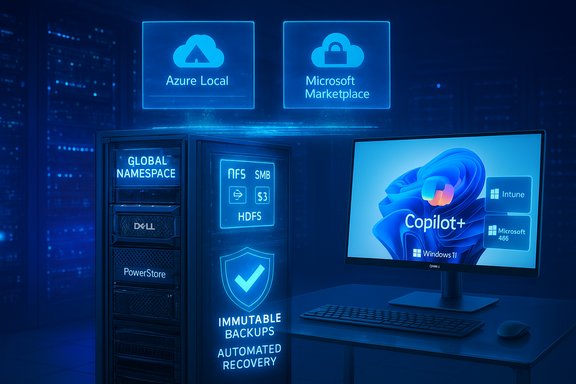
Dell Technologies and Microsoft have taken their Azure collaboration to the next level, announcing a coordinated set of hybrid and multicloud solutions that combine Dell’s APEX and PowerScale storage portfolio with Microsoft Azure-native controls, expanded data protection services, and a refreshed push into AI-enabled client devices and workplace modernisation. The announcement centers on deeper Azure integration — including a Dell‑managed, Azure‑native PowerScale offering in public preview — new PowerStore links with Azure Local for hybrid deployments, PowerProtect Backup Services delivered as backup‑as‑a‑service inside Azure, and enhancements for Dell’s AI PCs tightly integrated with Microsoft Intune, Windows 11, and Microsoft 365. These moves are designed to simplify operations for enterprises balancing legacy, on‑premises systems and cloud-native AI workloads while foregrounding cyber resilience and operational flexibility.
Dell and Microsoft have a long-standing engineering and go‑to‑market relationship, and this latest tranche of integrations consolidates that partnership around two strategic trends: enterprises retaining complex, stateful workloads (large unstructured file sets, HPC, EDA, AI training datasets) while adopting cloud‑native compute and AI services, and the rising priority of cyber resilience that pairs immutable backup and fast recovery with lifecycle automation and unified management. The new offerings aim to bridge on‑premises and Azure environments by offering either customer‑managed deployment models (for maximum control) or Dell‑managed, Azure‑native services (for operational simplicity).
However, the convenience of a managed, Azure‑native model comes with responsibilities: verify capacity and SLA claims in writing, model total cost of ownership carefully, preserve exit paths to avoid data gravity traps, and insist on full recovery testing before production migration. For organizations balancing legacy workloads, regulatory constraints, and cloud‑first AI ambitions, these new options deliver powerful tools — but their value will be realized only when IT teams pair them with rigorous validation, contractual clarity, and a clear operational playbook that aligns business needs with technical guarantees.
Source: IT Brief Asia Dell & Microsoft expand Azure partnership for hybrid cloud
 Background
Dell and Microsoft have a long-standing engineering and go‑to‑market relationship, and this latest tranche of integrations consolidates that partnership around two strategic trends: enterprises retaining complex, stateful workloads (large unstructured file sets, HPC, EDA, AI training datasets) while adopting cloud‑native compute and AI services, and the rising priority of cyber resilience that pairs immutable backup and fast recovery with lifecycle automation and unified management. The new offerings aim to bridge on‑premises and Azure environments by offering either customer‑managed deployment models (for maximum control) or Dell‑managed, Azure‑native services (for operational simplicity).Why this matters now
Several market forces make this release timely: growing demand for large‑scale, throughput‑sensitive file systems to feed AI/HPC workflows; regulatory and data sovereignty requirements that maintain on‑prem footprints; and CIOs’ desire to simplify procurement and billing by transacting more infrastructure through cloud marketplaces. By packaging PowerScale as an Azure Marketplace‑transactable resource and delivering PowerProtect and APEX file/protection services inside Azure, Dell and Microsoft are lowering operational friction for organizations that want to consume enterprise data services under Azure governance and billing.Hybrid cloud integration: PowerStore & Azure Local
Dell’s announcement emphasizes new integrations between PowerStore and Azure Local, Microsoft’s on‑premises‑focused hybrid platform designed to run Azure services locally. These integrations are positioned to deliver automated lifecycle management, independent scaling of on‑premises resources and cloud instances, and infrastructure choices that align with evolving IT footprints. The goal is to make on‑prem infrastructure behave more like cloud services — enabling automation, predictable upgrades, and consistent tooling while preserving local processing where latency or data residency matters.What PowerStore brings to hybrid deployments
PowerStore’s strengths — NVMe performance and always‑on data reduction — are being leveraged in hybrid architectures to reduce storage footprint and improve throughput for latency‑sensitive workloads. That capability is useful for edge or near‑data inference tasks, real‑time analytics, and legacy applications that require block or file semantics. The integration with Azure Local aims to allow organizations to run these workloads on validated hardware with Azure management, applying the same policy and lifecycle controls used in public Azure.Practical notes for IT teams
- Confirm which PowerStore features are available in the Azure Local validated hardware stack before design decisions.
- Validate automation and patching workflows; an Azure‑managed lifecycle reduces ops time but requires trust in the update cadence.
- Model cost and performance trade‑offs for NVMe‑backed on‑prem storage versus cloud block or object tiers.
Dell PowerScale for Azure: a managed, Azure‑native file service
The headline technical shift is the public preview of an Azure‑native, Dell‑managed PowerScale (marketed under APEX File Storage / PowerScale for Azure) that surfaces Dell’s OneFS features directly inside the Azure control plane. This converts PowerScale from a customer‑deployed set of VMs and OneFS clusters into a transactable, Dell‑operated file service that appears in the Azure Portal and can be consumed through Marketplace procurement and Azure billing.Feature parity and OneFS capabilities
Dell asserts that key OneFS capabilities are preserved in the cloud editions, including:- Single global namespace and scale‑out filesystem semantics
- Multi‑protocol access: NFS (v3/v4), SMB3, HDFS and S3 access
- Data services such as snapshots, inline compression, SmartDedupe, SmartLock immutability, SmartConnect client load balancing
- CloudPools tiering to push cold data to Azure Blob storage
- SyncIQ replication for asynchronous hybrid replication and DR
Two deployment models: choice and tradeoffs
Dell now advocates two models for PowerScale on Azure:- Customer‑managed PowerScale for Azure — you deploy OneFS on Azure VMs and retain control of compute, networking, and lifecycle.
- Dell‑managed (Azure‑native) PowerScale — Dell provisions and operates the infrastructure and OneFS; customers consume a managed filesystem resource from their Azure subscription.
Capacity, performance and a caution on numbers
Dell’s documentation provides guidance for the customer‑managed Azure edition (for example, cluster guidance of up to 18 nodes and about 5.6 PiB of usable capacity in Azure for that edition). However, some third‑party reports cited larger single‑namespace figures (for instance, an 8.4‑PB claim). That larger number has not been verified in Dell or Microsoft public documentation and should be treated as unconfirmed until Dell publishes explicit capacity limits for the Dell‑managed, Azure‑native edition. Enterprises must obtain contractual capacity and throughput guarantees for production use.File storage as a managed Azure service: operational implications
Bringing PowerScale into the Azure control plane changes several operational vectors:- Visibility and management via Azure Portal, Azure CLI, and PowerShell
- Billing flow through Azure subscriptions and Marketplace offers, enabling use of existing enterprise agreements and committed spend
- Role‑based access control (RBAC) integration and telemetry in Azure Monitor
- A simplified support boundary where Dell is primary for platform issues while customers remain responsible for application‑level integration
Data protection advances: PowerProtect Backup Services on Azure
Dell updated PowerProtect Backup Services, positioning it as a backup‑as‑a‑service offering within Azure that supports hybrid workloads and simplifies cyber resilience at scale. The enhancements emphasize automated recovery capabilities, broader cloud coverage for backups, and simplified management for ransomware protection and fast restoration. Dell frames this as part of a broader Dell Cyber Resilience approach that pairs immutable storage, automated recovery workflows, and managed detection/response patterns.Key capabilities to evaluate
- Backup‑as‑a‑service in Azure for hybrid workloads (on‑prem to cloud)
- Immutable backups and WORM functionality to help defend against ransomware tampering
- Automated recovery orchestration to reduce RTO and maintain business continuity
- Integration points with Azure AD, Azure storage controls, and potential support for customer‑managed encryption keys
Practical guidance for backup strategy
- Validate recovery orchestration with full‑scale drills that include AD, databases, and application stacks.
- Request explicit recovery time objectives (RTO) and recovery point objectives (RPO) for the managed service.
- Confirm immutability controls and who holds encryption keys during recovery operations.
- Model the economics of snapshot retention, egress, and cross‑region replication under your expected restore scenarios.
AI PCs and workplace modernisation: Copilot+ integration and on‑device AI
Dell also announced new features for its AI‑powered PCs designed to integrate tightly with Microsoft Intune, Windows 11, and Microsoft 365. These Copilot+ or AI PCs include local AI processors that allow on‑device inference and enable scenarios for automation, personalization, and improved endpoint security. Dell’s approach includes developer enablers for deploying on‑device AI models and expanding silicon support in the Dell AI Factory portfolio.What this means for end users and IT
- On‑device AI reduces latency, preserves privacy for sensitive inference tasks, and keeps some workloads off cloud infrastructure.
- Integration with Intune and Windows 11 management tooling maintains enterprise policy controls and simplifies device lifecycle management.
- Developer tools in Dell AI Factory aim to accelerate packaging and deployment of on‑device models, though enterprises should confirm supported frameworks and model size constraints.
Professional services, payment options and the go‑to‑market play
Dell described Professional Services for Microsoft to assist customers with deployment, security hardening, and productivity optimisation. These services are paired with Dell Payment Solutions to facilitate digital transformation budgets and procurement cycles. The combination of managed services plus financing options is a deliberate push to reduce friction for customers who want to accelerate migration and AI adoption without heavy upfront capital expenditure.What to expect from professional services
- Advisory and implementation services for Azure migrations and PowerScale/PowerStore deployments
- Security‑focused engagements to implement zero‑trust architectures and immutable backup strategies
- Operational runbooks and staff augmentation to accelerate early proofs‑of‑concept and production rollouts
Critical analysis — strengths, gaps and risks
Dell and Microsoft’s expanded collaboration brings meaningful benefits, but the package also introduces tradeoffs that enterprise buyers must examine carefully.Notable strengths
- Operational simplicity for complex file workloads: An Azure‑native, Dell‑managed PowerScale lowers operational burden and accelerates adoption for AI and HPC workloads that require scale‑out file semantics.
- Seamless procurement and billing: Marketplace transactable resources let organizations leverage committed Azure spend and enterprise agreements, aiding financial consolidation.
- Hybrid continuity and AI readiness: CloudPools tiering and SyncIQ replication provide practical hybrid paths for phased migration and cloud bursting for GPU/AI compute.
- Stronger focus on cyber resilience: Managed immutable backups and orchestrated recovery improve organizational resilience against ransomware and operational outages — provided recovery SLAs are tested.
Potential risks and gaps
- Capacity and performance ambiguity: Publicly published capacity guidance differs between customer‑managed and managed editions; unverified numbers (e.g., 8.4 PB) have circulated and should not be used for planning without contractual confirmation. Enterprises must obtain explicit capacity and performance SLAs from Dell.
- Vendor control and data gravity: Using a Dell‑managed service within Azure can increase data gravity and complicate future cloud portability. Exit strategy and bulk export mechanisms must be contractualized.
- Cost model complexity: File services bring non‑trivial TCO elements — snapshots, replication, egress, and CloudPools archive costs to Azure Blob can materially change long‑term economics. Run a full cost model and PoC.
- Compliance and telemetry concerns: Managed services change the control surface; organizations in regulated industries should verify telemetry residency, audit log access, and key management options.
- Performance predictability for tightly coupled HPC/AI workflows: Cloud VM variability and network effects can affect latency-sensitive training jobs. Validate end‑to‑end performance with representative workloads.
A pragmatic checklist for IT teams evaluating these offerings
- Confirm the edition: customer‑managed vs Dell‑managed and document operational responsibilities.
- Request written capacity limits, node counts, and performance SLAs for the Dell‑managed service.
- Validate region availability and data residency for the managed offering.
- Run PoCs with representative workloads to measure throughput, concurrency, and latency.
- Build a complete cost model that includes storage, snapshots, replication, CloudPools archival, and egress.
- Test recovery workflows end‑to‑end, including AD, database, and application failover.
- Confirm encryption and key management options, and where backup telemetry is stored.
- Negotiate contractual exit terms and data export mechanics in case of future migration needs.
- Validate supported Azure VM families and instance sizing for customer‑managed deployments.
- Ensure procurement teams understand Azure Marketplace billing mechanics and private offer options.
Conclusion
Dell’s expanded collaboration with Microsoft deepens the bridge between classic enterprise storage semantics and the agility of Azure, packaging PowerScale, PowerStore, PowerProtect and AI‑enabled endpoint tools into consumable models that map to both cloud‑native and hybrid use cases. The strategic value is clear: enterprises needing high throughput, scale‑out file systems for AI/HPC can now access those capabilities through Azure’s control plane with Dell assuming infrastructure operations where desired, while backup and cyber resilience are being elevated into managed Azure services.However, the convenience of a managed, Azure‑native model comes with responsibilities: verify capacity and SLA claims in writing, model total cost of ownership carefully, preserve exit paths to avoid data gravity traps, and insist on full recovery testing before production migration. For organizations balancing legacy workloads, regulatory constraints, and cloud‑first AI ambitions, these new options deliver powerful tools — but their value will be realized only when IT teams pair them with rigorous validation, contractual clarity, and a clear operational playbook that aligns business needs with technical guarantees.
Source: IT Brief Asia Dell & Microsoft expand Azure partnership for hybrid cloud
