

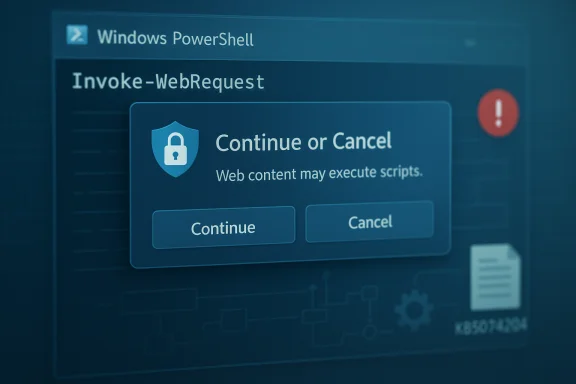
Microsoft’s security update for CVE-2025-54100 does more than patch a vulnerability — it changes the behavior of a widely used PowerShell cmdlet in a way that will be immediately visible to users and consequential for automation: after installing the update, Invoke‑WebRequest will present an interactive confirmation prompt warning that parsing or executing web‑retrieved content may run scripts, and the default action is to cancel unless the operator explicitly continues.
PowerShell’s web‑facing cmdlets (notably Invoke‑WebRequest and Invoke‑RestMethod) have long straddled convenience and risk. In Windows PowerShell 5.1, Invoke‑WebRequest historically attempted to populate a DOM-like object using the Internet Explorer (mshtml) engine when the cmdlet performed full HTML parsing. That behavior could — implicitly and sometimes invisibly — execute script elements or trigger browser-style UI while parsing a remote page. Attackers have repeatedly exploited similar download‑and‑execute patterns: a short one‑liner that fetches remote content and immediately evaluates it (for example, piping into Invoke‑Expression/iex) is a frequent initial access or staging technique.
Microsoft assigned CVE‑2025‑54100 to this class of risk and shipped a targeted update that changes Invoke‑WebRequest’s default interactive behavior to insert a human decision point before any parsing path that could execute script content. The update is distributed as a hotpatch for eligible builds (and in some cumulative rollups for broader servicing families).
The new confirmation prompt embeds a human‑in‑the‑loop for interactive sessions, increasing the chance that an operator will detect suspicious activity and cancel a dangerous operation. It is not a complete security boundary — rather, it is an additional, coarse control that reduces the success rate of low‑effort, opportunistic misuse.
Independent vulnerability trackers and security feeds list CVE‑2025‑54100 as a serious, high‑impact vulnerability tied to command‑injection-style concerns in PowerShell; vendor guidance frames the behavioral change as a mitigation to the identified risk.
Conclusion
The patch for CVE‑2025‑54100 is not merely a binary fix — it intentionally introduces a behavioral hardening that protects interactive users by default. That protection is valuable and sensible, but it imposes real operational work for automation owners. Treat the change as an opportunity to inventory risky patterns, modernize delivery pipelines, and harden runtime controls. Prioritize the pilot testing and script updates described above, avoid broad suppression of the prompt, and combine this vendor mitigation with layered defenses (signing, AppLocker, EDR and logging) to achieve a sustainable reduction in script‑execution risk.
Source: MSRC Security Update Guide - Microsoft Security Response Center
 Background
PowerShell’s web‑facing cmdlets (notably Invoke‑WebRequest and Invoke‑RestMethod) have long straddled convenience and risk. In Windows PowerShell 5.1, Invoke‑WebRequest historically attempted to populate a DOM-like object using the Internet Explorer (mshtml) engine when the cmdlet performed full HTML parsing. That behavior could — implicitly and sometimes invisibly — execute script elements or trigger browser-style UI while parsing a remote page. Attackers have repeatedly exploited similar download‑and‑execute patterns: a short one‑liner that fetches remote content and immediately evaluates it (for example, piping into Invoke‑Expression/iex) is a frequent initial access or staging technique.Microsoft assigned CVE‑2025‑54100 to this class of risk and shipped a targeted update that changes Invoke‑WebRequest’s default interactive behavior to insert a human decision point before any parsing path that could execute script content. The update is distributed as a hotpatch for eligible builds (and in some cumulative rollups for broader servicing families).
What changed — immediate, observable behavior
- The Invoke‑WebRequest cmdlet in PowerShell 5.1 now shows a confirmation prompt when the requested operation would cause DOM parsing that could execute scripts found in a web page. The prompt contains a security warning and allows the user to Continue or Cancel; the default/safer option cancels the operation.
- The update was packaged in a hotpatch (and in certain cumulative KBs depending on the servicing baseline). Administrators will see the change on devices that received the hotpatch or the cumulative rollup that includes the change.
- Microsoft documented the behavior change alongside a companion advisory and guidance for PowerShell 5.1 that explains how to prevent script execution from web content; the vendor cross‑references CVE‑2025‑54100 and a supplemental KB outlining recommended hardening steps.
Why Microsoft implemented the prompt (threat context)
Attackers commonly weaponize the convenience of web cmdlets: a user or an automated job downloads remote content and either directly executes it, or hands it to an interpreter. The "one‑liner" fetch‑and‑eval idiom has powered countless commodity attacks and social‑engineering traps.The new confirmation prompt embeds a human‑in‑the‑loop for interactive sessions, increasing the chance that an operator will detect suspicious activity and cancel a dangerous operation. It is not a complete security boundary — rather, it is an additional, coarse control that reduces the success rate of low‑effort, opportunistic misuse.
Independent vulnerability trackers and security feeds list CVE‑2025‑54100 as a serious, high‑impact vulnerability tied to command‑injection-style concerns in PowerShell; vendor guidance frames the behavioral change as a mitigation to the identified risk.
Immediate operational impact — what administrators and scripters will notice
Short paragraph: interactive users will see a prompt; automation may break silently. Below are the core impacts and the practical consequences.- Interactive desktop use: End users and administrators who run ad‑hoc Invoke‑WebRequest commands in interactive shells will be interrupted by a confirmation prompt when the request would trigger DOM parsing. For many power users this is desirable; it prevents inadvertent execution.
- Automation and unattended scripts: Any non‑interactive script (scheduled tasks, CI/CD runners, managed services, imaging workflows, remote management automation) that relied on silent DOM parsing will now be at risk of hanging or failing because the cmdlet may prompt for input. This is the most significant operational risk.
- Mixed rollouts: Microsoft delivered the hardening via hotpatch for hotpatch‑enrolled devices and via monthly rollups for other servicing baselines. Organizations with mixed enrollment will see inconsistent behavior across their fleet — some machines will prompt, others will not — complicating support and troubleshooting.
- Third‑party tooling: Installers, provisioning scripts, or management tools that embed Invoke‑WebRequest may encounter unexpected prompts and fail silent installs or deployments. These failure modes can cascade in deployment pipelines.
Concrete, verifiable checks to confirm the update and the affected binary
Operators should verify that the update applied and check file versions and OS build numbers:- Confirm the KB and hotpatch presence in Windows Update history or the Microsoft Update Catalog; Microsoft’s KB page for the PowerShell update lists the behavioral change explicitly.
- Inspect the PowerShell command resource DLL version. For the patched builds mentioned in vendor analyses, the resource DLL Microsoft.PowerShell.Commands.Utility.Resources.dll matched the patched OS build version (example file version cited in community analyses: 10.0.26100.7456). Validate the version on your endpoints.
- Confirm OS build and UBR values (run winver or query HKLM\SOFTWARE\Microsoft\Windows NT\CurrentVersion) to correlate which cumulative/hotpatch should have applied.
Practical mitigation and remediation steps (priority action plan)
This numbered plan is designed for immediate use by IT teams and automation owners.- Inventory: Search your codebase, repositories, scheduled tasks, and automation hosts for the most at‑risk patterns:
- Invoke‑WebRequest, iwr, piping into Invoke‑Expression (iex), and one‑liner download‑and‑eval idioms.
- Example search snippet to run across shared repos or file stores:
- Get‑ChildItem -Path "\path\to\repos" -Recurse -Include .ps1,.psm1 | Select‑String -Pattern "Invoke‑WebRequest|iwr|iex" -List
- Prioritize hosts that run unattended or that perform deployments.
- Pilot the update: Apply the hotpatch or cumulative to a small, representative pilot group that includes:
- At least one automation host (build agents, scheduled task server).
- A developer workstation and a regular desktop.
- Systems that run imaging or provisioning jobs.
Use the pilot to capture breakages and update scripts before broad deployment. - Update automation to safe patterns:
- Replace risky fetch‑and‑eval one‑liners with deterministic flows:
- Invoke‑WebRequest -Uri $uri -OutFile $path
- Validate the file (signature verification or strong hash)
- Only then execute or deploy
- Prefer structured APIs (Invoke‑RestMethod for JSON APIs) instead of scraping HTML that may trigger DOM parsing.
- Use -UseBasicParsing where appropriate: For PowerShell 5.1 scripts that only need raw content (headers, status, body) and not full DOM features, use -UseBasicParsing (or explicitly call -OutFile and parse the content safely). In PowerShell Core (7+), basic parsing is the default and avoids the IE DOM engine entirely. Note: -UseBasicParsing is deprecated in newer PowerShell documenation but remains a practical stopgap for many legacy scripts.
- Suppress confirmation only in tightly controlled contexts:
- When a script must run non‑interactively and the content source is trusted, use an explicit suppression pattern:
- Invoke‑WebRequest -Uri $uri -OutFile $path -Confirm:$false
- Do not apply blanket suppression across fleets. Document and limit use to service accounts and hardened hosts.
- Move to modern platforms and delivery pipelines:
- Migrate long‑term to PowerShell 7+ where the web cmdlet implementations do not rely on IE components.
- Use internal package feeds, signed modules, or artifact servers instead of ad‑hoc internet pulls.
- Enforce runtime and platform controls:
- Enable script block logging and AM SI integration.
- Implement application control (AppLocker, Device Guard) and require signed scripts (AllSigned) where feasible.
- Harden endpoint EDR and detection rules to look for suspicious download/execute chains (ie, cmd → powershell → iex, unexpected curl/certutil usage).
Sample verification commands and examples
- Verify KB and hotpatch presence (example checking installed updates):
- Get‑HotFix | Where‑Object {$_.HotFixID -like "KB5074"}
- Check file version for the PowerShell resource DLL:
- (Get‑Item "C:\Windows\System32\WindowsPowerShell\v1.0\Modules\Microsoft.PowerShell.Utility\Microsoft.PowerShell.Commands.Utility.Resources.dll").VersionInfo.FileVersion
- Search for risky script patterns:
- Get‑ChildItem -Path "\repos" -Recurse -Include .ps1,.psm1 | Select‑String -Pattern "Invoke‑WebRequest|iex|iwr" -List
What to monitor after deployment (first 72–168 hours)
- Automation failures: Scheduled tasks that once completed successfully but now hang or fail with prompts.
- Increased helpdesk tickets tied to provisioning or installer failures.
- Audit entries or logs showing scripts setting $ConfirmPreference = 'None' or broad changes to execution policy; such changes may indicate attempts to blunt the prompt globally.
- EDR or telemetry flags showing the classic download‑and‑execute pattern (curl/certutil usage, base64 decode sequences, unexpected outbound connections from automation hosts).
Strengths, limitations, and residual risk — critical analysis
Strengths:- The confirmation prompt is a low‑complexity, high‑impact mitigation that interrupts a simple and frequent attacker technique. It raises the bar for opportunistic abuse without requiring complex infrastructure changes.
- Delivered as a hotpatch for eligible systems, it can be applied quickly to reduce exposure in high‑risk environments with minimal downtime.
- It does not prevent determined attackers from using alternate channels (custom HTTP clients, compiled binaries, native APIs) to fetch and execute code. The prompt reduces accidental or naive execution, but is not a substitute for layered defensive controls.
- Automation owners may be tempted to disable or globally suppress confirmations to restore uptime, which undermines the protection. Any such suppression must be treated as a high‑risk, documented exception.
- Rollout fragmentation can create operational complexity; mixed fleets will behave inconsistently until all devices are updated or a single, validated configuration is enforced.
- Public telemetry and vendor estimates about exploitation prevalence or exact file version mappings can vary. Where public reports disagree or claim wide exploitation, verify against the organization’s own inventory and telemetry. If a claim cannot be corroborated by internal logs or multiple independent vendor feeds, treat it with caution.
Long‑term recommendations for reducing reliance on risky patterns
- Standardize on modern PowerShell (7+) across development and operations where practical; it eliminates the legacy IE DOM dependency for web cmdlets.
- Adopt artifact signing and internal package feeds as the canonical distribution mechanism for scripts and installers.
- Harden runtime policies (AllSigned, AppLocker) and ensure robust logging and EDR integration so suspicious behavior can be detected and triaged quickly.
- Apply a defensive development standard: require that any external content fetched for immediate execution must be returned by a vetted API that supplies structured, signed artifacts — not arbitrary HTML.
Final checklist — what to do now
- Confirm which devices received the hotpatch (or the cumulative that includes the PowerShell change) and validate file versions.
- Run a fast inventory for risky script patterns across code repositories and scheduled tasks.
- Pilot the update on representative machines (automation hosts included).
- Update automation to use -OutFile + signature/hash verification or -UseBasicParsing where appropriate; avoid blanket suppression of confirmations.
- Expand detection rules to alert on download‑and‑execute chains and unexpected use of native transfer utilities (curl, certutil).
- Plan a migration path to PowerShell 7+ and artifact feeds for medium‑term risk reduction.
Conclusion
The patch for CVE‑2025‑54100 is not merely a binary fix — it intentionally introduces a behavioral hardening that protects interactive users by default. That protection is valuable and sensible, but it imposes real operational work for automation owners. Treat the change as an opportunity to inventory risky patterns, modernize delivery pipelines, and harden runtime controls. Prioritize the pilot testing and script updates described above, avoid broad suppression of the prompt, and combine this vendor mitigation with layered defenses (signing, AppLocker, EDR and logging) to achieve a sustainable reduction in script‑execution risk.
Source: MSRC Security Update Guide - Microsoft Security Response Center
