

Verdict: PowerToys 0.100.0 Command Palette is ready for a controlled enterprise pilot, not a blanket standardized deployment. The new Extension Gallery makes discovery and self-service far easier, but it does not supply the per-extension approval, allowlist, or fleet-configuration controls IT needs to turn an open extension ecosystem into a managed software catalog.
For a low-risk pilot, install PowerToys 0.100.0, open Command Palette, enter the Extension Gallery, and use it to browse and install only extensions your IT team has reviewed. Because installation, updating, and removal are performed through WinGet, organizations should also decide which users may install packages and how WinGet activity is monitored before expanding beyond a tightly defined cohort.
Microsoft released PowerToys v0.100.0 on June 10, 2026, adding the Command Palette Extension Gallery alongside multi-monitor Dock support. Microsoft’s documentation describes Command Palette extensions as standalone .NET applications that run in their own processes and are discovered through the Windows Package Catalog—an architecture that improves separation, but does not eliminate the need for application governance.
The safest initial deployment is deliberately modest: a set of technically capable users whose work benefits from a keyboard launcher, automation, developer tools, or custom command workflows. Treat the Gallery as a new application-acquisition path, not as a cosmetic PowerToys feature update.
But curated does not mean enterprise-approved. A review process can establish a baseline for inclusion in a Microsoft-provided gallery; it does not automatically account for an individual organization’s compliance obligations, data classifications, software procurement rules, support requirements, or change-management process.
That distinction matters because Command Palette has an open and growing community-extension ecosystem. A user may reasonably see the Gallery as a Microsoft-sanctioned marketplace experience, while a security or desktop-engineering team sees an application installation surface linked to a productivity utility. Both views are understandable, but only the latter captures the administrative consequence.
WindowsForum’s earlier coverage of PowerToys 0.97 focused on Command Palette becoming faster and more extensible. Version 0.100.0 makes that extensibility substantially more accessible. The strategic shift is not merely that extensions exist; it is that employees can now find and manage them from inside the launcher they use every day.
The separate-process design can provide isolation boundaries and clearer packaging behavior. It also means each extension should be treated as software with its own code, update lifecycle, dependencies, support posture, and potential access to local or network resources. “It runs separately” is not equivalent to “it requires no review.”
Discovery through the Windows Package Catalog also helps explain why the Gallery is not an ordinary PowerToys toggle. Command Palette identifies installed applications that declare themselves as extensions. In practical terms, the launcher becomes an interface for invoking capabilities supplied by installed packages, rather than a closed collection of features shipped solely with PowerToys.
That architecture will appeal to developers and advanced users because it enables richer commands, pages, forms, settings, and workflows. It should make enterprise IT more—not less—intentional about which packages become part of a supported desktop baseline.
The gap is narrower but consequential: Microsoft’s published policy list does not document a Command Palette extension allowlist, a per-extension approval workflow, or a way to configure individual extensions across the fleet. An administrator can govern PowerToys at the utility level, yet still lack a native policy layer that says which Command Palette extensions are permitted and how their settings should be standardized.
That absence should shape deployment design. Do not represent a PowerToys ADMX deployment as complete extension governance simply because PowerToys itself is policy-managed. Those are different administrative problems.
For now, organizations need a companion model outside the PowerToys policy surface:
That recommendation may sound conservative for a tool built for power users, but it reflects how Command Palette changes the desktop experience. Extensions can create habits quickly. If an extension becomes the fastest way to reach a service, search a resource, or start an action, its removal or behavior change can create support demand even if the underlying package is technically functioning as designed.
WindowsForum users have followed Command Palette’s performance work through releases such as PowerToys 0.93 and the broader usability updates in PowerToys 0.90.1. The Extension Gallery is the point where that work starts to matter to desktop-management teams as much as it does to enthusiasts: a responsive launcher with easy installation is more likely to spread organically.
Administrators should watch for documented controls covering extension allowlisting, blocklisting, update pinning or approval, centrally managed configuration, and reliable inventory. Even one or two of those capabilities would materially change the rollout calculation; together, they would make Command Palette far easier to standardize.
Until then, PowerToys 0.100.0 should be positioned honestly: it is a capable employee self-service platform with a promising curated entry point, but it is not yet a complete enterprise extension-management system. The sensible near-term move is a curated pilot with written rules, named owners, and a clear exit path—not a company-wide invitation to browse.
For a low-risk pilot, install PowerToys 0.100.0, open Command Palette, enter the Extension Gallery, and use it to browse and install only extensions your IT team has reviewed. Because installation, updating, and removal are performed through WinGet, organizations should also decide which users may install packages and how WinGet activity is monitored before expanding beyond a tightly defined cohort.
Microsoft released PowerToys v0.100.0 on June 10, 2026, adding the Command Palette Extension Gallery alongside multi-monitor Dock support. Microsoft’s documentation describes Command Palette extensions as standalone .NET applications that run in their own processes and are discovered through the Windows Package Catalog—an architecture that improves separation, but does not eliminate the need for application governance.
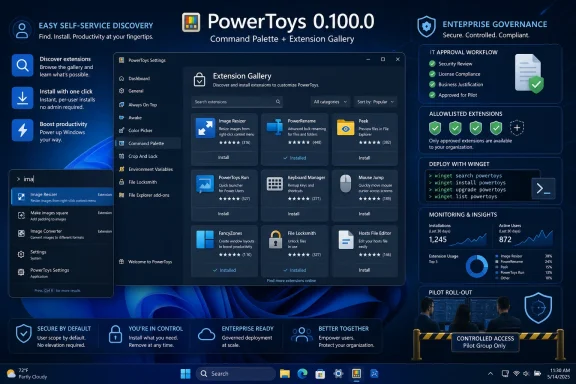 A practical pilot procedure for PowerToys 0.100.0
The safest initial deployment is deliberately modest: a set of technically capable users whose work benefits from a keyboard launcher, automation, developer tools, or custom command workflows. Treat the Gallery as a new application-acquisition path, not as a cosmetic PowerToys feature update.- Deploy or update the pilot group to PowerToys v0.100.0 and confirm that Command Palette is available on their devices.
- Open Command Palette and enter the Extension Gallery. Users can browse the curated feed, then select an extension to install, update, or remove.
- Review each proposed extension before approval, including its purpose, publisher identity, requested business use, support owner, and whether it introduces access to systems or data outside the local PC.
- Record the approved extension set separately from PowerToys configuration. The published PowerToys policy controls do not document a Command Palette extension allowlist, an approval workflow, or per-extension fleet configuration.
- Use the pilot to establish operational rules for WinGet-driven installs, updates, and removals. The extension action begins in Command Palette, but the actual package-management event is performed through WinGet.
- Expand only after the organization has a repeatable process to approve, document, monitor, update, and remove extensions.
The Gallery solves discoverability, not governance
The Extension Gallery is a meaningful improvement over asking users to find compatible packages elsewhere, determine whether they are legitimate, and work out how to install them. Microsoft says Gallery entries come from a curated, reviewed feed, which gives enterprise teams a better starting point than an entirely unfiltered discovery mechanism.But curated does not mean enterprise-approved. A review process can establish a baseline for inclusion in a Microsoft-provided gallery; it does not automatically account for an individual organization’s compliance obligations, data classifications, software procurement rules, support requirements, or change-management process.
That distinction matters because Command Palette has an open and growing community-extension ecosystem. A user may reasonably see the Gallery as a Microsoft-sanctioned marketplace experience, while a security or desktop-engineering team sees an application installation surface linked to a productivity utility. Both views are understandable, but only the latter captures the administrative consequence.
WindowsForum’s earlier coverage of PowerToys 0.97 focused on Command Palette becoming faster and more extensible. Version 0.100.0 makes that extensibility substantially more accessible. The strategic shift is not merely that extensions exist; it is that employees can now find and manage them from inside the launcher they use every day.
Why the extension model changes the enterprise risk calculation
Microsoft Learn describes each Command Palette extension as a standalone .NET application running in its own process and communicating with Command Palette through a WinRT API. That is an important engineering property: an extension is not simply a script pasted into a launcher configuration pane.The separate-process design can provide isolation boundaries and clearer packaging behavior. It also means each extension should be treated as software with its own code, update lifecycle, dependencies, support posture, and potential access to local or network resources. “It runs separately” is not equivalent to “it requires no review.”
Discovery through the Windows Package Catalog also helps explain why the Gallery is not an ordinary PowerToys toggle. Command Palette identifies installed applications that declare themselves as extensions. In practical terms, the launcher becomes an interface for invoking capabilities supplied by installed packages, rather than a closed collection of features shipped solely with PowerToys.
That architecture will appeal to developers and advanced users because it enables richer commands, pages, forms, settings, and workflows. It should make enterprise IT more—not less—intentional about which packages become part of a supported desktop baseline.
Existing PowerToys policy is useful, but it stops short of extension control
PowerToys has supported ADMX-backed policy management since v0.64. Administrators can centrally control PowerToys utilities and update behavior, which makes the suite far more manageable than a purely consumer-oriented toolbox.The gap is narrower but consequential: Microsoft’s published policy list does not document a Command Palette extension allowlist, a per-extension approval workflow, or a way to configure individual extensions across the fleet. An administrator can govern PowerToys at the utility level, yet still lack a native policy layer that says which Command Palette extensions are permitted and how their settings should be standardized.
That absence should shape deployment design. Do not represent a PowerToys ADMX deployment as complete extension governance simply because PowerToys itself is policy-managed. Those are different administrative problems.
For now, organizations need a companion model outside the PowerToys policy surface:
- Maintain an approved-extension register with a business owner and technical owner for every allowed package.
- Define how an extension enters the pilot, how updates are assessed, and what event triggers removal.
- Decide whether employees can use the Gallery directly or whether extension installation is restricted to IT-mediated workflows.
- Document rollback instructions before approving any extension that becomes part of a team’s daily process.
- Keep the initial cohort away from privileged administration, highly regulated data, and business-critical workflows until operational ownership is proven.
The best early users are not necessarily the most powerful users
A good first cohort is not “everyone in IT.” It is a small group whose use cases are useful but recoverable: developer productivity, internal documentation lookup, routine workstation tasks, or personal navigation workflows that do not depend on privileged credentials or sensitive data.That recommendation may sound conservative for a tool built for power users, but it reflects how Command Palette changes the desktop experience. Extensions can create habits quickly. If an extension becomes the fastest way to reach a service, search a resource, or start an action, its removal or behavior change can create support demand even if the underlying package is technically functioning as designed.
WindowsForum users have followed Command Palette’s performance work through releases such as PowerToys 0.93 and the broader usability updates in PowerToys 0.90.1. The Extension Gallery is the point where that work starts to matter to desktop-management teams as much as it does to enthusiasts: a responsive launcher with easy installation is more likely to spread organically.
What to watch before broad deployment
The next proof point is not the number of available extensions. It is whether Microsoft adds management features that let organizations translate a curated public feed into a controlled enterprise experience.Administrators should watch for documented controls covering extension allowlisting, blocklisting, update pinning or approval, centrally managed configuration, and reliable inventory. Even one or two of those capabilities would materially change the rollout calculation; together, they would make Command Palette far easier to standardize.
Until then, PowerToys 0.100.0 should be positioned honestly: it is a capable employee self-service platform with a promising curated entry point, but it is not yet a complete enterprise extension-management system. The sensible near-term move is a curated pilot with written rules, named owners, and a clear exit path—not a company-wide invitation to browse.
References
- Primary source: learn.microsoft.com
How Command Palette extensions work | Microsoft Learn
Understand the Command Palette extension model, including how extensions register, communicate, and provide commands and pages.learn.microsoft.com - Independent coverage: github.com
Releases · microsoft/PowerToys · GitHub
Microsoft PowerToys is a collection of utilities that supercharge productivity and customization on Windows - Releases · microsoft/PowerToys github.com
- Independent coverage: reddit.com

Reddit - Please wait for verification
www.reddit.com
- Primary source: WindowsForum
PowerToys v0.100.0 Adds Command Palette Extension Gallery and Shortcut Guide Updates | Windows Forum
Microsoft released PowerToys v0.100.0 on June 9, 2026, bringing a built-in Command Palette Extension Gallery, a redesigned Shortcut Guide, multi-monitor...windowsforum.com