

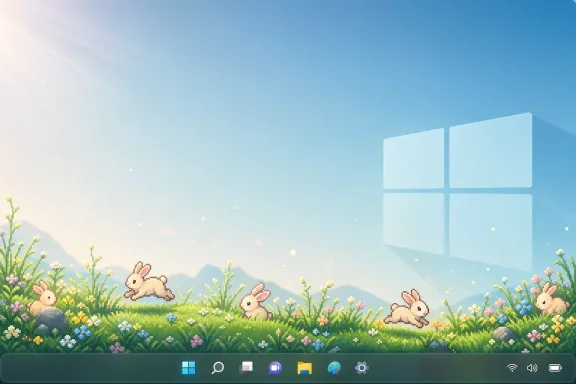
Microsoft is exploring an animated desktop footer for PowerToys, shown by PowerToys lead Clint Rutkas at a Windows Insiders meetup ahead of Build 2026, that could place pixel-art grass, bunnies, or other ambient scenes along the bottom of a Windows desktop. The feature is still a concept, not a finished utility, but it says something larger about where Microsoft thinks Windows needs repair. After years of louder prompts, louder AI branding, louder account nudges, and louder monetization experiments, the company is testing whether Windows can win back affection by becoming quieter. The grass is cute; the strategy behind it is not small.
The obvious joke is that Microsoft, after decades of turning the desktop into a productivity cockpit, has discovered the screensaver again. Animated grass at the bottom of the screen sounds like a late-night hack, the sort of thing a developer builds because it is charming, possible, and harmless enough to demo. Rutkas reportedly framed it almost that way: a visual experiment made while playing with frameworks, shown to an Insider audience as a concept that may eventually land in PowerToys.
But the timing matters. Microsoft is no longer merely trying to make Windows more capable. It is trying to make Windows feel less like a series of interruptions with an operating system attached.
That shift has been visible in the company’s 2026 Windows messaging: performance, reliability, craft, developer trust, and fewer distractions. The word “quiet” is doing a lot of work here. It suggests not just fewer sounds or fewer animations, but a Windows that knows when to get out of the way.
The animated footer is therefore less interesting as a feature than as a confession. Microsoft appears to understand that the Windows desktop has become emotionally noisy, even when it is technically idle.
That distinction is important. PowerToys lets Microsoft experiment without rewriting the social contract of the operating system. If a utility is powerful, weird, or polarizing, it can live there first. If users love it, the idea can influence Windows proper; if they ignore it, the damage is contained.
FancyZones is the classic example. It did not replace Snap, but it showed how much appetite existed for better window layout control among people who spend all day inside multi-monitor setups. PowerToys Run, Command Palette, Peek, Text Extractor, Mouse Without Borders, and Workspaces all orbit the same idea: Windows is adequate out of the box, but a certain kind of user wants it to be sharper.
An animated meadow is a departure from that history only on the surface. It does not resize windows or rename files, but it does address a real interface problem: the desktop has become a space of work without much sense of rest. If PowerToys has been Microsoft’s place for shaving down friction, an ambient footer is an attempt to shave down mood.
The most plausible version of the feature is not a permanent taskbar replacement. It sounds more like an ambient strip that appears after inactivity, or perhaps a desktop ornament that can be enabled by users who want it. Rutkas reportedly said it would probably be released in PowerToys at some point once Microsoft figures out the right user-experience metaphors.
That phrase, “UX metaphors,” is doing more work than it may appear. A screensaver has a metaphor: protect the display, then entertain the user. A widget has a metaphor: show live information. A wallpaper has a metaphor: decorate the background. An animated footer is somewhere in between, and Microsoft needs to decide whether it is decoration, status, idle mode, focus mode, or a tiny living toy.
If it is always on, it risks becoming yet another distraction. If it appears only when the user has stopped working, it becomes a cue for pause. If it is programmable or extensible, it becomes another PowerToys playground. The same pixels can be calm, clutter, or platform depending on the rules around them.
That is why the feature’s triviality is deceptive. Windows has plenty of ways to show things. What it lacks is a coherent philosophy for when not to.
The Start menu has carried recommendations. Edge has lobbied for itself. OneDrive has appeared in places that feel helpful to some users and invasive to others. Microsoft account prompts have turned setup and settings flows into moments of negotiation. Copilot has arrived, retreated, reappeared, and changed form often enough that even interested users can struggle to tell which part of the experience is product, preview, shortcut, web app, or future platform.
That history is why a “quiet” Windows cannot be established by animated grass alone. Calm is not a skin. It is a discipline.
A quiet operating system would reduce surprise. It would make commercial surfaces predictable and easy to decline. It would treat attention as a limited resource rather than a renewable one. It would make background work legible without turning every service into a notification campaign.
The challenge for Microsoft is that Windows now serves several masters. It is a consumer OS, an enterprise endpoint, a gaming platform, a developer workstation, an AI distribution channel, a security boundary, and a services funnel. Each constituency has legitimate demands, but the cumulative effect can feel like a machine that never stops raising its hand.
That is where the meadow becomes symbolic. The company is not short of features. It is short of trust that the next feature will behave politely.
Modern Windows never fully lost that capacity, but the center of gravity shifted. The desktop background became static branding or a personal photo. Lock screens became information surfaces. Widgets became feeds. Notifications became the default mechanism for urgency. Ambient computing migrated to phones, smart speakers, and tablets.
An animated footer hints at a different possibility: not a full-screen takeover, but a small persistent sign that the machine can be alive without being demanding. That is a subtle design space. Ambient software fails when it asks to be watched. It works when it rewards peripheral vision.
The risk is that Microsoft confuses “animated” with “calming.” Motion is not inherently soothing. A row of swaying grass could make the desktop feel warmer; a row of stomping mechs could make it feel like a novelty app from 2003. The difference is not just taste but control, timing, performance, and restraint.
If Microsoft gets it right, the utility could be the rare decorative feature that does not feel like bloat. If it gets it wrong, it will become an easy screenshot in every “Windows is unserious now” thread on the internet.
How much CPU and GPU does it use? Does it pause under full-screen apps? Does it respect battery saver? Can it be disabled globally in managed environments? Does it work across multiple monitors? Does it interfere with the taskbar, auto-hide, remote sessions, virtual desktops, HDR, variable refresh rate, or accessibility settings? Can animations be reduced for users who have motion sensitivity?
These questions are not buzzkill. They are the difference between a delightful utility and another thing IT departments have to neutralize.
PowerToys generally gets more leeway than inbox Windows because it is optional and user-installed. But that leeway is not infinite. The suite has become important enough that admins, developers, and power users now treat it as a semi-official extension layer. When Microsoft adds something whimsical, it still inherits the expectations of Microsoft software.
That is especially true if the company frames the feature as part of a broader “quiet” Windows vision. Quiet software must be modest with resources, transparent in behavior, and respectful of policy. A meadow that consumes battery while a laptop sits idle would not be quiet. It would merely be decorative.
But Microsoft’s broader quiet-Windows framing does matter deeply to enterprise IT. Admins are not asking for bunnies on the taskbar. They are asking for predictable update behavior, fewer consumer-grade prompts in business contexts, cleaner defaults, stronger policy controls, and a clearer line between operating system functions and service promotion.
The enterprise version of calm is not pastoral. It is administrative silence.
A quiet Windows endpoint is one that does not surprise users with account prompts during a meeting. It does not expose new consumer experiences before IT has evaluated them. It does not turn a monthly update into a help desk spike. It does not bury meaningful changes behind cheerful release language and then leave admins to reverse-engineer the blast radius.
That is why the PowerToys experiment is useful as a signal but insufficient as proof. Microsoft can show grass at a meetup; enterprises will judge the company by whether Windows becomes less needy in production.
The company’s advantage is that it knows how to build serious manageability when it chooses to. The question is whether the same restraint being advertised in design language will show up in defaults, policies, and servicing.
A PowerToys footer could avoid that trap because it begins from an opt-in, local, visual, low-stakes premise. The user chooses a scene. The scene runs. Nothing about that requires an account, a feed, a model, or a service subscription.
That is precisely why it feels refreshing. It imagines personalization as delight rather than targeting.
Still, Microsoft’s ecosystem instincts will hover over the project. If the footer becomes extensible, will there be downloadable packs? If there are downloadable packs, will they come from the Store, GitHub, a PowerToys gallery, or third parties? If third parties can build them, what security model applies? If animated scenes can be interactive, are they still decorations or mini-apps?
The innocent version is a toy. The ambitious version is a new desktop surface. Microsoft should be careful which one it is building.
Windows users are not opposed to fun. They are opposed to fun that arrives with telemetry, promotions, or edge-case breakage. The fastest way to ruin a quiet feature would be to make it strategically noisy.
Windows is still the place where many people do focused work. It is where spreadsheets sprawl, terminals run, IDEs compile, games launch, meetings happen, documents get signed, and browser tabs multiply into a private weather system. If Windows loses the feeling of being a stable workbench, it loses one of its most important advantages.
Phones are excellent interruption machines. They are also increasingly good at lightweight productivity. For Windows to remain distinctive, it has to be the environment where complexity can be managed without constant emotional taxation.
That is why a “quiet operating system” is a compelling phrase. It suggests that Microsoft sees calm not as nostalgia, but as competitive positioning. In a world where every app wants a badge, every service wants a login, and every platform wants an assistant, restraint becomes a premium feature.
The irony is that Microsoft helped create the noisier computing world it now wants to soften. But that does not make the pivot meaningless. It just raises the bar for credibility.
Bringing those gatherings back is not just community theater. It is product research with emotional stakes.
Windows is too large to steer only through telemetry. Metrics can tell Microsoft what users click, ignore, uninstall, or disable. They cannot fully explain whether an interface feels pushy, cheap, pleasant, trustworthy, or calm. Those qualities emerge in rooms, forums, bug threads, and long-running grudges.
PowerToys has benefited from that kind of loop because its audience is unusually vocal and technically literate. Users will tell Microsoft not only that something broke, but why the behavior violates the mental model they rely on. That makes PowerToys a useful listening post for broader Windows design.
The animated grass demo may have been a small moment. But if Microsoft is serious about quiet Windows, it needs many such moments: low-risk ideas shown early, criticized honestly, and either refined or killed before they become mandatory furniture.
None of that is inherently incompatible with quiet computing. In fact, the best AI features should be quiet by default: they should summarize when asked, automate when authorized, and stay invisible when irrelevant. A local model that saves a developer ten steps without throwing a badge in the taskbar is exactly the sort of thing a calmer Windows could use.
The danger is packaging. AI features are often marketed through spectacle, not restraint. They arrive with animations, sidebars, buttons, preview labels, prompts, and demos that imply the user is missing the future if they continue using the computer normally. That is a noisy posture even when the underlying technology is useful.
Microsoft therefore has two Windows stories to reconcile. One says Windows is becoming an AI platform. The other says Windows is becoming quieter. The only way both can be true is if AI becomes infrastructure rather than atmosphere.
That means less “look at me” and more “I handled it.” It means fewer branded surfaces and more dependable affordances. It means permission, reversibility, and silence when silence is the correct state.
In other words, it succeeds by not becoming too important.
That may sound like faint praise, but smallness is underrated in operating system design. Users often love features that solve a tiny problem or add a tiny pleasure without demanding a new habit. The Windows desktop has accumulated enough grand strategies. A little grass that behaves itself might be more persuasive than another keynote promise.
The trap would be to overinterpret the positive response that whimsy can generate. People like charming demos. They also like stable taskbars, fast File Explorer windows, clean settings pages, and updates that do not derail their day. The meadow can support Microsoft’s quiet-Windows argument, but it cannot substitute for the hard engineering and policy work behind it.
If Microsoft wants this feature to mean something, it should treat it as a design constraint exercise: how little can we add while making Windows feel more humane?
The question now is whether Microsoft can carry that restraint from a PowerToys concept into the parts of Windows that users cannot simply ignore. A quiet operating system is not built from meadows, mascots, or slogans. It is built from defaults that respect attention, features that justify their presence, and a platform owner willing to leave some empty space on the screen. If Microsoft can learn that lesson from a strip of animated grass, Windows may become not just more personal, but more tolerable in the places where personal computing still matters most.
 Microsoft Tries to Make Calm a Product Feature
The obvious joke is that Microsoft, after decades of turning the desktop into a productivity cockpit, has discovered the screensaver again. Animated grass at the bottom of the screen sounds like a late-night hack, the sort of thing a developer builds because it is charming, possible, and harmless enough to demo. Rutkas reportedly framed it almost that way: a visual experiment made while playing with frameworks, shown to an Insider audience as a concept that may eventually land in PowerToys.But the timing matters. Microsoft is no longer merely trying to make Windows more capable. It is trying to make Windows feel less like a series of interruptions with an operating system attached.
That shift has been visible in the company’s 2026 Windows messaging: performance, reliability, craft, developer trust, and fewer distractions. The word “quiet” is doing a lot of work here. It suggests not just fewer sounds or fewer animations, but a Windows that knows when to get out of the way.
The animated footer is therefore less interesting as a feature than as a confession. Microsoft appears to understand that the Windows desktop has become emotionally noisy, even when it is technically idle.
PowerToys Has Always Been Windows’ Pressure-Release Valve
PowerToys is the right place for this kind of experiment because PowerToys has always been where Microsoft puts ideas that are too useful, too niche, too unfinished, or too opinionated for the Windows box itself. The modern version is a free, open-source suite for Windows 10 and Windows 11 that includes utilities for window management, command launching, keyboard remapping, bulk renaming, OCR, display control, and dozens of other everyday friction points. It is not Windows, exactly, but it often feels like Windows after someone has listened to the complaints.That distinction is important. PowerToys lets Microsoft experiment without rewriting the social contract of the operating system. If a utility is powerful, weird, or polarizing, it can live there first. If users love it, the idea can influence Windows proper; if they ignore it, the damage is contained.
FancyZones is the classic example. It did not replace Snap, but it showed how much appetite existed for better window layout control among people who spend all day inside multi-monitor setups. PowerToys Run, Command Palette, Peek, Text Extractor, Mouse Without Borders, and Workspaces all orbit the same idea: Windows is adequate out of the box, but a certain kind of user wants it to be sharper.
An animated meadow is a departure from that history only on the surface. It does not resize windows or rename files, but it does address a real interface problem: the desktop has become a space of work without much sense of rest. If PowerToys has been Microsoft’s place for shaving down friction, an ambient footer is an attempt to shave down mood.
The Desktop Footer Is Not Really About Grass
The PCWorld report describes a soft green meadow, little bunnies, and the possibility of other themes, including the knowingly absurd image of mechs stomping through the lower edge of the desktop. That range is telling. Microsoft is not merely imagining a productivity widget; it is imagining a visual layer that users could personalize.The most plausible version of the feature is not a permanent taskbar replacement. It sounds more like an ambient strip that appears after inactivity, or perhaps a desktop ornament that can be enabled by users who want it. Rutkas reportedly said it would probably be released in PowerToys at some point once Microsoft figures out the right user-experience metaphors.
That phrase, “UX metaphors,” is doing more work than it may appear. A screensaver has a metaphor: protect the display, then entertain the user. A widget has a metaphor: show live information. A wallpaper has a metaphor: decorate the background. An animated footer is somewhere in between, and Microsoft needs to decide whether it is decoration, status, idle mode, focus mode, or a tiny living toy.
If it is always on, it risks becoming yet another distraction. If it appears only when the user has stopped working, it becomes a cue for pause. If it is programmable or extensible, it becomes another PowerToys playground. The same pixels can be calm, clutter, or platform depending on the rules around them.
That is why the feature’s triviality is deceptive. Windows has plenty of ways to show things. What it lacks is a coherent philosophy for when not to.
“Quiet Windows” Is a Rebuttal to Microsoft’s Own Recent Habits
Microsoft’s problem is not that Windows lacks personality. It is that too much of the personality users encounter comes from things they did not ask for.The Start menu has carried recommendations. Edge has lobbied for itself. OneDrive has appeared in places that feel helpful to some users and invasive to others. Microsoft account prompts have turned setup and settings flows into moments of negotiation. Copilot has arrived, retreated, reappeared, and changed form often enough that even interested users can struggle to tell which part of the experience is product, preview, shortcut, web app, or future platform.
That history is why a “quiet” Windows cannot be established by animated grass alone. Calm is not a skin. It is a discipline.
A quiet operating system would reduce surprise. It would make commercial surfaces predictable and easy to decline. It would treat attention as a limited resource rather than a renewable one. It would make background work legible without turning every service into a notification campaign.
The challenge for Microsoft is that Windows now serves several masters. It is a consumer OS, an enterprise endpoint, a gaming platform, a developer workstation, an AI distribution channel, a security boundary, and a services funnel. Each constituency has legitimate demands, but the cumulative effect can feel like a machine that never stops raising its hand.
That is where the meadow becomes symbolic. The company is not short of features. It is short of trust that the next feature will behave politely.
The Old Screensaver Returns as a Design Argument
There is an amusing historical loop here. The screensaver began as a utilitarian response to burn-in, then became one of the most personal parts of the PC. Flying toasters, starfields, pipes, photo slideshows, aquarium scenes, corporate logos: the idle screen was where the machine stopped being a tool and became a little theatrical.Modern Windows never fully lost that capacity, but the center of gravity shifted. The desktop background became static branding or a personal photo. Lock screens became information surfaces. Widgets became feeds. Notifications became the default mechanism for urgency. Ambient computing migrated to phones, smart speakers, and tablets.
An animated footer hints at a different possibility: not a full-screen takeover, but a small persistent sign that the machine can be alive without being demanding. That is a subtle design space. Ambient software fails when it asks to be watched. It works when it rewards peripheral vision.
The risk is that Microsoft confuses “animated” with “calming.” Motion is not inherently soothing. A row of swaying grass could make the desktop feel warmer; a row of stomping mechs could make it feel like a novelty app from 2003. The difference is not just taste but control, timing, performance, and restraint.
If Microsoft gets it right, the utility could be the rare decorative feature that does not feel like bloat. If it gets it wrong, it will become an easy screenshot in every “Windows is unserious now” thread on the internet.
Power Users Will Ask the Right Unromantic Questions
The Windows enthusiast reaction will not be purely sentimental. It will include the usual practical cross-examination, and rightly so.How much CPU and GPU does it use? Does it pause under full-screen apps? Does it respect battery saver? Can it be disabled globally in managed environments? Does it work across multiple monitors? Does it interfere with the taskbar, auto-hide, remote sessions, virtual desktops, HDR, variable refresh rate, or accessibility settings? Can animations be reduced for users who have motion sensitivity?
These questions are not buzzkill. They are the difference between a delightful utility and another thing IT departments have to neutralize.
PowerToys generally gets more leeway than inbox Windows because it is optional and user-installed. But that leeway is not infinite. The suite has become important enough that admins, developers, and power users now treat it as a semi-official extension layer. When Microsoft adds something whimsical, it still inherits the expectations of Microsoft software.
That is especially true if the company frames the feature as part of a broader “quiet” Windows vision. Quiet software must be modest with resources, transparent in behavior, and respectful of policy. A meadow that consumes battery while a laptop sits idle would not be quiet. It would merely be decorative.
Enterprise IT Has Little Patience for Vibes
For managed fleets, the animated footer will probably be either irrelevant or disabled. That is fine. Not every Windows idea needs to be enterprise-first.But Microsoft’s broader quiet-Windows framing does matter deeply to enterprise IT. Admins are not asking for bunnies on the taskbar. They are asking for predictable update behavior, fewer consumer-grade prompts in business contexts, cleaner defaults, stronger policy controls, and a clearer line between operating system functions and service promotion.
The enterprise version of calm is not pastoral. It is administrative silence.
A quiet Windows endpoint is one that does not surprise users with account prompts during a meeting. It does not expose new consumer experiences before IT has evaluated them. It does not turn a monthly update into a help desk spike. It does not bury meaningful changes behind cheerful release language and then leave admins to reverse-engineer the blast radius.
That is why the PowerToys experiment is useful as a signal but insufficient as proof. Microsoft can show grass at a meetup; enterprises will judge the company by whether Windows becomes less needy in production.
The company’s advantage is that it knows how to build serious manageability when it chooses to. The question is whether the same restraint being advertised in design language will show up in defaults, policies, and servicing.
Personalization Is the Safer Word for a Riskier Ambition
Microsoft has tried to personalize Windows many times. Themes, accent colors, live tiles, widgets, Spotlight images, Start menu recommendations, Copilot experiences, and cloud-backed settings are all versions of the same ambition: make the PC feel like it belongs to the person using it. The trouble is that personalization easily becomes vendor personalization of the user, not user personalization of the machine.A PowerToys footer could avoid that trap because it begins from an opt-in, local, visual, low-stakes premise. The user chooses a scene. The scene runs. Nothing about that requires an account, a feed, a model, or a service subscription.
That is precisely why it feels refreshing. It imagines personalization as delight rather than targeting.
Still, Microsoft’s ecosystem instincts will hover over the project. If the footer becomes extensible, will there be downloadable packs? If there are downloadable packs, will they come from the Store, GitHub, a PowerToys gallery, or third parties? If third parties can build them, what security model applies? If animated scenes can be interactive, are they still decorations or mini-apps?
The innocent version is a toy. The ambitious version is a new desktop surface. Microsoft should be careful which one it is building.
Windows users are not opposed to fun. They are opposed to fun that arrives with telemetry, promotions, or edge-case breakage. The fastest way to ruin a quiet feature would be to make it strategically noisy.
The Real Contest Is Against the Phone, Not Linux
It is tempting to view every Windows design shift through the old desktop OS rivalry: Windows versus macOS, Windows versus Linux, Windows versus ChromeOS. But the “quiet” metaphor points to a different competitor. The enemy is the attention economy that has trained users to expect every screen to be a feed.Windows is still the place where many people do focused work. It is where spreadsheets sprawl, terminals run, IDEs compile, games launch, meetings happen, documents get signed, and browser tabs multiply into a private weather system. If Windows loses the feeling of being a stable workbench, it loses one of its most important advantages.
Phones are excellent interruption machines. They are also increasingly good at lightweight productivity. For Windows to remain distinctive, it has to be the environment where complexity can be managed without constant emotional taxation.
That is why a “quiet operating system” is a compelling phrase. It suggests that Microsoft sees calm not as nostalgia, but as competitive positioning. In a world where every app wants a badge, every service wants a login, and every platform wants an assistant, restraint becomes a premium feature.
The irony is that Microsoft helped create the noisier computing world it now wants to soften. But that does not make the pivot meaningless. It just raises the bar for credibility.
The Insider Meetup Matters Because Windows Needs Humans in the Loop
The setting of the demo matters almost as much as the demo itself. Windows Insider meetups were a visible part of the Windows 10 era, when Microsoft wanted users to feel that Windows was being built in public with feedback from enthusiasts. That relationship frayed over time as Windows 11’s hardware requirements, shifting feature priorities, and AI-heavy messaging made some longtime users feel more managed than heard.Bringing those gatherings back is not just community theater. It is product research with emotional stakes.
Windows is too large to steer only through telemetry. Metrics can tell Microsoft what users click, ignore, uninstall, or disable. They cannot fully explain whether an interface feels pushy, cheap, pleasant, trustworthy, or calm. Those qualities emerge in rooms, forums, bug threads, and long-running grudges.
PowerToys has benefited from that kind of loop because its audience is unusually vocal and technically literate. Users will tell Microsoft not only that something broke, but why the behavior violates the mental model they rely on. That makes PowerToys a useful listening post for broader Windows design.
The animated grass demo may have been a small moment. But if Microsoft is serious about quiet Windows, it needs many such moments: low-risk ideas shown early, criticized honestly, and either refined or killed before they become mandatory furniture.
The AI Era Makes Quiet Harder, Not Easier
The hardest part of Microsoft’s quiet-Windows ambition is that it collides with the company’s AI platform ambitions. Build 2026 is not happening in a vacuum. Microsoft is continuing to position Windows as a home for local models, AI APIs, agentic workflows, developer tools, and Copilot-branded experiences.None of that is inherently incompatible with quiet computing. In fact, the best AI features should be quiet by default: they should summarize when asked, automate when authorized, and stay invisible when irrelevant. A local model that saves a developer ten steps without throwing a badge in the taskbar is exactly the sort of thing a calmer Windows could use.
The danger is packaging. AI features are often marketed through spectacle, not restraint. They arrive with animations, sidebars, buttons, preview labels, prompts, and demos that imply the user is missing the future if they continue using the computer normally. That is a noisy posture even when the underlying technology is useful.
Microsoft therefore has two Windows stories to reconcile. One says Windows is becoming an AI platform. The other says Windows is becoming quieter. The only way both can be true is if AI becomes infrastructure rather than atmosphere.
That means less “look at me” and more “I handled it.” It means fewer branded surfaces and more dependable affordances. It means permission, reversibility, and silence when silence is the correct state.
The Meadow Will Succeed Only If Microsoft Leaves It Small
The best version of the animated footer is modest. It lives in PowerToys. It is off by default or plainly opt-in. It pauses intelligently. It respects accessibility. It exposes enough customization to be fun without becoming a marketplace. It gives developers a clean example of building gentle desktop experiences without teaching them to hijack attention.In other words, it succeeds by not becoming too important.
That may sound like faint praise, but smallness is underrated in operating system design. Users often love features that solve a tiny problem or add a tiny pleasure without demanding a new habit. The Windows desktop has accumulated enough grand strategies. A little grass that behaves itself might be more persuasive than another keynote promise.
The trap would be to overinterpret the positive response that whimsy can generate. People like charming demos. They also like stable taskbars, fast File Explorer windows, clean settings pages, and updates that do not derail their day. The meadow can support Microsoft’s quiet-Windows argument, but it cannot substitute for the hard engineering and policy work behind it.
If Microsoft wants this feature to mean something, it should treat it as a design constraint exercise: how little can we add while making Windows feel more humane?
A Tiny Strip of Pixel Grass Carries a Larger Windows Test
The practical lessons from this concept are narrow, but the strategic ones are broader. Microsoft is testing whether users will accept a softer Windows personality at the same time the company is trying to make the platform more powerful, more AI-capable, and more developer-focused.- Microsoft’s animated PowerToys footer is still a concept, not a shipping Windows feature.
- The feature matters because it aligns with a broader push to make Windows feel calmer, more personal, and less intrusive.
- PowerToys gives Microsoft a safer testing ground for experimental interface ideas than the Windows inbox experience.
- The utility will be judged less by its charm than by its restraint, resource use, accessibility behavior, and administrative controllability.
- A genuinely quiet Windows will require fewer unwanted prompts and surprises, not just more soothing visuals.
- Microsoft’s AI ambitions will only fit the quiet-Windows message if they become opt-in, useful, and largely invisible until needed.
The question now is whether Microsoft can carry that restraint from a PowerToys concept into the parts of Windows that users cannot simply ignore. A quiet operating system is not built from meadows, mascots, or slogans. It is built from defaults that respect attention, features that justify their presence, and a platform owner willing to leave some empty space on the screen. If Microsoft can learn that lesson from a strip of animated grass, Windows may become not just more personal, but more tolerable in the places where personal computing still matters most.
References
- Primary source: PCWorld
Published: Tue, 02 Jun 2026 16:43:00 GMT
Microsoft is building a 'quiet' Windows, starting with animated grass | PCWorld
A new PowerToys concept would bring animated scenes to your Windows footer, and it hints at a bigger Microsoft personalization push.www.pcworld.com - Related coverage: techradar.com
Windows 12 at Build 2026: What to expect | TechRadar
What Build 2026 signals about the future of the Windowswww.techradar.com - Official source: developer.microsoft.com
GDC 2026: Windows Game Development with Visual Studio 2026 & GitHub Copilot
From improvements in runtime performance to updated Windows tools, here are some ways to make everyday development work more efficient.developer.microsoft.com - Related coverage: computerworld.com
Windows – Computerworld
Windows | News, analysis, features, how-tos, and videos www.computerworld.com
- Official source: news.microsoft.com
Microsoft Build 2026
 news.microsoft.com
- Related coverage: windowsforum.com
Windows Insider Builds Boost Power Efficiency and PowerToys Update | Windows Forum
Microsoft’s Windows ecosystem is moving in two parallel directions this month: a fresh Insider build that promises quieter, greener defaults and...windowsforum.com
- Official source: support.microsoft.com
Make it easier to focus on tasks | Microsoft Support
Use Windows accessibility features, such as Focus assist, to help improve focus on tasks and minimize distractions.support.microsoft.com - Official source: blogs.windows.com
Build 2026: Furthering Windows as the trusted platform for development
Build is one of our favorite moments each year - a chance to connect with the global developer community and share what we’ve been building. Over the past year, we have connected with many developers pushing the boundaries of what’s possible onblogs.windows.com - Related coverage: windowscentral.com
Windows 11 gets auto dark mode via Microsoft PowerToys | Windows Central
PowerToys now lets Windows 11 switch between light and dark mode automatically at sunrise and sunset.www.windowscentral.com - Official source: learn.microsoft.com
Microsoft PowerToys - Windows Utilities for Power Users | Microsoft Learn
Microsoft PowerToys includes 25+ free Windows utilities including FancyZones, PowerToys Run, Color Picker, PowerRename, and more. Boost productivity for power users on Windows 10/11.learn.microsoft.com - Related coverage: doccompiler.ai
- Official source: techcommunity.microsoft.com
- Official source: cdn.techcommunity.microsoft.com
- Official source: cdn-dynmedia-1.microsoft.com
How Windows 11 Pro helps Klöckner Pentaplast accelerate business success
PDF documentcdn-dynmedia-1.microsoft.com
