

Microsoft’s PowerToys v0.45.0 is the release that finally gave the long-running utility suite a visual identity that matches Windows 11 — but the update is more than a skin-deep tweak. The v0.45.0 cycle focused on stability, accessibility, and installer improvements while introducing a Fluent‑style settings UI and a handful of meaningful bug fixes across nearly every module, laying groundwork for the experimental additions that followed shortly after.
PowerToys began as a grab‑bag of Windows power‑user tools and has steadily matured into a modular productivity platform maintained openly on GitHub. Over successive releases the project has broadened its scope — from window‑tiling utilities to clipboard enhancements and on‑device AI integrations in later years — while keeping development and release notes public so users and administrators can track changes precisely. The v0.45.0 release represents a key point in that evolution because it aligned the PowerToys settings interfaces with Microsoft’s Windows 11 visual language while continuing a steady cadence of stability fixes. PowerToys is distributed through multiple channels (GitHub releases, Microsoft Store, winget) and ships both stable and experimental builds. The team’s cadence usually pairs a broadly tested stable release with a near-term experimental build that surfaces new utilities or major feature overhauls for community testing. In the case of v0.45.0, the experimental v0.46 branch followed with an updated Video Conference Mute utility.
The release is fully documented on the project’s GitHub release page, and contemporaneous coverage confirmed the headline changes. Where third‑party aggregators diverge on dates, refer to the GitHub entry for installer hashes and authoritative changelogs. If you plan to deploy PowerToys across multiple machines, add a quick test plan and hash verification step to your rollout checklist to ensure predictable, secure results.
PowerToys continues to be a nimble, community‑driven way to extend Windows productivity; v0.45.0 reinforced that path by making the toolset look and behave more like native Windows while cleaning up long‑standing stability and accessibility issues — a practical, well‑balanced release that set the stage for the experimental features that followed.
Source: BetaNews Microsoft releases PowerToys v0.45.0 with Windows 11 styling
 Background
PowerToys began as a grab‑bag of Windows power‑user tools and has steadily matured into a modular productivity platform maintained openly on GitHub. Over successive releases the project has broadened its scope — from window‑tiling utilities to clipboard enhancements and on‑device AI integrations in later years — while keeping development and release notes public so users and administrators can track changes precisely. The v0.45.0 release represents a key point in that evolution because it aligned the PowerToys settings interfaces with Microsoft’s Windows 11 visual language while continuing a steady cadence of stability fixes. PowerToys is distributed through multiple channels (GitHub releases, Microsoft Store, winget) and ships both stable and experimental builds. The team’s cadence usually pairs a broadly tested stable release with a near-term experimental build that surfaces new utilities or major feature overhauls for community testing. In the case of v0.45.0, the experimental v0.46 branch followed with an updated Video Conference Mute utility. What v0.45.0 changed — quick summary
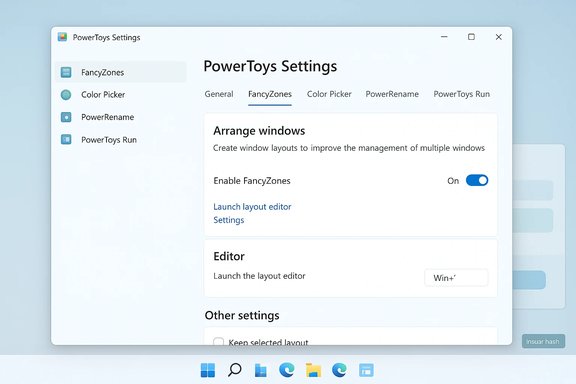
- Fluent/WinUI styling applied to Settings and OOBE windows, updating the look and feel to be consistent with Windows 11. The release notes call this a major visual refresh.
- Stability and accessibility work across many modules: FancyZones, Color Picker, PowerRename, PowerToys Run, Image Resizer, File Explorer add‑ons, Keyboard Manager, Awake, and others received bug fixes and accessibility improvements.
- Installer and update improvements — signed installer components and tweaks to auto‑update messaging and behavior aim to reduce install failures and improve user clarity. The installer hash was published with the release for integrity verification.
- Preparatory work for Video Conference Mute: the stable release included fixes for the Video Conference Mute toolbar and integrated the utility into the out‑of‑box experience (OOBE) where experimental builds would iterate further.
A closer look at the Fluent UX update
What changed in the UI
The v0.45.0 release updated the PowerToys Settings app and the OOBE (out‑of‑box experience) window with Fluent‑style controls, rounded corners, and updated spacing that mirrors Windows 11’s aesthetics. The release notes call out explicit items implemented by contributors: colored icons in the sidebar, revised header alignment, adjusted copy for clarity, and improved keyboard navigation for links in OOBE. These are not cosmetic flourishes alone — they target accessibility and consistency with the OS.Why the change matters
- Visual consistency: Users who have already moved to Windows 11 expect third‑party or supplementary tools to feel like first‑class citizens. A matching UI reduces cognitive friction and presents PowerToys as an official, well‑maintained utility suite.
- Usability and accessibility: The Fluent refresh included fixes that improve keyboard navigation and screen‑reader behavior — concrete accessibility improvements rather than just visual polish.
- Community-driven design: The team credited contributors for driving the UI work and acknowledged iterative feedback from the project community, underscoring the open‑source development model.
Verification and caveats
The Fluent‑style claims are documented directly in the official release notes published on the PowerToys GitHub release page (v0.45.0), and contemporaneous reporting in mainstream tech outlets echoed the change. That makes the claim verifiable from multiple independent sources. However, UI behavior can vary slightly by environment (Windows 10 vs Windows 11, display scaling, high‑DPI settings), so hands‑on testing remains the best validation for any accessibility claim in a particular configuration.Module‑level fixes and improvements
PowerToys is modular; v0.45.0’s changelog demonstrates a broad sweep of fixes across utilities. The most notable areas:- FancyZones: crash fixes, editor stability improvements, and better DPI handling that reduce layout corruption on multi‑monitor setups.
- Color Picker: fixed synchronization between RGB and HEX fields and several screen‑reader accessibility issues.
- PowerToys Run: reduced lag and fixed several plugin and registry-related crashes that could cause the launcher to behave inconsistently.
- Image Resizer and File Explorer add‑ons: improved previews and compatibility (PDF previews, markdown preview toggles), along with GIF resizing warnings for certain encodings.
- Video Conference Mute: toolbar position fixes and micro‑regressions resolved ahead of the experimental release that extended the feature set.
Release timing, distribution and verification
The official PowerToys v0.45.0 release entry on GitHub (tag v0.45.0) is authoritative: the release notes, installer hash, and the list of changes are published there. The GitHub page records the release and the installer hash BC1C7EDA2EB8… for integrity checks. Community coverage published around the same period records the public announcement on or around early September 2021. Some third‑party aggregators listed internal dates slightly differently (a disparity sometimes seen between commit dates and the public release timestamp), but the GitHub release page is the source of truth for the shipped installer and changelog. If you need to verify installer integrity, compare the file hash of the downloaded installer against the published installer hash in the release notes.What followed: experimental builds and Video Conference Mute
Shortly after v0.45.0 reached stable users the PowerToys team released an experimental v0.46 build that bundled a refreshed Video Conference Mute utility. The experimental release contained new tooling for muting webcams and microphones, further toolbar positioning fixes, and iterative changes based on community feedback. Experimental builds are where PowerToys tests higher‑risk changes and new utilities before promoting them to the stable channel — a deliberate risk‑managed approach.Strengths — why this release matters for users and IT
- Polished UI + accessibility: The Fluent UX brings the PowerToys settings into visual alignment with Windows 11 while addressing keyboard navigation and screen‑reader issues. That’s an unusual combination of visual and accessibility work in a single release.
- Stability focus: Rather than introducing many new, risky features, v0.45.0 prioritized fixes that reduce crashes and improve behavior for long‑standing tools like FancyZones and PowerToys Run — a practical win for daily reliability.
- Transparent development and verifiable notes: The GitHub release contains a granular changelog and installer hash, giving administrators the data they need for verification and rollout planning.
- Community collaboration: The release explicitly credits contributors and shows rapid response to community‑reported accessibility and localization issues, reflecting a healthy open‑source governance model.
Risks and trade‑offs — what to watch for
- Permission and security surface: Some PowerToys modules require elevated privileges or register global hooks (keyboard, mouse, clipboard). On managed fleets, this can conflict with endpoint protection, EDR policies, or enterprise hardening. Test each enabled module in a staging environment before broad deployment.
- Potential for regressions in fast cadence: PowerToys’ active release schedule is a double‑edged sword: frequent fixes and features but occasional instability, particularly with experimental builds. Conservative administrators may prefer to lag one or two stable releases behind the latest to absorb regressions.
- Visual improvements don’t guarantee parity across environments: Fluent styling depends on WinUI/Windows App SDK and can behave differently on Windows 10 vs Windows 11, especially under high‑DPI or accessibility settings. Validate the experience on representative hardware.
- Telemetry and data flows in later AI features: While not central to v0.45.0, PowerToys later added features (in subsequent release cycles) that interface with cloud backends. Any clipboard, camera, or AI integrations should be carefully assessed for data egress and compliance. Administrators should require explicit configuration for external service credentials and prefer on‑device or internal models where privacy is a concern.
Practical guidance for users and administrators
- If you run a single PC and care about the latest UI and bug fixes, use the built‑in updater in PowerToys or install the GitHub release. Confirm the installer hash (published in the release notes) after download to ensure package integrity.
- For enterprise or multi‑machine rollouts: test v0.45.0 on a small cohort first. Verify that endpoint protection does not flag any installer components, and validate the behavior of modules that register system‑level hooks (Keyboard Manager, PowerToys Run). Consider a staged upgrade policy.
- When enabling new modules, check the module‑specific accessibility and permission notes in the settings UI or documentation. Use the settings page to enable only what you need to limit attack surface and reduce conflicts.
- Keep experimental builds separate: if you want to try features such as the revised Video Conference Mute, use the experimental channel on a non‑production machine. Experimental builds are for testing and feedback, not for mission‑critical deployments.
Verification notes and how claims were confirmed
- The Fluent UX update, installer hash, specific module fixes (FancyZones, PowerToys Run, Color Picker, etc., and the mention of experimental v0.46 were verified against the official PowerToys v0.45.0 release notes on GitHub (release page). The GitHub release page is the canonical source for what shipped in that version.
- Independent technology reporting at the time (coverage in outlets that tracked the release) corroborated the visible UI changes and stability focus, providing a second line of confirmation for the release highlights.
- Community and forum posts around the release (including experimental release threads) corroborate the timeline for the experimental Video Conference Mute changes and common user experiences during the rollout. For hands‑on verification (for example, precise installer behavior on specific hardware), testing on target hardware remains the definitive step.
The longer arc — why v0.45.0 matters in retrospect
v0.45.0 marks a turning point where PowerToys stopped being purely functional and began to present a cohesive, modern user experience that mirrors Microsoft’s visual direction. That stylistic alignment matters because it increases adoption and lowers the barrier for everyday users to enable advanced utilities safely. In later cycles the project would expand further — adding AI‑assisted clipboard actions, richer Command Palette features, and deeper file‑metadata renaming utilities — but v0.45.0’s combination of stability and a first polished Fluent UX made it a watershed release that signaled PowerToys’ intent to remain a long‑term, first‑party adjunct to Windows rather than a niche hobby project.Final assessment
PowerToys v0.45.0 is an example of pragmatic engineering: a release that balances the visible (Fluent UX) with the necessary (bug fixes, installer hardening, accessibility). For most users and administrators the immediate takeaway is simple — expect a more polished settings experience and fewer intermittent crashes. For teams managing fleets, the advice is unchanged: validate modules that require elevated hooks before broad deployment and treat experimental builds as sandboxed previews.The release is fully documented on the project’s GitHub release page, and contemporaneous coverage confirmed the headline changes. Where third‑party aggregators diverge on dates, refer to the GitHub entry for installer hashes and authoritative changelogs. If you plan to deploy PowerToys across multiple machines, add a quick test plan and hash verification step to your rollout checklist to ensure predictable, secure results.
PowerToys continues to be a nimble, community‑driven way to extend Windows productivity; v0.45.0 reinforced that path by making the toolset look and behave more like native Windows while cleaning up long‑standing stability and accessibility issues — a practical, well‑balanced release that set the stage for the experimental features that followed.
Source: BetaNews Microsoft releases PowerToys v0.45.0 with Windows 11 styling
