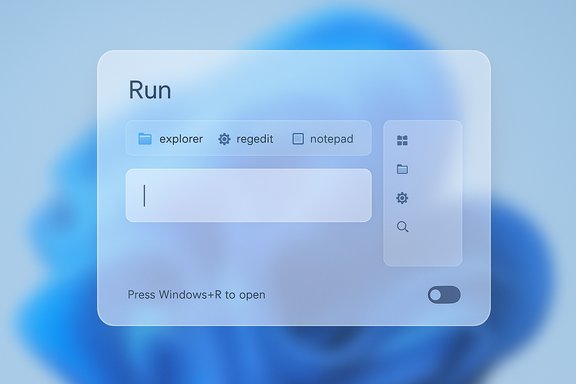
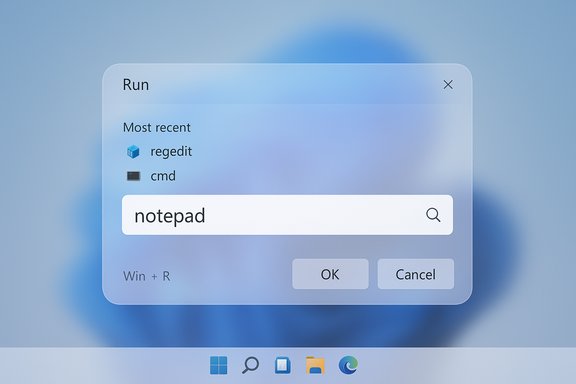
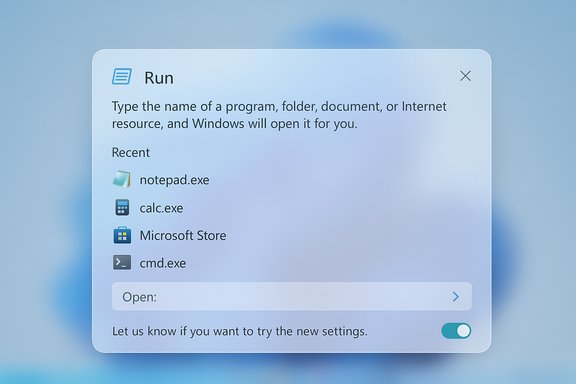
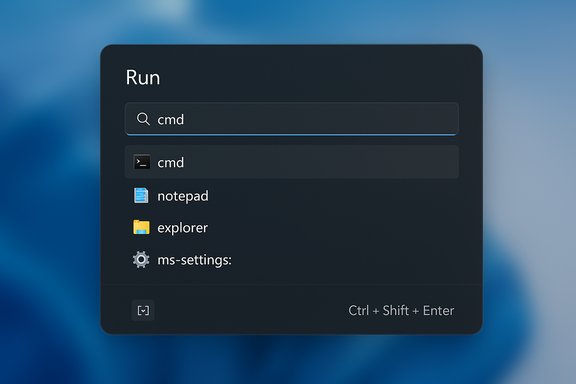
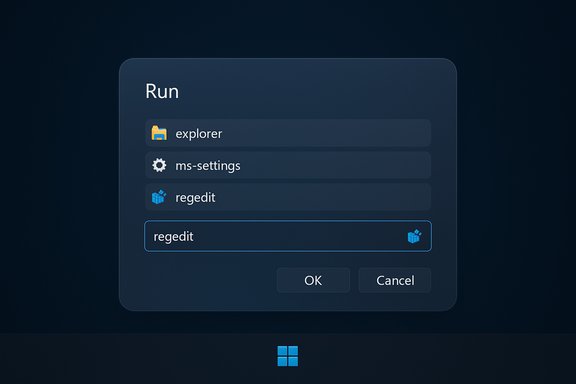
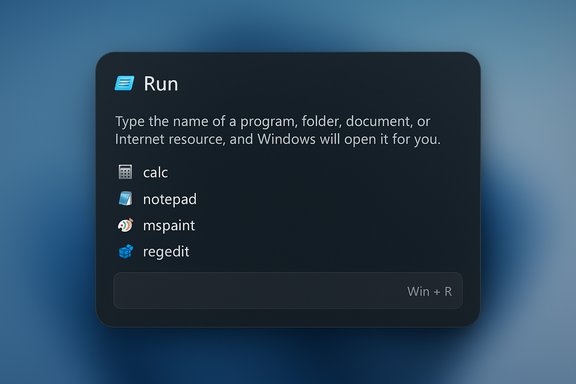
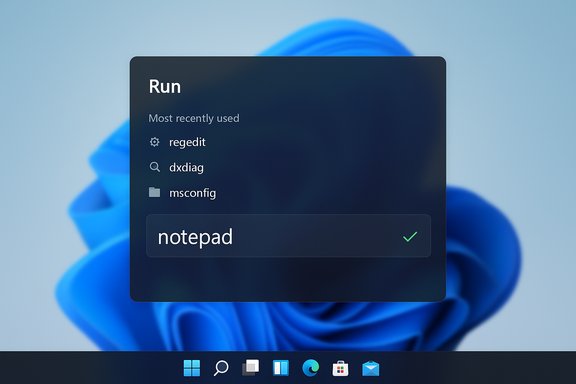
Microsoft has quietly given the Run dialog — the tiny Win+R prompt that’s been part of Windows for three decades — its first substantial visual overhaul, replacing the stark Win32 modal with a roomier, Fluent‑style overlay in recent Windows 11 preview builds.
For many power users and IT professionals, the Run dialog is a reflex: press Win+R, type a command such as mspaint, calc, or dxdiag, and press Enter. That compact one‑line interface has survived successive Windows redesigns since the Windows 95 era, remaining functionally consistent even as the rest of the shell adopted Fluent Design and WinUI. The newly observed update preserves the core behavior but modernizes the surface to match Windows 11’s visual language. This change appears in Windows Insider preview builds and is being staged as an opt‑in experience, with an on/off control exposed in Settings → System → Advanced so users and administrators can revert to the classic dialog if they prefer. Multiple hands‑on reports and community screenshots surfaced this behavior and the toggle exposure.
At the same time, the change is not without tradeoffs: security teams must be mindful of social‑engineering vectors, accessibility teams should verify assistive behavior, and automation owners need to retest fragile sequences. Microsoft’s staged and optional rollout reduces immediate risk, but organizations that manage Windows at scale should pilot the feature and update documentation accordingly.
The modern Run is not a reinvention; it’s a graceful update that brings one of Windows’ most durable primitives into the 2025 UI era while leaving the underlying utility — and the user’s speed — intact.
Source: The Tech Buzz https://www.techbuzz.ai/articles/microsoft-redesigns-30-year-old-windows-run-dialog-for-first-time/
 Background
For many power users and IT professionals, the Run dialog is a reflex: press Win+R, type a command such as mspaint, calc, or dxdiag, and press Enter. That compact one‑line interface has survived successive Windows redesigns since the Windows 95 era, remaining functionally consistent even as the rest of the shell adopted Fluent Design and WinUI. The newly observed update preserves the core behavior but modernizes the surface to match Windows 11’s visual language. This change appears in Windows Insider preview builds and is being staged as an opt‑in experience, with an on/off control exposed in Settings → System → Advanced so users and administrators can revert to the classic dialog if they prefer. Multiple hands‑on reports and community screenshots surfaced this behavior and the toggle exposure. What changed: feature breakdown
The refresh is conservative by design: it keeps Run’s scripting and command semantics intact while bringing a handful of modern UX refinements.Visual and layout updates
- Fluent/WinUI styling: rounded corners, softened shadows, and typography aligned with Windows 11’s system font and spacing.
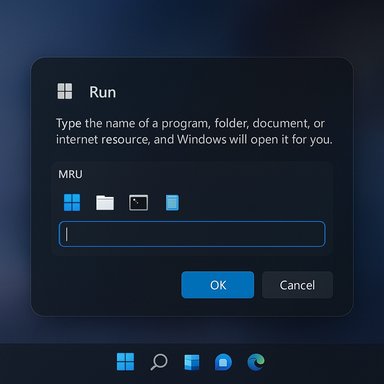
- Larger overlay: the tiny modal is replaced by a roomier overlay that centers a larger input field for improved visibility and touch targeting.
- Tone‑aware theming: the new dialog respects system light/dark theme settings where dark‑mode support was already added to many legacy dialogs.
Discovery and productivity tweaks
- Recent commands list: a Most‑Recently‑Used (MRU) area appears above the input box, turning Run into a minimal launcher that surfaces frequently used commands without retyping.
- Inline icons and match feedback: when typed text resolves to an installed app or known executable, an icon and visual hint appear inline to help users confirm what they’ll launch.
Settings and rollout model
- Opt‑in by default in previews: the modern Run is gated behind an Advanced toggle in preview builds so the classic Run remains the default for most users while Microsoft collects telemetry and feedback.
- Server‑side gating and staged rollout: appearances in Insiders vary by ring and server flags, so screenshots and firsthand reports do not necessarily reflect a single build number across the board. Some build‑specific claims remain provisional.
Why Microsoft is doing this now
Several converging factors explain the timing:- Visual consistency: Microsoft has been methodically removing “legacy flashes” — bright Win32 dialogs that break dark mode and the Fluent aesthetic across Windows 11 — and Run was an obvious holdout. Recent preview flights already extended dark mode to a swath of legacy dialogs, and modernizing Run continues that polish work.
- Competitive pressure from modern launchers: consumer and developer attention has shifted toward feature‑rich, keyboard‑first launchers like Raycast, which launched a public Windows beta in late 2025 and offers modern command palettes, file search, clipboard history, and extensibility. Microsoft’s modest Run refresh reduces one small advantage third‑party launchers leverage: a notably more modern, integrated UI for quick commands.
- Platform migration to WinUI: moving legacy micro‑surfaces into WinUI/Windows App SDK makes future theming, accessibility, and incremental feature expansion easier to ship without tinkering with ancient Win32 controls. The Run redesign fits that long‑running migration path.
What stays the same (and why it matters)
- Win+R and command semantics remain unchanged: the modern Run accepts the same commands and scripts; muscle memory for administrators remains valid.
- Keyboard‑first behavior is preserved in early previews: arrow navigation through history items and simple Enter/Tab workflows continue to function in hands‑on reports.
- Opt‑out keeps legacy workflows intact: making the new Run optional removes the immediate risk of breaking documentation or training that references the classic dialog.
Cross‑referenced verification of key claims
To validate the core claims around the redesign and timing, reporting from multiple independent outlets was reviewed:- The Verge confirms the modern Run preview and the optional toggle exposure, describing the redesign as the first major visual update to Run in over 30 years.
- How‑To‑Geek and Windows Latest documented prior dark‑mode work that brought the classic Run box into theme parity in Insider builds, establishing the antecedent step before a broader UI refresh.
- Raycast’s official blog confirms the arrival of Raycast for Windows in public beta on November 20, 2025, underscoring why third‑party launchers now matter as design and productivity competitors.
- Community and Insider thread artifacts aggregated from preview reports further corroborate the MRU, iconized results, and opt‑in toggle behavior, while also flagging that specific build attributions are inconsistent and therefore provisional.
Strengths and practical benefits
The modern Run dialog delivers measurable usability and accessibility improvements while minimizing disruption.- Better discoverability: surfacing recent commands and providing icons helps occasional users find the command they need without memorizing exact strings.
- Visual parity and reduced “flash”: aligning Run with Fluent Design and dark mode reduces jarring visual transitions that previously broke immersion on dark desktops.
- Improved touch and high‑DPI handling: a larger input area and increased spacing make Run more usable on tablets and ultra‑high‑resolution screens.
- Low friction rollout: by gating the change as opt‑in in preview builds, Microsoft allows conservative rollouts, telemetry collection, and real‑world testing without forcing users to adapt immediately.
Risks, caveats, and enterprise considerations
The redesign is small, but the implications are meaningful when viewed through security, automation, and enterprise management lenses.1) Security: easier suggestions increase social‑engineering surface
- A more inviting Run interface that surfaces suggestions and icons could inadvertently make paste‑and‑run or copy‑and‑execute social engineering tricks easier for inexperienced users.
- Visual icons and MRU entries may create a false sense of safety; attackers can still craft similarly named files or malicious scripts that appear legitimate in a condensed view.
- Administrators should evaluate whether Group Policy or endpoint protection rules should restrict Run usage or monitor Run invocation telemetry in high‑risk environments.
2) Fragmentation and support complexity
- Two coexisting Run experiences (classic and modern) increase variability across devices. Support documentation, training materials, and internal KB articles may need minor updates to reflect both interfaces.
- Helpdesk screenshots and troubleshooting steps will have to account for which Run flavor a user is running, particularly when modal dimensions or visual affordances matter.
3) Automation and accessibility hazards
- Some automation scripts and UI automation tools assume the classic Run dialog’s dimensions, focus behavior, or z‑order. Changes to overlay size or how focus is acquired could break brittle automation sequences if organizations enable the modern Run in test rings without regression checks.
- Accessibility must be validated: lists, icons, and MRU items need clear semantics for screen readers and predictable keyboard focus so the experience remains fully usable for assistive tech users. Early previews hint at arrow key navigation, but conformance needs formal testing before broad rollout.
4) Expectations vs reality
- The new Run visually resembles fuller command palettes (PowerToys Run, Raycast, etc., which may create user expectations for indexed search, plugin ecosystems, or window switching. If Microsoft intentionally keeps Run intentionally lightweight, users might be disappointed. Conversely, if Microsoft starts adding more features, it risks duplicating or encroaching on PowerToys and third‑party ecosystems.
How this fits into Microsoft’s launcher strategy
Microsoft has not been silent on launchers and command palettes. The company has been experimenting with richer in‑OS command experiences and has shipped or evolved tools that address similar use cases:- PowerToys Run provided an advanced quick‑launcher for years, and Microsoft has iterated on PowerToys features that overlap with the use cases of a modern Run.
- Command Palette and other elevated tools: Microsoft’s broader shell investments show a pattern of moving high‑frequency utilities toward more modern frameworks.
Practical guidance for administrators and enthusiasts
- Pilot the modern Run in controlled rings before enabling across managed fleets: validate script compatibility and automation scenarios and audit assistive tool behavior.
- Review endpoint policies: if your threat model disallows Run usage, maintain or implement Group Policy/EDR rules; otherwise, educate users about paste‑and‑run risks and reinforce safe command practices.
- Test accessibility: use screen readers and high‑contrast themes to verify MRU items and icons are exposed correctly to assistive technologies.
- Document both interfaces: update internal knowledge bases with screenshots and behavior notes for classic and modern Run so support staff can quickly recognize which variant a user is running.
Unresolved and unverifiable points
- Exact build attribution for the first appearance of the modern Run UI remains inconsistent in community reports. Multiple preview builds and server‑side gating mean a single build number claim should be treated as provisional until Microsoft publishes specific release notes.
- The underlying implementation (explicit confirmation that Run is built on WinUI 3 / Windows App SDK) is plausible given Microsoft’s migration patterns but has not been formally confirmed in engineering notes at the time of writing; treat that implementation detail as likely but unverified.
Conclusion
This Run redesign is a small but meaningful evolution: it modernizes a tiny, high‑frequency utility while deliberately avoiding heavy disruption to established workflows. The update packages polished Fluent visuals, dark‑mode parity, and modest productivity features — like recent commands and inline icons — into an opt‑in overlay that preserves Win+R muscle memory. That balance between familiarity and refinement is the right pragmatic move for a tool used daily by power users and enterprises.At the same time, the change is not without tradeoffs: security teams must be mindful of social‑engineering vectors, accessibility teams should verify assistive behavior, and automation owners need to retest fragile sequences. Microsoft’s staged and optional rollout reduces immediate risk, but organizations that manage Windows at scale should pilot the feature and update documentation accordingly.
The modern Run is not a reinvention; it’s a graceful update that brings one of Windows’ most durable primitives into the 2025 UI era while leaving the underlying utility — and the user’s speed — intact.
Source: The Tech Buzz https://www.techbuzz.ai/articles/microsoft-redesigns-30-year-old-windows-run-dialog-for-first-time/