

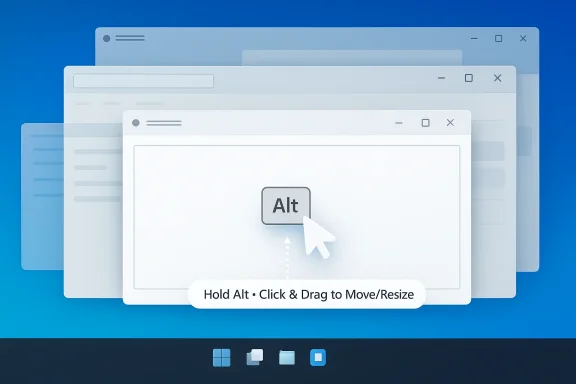
PowerToys is edging toward another small but genuinely practical upgrade, and this one could matter more than it first appears. A proposed WinPos module would let Windows users move or resize windows by holding Alt and clicking anywhere on the window with the left or right mouse button, instead of having to fumble for the title bar or a tiny edge grab area. If Microsoft ships it, the feature could make desktop window management feel less fussy on Windows 11 and Windows 10, especially on high-resolution displays and for apps whose title bars are already crowded with tabs, buttons, and search boxes. PowerToys already includes productivity tools such as Always On Top, FancyZones, and Workspaces, so WinPos would fit neatly into an ecosystem Microsoft has spent years refining for power users. (learn.microsoft.com)
Microsoft has spent a long time making window management less painful in Windows, but the company has also left plenty of room for third-party experimentation. The built-in Snap experience in Windows 11 now offers drag-to-edge snapping, Snap Assist, Snap Layouts, and keyboard-based positioning, which together cover a lot of modern multitasking needs. Microsoft’s own support documentation describes those workflows as core ways to organize windows and notes that users can arrange apps with the mouse, touch, or keyboard.
That said, snapping is only part of the story. Plenty of users still prefer to move windows manually, resize them by dragging borders, or arrange them in ways that are not neatly captured by preset layouts. The problem is that the exact zones Windows expects users to grab can be awkward, particularly when an app places tabs, toolbar buttons, and search controls directly in the title bar. On a crowded UI, the old-fashioned act of “just drag the window” can become a surprisingly finicky experience. That friction is what makes the proposed WinPos concept interesting.
PowerToys has become Microsoft’s most visible laboratory for solving exactly this sort of annoyance. The project is explicitly positioned as a set of free, open-source utilities that help users “get more out of Windows” and remove friction from everyday tasks. Microsoft’s current PowerToys documentation highlights utilities such as Always On Top, FancyZones, Workspaces, Mouse Utilities, and others aimed at making the desktop easier to control. (learn.microsoft.com)
The broader context matters because PowerToys has a pattern of picking up ideas that began as niche community tools and turning them into polished, integrated features. FancyZones already demonstrates that Microsoft is willing to enhance drag-and-drop window behavior with custom layouts and keyboard shortcuts, while Always On Top adds a simple but valuable productivity layer to any app. WinPos would be another step in that direction: not a new way to multitask in the abstract, but a more forgiving way to physically manipulate the windows already on screen. (learn.microsoft.com)
Historically, the idea is not even new. The proposed behavior echoes AltDrag, an older Windows utility that lets users move and resize windows with modifier-key-and-mouse combinations. That concept has long been popular among users who want Linux-like flexibility on Windows, where similar shortcuts have often felt more natural than the default resize handles. In other words, WinPos would not be inventing a new paradigm so much as bringing an established one into a Microsoft-maintained package. That distinction is important, because it could determine whether the feature remains a niche hack or becomes a mainstream habit.
The appeal is especially strong for users who work with many overlapping windows throughout the day. Designers, developers, analysts, and anyone juggling browser tabs, terminals, chat apps, and documents often want fast, low-thought manipulation, not a choreography of perfect clicks. A feature that says “hold Alt, click anywhere, and drag” is easy to remember and easy to repeat. That simplicity is the whole point.
That is also why this proposal feels more important than a random GitHub experiment. If Microsoft adopts it, the feature benefits from PowerToys’ installer, branding, settings framework, and broader credibility. A niche utility can survive with a tiny audience; a PowerToys module can become part of the default toolkit for enthusiasts and IT admins alike.
In practical terms, the attraction is obvious. Desktop users often need to adjust windows that are partially obscured, stacked, or opened inside apps whose chrome has evolved into a mini control panel. Browsers are a good example, with tab rows, extension icons, profile buttons, and menu controls occupying the top of the window. A broader drag target makes the OS feel more forgiving and the app feel less crowded.
PowerToys is the obvious place to rescue ideas like this because it already serves as a home for polished, supported utilities. If WinPos lands there, the idea stops depending on an aging hobby project and instead becomes part of a maintained Microsoft ecosystem. That shift would matter as much for trust as for convenience.
That sounds small, but the practical consequences are significant. It would make window manipulation more accessible in apps where the title bar is visually busy or functionally embedded into the top of the interface. It would also reduce the frustration of trying to find a resize edge on a thin, borderless, or custom-styled window.
For enterprises, the case is different but just as strong. IT departments care about consistency, training cost, and reducing the number of user-level complaints about “the system being awkward.” A PowerToys utility that standardizes easier dragging behavior could reduce frustration in environments with many shared workstations, many monitor sizes, and many custom applications.
Yet snapping is not the same as manual repositioning. Snap is about structure, while WinPos would be about control. When users want a window placed almost exactly where they want it, or when they want to nudge it by feel, snapping is often too opinionated. A utility like WinPos fills the gap between rigid layout management and full freeform dragging.
Microsoft has also made it clear that PowerToys utilities can coexist with built-in Windows behavior. FancyZones, for example, can override Snap hotkeys and provide alternate zone-based positioning with mouse and keyboard. That shows Microsoft is comfortable letting PowerToys act as an advanced layer on top of core OS window management. (learn.microsoft.com)
That cross-version support is not just compatibility trivia. It suggests the feature is being designed as a utility rather than as a shiny platform showcase. In other words, its success would depend on usefulness, not on the latest Windows interface trend.
By bringing the concept into PowerToys, Microsoft would be doing more than adding one more feature. It would be claiming a category of behavior that has often lived in the margins of the Windows world. That has implications for developers of niche tools, because first-party polish usually wins when the underlying idea is simple enough to copy and support.
It also matters for platform perception. A strong PowerToys lineup makes Windows feel more adaptable without forcing users into third-party shells or launcher ecosystems. The more Microsoft folds practical workflows into PowerToys, the harder it becomes for critics to claim that the company is ignoring power users.
WinPos would not make Windows a tiling window manager, but it would borrow a small piece of that ethos: the idea that the user should be able to re-interpret the mouse more flexibly. In a world where users increasingly split time across operating systems, small differences in feel can become surprisingly influential.
Another advantage is conceptual clarity. Many utilities are hard to explain, but this one can be shown in seconds. That makes it easier for Microsoft to market, easier for support teams to describe, and easier for users to teach each other. Ease of explanation is often a hidden superpower in product adoption.
Another concern is discoverability. A modifier-key gesture can be elegant once learned, but users need to know it exists in the first place. If Microsoft hides it too deeply, adoption will lag; if it surfaces too aggressively, it may create accidental window moves that irritate users instead of helping them.
Finally, Microsoft will need to avoid the trap of making the feature feel too much like a workaround for existing Windows quirks. Users want better control, not another layer of exceptions. If WinPos behaves predictably, it can be a win; if it requires too many caveats, it risks becoming one more toggle buried in a settings page.
The broader pattern, however, is encouraging. Microsoft continues to invest in PowerToys as a first-class playground for productivity features, and the current lineup already shows how far the suite has come. With Always On Top, FancyZones, and Workspaces in the mix, WinPos would not be an isolated experiment but a natural extension of an established philosophy. (learn.microsoft.com)
Source: Neowin PowerToys may soon get a useful window management utility for Windows 11 and 10
 Background
Microsoft has spent a long time making window management less painful in Windows, but the company has also left plenty of room for third-party experimentation. The built-in Snap experience in Windows 11 now offers drag-to-edge snapping, Snap Assist, Snap Layouts, and keyboard-based positioning, which together cover a lot of modern multitasking needs. Microsoft’s own support documentation describes those workflows as core ways to organize windows and notes that users can arrange apps with the mouse, touch, or keyboard.That said, snapping is only part of the story. Plenty of users still prefer to move windows manually, resize them by dragging borders, or arrange them in ways that are not neatly captured by preset layouts. The problem is that the exact zones Windows expects users to grab can be awkward, particularly when an app places tabs, toolbar buttons, and search controls directly in the title bar. On a crowded UI, the old-fashioned act of “just drag the window” can become a surprisingly finicky experience. That friction is what makes the proposed WinPos concept interesting.
PowerToys has become Microsoft’s most visible laboratory for solving exactly this sort of annoyance. The project is explicitly positioned as a set of free, open-source utilities that help users “get more out of Windows” and remove friction from everyday tasks. Microsoft’s current PowerToys documentation highlights utilities such as Always On Top, FancyZones, Workspaces, Mouse Utilities, and others aimed at making the desktop easier to control. (learn.microsoft.com)
The broader context matters because PowerToys has a pattern of picking up ideas that began as niche community tools and turning them into polished, integrated features. FancyZones already demonstrates that Microsoft is willing to enhance drag-and-drop window behavior with custom layouts and keyboard shortcuts, while Always On Top adds a simple but valuable productivity layer to any app. WinPos would be another step in that direction: not a new way to multitask in the abstract, but a more forgiving way to physically manipulate the windows already on screen. (learn.microsoft.com)
Historically, the idea is not even new. The proposed behavior echoes AltDrag, an older Windows utility that lets users move and resize windows with modifier-key-and-mouse combinations. That concept has long been popular among users who want Linux-like flexibility on Windows, where similar shortcuts have often felt more natural than the default resize handles. In other words, WinPos would not be inventing a new paradigm so much as bringing an established one into a Microsoft-maintained package. That distinction is important, because it could determine whether the feature remains a niche hack or becomes a mainstream habit.
Why WinPos Matters
At first glance, a utility for dragging windows from anywhere may sound trivial. In practice, it speaks to a broader issue: Windows has become increasingly capable, but some of its most common interactions still assume precise mouse targeting. When the active title bar is packed with controls, or when a window is positioned near the edge of a large display, the act of moving or resizing it can take more effort than it should. WinPos promises to reduce that tiny but recurring frustration.The appeal is especially strong for users who work with many overlapping windows throughout the day. Designers, developers, analysts, and anyone juggling browser tabs, terminals, chat apps, and documents often want fast, low-thought manipulation, not a choreography of perfect clicks. A feature that says “hold Alt, click anywhere, and drag” is easy to remember and easy to repeat. That simplicity is the whole point.
A Small Gesture With Large Surface Area
The best productivity features are often the least glamorous. A window-management tweak does not look like much in a release video, yet it can save time dozens or hundreds of times per day. Multiply a half-second of reduced friction across a workday, and the value becomes more tangible than any benchmark.- Less need to aim for a tiny title bar
- Fewer accidental misses on crowded app chrome
- More comfortable use on high-DPI monitors
- Better ergonomics for repetitive workflow use
- Faster manual control when snapping is not ideal
Why It Fits PowerToys
PowerToys has always been strongest when it fills gaps that the operating system leaves open. Microsoft describes the suite as a collection of tools that add “thoughtful” productivity improvements not present out of the box. A window utility that improves manual dragging would land squarely in that mission, because it smooths behavior that users already expect but do not always get in the most convenient form. (learn.microsoft.com)That is also why this proposal feels more important than a random GitHub experiment. If Microsoft adopts it, the feature benefits from PowerToys’ installer, branding, settings framework, and broader credibility. A niche utility can survive with a tiny audience; a PowerToys module can become part of the default toolkit for enthusiasts and IT admins alike.
The AltDrag Connection
The comparison to AltDrag is not accidental. AltDrag earned a following by making window manipulation feel more fluid: hold a modifier key and move or resize windows with mouse gestures instead of chasing tiny resize zones. That behavior aligns with what many users already do instinctively on other platforms, where manual window movement can feel more permissive and less cursor-dependent.In practical terms, the attraction is obvious. Desktop users often need to adjust windows that are partially obscured, stacked, or opened inside apps whose chrome has evolved into a mini control panel. Browsers are a good example, with tab rows, extension icons, profile buttons, and menu controls occupying the top of the window. A broader drag target makes the OS feel more forgiving and the app feel less crowded.
Why Users Still Want It
There is a reason this style of interaction keeps resurfacing. It matches the way people already think about the desktop: click to grab, drag to place, release to commit. When the system forces exact pointer placement, the mental model breaks down and the interaction becomes more tedious than it should be.- It reduces dependence on precision targeting
- It lowers the cognitive cost of window rearrangement
- It makes mixed-input workflows feel smoother
- It helps on large monitors where the title bar may be far from the pointer
- It benefits users who prefer mouse-first navigation over keyboard shortcuts
The Abandonment Problem
The downside, of course, is that community tools can fade away. The Neowin report notes that AltDrag appears to have been abandoned, with its latest update more than a decade old. That creates an opening for Microsoft, but it also raises a practical question: how many useful utilities remain trapped in old binaries simply because no first-party alternative exists?PowerToys is the obvious place to rescue ideas like this because it already serves as a home for polished, supported utilities. If WinPos lands there, the idea stops depending on an aging hobby project and instead becomes part of a maintained Microsoft ecosystem. That shift would matter as much for trust as for convenience.
How It Would Work in Practice
The reported WinPos behavior is straightforward enough to explain in a sentence, which is often a sign that the UX is on the right track. Hold Alt, then use the left mouse button to move a window or the right mouse button to resize it. Instead of targeting a title bar or border, the user could interact from anywhere inside the window surface.That sounds small, but the practical consequences are significant. It would make window manipulation more accessible in apps where the title bar is visually busy or functionally embedded into the top of the interface. It would also reduce the frustration of trying to find a resize edge on a thin, borderless, or custom-styled window.
A More Forgiving Pointer Model
Traditional window controls assume the user can easily locate the exact control regions Microsoft and the app developer defined. WinPos would change the action from precision first to modifier first, which is a much more forgiving interaction model. That is the kind of change users often love after they try it, because it feels immediately obvious.- Left-click drag could become a universal move gesture
- Right-click drag could become an intuitive resize gesture
- Modifier-key gating would reduce accidental activation
- The feature would be especially useful on large displays
- It could help users who do a lot of multiwindow arrangement
Consumer and Enterprise Value
For consumers, the value is immediate and experiential. The feature makes a familiar task faster, less annoying, and easier to teach to others. It is the sort of quality-of-life improvement that users may not notice in a feature checklist but will absolutely remember once it becomes part of their muscle memory.For enterprises, the case is different but just as strong. IT departments care about consistency, training cost, and reducing the number of user-level complaints about “the system being awkward.” A PowerToys utility that standardizes easier dragging behavior could reduce frustration in environments with many shared workstations, many monitor sizes, and many custom applications.
Sequential Benefits
- Fewer missed clicks when moving windows.
- Less dependence on visible title bars.
- Better handling of app UIs with crowded chrome.
- Easier use on very high-resolution displays.
- More predictable behavior for mouse-heavy workflows.
Windows 11, Windows 10, and the Snap Gap
Windows 11 is already strong at snapping, and Microsoft has worked to make that system feel richer and more discoverable than it used to be. Official documentation highlights Snap layouts accessible via the maximize button or Win + Z, plus Snap Assist to fill in the remaining positions in a layout. The same docs emphasize that the Snap feature works with mouse, touch, and keyboard.Yet snapping is not the same as manual repositioning. Snap is about structure, while WinPos would be about control. When users want a window placed almost exactly where they want it, or when they want to nudge it by feel, snapping is often too opinionated. A utility like WinPos fills the gap between rigid layout management and full freeform dragging.
Why Snap Is Not Enough
Snap layouts are excellent when users are rearranging a workspace around a known pattern. They are less useful when someone simply wants to move a chat window from one spot to another without invoking a layout decision. In that sense, Snap and WinPos solve adjacent but distinct problems.Microsoft has also made it clear that PowerToys utilities can coexist with built-in Windows behavior. FancyZones, for example, can override Snap hotkeys and provide alternate zone-based positioning with mouse and keyboard. That shows Microsoft is comfortable letting PowerToys act as an advanced layer on top of core OS window management. (learn.microsoft.com)
A Good Fit for Mixed Workflows
Many users do not manage windows in a single uniform way. They may snap a pair of documents side by side, pin one window above others with Always On Top, and then manually drag a small floating tool palette or terminal window into the remaining space. WinPos would make that last step far easier.- Snap for structured layouts
- FancyZones for custom workspace geometry
- Always On Top for persistent visibility
- WinPos for fast manual movement and resizing
- Workspaces for launching a known app set into place
Windows 10 Still Matters
The fact that the reported module would support both Windows 11 and Windows 10 is also noteworthy. Windows 10 users have less access to the newest Snap UI flourishes, but they still have real productivity needs and plenty of active machines in the field. A PowerToys feature that spans both systems offers Microsoft a broader audience and a longer relevance window.That cross-version support is not just compatibility trivia. It suggests the feature is being designed as a utility rather than as a shiny platform showcase. In other words, its success would depend on usefulness, not on the latest Windows interface trend.
Competition and Ecosystem Pressure
If Microsoft ships WinPos, the immediate competition is not another first-party Windows feature. It is the ecosystem of small utilities, workflow enhancers, and user scripts that have historically filled this exact gap. That includes AltDrag-like tools, window managers, and input customizers that exist because users want more direct control over the desktop.By bringing the concept into PowerToys, Microsoft would be doing more than adding one more feature. It would be claiming a category of behavior that has often lived in the margins of the Windows world. That has implications for developers of niche tools, because first-party polish usually wins when the underlying idea is simple enough to copy and support.
What Rivals Would Feel
For rival utility makers, the effect would be familiar. Microsoft’s entrance into a niche often validates the use case while compressing the room for independent offerings. Users may still prefer a standalone app if it has deeper customization, but a built-in or Microsoft-backed option usually becomes the default recommendation.- Community tools may lose casual users first
- Advanced power users may still prefer deeper customization elsewhere
- Documentation and support become major differentiators
- Integration into PowerToys can lower adoption friction
- Microsoft can rapidly normalize the behavior across the ecosystem
PowerToys as a Competitive Signal
PowerToys itself has become a competitive signal about where Microsoft sees room for improvement. When Microsoft invests in utilities like FancyZones or Workspaces, it signals that the stock Windows desktop is not considered “done.” That matters because enterprise buyers and enthusiast communities both pay attention to what Microsoft chooses to polish. (learn.microsoft.com)It also matters for platform perception. A strong PowerToys lineup makes Windows feel more adaptable without forcing users into third-party shells or launcher ecosystems. The more Microsoft folds practical workflows into PowerToys, the harder it becomes for critics to claim that the company is ignoring power users.
The Linux Comparison
The Linux comparison in the Neowin report is more than a throwaway line. Linux desktops and window managers have long offered highly configurable mouse and keyboard behaviors, and Windows users who cross over often notice the difference immediately. That does not mean Linux is categorically better; it means it has historically offered more room for interaction customization.WinPos would not make Windows a tiling window manager, but it would borrow a small piece of that ethos: the idea that the user should be able to re-interpret the mouse more flexibly. In a world where users increasingly split time across operating systems, small differences in feel can become surprisingly influential.
Strengths and Opportunities
The best thing about WinPos is that it targets a real annoyance without demanding a major behavioral shift from users. It also fits PowerToys’ identity extremely well, because the suite has always been about making Windows feel more efficient through practical, opt-in tools. If Microsoft executes the module cleanly, it could become one of those features people forget to praise only because it starts feeling indispensable.- Makes moving and resizing windows faster
- Reduces reliance on precise title-bar targeting
- Complements existing Snap and FancyZones workflows
- Fits PowerToys’ mission of removing friction
- Could revive a beloved but aging interaction model
- Works well across both Windows 11 and Windows 10
- Has appeal for both newcomers and power users
Another advantage is conceptual clarity. Many utilities are hard to explain, but this one can be shown in seconds. That makes it easier for Microsoft to market, easier for support teams to describe, and easier for users to teach each other. Ease of explanation is often a hidden superpower in product adoption.
Risks and Concerns
The biggest risk is not that WinPos would be bad, but that it could feel redundant if the implementation is not carefully tuned. Windows already has several overlapping window-management systems, and users may be confused if the new gesture conflicts with existing mouse actions or app-specific behaviors. The feature must feel additive, not intrusive.Another concern is discoverability. A modifier-key gesture can be elegant once learned, but users need to know it exists in the first place. If Microsoft hides it too deeply, adoption will lag; if it surfaces too aggressively, it may create accidental window moves that irritate users instead of helping them.
- Potential conflicts with app-specific mouse controls
- Risk of accidental activation if the gesture is too easy
- Discoverability challenges for casual users
- Possible overlap with other PowerToys and third-party tools
- Need for careful behavior on borderless or custom windows
- Maintenance burden if the feature interacts with many window styles
- User confusion if the resize and move rules are not consistent
Finally, Microsoft will need to avoid the trap of making the feature feel too much like a workaround for existing Windows quirks. Users want better control, not another layer of exceptions. If WinPos behaves predictably, it can be a win; if it requires too many caveats, it risks becoming one more toggle buried in a settings page.
Looking Ahead
For now, WinPos appears to be a proposed module rather than a finished feature, which means timing remains the real unknown. The Neowin report says there is no public release date, and that is the key caveat. As with many PowerToys ideas, the jump from GitHub concept to polished utility depends on design validation, implementation quality, and whether the team believes the feature will serve enough users to justify maintenance.The broader pattern, however, is encouraging. Microsoft continues to invest in PowerToys as a first-class playground for productivity features, and the current lineup already shows how far the suite has come. With Always On Top, FancyZones, and Workspaces in the mix, WinPos would not be an isolated experiment but a natural extension of an established philosophy. (learn.microsoft.com)
What to Watch
- Whether the module lands as a full PowerToys utility or remains a GitHub proposal
- Whether Microsoft chooses Alt-only behavior or offers configurable modifiers
- Whether the feature supports both move and resize with enough precision
- Whether Windows 10 and Windows 11 receive identical behavior
- Whether PowerToys documentation explains the feature alongside FancyZones and Always On Top
- Whether community feedback pushes the design toward more customization
Source: Neowin PowerToys may soon get a useful window management utility for Windows 11 and 10
