

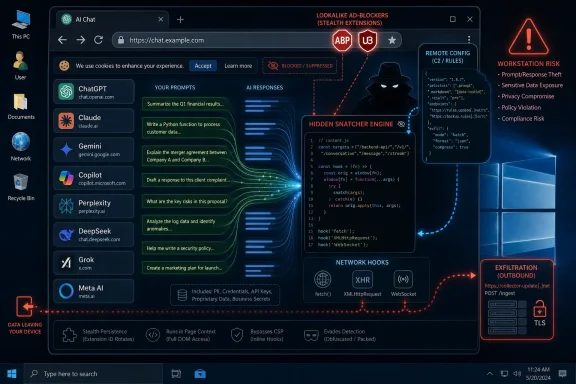
A security report published June 13, 2026, by MalExt Sentry says two browser ad-blocking extensions, Smart Adblocker and Adblock for Browser, secretly intercepted AI conversations and account metadata from roughly 90,000 users across ChatGPT, Claude, Gemini, Copilot, Perplexity, DeepSeek, Grok, and Meta AI. The operation, dubbed PromptSnatcher and internally tied to “Panel 231,” is not just another sketchy extension story. It is a warning about what happens when browsers become the front door to both consumer AI and corporate knowledge work. The ad blocker was the camouflage; the real product was access to the prompt stream.
The most important thing about PromptSnatcher is not that it pretended to block ads. It is that the deception worked because an ad blocker is one of the few browser tools users are trained to trust with broad page access.
For years, browser extensions have occupied an awkward place in the security model. They are small enough to feel harmless, useful enough to become part of daily muscle memory, and privileged enough to see the web as the user sees it. That combination has always made them attractive to attackers, but generative AI has changed the value of the prize.
A password-stealing extension can compromise accounts. A prompt-stealing extension can compromise intent, trade secrets, legal strategy, medical questions, source code, customer data, and unreleased business plans. The prompt window has become a confession booth for modern computing, and many users still treat it like a private scratchpad.
That is the gap PromptSnatcher exploited. The extensions reportedly provided real ad-blocking and cookie-banner suppression by using legitimate public filter lists, including EasyList and I Don’t Care About Cookies. In other words, they did enough of the advertised job to avoid feeling fake.
That is a more durable model than crude malware. A useless extension gets uninstalled. A useful malicious extension becomes infrastructure.
That means the attackers did not need to defeat OpenAI, Anthropic, Google, Microsoft, Perplexity, xAI, DeepSeek, or Meta at the server side. They simply sat inside the browser session after the user had already authenticated. From that position, the extension could observe the conversation as the page sent and received it.
This is the uncomfortable security lesson of the AI web app era. A platform can have strong account security, TLS, server-side monitoring, and enterprise controls, but the user’s browser remains the place where decrypted content becomes usable. If malware lives there, the platform’s defenses are partly downstream of the compromise.
The reported buffers are revealing: up to 10,000 characters for prompts and 30,000 characters for responses. That is not a token-sized accident or generic telemetry. It is sized for substantive prompt-response exchanges, the sort of messages where users paste contracts, stack traces, HR drafts, PowerShell snippets, procurement terms, and confidential summaries.
The targeting was also platform-aware. MalExt reported custom parsers for each AI service, including subscription-tier checks for services such as ChatGPT and Copilot. This was not indiscriminate form grabbing; it was an AI conversation collection system.
That is not a minor UX detail. Consent banners are now so common, so vague, and so numbing that attackers can hide in their shape. A phrase like “Enhanced Protection” sounds like the sort of thing a privacy tool would ask for, especially when the extension visibly blocks ads.
This is where extension security has a human factors problem as much as a code review problem. Users are told to read permissions, but browser permission text often compresses enormous authority into bland warnings. When an extension claims to improve privacy, the warning itself can feel like a necessary cost of protection.
The twist is especially cruel for ad blockers. The category exists because users distrust the tracking economy. PromptSnatcher reportedly used that distrust as the acquisition funnel for another surveillance channel.
The result is not just stolen data; it is poisoned trust in privacy tooling. Every malicious ad blocker makes life harder for legitimate projects that already operate under scrutiny from browser vendors, advertisers, publishers, and regulators.
That matters because app-store review is fundamentally a snapshot. Reviewers and automated scanners inspect what is submitted, what permissions are declared, and what behavior appears under test conditions. A remote configuration channel can change the effective behavior after approval, or expose behavior only to requests that look like they came from a real installed extension.
MalExt said Meta AI was absent from the static code but present and enabled in the live remote configuration. That is the kind of detail that turns a single incident into an architectural indictment. If true, the operator could add new AI targets without shipping a visibly updated extension.
Browser vendors have spent years tightening rules around remotely hosted code, especially in the Manifest V3 era. But PromptSnatcher demonstrates the gray zone between remote code and remote logic. If an extension ships a generic capture engine and downloads the map of what to capture, the store may see one thing while users experience another.
That is the challenge for reviewers. Malicious behavior no longer has to be a hardcoded smoking gun. It can be a latent capability waiting for configuration.
If accurate, that discrepancy is not just a policy violation; it is a direct attack on the usefulness of disclosure systems. A declaration that says “none” only helps users if the ecosystem can verify that “none” resembles reality.
Mozilla has moved toward clearer extension data-collection disclosures, while Chrome’s extension ecosystem has emphasized permission scoping, Manifest V3 constraints, and store policy enforcement. Those are necessary moves, but PromptSnatcher shows how a determined operator can combine legitimate-looking functionality, obfuscation, and runtime configuration to slip between the layers.
The problem is not that store review is worthless. It is that store review is being asked to answer a question that changes after installation: what does this extension do today, for this user, on this site, with this remote configuration?
That is a harder question than whether the manifest looks clean.
If a user pasted incident-response notes into Copilot, summarized customer data in ChatGPT, debugged proprietary code in Claude, or used Gemini to rewrite internal documents, the extension may have seen more than “chat.” It may have seen the connective tissue of the user’s work.
The risk is broader in enterprises that allow unmanaged extensions. Many organizations have spent years hardening endpoints with EDR, disk encryption, conditional access, and phishing-resistant MFA, while leaving browser extension inventories to user preference or loose allowlists. That mismatch is no longer defensible.
The rise of AI makes extension governance a data-loss prevention issue. If AI chats are where employees increasingly synthesize sensitive material, then browser extensions that can read those chats become part of the data boundary.
This also complicates the advice to “use enterprise AI.” Even if a company standardizes on Microsoft Copilot or another managed AI platform, the session still runs in a browser. A rogue extension does not care whether the service is consumer or enterprise-branded if it can read the traffic in the page context.
The reported use of public filter lists is especially clever. It gives the extension a baseline of legitimate behavior and creates a plausible explanation for network activity and rule updates. It also borrows reputational gravity from well-known community-maintained lists without necessarily being part of that community.
This is a familiar pattern in supply-chain abuse. Attackers do not always need to compromise a trusted project; sometimes they build a knockoff that imports enough legitimate material to feel authentic. The user experiences the expected benefit, while the malicious component operates in parallel.
The browser store search experience makes this worse. Users often choose extensions by name similarity, star ratings, install counts, and screenshots. “Smart Adblocker” and “Adblock for Browser” are exactly the kind of generic names that can blend into a crowded marketplace.
Install count then becomes a trust signal, even when it should be treated as an exposure metric.
A visited URL may reveal that a user opened a legal portal. A prompt may reveal the legal question, the draft language, the parties involved, and the desired negotiation strategy. A code repository URL may identify a project; an AI debugging prompt may include the failing function, the secret-bearing environment variable, and the internal architecture diagram pasted for convenience.
This is why PromptSnatcher lands differently from ordinary web tracking. It reportedly collected not merely where users went, but what they asked and what answers they received. In many workplaces, those conversations may be closer to internal email or document drafts than to telemetry.
The subscription-tier fingerprinting also deserves attention. Knowing whether a user has a paid ChatGPT account or Copilot Pro subscription may help profile high-value users. It can also help distinguish casual consumers from professionals likely to generate more valuable data.
That kind of metadata may seem secondary, but attackers love ranking signals. If you are stealing from 90,000 users, knowing which users pay for advanced AI tools is a useful way to prioritize the haul.
AI vendors have pushed users toward browser-based productivity at astonishing speed. Browser vendors have encouraged an extension ecosystem that can transform the web experience. Enterprises have allowed employees to stitch together tools from public stores. Users have learned to click through consent screens because software has trained them that meaningful refusal is rare.
PromptSnatcher sits at the intersection of all four trends. It is not an exotic exploit so much as a predictable result of incentives: browser extensions want broad access, AI sessions contain valuable data, store review is imperfect, and users reward tools that reduce friction.
The fix will not be a single new warning banner. Warnings are already overdrawn as a security currency. If everything is a warning, nothing is.
Instead, the extension model needs more runtime accountability. Users and administrators need to know not just what an extension requested during installation, but what it is doing now, which domains it is active on, what remote endpoints it talks to, and whether its behavior changed after an update or configuration fetch.
The better answer is managed scarcity. Enterprises should maintain an allowlist, pin approved extensions by ID, block side-loaded and unreviewed extensions where possible, and separate consumer convenience tools from corporate browser profiles. On Windows fleets, that means using browser management through Group Policy, Intune, or equivalent device-management tooling rather than relying on employee judgment.
The priority should be extensions with broad host permissions, content-script injection, network interception, or remote configuration behavior. Those are not automatically malicious capabilities, but they are powerful enough to deserve review. An ad blocker, password manager, grammar assistant, coupon tool, meeting recorder, or AI helper can all sit near sensitive data.
Organizations should also revisit AI acceptable-use policies through the extension lens. It is not enough to tell employees which AI services they may use. Security teams need to ask what else is running in the browser when those services are used.
For high-risk roles, a managed browser profile with a minimal extension set may be more realistic than trying to classify every prompt. The goal is to reduce the number of untrusted components that can observe the session in the first place.
That advice is unsatisfying because it pushes work onto users. But until browser stores expose richer behavioral signals, users still have to make judgment calls from imperfect evidence. A polished icon and a plausible name are not enough.
Ad blockers are particularly tricky because there are legitimate, widely used options with public reputations and large communities. The lesson is not “never use an ad blocker.” The lesson is to avoid random lookalikes, especially when a better-known project exists and has been audited by the crowd for years.
Users who installed the named extensions should remove them, clear browser data as appropriate, review AI chat histories for sensitive disclosures, and consider changing passwords or rotating tokens if secrets were pasted into AI conversations. For developers and admins, that last point matters: prompts often contain API keys, logs, hostnames, internal URLs, and snippets that were never meant to leave the machine.
The awkward part is that remediation may be impossible for some data. You can rotate a key. You cannot unshare a confidential strategy memo that was pasted into a chat and exfiltrated.
Browser storefronts still present popularity as a rough proxy for legitimacy. That is understandable; users need signals. But install counts can also normalize risk, especially when an extension category is crowded with similar names and near-identical promises.
The better signals would be harder to game. How long has the extension existed under the same publisher? Has ownership changed? Does it use remote configuration? What domains does it contact? Has its permission set expanded? Does its declared data collection match observed behavior?
Some of this is technically difficult, and some of it risks overwhelming users. But the current model already overwhelms them with low-context permission prompts. A more useful store would hide less of the behavior that actually matters.
For enterprise administrators, this argues for private extension catalogs and curated browser baselines. For consumers, it argues for browser vendors surfacing trust history in plain language rather than burying it in developer metadata.
That makes AI chat interception a natural evolution of infostealer behavior. Traditional stealers grab browser cookies, saved passwords, crypto wallets, and files. AI prompt stealers grab the working memory of the user. In some cases, that may be more valuable than the account itself.
The dynamic target list also points forward. Today’s eight platforms are the obvious consumer and prosumer AI destinations. Tomorrow’s target list could include enterprise copilots, internal chatbots, coding agents, CRM assistants, legal AI tools, helpdesk summarizers, and local web interfaces for private models.
The more AI becomes a layer across all software, the more browser-level interception becomes a way to spy on everything at once. Attackers will follow the workflow, not the branding.
That is why this incident should not be dismissed as a bad pair of ad blockers. It is a prototype for a market: collect the conversations that reveal what people are trying to do before they do it.
PromptSnatcher is a reminder that the AI security perimeter is not only around the model, the cloud tenant, or the login page; it is also around the little extension icon sitting beside the address bar. As Windows users move more of their work into browser-hosted AI tools, the winners will be the organizations and individuals that treat extensions as software with privileges, not decorations with settings. The next version of this attack may not call itself an ad blocker, and it may not stop at public AI chatbots, but the lesson will be the same: when the browser becomes the operating system for AI, anything allowed to live inside it deserves suspicion.
 The Browser Extension Became the Soft Underbelly of AI
The most important thing about PromptSnatcher is not that it pretended to block ads. It is that the deception worked because an ad blocker is one of the few browser tools users are trained to trust with broad page access.For years, browser extensions have occupied an awkward place in the security model. They are small enough to feel harmless, useful enough to become part of daily muscle memory, and privileged enough to see the web as the user sees it. That combination has always made them attractive to attackers, but generative AI has changed the value of the prize.
A password-stealing extension can compromise accounts. A prompt-stealing extension can compromise intent, trade secrets, legal strategy, medical questions, source code, customer data, and unreleased business plans. The prompt window has become a confession booth for modern computing, and many users still treat it like a private scratchpad.
That is the gap PromptSnatcher exploited. The extensions reportedly provided real ad-blocking and cookie-banner suppression by using legitimate public filter lists, including EasyList and I Don’t Care About Cookies. In other words, they did enough of the advertised job to avoid feeling fake.
That is a more durable model than crude malware. A useless extension gets uninstalled. A useful malicious extension becomes infrastructure.
PromptSnatcher Did Not Need to Break AI Platforms
The campaign’s technical trick is almost banal, which is why it matters. According to the MalExt analysis, the extensions injected a shared JavaScript capture engine into targeted AI sites and patched ordinary browser communication paths such asfetch, XMLHttpRequest, and WebSocket.That means the attackers did not need to defeat OpenAI, Anthropic, Google, Microsoft, Perplexity, xAI, DeepSeek, or Meta at the server side. They simply sat inside the browser session after the user had already authenticated. From that position, the extension could observe the conversation as the page sent and received it.
This is the uncomfortable security lesson of the AI web app era. A platform can have strong account security, TLS, server-side monitoring, and enterprise controls, but the user’s browser remains the place where decrypted content becomes usable. If malware lives there, the platform’s defenses are partly downstream of the compromise.
The reported buffers are revealing: up to 10,000 characters for prompts and 30,000 characters for responses. That is not a token-sized accident or generic telemetry. It is sized for substantive prompt-response exchanges, the sort of messages where users paste contracts, stack traces, HR drafts, PowerShell snippets, procurement terms, and confidential summaries.
The targeting was also platform-aware. MalExt reported custom parsers for each AI service, including subscription-tier checks for services such as ChatGPT and Copilot. This was not indiscriminate form grabbing; it was an AI conversation collection system.
The Consent Screen Was the Social Engineering Payload
The user-facing lie appears to have been wrapped in respectable privacy language. The extensions reportedly presented onboarding consent around generic “Enhanced Protection,” without clearly disclosing AI chat collection.That is not a minor UX detail. Consent banners are now so common, so vague, and so numbing that attackers can hide in their shape. A phrase like “Enhanced Protection” sounds like the sort of thing a privacy tool would ask for, especially when the extension visibly blocks ads.
This is where extension security has a human factors problem as much as a code review problem. Users are told to read permissions, but browser permission text often compresses enormous authority into bland warnings. When an extension claims to improve privacy, the warning itself can feel like a necessary cost of protection.
The twist is especially cruel for ad blockers. The category exists because users distrust the tracking economy. PromptSnatcher reportedly used that distrust as the acquisition funnel for another surveillance channel.
The result is not just stolen data; it is poisoned trust in privacy tooling. Every malicious ad blocker makes life harder for legitimate projects that already operate under scrutiny from browser vendors, advertisers, publishers, and regulators.
Remote Configuration Turned Store Review Into a Snapshot
The most strategically important detail in the report is the dynamic configuration system. Instead of baking all targeting logic into the extension package, the background manager reportedly downloaded parser rules from a remote endpoint at runtime.That matters because app-store review is fundamentally a snapshot. Reviewers and automated scanners inspect what is submitted, what permissions are declared, and what behavior appears under test conditions. A remote configuration channel can change the effective behavior after approval, or expose behavior only to requests that look like they came from a real installed extension.
MalExt said Meta AI was absent from the static code but present and enabled in the live remote configuration. That is the kind of detail that turns a single incident into an architectural indictment. If true, the operator could add new AI targets without shipping a visibly updated extension.
Browser vendors have spent years tightening rules around remotely hosted code, especially in the Manifest V3 era. But PromptSnatcher demonstrates the gray zone between remote code and remote logic. If an extension ships a generic capture engine and downloads the map of what to capture, the store may see one thing while users experience another.
That is the challenge for reviewers. Malicious behavior no longer has to be a hardcoded smoking gun. It can be a latent capability waiting for configuration.
The Firefox Declaration Makes the Trust Gap Harder to Ignore
One of the more damning claims in the report concerns Firefox variants of the extensions. MalExt says they declared no data collection permissions while shipping a capture engine functionally equivalent to the Chrome versions.If accurate, that discrepancy is not just a policy violation; it is a direct attack on the usefulness of disclosure systems. A declaration that says “none” only helps users if the ecosystem can verify that “none” resembles reality.
Mozilla has moved toward clearer extension data-collection disclosures, while Chrome’s extension ecosystem has emphasized permission scoping, Manifest V3 constraints, and store policy enforcement. Those are necessary moves, but PromptSnatcher shows how a determined operator can combine legitimate-looking functionality, obfuscation, and runtime configuration to slip between the layers.
The problem is not that store review is worthless. It is that store review is being asked to answer a question that changes after installation: what does this extension do today, for this user, on this site, with this remote configuration?
That is a harder question than whether the manifest looks clean.
Windows Users Should Treat This as a Workstation Compromise
For WindowsForum readers, the practical lesson is simple: a malicious browser extension should be treated less like a nuisance and more like a workstation-level data exposure. On a modern Windows PC, the browser is where Microsoft 365, Entra-connected apps, GitHub, admin portals, ticketing systems, cloud consoles, and AI assistants all converge.If a user pasted incident-response notes into Copilot, summarized customer data in ChatGPT, debugged proprietary code in Claude, or used Gemini to rewrite internal documents, the extension may have seen more than “chat.” It may have seen the connective tissue of the user’s work.
The risk is broader in enterprises that allow unmanaged extensions. Many organizations have spent years hardening endpoints with EDR, disk encryption, conditional access, and phishing-resistant MFA, while leaving browser extension inventories to user preference or loose allowlists. That mismatch is no longer defensible.
The rise of AI makes extension governance a data-loss prevention issue. If AI chats are where employees increasingly synthesize sensitive material, then browser extensions that can read those chats become part of the data boundary.
This also complicates the advice to “use enterprise AI.” Even if a company standardizes on Microsoft Copilot or another managed AI platform, the session still runs in a browser. A rogue extension does not care whether the service is consumer or enterprise-branded if it can read the traffic in the page context.
Ad Blocking as Cover Was the Perfect Choice
PromptSnatcher’s cover story was well chosen because ad blockers are expected to interact deeply with pages. They inspect requests, apply filter lists, hide elements, and sometimes need broad host permissions. A user who would reject a random productivity extension may accept the same level of access from something that promises to remove ads and cookie nags.The reported use of public filter lists is especially clever. It gives the extension a baseline of legitimate behavior and creates a plausible explanation for network activity and rule updates. It also borrows reputational gravity from well-known community-maintained lists without necessarily being part of that community.
This is a familiar pattern in supply-chain abuse. Attackers do not always need to compromise a trusted project; sometimes they build a knockoff that imports enough legitimate material to feel authentic. The user experiences the expected benefit, while the malicious component operates in parallel.
The browser store search experience makes this worse. Users often choose extensions by name similarity, star ratings, install counts, and screenshots. “Smart Adblocker” and “Adblock for Browser” are exactly the kind of generic names that can blend into a crowded marketplace.
Install count then becomes a trust signal, even when it should be treated as an exposure metric.
AI Conversations Are Becoming the New Browser History
Security teams already understand that browser history can be sensitive. AI chat history is worse because it compresses context, intention, and content into a single stream.A visited URL may reveal that a user opened a legal portal. A prompt may reveal the legal question, the draft language, the parties involved, and the desired negotiation strategy. A code repository URL may identify a project; an AI debugging prompt may include the failing function, the secret-bearing environment variable, and the internal architecture diagram pasted for convenience.
This is why PromptSnatcher lands differently from ordinary web tracking. It reportedly collected not merely where users went, but what they asked and what answers they received. In many workplaces, those conversations may be closer to internal email or document drafts than to telemetry.
The subscription-tier fingerprinting also deserves attention. Knowing whether a user has a paid ChatGPT account or Copilot Pro subscription may help profile high-value users. It can also help distinguish casual consumers from professionals likely to generate more valuable data.
That kind of metadata may seem secondary, but attackers love ranking signals. If you are stealing from 90,000 users, knowing which users pay for advanced AI tools is a useful way to prioritize the haul.
The Platform Vendors Are Not the Only Ones on the Hook
It would be tempting to frame this as a Chrome Web Store or Firefox Add-ons failure, and in part it is. But the accountability is broader.AI vendors have pushed users toward browser-based productivity at astonishing speed. Browser vendors have encouraged an extension ecosystem that can transform the web experience. Enterprises have allowed employees to stitch together tools from public stores. Users have learned to click through consent screens because software has trained them that meaningful refusal is rare.
PromptSnatcher sits at the intersection of all four trends. It is not an exotic exploit so much as a predictable result of incentives: browser extensions want broad access, AI sessions contain valuable data, store review is imperfect, and users reward tools that reduce friction.
The fix will not be a single new warning banner. Warnings are already overdrawn as a security currency. If everything is a warning, nothing is.
Instead, the extension model needs more runtime accountability. Users and administrators need to know not just what an extension requested during installation, but what it is doing now, which domains it is active on, what remote endpoints it talks to, and whether its behavior changed after an update or configuration fetch.
Enterprise IT Needs an Extension Policy With Teeth
For organizations, the answer is not to ban every extension and declare victory. That usually fails in practice, especially when accessibility tools, password managers, security plug-ins, developer helpers, and approved ad blockers are part of real workflows.The better answer is managed scarcity. Enterprises should maintain an allowlist, pin approved extensions by ID, block side-loaded and unreviewed extensions where possible, and separate consumer convenience tools from corporate browser profiles. On Windows fleets, that means using browser management through Group Policy, Intune, or equivalent device-management tooling rather than relying on employee judgment.
The priority should be extensions with broad host permissions, content-script injection, network interception, or remote configuration behavior. Those are not automatically malicious capabilities, but they are powerful enough to deserve review. An ad blocker, password manager, grammar assistant, coupon tool, meeting recorder, or AI helper can all sit near sensitive data.
Organizations should also revisit AI acceptable-use policies through the extension lens. It is not enough to tell employees which AI services they may use. Security teams need to ask what else is running in the browser when those services are used.
For high-risk roles, a managed browser profile with a minimal extension set may be more realistic than trying to classify every prompt. The goal is to reduce the number of untrusted components that can observe the session in the first place.
Consumers Need Boring Extension Hygiene
Home users face a simpler but still annoying reality: uninstall what you do not need, distrust generic clones, and prefer extensions with a long public history, transparent ownership, and active scrutiny. The safest extension is the one you never install.That advice is unsatisfying because it pushes work onto users. But until browser stores expose richer behavioral signals, users still have to make judgment calls from imperfect evidence. A polished icon and a plausible name are not enough.
Ad blockers are particularly tricky because there are legitimate, widely used options with public reputations and large communities. The lesson is not “never use an ad blocker.” The lesson is to avoid random lookalikes, especially when a better-known project exists and has been audited by the crowd for years.
Users who installed the named extensions should remove them, clear browser data as appropriate, review AI chat histories for sensitive disclosures, and consider changing passwords or rotating tokens if secrets were pasted into AI conversations. For developers and admins, that last point matters: prompts often contain API keys, logs, hostnames, internal URLs, and snippets that were never meant to leave the machine.
The awkward part is that remediation may be impossible for some data. You can rotate a key. You cannot unshare a confidential strategy memo that was pasted into a chat and exfiltrated.
The Storefronts Need to Stop Treating Install Counts Like Reassurance
The reported 90,000-user footprint is large enough to matter but small enough to show how quickly trust can accumulate below the level of mainstream attention. A malicious extension does not need tens of millions of installs to be damaging. It only needs the right users.Browser storefronts still present popularity as a rough proxy for legitimacy. That is understandable; users need signals. But install counts can also normalize risk, especially when an extension category is crowded with similar names and near-identical promises.
The better signals would be harder to game. How long has the extension existed under the same publisher? Has ownership changed? Does it use remote configuration? What domains does it contact? Has its permission set expanded? Does its declared data collection match observed behavior?
Some of this is technically difficult, and some of it risks overwhelming users. But the current model already overwhelms them with low-context permission prompts. A more useful store would hide less of the behavior that actually matters.
For enterprise administrators, this argues for private extension catalogs and curated browser baselines. For consumers, it argues for browser vendors surfacing trust history in plain language rather than burying it in developer metadata.
PromptSnatcher Is a Preview of AI-Native Data Theft
The campaign’s name is apt because prompts are becoming a native unit of work. They are not merely search queries. They are instructions, drafts, datasets, credentials by accident, and business logic in prose form.That makes AI chat interception a natural evolution of infostealer behavior. Traditional stealers grab browser cookies, saved passwords, crypto wallets, and files. AI prompt stealers grab the working memory of the user. In some cases, that may be more valuable than the account itself.
The dynamic target list also points forward. Today’s eight platforms are the obvious consumer and prosumer AI destinations. Tomorrow’s target list could include enterprise copilots, internal chatbots, coding agents, CRM assistants, legal AI tools, helpdesk summarizers, and local web interfaces for private models.
The more AI becomes a layer across all software, the more browser-level interception becomes a way to spy on everything at once. Attackers will follow the workflow, not the branding.
That is why this incident should not be dismissed as a bad pair of ad blockers. It is a prototype for a market: collect the conversations that reveal what people are trying to do before they do it.
The Practical Lessons Hide in the Extension Drawer
The concrete response to PromptSnatcher is not panic, but inventory. The browser extension drawer has become part of the attack surface, and it deserves the same dull, repetitive discipline that organizations already apply to installed software and endpoint agents.- Users should remove Smart Adblocker and Adblock for Browser if present and review recent AI conversations for any passwords, tokens, customer data, legal material, source code, or internal documents that may have been exposed.
- Administrators should audit managed browsers for extension IDs, not just extension names, because generic ad-blocking names are easy to imitate and hard for users to distinguish.
- Organizations should restrict AI use to managed browser profiles with approved extensions, especially for employees who handle source code, regulated data, finance, legal work, or incident response.
- Security teams should treat broad host permissions, page-context script injection, and remote configuration as review triggers rather than harmless implementation details.
- Browser vendors should make post-install behavior more visible, including remote endpoints, configuration changes, and mismatches between declared and observed data collection.
PromptSnatcher is a reminder that the AI security perimeter is not only around the model, the cloud tenant, or the login page; it is also around the little extension icon sitting beside the address bar. As Windows users move more of their work into browser-hosted AI tools, the winners will be the organizations and individuals that treat extensions as software with privileges, not decorations with settings. The next version of this attack may not call itself an ad blocker, and it may not stop at public AI chatbots, but the lesson will be the same: when the browser becomes the operating system for AI, anything allowed to live inside it deserves suspicion.
References
- Primary source: cyberpress.org
Published: 2026-06-15T07:20:07.650351
- Related coverage: developer.chrome.com
Deal with remote hosted code violations | Chrome Extensions | Chrome for Developers
A service worker enables extensions to run only when needed, saving resources. developer.chrome.com
- Official source: blog.mozilla.org

Announcing data collection consent changes for new Firefox extensions – Mozilla Add-ons Community Blog
As of November 3rd 2025, all new Firefox extensions will be required to specify if they collect or transmit personal data in their manifest.json file using the browser_specific_settings.gecko.data_collection_permissions key. This ...
blog.mozilla.org
- Official source: support.mozilla.org
About permission request messages for Firefox extensions | Firefox Help
Learn about permission requests when adding extensions to Firefox. Get details on each request for a clearer understanding. support.mozilla.org
- Related coverage: stackoverflow.com
google chrome - What does it mean that V3 extensions is the disallowing of remotely hosted code - Stack Overflow
Google chrome has just announced that V3 extensions is the disallowing of remotely hosted code. What does this means ? are they disallowing iframe? I am unable to find any details on this?stackoverflow.com
- Related coverage: virusbulletin.com
Malicious GenAI Chrome extensions unpacking data exfiltration and malicious behaviours
PDF documentwww.virusbulletin.com
