

Microsoft’s Copilot has quietly begun ingesting usage signals from other Microsoft products — including Edge, Bing, and MSN — and the setting that permits this cross‑product data flow appears to be enabled by default for many users, creating a privacy decision point that every Windows user should check now.
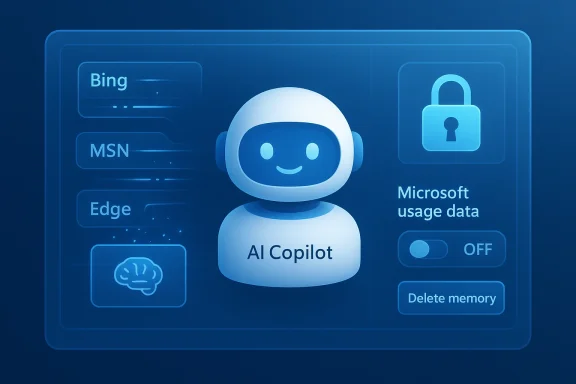
Copilot’s Memory and personalization features were designed to make the assistant feel less repetitive and more useful by remembering preferences, facts you’ve told it, and contextual signals from your activity. Recently, Microsoft surfaced a new, explicit control inside Copilot’s Settings labeled Microsoft usage data. The on‑screen wording accompanying that control reads something along the lines of: “Let Copilot use data from Bing, MSN, Edge, and other Microsoft products you’ve used.” Reporters and hands‑on testers found the control inside the Copilot web UI and some client builds, and many accounts showed the toggle turned on by default.
Microsoft’s public guidance frames the activity as a personalization feature and explains that these product usage signals are intended to improve Copilot’s individual responses rather than to train its public foundation models. That explanation helps set boundaries, but it does not eliminate the practical privacy concerns raised by a system that can aggregate behavior signals across multiple products linked to the same Microsoft account.
This is an important distinction, but it is not the whole picture. There are three separate technical and policy layers to consider:
Users are waking up to the idea that convenience often has hidden costs — and that defaults matter. The simplest privacy parity is to default to conservative settings and make users opt in to richer data sharing. Where vendors choose the opposite, transparency and easy access to controls become critical.
Microsoft has created more explicit controls by surfacing this toggle in Copilot’s Memory settings. That is a positive step. However, the fact that the toggle appears to ship turned on for many users — and that the exact technical scope is not exhaustively documented in the product UI — is why journalists and privacy advocates have pushed for scrutiny and why many readers are being advised to disable it immediately.
If you value privacy or want to limit cross‑product collection, open Copilot’s Settings now, turn off Microsoft usage data, and delete any memory you don’t want retained. If you’re an administrator, treat this as a governance item: review tenant policies, retention rules, and communications to users. Above all, don’t assume the default reflects your privacy preferences — check the settings and make the decision deliberately.
Source: Inbox.lv It's Dangerous: This Windows Feature Should Be Disabled Immediately
 Background
Copilot’s Memory and personalization features were designed to make the assistant feel less repetitive and more useful by remembering preferences, facts you’ve told it, and contextual signals from your activity. Recently, Microsoft surfaced a new, explicit control inside Copilot’s Settings labeled Microsoft usage data. The on‑screen wording accompanying that control reads something along the lines of: “Let Copilot use data from Bing, MSN, Edge, and other Microsoft products you’ve used.” Reporters and hands‑on testers found the control inside the Copilot web UI and some client builds, and many accounts showed the toggle turned on by default.Microsoft’s public guidance frames the activity as a personalization feature and explains that these product usage signals are intended to improve Copilot’s individual responses rather than to train its public foundation models. That explanation helps set boundaries, but it does not eliminate the practical privacy concerns raised by a system that can aggregate behavior signals across multiple products linked to the same Microsoft account.
What the new setting actually does
The user-visible change
- The new control is surfaced under Settings → Memory (or Personalization) in the Copilot web UI and related clients.
- The toggle’s label makes the scope explicit: it permits Copilot to draw on signals from Bing, MSN, Edge, and other Microsoft products associated with your account.
- In many observed cases the toggle is switched on by default, meaning users who never checked Copilot’s deep privacy menus may already have cross‑product signals seeding Copilot memory.
What “usage data” may include (and what is uncertain)
When enabled, the feature allows Copilot to take non‑chat signals from other Microsoft services and incorporate them into the assistant’s memory and personalization pipeline. That could reasonably include:- Recent Bing search queries and search history.
- Browsing activity recorded by Microsoft Edge (visited pages, tabs, and possibly time/context signals).
- Interest signals surfaced through MSN or other Microsoft content experiences.
- Other usage metadata produced by Microsoft services tied to your account.
What Microsoft says (and what that means)
Microsoft has stated that the usage signals are used to personalize the Copilot experience and, according to the company guidance, product usage signals are not used to train the public foundation models that power Copilot. Microsoft also documents other, separate privacy controls — like opt‑outs for model training on text and voice — which govern whether your conversational data may be used to improve Microsoft’s models in certain markets.This is an important distinction, but it is not the whole picture. There are three separate technical and policy layers to consider:
- The Memory/Personalization layer (what’s surfaced in Copilot settings) — controls what Copilot retains and how it uses cross‑product signals to personalize replies.
- The Model training layer — separate toggles control whether conversational text/voice is used to train/refine Microsoft’s models.
- The Enterprise/tenant layer — for business accounts, administrators can impose retention, discovery, and eDiscovery policies that supersede or complement consumer toggles.
How to check and disable the setting (step‑by‑step)
If you are concerned about cross‑product signals feeding Copilot memory, follow these steps to inspect and opt out. Menu labels can vary slightly depending on client and region, but the general flow is consistent.- Open the Copilot web app in your browser and sign in with the Microsoft account used for Copilot.
- Click your profile avatar (commonly located in the lower‑left of the Copilot web UI) and choose Settings.
- Open the Memory or Personalization tab inside Settings.
- Locate the toggle labeled Microsoft usage data (or copy that describes “Let Copilot use data from Bing, MSN, Edge, and other Microsoft products you’ve used”) and switch it off.
- If you want to remove data already collected by Copilot, choose Delete all memory (or the equivalent “Delete memory”) in the same area and confirm the deletion.
- Optionally, review and toggle off the master Personalization and memory control if you prefer that Copilot not retain any personal facts at all.
- While in your Microsoft account privacy pages, also review model‑training options — look for controls labeled Model training on text and Model training on voice and turn them off if you don’t want your conversational inputs used to train models.
- The Copilot mobile app and some Edge sidebar clients expose the Memory settings too; check the mobile menu or Edge Copilot settings if you use those clients.
- Deleting memory is a separate action from toggling the usage data control. Turning the toggle off prevents future ingestion; it does not necessarily purge what’s already been recorded unless you explicitly delete it.
- If you use Copilot under a work or school account, contact your IT admin. Tenant and admin settings may override or mirror these controls, and enterprise logs or retention policies can preserve copies for compliance.
Immediate practical effects of disabling Microsoft usage data
Disabling the Microsoft usage data toggle will reduce the amount of cross‑product context available to Copilot. Practically this means:- Less personalization: Copilot will have fewer account‑wide signals to infer your preferences or remember contextual facts about your browsing and search habits.
- Reduced continuity: Memory‑based continuations or references that once referenced your recent searches or Edge activity may no longer work.
- Potentially less useful answers: For users who rely on Copilot for contextual, personalized assistance, responses may feel more generic or require extra prompting.
- Some features may degrade: Integrations that explicitly rely on cross‑product signals (for reminders, news personalization, or health app context) could behave differently or be unavailable.
Why this matters: risks and tradeoffs
Privacy and scope creep
When a single assistant can draw signals from multiple products on the same account, the result is a stitched profile of behavior across search, browsing, news consumption, and other digital traces. That stitched profile can reveal far more than any single product provides on its own. For privacy‑focused users, that aggregation is the key risk.Ambiguity about exactly what is included
Microsoft’s interface explicitly names product sources, but the company has not published a fully detailed technical inventory of the atomic signals counted as “usage data.” Without that list, users and compliance teams must make decisions with some uncertainty about scope, retention mechanics, and whether ephemeral cookies or inferred attributes are included.Data persistence and enterprise retention
- Turning the toggle off does not automatically purge previously captured memories; deletion is a separate step.
- In enterprise contexts, admin retention policies and eDiscovery processes can preserve copies regardless of a user’s toggle changes. This matters for regulators, legal holds, and compliance officers.
Sensitive data leakage
Even if Microsoft intends the signals to be used solely for personalization, product usage signals may indirectly reveal sensitive facts — health interests, financial research, or browsing about legal matters — if aggregated and linked to a person’s identity. Users need to be careful about what they search, store, or allow Copilot to remember.Usability tradeoffs
Users who rely on Copilot for productivity — especially cross‑device continuity or context‑sensitive recommendations — will notice a functional tradeoff. There is no universal “best” setting; the correct balance depends on individual privacy priorities and workflow needs.Notable strengths and benefits of the feature
It’s important to acknowledge why Microsoft implemented this cross‑product data sharing:- Stronger personalization: Copilot can give more contextually relevant answers by incorporating recent searches, browsing context, and known preferences.
- Smoother workflows: Cross‑product memory can reduce repetitive prompts, remember preferences across sessions, and allow Copilot to act on long‑running user needs (for example, remembering your preferred tone or a frequently used time zone).
- Feature enablement: Some integrations — reminders, health data context, or cross‑service suggestions — rely on a richer signal set to be useful and accurate.
- Efficiency: For many everyday tasks, a personalized assistant saves time and reduces friction.
Recommendations — a practical checklist for every Windows user
- Audit Copilot settings now. Turn off Microsoft usage data if you do not want cross‑product signals contributing to Copilot memory.
- If you want a fresh slate, use Delete all memory after disabling ingestion to remove previously stored facts and inferred preferences.
- Review model training controls (text and voice) and opt out where available if you do not want conversational data used to improve Microsoft’s models.
- Check your Microsoft account privacy dashboard and Edge privacy settings. In Edge, look for the setting that allows Microsoft to use browsing activity for personalization and disable it if necessary.
- Avoid entering highly sensitive personal information into Copilot prompts. Assume that whatever you type can be retained by the service unless you’ve explicitly purged it and confirmed settings.
- Use separate accounts where practical: keep a dedicated, privacy‑focused account for personal browsing and AI interactions and a different account for corporate or high‑sensitivity work tasks.
- For administrators: review tenant‑level Copilot and Microsoft 365 controls, update acceptable‑use policies, and ensure compliance procedures account for Copilot memory and eDiscovery.
For enterprise and IT admins
- Treat Copilot memory and cross‑product signals as a compliance vector. Admins should verify tenant settings, retention policies, and eDiscovery flows so that Copilot interactions are covered by the organization’s governance.
- Communicate to end users what is and is not covered by corporate policies. Provide clear, step‑by‑step guidance on how to check memory settings and request deletions if needed.
- Consider deploying conditional access, endpoint controls, and policy templates that limit the behaviors of Copilot on managed devices.
- If your organization handles regulated data (HIPAA, GDPR, financial data, etc.), perform a privacy impact assessment before enabling cross‑product personalization for corporate accounts.
The wider context: industry trends and user expectations
This development is part of a broader pattern across the AI industry: vendors are integrating assistants more tightly into their product ecosystems to deliver smarter, more seamless experiences. That integration offers clear value, but it increasingly requires users to make active privacy decisions rather than rely on silent defaults.Users are waking up to the idea that convenience often has hidden costs — and that defaults matter. The simplest privacy parity is to default to conservative settings and make users opt in to richer data sharing. Where vendors choose the opposite, transparency and easy access to controls become critical.
Microsoft has created more explicit controls by surfacing this toggle in Copilot’s Memory settings. That is a positive step. However, the fact that the toggle appears to ship turned on for many users — and that the exact technical scope is not exhaustively documented in the product UI — is why journalists and privacy advocates have pushed for scrutiny and why many readers are being advised to disable it immediately.
Conclusion
The new Copilot option that lets the assistant draw on signals from Bing, MSN, Edge, and other Microsoft products represents a meaningful shift in how personalization is delivered. It can improve Copilot’s usefulness, but it also aggregates behavioral signals across services in ways that are not fully transparent at the atomic level. That combination — convenience plus ambiguity — is why many users should pause and make an explicit choice.If you value privacy or want to limit cross‑product collection, open Copilot’s Settings now, turn off Microsoft usage data, and delete any memory you don’t want retained. If you’re an administrator, treat this as a governance item: review tenant policies, retention rules, and communications to users. Above all, don’t assume the default reflects your privacy preferences — check the settings and make the decision deliberately.
Source: Inbox.lv It's Dangerous: This Windows Feature Should Be Disabled Immediately
