

Valve has released Proton 11.0-1, the new stable Steam Play compatibility layer based on Wine 11.0, and the practical takeaway is simple: if you game on Linux, Steam Deck, or a Linux gaming handheld, you can try it now from Steam’s compatibility settings.
To enable Proton 11 globally in Steam, open Steam > Settings > Compatibility, enable Steam Play for supported titles if needed, and select Proton 11.0-1 as the compatibility tool. To test it on one game first, right-click the game in your Steam Library, open Properties > Compatibility, check Force the use of a specific Steam Play compatibility tool, and choose Proton 11.0-1. That per-game path is the safer option if you have a working setup and only want Proton 11 for titles that benefit from the new release.
The most important fixes fall into a few practical buckets:
That is the WindowsForum angle. If you are a Windows holdout, a dual-boot user, or someone considering a Steam Deck-style handheld, Proton 11 is not a reason to wipe your Windows install tomorrow. It is a reason to take Linux gaming more seriously as a practical option — especially if most of your gaming life is already inside Steam.
Proton began as Valve’s answer to a simple commercial problem: Steam’s catalog was overwhelmingly built for Windows, while SteamOS, Steam Deck, and Linux gaming PCs need access to that catalog to be viable. Proton is the bridge between those worlds. Proton 11.0-1 is the latest stable maintenance release for that bridge.
PC Gamer described Proton in plain terms as Valve’s “play-Windows-games-on-Linux” technology. 9to5Linux framed the release more formally as the latest stable version of an open-source Steam Play compatibility tool based on Wine and additional components. Those two descriptions fit the same product from different angles. For players, Proton is the Steam setting that may make a Windows game launch on Linux. For Valve, it is a stack of compatibility work covering graphics, launchers, controller input, media playback, overlays, redistributables, account flows, and desktop-window behavior.
The new stable release is Proton 11.0-1. Valve’s release notes make clear that the branch is moving from testing into a stable option users can select in Steam. PC Gamer noted that Proton 11 had previously been in beta, which is important because “stable” here does not mean “untouched.” It means fixes from the experimental and beta path are being promoted into a version ordinary Steam users can choose without manually assembling compatibility workarounds.
That promotion path is the real story. Proton Experimental remains where many fixes appear first. Stable Proton is where those fixes become easier for normal users to trust, test, and apply per game. The value is not that every game suddenly works. The value is that the compatibility process has become visible, selectable, and reversible inside Steam.
For Windows users, that changes the risk calculation. A dual-boot setup no longer has to be a leap of faith. A Linux handheld no longer means abandoning a Windows-era Steam library. A living-room SteamOS box or desktop Linux gaming PC still requires realistic expectations, but the library barrier keeps getting lower.
Valve’s notes include both title-specific fixes and broad compatibility fixes. That matters because many of Proton’s best improvements are not glamorous. A game may already render correctly but still be frustrating because its launcher hangs, its controller mapping is wrong, its intro video freezes, or its window refuses to behave on a multi-monitor desktop.
Some of the headline game-compatibility wins include older Capcom titles, strategy games, simulation software, cult favorites, and modern multiplayer titles. Resident Evil (1996), Resident Evil 2 (1998), Dino Crisis, Dino Crisis 2, From Dust, Warhammer: Vermintide 2, METAL GEAR SURVIVE, Metal Fatigue, and SHOGUN: Total War are among the titles listed as now playable after previously working with Proton Experimental. Newly playable titles include Unknown Faces, Gothic 1 Classic, X-Plane 12, Breath of Fire IV, and Deadly Premonition.
That is an unusually broad spread: retro survival horror, old strategy, cult PC ports, flight simulation, and modern co-op all appear in the same release conversation. Proton 11 is not just chasing the newest blockbuster. It is also working through the back catalog that makes Steam libraries valuable.
The table is useful, but it should not distract from the broader point. Proton 11 is less about a single breakthrough title than about the accumulated work required to make a Windows game feel normal on Linux.
That distinction matters. Users do not experience Wine, DXVK, vkd3d-proton, Wine Mono, or Xalia as separate pieces. They experience a game either launching or not launching. They experience a controller either working or not working. They experience a launcher either exiting or hanging. Proton’s job is to package deep compatibility engineering into a Steam drop-down menu.
9to5Linux highlighted Proton 11’s under-the-hood updates, including Wine 11.0, Xalia 0.4.9, vkd3d, DXVK, dxvk-nvapi, Wine Mono, and vkd3d-proton updates. Valve’s own notes similarly list component churn. Those component versions are not window dressing. They are the machinery that translates graphics APIs, supports Windows-style dependencies, improves launcher behavior, and keeps old Windows assumptions from breaking on Linux.
Xalia is a useful example because it touches something many players never think about: navigating Windows-oriented installers and launchers with controller-first devices. Proton 11 updates Xalia and includes fixes for lockups when interacting with the EA App. It also adds controller support for the Microsoft Visual C++ 2010 redistributable installer. That sounds deeply unglamorous, but it is exactly the kind of thing a Steam Deck user may hit before a game even starts.
To play a Windows game on a Linux handheld, a user may need to move through a redistributable installer, a publisher launcher, a store login, an overlay, and the game’s own settings menu. Some of those interfaces were designed for a mouse and keyboard on Windows. Proton’s job is not just to make the game executable run. It has to make the whole first-run ritual survivable.
That is why Proton 11 is best understood as practical compatibility maintenance. It is not just “can Linux run this game?” It is “can Steam make this Windows game feel ordinary enough that users stop thinking about the compatibility layer?”
This is where Linux gaming and Windows gaming overlap most painfully. Windows users already know that launchers are often the tax attached to owning a PC game. They update unpredictably, duplicate store functions, manage accounts, inject overlays, display popups, and sometimes break things that worked before. Proton users inherit those problems, then add the extra challenge of running the launcher through a compatibility layer on Linux.
The EA fixes are especially important because they show the moving-target problem. Valve did not merely fix one executable. It fixed many EA games after a recent EA Desktop update made them unplayable. It also fixed Steam Overlay issues with many EA games. That is the real world of PC compatibility: a third-party launcher changes, a class of games breaks, and Valve has to adapt Proton so users can play again.
This is also where Proton’s limitations remain obvious. Valve controls Steam, Proton, SteamOS, and the Steam Deck integration layer. Valve does not control EA Desktop, Rockstar Launcher, REDLauncher, Square Enix account systems, every publisher update, or every anti-cheat policy. Proton can respond quickly, but it still sits downstream from companies building primarily for Windows.
That is why the Hollow Knight fix matters. Proton 11 fixes a problem where Hollow Knight could wrongly register the Steam Deck’s Steam button as a left trigger after a game update. On paper, that is a single controller mapping bug. In practice, it is the kind of bug that makes a polished handheld feel unreliable. A system button cannot start behaving like an in-game input without damaging user trust.
Killer Inn gets several important fixes as well. Proton 11 addresses random hangs, fixes the game not launching on Steam Decks and other machines with
Controller hotplugging also gets attention. Proton 11 fixes controller hotplug problems for the 8BitDo Ultimate 2C and other controllers that expose multiple HID devices. That matters on desktops, living-room PCs, and handheld setups alike. PC gamers plug and unplug controllers constantly. A compatibility layer that loses track of devices or sees one controller as several devices will feel fragile no matter how well the game renders.
Steam Overlay support is another quiet but important piece. Proton 11 improves Steam Overlay support and fixes lag spikes caused by leaving the overlay open for a long time. On Steam Deck, the overlay is not just a social or chat layer. It is part of how users manage the system, performance settings, and session behavior. If the overlay causes performance problems, the whole device feels less polished.
The Steam Deck lesson is straightforward: compatibility is not the same as launchability. A game that starts but has broken input, hanging overlays, incorrect button mapping, video freezes, or launcher problems is not meaningfully working for most players.
These fixes are not decorative. Linux desktop gaming is where the fragmentation argument has traditionally been strongest. Different desktop environments, display servers, window managers, scaling setups, monitor arrangements, and input paths can produce failures that never appear on a more controlled handheld device. Proton 11 shows Valve continuing to treat that complexity as part of the compatibility job.
KDE support stands out because PC Gamer’s coverage called attention to the KDE window maximization fix as a personally meaningful quality-of-life issue. That anecdote fits the lived reality of Linux gaming: the biggest compatibility story is often made of small irritations. A game that technically launches but fights the window manager every time it opens on a TV-connected desktop is still not a good experience.
Dual-monitor behavior receives attention too. Space Engineers gets improved dual-monitor support, and Call of Duty: WWII gets a fullscreen native-resolution fix on dual-monitor setups. Dual monitors are ordinary in PC gaming, streaming, and enthusiast desktop use, but they remain a stress test for compatibility layers. A Windows game’s assumptions about display enumeration, fullscreen modes, focus behavior, and monitor priority can collide with Linux compositor behavior in strange ways.
Scaling and resizing show up as well. Arma Reforger gets a scaling fix when changing window modes, and Brighter Shores gets window resizing support. These sound like small interface issues, but they are exactly the kind of bugs that separate “it runs” from “I would recommend this to a normal person.”
For WindowsForum readers, this should feel familiar rather than exotic. Windows users live with their own version of display-driver quirks, multi-monitor weirdness, DPI scaling problems, and focus bugs. Proton 11 is not proving Linux is immune to PC complexity. It is showing that Valve is willing to chase that complexity at the level where users actually feel it.
Modern PC games often bring live services, launchers, anti-cheat systems, account gates, embedded browser flows, and frequent updates. Older games bring a different set of problems: ancient codecs, outdated installers, fixed-resolution assumptions, input oddities, dated DirectX behavior, brittle fullscreen modes, and menus that were never designed for modern displays or handheld controls. Proton has to deal with both.
The Capcom survival-horror cluster is especially visible. Resident Evil (1996), Resident Evil 2 (1998), Dino Crisis, and Dino Crisis 2 are listed among games now playable after previously working with Proton Experimental. Xalia’s controller-support improvements also mention launchers for Resident Evil (1996), Resident Evil 2 (1998), Resident Evil 3 Nemesis (1999), Dino Crisis, and Dino Crisis 2. That suggests Valve is not only making older games run; it is also smoothing the first-run and launcher experience around them.
Deadly Premonition, newly playable in Proton 11, is another useful example. It is a cult game whose reputation has long exceeded the polish of its PC version. A compatibility layer that can absorb odd older PC releases is not just serving nostalgia. It is increasing the value of long-tail Steam libraries.
This is where Proton becomes most relevant to Windows holdouts. A Steam library is not just the dozen games installed right now. It is years of purchases, bundles, gifts, experiments, abandoned campaigns, rediscovered favorites, and multiplayer titles friends may revisit later. If Linux can run more of the new games and more of the strange old backlog, the emotional and economic argument for staying Windows-only becomes less absolute.
That does not mean every old game is fixed. It means Valve is putting continuing engineering effort into the back catalog, and that effort compounds. A media playback improvement, launcher workaround, controller fix, or windowing patch can help more than one title.
VR compatibility is unforgiving. Latency, tracking fidelity, controller mapping, compositor behavior, rendering timing, and runtime integration all matter at once. A desktop game can survive some rough edges. A VR game often cannot. If controller tracking fails, the user feels the bug immediately.
No Man’s Sky VR mode being playable again is a reminder that compatibility is a moving target. Games update, runtimes update, drivers update, Proton updates, and regressions happen. A compatibility layer has to keep circling back to titles that previously worked.
Media playback is another recurring theme. Proton 11 fixes or improves video behavior across She Sees Red, Crimson Desert, 我打不过漂亮的她们, Satisfactory, THE KING OF FIGHTERS XIII GLOBAL MATCH, Blazblue Centralfiction, BIRDCAGE, and Disintegration. Some fixes concern intro videos. Others involve gallery playback, freezing, looping, or audio. That is the unromantic side of compatibility: the game engine may render, but a video file in a menu can still break the experience.
PC game video playback has always been a swamp of codecs, middleware, containers, and legacy assumptions. Proton must make enough of those assumptions work without forcing ordinary users into per-game hacks. The more Valve solves these cases in Proton, the less the average player has to know about why a cutscene or intro video failed.
Kodi also appears in coverage of the release as receiving improved support. Kodi is a media player rather than a game, so it should not be overstated as a gaming milestone. Still, it shows how compatibility work can spill into adjacent Windows application behavior even when Steam Play remains primarily game-focused.
This is the uncomfortable dependency at the heart of Proton. Valve controls Steam. Valve controls Proton. Valve controls SteamOS and Steam Deck integration. But Valve does not control EA Desktop, Rockstar Launcher, REDLauncher, Square Enix account systems, every game update, every anti-cheat policy, or every publisher’s appetite for launcher churn.
The Square Enix account fix for Killer Inn fits the same pattern. Account connectivity is now part of game compatibility. A title can render correctly, accept input, and still fail at the login gate. For Linux gaming to feel mainstream, Proton increasingly has to handle authentication flows, embedded browser behavior, overlay interactions, and vendor account handshakes.
This is also where businesses, schools, esports spaces, and IT pros should pay attention. Any organization supporting Linux gaming devices, shared SteamOS systems, classroom machines, esports labs, or handheld fleets should treat Proton versions as compatibility baselines. A launcher update can break a set of games. A Proton update can restore them. A per-game override can buy time while avoiding unnecessary changes to titles that already work.
The timeline is important because Proton is not a one-and-done installer. It is a compatibility track. Users can move a game forward to Proton 11 when it helps, hold another game on an older Proton version when needed, and follow Proton Experimental when a fix has not yet reached stable.
That is a very PC answer to a very PC problem. It is also why Steam’s per-game compatibility UI matters so much. Compatibility is not all-or-nothing. It is increasingly something users can manage with the same kind of practical caution they already apply to GPU drivers, Windows updates, launcher updates, and game patches.
But Proton 11 does change the conversation in several useful ways.
The key shift is practical rather than ideological. Proton 11 makes it easier to experiment with Linux gaming without abandoning Windows entirely. That is how many users will make the transition if they make it at all: not through a dramatic switch, but through one working game at a time.
That is what makes the release worth attention from Windows users as well as Linux users. The strongest argument for staying Windows-only has always been practical compatibility. Proton 11 does not erase that argument, but it weakens it in the place that matters most: the day-to-day experience of launching, controlling, exiting, and replaying the games people already own.
The sensible advice is not to declare a winner. It is to test. If you use Linux or Steam Deck, try Proton 11 per game first. If you dual-boot, move a few compatible titles over and keep Windows for the stubborn ones. If you are shopping for a Linux gaming handheld, read Proton releases less like hobbyist patch notes and more like the maintenance log for the library you expect to carry with you.
Valve’s work here is incremental, messy, and often unglamorous. That is why it matters. PC gaming itself is incremental, messy, and full of old assumptions. Proton 11 succeeds not by pretending otherwise, but by fixing more of those assumptions where players actually notice them.
To enable Proton 11 globally in Steam, open Steam > Settings > Compatibility, enable Steam Play for supported titles if needed, and select Proton 11.0-1 as the compatibility tool. To test it on one game first, right-click the game in your Steam Library, open Properties > Compatibility, check Force the use of a specific Steam Play compatibility tool, and choose Proton 11.0-1. That per-game path is the safer option if you have a working setup and only want Proton 11 for titles that benefit from the new release.
The most important fixes fall into a few practical buckets:
- Launcher fixes: many EA games are fixed after a recent EA Desktop update made them unplayable, REDLauncher exits more cleanly, Rockstar Launcher popups render better, and several individual launcher rendering problems are addressed.
- Steam Deck and handheld fixes: Proton 11 fixes a Steam Deck-specific issue where Hollow Knight could misread the Steam button as a left trigger, addresses Killer Inn launch failures on systems with less than 10GB available under
/tmp, and improves controller behavior. - Controller fixes: hotplugging is improved for the 8BitDo Ultimate 2C and other controllers that expose multiple HID devices.
- Overlay and UI fixes: Steam Overlay behavior is improved, including fixes for lag spikes after leaving the overlay open for a long time and overlay problems with many EA games.
- Desktop Linux fixes: KDE window maximization, KDE Wayland focus behavior, GNOME resolution switching, Alt-Tab behavior, dual-monitor fullscreen behavior, and window resizing all receive attention.
- Game compatibility wins: several titles graduate from Proton Experimental to stable Proton 11, and additional games are newly playable.
That is the WindowsForum angle. If you are a Windows holdout, a dual-boot user, or someone considering a Steam Deck-style handheld, Proton 11 is not a reason to wipe your Windows install tomorrow. It is a reason to take Linux gaming more seriously as a practical option — especially if most of your gaming life is already inside Steam.
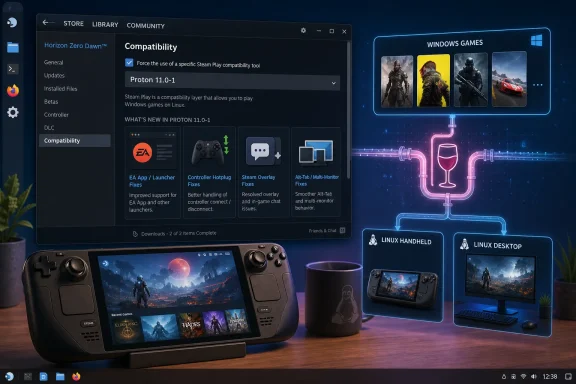 Proton 11 Is a Practical Upgrade, Not a Philosophy Lecture
Proton began as Valve’s answer to a simple commercial problem: Steam’s catalog was overwhelmingly built for Windows, while SteamOS, Steam Deck, and Linux gaming PCs need access to that catalog to be viable. Proton is the bridge between those worlds. Proton 11.0-1 is the latest stable maintenance release for that bridge.PC Gamer described Proton in plain terms as Valve’s “play-Windows-games-on-Linux” technology. 9to5Linux framed the release more formally as the latest stable version of an open-source Steam Play compatibility tool based on Wine and additional components. Those two descriptions fit the same product from different angles. For players, Proton is the Steam setting that may make a Windows game launch on Linux. For Valve, it is a stack of compatibility work covering graphics, launchers, controller input, media playback, overlays, redistributables, account flows, and desktop-window behavior.
The new stable release is Proton 11.0-1. Valve’s release notes make clear that the branch is moving from testing into a stable option users can select in Steam. PC Gamer noted that Proton 11 had previously been in beta, which is important because “stable” here does not mean “untouched.” It means fixes from the experimental and beta path are being promoted into a version ordinary Steam users can choose without manually assembling compatibility workarounds.
That promotion path is the real story. Proton Experimental remains where many fixes appear first. Stable Proton is where those fixes become easier for normal users to trust, test, and apply per game. The value is not that every game suddenly works. The value is that the compatibility process has become visible, selectable, and reversible inside Steam.
For Windows users, that changes the risk calculation. A dual-boot setup no longer has to be a leap of faith. A Linux handheld no longer means abandoning a Windows-era Steam library. A living-room SteamOS box or desktop Linux gaming PC still requires realistic expectations, but the library barrier keeps getting lower.
What Proton 11 Fixes First
The easiest version of this story is the list of games that now work. The better version is that Proton 11 addresses the common failure modes around PC games: launchers, overlays, controller hotplugging, intro videos, account sign-ins, fullscreen modes, Alt-Tab behavior, and desktop-environment quirks.Valve’s notes include both title-specific fixes and broad compatibility fixes. That matters because many of Proton’s best improvements are not glamorous. A game may already render correctly but still be frustrating because its launcher hangs, its controller mapping is wrong, its intro video freezes, or its window refuses to behave on a multi-monitor desktop.
Some of the headline game-compatibility wins include older Capcom titles, strategy games, simulation software, cult favorites, and modern multiplayer titles. Resident Evil (1996), Resident Evil 2 (1998), Dino Crisis, Dino Crisis 2, From Dust, Warhammer: Vermintide 2, METAL GEAR SURVIVE, Metal Fatigue, and SHOGUN: Total War are among the titles listed as now playable after previously working with Proton Experimental. Newly playable titles include Unknown Faces, Gothic 1 Classic, X-Plane 12, Breath of Fire IV, and Deadly Premonition.
That is an unusually broad spread: retro survival horror, old strategy, cult PC ports, flight simulation, and modern co-op all appear in the same release conversation. Proton 11 is not just chasing the newest blockbuster. It is also working through the back catalog that makes Steam libraries valuable.
| Proton 11 compatibility bucket | Games listed by Valve | What the category means for users |
|---|---|---|
| Now playable after Proton Experimental | Universe Generator: The Golden Sword; DCS World Steam Edition; Resident Evil (1996); Resident Evil 2 (1998); Dino Crisis; Dino Crisis 2; From Dust; Blaite; Don’t Die Dateless, Dummy!; METAL GEAR SURVIVE; Warhammer: Vermintide 2; Metal Fatigue; SHOGUN: Total War | These titles already had a path through Valve’s experimental channel and are now promoted into the stable Proton 11 line. |
| Newly playable | Unknown Faces; Gothic 1 Classic; X-Plane 12; Breath of Fire IV; Deadly Premonition | These are cleaner user-facing wins: games Valve now lists as newly playable under Proton 11. |
Key fixes by category
- Launchers and publisher clients: EA Desktop, REDLauncher, Rockstar Launcher popups, DEATH STRANDING 2: ON THE BEACH launcher rendering, Hellsinker. launcher rendering, and EA App interactions all receive attention.
- Steam platform behavior: Steam Overlay support improves, including fixes for lag spikes and many EA overlay issues.
- Handheld usability: Steam Deck button mapping, controller hotplugging, and low-
/tmplaunch problems are addressed. - Desktop usability: KDE, KDE Wayland, GNOME, fullscreen, Alt-Tab, dual-monitor, resizing, and scaling fixes make desktop Linux gaming less fragile.
- Media playback: intro videos, gallery playback, freezing, looping, and video/audio behavior are improved across several games.
- VR: Microsoft Flight Simulator VR controller tracking is fixed, and No Man’s Sky VR mode is made playable again.
Wine 11.0 Is the Foundation, but Steam Integration Is the Product
Proton 11 is rebased on Wine 11.0, and that is the architectural foundation of the release. Wine is the long-running compatibility project that implements Windows APIs for Unix-like systems. Proton builds on that foundation with game-focused components, Valve patches, Steam integration, runtime behavior, graphics translation, controller handling, media support, and compatibility defaults aimed at commercial PC games.That distinction matters. Users do not experience Wine, DXVK, vkd3d-proton, Wine Mono, or Xalia as separate pieces. They experience a game either launching or not launching. They experience a controller either working or not working. They experience a launcher either exiting or hanging. Proton’s job is to package deep compatibility engineering into a Steam drop-down menu.
9to5Linux highlighted Proton 11’s under-the-hood updates, including Wine 11.0, Xalia 0.4.9, vkd3d, DXVK, dxvk-nvapi, Wine Mono, and vkd3d-proton updates. Valve’s own notes similarly list component churn. Those component versions are not window dressing. They are the machinery that translates graphics APIs, supports Windows-style dependencies, improves launcher behavior, and keeps old Windows assumptions from breaking on Linux.
Xalia is a useful example because it touches something many players never think about: navigating Windows-oriented installers and launchers with controller-first devices. Proton 11 updates Xalia and includes fixes for lockups when interacting with the EA App. It also adds controller support for the Microsoft Visual C++ 2010 redistributable installer. That sounds deeply unglamorous, but it is exactly the kind of thing a Steam Deck user may hit before a game even starts.
To play a Windows game on a Linux handheld, a user may need to move through a redistributable installer, a publisher launcher, a store login, an overlay, and the game’s own settings menu. Some of those interfaces were designed for a mouse and keyboard on Windows. Proton’s job is not just to make the game executable run. It has to make the whole first-run ritual survivable.
That is why Proton 11 is best understood as practical compatibility maintenance. It is not just “can Linux run this game?” It is “can Steam make this Windows game feel ordinary enough that users stop thinking about the compatibility layer?”
The Launcher Fixes Are the Center of the Release
If there is a villain in the Proton 11 notes, it is the launcher. Proton 11 improves rendering for Rockstar Launcher popups. REDLauncher, associated with games such as Cyberpunk 2077 and The Witcher 3 in PC Gamer’s coverage, gets a fix for taking a long time to exit. The launcher for DEATH STRANDING 2: ON THE BEACH gets a rendering fix. Hellsinker. gets a launcher rendering fix. Xalia gets launcher and installer controller improvements. Many EA games are fixed after a recent EA Desktop update made them unplayable, and Steam Overlay behavior with many EA games is also fixed.This is where Linux gaming and Windows gaming overlap most painfully. Windows users already know that launchers are often the tax attached to owning a PC game. They update unpredictably, duplicate store functions, manage accounts, inject overlays, display popups, and sometimes break things that worked before. Proton users inherit those problems, then add the extra challenge of running the launcher through a compatibility layer on Linux.
The EA fixes are especially important because they show the moving-target problem. Valve did not merely fix one executable. It fixed many EA games after a recent EA Desktop update made them unplayable. It also fixed Steam Overlay issues with many EA games. That is the real world of PC compatibility: a third-party launcher changes, a class of games breaks, and Valve has to adapt Proton so users can play again.
This is also where Proton’s limitations remain obvious. Valve controls Steam, Proton, SteamOS, and the Steam Deck integration layer. Valve does not control EA Desktop, Rockstar Launcher, REDLauncher, Square Enix account systems, every publisher update, or every anti-cheat policy. Proton can respond quickly, but it still sits downstream from companies building primarily for Windows.
Launcher fixes to watch
- EA Desktop: many EA games fixed after a recent EA Desktop update made them unplayable.
- EA games and Steam Overlay: overlay behavior fixed for many EA titles.
- REDLauncher: long exit delay fixed.
- Rockstar Launcher: popup rendering improved.
- DEATH STRANDING 2: ON THE BEACH: launcher rendering fixed.
- Hellsinker.: launcher rendering fixed.
- EA App through Xalia: lockups when interacting with the EA App fixed.
Steam Deck Benefits When Proton Becomes Invisible
The Steam Deck is not the only target for Proton 11, but it is the device that makes the release easiest to understand. Desktop Linux users may tolerate some tinkering. Steam Deck users expect a handheld that behaves more like a console. Proton has to serve both groups without becoming two different products.That is why the Hollow Knight fix matters. Proton 11 fixes a problem where Hollow Knight could wrongly register the Steam Deck’s Steam button as a left trigger after a game update. On paper, that is a single controller mapping bug. In practice, it is the kind of bug that makes a polished handheld feel unreliable. A system button cannot start behaving like an in-game input without damaging user trust.
Killer Inn gets several important fixes as well. Proton 11 addresses random hangs, fixes the game not launching on Steam Decks and other machines with
/tmp sizes lower than 10GB, and fixes a Square Enix account connection problem. That cluster is a good example of modern compatibility work because it spans storage assumptions, runtime behavior, and account connectivity. If any part breaks, the user only sees the same result: the game does not work.Controller hotplugging also gets attention. Proton 11 fixes controller hotplug problems for the 8BitDo Ultimate 2C and other controllers that expose multiple HID devices. That matters on desktops, living-room PCs, and handheld setups alike. PC gamers plug and unplug controllers constantly. A compatibility layer that loses track of devices or sees one controller as several devices will feel fragile no matter how well the game renders.
Steam Overlay support is another quiet but important piece. Proton 11 improves Steam Overlay support and fixes lag spikes caused by leaving the overlay open for a long time. On Steam Deck, the overlay is not just a social or chat layer. It is part of how users manage the system, performance settings, and session behavior. If the overlay causes performance problems, the whole device feels less polished.
The Steam Deck lesson is straightforward: compatibility is not the same as launchability. A game that starts but has broken input, hanging overlays, incorrect button mapping, video freezes, or launcher problems is not meaningfully working for most players.
Steam Deck and handheld checklist
- Test Proton 11 per game before changing working defaults.
- Pay attention to launcher-heavy games, especially those tied to EA, Rockstar, REDLauncher, or publisher account systems.
- Re-test controller behavior if you use 8BitDo or other devices that expose multiple HID interfaces.
- Keep an eye on games that require large temporary storage during launch or setup.
- If a game regresses under Proton 11, switch that game back to a previous Proton version from its individual compatibility settings.
Desktop Linux Gets the Boring Fixes It Needs
The Steam Deck gets much of the public attention, but Proton 11 is also a desktop Linux release in the most literal sense. KDE window maximization support is fixed. KDE Wayland focus behavior improves for RAGE when Alt-Tabbing. The Elder Scrolls IV: Oblivion Game of the Year Edition (2009) no longer has problems minimizing after Alt-Tabbing. Resident Evil 2 should no longer have issues changing resolutions on GNOME. Call of Duty: WWII should no longer fail to render properly at fullscreen native resolution on dual-monitor setups.These fixes are not decorative. Linux desktop gaming is where the fragmentation argument has traditionally been strongest. Different desktop environments, display servers, window managers, scaling setups, monitor arrangements, and input paths can produce failures that never appear on a more controlled handheld device. Proton 11 shows Valve continuing to treat that complexity as part of the compatibility job.
KDE support stands out because PC Gamer’s coverage called attention to the KDE window maximization fix as a personally meaningful quality-of-life issue. That anecdote fits the lived reality of Linux gaming: the biggest compatibility story is often made of small irritations. A game that technically launches but fights the window manager every time it opens on a TV-connected desktop is still not a good experience.
Dual-monitor behavior receives attention too. Space Engineers gets improved dual-monitor support, and Call of Duty: WWII gets a fullscreen native-resolution fix on dual-monitor setups. Dual monitors are ordinary in PC gaming, streaming, and enthusiast desktop use, but they remain a stress test for compatibility layers. A Windows game’s assumptions about display enumeration, fullscreen modes, focus behavior, and monitor priority can collide with Linux compositor behavior in strange ways.
Scaling and resizing show up as well. Arma Reforger gets a scaling fix when changing window modes, and Brighter Shores gets window resizing support. These sound like small interface issues, but they are exactly the kind of bugs that separate “it runs” from “I would recommend this to a normal person.”
For WindowsForum readers, this should feel familiar rather than exotic. Windows users live with their own version of display-driver quirks, multi-monitor weirdness, DPI scaling problems, and focus bugs. Proton 11 is not proving Linux is immune to PC complexity. It is showing that Valve is willing to chase that complexity at the level where users actually feel it.
The Back Catalog Is Part of the Strategy
One of the most interesting parts of Proton 11 is how much attention it gives older games. Resident Evil (1996), Resident Evil 2 (1998), Dino Crisis, Dino Crisis 2, Breath of Fire IV, SHOGUN: Total War, Gothic 1 Classic, Metal Fatigue, Call of Duty 2, CHRONO TRIGGER, Far Cry 4, and The Elder Scrolls IV: Oblivion Game of the Year Edition (2009) all appear in the release notes in one form or another. This is not just nostalgia. It is library preservation as a practical selling point.Modern PC games often bring live services, launchers, anti-cheat systems, account gates, embedded browser flows, and frequent updates. Older games bring a different set of problems: ancient codecs, outdated installers, fixed-resolution assumptions, input oddities, dated DirectX behavior, brittle fullscreen modes, and menus that were never designed for modern displays or handheld controls. Proton has to deal with both.
The Capcom survival-horror cluster is especially visible. Resident Evil (1996), Resident Evil 2 (1998), Dino Crisis, and Dino Crisis 2 are listed among games now playable after previously working with Proton Experimental. Xalia’s controller-support improvements also mention launchers for Resident Evil (1996), Resident Evil 2 (1998), Resident Evil 3 Nemesis (1999), Dino Crisis, and Dino Crisis 2. That suggests Valve is not only making older games run; it is also smoothing the first-run and launcher experience around them.
Deadly Premonition, newly playable in Proton 11, is another useful example. It is a cult game whose reputation has long exceeded the polish of its PC version. A compatibility layer that can absorb odd older PC releases is not just serving nostalgia. It is increasing the value of long-tail Steam libraries.
This is where Proton becomes most relevant to Windows holdouts. A Steam library is not just the dozen games installed right now. It is years of purchases, bundles, gifts, experiments, abandoned campaigns, rediscovered favorites, and multiplayer titles friends may revisit later. If Linux can run more of the new games and more of the strange old backlog, the emotional and economic argument for staying Windows-only becomes less absolute.
That does not mean every old game is fixed. It means Valve is putting continuing engineering effort into the back catalog, and that effort compounds. A media playback improvement, launcher workaround, controller fix, or windowing patch can help more than one title.
VR and Media Playback Show Why Compatibility Is Hard
Proton 11 also reaches into VR and media playback, two areas where shallow compatibility is not enough. Microsoft Flight Simulator gets a VR controller tracking fix. No Man’s Sky VR mode is made playable again. Those are meaningful fixes because VR stacks already have many moving parts even on native platforms.VR compatibility is unforgiving. Latency, tracking fidelity, controller mapping, compositor behavior, rendering timing, and runtime integration all matter at once. A desktop game can survive some rough edges. A VR game often cannot. If controller tracking fails, the user feels the bug immediately.
No Man’s Sky VR mode being playable again is a reminder that compatibility is a moving target. Games update, runtimes update, drivers update, Proton updates, and regressions happen. A compatibility layer has to keep circling back to titles that previously worked.
Media playback is another recurring theme. Proton 11 fixes or improves video behavior across She Sees Red, Crimson Desert, 我打不过漂亮的她们, Satisfactory, THE KING OF FIGHTERS XIII GLOBAL MATCH, Blazblue Centralfiction, BIRDCAGE, and Disintegration. Some fixes concern intro videos. Others involve gallery playback, freezing, looping, or audio. That is the unromantic side of compatibility: the game engine may render, but a video file in a menu can still break the experience.
PC game video playback has always been a swamp of codecs, middleware, containers, and legacy assumptions. Proton must make enough of those assumptions work without forcing ordinary users into per-game hacks. The more Valve solves these cases in Proton, the less the average player has to know about why a cutscene or intro video failed.
Kodi also appears in coverage of the release as receiving improved support. Kodi is a media player rather than a game, so it should not be overstated as a gaming milestone. Still, it shows how compatibility work can spill into adjacent Windows application behavior even when Steam Play remains primarily game-focused.
The EA Fixes Are a Warning, Not a Victory Lap
The most cautionary line in the Proton 11 notes may be the one about many EA games being unplayable after a recent EA Desktop update. Proton 11 fixes that, but the fact that the fix was needed is the warning. Compatibility layers sit downstream from companies that are not necessarily designing updates around Linux behavior.This is the uncomfortable dependency at the heart of Proton. Valve controls Steam. Valve controls Proton. Valve controls SteamOS and Steam Deck integration. But Valve does not control EA Desktop, Rockstar Launcher, REDLauncher, Square Enix account systems, every game update, every anti-cheat policy, or every publisher’s appetite for launcher churn.
The Square Enix account fix for Killer Inn fits the same pattern. Account connectivity is now part of game compatibility. A title can render correctly, accept input, and still fail at the login gate. For Linux gaming to feel mainstream, Proton increasingly has to handle authentication flows, embedded browser behavior, overlay interactions, and vendor account handshakes.
This is also where businesses, schools, esports spaces, and IT pros should pay attention. Any organization supporting Linux gaming devices, shared SteamOS systems, classroom machines, esports labs, or handheld fleets should treat Proton versions as compatibility baselines. A launcher update can break a set of games. A Proton update can restore them. A per-game override can buy time while avoiding unnecessary changes to titles that already work.
Action checklist for admins
- Validate Proton 11 on a small test group before changing defaults across shared SteamOS or desktop Linux systems.
- Use Steam’s per-game compatibility settings for titles that benefit from Proton 11 while leaving known-good games on older Proton builds if needed.
- Re-test launcher-heavy games from EA, Rockstar, CD Projekt RED-associated REDLauncher titles, Square Enix account-linked titles, and other publisher-client ecosystems.
- Confirm Steam Overlay behavior on games where the overlay is part of the support workflow, chat workflow, performance workflow, or controller workflow.
- Test controllers that expose multiple HID devices, including the 8BitDo Ultimate 2C and similar hardware.
- Check Steam Deck and handheld systems with limited temporary storage if a game previously failed during launch or setup.
- Re-test KDE, KDE Wayland, GNOME, fullscreen, Alt-Tab, and dual-monitor behavior before assuming a game’s old workaround is still needed.
- Keep a rollback path by documenting which games are assigned to Proton 11 and which remain pinned to older Proton builds.
Proton 11 Timeline
| Stage | What happened | Why it matters |
|---|---|---|
| Proton Experimental | Many fixes and game-compatibility improvements appeared first in Valve’s faster-moving test channel. | This is where users often see early fixes before they become stable defaults. |
| Proton 11 beta | Proton 11 entered testing before the stable release. | The beta period gave Valve time to refine the branch before normal users selected it as a stable compatibility tool. |
| Proton 11.0-1 stable | Valve released Proton 11.0-1 as a stable Steam Play compatibility layer based on Wine 11.0. | Users can now select Proton 11 globally or per game from Steam’s compatibility settings. |
| Post-release testing | Users, admins, and handheld owners should validate specific games and launchers. | Proton remains a moving target because publishers, launchers, drivers, desktops, and games continue to update. |
That is a very PC answer to a very PC problem. It is also why Steam’s per-game compatibility UI matters so much. Compatibility is not all-or-nothing. It is increasingly something users can manage with the same kind of practical caution they already apply to GPU drivers, Windows updates, launcher updates, and game patches.
What This Means for Windows Users
For WindowsForum readers, Proton 11 should not be read as a declaration that Windows gaming is obsolete. That would be an overreach. Windows remains the default target for most PC game development, launcher design, anti-cheat support, and publisher QA. If you want maximum compatibility with the least thought, Windows is still the safest answer for many players.But Proton 11 does change the conversation in several useful ways.
If you are Windows-only
You no longer have to treat Linux gaming as a curiosity. If your library is mostly on Steam, Proton 11 is another sign that a growing number of Windows games can be tested on Linux without exotic setup work. That does not mean everything will work. It means the test is less painful than it used to be.If you dual-boot
Proton 11 gives you another reason to move some games to the Linux side of the fence. Start with the titles Valve lists as newly playable or promoted from Experimental, then test launcher-heavy games carefully. Keep Windows for the games that still need it, especially titles with strict anti-cheat or fragile publisher clients.If you are considering a Steam Deck or Linux handheld
The release is directly relevant. Proton 11 includes Steam Deck-specific and controller-focused fixes, including the Hollow Knight Steam button issue, Killer Inn’s/tmp launch problem, controller hotplugging improvements, and overlay fixes. Those are exactly the sorts of problems that matter on handheld hardware.If you manage shared systems
Treat Proton as part of your software baseline. Document which Proton version each important game uses. Do not assume that the newest Proton is automatically best for every title. Use per-game overrides, test launcher updates, and keep known-good configurations recorded.The key shift is practical rather than ideological. Proton 11 makes it easier to experiment with Linux gaming without abandoning Windows entirely. That is how many users will make the transition if they make it at all: not through a dramatic switch, but through one working game at a time.
The Bottom Line
Proton 11.0-1 is not exciting because it makes one famous game work. It is exciting because it fixes the annoying, ordinary, platform-defining problems that decide whether people trust Linux gaming: EA Desktop breakage, Steam Overlay regressions, controller hotplugging, Steam Deck input behavior, temporary-storage assumptions, KDE and Wayland focus issues, GNOME resolution switching, media playback, VR regressions, and old-game compatibility.That is what makes the release worth attention from Windows users as well as Linux users. The strongest argument for staying Windows-only has always been practical compatibility. Proton 11 does not erase that argument, but it weakens it in the place that matters most: the day-to-day experience of launching, controlling, exiting, and replaying the games people already own.
The sensible advice is not to declare a winner. It is to test. If you use Linux or Steam Deck, try Proton 11 per game first. If you dual-boot, move a few compatible titles over and keep Windows for the stubborn ones. If you are shopping for a Linux gaming handheld, read Proton releases less like hobbyist patch notes and more like the maintenance log for the library you expect to carry with you.
Valve’s work here is incremental, messy, and often unglamorous. That is why it matters. PC gaming itself is incremental, messy, and full of old assumptions. Proton 11 succeeds not by pretending otherwise, but by fixing more of those assumptions where players actually notice them.
References
- Primary source: PC Gamer
Published: Wed, 08 Jul 2026 15:07:08 GMT
Loading…
www.pcgamer.com - Independent coverage: 9to5Linux
Published: Tue, 07 Jul 2026 21:19:48 GMT
Loading…
9to5linux.com - Related coverage: linux.org
Loading…
www.linux.org - Official source: github.com
Loading…
github.com - Related coverage: videocardz.com
Loading…
videocardz.com - Related coverage: phoronix.com
Loading…
www.phoronix.com