

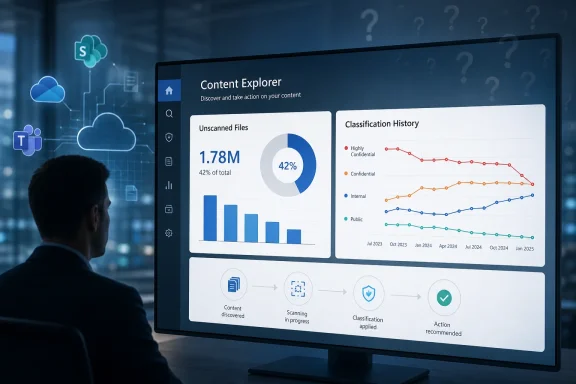
Microsoft is adding new summary metrics to Microsoft Purview Content Explorer that will show admins how many files remain unscanned for classification and how classifications have changed over time, with preview targeted for July 2026 and general availability planned for November 2026. The feature, listed as Microsoft 365 Roadmap ID 526796 and updated on July 7, 2026, is not a flashy compliance reinvention. It is a dashboard-level change with a sharper message: Microsoft wants Purview customers to stop treating classification coverage as an act of faith. For Windows and Microsoft 365 shops preparing for AI search, Copilot, retention audits, and data-loss prevention tuning, the new numbers may matter more than their modest packaging suggests.
The new Purview update is aimed at Content Explorer, the Microsoft 365 compliance tool that lets authorized administrators inspect where sensitive information, sensitivity labels, and retention labels exist across supported workloads. According to Microsoft’s roadmap entry, the update will add an unscanned files summary showing both count and percentage, plus classification history insights that expose trends and details of classification changes over time.
That sounds like another compliance-console widget until you consider what it measures. A file that has never been scanned is not merely “unknown” in a reporting sense; it is outside the evidence base that administrators use to justify DLP policies, sensitivity labeling, retention decisions, and risk assessments. If Content Explorer previously told organizations what Purview had seen, this update begins to quantify what Purview may not have seen.
The distinction is important because enterprise data protection often fails in the gap between policy design and actual coverage. A tenant may have carefully tuned sensitive information types, trainable classifiers, auto-labeling rules, and DLP policies, yet still contain vast pockets of stale, migrated, encrypted, unsupported, dormant, or simply untouched content. The roadmap item suggests Microsoft is beginning to surface that gap directly, instead of leaving admins to infer it from incomplete search results or suspiciously low classification counts.
Microsoft’s own documentation has long positioned Content Explorer as a way to view a current snapshot of items with sensitivity labels, retention labels, or sensitive information types. The new roadmap entry changes the emotional center of that experience. The question is no longer just “What sensitive data did we find?” It becomes “How much of the estate did we fail to inspect?”
For admins, the count matters, but the percentage may matter more. A tenant with 50,000 unscanned files has a very different risk profile if it stores 60,000 files total than if it stores 60 million. Percentage turns a scary absolute number into an operational signal, and it gives compliance teams a way to track remediation over time rather than argue over whether the raw backlog is large enough to matter.
This is also where Purview’s role becomes more complicated in the Copilot era. Microsoft has been explicit in its Purview documentation that classification and information protection are part of the broader effort to discover, classify, and protect sensitive data wherever it lives or travels. But AI assistants raise the stakes for old data because content that sat quietly in SharePoint for years can become newly discoverable through semantic search, summarization, and automated retrieval.
The unscanned-files metric does not itself prove exposure. It does not say a file is sensitive, shared too broadly, or retrievable by Copilot. But it does tell administrators where the classification story has not yet been written, and that is the first step toward a more honest risk model. In many organizations, the most dangerous sentence in compliance is still “We assume that data is covered.”
Classification history is not just an audit convenience. It is a way to detect whether the organization’s understanding of its data is aging faster than its controls. A file labeled “General” five years ago may contain content that today would trigger a stricter label. A document classified under an old taxonomy may be technically labeled but practically misleading. A library may show healthy labeling coverage while hiding the fact that nothing has been re-evaluated since a migration, merger, regulatory change, or policy redesign.
This is the kind of problem that does not show up cleanly in traditional dashboards. A file can be labeled and still be stale. A classification can be present and still be wrong. A policy can be current while the metadata it depends on reflects decisions made under a previous security model.
Classification history gives administrators a temporal lens. If the new interface can show which classifications changed, when they changed, and which areas have not changed in a suspiciously long time, Purview becomes less of an inventory tool and more of a governance-maintenance tool. That may sound dull, but dull maintenance is where most compliance programs either become real or collapse into ceremony.
Microsoft’s service descriptions and Learn documentation describe Content Explorer as a tool for indexing sensitive documents in supported Microsoft 365 workloads and identifying where sensitive information is stored. They also note that Activity Explorer shows activity related to sensitive data and labels, including label actions and DLP-related activity. The roadmap update effectively joins those ideas: Content Explorer is getting more reporting about both coverage and change.
That matters because Purview has always had a split personality. It is at once a compliance product, a security product, an administrative portal, and a reporting surface over complex Microsoft 365 data pipelines. Customers often experience it less as one product than as a collection of overlapping controls with different licensing gates, delays, permissions, and workload-specific caveats.
The new metrics do not erase that complexity. They may, however, make it harder to ignore. Once Purview can show that a meaningful share of content remains unscanned, the organization has a clearer basis for asking why. Is it a licensing limitation? A workload limitation? A file-type issue? A backlog? A configuration gap? Or a symptom that the tenant’s information architecture is more chaotic than anyone wants to admit?
The permissions model alone is a reminder that this is not a casual reporting page. Access to the Content Explorer tab is separate from access to item lists or content previews. Microsoft’s documentation distinguishes between list-view permissions and content-view permissions because the latter can allow users to read contents that local file permissions would otherwise prevent them from seeing. That makes Content Explorer powerful, but also politically sensitive inside many organizations.
New summary metrics will land inside that same tension. Security teams want broader visibility; privacy officers and legal departments often want strict limits on who can see what; business units do not want yet another dashboard interpreted without context. A simple unscanned percentage can therefore become a governance flashpoint, especially if it exposes uneven classification hygiene across departments.
This is where Microsoft’s implementation details will matter. A tenant-wide percentage is useful for executives, but operational teams need drill-down. They need to know whether unscanned files cluster in specific SharePoint sites, OneDrive accounts, Teams-connected libraries, file types, geographies, business units, or date ranges. Without that granularity, the metric risks becoming another scary number that everyone agrees is bad but no one can fix.
Preview in July means early adopters should begin looking for the experience in Purview tenants soon, depending on rollout sequencing and tenant eligibility. General availability in November puts the feature in the pre-year-end compliance window for many organizations, when audit preparation, records cleanup, and policy reviews often collide with budget planning.
That matters because classification remediation is not a one-week project. If an organization discovers that a nontrivial percentage of files are unscanned, the response may involve policy changes, on-demand scans, site-owner engagement, sensitivity-label tuning, retention review, and possibly licensing conversations. The dashboard may arrive quickly; the cleanup will not.
Administrators should also remember that Microsoft 365 roadmap entries can move. Microsoft frequently adjusts rollout timing as engineering, telemetry, and customer feedback dictate. The useful move is not to build a rigid project plan around November 2026, but to prepare the questions the new metrics will force once they appear.
Purview is one of Microsoft’s main answers to that anxiety. Sensitivity labels, DLP policies, audit records, eDiscovery, information barriers, and data classification all form part of the vendor’s pitch that organizations can adopt AI without losing control of information. But that pitch depends on visibility, and visibility depends on knowing not only what has been classified but what has escaped classification.
Unscanned-file counts are therefore more than housekeeping. They are a pressure gauge for AI-era governance. If 15 percent of a tenant’s files have never been classified, the organization may not know whether those files are harmless archives or highly sensitive documents with obsolete permissions. If classification history shows that a critical library has not changed labels in years, the organization may need to ask whether its policies are working or merely existing.
The best version of this feature would help customers move from fear to prioritization. Not every unscanned file deserves panic. But a report that identifies old, broadly shared, business-critical, unscanned repositories could become a practical starting point for AI readiness work that too often begins with abstract risk workshops.
Microsoft already has adjacent capabilities that point in that direction. Its on-demand classification documentation describes targeted scanning for historical data stored in SharePoint, OneDrive, and endpoints, including files that were never classified, have not been modified for a long time, or need updated classification under current policies. That is almost exactly the remediation story implied by the new Content Explorer metrics.
The missing piece is integration. Admins should not have to discover unscanned files in one view, manually reconstruct the affected locations, build a separate scan somewhere else, and then wait for counts to reconcile across interfaces. In a mature Purview experience, the unscanned summary would become a launchpad: identify a gap, scope a scan, review results, update labels, and track classification history afterward.
That is the difference between compliance reporting and security operations. Reporting says, “Here is the problem.” Operations says, “Here is the next best action.” Microsoft has spent years consolidating branding under Purview; customers will now judge whether the workflows are equally consolidated.
That creates both opportunity and risk. The opportunity is that classification work, often invisible and underfunded, may get clearer executive attention. The risk is that leadership may demand an artificially low number without understanding what scanning can and cannot tell them. A tenant can reduce unscanned counts while still maintaining poor permissions, weak labels, or flawed DLP policies.
Classification is not protection by itself. A sensitivity label can enable encryption, marking, access restrictions, or policy enforcement, but a label is still part of a broader control chain. A file can be scanned and found clean because the relevant sensitive information type is missing, poorly tuned, or contextually inadequate. Conversely, a file can trigger a sensitive-information match that requires human review before anyone should treat it as a genuine incident.
The new metrics should therefore be used as operational indicators, not vanity targets. A falling unscanned percentage is good news only if the organization is improving the quality of classification and the appropriateness of downstream controls. Otherwise, the dashboard becomes another place where compliance theater can masquerade as progress.
A department with a high proportion of unscanned data may reveal operational neglect, legacy storage habits, or the aftermath of a migration. A classification-history view could show when a team began handling regulated data or when a policy change swept across a business unit. In regulated industries, even metadata about sensitive data can be sensitive.
Microsoft will need to balance usefulness with least privilege. Security administrators may need tenant-wide summaries; data owners may need scoped views; auditors may need read-only evidence; help desk staff may need none of it. If the new metrics inherit existing Content Explorer role patterns cleanly, deployment will be easier. If they blur visibility boundaries, organizations will need to revisit Purview role assignments before turning the feature loose.
This is especially relevant for large enterprises using administrative units or delegated administration. A global compliance team may want one number for the tenant, while regional teams need only their slice. The more the feature supports scoped accountability, the more likely it is to improve behavior rather than merely centralize blame.
 Microsoft Turns a Blind Spot Into a Metric
The new Purview update is aimed at Content Explorer, the Microsoft 365 compliance tool that lets authorized administrators inspect where sensitive information, sensitivity labels, and retention labels exist across supported workloads. According to Microsoft’s roadmap entry, the update will add an unscanned files summary showing both count and percentage, plus classification history insights that expose trends and details of classification changes over time.That sounds like another compliance-console widget until you consider what it measures. A file that has never been scanned is not merely “unknown” in a reporting sense; it is outside the evidence base that administrators use to justify DLP policies, sensitivity labeling, retention decisions, and risk assessments. If Content Explorer previously told organizations what Purview had seen, this update begins to quantify what Purview may not have seen.
The distinction is important because enterprise data protection often fails in the gap between policy design and actual coverage. A tenant may have carefully tuned sensitive information types, trainable classifiers, auto-labeling rules, and DLP policies, yet still contain vast pockets of stale, migrated, encrypted, unsupported, dormant, or simply untouched content. The roadmap item suggests Microsoft is beginning to surface that gap directly, instead of leaving admins to infer it from incomplete search results or suspiciously low classification counts.
Microsoft’s own documentation has long positioned Content Explorer as a way to view a current snapshot of items with sensitivity labels, retention labels, or sensitive information types. The new roadmap entry changes the emotional center of that experience. The question is no longer just “What sensitive data did we find?” It becomes “How much of the estate did we fail to inspect?”
The Compliance Console Learns to Admit Uncertainty
Security dashboards are notoriously bad at expressing uncertainty. They are excellent at red, yellow, and green indicators; less excellent at saying, “This chart is based on a partial view of your environment.” Purview’s unscanned-file summary is valuable precisely because it pushes uncertainty into the interface.For admins, the count matters, but the percentage may matter more. A tenant with 50,000 unscanned files has a very different risk profile if it stores 60,000 files total than if it stores 60 million. Percentage turns a scary absolute number into an operational signal, and it gives compliance teams a way to track remediation over time rather than argue over whether the raw backlog is large enough to matter.
This is also where Purview’s role becomes more complicated in the Copilot era. Microsoft has been explicit in its Purview documentation that classification and information protection are part of the broader effort to discover, classify, and protect sensitive data wherever it lives or travels. But AI assistants raise the stakes for old data because content that sat quietly in SharePoint for years can become newly discoverable through semantic search, summarization, and automated retrieval.
The unscanned-files metric does not itself prove exposure. It does not say a file is sensitive, shared too broadly, or retrievable by Copilot. But it does tell administrators where the classification story has not yet been written, and that is the first step toward a more honest risk model. In many organizations, the most dangerous sentence in compliance is still “We assume that data is covered.”
Classification History Is Really a Staleness Detector
The second half of the roadmap item may prove even more interesting: classification history insights. Microsoft says the feature will show trends and details of classification changes over time, helping admins discover stale data in the organization. That phrasing is revealing.Classification history is not just an audit convenience. It is a way to detect whether the organization’s understanding of its data is aging faster than its controls. A file labeled “General” five years ago may contain content that today would trigger a stricter label. A document classified under an old taxonomy may be technically labeled but practically misleading. A library may show healthy labeling coverage while hiding the fact that nothing has been re-evaluated since a migration, merger, regulatory change, or policy redesign.
This is the kind of problem that does not show up cleanly in traditional dashboards. A file can be labeled and still be stale. A classification can be present and still be wrong. A policy can be current while the metadata it depends on reflects decisions made under a previous security model.
Classification history gives administrators a temporal lens. If the new interface can show which classifications changed, when they changed, and which areas have not changed in a suspiciously long time, Purview becomes less of an inventory tool and more of a governance-maintenance tool. That may sound dull, but dull maintenance is where most compliance programs either become real or collapse into ceremony.
The Feature Arrives as Purview Becomes More Central to Microsoft 365
The timing is not accidental. Microsoft Purview has become the umbrella under which Microsoft places data classification, sensitivity labels, DLP, insider risk, eDiscovery, records management, audit, and related compliance capabilities. The company has also been pushing customers toward more integrated data security posture management, where classification is not an isolated compliance chore but a prerequisite for understanding risk across Microsoft 365.Microsoft’s service descriptions and Learn documentation describe Content Explorer as a tool for indexing sensitive documents in supported Microsoft 365 workloads and identifying where sensitive information is stored. They also note that Activity Explorer shows activity related to sensitive data and labels, including label actions and DLP-related activity. The roadmap update effectively joins those ideas: Content Explorer is getting more reporting about both coverage and change.
That matters because Purview has always had a split personality. It is at once a compliance product, a security product, an administrative portal, and a reporting surface over complex Microsoft 365 data pipelines. Customers often experience it less as one product than as a collection of overlapping controls with different licensing gates, delays, permissions, and workload-specific caveats.
The new metrics do not erase that complexity. They may, however, make it harder to ignore. Once Purview can show that a meaningful share of content remains unscanned, the organization has a clearer basis for asking why. Is it a licensing limitation? A workload limitation? A file-type issue? A backlog? A configuration gap? Or a symptom that the tenant’s information architecture is more chaotic than anyone wants to admit?
Admins Needed This Because Content Explorer Has Never Been a Magic Mirror
It is tempting to read “Content Explorer” literally, as though it provides a complete view into all content across Microsoft 365. Microsoft’s own documentation is more careful. Content Explorer shows a snapshot of items that have labels or have been classified as sensitive information types, and Microsoft documents role requirements and restrictions because the tool can expose sensitive filenames, locations, and contents.The permissions model alone is a reminder that this is not a casual reporting page. Access to the Content Explorer tab is separate from access to item lists or content previews. Microsoft’s documentation distinguishes between list-view permissions and content-view permissions because the latter can allow users to read contents that local file permissions would otherwise prevent them from seeing. That makes Content Explorer powerful, but also politically sensitive inside many organizations.
New summary metrics will land inside that same tension. Security teams want broader visibility; privacy officers and legal departments often want strict limits on who can see what; business units do not want yet another dashboard interpreted without context. A simple unscanned percentage can therefore become a governance flashpoint, especially if it exposes uneven classification hygiene across departments.
This is where Microsoft’s implementation details will matter. A tenant-wide percentage is useful for executives, but operational teams need drill-down. They need to know whether unscanned files cluster in specific SharePoint sites, OneDrive accounts, Teams-connected libraries, file types, geographies, business units, or date ranges. Without that granularity, the metric risks becoming another scary number that everyone agrees is bad but no one can fix.
Preview in July, GA in November, and the Calendar Still Matters
The roadmap entry lists preview availability for July 2026 and general availability for November 2026, with the feature in development for the worldwide standard multi-tenant cloud. Those dates are roadmap targets, not contractual guarantees, but they give Microsoft 365 administrators a useful planning window.Preview in July means early adopters should begin looking for the experience in Purview tenants soon, depending on rollout sequencing and tenant eligibility. General availability in November puts the feature in the pre-year-end compliance window for many organizations, when audit preparation, records cleanup, and policy reviews often collide with budget planning.
That matters because classification remediation is not a one-week project. If an organization discovers that a nontrivial percentage of files are unscanned, the response may involve policy changes, on-demand scans, site-owner engagement, sensitivity-label tuning, retention review, and possibly licensing conversations. The dashboard may arrive quickly; the cleanup will not.
Administrators should also remember that Microsoft 365 roadmap entries can move. Microsoft frequently adjusts rollout timing as engineering, telemetry, and customer feedback dictate. The useful move is not to build a rigid project plan around November 2026, but to prepare the questions the new metrics will force once they appear.
The Copilot Subtext Is Hard to Miss
Microsoft’s roadmap text does not mention Copilot, but the connection is difficult to avoid. The modern Microsoft 365 security conversation is now deeply entangled with AI readiness: overshared files, unlabeled data, stale permissions, outdated retention, and poorly understood sensitive content all become more urgent when users can query institutional knowledge in natural language.Purview is one of Microsoft’s main answers to that anxiety. Sensitivity labels, DLP policies, audit records, eDiscovery, information barriers, and data classification all form part of the vendor’s pitch that organizations can adopt AI without losing control of information. But that pitch depends on visibility, and visibility depends on knowing not only what has been classified but what has escaped classification.
Unscanned-file counts are therefore more than housekeeping. They are a pressure gauge for AI-era governance. If 15 percent of a tenant’s files have never been classified, the organization may not know whether those files are harmless archives or highly sensitive documents with obsolete permissions. If classification history shows that a critical library has not changed labels in years, the organization may need to ask whether its policies are working or merely existing.
The best version of this feature would help customers move from fear to prioritization. Not every unscanned file deserves panic. But a report that identifies old, broadly shared, business-critical, unscanned repositories could become a practical starting point for AI readiness work that too often begins with abstract risk workshops.
The Real Test Is Whether Microsoft Gives Admins a Path From Number to Action
A metric is only as good as the workflow it enables. If Purview tells admins that 8 percent of files are unscanned but does not help them understand why, the feature will produce anxiety without leverage. If it allows filtering, exporting, scoping, and connection to on-demand classification or policy remediation, it could become a genuinely useful control point.Microsoft already has adjacent capabilities that point in that direction. Its on-demand classification documentation describes targeted scanning for historical data stored in SharePoint, OneDrive, and endpoints, including files that were never classified, have not been modified for a long time, or need updated classification under current policies. That is almost exactly the remediation story implied by the new Content Explorer metrics.
The missing piece is integration. Admins should not have to discover unscanned files in one view, manually reconstruct the affected locations, build a separate scan somewhere else, and then wait for counts to reconcile across interfaces. In a mature Purview experience, the unscanned summary would become a launchpad: identify a gap, scope a scan, review results, update labels, and track classification history afterward.
That is the difference between compliance reporting and security operations. Reporting says, “Here is the problem.” Operations says, “Here is the next best action.” Microsoft has spent years consolidating branding under Purview; customers will now judge whether the workflows are equally consolidated.
Enterprise IT Will Read the Percentage as a Management Problem
For sysadmins and compliance engineers, the new metrics will be technical. For executives, they will be managerial. A percentage of unscanned files is the kind of number that travels upward quickly, especially if it appears in screenshots, posture reports, audit prep decks, or security steering committees.That creates both opportunity and risk. The opportunity is that classification work, often invisible and underfunded, may get clearer executive attention. The risk is that leadership may demand an artificially low number without understanding what scanning can and cannot tell them. A tenant can reduce unscanned counts while still maintaining poor permissions, weak labels, or flawed DLP policies.
Classification is not protection by itself. A sensitivity label can enable encryption, marking, access restrictions, or policy enforcement, but a label is still part of a broader control chain. A file can be scanned and found clean because the relevant sensitive information type is missing, poorly tuned, or contextually inadequate. Conversely, a file can trigger a sensitive-information match that requires human review before anyone should treat it as a genuine incident.
The new metrics should therefore be used as operational indicators, not vanity targets. A falling unscanned percentage is good news only if the organization is improving the quality of classification and the appropriateness of downstream controls. Otherwise, the dashboard becomes another place where compliance theater can masquerade as progress.
Permissions and Privacy Will Shape Who Gets to See the New Truth
Content Explorer’s power has always been constrained by role-based access, and rightly so. Microsoft’s documentation emphasizes that viewing item lists and contents requires additional permissions beyond simply accessing the tool. That matters because the new summary metrics could expose sensitive organizational patterns even without exposing file contents.A department with a high proportion of unscanned data may reveal operational neglect, legacy storage habits, or the aftermath of a migration. A classification-history view could show when a team began handling regulated data or when a policy change swept across a business unit. In regulated industries, even metadata about sensitive data can be sensitive.
Microsoft will need to balance usefulness with least privilege. Security administrators may need tenant-wide summaries; data owners may need scoped views; auditors may need read-only evidence; help desk staff may need none of it. If the new metrics inherit existing Content Explorer role patterns cleanly, deployment will be easier. If they blur visibility boundaries, organizations will need to revisit Purview role assignments before turning the feature loose.
This is especially relevant for large enterprises using administrative units or delegated administration. A global compliance team may want one number for the tenant, while regional teams need only their slice. The more the feature supports scoped accountability, the more likely it is to improve behavior rather than merely centralize blame.
The Small Dashboard Change That Will Start Bigger Arguments
The concrete details are straightforward, but the implications are larger than the wording of the roadmap item suggests. Microsoft is adding visibility into unscanned classification coverage and classification history; admins should treat that as a prompt to examine the assumptions beneath their Purview deployments.- Microsoft plans to preview the new Content Explorer summary metrics in July 2026 and make them generally available in November 2026 for worldwide standard multi-tenant customers.
- The unscanned-files summary will show both the number and percentage of files that have not been scanned for classification.
- Classification history insights are intended to show trends and details of classification changes over time, which can help identify stale or outdated data.
- The feature is most useful when paired with remediation workflows such as on-demand classification, label review, DLP tuning, and site-owner cleanup.
- Administrators should prepare for the metric to create governance conversations about ownership, licensing, permissions, and AI readiness.
- A lower unscanned percentage should be treated as a starting indicator of better coverage, not as proof that sensitive data is fully protected.
References
- Primary source: Microsoft 365 Roadmap
Published: 2026-07-07T23:01:01.6729014Z
Microsoft 365 Roadmap | Microsoft 365
The Microsoft 365 Roadmap lists updates that are currently planned for applicable subscribers. Check here for more information on the status of new features and updates.www.microsoft.com
- Related coverage: m365admin.handsontek.net
Microsoft Purview | Information Protection - Content Explorer: Unscanned data and Classification History summary metrics - M365 Admin
Microsoft Purview Content Explorer will add summary metrics showing unscanned files and classification history trends, helping admins monitor data scanning and classification. Rolling out from January to March 2026, these features require no action and do not change existing policies or data...m365admin.handsontek.net - Official source: learn.microsoft.com
On-demand classification | Microsoft Learn
Learn how to scan historical data using On-demand classification.learn.microsoft.com - Official source: cdn-dynmedia-1.microsoft.com
Slide 1: Microsoft Purview Data Governance Roadmap H1 CY2025
PDF documentcdn-dynmedia-1.microsoft.com
- Official source: techcommunity.microsoft.com
</rdf:Alt> </dc:title> <dc:description> <rdf:Alt> <rdf:li xml:lang="x-default"/> </rdf:Alt> </dc:description> <dc:creator> <rdf:Seq> <rdf:li>Microso
</rdf:Alt> </dc:description> <dc:creator> <rdf:Seq> <rdf:li>Microsoft Office Usertechcommunity.microsoft.com