

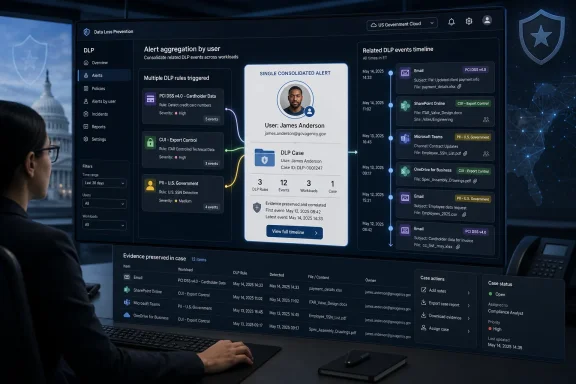
Microsoft added Microsoft Purview Data Loss Prevention alert aggregation by user to the Microsoft 365 Roadmap on July 7, 2026, targeting general availability in September 2026 for GCC, GCC High, and DoD tenants. The feature, Roadmap ID 567010, is not a flashy security control so much as an operational admission: DLP programs now generate more signal than many teams can reasonably triage. By grouping related alert events around a common user even when multiple DLP rules are matched, Microsoft is trying to turn the DLP console from a noisy event ledger into something closer to an investigative workbench. For government cloud customers, that shift matters because compliance workflows often fail not at detection, but at the point where humans must decide what happened, whether it matters, and what to do next.
The roadmap item is straightforward in its language: Purview will consolidate related DLP alert events into a single alert object when they share a common user, even if multiple rules are involved. That last clause is the important one. Traditional DLP alerting has often been organized around policies and rules, because that is how administrators build the system: detect credit card numbers, detect health records, detect classified labels, detect sharing to external domains, detect copying to removable storage.
Investigators, however, do not usually think in rules. They think in actors, timelines, intent, and impact. If the same employee downloads a sensitive spreadsheet, attaches a regulated document to an external email, and attempts to upload files to an unmanaged cloud service, those may be three rule matches, but they are one story.
Microsoft has already documented user and rule-based aggregation in Purview DLP, including configurable aggregation windows and the distinction between single-event and aggregate-event alerts. But Roadmap ID 567010 is framed specifically around common entities user even when multiple rules are matched, and it is scoped to Microsoft’s government cloud instances. That makes it less a brand-new DLP concept than a meaningful expansion of the way Purview presents related violations to the people expected to investigate them.
The timing also fits Microsoft’s broader Purview trajectory. The company has been building toward more consolidated investigation experiences across Purview and Defender XDR, where alerts are not merely records but inputs into incidents, summaries, and risk narratives. The promise is not that DLP suddenly becomes simple. The promise is that the first screen an analyst sees might finally resemble the incident they are actually investigating.
Microsoft’s own Purview documentation acknowledges that alerts can be generated whenever DLP policy conditions are matched, and that aggregation exists to reduce noise. That is the polite version. The blunt version is that DLP without aggregation can train analysts to ignore the very system they were told to trust.
This is especially true in Microsoft 365 environments because one user action can ripple across multiple workloads. A file can live in SharePoint, synchronize through OneDrive, be opened on a Windows endpoint, shared through Teams, attached in Outlook, and inspected under overlapping sensitivity rules. A single risky behavior pattern can therefore become a burst of mechanically accurate but operationally repetitive alerts.
The result is a paradox familiar to sysadmins and security operations teams: the better the organization becomes at detecting policy violations, the worse the queue can become for humans. Each alert may be correct, but correctness does not equal usefulness. The real scarce resource is not detection. It is analyst attention.
User-based aggregation attacks that scarcity directly. Instead of forcing the investigator to reconstruct a user’s activity from separate alerts, Purview can place those related events into one object. That does not make the underlying events less serious. It makes the case easier to understand.
In commercial tenants, noisy DLP may produce missed cases, frustrated analysts, or slow tuning cycles. In government environments, those same problems can collide with records retention, incident documentation, insider-risk procedures, procurement constraints, and mission impact. An alert queue is not just a queue; it is part of an accountability chain.
GCC High and DoD customers also often receive features later than worldwide commercial tenants because Microsoft must meet additional compliance, isolation, and validation requirements before release. That means a roadmap item like this can look modest from the outside while being important to the administrators waiting for parity. The feature is not glamorous, but it belongs to the category of improvements that make a platform livable at scale.
It is also notable that Microsoft lists the platform as Web. This is about the cloud management and investigation experience, not a new endpoint agent or a new Windows enforcement primitive. The change lives where compliance officers and security analysts spend their time: in the Purview and Defender-facing investigation surfaces.
That matters because government organizations are often slower to overhaul endpoint fleets or redesign policy architecture, but they can still gain efficiency from better alert presentation. If Microsoft can reduce duplicated casework without requiring a wholesale DLP redesign, adoption friction should be relatively low.
That is where Roadmap ID 567010 becomes more interesting. The description says aggregation can happen based on the common user even when multiple rules are matched. In DLP terms, that moves the pivot point away from the rule and toward the person.
That shift can expose intent more clearly. A user who accidentally sends one spreadsheet externally is different from a user who downloads sensitive content, renames files, copies data to removable media, and attempts external sharing across several channels. Rule-by-rule alerting can fragment that pattern. User-based aggregation can make it visible.
There is a risk, of course. Aggregation can also hide severity if implemented clumsily. A single consolidated alert must still preserve the event details, matched policies, affected items, timestamps, destinations, and enforcement actions that investigators need. Fewer alert objects should not mean less evidence.
The best version of this feature will therefore behave like a case folder, not a trash compactor. It should reduce the number of things analysts must open while increasing the amount of context available once they open the right one. That distinction will determine whether admins see it as genuine triage improvement or just a cosmetic deduplication layer.
The old enterprise perimeter was a network boundary. The modern Microsoft 365 perimeter is often a user with a token, a device posture, a sensitivity label, and access to cloud data. In that model, the user is not just the person who triggered the alert. The user is the organizing principle of the investigation.
That has practical benefits. User-centered aggregation helps analysts distinguish between systemic policy noise and individual behavior that deserves scrutiny. If hundreds of users trigger one rule after a policy change, the problem may be tuning. If one user triggers many rules across multiple data types and destinations, the problem may be risk.
But user-centered security also carries cultural and governance baggage. Organizations must be careful not to treat every grouped DLP alert as evidence of malicious intent. DLP detects policy matches, not motives. A consolidated user alert may show a pattern, but the interpretation still belongs to a properly governed investigative process.
That is particularly important in public-sector settings, where employee monitoring, labor rules, privacy expectations, and legal process may be more formalized than in private enterprise. Better aggregation can improve investigations, but it does not remove the need for clear policy, role-based access, auditability, and restraint.
That is where many DLP deployments stumble. Administrators often start with templates, add custom sensitive information types, expand to endpoints, introduce labels, and then discover that every improvement in coverage creates new demands on triage. The tool becomes more powerful at the same time the process becomes more fragile.
A consolidated alert object can help because investigation is fundamentally a context problem. An analyst needs to know whether an event is isolated or repeated, whether the user has triggered related rules, whether the data involved is truly sensitive, whether the action was blocked or merely audited, and whether the destination increases risk. Those answers are rarely contained in a single raw rule match.
Microsoft’s roadmap language points directly at that pain: reduce alert noise, simplify investigation workflows, and enhance contextual understanding of violations. Those are not marketing abstractions. They are the three daily complaints of almost every security and compliance queue.
Still, the feature will not rescue badly designed policies. If an organization has overbroad sensitive information types, poorly scoped rules, weak exceptions, or no agreed severity model, aggregation may simply produce fewer but messier alerts. The improvement is real, but it is not a substitute for DLP hygiene.
Microsoft’s existing Purview documentation describes user-based aggregation using tenant-level settings and configurable time windows such as 15, 30, 45, and 60 minutes in preview contexts. The new government-cloud roadmap item does not provide all configuration details in the short public entry, so administrators should treat September 2026 as a planning marker rather than a final implementation guide. The final behavior will need to be checked in Microsoft’s documentation and Message Center posts as rollout approaches.
The decision is not purely technical. A 15-minute window may suit high-volume email DLP where administrators want tight grouping. A longer window may better capture slow-moving exfiltration patterns, such as a user copying files in batches or moving between services. Different organizations will have different tolerances for under-grouping and over-grouping.
There is also a reporting consequence. Many teams measure DLP programs by alert counts, closure times, severity distribution, and repeat offenders. When aggregation changes the unit of measurement, historical comparisons become tricky. A drop in alert volume after September 2026 may reflect better grouping, not necessarily less risky behavior.
That means administrators should prepare their stakeholders now. If a compliance dashboard suddenly shows fewer DLP alerts, leadership may celebrate the wrong thing. The better metric may be events per alert, users per case, time to triage, and whether repeat behavior is detected sooner.
That distinction matters because alerting and enforcement are often conflated. A blocked upload, a policy tip, an audit event, and an analyst-facing alert may all arise from the same rule, but they serve different purposes. Aggregating alert events should not imply that enforcement actions are merged or skipped.
For users, the change may be invisible. They may still see the same policy tips or blocks when they attempt restricted actions. For analysts, the same underlying behavior may appear as one richer alert instead of several thinner ones. For auditors, the key question will be whether the consolidated object preserves the event-level trail.
If Microsoft gets this right, the feature could actually improve evidentiary quality. A single alert containing a coherent sequence of user-linked events is easier to review, assign, document, and escalate. It is also easier to explain to nontechnical stakeholders than a scattered set of rule matches.
But Microsoft must avoid the temptation to make the consolidated alert too tidy. Investigators need the mess: timestamps, workloads, files, rules, actions, exceptions, and user context. A clean summary is useful only if the raw trail remains close at hand.
User-based DLP aggregation becomes more powerful when it lands in that cross-domain context. A DLP pattern may coincide with risky sign-ins, impossible travel, malware on an endpoint, suspicious OAuth app consent, or unusual mailbox activity. If the alert object is already organized around a user, Defender has a cleaner basis for correlation.
That is where the feature may eventually matter beyond noise reduction. A consolidated DLP alert can become a better ingredient for incident correlation, Copilot summaries, insider-risk workflows, and Sentinel analytics. The alert object is not just a UI convenience; it is a data model choice.
For WindowsForum readers running Microsoft-heavy environments, this is the familiar story of Microsoft integration paying dividends only when the plumbing is aligned. Purview alone can see sensitive data movement. Defender can see broader security activity. Entra can see identity risk. Sentinel can query across logs. User-based aggregation gives these layers a more natural shared handle.
The caveat is licensing and role design. Not every organization that uses Purview DLP has the same Defender, Sentinel, or advanced compliance capabilities. Government tenants in particular may have segmented teams and strict access boundaries. The feature’s value will depend partly on whether the people investigating DLP alerts can see enough surrounding context to use the aggregation intelligently.
If a user triggers multiple DLP rules, that may indicate deliberate exfiltration. It may also indicate a poorly tuned policy, a business process involving regulated data, a migration project, a user trying to meet a deadline, or an application workflow that produces predictable DLP hits. Aggregation helps analysts see patterns, but patterns still require interpretation.
This is why Microsoft’s phrase “enhance contextual understanding” should be read carefully. Context is not the same as conclusion. A consolidated alert can show that several events are linked by a user, but it cannot by itself establish intent, authorization, or harm.
Administrators should therefore pair the feature with investigation playbooks. What evidence must be reviewed before escalation? When should a manager be contacted? When should legal, HR, privacy, or an insider-risk team be involved? What threshold separates user coaching from formal investigation?
Those questions are not product settings. They are governance decisions. The technology can reduce the time spent assembling the picture, but organizations must still decide what the picture means.
That uncertainty should not stop planning. If anything, it gives administrators time to prepare. DLP teams should review current alert volumes, identify noisy policies, document existing triage workflows, and decide how they want to measure the effect of aggregation once it appears.
The most useful pre-rollout exercise is to look at recent DLP cases and ask how many were really user-centered incidents disguised as rule-centered alerts. If analysts regularly reconstruct timelines by searching for the same user across multiple alerts, this feature is aimed directly at that wasted labor. If alert volume is already low and policy scope is narrow, the operational impact may be modest.
Government tenants should also watch Message Center for implementation details. The roadmap entry provides the direction of travel, but Message Center posts usually carry rollout timing, admin action requirements, default states, and configuration notes. Those details will determine whether the feature arrives as an opt-in setting, a default behavior, or a tenant-level control that requires deliberate activation.
The best outcome is not simply fewer alerts. The best outcome is fewer unhelpful alerts, faster investigation, and better confidence that repeated user-linked violations are not being lost in the queue.
 Microsoft Is Moving DLP From Rule Matching to User Storytelling
The roadmap item is straightforward in its language: Purview will consolidate related DLP alert events into a single alert object when they share a common user, even if multiple rules are involved. That last clause is the important one. Traditional DLP alerting has often been organized around policies and rules, because that is how administrators build the system: detect credit card numbers, detect health records, detect classified labels, detect sharing to external domains, detect copying to removable storage.Investigators, however, do not usually think in rules. They think in actors, timelines, intent, and impact. If the same employee downloads a sensitive spreadsheet, attaches a regulated document to an external email, and attempts to upload files to an unmanaged cloud service, those may be three rule matches, but they are one story.
Microsoft has already documented user and rule-based aggregation in Purview DLP, including configurable aggregation windows and the distinction between single-event and aggregate-event alerts. But Roadmap ID 567010 is framed specifically around common entities user even when multiple rules are matched, and it is scoped to Microsoft’s government cloud instances. That makes it less a brand-new DLP concept than a meaningful expansion of the way Purview presents related violations to the people expected to investigate them.
The timing also fits Microsoft’s broader Purview trajectory. The company has been building toward more consolidated investigation experiences across Purview and Defender XDR, where alerts are not merely records but inputs into incidents, summaries, and risk narratives. The promise is not that DLP suddenly becomes simple. The promise is that the first screen an analyst sees might finally resemble the incident they are actually investigating.
Alert Fatigue Is the Tax on Every Ambitious DLP Program
DLP tools are notorious for punishing organizations that configure them aggressively. The more sensitive information types, labels, locations, endpoint actions, sharing conditions, and exceptions an administrator defines, the more alert volume the system can produce. In theory, that is visibility. In practice, it can become a second inbox for compliance teams already drowning in governance obligations.Microsoft’s own Purview documentation acknowledges that alerts can be generated whenever DLP policy conditions are matched, and that aggregation exists to reduce noise. That is the polite version. The blunt version is that DLP without aggregation can train analysts to ignore the very system they were told to trust.
This is especially true in Microsoft 365 environments because one user action can ripple across multiple workloads. A file can live in SharePoint, synchronize through OneDrive, be opened on a Windows endpoint, shared through Teams, attached in Outlook, and inspected under overlapping sensitivity rules. A single risky behavior pattern can therefore become a burst of mechanically accurate but operationally repetitive alerts.
The result is a paradox familiar to sysadmins and security operations teams: the better the organization becomes at detecting policy violations, the worse the queue can become for humans. Each alert may be correct, but correctness does not equal usefulness. The real scarce resource is not detection. It is analyst attention.
User-based aggregation attacks that scarcity directly. Instead of forcing the investigator to reconstruct a user’s activity from separate alerts, Purview can place those related events into one object. That does not make the underlying events less serious. It makes the case easier to understand.
Government Tenants Get the Operational Feature They Actually Needed
The roadmap entry is explicitly scoped to GCC, GCC High, and DoD, with general availability listed for September 2026. That cloud targeting is not incidental. Government tenants tend to sit at the intersection of higher compliance burden, more formal investigative process, and stricter data-handling expectations.In commercial tenants, noisy DLP may produce missed cases, frustrated analysts, or slow tuning cycles. In government environments, those same problems can collide with records retention, incident documentation, insider-risk procedures, procurement constraints, and mission impact. An alert queue is not just a queue; it is part of an accountability chain.
GCC High and DoD customers also often receive features later than worldwide commercial tenants because Microsoft must meet additional compliance, isolation, and validation requirements before release. That means a roadmap item like this can look modest from the outside while being important to the administrators waiting for parity. The feature is not glamorous, but it belongs to the category of improvements that make a platform livable at scale.
It is also notable that Microsoft lists the platform as Web. This is about the cloud management and investigation experience, not a new endpoint agent or a new Windows enforcement primitive. The change lives where compliance officers and security analysts spend their time: in the Purview and Defender-facing investigation surfaces.
That matters because government organizations are often slower to overhaul endpoint fleets or redesign policy architecture, but they can still gain efficiency from better alert presentation. If Microsoft can reduce duplicated casework without requiring a wholesale DLP redesign, adoption friction should be relatively low.
The Multiple-Rule Clause Is the Real Product Change
User-based aggregation is not conceptually difficult when one user repeatedly trips the same rule. If a user sends several emails containing the same category of sensitive data within a short window, grouping those events is obvious. The harder and more useful case is when one user triggers several different rules that nonetheless belong to a single behavior pattern.That is where Roadmap ID 567010 becomes more interesting. The description says aggregation can happen based on the common user even when multiple rules are matched. In DLP terms, that moves the pivot point away from the rule and toward the person.
That shift can expose intent more clearly. A user who accidentally sends one spreadsheet externally is different from a user who downloads sensitive content, renames files, copies data to removable media, and attempts external sharing across several channels. Rule-by-rule alerting can fragment that pattern. User-based aggregation can make it visible.
There is a risk, of course. Aggregation can also hide severity if implemented clumsily. A single consolidated alert must still preserve the event details, matched policies, affected items, timestamps, destinations, and enforcement actions that investigators need. Fewer alert objects should not mean less evidence.
The best version of this feature will therefore behave like a case folder, not a trash compactor. It should reduce the number of things analysts must open while increasing the amount of context available once they open the right one. That distinction will determine whether admins see it as genuine triage improvement or just a cosmetic deduplication layer.
This Is Also a Bet on the User as the Security Boundary
Microsoft’s security stack has spent years moving toward identity-centered analysis. Defender correlates across endpoints, email, cloud apps, and identity. Entra ID risk signals feed conditional access decisions. Purview Insider Risk Management uses user activity patterns to support investigations. DLP alert aggregation by user fits neatly into that worldview.The old enterprise perimeter was a network boundary. The modern Microsoft 365 perimeter is often a user with a token, a device posture, a sensitivity label, and access to cloud data. In that model, the user is not just the person who triggered the alert. The user is the organizing principle of the investigation.
That has practical benefits. User-centered aggregation helps analysts distinguish between systemic policy noise and individual behavior that deserves scrutiny. If hundreds of users trigger one rule after a policy change, the problem may be tuning. If one user triggers many rules across multiple data types and destinations, the problem may be risk.
But user-centered security also carries cultural and governance baggage. Organizations must be careful not to treat every grouped DLP alert as evidence of malicious intent. DLP detects policy matches, not motives. A consolidated user alert may show a pattern, but the interpretation still belongs to a properly governed investigative process.
That is particularly important in public-sector settings, where employee monitoring, labor rules, privacy expectations, and legal process may be more formalized than in private enterprise. Better aggregation can improve investigations, but it does not remove the need for clear policy, role-based access, auditability, and restraint.
Purview’s Bigger Problem Is Not Detection but Triage
Microsoft Purview DLP already covers a broad set of Microsoft 365 surfaces and endpoint scenarios. The platform can identify sensitive information, apply policy conditions, generate alerts, show policy tips, support incident reports, and route investigations into Microsoft Defender XDR. The question for mature tenants is no longer whether Purview can detect enough. It is whether organizations can operationalize what it detects.That is where many DLP deployments stumble. Administrators often start with templates, add custom sensitive information types, expand to endpoints, introduce labels, and then discover that every improvement in coverage creates new demands on triage. The tool becomes more powerful at the same time the process becomes more fragile.
A consolidated alert object can help because investigation is fundamentally a context problem. An analyst needs to know whether an event is isolated or repeated, whether the user has triggered related rules, whether the data involved is truly sensitive, whether the action was blocked or merely audited, and whether the destination increases risk. Those answers are rarely contained in a single raw rule match.
Microsoft’s roadmap language points directly at that pain: reduce alert noise, simplify investigation workflows, and enhance contextual understanding of violations. Those are not marketing abstractions. They are the three daily complaints of almost every security and compliance queue.
Still, the feature will not rescue badly designed policies. If an organization has overbroad sensitive information types, poorly scoped rules, weak exceptions, or no agreed severity model, aggregation may simply produce fewer but messier alerts. The improvement is real, but it is not a substitute for DLP hygiene.
The Admin Burden Shifts From Counting Alerts to Designing Windows
Aggregation always raises the same administrative question: what belongs together? If the window is too short, related activity remains fragmented. If it is too long, unrelated events may be grouped into a misleading narrative.Microsoft’s existing Purview documentation describes user-based aggregation using tenant-level settings and configurable time windows such as 15, 30, 45, and 60 minutes in preview contexts. The new government-cloud roadmap item does not provide all configuration details in the short public entry, so administrators should treat September 2026 as a planning marker rather than a final implementation guide. The final behavior will need to be checked in Microsoft’s documentation and Message Center posts as rollout approaches.
The decision is not purely technical. A 15-minute window may suit high-volume email DLP where administrators want tight grouping. A longer window may better capture slow-moving exfiltration patterns, such as a user copying files in batches or moving between services. Different organizations will have different tolerances for under-grouping and over-grouping.
There is also a reporting consequence. Many teams measure DLP programs by alert counts, closure times, severity distribution, and repeat offenders. When aggregation changes the unit of measurement, historical comparisons become tricky. A drop in alert volume after September 2026 may reflect better grouping, not necessarily less risky behavior.
That means administrators should prepare their stakeholders now. If a compliance dashboard suddenly shows fewer DLP alerts, leadership may celebrate the wrong thing. The better metric may be events per alert, users per case, time to triage, and whether repeat behavior is detected sooner.
Fewer Alerts Can Mean Better Evidence, Not Less Enforcement
One easy misreading of the roadmap item is that Microsoft is softening DLP. It is not. The public description is about alert consolidation, not policy enforcement. DLP rules can still match, block, audit, notify, or generate incident information according to configuration.That distinction matters because alerting and enforcement are often conflated. A blocked upload, a policy tip, an audit event, and an analyst-facing alert may all arise from the same rule, but they serve different purposes. Aggregating alert events should not imply that enforcement actions are merged or skipped.
For users, the change may be invisible. They may still see the same policy tips or blocks when they attempt restricted actions. For analysts, the same underlying behavior may appear as one richer alert instead of several thinner ones. For auditors, the key question will be whether the consolidated object preserves the event-level trail.
If Microsoft gets this right, the feature could actually improve evidentiary quality. A single alert containing a coherent sequence of user-linked events is easier to review, assign, document, and escalate. It is also easier to explain to nontechnical stakeholders than a scattered set of rule matches.
But Microsoft must avoid the temptation to make the consolidated alert too tidy. Investigators need the mess: timestamps, workloads, files, rules, actions, exceptions, and user context. A clean summary is useful only if the raw trail remains close at hand.
Defender XDR Makes the Feature More Valuable Than Purview Alone
Microsoft’s documentation recommends the Microsoft Defender portal for investigating and managing DLP alerts, while the Purview portal remains the natural home for creating and editing DLP policies. That division reflects Microsoft’s broader product strategy: Purview defines and governs information protection; Defender increasingly becomes the operational investigation cockpit.User-based DLP aggregation becomes more powerful when it lands in that cross-domain context. A DLP pattern may coincide with risky sign-ins, impossible travel, malware on an endpoint, suspicious OAuth app consent, or unusual mailbox activity. If the alert object is already organized around a user, Defender has a cleaner basis for correlation.
That is where the feature may eventually matter beyond noise reduction. A consolidated DLP alert can become a better ingredient for incident correlation, Copilot summaries, insider-risk workflows, and Sentinel analytics. The alert object is not just a UI convenience; it is a data model choice.
For WindowsForum readers running Microsoft-heavy environments, this is the familiar story of Microsoft integration paying dividends only when the plumbing is aligned. Purview alone can see sensitive data movement. Defender can see broader security activity. Entra can see identity risk. Sentinel can query across logs. User-based aggregation gives these layers a more natural shared handle.
The caveat is licensing and role design. Not every organization that uses Purview DLP has the same Defender, Sentinel, or advanced compliance capabilities. Government tenants in particular may have segmented teams and strict access boundaries. The feature’s value will depend partly on whether the people investigating DLP alerts can see enough surrounding context to use the aggregation intelligently.
The Quiet Risk Is Over-Correlation
Every security platform eventually discovers that correlation is seductive. It promises clarity from chaos. It also risks turning coincidence into narrative.If a user triggers multiple DLP rules, that may indicate deliberate exfiltration. It may also indicate a poorly tuned policy, a business process involving regulated data, a migration project, a user trying to meet a deadline, or an application workflow that produces predictable DLP hits. Aggregation helps analysts see patterns, but patterns still require interpretation.
This is why Microsoft’s phrase “enhance contextual understanding” should be read carefully. Context is not the same as conclusion. A consolidated alert can show that several events are linked by a user, but it cannot by itself establish intent, authorization, or harm.
Administrators should therefore pair the feature with investigation playbooks. What evidence must be reviewed before escalation? When should a manager be contacted? When should legal, HR, privacy, or an insider-risk team be involved? What threshold separates user coaching from formal investigation?
Those questions are not product settings. They are governance decisions. The technology can reduce the time spent assembling the picture, but organizations must still decide what the picture means.
September 2026 Is a Planning Date, Not a Finish Line
The roadmap lists general availability for September 2026, but Microsoft 365 roadmap dates are guidance, not contracts. Features can slip, roll out gradually, or arrive with tenant-specific behavior that depends on licensing, cloud instance, and admin configuration. Government cloud rollouts are especially prone to staged availability.That uncertainty should not stop planning. If anything, it gives administrators time to prepare. DLP teams should review current alert volumes, identify noisy policies, document existing triage workflows, and decide how they want to measure the effect of aggregation once it appears.
The most useful pre-rollout exercise is to look at recent DLP cases and ask how many were really user-centered incidents disguised as rule-centered alerts. If analysts regularly reconstruct timelines by searching for the same user across multiple alerts, this feature is aimed directly at that wasted labor. If alert volume is already low and policy scope is narrow, the operational impact may be modest.
Government tenants should also watch Message Center for implementation details. The roadmap entry provides the direction of travel, but Message Center posts usually carry rollout timing, admin action requirements, default states, and configuration notes. Those details will determine whether the feature arrives as an opt-in setting, a default behavior, or a tenant-level control that requires deliberate activation.
The best outcome is not simply fewer alerts. The best outcome is fewer unhelpful alerts, faster investigation, and better confidence that repeated user-linked violations are not being lost in the queue.
The September Roadmap Item Gives DLP Teams a Homework Assignment
The practical value of Roadmap ID 567010 will depend on whether organizations treat it as an operational change rather than a passive platform enhancement. Microsoft can ship aggregation, but customers still need to decide how grouped alerts should be triaged, measured, and escalated.- Organizations should baseline current DLP alert volume before September 2026 so they can distinguish real risk reduction from alert-object consolidation.
- Administrators should review noisy rules now, because aggregation will not fix overbroad sensitive information types or poorly scoped policy conditions.
- Security and compliance teams should update playbooks to define how user-linked multi-rule alerts are assigned, investigated, and escalated.
- Government cloud tenants should monitor Microsoft 365 Message Center for rollout details, especially whether the feature is enabled by default or requires tenant-level activation.
- Reporting owners should prepare stakeholders for metric changes, because fewer alert objects may still contain the same or greater number of underlying DLP events.
- Investigators should verify that consolidated alerts preserve event-level evidence, including rules matched, workloads involved, actions taken, affected items, and timestamps.
References
- Primary source: Microsoft 365 Roadmap
Published: 2026-07-07T23:10:08.8577921Z
Loading…
www.microsoft.com - Related coverage: m365admin.handsontek.net
Loading…
m365admin.handsontek.net - Official source: learn.microsoft.com
Loading…
learn.microsoft.com - Official source: techcommunity.microsoft.com
Loading…
techcommunity.microsoft.com - Related coverage: 00040131fbf8fd8894bd-9cf2bcc53faec38589bd9b16d497132e.ssl.cf1.rackcdn.com
Loading…
00040131fbf8fd8894bd-9cf2bcc53faec38589bd9b16d497132e.ssl.cf1.rackcdn.com - Official source: cdn-dynmedia-1.microsoft.com