

Microsoft is developing a Microsoft Purview Compliance Portal capability, Roadmap ID 499076, that will let administrators scan existing files at rest in SharePoint and OneDrive for Business for sensitive information, with general availability planned for December 2026 across GCC, GCC High, and DoD clouds. The feature, last updated on July 6, 2026, looks narrow on the roadmap but lands in one of Microsoft 365’s most uncomfortable security gaps: old content that predates today’s labeling, DLP, and AI-era governance assumptions. Microsoft’s own Purview documentation has already framed this class of capability as on-demand classification for historical data, and the new government-cloud roadmap item suggests Redmond is moving that model deeper into regulated tenant operations.
For years, the Microsoft 365 compliance story has been strongest at the moment of activity. A user creates a document, edits a spreadsheet, shares a file, sends an email, or triggers a policy evaluation; Purview has a chance to classify, label, block, warn, encrypt, or log. That model works tolerably well for new work, but it has always left a messy question sitting in the back of every SharePoint migration: what about everything already there?
The answer, too often, has been “we will get to it later.” Later became a decade of departmental SharePoint sites, inherited OneDrive folders, dumped file shares, abandoned Teams-connected document libraries, and archives whose permissions tell one story while the data inside tells another. In an ordinary collaboration environment, that is bad housekeeping. In a Copilot-enabled environment, it becomes a live exposure path.
Microsoft’s latest roadmap entry is aimed at that older, colder layer of content. The company says the new Purview Compliance Portal capability will enable admins to scan existing files at rest in SharePoint or OneDrive for Business for sensitive data. The language is spare, but the direction is clear: classification can no longer wait for user behavior to wake files up.
That is the right instinct. The weakest files in a modern Microsoft 365 tenant are not always the ones being worked on today. They are often the HR spreadsheet uploaded in 2019, the legal folder inherited from a migrated file share, the board deck copied into a broadly accessible team, or the customer export saved by a long-departed employee.
Microsoft often ships commercial-cloud features first and then works through the compliance, isolation, operational, and certification realities of government clouds. By the time a capability is explicitly mapped to GCC High and DoD, it is no longer just a convenience feature for administrators. It is part of the control plane that regulated organizations expect to use in audits, incident response, data minimization, and security operations.
The timing also matters. Microsoft lists general availability for December 2026, which puts this feature well beyond a speculative preview experiment and into the planning horizon for public-sector and defense-adjacent tenants. Those organizations tend to move slowly, not because they lack urgency, but because every control has to be tested against process, policy, authority to operate, and procurement reality.
There is also a notable echo here. Microsoft previously described a related “scan cold files” capability for SharePoint and OneDrive in the commercial Microsoft 365 roadmap, while Microsoft Learn now documents on-demand classification as a way to identify sensitive content in historical data stored in SharePoint, OneDrive, and endpoints. The new Roadmap ID 499076 appears to be the government-cloud continuation of that broader Purview shift: old files are becoming first-class compliance targets.
Copilot does not generally invent permissions; it operates within the access a user already has. But that reassurance has always been less comforting than vendors want it to be. If a user has access to an over-permissioned SharePoint site, a forgotten OneDrive folder, or a document library inherited from a sloppy migration, AI can make that access more useful, more searchable, and more surprising.
That is why the old “security by obscurity inside SharePoint” model is dying. A file hidden six folders deep in a project archive is not meaningfully hidden if discovery tools can summarize it, retrieve it, or use it as context. The problem is not that AI breaks the permission model. The problem is that AI reveals how casually many organizations have lived with the permission model they already had.
Purview scanning for files at rest is therefore less about checking a compliance box than rebuilding the substrate that AI depends on. Labels, DLP policies, insider-risk signals, eDiscovery scopes, and retention workflows all become more credible when the underlying data has actually been inspected under current rules. Without that scan, Microsoft 365 security is often making decisions based on the most recent touch, not the most recent policy.
A file that looked harmless in 2021 may be sensitive under a 2026 policy. A document that once lacked a recognized identifier may now match a custom pattern for employee data, export-controlled material, contract metadata, or patient information. Classification drift is real, and it cuts both ways: files can be over-classified, under-classified, or simply never evaluated against the controls an organization now claims to enforce.
The value of scanning existing SharePoint and OneDrive content is that it acknowledges this drift. Instead of waiting for users to reopen files, Purview can be used to sweep historical data and bring it back into the governance conversation. That is particularly important in tenants where Teams adoption created a sprawling SharePoint estate that no human administrator can realistically review by hand.
Microsoft Learn says on-demand classification scans can be scoped by location, classifiers, file modified date range, and file extensions, with an estimation stage before classification begins. Those details are not glamorous, but they are exactly what administrators need. A scan-everything button without estimation would be an operational hazard; a scoped scan with cost and volume awareness is a tool.
In a commercial tenant, an unclassified file containing sensitive customer information may trigger a breach review, a contract issue, or a regulatory notification. In a government or defense tenant, the same kind of failure can collide with controlled unclassified information policies, agency-specific retention obligations, export-control considerations, or mission data handling requirements. The vocabulary changes, but the operational pain is familiar: you cannot protect what you have not found.
This is also why “at rest” matters. Regulated organizations often retain material for long periods, and much of that material may not be edited frequently. If the compliance engine only gets serious when a file is active, it misses precisely the content that government tenants are required to preserve and govern.
Microsoft is not alone in recognizing this. The broader security industry has spent years pushing data security posture management, cloud data discovery, and classification tooling as organizations lose track of where sensitive data lives. What is different here is that Microsoft controls the productivity platform, the storage layer, the identity graph, the compliance portal, and increasingly the AI interface. That gives Purview a privileged position, but it also raises expectations.
This is where Microsoft’s feature will succeed or fail in the real world. Discovery is only useful if it leads to action. A dashboard full of sensitive matches can become just another compliance graveyard if administrators lack ownership models, escalation paths, and policy discipline.
There is also a sequencing problem. Before scanning millions of files, organizations need to clean up their classifiers. Built-in sensitive information types are useful, but regulated environments frequently need custom definitions, exact data match, and tuned confidence levels. A poorly designed scan can create noise; a well-designed scan can reveal a map of risk that was previously invisible.
Licensing and cost will also matter. Microsoft’s existing on-demand classification documentation talks about estimation, scan cost, and limits, including large-scale processing boundaries for SharePoint and OneDrive. The roadmap entry for ID 499076 does not spell out licensing or pricing details, so admins should not assume this will be universally available in every Microsoft 365 plan. In Purview, the most useful compliance controls often live where enterprise licensing, add-ons, and premium audit expectations intersect.
Purview’s file-at-rest scanning is a belated admission that the migration did not magically classify the data. Moving content into SharePoint does not tell you whether it contains national identifiers, health records, financial data, contract terms, credentials, or controlled technical information. It only changes where the unclassified data lives.
That distinction matters for WindowsForum readers because many sysadmins have lived through these migrations from both ends. They decommissioned file servers, mapped drives to Teams libraries, trained users on OneDrive sync, and then inherited the compliance burden when executives asked whether Copilot was safe to enable. The answer depends less on Copilot’s marketing than on the tenant’s actual data hygiene.
Microsoft’s advantage is that it can make this scanning native. The alternative is usually third-party discovery tooling, export workflows, custom scripts, or one-off consulting projects that struggle with Microsoft 365 scale and permissions. Native does not automatically mean better, but it usually means less friction, especially in government clouds where external tooling can be difficult to approve.
This is why Purview’s integration story matters. Microsoft Learn describes classified files as feeding into other Purview controls such as DLP, Information Protection, Data Lifecycle Management, and Insider Risk Management policies. That is the architecture Microsoft wants customers to buy into: classification is the signal, Purview is the policy engine, and Microsoft 365 is the enforcement surface.
The danger is that administrators will discover more than their organizations are ready to handle. A scan may show sensitive files in executive OneDrives, archived project sites, old external collaboration spaces, or libraries with guest access. The technical result then becomes a political problem: who owns the data, who accepts the risk, and who gets to break someone’s workflow in the name of compliance?
The better organizations will treat this as a staged program. Start with high-risk sites. Run estimations. Tune classifiers. Review samples. Apply labels in simulation or test modes where available. Build reports that business owners can understand. Then enforce.
Those omissions are normal for a roadmap entry, but they are not trivial. SharePoint and OneDrive contain more than tidy Office documents. Tenants include PDFs, images, zipped exports, legacy formats, generated reports, password-protected files, and files encrypted by labels or third-party tools. Each category can complicate scanning.
OCR is a particularly important boundary. Microsoft’s broader Purview guidance notes that optical character recognition extends sensitive information detection to image-based content, scanned documents, screenshots, and invoices, but it has its own configuration and billing considerations. In government environments, the difference between scanning text and scanning images can be the difference between finding the obvious and missing the archive.
The roadmap also does not clarify whether the new capability is purely discovery-oriented or whether it will directly classify and label as part of the same workflow in these clouds. Related Microsoft documentation for on-demand classification points toward classification and downstream policy evaluation, but administrators should wait for Microsoft’s implementation details before building hard project plans around assumptions.
That preparation starts with inventory. Admins need to know which SharePoint sites and OneDrive populations matter most, where sensitive data is likely to sit, and which repositories are historical dumping grounds. They also need to understand how labels and DLP rules behave today before adding a large volume of newly classified historical content.
There is a human side as well. Once files are labeled or restricted, users will notice. Some will discover that workflows depended on oversharing. Others will complain that old project material became harder to access. If IT cannot explain why the change happened and how exceptions work, a security improvement will be remembered as another arbitrary Microsoft 365 disruption.
Microsoft should also be judged on the quality of the admin experience. Purview has improved over the years, but it remains a portal where naming, navigation, licensing boundaries, and feature overlap can frustrate even experienced operators. A powerful scan feature buried behind unclear flows or inconsistent reporting will blunt the impact of the underlying engineering.
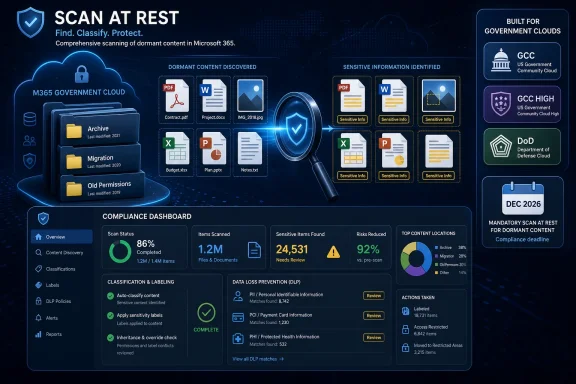 Microsoft Is Finally Treating Dormant Files as Active Risk
For years, the Microsoft 365 compliance story has been strongest at the moment of activity. A user creates a document, edits a spreadsheet, shares a file, sends an email, or triggers a policy evaluation; Purview has a chance to classify, label, block, warn, encrypt, or log. That model works tolerably well for new work, but it has always left a messy question sitting in the back of every SharePoint migration: what about everything already there?The answer, too often, has been “we will get to it later.” Later became a decade of departmental SharePoint sites, inherited OneDrive folders, dumped file shares, abandoned Teams-connected document libraries, and archives whose permissions tell one story while the data inside tells another. In an ordinary collaboration environment, that is bad housekeeping. In a Copilot-enabled environment, it becomes a live exposure path.
Microsoft’s latest roadmap entry is aimed at that older, colder layer of content. The company says the new Purview Compliance Portal capability will enable admins to scan existing files at rest in SharePoint or OneDrive for Business for sensitive data. The language is spare, but the direction is clear: classification can no longer wait for user behavior to wake files up.
That is the right instinct. The weakest files in a modern Microsoft 365 tenant are not always the ones being worked on today. They are often the HR spreadsheet uploaded in 2019, the legal folder inherited from a migrated file share, the board deck copied into a broadly accessible team, or the customer export saved by a long-departed employee.
The Roadmap Item Is Small Because the Problem Is Huge
The roadmap metadata tells its own story. This is a Microsoft Purview web capability, currently in development, targeted for preview and general availability, and specifically listed for GCC, GCC High, and DoD. That cloud-instance list matters more than it might appear at first glance.Microsoft often ships commercial-cloud features first and then works through the compliance, isolation, operational, and certification realities of government clouds. By the time a capability is explicitly mapped to GCC High and DoD, it is no longer just a convenience feature for administrators. It is part of the control plane that regulated organizations expect to use in audits, incident response, data minimization, and security operations.
The timing also matters. Microsoft lists general availability for December 2026, which puts this feature well beyond a speculative preview experiment and into the planning horizon for public-sector and defense-adjacent tenants. Those organizations tend to move slowly, not because they lack urgency, but because every control has to be tested against process, policy, authority to operate, and procurement reality.
There is also a notable echo here. Microsoft previously described a related “scan cold files” capability for SharePoint and OneDrive in the commercial Microsoft 365 roadmap, while Microsoft Learn now documents on-demand classification as a way to identify sensitive content in historical data stored in SharePoint, OneDrive, and endpoints. The new Roadmap ID 499076 appears to be the government-cloud continuation of that broader Purview shift: old files are becoming first-class compliance targets.
The AI Era Made Old Permissions Unforgiving
The sudden urgency around dormant files is not happening in a vacuum. Microsoft 365 Copilot, Graph-grounded search, semantic indexing, and AI-assisted knowledge discovery all raise the value of accurately classified data. They also raise the cost of getting it wrong.Copilot does not generally invent permissions; it operates within the access a user already has. But that reassurance has always been less comforting than vendors want it to be. If a user has access to an over-permissioned SharePoint site, a forgotten OneDrive folder, or a document library inherited from a sloppy migration, AI can make that access more useful, more searchable, and more surprising.
That is why the old “security by obscurity inside SharePoint” model is dying. A file hidden six folders deep in a project archive is not meaningfully hidden if discovery tools can summarize it, retrieve it, or use it as context. The problem is not that AI breaks the permission model. The problem is that AI reveals how casually many organizations have lived with the permission model they already had.
Purview scanning for files at rest is therefore less about checking a compliance box than rebuilding the substrate that AI depends on. Labels, DLP policies, insider-risk signals, eDiscovery scopes, and retention workflows all become more credible when the underlying data has actually been inspected under current rules. Without that scan, Microsoft 365 security is often making decisions based on the most recent touch, not the most recent policy.
Purview’s Control Plane Is Moving From Reactive to Retrospective
Microsoft’s Purview documentation describes on-demand classification as a targeted way to scan and identify files at rest using current sensitive information types and classification policies. That phrase, “current,” is doing a lot of work. Sensitive information detection is not static; organizations add custom sensitive information types, exact data match schemas, trainable classifiers, and policy refinements as their regulatory and business environment changes.A file that looked harmless in 2021 may be sensitive under a 2026 policy. A document that once lacked a recognized identifier may now match a custom pattern for employee data, export-controlled material, contract metadata, or patient information. Classification drift is real, and it cuts both ways: files can be over-classified, under-classified, or simply never evaluated against the controls an organization now claims to enforce.
The value of scanning existing SharePoint and OneDrive content is that it acknowledges this drift. Instead of waiting for users to reopen files, Purview can be used to sweep historical data and bring it back into the governance conversation. That is particularly important in tenants where Teams adoption created a sprawling SharePoint estate that no human administrator can realistically review by hand.
Microsoft Learn says on-demand classification scans can be scoped by location, classifiers, file modified date range, and file extensions, with an estimation stage before classification begins. Those details are not glamorous, but they are exactly what administrators need. A scan-everything button without estimation would be an operational hazard; a scoped scan with cost and volume awareness is a tool.
Government Clouds Get the Feature Because Government Clouds Need It Most
The GCC, GCC High, and DoD targeting is the most important part of this roadmap item. These tenants are where stale data problems meet formal compliance obligations, sovereign-cloud requirements, stricter identity boundaries, and long retention cycles. The content is older, the rules are harder, and the consequences of misclassification are often more severe.In a commercial tenant, an unclassified file containing sensitive customer information may trigger a breach review, a contract issue, or a regulatory notification. In a government or defense tenant, the same kind of failure can collide with controlled unclassified information policies, agency-specific retention obligations, export-control considerations, or mission data handling requirements. The vocabulary changes, but the operational pain is familiar: you cannot protect what you have not found.
This is also why “at rest” matters. Regulated organizations often retain material for long periods, and much of that material may not be edited frequently. If the compliance engine only gets serious when a file is active, it misses precisely the content that government tenants are required to preserve and govern.
Microsoft is not alone in recognizing this. The broader security industry has spent years pushing data security posture management, cloud data discovery, and classification tooling as organizations lose track of where sensitive data lives. What is different here is that Microsoft controls the productivity platform, the storage layer, the identity graph, the compliance portal, and increasingly the AI interface. That gives Purview a privileged position, but it also raises expectations.
Admins Should Expect a Governance Project, Not a Checkbox
The phrase “enable admins to scan existing files” sounds deceptively simple. In practice, any organization that turns this on at scale will immediately confront decisions it may have postponed for years. Which sensitive information types matter? Which labels should be applied automatically? Which sites are exempt? Which results are false positives? Which business owners are accountable for remediation?This is where Microsoft’s feature will succeed or fail in the real world. Discovery is only useful if it leads to action. A dashboard full of sensitive matches can become just another compliance graveyard if administrators lack ownership models, escalation paths, and policy discipline.
There is also a sequencing problem. Before scanning millions of files, organizations need to clean up their classifiers. Built-in sensitive information types are useful, but regulated environments frequently need custom definitions, exact data match, and tuned confidence levels. A poorly designed scan can create noise; a well-designed scan can reveal a map of risk that was previously invisible.
Licensing and cost will also matter. Microsoft’s existing on-demand classification documentation talks about estimation, scan cost, and limits, including large-scale processing boundaries for SharePoint and OneDrive. The roadmap entry for ID 499076 does not spell out licensing or pricing details, so admins should not assume this will be universally available in every Microsoft 365 plan. In Purview, the most useful compliance controls often live where enterprise licensing, add-ons, and premium audit expectations intersect.
The Real Competitor Is the File Share Microsoft Replaced
Many organizations moved from traditional file shares to SharePoint and OneDrive with an implicit promise: Microsoft 365 would make collaboration cleaner, searchable, mobile, secure, and governable. Some of that promise came true. But the migration also turned old folder chaos into cloud folder chaos, often with more sharing links and less local visibility.Purview’s file-at-rest scanning is a belated admission that the migration did not magically classify the data. Moving content into SharePoint does not tell you whether it contains national identifiers, health records, financial data, contract terms, credentials, or controlled technical information. It only changes where the unclassified data lives.
That distinction matters for WindowsForum readers because many sysadmins have lived through these migrations from both ends. They decommissioned file servers, mapped drives to Teams libraries, trained users on OneDrive sync, and then inherited the compliance burden when executives asked whether Copilot was safe to enable. The answer depends less on Copilot’s marketing than on the tenant’s actual data hygiene.
Microsoft’s advantage is that it can make this scanning native. The alternative is usually third-party discovery tooling, export workflows, custom scripts, or one-off consulting projects that struggle with Microsoft 365 scale and permissions. Native does not automatically mean better, but it usually means less friction, especially in government clouds where external tooling can be difficult to approve.
Classification Without Remediation Is Just Better Anxiety
Scanning existing files is not the same as protecting them. It is the beginning of the chain, not the end. Once sensitive data is found, organizations still have to decide whether to label it, encrypt it, restrict sharing, quarantine it, retain it, delete it, move it, or simply document it.This is why Purview’s integration story matters. Microsoft Learn describes classified files as feeding into other Purview controls such as DLP, Information Protection, Data Lifecycle Management, and Insider Risk Management policies. That is the architecture Microsoft wants customers to buy into: classification is the signal, Purview is the policy engine, and Microsoft 365 is the enforcement surface.
The danger is that administrators will discover more than their organizations are ready to handle. A scan may show sensitive files in executive OneDrives, archived project sites, old external collaboration spaces, or libraries with guest access. The technical result then becomes a political problem: who owns the data, who accepts the risk, and who gets to break someone’s workflow in the name of compliance?
The better organizations will treat this as a staged program. Start with high-risk sites. Run estimations. Tune classifiers. Review samples. Apply labels in simulation or test modes where available. Build reports that business owners can understand. Then enforce.
Microsoft’s Wording Leaves Important Gaps
The roadmap entry gives admins the headline, not the operating manual. It says the capability will scan existing files at rest in SharePoint or OneDrive for Business for sensitive data. It does not, by itself, say which file types are supported in this government-cloud release, whether OCR is included, how encrypted files are handled, how scan limits will apply, or what licensing tier will be required.Those omissions are normal for a roadmap entry, but they are not trivial. SharePoint and OneDrive contain more than tidy Office documents. Tenants include PDFs, images, zipped exports, legacy formats, generated reports, password-protected files, and files encrypted by labels or third-party tools. Each category can complicate scanning.
OCR is a particularly important boundary. Microsoft’s broader Purview guidance notes that optical character recognition extends sensitive information detection to image-based content, scanned documents, screenshots, and invoices, but it has its own configuration and billing considerations. In government environments, the difference between scanning text and scanning images can be the difference between finding the obvious and missing the archive.
The roadmap also does not clarify whether the new capability is purely discovery-oriented or whether it will directly classify and label as part of the same workflow in these clouds. Related Microsoft documentation for on-demand classification points toward classification and downstream policy evaluation, but administrators should wait for Microsoft’s implementation details before building hard project plans around assumptions.
December 2026 Is Closer Than It Looks for Regulated Tenants
A December 2026 general availability date may sound distant, but government-cloud adoption cycles compress that timeline quickly. Agencies and contractors need time to validate the feature, update procedures, train administrators, amend control documentation, and align it with existing records, DLP, and incident-response processes. By the time GA arrives, the organizations that benefit most will already have done the preparatory work.That preparation starts with inventory. Admins need to know which SharePoint sites and OneDrive populations matter most, where sensitive data is likely to sit, and which repositories are historical dumping grounds. They also need to understand how labels and DLP rules behave today before adding a large volume of newly classified historical content.
There is a human side as well. Once files are labeled or restricted, users will notice. Some will discover that workflows depended on oversharing. Others will complain that old project material became harder to access. If IT cannot explain why the change happened and how exceptions work, a security improvement will be remembered as another arbitrary Microsoft 365 disruption.
Microsoft should also be judged on the quality of the admin experience. Purview has improved over the years, but it remains a portal where naming, navigation, licensing boundaries, and feature overlap can frustrate even experienced operators. A powerful scan feature buried behind unclear flows or inconsistent reporting will blunt the impact of the underlying engineering.
The Practical Reading for WindowsForum Admins
This roadmap item is not a reason to wait until late 2026. It is a reason to start cleaning the foundation now. The organizations that will get the most out of Microsoft’s at-rest scanning are the ones that have already decided what “sensitive” means, where their riskiest data lives, and how they will respond when Purview finds it.- Microsoft’s Roadmap ID 499076 targets a Purview Compliance Portal capability for scanning existing SharePoint and OneDrive for Business files at rest for sensitive information in GCC, GCC High, and DoD.
- The current roadmap date points to December 2026 general availability, so regulated tenants should treat this as a planning item rather than an immediate control.
- The feature fits Microsoft’s broader on-demand classification direction, which is designed to evaluate historical or inactive files against current sensitive information types and policies.
- The operational value will depend on classifier quality, licensing details, supported file types, scan limits, reporting, and integration with labeling, DLP, retention, and insider-risk workflows.
- The biggest security payoff is likely to come from reducing AI-era exposure in old SharePoint and OneDrive content that users can already access but administrators have never properly classified.
- Admins should begin by reviewing labels, sensitive information types, high-risk sites, external sharing posture, and historical migration repositories before the government-cloud release arrives.
References
- Primary source: Microsoft 365 Roadmap
Published: 2026-07-06T23:00:50.6928566Z
Microsoft 365 Roadmap | Microsoft 365
The Microsoft 365 Roadmap lists updates that are currently planned for applicable subscribers. Check here for more information on the status of new features and updates.www.microsoft.com
- Official source: learn.microsoft.com
Enable sensitivity labels for files in SharePoint and OneDrive | Microsoft Learn
Administrators can enable sensitivity label support for Word, Excel, PowerPoint, and PDF files in SharePoint and OneDrive.learn.microsoft.com - Official source: techcommunity.microsoft.com
- Official source: directionsonmicrosoft.com
Purview Information Protection & Governance - Directions on Microsoft
 www.directionsonmicrosoft.com
- Official source: download.microsoft.com
- Official source: cdn-dynmedia-1.microsoft.com
- Related coverage: messagingarchitects.com
- Related coverage: infrassist.com