

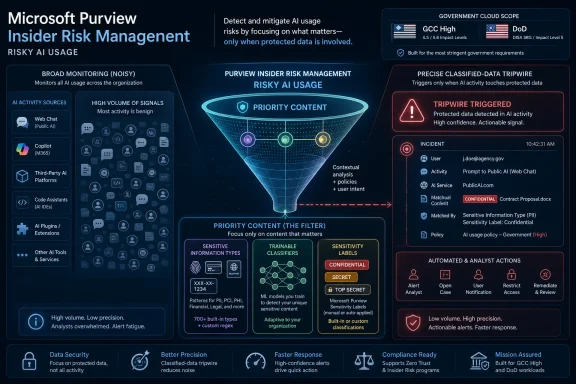
Microsoft is adding priority-content filtering to the Microsoft Purview Insider Risk Management Risky AI usage policy template in August 2026 for GCC, GCC High, and DoD tenants, letting administrators alert only when AI activity involves selected sensitive information types, trainable classifiers, or sensitivity labels. The change, listed as Microsoft 365 Roadmap ID 528978 and updated on July 6, is small in UI terms but large in operating model. It turns risky AI monitoring from a broad behavioral net into something closer to a classified-data tripwire. For government and regulated Microsoft 365 customers, that is the difference between “AI usage happened” and “AI usage touched the stuff we actually care about.”
The headline feature is straightforward: the Risky AI usage template in Purview Insider Risk Management will support priority content. In practice, that means an organization can define which categories of content matter most — sensitive information types, trainable classifiers, and sensitivity labels — and then receive alerts only when risky AI activity intersects with those categories.
That sounds like a filter, and technically it is. But in the current enterprise AI moment, filters are governance architecture. Security teams are already drowning in telemetry from browsers, Copilot experiences, third-party AI services, endpoint DLP, audit logs, and SaaS connectors. A new AI alert that merely says “someone did something risky with AI” is not especially useful unless it can tell the investigator whether the activity involved crown-jewel data.
Microsoft’s own documentation frames Insider Risk Management as a system that correlates signals to detect malicious or inadvertent insider risks such as data leakage, IP theft, and security violations. The new roadmap item brings that same philosophy into the AI layer: risk is not just the behavior, and it is not just the content. It is the combination.
The timing matters. The feature is marked “in development,” targeted for general availability in August 2026, and scoped to U.S. government clouds: GCC, GCC High, and DoD. That rollout pattern says something about where Microsoft thinks the pressure is coming from. The commercial Copilot market has the adoption story; government and defense environments have the classification, oversight, and auditability problem.
The more durable question is what kind of information is being introduced into, retrieved by, or transformed through AI systems. A prompt containing a meeting agenda is not the same risk as a prompt containing export-controlled technical data, source code, merger documents, investigative records, health information, or personnel files. The activity may look similar in a log; the consequence is not.
That is why Microsoft’s choice of supported priority-content mechanisms is notable. Sensitive information types are the pattern-matching workhorses of Purview, used to identify things like financial identifiers, government IDs, medical terms, and other regulated data patterns. Sensitivity labels carry the organization’s own classification intent, such as Confidential, Highly Confidential, or Secret. Trainable classifiers extend the model to content categories that are harder to identify with simple patterns, such as source code, legal material, contracts, or organization-specific document types.
By allowing those signals to constrain Risky AI usage alerts, Microsoft is effectively telling customers that AI monitoring is only as good as the information architecture beneath it. If your sensitivity labels are chaotic, if your sensitive information types are noisy, or if your trainable classifiers are untested, the new policy option will faithfully inherit that mess. Purview can enforce the map, but it cannot invent a mature classification program out of thin air.
This is the quiet catch in almost every Microsoft Purview announcement tied to AI. The company can add Copilot controls, browser DLP, audit events, activity explorer views, and Insider Risk templates. But the customer still has to decide what data matters, where it lives, who owns it, and how confidently it can be identified.
A large organization can have thousands or millions of AI interactions. Some will be harmless. Some will be sloppy. Some will be genuinely dangerous. The security team’s problem is not merely detecting that an employee used AI; it is deciding which interaction deserves human attention before the alert queue becomes performance art.
Priority content gives the Risky AI template a sharper edge. An organization can tell Purview, in effect: do not wake us up for every questionable AI action; wake us up when the action involves data that matches our priority content definitions. That could be a sensitivity label applied to a controlled project folder, a sensitive information type for regulated identifiers, or a trainable classifier built to recognize proprietary engineering documents.
This is especially relevant for Insider Risk Management because IRM is not a generic blocking tool. It is an investigation and risk-scoring system, built around policies, indicators, alerts, cases, and analyst workflows. Microsoft emphasizes privacy-by-design controls such as pseudonymization by default, role-based access controls, and audit logs. That architecture assumes that alerts are serious enough to justify investigative handling.
If everything is risky, nothing is. Priority content is Microsoft’s attempt to keep the Risky AI template from becoming another dashboard that looks impressive in a demo and unusable after a month in production.
GCC High and DoD tenants, in particular, are built for organizations handling sensitive government workloads. In those environments, a generic “AI risk” alert is rarely enough. Investigators need to know whether the activity touched controlled unclassified information, mission data, export-controlled material, legal discovery content, personnel data, or other records governed by agency policy.
The feature also fits a broader Microsoft pattern: bring AI capability into regulated environments, then layer Purview controls around it to make adoption politically and operationally viable. Microsoft has spent the past two years positioning Purview as the governance spine for Copilot and generative AI in Microsoft 365. That strategy is not just about compliance checkboxes. It is about reassuring customers that Microsoft can sell AI without forcing security teams to abandon familiar classification, DLP, audit, and insider-risk concepts.
For WindowsForum readers who live in endpoint and identity trenches, this is the cloud-side version of a familiar lesson. New technology arrives as a productivity feature; the real deployment begins when admins can scope it, log it, tune it, and explain it to risk owners. AI is no different, except the blast radius includes language, context, and data synthesis rather than only files and network paths.
The addition of AI signals makes the privacy tension sharper. AI prompts can be unusually revealing. They may contain not just data but intent: what a user is trying to summarize, rewrite, translate, compare, extract, or hide. An investigator reviewing a risky AI interaction may be looking at the intersection of work product, private phrasing, and sensitive business context.
Priority-content filtering can help here by reducing unnecessary review. If a policy is configured to alert only when selected priority content is involved, fewer benign interactions should become cases. That is a privacy improvement if the alternative is broad surveillance of AI usage. It is also an operational improvement because analysts spend less time adjudicating low-value events.
But the privacy story depends on governance discipline. Pseudonymization is useful only if de-anonymization is controlled. Role-based access is meaningful only if roles are tightly assigned. Audit logs deter abuse only if someone reviews them. Microsoft provides the mechanisms, but an organization’s internal process determines whether Insider Risk Management feels like a safety system or workplace surveillance with nicer branding.
This is where customers should resist treating the new feature as a simple enablement toggle. The question is not just “which sensitive info types should trigger AI alerts?” It is also “who is allowed to see the alert, who can unmask the user, what constitutes escalation, and how do we document proportionality?”
A well-run tenant can use this update to make AI monitoring substantially more precise. A poorly classified tenant may find that the feature exposes the gaps it hoped AI governance would paper over. If everything is labeled Confidential, priority content becomes a giant bucket. If nothing is labeled, the filter misses the point. If sensitive information types are too broad, alerts become noisy; if they are too narrow, risky behavior slips through.
Trainable classifiers are particularly powerful and particularly easy to misunderstand. Microsoft describes them as machine-learning-based classifiers trained to recognize content by examples rather than only fixed patterns. That makes them attractive for intellectual property, contracts, source code, and other content categories where regular expressions are not enough. It also means they require validation and ongoing tuning, not blind faith.
The customers who benefit most in August 2026 will be the ones that use the intervening time to audit their classification estate. Which labels are actually applied? Which labels correspond to real handling requirements? Which sensitive information types produce false positives? Which business units own the trainable classifiers? Which AI interactions should become Insider Risk events, and which should remain in aggregate reporting?
Microsoft is giving customers a sharper knife. It is not promising that the customer has a cutting board.
Risky AI usage is a fertile source of ambiguous signals. A developer may paste code into an AI tool to debug an error. A lawyer may summarize a draft agreement. A human resources manager may ask Copilot to rewrite a sensitive communication. A researcher may use AI to extract themes from a controlled document. Some of those workflows may be approved, some may be prohibited, and some may be acceptable only in sanctioned tools.
Priority content does not solve policy ambiguity, but it does help locate the highest-value ambiguity. If an interaction involves public marketing copy, it may not deserve an insider-risk alert. If it involves a sensitivity label reserved for restricted investigations, it probably does. The policy moves the organization closer to a risk-based model rather than a moral panic model around AI.
That matters because over-alerting can backfire. Users learn to ignore warnings. Analysts learn to close alerts mechanically. Managers start seeing the security team as an adoption blocker. The credibility of AI governance depends on being able to say, with evidence, that controls are aimed at real data risk rather than reflexive fear of new tools.
Microsoft’s update is best understood as an admission that broad AI monitoring is not enough. The enterprise does not need another stream of events. It needs defensible prioritization.
Purview’s AI story is therefore partly a governance catch-up story. Microsoft’s security blog and Learn content have repeatedly pointed customers toward sensitivity labels, endpoint DLP, DSPM for AI, activity explorer, audit logs, and Insider Risk Management as pieces of the same control plane. The company is not saying AI can be secured by one product switch. It is saying AI forces customers to make use of the controls many already licensed but never fully operationalized.
Priority-content support in Risky AI usage sits neatly in that pattern. It assumes that the organization has already expressed data value through labels and classifiers. It then uses those expressions to decide when AI behavior should become an insider-risk alert. That is elegant when the underlying program is mature and unforgiving when it is not.
There is also a competitive angle. Microsoft wants enterprises to believe that using Microsoft 365 Copilot and Microsoft-governed AI experiences is safer than letting employees roam uncontrolled across consumer AI sites. Purview is the proof point. The more Microsoft can connect AI activity to existing compliance primitives, the stronger its argument that AI belongs inside the Microsoft security boundary.
Still, customers should be clear-eyed. Purview controls do not eliminate the need for access reviews, data minimization, endpoint hardening, browser controls, legal policy, employee training, and incident response planning. AI governance is not a module; it is the place where several unfinished governance projects collide.
Start with content categories, not tools. Which types of data create the highest harm if mishandled through AI? That answer should come from legal, compliance, security, records management, HR, engineering, and business data owners. If the security team invents the list alone, it will either miss business reality or create a policy too broad to operate.
Then map those categories to Purview controls. Some will align with built-in sensitive information types. Some will require custom SITs or exact data match approaches. Some will be better represented by sensitivity labels. Some may need trainable classifiers. The point is to make the priority-content selection reflect the organization’s risk model rather than the arbitrary defaults most convenient to click.
Teams should also decide what “alert only when priority content is involved” means for parallel controls. A risky AI interaction that does not involve priority content may still belong in reporting, audit, or analytics. It may still inform training. It may still indicate a need for DLP tuning. Not every signal needs to become an Insider Risk alert, but not every non-alert should disappear from governance visibility.
Finally, organizations should rehearse the response path. When an alert fires, who reviews it? What evidence is visible? When is a user pseudonym unmasked? When does the case move to HR, legal, or eDiscovery? How does the organization distinguish negligence from malicious intent? The technology can identify a risky intersection; the institution must decide what fairness looks like afterward.
 Microsoft Narrows the AI Alarm Bell
The headline feature is straightforward: the Risky AI usage template in Purview Insider Risk Management will support priority content. In practice, that means an organization can define which categories of content matter most — sensitive information types, trainable classifiers, and sensitivity labels — and then receive alerts only when risky AI activity intersects with those categories.That sounds like a filter, and technically it is. But in the current enterprise AI moment, filters are governance architecture. Security teams are already drowning in telemetry from browsers, Copilot experiences, third-party AI services, endpoint DLP, audit logs, and SaaS connectors. A new AI alert that merely says “someone did something risky with AI” is not especially useful unless it can tell the investigator whether the activity involved crown-jewel data.
Microsoft’s own documentation frames Insider Risk Management as a system that correlates signals to detect malicious or inadvertent insider risks such as data leakage, IP theft, and security violations. The new roadmap item brings that same philosophy into the AI layer: risk is not just the behavior, and it is not just the content. It is the combination.
The timing matters. The feature is marked “in development,” targeted for general availability in August 2026, and scoped to U.S. government clouds: GCC, GCC High, and DoD. That rollout pattern says something about where Microsoft thinks the pressure is coming from. The commercial Copilot market has the adoption story; government and defense environments have the classification, oversight, and auditability problem.
AI Governance Is Becoming a Data Classification Problem
The first wave of enterprise AI governance often treated AI as a destination. Can users reach ChatGPT? Can they paste into a browser? Can Copilot access this SharePoint site? Can an agent call that connector? Those are valid questions, but they are increasingly too blunt for the way AI is actually used inside large organizations.The more durable question is what kind of information is being introduced into, retrieved by, or transformed through AI systems. A prompt containing a meeting agenda is not the same risk as a prompt containing export-controlled technical data, source code, merger documents, investigative records, health information, or personnel files. The activity may look similar in a log; the consequence is not.
That is why Microsoft’s choice of supported priority-content mechanisms is notable. Sensitive information types are the pattern-matching workhorses of Purview, used to identify things like financial identifiers, government IDs, medical terms, and other regulated data patterns. Sensitivity labels carry the organization’s own classification intent, such as Confidential, Highly Confidential, or Secret. Trainable classifiers extend the model to content categories that are harder to identify with simple patterns, such as source code, legal material, contracts, or organization-specific document types.
By allowing those signals to constrain Risky AI usage alerts, Microsoft is effectively telling customers that AI monitoring is only as good as the information architecture beneath it. If your sensitivity labels are chaotic, if your sensitive information types are noisy, or if your trainable classifiers are untested, the new policy option will faithfully inherit that mess. Purview can enforce the map, but it cannot invent a mature classification program out of thin air.
This is the quiet catch in almost every Microsoft Purview announcement tied to AI. The company can add Copilot controls, browser DLP, audit events, activity explorer views, and Insider Risk templates. But the customer still has to decide what data matters, where it lives, who owns it, and how confidently it can be identified.
The Risky AI Template Gets a More Useful Target
Microsoft’s Risky AI usage policy template is designed to detect risky use of generative AI and Copilot-style tools. Microsoft Learn describes Purview’s AI protections as covering prompts and responses, including sensitive information in AI interactions, risky patterns, prompt injection concerns, and signals that can feed investigation workflows. That is the right scope, but it also creates a classic signal-to-noise problem.A large organization can have thousands or millions of AI interactions. Some will be harmless. Some will be sloppy. Some will be genuinely dangerous. The security team’s problem is not merely detecting that an employee used AI; it is deciding which interaction deserves human attention before the alert queue becomes performance art.
Priority content gives the Risky AI template a sharper edge. An organization can tell Purview, in effect: do not wake us up for every questionable AI action; wake us up when the action involves data that matches our priority content definitions. That could be a sensitivity label applied to a controlled project folder, a sensitive information type for regulated identifiers, or a trainable classifier built to recognize proprietary engineering documents.
This is especially relevant for Insider Risk Management because IRM is not a generic blocking tool. It is an investigation and risk-scoring system, built around policies, indicators, alerts, cases, and analyst workflows. Microsoft emphasizes privacy-by-design controls such as pseudonymization by default, role-based access controls, and audit logs. That architecture assumes that alerts are serious enough to justify investigative handling.
If everything is risky, nothing is. Priority content is Microsoft’s attempt to keep the Risky AI template from becoming another dashboard that looks impressive in a demo and unusable after a month in production.
Government Clouds Get the First Shot Because the Stakes Are Different
The roadmap entry lists GCC, GCC High, and DoD rather than the worldwide commercial cloud. That scope is not incidental. Government cloud customers face the same AI productivity pressure as everyone else, but their tolerance for uncontrolled data movement is lower, their audit obligations are heavier, and their procurement timelines are less forgiving.GCC High and DoD tenants, in particular, are built for organizations handling sensitive government workloads. In those environments, a generic “AI risk” alert is rarely enough. Investigators need to know whether the activity touched controlled unclassified information, mission data, export-controlled material, legal discovery content, personnel data, or other records governed by agency policy.
The feature also fits a broader Microsoft pattern: bring AI capability into regulated environments, then layer Purview controls around it to make adoption politically and operationally viable. Microsoft has spent the past two years positioning Purview as the governance spine for Copilot and generative AI in Microsoft 365. That strategy is not just about compliance checkboxes. It is about reassuring customers that Microsoft can sell AI without forcing security teams to abandon familiar classification, DLP, audit, and insider-risk concepts.
For WindowsForum readers who live in endpoint and identity trenches, this is the cloud-side version of a familiar lesson. New technology arrives as a productivity feature; the real deployment begins when admins can scope it, log it, tune it, and explain it to risk owners. AI is no different, except the blast radius includes language, context, and data synthesis rather than only files and network paths.
The Privacy Story Is Necessary, but Not Sufficient
Microsoft’s roadmap language repeats the standard Insider Risk Management privacy posture: users are pseudonymized by default, role-based access controls and audit logs are in place, and customers configure policies based on internal governance requirements. That language is not filler. Insider-risk tooling sits in one of the most sensitive corners of enterprise security because it observes employees, contractors, and sometimes executives.The addition of AI signals makes the privacy tension sharper. AI prompts can be unusually revealing. They may contain not just data but intent: what a user is trying to summarize, rewrite, translate, compare, extract, or hide. An investigator reviewing a risky AI interaction may be looking at the intersection of work product, private phrasing, and sensitive business context.
Priority-content filtering can help here by reducing unnecessary review. If a policy is configured to alert only when selected priority content is involved, fewer benign interactions should become cases. That is a privacy improvement if the alternative is broad surveillance of AI usage. It is also an operational improvement because analysts spend less time adjudicating low-value events.
But the privacy story depends on governance discipline. Pseudonymization is useful only if de-anonymization is controlled. Role-based access is meaningful only if roles are tightly assigned. Audit logs deter abuse only if someone reviews them. Microsoft provides the mechanisms, but an organization’s internal process determines whether Insider Risk Management feels like a safety system or workplace surveillance with nicer branding.
This is where customers should resist treating the new feature as a simple enablement toggle. The question is not just “which sensitive info types should trigger AI alerts?” It is also “who is allowed to see the alert, who can unmask the user, what constitutes escalation, and how do we document proportionality?”
The Feature Rewards Tenants That Already Did the Hard Work
There is a temptation to read Microsoft 365 roadmap items as if features arrive self-contained. They rarely do. This one is explicitly dependent on prior Purview hygiene: sensitivity labels must exist and be published; sensitive information types must be selected or customized; trainable classifiers must be understood, tested, and trusted.A well-run tenant can use this update to make AI monitoring substantially more precise. A poorly classified tenant may find that the feature exposes the gaps it hoped AI governance would paper over. If everything is labeled Confidential, priority content becomes a giant bucket. If nothing is labeled, the filter misses the point. If sensitive information types are too broad, alerts become noisy; if they are too narrow, risky behavior slips through.
Trainable classifiers are particularly powerful and particularly easy to misunderstand. Microsoft describes them as machine-learning-based classifiers trained to recognize content by examples rather than only fixed patterns. That makes them attractive for intellectual property, contracts, source code, and other content categories where regular expressions are not enough. It also means they require validation and ongoing tuning, not blind faith.
The customers who benefit most in August 2026 will be the ones that use the intervening time to audit their classification estate. Which labels are actually applied? Which labels correspond to real handling requirements? Which sensitive information types produce false positives? Which business units own the trainable classifiers? Which AI interactions should become Insider Risk events, and which should remain in aggregate reporting?
Microsoft is giving customers a sharper knife. It is not promising that the customer has a cutting board.
The Alert Queue Is the Real Battleground
Every security product eventually meets the same enemy: human attention. Insider Risk Management is no exception. The value of the new priority-content support will be measured less by whether it can technically generate alerts and more by whether it helps teams make better decisions with fewer interruptions.Risky AI usage is a fertile source of ambiguous signals. A developer may paste code into an AI tool to debug an error. A lawyer may summarize a draft agreement. A human resources manager may ask Copilot to rewrite a sensitive communication. A researcher may use AI to extract themes from a controlled document. Some of those workflows may be approved, some may be prohibited, and some may be acceptable only in sanctioned tools.
Priority content does not solve policy ambiguity, but it does help locate the highest-value ambiguity. If an interaction involves public marketing copy, it may not deserve an insider-risk alert. If it involves a sensitivity label reserved for restricted investigations, it probably does. The policy moves the organization closer to a risk-based model rather than a moral panic model around AI.
That matters because over-alerting can backfire. Users learn to ignore warnings. Analysts learn to close alerts mechanically. Managers start seeing the security team as an adoption blocker. The credibility of AI governance depends on being able to say, with evidence, that controls are aimed at real data risk rather than reflexive fear of new tools.
Microsoft’s update is best understood as an admission that broad AI monitoring is not enough. The enterprise does not need another stream of events. It needs defensible prioritization.
Copilot Made the Old Data Sprawl Impossible to Ignore
Microsoft’s broader AI push has exposed an uncomfortable truth: many organizations did not have a clean handle on their Microsoft 365 data before AI arrived. Overshared SharePoint sites, stale Teams, permissive OneDrive links, inconsistent labels, and neglected retention practices were already security problems. Copilot and other AI tools simply made those problems easier to surface and faster to exploit.Purview’s AI story is therefore partly a governance catch-up story. Microsoft’s security blog and Learn content have repeatedly pointed customers toward sensitivity labels, endpoint DLP, DSPM for AI, activity explorer, audit logs, and Insider Risk Management as pieces of the same control plane. The company is not saying AI can be secured by one product switch. It is saying AI forces customers to make use of the controls many already licensed but never fully operationalized.
Priority-content support in Risky AI usage sits neatly in that pattern. It assumes that the organization has already expressed data value through labels and classifiers. It then uses those expressions to decide when AI behavior should become an insider-risk alert. That is elegant when the underlying program is mature and unforgiving when it is not.
There is also a competitive angle. Microsoft wants enterprises to believe that using Microsoft 365 Copilot and Microsoft-governed AI experiences is safer than letting employees roam uncontrolled across consumer AI sites. Purview is the proof point. The more Microsoft can connect AI activity to existing compliance primitives, the stronger its argument that AI belongs inside the Microsoft security boundary.
Still, customers should be clear-eyed. Purview controls do not eliminate the need for access reviews, data minimization, endpoint hardening, browser controls, legal policy, employee training, and incident response planning. AI governance is not a module; it is the place where several unfinished governance projects collide.
Security Teams Should Prepare the Policy Before the Feature Arrives
The August 2026 target gives administrators time to prepare, and they should use it. Waiting for the toggle to appear in the Purview portal is the least useful version of readiness. The harder work is deciding what the toggle should mean.Start with content categories, not tools. Which types of data create the highest harm if mishandled through AI? That answer should come from legal, compliance, security, records management, HR, engineering, and business data owners. If the security team invents the list alone, it will either miss business reality or create a policy too broad to operate.
Then map those categories to Purview controls. Some will align with built-in sensitive information types. Some will require custom SITs or exact data match approaches. Some will be better represented by sensitivity labels. Some may need trainable classifiers. The point is to make the priority-content selection reflect the organization’s risk model rather than the arbitrary defaults most convenient to click.
Teams should also decide what “alert only when priority content is involved” means for parallel controls. A risky AI interaction that does not involve priority content may still belong in reporting, audit, or analytics. It may still inform training. It may still indicate a need for DLP tuning. Not every signal needs to become an Insider Risk alert, but not every non-alert should disappear from governance visibility.
Finally, organizations should rehearse the response path. When an alert fires, who reviews it? What evidence is visible? When is a user pseudonym unmasked? When does the case move to HR, legal, or eDiscovery? How does the organization distinguish negligence from malicious intent? The technology can identify a risky intersection; the institution must decide what fairness looks like afterward.
The August Release Is a Governance Deadline in Disguise
The concrete change in Roadmap ID 528978 is narrow, but the preparation list is not. Customers in GCC, GCC High, and DoD should treat the August 2026 general availability date as a forcing function for AI data governance rather than a routine Purview enhancement.- Organizations will be able to scope Risky AI usage alerts to selected priority content instead of alerting on every matching AI activity.
- Priority content will include sensitive information types, trainable classifiers, and sensitivity labels, which makes classification hygiene a prerequisite for useful alerting.
- The initial roadmap scope is government cloud, including GCC, GCC High, and DoD, with general availability targeted for August 2026.
- The feature should reduce alert noise only if customers resist overbroad labels, noisy sensitive information types, and unvalidated classifiers.
- Privacy controls such as pseudonymization, role-based access, and audit logs remain central because AI prompts can expose intent as well as data.
- The best deployments will define escalation rules, ownership, and evidence handling before the new policy option appears in the portal.
References
- Primary source: Microsoft 365 Roadmap
Published: 2026-07-06T23:00:50.6928566Z
Microsoft 365 Roadmap | Microsoft 365
The Microsoft 365 Roadmap lists updates that are currently planned for applicable subscribers. Check here for more information on the status of new features and updates.www.microsoft.com
- Official source: directionsonmicrosoft.com
Purview Insider Risk Management Roadmap - Directions on Microsoft
Purview Insider Risk Management helps ensure employee activity remains compliant with existing regulations and policies. Insider Risk Management reports on “signals” from potentially risky activities such as insider trading or harmful content. Insider Risk Management features are available to...www.directionsonmicrosoft.com - Official source: microsoft.github.io
Deploy Risky AI and Risky Agents Policies | Microsoft Zero Trust
Implementation Effort: Low – One-click deployment available from DSPM for AI, or manual configuration through Insider Risk Management.microsoft.github.io - Official source: techcommunity.microsoft.com
- Related coverage: seppala365.cloud
Fine-tuning Microsoft Purview Insider Risk Management – part 3 – Seppala365.cloud
This article is part of a series discussing my experiences fine-tuning IRM policies. To start from the beginning, check out part 1. Part 1 The importance of accurate risk scoring Defining excl…seppala365.cloud - Official source: cdn-dynmedia-1.microsoft.com
</rdf:Alt> </dc:title> <dc:creator><rdf:Seq><rdf:li>Microsoft Office User
PDF documentcdn-dynmedia-1.microsoft.com
- Related coverage: adeliarisk.com
- Official source: cdn-dynmedia-1htbprolmicrosofthtbprolcom-s.evpn.library.nenu.edu.cn
Loading…
cdn-dynmedia-1htbprolmicrosofthtbprolcom-s.evpn.library.nenu.edu.cn