

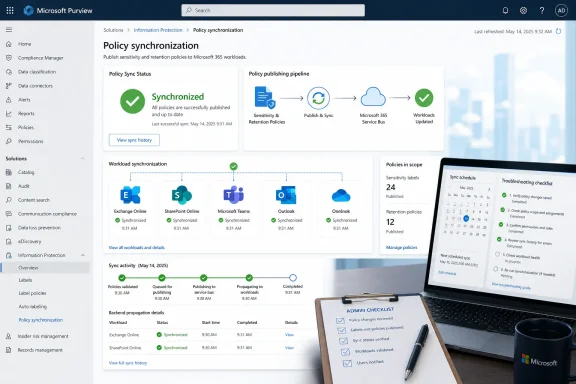
Microsoft launched Roadmap ID 558687 for Microsoft Purview in April 2026, adding policy sync status for Microsoft 365 sensitivity label publishing policies in the Purview web portal for worldwide standard multi-tenant customers after a March 2026 preview. The feature sounds small because it is mostly a visibility change, not a new enforcement engine. But for administrators who have lived through label rollouts by stopwatch, PowerShell, and hope, it fixes one of Purview’s most irritating operational gaps. Microsoft is turning a background propagation mystery into an observable state, and that matters more than the modest roadmap wording suggests.
As detailed in Microsoft’s Microsoft 365 Roadmap entry and echoed in Message Center mirrors such as M365 Admin and Merill Fernando’s Microsoft 365 Message Center archive, admins can now see whether sensitivity label publishing policy changes have fully synchronized across Microsoft 365 workloads. That is not the same as saying every client has refreshed, every user has restarted Office, or every edge case has disappeared. It does mean the service-side portion of the label publishing pipeline now has an answer beyond “wait up to 24 hours.”
Sensitivity labels are one of those Microsoft 365 features whose simplicity at the user interface hides a messy amount of distributed machinery. A user sees a drop-down in Word, Outlook, Teams, or SharePoint and chooses “Confidential.” Behind that drop-down sits Purview configuration, label priority, policy priority, identity scoping, client support, service integration, and a synchronization process that must reach multiple Microsoft 365 workloads before the experience becomes predictable.
Microsoft’s own Learn documentation has long warned administrators to allow up to 24 hours for label and label policy changes to replicate throughout an organization. In some cases, Microsoft says changes can appear faster, particularly in web apps; in other cases, group membership changes, service timing cycles, and network realities can push the wait longer. That guidance is practical, but it has always been unsatisfying because it gives admins a time window rather than a system state.
The new Purview portal sync status narrows that gap. Instead of asking whether a policy change should have propagated by now, admins can see whether Microsoft 365 believes the publishing policy has completed its service-side distribution. That is a different operational posture. The admin is no longer relying only on a test user, a client refresh, and a calendar reminder.
This is especially useful because sensitivity label publishing policies are not decorative. They decide which users and groups can see which labels, what defaults apply, whether mandatory labeling is enforced, and how label policy conflicts resolve. When a policy update is wrong or incomplete, the failure often appears to users as missing labels, stale defaults, inconsistent Outlook behavior, or a support ticket that begins with the most dangerous phrase in enterprise IT: “It works for some people.”
The real problem was that Purview made administrators reason about that delay indirectly. If a label was not appearing, was the policy still syncing? Was the user outside the policy scope? Had group membership not updated? Was the client caching old data? Was the label order wrong? Was the workload not yet honoring the change? Or had the admin simply forgotten that one of Microsoft’s “up to 24 hours” notes actually means “do not troubleshoot too aggressively before tomorrow”?
That uncertainty is expensive. It creates false escalations to Microsoft support, burns time in change windows, and undermines trust in information protection programs. A compliance team may announce a new label model, but desktop engineering and messaging administrators have to absorb the blast radius when labels arrive inconsistently across the tenant.
The sync status indicator gives admins a first diagnostic branch. If the policy is still syncing, the answer is patience and monitoring. If the policy is synced but users still do not see the expected labels, the troubleshooting shifts toward scope, priority, licensing, client refresh, Office version, workload-specific behavior, or identity membership. That sounds mundane, but good operations are often built from mundane distinctions.
That makes publishing policy synchronization a higher-stakes operation than it was a few years ago. If a label is merely informational, a delayed rollout is annoying. If a label controls encryption or default behavior for documents and email, a delayed rollout can block access, expose content under weaker defaults, confuse users, or derail a migration plan.
Microsoft’s Learn guidance makes the dependency chain explicit: sensitivity labels must be published through label policies before users and services can select them. Those policies can target users and groups, carry different settings for different populations, and resolve conflicts through priority. A label taxonomy may look like governance work, but the publishing layer is where that taxonomy becomes production behavior.
This is why visibility belongs in the product rather than in tribal knowledge. A large tenant may have legal, finance, HR, engineering, executive, and regional label policies layered across dynamic and static groups. The question “has the policy synced?” is not a junior-admin curiosity. It is the difference between a controlled rollout and a tenant-wide guessing exercise.
Policy sync status is part of Microsoft’s ongoing attempt to make Purview feel like a real control plane rather than a glossy front end over opaque backend jobs. The roadmap entry is specific to Microsoft 365 label publishing policies, but Microsoft had already been moving in this direction with broader policy sync status experiences in Purview for areas such as DLP, Information Protection, Data Lifecycle Management, Records Management, Information Barriers, and related policy pages. The new item sharpens that visibility for the label publishing workflow itself.
That distinction matters. Broad policy sync status is useful, but sensitivity label publishing has its own failure modes and its own audience. Information protection admins do not just need to know that a generic Purview policy distributed somewhere; they need to know that the labels users rely on in Microsoft 365 are ready where they are supposed to be ready.
Microsoft’s challenge is that administrators increasingly judge cloud management portals by the standards of observability platforms. They expect status, timestamps, target health, error states, and drill-downs. A simple sync state is not full observability, but it is a step away from the black box.
Before this change, admins had to plan around uncertainty. They could publish labels, wait, test a representative group, and hope that the rest of the tenant was in roughly the same state. If users complained on day one, administrators had to determine whether they were seeing genuine misconfiguration or propagation lag.
With sync status in the Purview portal, rollout owners can make more defensible decisions. They can wait until the policy reports synchronized before sending final communications. They can avoid declaring a configuration broken while the service is still distributing it. They can document that the policy reached the service side before moving to client-side troubleshooting.
That does not remove the need for staged deployment. Microsoft still recommends testing labels and policies with limited users before broad publication, especially for labels that affect groups, sites, encryption, or default behavior. But the new status indicator makes staged deployment less theatrical. Admins can observe each step instead of treating time as the only source of truth.
Policy sync status gives first-line and second-line teams a cleaner runbook. If the policy change is not synced, the ticket can be held or routed as a deployment-state issue. If it is synced, the team can stop blaming backend propagation and start isolating the user, group, app, workload, or cache layer. That is a material improvement in mean time to clarity, even if it is not always a reduction in mean time to resolution.
It also gives administrators better language for business stakeholders. “Microsoft says wait 24 hours” is technically true but emotionally weak. “The publishing policy has not completed synchronization yet” is better. “The policy is synchronized, so we are investigating client refresh and group scope” is better still.
For regulated organizations, the evidence trail may matter as much as the operational convenience. If a label policy was changed as part of a compliance control, being able to confirm synchronization from the portal gives the administrator a more concrete checkpoint. It is not an audit report by itself, but it is a more credible operational marker than “we published it yesterday.”
Microsoft’s documentation remains clear that label and label policy changes can take time across apps and services. The new portal status should therefore be treated as service-side signal, not as user-side proof. It confirms that an important part of the pipeline is complete; it does not replace acceptance testing.
There is also the question of detail. A simple status indicator is useful, but admins will quickly want more: which workloads have synced, when the last successful sync happened, which target failed, whether a retry is pending, and whether there is an error that requires action. Microsoft’s roadmap wording promises clear confirmation that policy changes have been fully applied across Microsoft 365 workloads, but the practical value will depend on how much diagnostic depth the portal exposes.
If the indicator becomes merely a green check with no history, it will still help. If it evolves into workload-aware sync telemetry, it could become genuinely powerful. Purview’s policy world is now broad enough that administrators need more than confidence; they need traceability.
Purview has often felt stronger in policy ambition than in operational ergonomics. Microsoft has poured enormous effort into information protection, data lifecycle management, eDiscovery, audit, insider risk, compliance management, and now AI-era data security posture. But the daily experience for admins can still involve long waits, overlapping portals, documentation caveats, and the occasional sense that the product team assumes propagation is someone else’s problem.
This roadmap item is a small act of respect for administrators. It acknowledges that policy distribution is not a footnote; it is part of the product experience. When Microsoft sells Purview as the place to govern sensitive data across Microsoft 365, Azure, SaaS, endpoints, and AI workflows, it must also make the plumbing visible enough for real organizations to trust.
That is especially true as Copilot and other AI features increase the premium on correct labeling. A mislabeled or unlabeled document was already a compliance risk. In an AI-assisted workplace, labels increasingly influence what systems can discover, summarize, protect, or restrict. The synchronization of label policy is no longer just a desktop-app readiness issue. It is part of the data security posture.
Admins should treat the new sync status as a checkpoint in their label governance process, not as a substitute for it. It belongs in rollout plans, change records, help desk runbooks, and post-change validation. It also belongs in the mental model of anyone who has ever edited a label policy and wondered whether Microsoft 365 had heard them.
As detailed in Microsoft’s Microsoft 365 Roadmap entry and echoed in Message Center mirrors such as M365 Admin and Merill Fernando’s Microsoft 365 Message Center archive, admins can now see whether sensitivity label publishing policy changes have fully synchronized across Microsoft 365 workloads. That is not the same as saying every client has refreshed, every user has restarted Office, or every edge case has disappeared. It does mean the service-side portion of the label publishing pipeline now has an answer beyond “wait up to 24 hours.”
 Microsoft Turns a Waiting Game Into an Admin Signal
Sensitivity labels are one of those Microsoft 365 features whose simplicity at the user interface hides a messy amount of distributed machinery. A user sees a drop-down in Word, Outlook, Teams, or SharePoint and chooses “Confidential.” Behind that drop-down sits Purview configuration, label priority, policy priority, identity scoping, client support, service integration, and a synchronization process that must reach multiple Microsoft 365 workloads before the experience becomes predictable.Microsoft’s own Learn documentation has long warned administrators to allow up to 24 hours for label and label policy changes to replicate throughout an organization. In some cases, Microsoft says changes can appear faster, particularly in web apps; in other cases, group membership changes, service timing cycles, and network realities can push the wait longer. That guidance is practical, but it has always been unsatisfying because it gives admins a time window rather than a system state.
The new Purview portal sync status narrows that gap. Instead of asking whether a policy change should have propagated by now, admins can see whether Microsoft 365 believes the publishing policy has completed its service-side distribution. That is a different operational posture. The admin is no longer relying only on a test user, a client refresh, and a calendar reminder.
This is especially useful because sensitivity label publishing policies are not decorative. They decide which users and groups can see which labels, what defaults apply, whether mandatory labeling is enforced, and how label policy conflicts resolve. When a policy update is wrong or incomplete, the failure often appears to users as missing labels, stale defaults, inconsistent Outlook behavior, or a support ticket that begins with the most dangerous phrase in enterprise IT: “It works for some people.”
The Old Purview Problem Was Never Just Propagation Delay
Microsoft has not eliminated propagation delay, and it would be a mistake to read the roadmap item that way. Distributed cloud policy systems take time because they are distributed cloud policy systems. Exchange, SharePoint, OneDrive, Teams, Office clients, web apps, mobile apps, and identity groups do not all behave like a single registry key on a single Windows machine.The real problem was that Purview made administrators reason about that delay indirectly. If a label was not appearing, was the policy still syncing? Was the user outside the policy scope? Had group membership not updated? Was the client caching old data? Was the label order wrong? Was the workload not yet honoring the change? Or had the admin simply forgotten that one of Microsoft’s “up to 24 hours” notes actually means “do not troubleshoot too aggressively before tomorrow”?
That uncertainty is expensive. It creates false escalations to Microsoft support, burns time in change windows, and undermines trust in information protection programs. A compliance team may announce a new label model, but desktop engineering and messaging administrators have to absorb the blast radius when labels arrive inconsistently across the tenant.
The sync status indicator gives admins a first diagnostic branch. If the policy is still syncing, the answer is patience and monitoring. If the policy is synced but users still do not see the expected labels, the troubleshooting shifts toward scope, priority, licensing, client refresh, Office version, workload-specific behavior, or identity membership. That sounds mundane, but good operations are often built from mundane distinctions.
Sensitivity Labels Have Become Infrastructure, Not Metadata
The timing of this feature is telling. Sensitivity labels began as a classification and protection mechanism for files and emails, but Microsoft has steadily expanded their role across Microsoft 365. Labels can influence encryption, visual markings, content handling, meetings, groups, sites, Teams, Power BI, and data loss prevention scenarios. In Microsoft’s current Purview story, labels are not just tags; they are policy handles that other systems interpret.That makes publishing policy synchronization a higher-stakes operation than it was a few years ago. If a label is merely informational, a delayed rollout is annoying. If a label controls encryption or default behavior for documents and email, a delayed rollout can block access, expose content under weaker defaults, confuse users, or derail a migration plan.
Microsoft’s Learn guidance makes the dependency chain explicit: sensitivity labels must be published through label policies before users and services can select them. Those policies can target users and groups, carry different settings for different populations, and resolve conflicts through priority. A label taxonomy may look like governance work, but the publishing layer is where that taxonomy becomes production behavior.
This is why visibility belongs in the product rather than in tribal knowledge. A large tenant may have legal, finance, HR, engineering, executive, and regional label policies layered across dynamic and static groups. The question “has the policy synced?” is not a junior-admin curiosity. It is the difference between a controlled rollout and a tenant-wide guessing exercise.
The Portal Is Becoming the Control Plane Microsoft Always Promised
Purview has spent years absorbing responsibilities from older Microsoft compliance and security experiences. The branding has changed, the portal has changed, and the old Security & Compliance Center muscle memory has slowly given way to a more consolidated Microsoft Purview portal. Yet admins still often fall back to PowerShell and back-channel diagnostics when the portal cannot answer basic operational questions.Policy sync status is part of Microsoft’s ongoing attempt to make Purview feel like a real control plane rather than a glossy front end over opaque backend jobs. The roadmap entry is specific to Microsoft 365 label publishing policies, but Microsoft had already been moving in this direction with broader policy sync status experiences in Purview for areas such as DLP, Information Protection, Data Lifecycle Management, Records Management, Information Barriers, and related policy pages. The new item sharpens that visibility for the label publishing workflow itself.
That distinction matters. Broad policy sync status is useful, but sensitivity label publishing has its own failure modes and its own audience. Information protection admins do not just need to know that a generic Purview policy distributed somewhere; they need to know that the labels users rely on in Microsoft 365 are ready where they are supposed to be ready.
Microsoft’s challenge is that administrators increasingly judge cloud management portals by the standards of observability platforms. They expect status, timestamps, target health, error states, and drill-downs. A simple sync state is not full observability, but it is a step away from the black box.
The Best Use Case Is the Large Label Rollout Everyone Dreads
The most obvious beneficiary is the organization moving from a pilot label model to a full production deployment. A small pilot can be validated by hand: assign a few users, refresh Office, test in Outlook and Word, check SharePoint, and move on. A large rollout across departments, geographies, and workloads is different. It has communications plans, training windows, help desk scripts, executive visibility, and often a compliance deadline attached.Before this change, admins had to plan around uncertainty. They could publish labels, wait, test a representative group, and hope that the rest of the tenant was in roughly the same state. If users complained on day one, administrators had to determine whether they were seeing genuine misconfiguration or propagation lag.
With sync status in the Purview portal, rollout owners can make more defensible decisions. They can wait until the policy reports synchronized before sending final communications. They can avoid declaring a configuration broken while the service is still distributing it. They can document that the policy reached the service side before moving to client-side troubleshooting.
That does not remove the need for staged deployment. Microsoft still recommends testing labels and policies with limited users before broad publication, especially for labels that affect groups, sites, encryption, or default behavior. But the new status indicator makes staged deployment less theatrical. Admins can observe each step instead of treating time as the only source of truth.
The Feature Also Changes the Support Conversation
A support ticket about missing sensitivity labels usually begins in ambiguity. The user says the label is gone. The help desk asks for screenshots. The admin checks policy scope. Someone asks whether the user is in the right group. Someone else asks whether Outlook on the web behaves differently from the desktop client. Eventually, the team wonders whether Purview has simply not caught up.Policy sync status gives first-line and second-line teams a cleaner runbook. If the policy change is not synced, the ticket can be held or routed as a deployment-state issue. If it is synced, the team can stop blaming backend propagation and start isolating the user, group, app, workload, or cache layer. That is a material improvement in mean time to clarity, even if it is not always a reduction in mean time to resolution.
It also gives administrators better language for business stakeholders. “Microsoft says wait 24 hours” is technically true but emotionally weak. “The publishing policy has not completed synchronization yet” is better. “The policy is synchronized, so we are investigating client refresh and group scope” is better still.
For regulated organizations, the evidence trail may matter as much as the operational convenience. If a label policy was changed as part of a compliance control, being able to confirm synchronization from the portal gives the administrator a more concrete checkpoint. It is not an audit report by itself, but it is a more credible operational marker than “we published it yesterday.”
The Limits Are Where Admins Should Keep Their Eyes Open
There is a danger in overreading any new status indicator. A “synced” publishing policy does not guarantee that every user has the right experience at that exact moment. Office applications cache policy data. Mobile apps may behave differently from desktop apps. Browser sessions may need a refresh. Group membership changes can introduce their own timing. Labels configured for containers such as Teams, Microsoft 365 groups, and SharePoint sites can involve additional dependencies.Microsoft’s documentation remains clear that label and label policy changes can take time across apps and services. The new portal status should therefore be treated as service-side signal, not as user-side proof. It confirms that an important part of the pipeline is complete; it does not replace acceptance testing.
There is also the question of detail. A simple status indicator is useful, but admins will quickly want more: which workloads have synced, when the last successful sync happened, which target failed, whether a retry is pending, and whether there is an error that requires action. Microsoft’s roadmap wording promises clear confirmation that policy changes have been fully applied across Microsoft 365 workloads, but the practical value will depend on how much diagnostic depth the portal exposes.
If the indicator becomes merely a green check with no history, it will still help. If it evolves into workload-aware sync telemetry, it could become genuinely powerful. Purview’s policy world is now broad enough that administrators need more than confidence; they need traceability.
The Competitive Bar Is Not Another Compliance Portal
Microsoft is not competing here only with Google Workspace, Box, or specialist data governance vendors. It is competing with the expectations created by modern cloud operations. Administrators who run Azure, Microsoft Entra, Intune, Defender, and Microsoft 365 know what decent state reporting looks like. They may not always get it, but they know the difference between a control plane that explains itself and one that shrugs.Purview has often felt stronger in policy ambition than in operational ergonomics. Microsoft has poured enormous effort into information protection, data lifecycle management, eDiscovery, audit, insider risk, compliance management, and now AI-era data security posture. But the daily experience for admins can still involve long waits, overlapping portals, documentation caveats, and the occasional sense that the product team assumes propagation is someone else’s problem.
This roadmap item is a small act of respect for administrators. It acknowledges that policy distribution is not a footnote; it is part of the product experience. When Microsoft sells Purview as the place to govern sensitive data across Microsoft 365, Azure, SaaS, endpoints, and AI workflows, it must also make the plumbing visible enough for real organizations to trust.
That is especially true as Copilot and other AI features increase the premium on correct labeling. A mislabeled or unlabeled document was already a compliance risk. In an AI-assisted workplace, labels increasingly influence what systems can discover, summarize, protect, or restrict. The synchronization of label policy is no longer just a desktop-app readiness issue. It is part of the data security posture.
The Admin Win Is Narrow, Practical, and Real
The most important thing about Roadmap ID 558687 is not that it introduces a dazzling new Purview capability. It does not. It introduces a missing operational signal for a feature customers already depend on. In enterprise software, that can be more valuable than another headline feature.Admins should treat the new sync status as a checkpoint in their label governance process, not as a substitute for it. It belongs in rollout plans, change records, help desk runbooks, and post-change validation. It also belongs in the mental model of anyone who has ever edited a label policy and wondered whether Microsoft 365 had heard them.
- Microsoft lists Roadmap ID 558687 as launched, with preview availability in March 2026 and general availability in April 2026 for worldwide standard multi-tenant customers.
- The feature adds policy sync status for Microsoft 365 sensitivity label publishing policies directly in the Purview web portal.
- The status helps administrators distinguish backend policy distribution delay from client, scope, group membership, or workload-specific problems.
- A synchronized policy should not be treated as proof that every Office client or user session has refreshed immediately.
- The largest benefit is during broad label deployments, where rollout teams need a defensible signal before communicating completion or escalating issues.
- The next logical step for Microsoft is deeper workload-level sync telemetry, because a single status indicator will not satisfy every troubleshooting scenario.
References
- Primary source: Microsoft 365 Roadmap
Published: 2026-07-07T23:01:01.6729014Z
Loading…
www.microsoft.com - Related coverage: m365admin.handsontek.net
Loading…
m365admin.handsontek.net - Related coverage: msendpoint.com
Loading…
msendpoint.com - Related coverage: ryantechinc.com
Loading…
ryantechinc.com - Related coverage: mwpro.co.uk
Loading…
mwpro.co.uk - Official source: cdn-dynmedia-1.microsoft.com
- Official source: download.microsoft.com
PDF_MSFT_Cloud_architecture_information protection for GDPR.vsdx
PDF documentdownload.microsoft.com
- Official source: learn.microsoft.com
Loading…
learn.microsoft.com - Official source: support.microsoft.com
Loading…
support.microsoft.com