

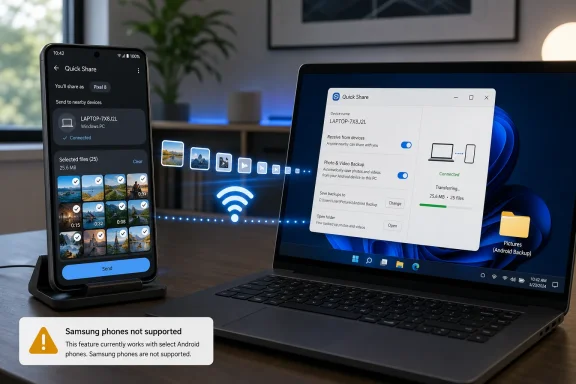
Google is preparing a cloud-free Android feature that would automatically back up selected photos and videos from a phone to a Windows PC over Wi‑Fi, according to GSMArena, but the reported hidden Google Play Services page says Samsung phones are not supported for now. The immediate takeaway is simple: if this ships as described, non-Samsung Android users may get an automatic local media backup option through Quick Share on Windows, while Galaxy owners will need to keep using Samsung’s existing tools or wait for a change.
The scope matters. This is not a full-device backup. It is described as a photos-and-videos feature, not a replacement for Smart Switch, not a complete phone migration tool, and not a substitute for every cloud backup service a user may already rely on. For Windows users, that still makes it useful: a second copy of personal media on a nearby PC can be valuable. But it should be understood as local media backup, not a complete Android backup strategy.
The important part of the report is not simply that Android phones may soon be able to copy photos and videos to Windows. Android users already have many ways to move files to a PC: cables, manual file transfer, Bluetooth, cloud services, OEM utilities, and the existing Quick Share workflow. The change described by GSMArena is automation.
Quick Share is currently best understood by most users as a send-and-receive feature. You choose files, pick a nearby device, and transfer them. The reported feature changes that posture. Instead of manually sending photos or videos each time, users would be able to activate a backup flow from the Windows Quick Share app and have selected media copied automatically when the phone and PC meet the required conditions.
Those conditions are the practical center of the story. Based on the report, the expected activation flow is:
For WindowsForum readers, the Windows side is the most interesting piece. Google appears to be using Quick Share for Windows as the receiving side rather than introducing a separate PC backup application. That makes sense from a product standpoint: Quick Share already exists as the Android-to-Windows bridge for nearby transfers. Adding an automatic media backup mode would extend the app from one-time file movement into a recurring local workflow.
Still, the word “backup” needs to be handled carefully. The confirmed behavior, as reported, is automatic copying of selected photos and videos over Wi‑Fi when the phone and PC are on the same network and signed into the same Google account. Anything beyond that — retention behavior, restore flow, conflict handling, folder structure, deletion rules, error reporting, and admin controls — has not been established in the report. Until Google publishes final documentation, users should treat this as an upcoming automatic local media-copy feature with backup intent, not as a fully documented backup system.
The biggest limitation appears at the start: Samsung phones are reportedly excluded.
GSMArena suggests the exclusion may be related to Samsung already having Smart Switch, its own backup and migration tool. That is a reasonable possibility, but it should be treated as an explanation offered by the report, not as a confirmed reason from Google or Samsung. The only reported fact is the exclusion itself. The reason for it has not been publicly confirmed.
That distinction matters. It is tempting to turn the exclusion into a large platform-politics story, but readers need the operational result first: a non-Samsung Android phone may get this Quick Share-based automatic media backup, while a Samsung Galaxy phone may not. Galaxy users should not assume the setting is missing because they configured something incorrectly. If the report accurately reflects the launch behavior, the absence would be by design, at least for now.
The difference between Google’s reported feature and Samsung Smart Switch is also important. Smart Switch is Samsung’s established route for Galaxy backup and migration to a computer. It is broader than a photos-and-videos-only feature. But according to GSMArena’s description, Smart Switch does not currently provide the same automatic backup behavior described for Google’s Quick Share feature.
That creates a practical mismatch:
The table shows why the feature should not be oversold. Google’s reported Quick Share backup is narrower but more automatic. Samsung’s Smart Switch is broader but more manual. A Galaxy owner may reasonably want both: a full manual backup before changing phones and a recurring local copy of new photos and videos when the phone is at home. Based on the reported hidden page, that combination is not currently available through Google’s upcoming Quick Share workflow.
The responsible wording is “reportedly excluded,” not “permanently locked out.” Hidden pages and pre-release app text can change before launch. Google could revise the feature, Samsung could add a comparable function, or the public rollout could define support differently. But if the wording survives, the exclusion will be one of the first things Windows users notice.
But users deciding whether this replaces another tool need a plain answer: no, not by itself.
A photos-and-videos-only backup does not cover apps, app data, text messages, call history, settings, downloads, documents, authentication apps, device layout, or other categories that matter during phone replacement or recovery. It may help protect the camera roll or selected media, depending on how Google implements selection. It does not appear to be a complete Android recovery path.
That matters most for two groups:
The same-network requirement also narrows the use case. If the PC is asleep, powered off, disconnected, on a different network, or signed into a different Google account, the backup should not be expected to run. That is not a flaw; it is the nature of a local feature. The advantage is that media can move directly between the phone and PC over the local network. The tradeoff is that the local environment has to cooperate.
Before enabling it, check four things:
Also decide what happens after the media lands on the PC. If the Windows machine is your only second copy, it can still fail. A stronger setup would have the PC backed up separately to an external drive, NAS, or another backup service. The Quick Share feature may get media off the phone, but the PC then becomes part of the backup chain.
The key point is not to wait for a missing toggle. If Galaxy support is excluded at launch, troubleshooting Quick Share, reinstalling the app, or changing Windows settings may not solve it. The limitation would be device support, not necessarily user error.
Galaxy owners should watch for three possible developments:
But cloud-free does not mean risk-free. The trust questions move from a cloud account to the local endpoint. Users still need to ask:
Automatic behavior raises the stakes because the setup decision persists. A manual transfer makes the user choose files and a destination each time. Automatic backup asks the user to make that decision once and then trust the system to keep doing the right thing. That is convenient, but it requires clear status reporting.
At minimum, a reliable Windows implementation should show the signed-in account, the destination location, the last successful backup time, the number of items copied, any skipped items, and any errors. Without that, users may believe their media is protected when it is not.
The same issue applies to network behavior. “Same Wi‑Fi network” sounds simple, but real homes and offices often include guest networks, mesh systems, VPNs, Ethernet-connected PCs, firewalls, and power-saving laptops. A local backup feature should explain when it is waiting, when it is blocked, and when it has succeeded. Silent failure would be the worst outcome.
That is useful. It is not enough by itself.
A Windows PC can fail. A drive can die. A laptop can be stolen. Malware can damage files. A user can delete a folder while trying to free space. If all of your important media exists only on the phone and one PC, you are better protected than before, but you are still exposed.
A stronger approach is layered:
For less technical users, defaults will decide whether the feature succeeds. If setup is confusing, people will ignore it. If setup is too invisible, people may not know where their media is going. The right middle ground is an explicit opt-in on the Windows PC, a clear account match, a visible destination folder, and a simple health indicator that says whether the last backup worked.
For power users, the feature could be a welcome building block. It could reduce dependence on cable transfers, make it easier to maintain a local media archive, and fit into existing PC backup routines. But even power users should wait for final documentation before assuming how selection, folder mapping, deduplication, and deletion behavior work.
The risk is not that the feature is inherently unsafe. The risk is that it changes where personal media lands and how quietly it gets there. An employee might sign into Quick Share with a personal Google account on a managed PC. A contractor might use a company laptop as a convenient backup destination. A shared desktop might receive private photos under the wrong Windows profile.
Those scenarios depend on configuration, policy, and user behavior. They are not reasons to panic, but they are reasons to prepare.
That creates confusion because “Android” does not always mean “available on every Android phone.” Some features depend on Google Play Services, some depend on OEM support, some depend on regional rollout, and some depend on companion apps. Users have learned to ask not “Does Android support this?” but “Does my phone support this?”
The reported Quick Share backup feature reinforces that lesson. A Pixel or other non-Samsung Android phone may qualify. A Galaxy phone may not. The feature may use Google’s Android infrastructure and Google’s Windows app, but device support still matters.
That is why Google’s public messaging, if and when the feature launches, needs to be plain. If Samsung phones are unsupported, say so early. If the limitation is temporary, say that. If Samsung has a different recommended path, point users to it. The worst version would be a vague “available on supported devices” message that sends Galaxy owners searching through settings that do not exist.
Samsung also has a communication burden. If Galaxy phones are excluded because Samsung wants users to rely on Smart Switch, Galaxy users need to know what Smart Switch does and does not do compared with Google’s reported feature. If Samsung plans similar automation, it should say so when ready. If not, users will compare the experience across Android brands and draw their own conclusions.
The practical user complaint will not be about ecosystem governance. It will be: “Why can my other Android phone automatically copy videos to my PC, but my Galaxy cannot?”
That is the question both companies should be ready to answer.
Windows users should watch for:
That is still a meaningful feature. A lot of people lose photos and videos because they never plug in a phone, never clean up cloud storage, or assume a backup is happening somewhere. A simple local copy to a Windows PC could help, especially if it is visible and reliable.
But the feature will only earn trust if Google avoids overpromising. Users need to know what is backed up, where it goes, when it last worked, and what devices are excluded. Samsung users need a straight answer, not a scavenger hunt. Admins need enough information to decide whether the feature belongs on managed PCs.
If Google gets those details right, Quick Share for Windows could become more than a nearby file-transfer utility. It could become a practical local media safety net for many Android users. If the Samsung exclusion remains and the documentation is vague, the story will be less about automatic backup and more about another Android feature that works only if your particular phone is on the right side of the support line.
The scope matters. This is not a full-device backup. It is described as a photos-and-videos feature, not a replacement for Smart Switch, not a complete phone migration tool, and not a substitute for every cloud backup service a user may already rely on. For Windows users, that still makes it useful: a second copy of personal media on a nearby PC can be valuable. But it should be understood as local media backup, not a complete Android backup strategy.
 Google Is Turning Quick Share From a Send Button Into an Automatic Media Backup Path
The important part of the report is not simply that Android phones may soon be able to copy photos and videos to Windows. Android users already have many ways to move files to a PC: cables, manual file transfer, Bluetooth, cloud services, OEM utilities, and the existing Quick Share workflow. The change described by GSMArena is automation.Quick Share is currently best understood by most users as a send-and-receive feature. You choose files, pick a nearby device, and transfer them. The reported feature changes that posture. Instead of manually sending photos or videos each time, users would be able to activate a backup flow from the Windows Quick Share app and have selected media copied automatically when the phone and PC meet the required conditions.
Those conditions are the practical center of the story. Based on the report, the expected activation flow is:
- Open Quick Share on the Windows PC.
- Turn on the new photo/video backup option in the Windows Quick Share app.
- Make sure the Android phone and the Windows Quick Share app are signed into the same Google account.
- Keep the phone and PC on the same Wi‑Fi network so the transfer can happen locally.
- Select the photos and videos to be backed up from the phone.
For WindowsForum readers, the Windows side is the most interesting piece. Google appears to be using Quick Share for Windows as the receiving side rather than introducing a separate PC backup application. That makes sense from a product standpoint: Quick Share already exists as the Android-to-Windows bridge for nearby transfers. Adding an automatic media backup mode would extend the app from one-time file movement into a recurring local workflow.
Still, the word “backup” needs to be handled carefully. The confirmed behavior, as reported, is automatic copying of selected photos and videos over Wi‑Fi when the phone and PC are on the same network and signed into the same Google account. Anything beyond that — retention behavior, restore flow, conflict handling, folder structure, deletion rules, error reporting, and admin controls — has not been established in the report. Until Google publishes final documentation, users should treat this as an upcoming automatic local media-copy feature with backup intent, not as a fully documented backup system.
The biggest limitation appears at the start: Samsung phones are reportedly excluded.
The Samsung Exclusion Is the Story, Not a Footnote
The hidden information page reportedly includes the direct note that Samsung phones are not supported. That is a sharp limitation because Galaxy phones are a major part of the Android market and are commonly used with Windows PCs. If any Android users would notice a Windows media-backup feature, Galaxy users would be among them.GSMArena suggests the exclusion may be related to Samsung already having Smart Switch, its own backup and migration tool. That is a reasonable possibility, but it should be treated as an explanation offered by the report, not as a confirmed reason from Google or Samsung. The only reported fact is the exclusion itself. The reason for it has not been publicly confirmed.
That distinction matters. It is tempting to turn the exclusion into a large platform-politics story, but readers need the operational result first: a non-Samsung Android phone may get this Quick Share-based automatic media backup, while a Samsung Galaxy phone may not. Galaxy users should not assume the setting is missing because they configured something incorrectly. If the report accurately reflects the launch behavior, the absence would be by design, at least for now.
The difference between Google’s reported feature and Samsung Smart Switch is also important. Smart Switch is Samsung’s established route for Galaxy backup and migration to a computer. It is broader than a photos-and-videos-only feature. But according to GSMArena’s description, Smart Switch does not currently provide the same automatic backup behavior described for Google’s Quick Share feature.
That creates a practical mismatch:
| Backup route | Trigger model | Windows relationship | Content emphasis | Samsung status | Practical tradeoff |
|---|---|---|---|---|---|
| Google Quick Share media backup | Reportedly activated in Quick Share on the PC, then runs automatically when conditions are met | Phone and Windows Quick Share app use the same Google account on the same Wi‑Fi network | Selected photos and videos | Reportedly excludes Samsung phones | Convenient local media copy, but narrow scope |
| Samsung Smart Switch | User-initiated backup workflow | Samsung’s own PC backup and migration tool | Broader Galaxy backup and transfer use cases | Native Samsung path | More comprehensive for Galaxy users, but not the same reported automation |
The responsible wording is “reportedly excluded,” not “permanently locked out.” Hidden pages and pre-release app text can change before launch. Google could revise the feature, Samsung could add a comparable function, or the public rollout could define support differently. But if the wording survives, the exclusion will be one of the first things Windows users notice.
This Is Photos and Videos Only — and That Limit Should Be Clear Up Front
The reported feature is useful because photos and videos are often the files people most want to protect. They are personal, large, easy to accumulate, and painful to lose. A local copy on a Windows PC can reduce the risk of leaving all media on a phone.But users deciding whether this replaces another tool need a plain answer: no, not by itself.
A photos-and-videos-only backup does not cover apps, app data, text messages, call history, settings, downloads, documents, authentication apps, device layout, or other categories that matter during phone replacement or recovery. It may help protect the camera roll or selected media, depending on how Google implements selection. It does not appear to be a complete Android recovery path.
That matters most for two groups:
- People who are replacing or resetting a phone. They still need a full backup or migration plan. For Galaxy users, that may mean Smart Switch. For other Android users, that may mean Android’s built-in backup options, app-specific backups, and manual checks.
- People trying to reduce cloud-storage pressure. A local Windows copy can help preserve media outside the phone, but users need to understand whether deleting items from the phone affects the PC copy, whether edited files are included, and where the files are stored.
The same-network requirement also narrows the use case. If the PC is asleep, powered off, disconnected, on a different network, or signed into a different Google account, the backup should not be expected to run. That is not a flaw; it is the nature of a local feature. The advantage is that media can move directly between the phone and PC over the local network. The tradeoff is that the local environment has to cooperate.
What To Do Now
The best advice depends on what phone you use.If you use a non-Samsung Android phone
Watch for the feature to appear in Quick Share for Windows and in Google Play Services-related UI on the phone. If it rolls out as reported, set it up deliberately rather than clicking through quickly.Before enabling it, check four things:
- The Windows PC is a device you control and want to use as a media destination.
- Quick Share for Windows is signed into the same Google account as the Android phone.
- The phone and PC are on the same trusted Wi‑Fi network.
- You understand that the feature is for selected photos and videos, not a complete phone backup.
Also decide what happens after the media lands on the PC. If the Windows machine is your only second copy, it can still fail. A stronger setup would have the PC backed up separately to an external drive, NAS, or another backup service. The Quick Share feature may get media off the phone, but the PC then becomes part of the backup chain.
If you use a Samsung Galaxy phone
Do not expect this Quick Share media-backup feature to be available unless Google or Samsung changes the reported exclusion. Use Samsung’s existing backup and migration tools, including Smart Switch where appropriate, and continue using whatever media backup method you already trust.The key point is not to wait for a missing toggle. If Galaxy support is excluded at launch, troubleshooting Quick Share, reinstalling the app, or changing Windows settings may not solve it. The limitation would be device support, not necessarily user error.
Galaxy owners should watch for three possible developments:
- Google changes the feature before public launch and adds Samsung support.
- Samsung adds similar automatic local media backup behavior to its own tooling.
- The public documentation explains a specific reason for the exclusion and offers an alternate path.
“Cloud-Free” Does Not Mean “No Trust Required”
The reported feature is attractive because it moves media locally instead of depending on an internet upload. That can be faster at home, more predictable on limited broadband, and appealing to users who want a copy on their own PC.But cloud-free does not mean risk-free. The trust questions move from a cloud account to the local endpoint. Users still need to ask:
- Which Google account is authorizing the relationship?
- Which Windows user profile receives the files?
- Where are the photos and videos stored?
- Is the PC shared with family members, coworkers, or guests?
- Is the Windows drive encrypted?
- Is the PC itself backed up?
- What happens if the phone deletes an item after it was copied?
- What happens if the same file already exists on the PC?
Automatic behavior raises the stakes because the setup decision persists. A manual transfer makes the user choose files and a destination each time. Automatic backup asks the user to make that decision once and then trust the system to keep doing the right thing. That is convenient, but it requires clear status reporting.
At minimum, a reliable Windows implementation should show the signed-in account, the destination location, the last successful backup time, the number of items copied, any skipped items, and any errors. Without that, users may believe their media is protected when it is not.
The same issue applies to network behavior. “Same Wi‑Fi network” sounds simple, but real homes and offices often include guest networks, mesh systems, VPNs, Ethernet-connected PCs, firewalls, and power-saving laptops. A local backup feature should explain when it is waiting, when it is blocked, and when it has succeeded. Silent failure would be the worst outcome.
The Windows PC Is a Backup Destination, Not a Complete Backup Plan
For home users, the ideal use case is easy to understand: your Android phone backs up selected photos and videos to your Windows desktop or laptop when both devices are on the same Wi‑Fi network. That gives you another copy without plugging in a cable.That is useful. It is not enough by itself.
A Windows PC can fail. A drive can die. A laptop can be stolen. Malware can damage files. A user can delete a folder while trying to free space. If all of your important media exists only on the phone and one PC, you are better protected than before, but you are still exposed.
A stronger approach is layered:
- Phone captures the photos and videos.
- Quick Share, if available, copies selected media to the Windows PC.
- The Windows PC is backed up separately.
- The user periodically verifies that files can be found and opened.
For less technical users, defaults will decide whether the feature succeeds. If setup is confusing, people will ignore it. If setup is too invisible, people may not know where their media is going. The right middle ground is an explicit opt-in on the Windows PC, a clear account match, a visible destination folder, and a simple health indicator that says whether the last backup worked.
For power users, the feature could be a welcome building block. It could reduce dependence on cable transfers, make it easier to maintain a local media archive, and fit into existing PC backup routines. But even power users should wait for final documentation before assuming how selection, folder mapping, deduplication, and deletion behavior work.
Admins Should Treat Automatic Media Copy as a Policy Question
The feature sounds consumer-friendly, but many Windows PCs live in mixed environments. A personal phone may connect to a work laptop. A family PC may have multiple users. A school or small business device may allow personal sign-ins. Automatic media copy can become an endpoint management issue even if the feature was designed for home use.The risk is not that the feature is inherently unsafe. The risk is that it changes where personal media lands and how quietly it gets there. An employee might sign into Quick Share with a personal Google account on a managed PC. A contractor might use a company laptop as a convenient backup destination. A shared desktop might receive private photos under the wrong Windows profile.
Those scenarios depend on configuration, policy, and user behavior. They are not reasons to panic, but they are reasons to prepare.
Action checklist for admins
- Inventory where Quick Share for Windows is installed or allowed on managed PCs.
- Decide whether personal Android-to-PC media backup is acceptable on corporate devices.
- Review endpoint storage, encryption, and data-loss-prevention policies for user media folders.
- Document whether users may sign personal Google accounts into PC companion apps.
- Watch for Google’s public rollout notes before enabling, documenting, or blocking the feature at scale.
- For Samsung-heavy fleets, track whether Samsung adds automatic Smart Switch media backup or whether Google changes the reported exclusion.
The Galaxy Problem Is Practical, Not Just Political
It is easy to read the Samsung exclusion as a platform drama story. There may be business or product-boundary reasons behind it, but those reasons are not confirmed. For users, the issue is simpler: the biggest Android brand may not get a useful Android-to-Windows convenience at launch.That creates confusion because “Android” does not always mean “available on every Android phone.” Some features depend on Google Play Services, some depend on OEM support, some depend on regional rollout, and some depend on companion apps. Users have learned to ask not “Does Android support this?” but “Does my phone support this?”
The reported Quick Share backup feature reinforces that lesson. A Pixel or other non-Samsung Android phone may qualify. A Galaxy phone may not. The feature may use Google’s Android infrastructure and Google’s Windows app, but device support still matters.
That is why Google’s public messaging, if and when the feature launches, needs to be plain. If Samsung phones are unsupported, say so early. If the limitation is temporary, say that. If Samsung has a different recommended path, point users to it. The worst version would be a vague “available on supported devices” message that sends Galaxy owners searching through settings that do not exist.
Samsung also has a communication burden. If Galaxy phones are excluded because Samsung wants users to rely on Smart Switch, Galaxy users need to know what Smart Switch does and does not do compared with Google’s reported feature. If Samsung plans similar automation, it should say so when ready. If not, users will compare the experience across Android brands and draw their own conclusions.
The practical user complaint will not be about ecosystem governance. It will be: “Why can my other Android phone automatically copy videos to my PC, but my Galaxy cannot?”
That is the question both companies should be ready to answer.
What Windows Users Should Watch
The practical reading is narrower than the headline but more useful. This is an upcoming feature surfaced through hidden Google Play Services material, not a public rollout with final documentation. The concept is strong, but the final details matter.Windows users should watch for:
- A public Google announcement or support page.
- The feature appearing in Quick Share for Windows.
- Clear wording about supported Android phones.
- Confirmation of whether Samsung phones remain excluded.
- The exact destination folder on Windows.
- Backup status indicators and error reporting.
- Whether the user can choose albums, folders, or media categories.
- Deletion behavior between phone and PC.
- Any admin controls for managed Windows environments.
That is still a meaningful feature. A lot of people lose photos and videos because they never plug in a phone, never clean up cloud storage, or assume a backup is happening somewhere. A simple local copy to a Windows PC could help, especially if it is visible and reliable.
But the feature will only earn trust if Google avoids overpromising. Users need to know what is backed up, where it goes, when it last worked, and what devices are excluded. Samsung users need a straight answer, not a scavenger hunt. Admins need enough information to decide whether the feature belongs on managed PCs.
If Google gets those details right, Quick Share for Windows could become more than a nearby file-transfer utility. It could become a practical local media safety net for many Android users. If the Samsung exclusion remains and the documentation is vague, the story will be less about automatic backup and more about another Android feature that works only if your particular phone is on the right side of the support line.
References
- Primary source: gsmarena.com
Published: Wed, 08 Jul 2026 18:31:02 GMT
Android's upcoming automatic backup to PC feature excludes Samsung devices - GSMArena.com news
There's probably a good reason for this decision, though. Google is working on cloud-free automatic backup to Windows PCs for Android, according to a new...www.gsmarena.com
- Official source: support.google.com

Share files between Android & Windows with Quick Share - Android Help
You can send and receive files between your Android device and Windows computer with Quick Share. You can share: Images, videos, and documents between Windows computers and Android devices that ar
support.google.com
- Related coverage: android.com
- Related coverage: macrumors.com
Google Expands AirDrop Support to More Android Phones
Google today said its Quick Share feature that allows Android and iPhone users to exchange files with AirDrop is expanding to more devices. Quick Share is now available on the following Android smartphones.www.macrumors.com - Related coverage: blog.google
How to use Quick Share to transfer files between Android devices
Want to send photos, links or text to a friend or family member? Quick Share lets you send content between nearby devices in just a few taps.blog.google - Related coverage: phonearena.com
My Galaxy phone won't be getting Android's new backup feature, and I'm furious - PhoneArena
Digging deep inside the Google Play Services app, our colleagues at Android Authority have managed to get a hold of the info page for Google’s PC-based backup solution. And something's missing.www.phonearena.com
- Related coverage: computerbild.de
Quick Share: Dateitransfer zwischen Android und Windows - COMPUTER BILD
Dank Google Quick Share können Sie Dateien drahtlos zwischen Android- und Windows-Geräten übertragen. Wir zeigen, wie das geht.www.computerbild.de - Related coverage: techyorker.com
Unlocking the Mystery: Where Does Samsung Smart Switch Store
Where does Samsung Smart Switch store backups? Learn the exact Windows folders to find your Galaxy data fast and restore with confidence. techyorker.com
- Related coverage: samsung.com
Transfer data to a new phone using Smart Switch for Windows or Mac
Use Smart Switch on your PC to create a phone back up file. You can then transfer the back up file to another phone to transfer your data.www.samsung.com - Related coverage: androidcentral.com
How to use Quick Share on your Android phone | Android Central
Quick Share is the best Android feature you aren't using. We'll show you how to get started so you can begin using it like a pro!www.androidcentral.com - Related coverage: sammobile.com
Google's Nearby Share merges with Samsung's Quick Share for file sharing - SamMobile
Google's Nearby Share and Samsung's Quick Share file sharing features have merged together on Android, Chrome OS, and Windows. - SamMobilewww.sammobile.com - Related coverage: windowscentral.com
Microsoft confirms that Samsung is killing OneDrive integration on its Galaxy phones very soon: Here's what will happen to your photo backups | Windows Central
Starting September 30, Samsung Galaxy users will no longer be able to backup their photos to OneDrive using the Gallery app.www.windowscentral.com - Related coverage: techradar.com
It’s actually happened – Android now works with Apple AirDrop for simple file-sharing, starting with the Pixel 10 | TechRadar
That's the sound of walled gardens crumblingwww.techradar.com - Related coverage: tomsguide.com
I’ve been waiting a decade for AirDrop on Android — and it’s finally fixed my biggest frustration | Tom's Guide
Some Android phones can now share files to iPhones with a unified version of Quick Share and AirDrop — and it's something I never thought would happen.www.tomsguide.com - Related coverage: androidauthority.com
Google is bringing Quick Share to the Android 15 setup wizard — Here's why that matters
Google is requiring OEMs to add a page for Quick Share into the setup wizard, hopefully boosting awareness of the file sharing tool.www.androidauthority.com - Related coverage: android.gadgethacks.com

Android Per-App Backup Controls Explained: What You Actually Give Up << Android :: Gadget Hacks
Android Per-App Backup Controls Explained: What You Actually Give Up Google is rolling out Android per-app backup controls to Pixel devices, letting users...
android.gadgethacks.com
