

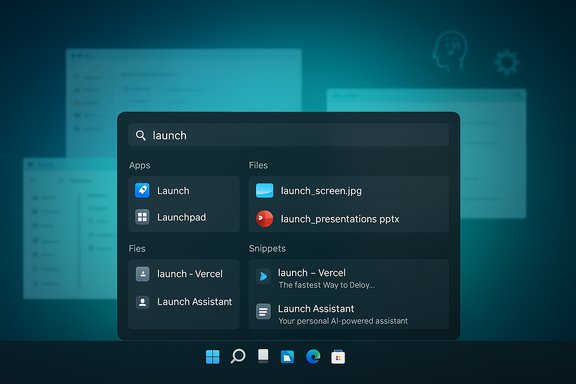
I stopped using the Windows 11 Start menu the day Raycast’s Windows beta moved from curiosity to core part of my workflow — and after a week of daily use the Start menu feels like dead weight. Raycast brings a keyboard‑first command bar, instant file and app search, clipboard history, text snippets, and AI commands into a single, focused surface that appears with a hotkey and disappears the moment you’re done. For longtime macOS power users who’ve enjoyed Raycast or Alfred, the Windows beta delivers a similar, polished experience; for Windows purists it’s an elegant rethink of how an OS should help you work, not distract you.
Source: groovyPost I ditched the Windows 11 Start menu for this beta app and I’m never going back
 Background
Why this matters now
Windows 11’s Start menu and system search have slowly evolved into a multi‑tasking hub for apps, widgets, news, and web suggestions — useful for some, noisy and slow for many. That gap has created steady demand for keyboard‑first launchers that keep you in flow. Raycast began life as a Mac utility that rivals Spotlight and Alfred, then expanded into AI and a large extension ecosystem; its move to Windows was announced publicly in 2024 and the company has since rolled out a Windows beta to early adopters. The arrival of Raycast on Windows brings a mature, cross‑platform product into a space dominated by a mix of niche open‑source launchers, native search, and Microsoft tools.What Raycast aims to replace
Raycast isn’t trying to be another Start menu clone. Instead it positions itself as a command bar — minimal, keyboard‑driven, and extensible. The idea is to reduce context switches: launch apps, find files, paste commonly used text snippets, manage windows, and even call AI helpers without leaving the keyboard. On macOS this approach already changed many users’ habits; the Windows beta attempts to transplant that workflow into a Windows‑native app.What Raycast does on Windows: features and behavior
Instant launcher and file search
At its core, Raycast is a fast launcher: press its hotkey, type, and the result you need appears instantly — app, file, or system action. The Windows beta includes a local indexer and a “Fast File Scanner” that speeds initial indexing. This is not just “search the Start menu”; Raycast indexes apps, frequently used folders, and file content (depending on settings), and surfaces results as you type. The speed and predictability are what make it feel like a productivity tool rather than a search box.Clipboard history and snippets
Raycast bundles a built‑in clipboard manager and a text snippets (text expander) feature. The clipboard UI lets you retrieve recent copied items without opening a separate utility; snippets enable insertion of repetitive text or templates via keywords. The snippets system imposes a large character limit (a 65,536‑character cap is documented), making it suitable for long templates and code blocks. Clipboard retention and feature caps differ between the free tier and Pro subscription (more on that below).Window management and system commands
Raycast offers window arranging and system actions so you can reposition, resize, or move windows across displays with keyboard commands. That reduces reliance on mouse‑driven window dragging or separate window‑management utilities. It also exposes quick system actions and a command palette that can trigger custom scripts or extensions.AI, chat, and automation
One of Raycast’s headline differentiators is integrated AI. In the Windows beta you can switch into an AI prompt (often with Tab) and run commands or ask the built‑in chat for help. Raycast’s Pro and Advanced AI tiers let you select from many models and providers — OpenAI, Anthropic, Google, and others are supported — and enable “AI Commands” that automate repetitive tasks. These AI capabilities are a central part of Raycast’s roadmap and a key reason it’s attracted attention.How the Windows beta compares to the Windows 11 Start menu
Faster, less noisy, and more focused
The Windows Start menu tries to be a universal entry point — search, news, suggestions, app tiles, and web results. Raycast’s UX is deliberately minimal: it waits for your input and surfaces only the command results you need. That focus reduces distraction and is the most immediate reason power users prefer a command bar. The difference is practical: where Start can show suggestions and web content, Raycast keeps the interface compact and keyboard‑centric.Better multi‑tool consolidation
Raycast consolidates functionality that otherwise requires several separate utilities: a clipboard manager, a text expander, a window manager, and a fast search tool. For people who previously used multiple small utilities to achieve the same workflow, Raycast reduces cognitive load and settings overhead. In short: less hunting through menus, more one‑stop typing.Limitations where the Start menu still wins
The Start menu remains more integrated with Windows settings, Live Tiles (where applicable), and Microsoft‑first experiences like pinned apps and recommended items from Microsoft 365. For non‑keyboard interactions — touch, pen, or casual discovery — the Start menu is still convenient for mainstream users. Raycast is intentionally power‑user focused; it’s not trying to replace every Start menu affordance.Where the Windows beta still falls short
Missing macOS parity and extensions gap
Raycast’s macOS edition benefits from years of community extensions and tight mac integration (music control, GitHub, etc.. The Windows beta does not yet offer the same breadth of third‑party extensions or every integration Mac users enjoy. The extension ecosystem on Windows is growing but still sparse compared with macOS, and some platform‑specific integrations (calendar sync, certain system hooks) are delayed. Expect functionality gaps to narrow over time, but for now there are trade‑offs.Hotkey limitations and the Windows key
Raycast ships with a default hotkey (commonly Alt + Space) that is immediate and convenient, but mapping Raycast to the Windows (Win) key alone — to fully replace the Start menu’s Win key behavior — is not straightforward. Community reporting and developer replies indicate that Raycast’s shortcut configuration currently requires modifier keys and does not let you simply claim the raw Win key in the app settings. Workarounds using AutoHotkey or remapping tools exist, but they add complexity and are unofficial. If your goal is to have Raycast open with a single tap of the Win key, be prepared to use third‑party remapping.Beta quirks: clipboard capture and early bugs
Early Windows beta testers report occasional clipboard capture failures and startup quirks — e.g., Raycast not registering its hotkey until the app is manually relaunched after login. These are typical of beta software and Raycast has been updating rapidly, but organizations should test stability before deploying widely. The issues are notable but not catastrophic; many users describe the app as stable for daily use despite these rough edges.Pricing, limits, and technical specifics (verified)
What the free tier includes
Raycast’s free tier provides the core launcher, a limited clipboard history, snippets, calculator, window management, and many built‑in extensions. The product is positioned to be useful without immediate cost for individual users.Pro and Advanced AI tiers
Raycast Pro unlocks cloud sync, unlimited clipboard history, unlimited notes, custom themes, and expanded AI usage. The Advanced AI add‑on unlocks access to higher‑end models and broader model selection. Raycast’s published pricing shows Pro starting at a roughly $8/month equivalent on annual billing (the site also lists current monthly prices), with Advanced AI often presented as an add‑on. If AI power and cross‑device sync matter, expect recurring costs.Notable technical numbers
- Snippet character limit: 65,536 characters (documented in the Raycast manual).
- Default hotkey (Windows beta): Alt + Space (users can rebind to other combos that include modifiers).
- Clipboard history retention: free tier capped to a relatively short window (three months in some plan summaries); Pro offers unlimited retention. Check current plan pages for exact numbers when you sign up.
Security, privacy, and enterprise considerations
Local‑first indexing and privacy controls
Raycast emphasizes a local‑first model for file indexing and native commands: most processing runs locally and indexing data remains on your device by default. When you opt into cloud sync or AI features, data can leave your device depending on configuration. The company documents extension review processes and provides controls for team and enterprise deployments. For privacy‑sensitive environments, the ability to “bring your own key” for AI tooling and enterprise controls (SAML, SCIM, admin toggles) is important.AI data flow and model selection
Raycast supports multiple AI providers and offers a BYOK (bring your own key) option so organizations can control which model provider is used and where data is sent. That said, enabling Advanced AI models without strict controls can expose sensitive content to third‑party models; enterprises should evaluate data governance and use the Raycast enterprise controls (AI Control Center, provider allow‑lists) before broadly enabling AI across a team.Operational risk and recommendations
- Test indexing scope: limit which folders Raycast indexes to reduce potential exposure and IO during index builds.
- Review extension provenance: community extensions are open source, but verify owners and review code for organization deployments.
- Treat Windows beta as pre‑production for mission‑critical machines: it’s stable for daily use but still under active development.
Practical setup tips and workarounds
How to map Raycast to the Win key (if you want to)
Raycast’s settings typically require a modifier in the shortcut binding, so to emulate “Win = Raycast” you can use an AutoHotkey script that remaps a single Win key tap to the Raycast activation shortcut (for example, Alt + Space). Community examples and an official‑adjacent developer comment indicate this approach works but is unofficial; it adds resilience but also a third‑party dependency. For users comfortable with scripting, the AutoHotkey method is the most direct route today.Recommended configuration for reliability
- Install Raycast and let it complete initial indexing with the folders you want.
- Rebind the hotkey early (Alt + Space is default) to a combo that doesn’t conflict with other apps.
- Limit indexing scope to sensible folders (Documents, Projects) and exclude Dropbox/OneDrive system folders unless needed.
- Enable cloud sync only if you need multi‑device parity and understand the privacy tradeoffs.
- If using AI extensively, consider the Pro + Advanced AI path or BYOK for enterprise control.
How Raycast fits into the wider landscape of Windows search alternatives
Raycast competes with several approaches:- Everything + a small launcher: extreme filename speed for those who need raw file lookup.
- Flow Launcher: highly extensible and plugin‑driven, ideal for custom workflows.
- Fluent Search / Listary: deeper in‑app content search, OCR, and different UX philosophies.
- PowerToys Command Palette: Microsoft’s keyboard‑centric tool offers safety and support, but lacks Raycast’s extension ecosystem and AI.
Raycast’s sweet spot is a polished, integrated launcher with built‑in utilities and AI — it’s not the absolute fastest filename search, but it’s the most consolidated, keyboard‑first productivity surface in many users’ toolchains. For cross‑platform teams or users who also run macOS, Raycast provides parity and a single mental model.
Strengths, risks, and the verdict
Strengths
- Speed and focus: fast, keyboard‑first command bar that reduces distractions.
- Feature consolidation: launcher, clipboard manager, snippets, window management, and AI in one app.
- Cross‑platform parity: familiar experience for macOS Raycast users and an attractive option for multi‑OS setups.
- Extensible: extension store and developer tooling let power users and teams build integrations.
Risks and trade‑offs
- Beta maturity: Windows support is still catching up to macOS; expect missing integrations and occasional bugs.
- Subscription model: advanced features (unlimited clipboard history, cloud sync, Advanced AI) involve recurring fees. Budget accordingly.
- Privacy considerations: cloud sync and hosted AI models change the privacy profile; enterprise controls mitigate but require planning.
- Hotkey friction: inability to claim the bare Win key natively may frustrate users who want exact Start‑key parity without third‑party remapping.
Final verdict
Raycast’s Windows beta is a meaningful productivity upgrade for keyboard‑centric users and teams who want a modern, extensible command palette with AI built in. It won’t replace every Windows feature or every user’s habits overnight, but for anyone who values speed, fewer context switches, and consolidated tools, Raycast is worth testing. If you’re the kind of user who already relies on a clipboard manager, snippets, or a launcher on macOS, Raycast will likely improve your Windows workflow substantially — just plan for some configuration and accept that a few features are still catching up on Windows.Conclusion
Raycast on Windows doesn't merely offer another way to launch apps — it reframes how a desktop OS can help you work. The Windows beta brings a mature, keyboard‑first command bar with practical productivity tools and integrated AI, and it delivers much of the feel that made it a favorite on macOS. There are genuine missing pieces and beta‑era quirks — a slimmer extension catalog, occasional clipboard hiccups, and some shortcut limitations — but the underlying design and engineering are strong. For power users who want to stop opening the Start menu and start typing to get things done, Raycast is a pragmatic, polished alternative that’s already reshaping workflows. If you try it, begin with modest indexing scope, set a reliable hotkey (or use AutoHotkey if you must reclaim the Win key), and evaluate Pro features only after testing whether the free core features address your needs. The Start menu has served Windows well, but for focused, keyboard‑centered work, Raycast is the cleaner, faster option — and for many users, that will be enough to never go back.Source: groovyPost I ditched the Windows 11 Start menu for this beta app and I’m never going back
