

Raycast’s keyboard-first launcher has quietly reshaped how many power users open apps, manage clipboards and trigger quick actions — and for a growing number of Windows users the Start menu is no longer the center of their workflow.
Windows’ Start menu has long been the front door to applications, settings and system commands. Since Windows 11’s redesign, many users have complained about discoverability, responsiveness and lack of flexibility; those frustrations have created a market for keyboard-first launchers that can do everything from instant app launches to persistent clipboard histories and deep integrations with third‑party services. Community experiments and published writeups document users who deliberately abandoned the Start menu in favor of launchers like Flow Launcher and, more recently, Raycast on Windows.
Raycast began life as a macOS-first productivity tool, focusing on speed, extensions and a single prompt to run actions. The team has expanded its platform footprint with a Windows preview/beta that brings the same keyboard-centric model and curated extension ecosystem to Windows users, aiming to replace or augment the native Start experience for fast workflows. The official product pages confirm a freemium pricing model with built-in clipboard, emoji picker and the ability to add thousands of extensions — while paid tiers unlock cloud sync, longer clipboard retention and advanced AI.
The XDA field piece that inspired renewed attention to this shift captures what many in the community now feel: the Start menu is no longer sacrosanct — and modern launchers like Raycast make it possible to replace it with a faster, more flexible command surface.
(If choosing to adopt Raycast as your primary launcher, test your workflows, confirm extension parity for your most-used integrations and, when remapping keys, proceed cautiously with backups and IT policy in mind.
Source: XDA I don't use the Windows Start menu anymore, because I have Raycast instead
 Background
Windows’ Start menu has long been the front door to applications, settings and system commands. Since Windows 11’s redesign, many users have complained about discoverability, responsiveness and lack of flexibility; those frustrations have created a market for keyboard-first launchers that can do everything from instant app launches to persistent clipboard histories and deep integrations with third‑party services. Community experiments and published writeups document users who deliberately abandoned the Start menu in favor of launchers like Flow Launcher and, more recently, Raycast on Windows.Raycast began life as a macOS-first productivity tool, focusing on speed, extensions and a single prompt to run actions. The team has expanded its platform footprint with a Windows preview/beta that brings the same keyboard-centric model and curated extension ecosystem to Windows users, aiming to replace or augment the native Start experience for fast workflows. The official product pages confirm a freemium pricing model with built-in clipboard, emoji picker and the ability to add thousands of extensions — while paid tiers unlock cloud sync, longer clipboard retention and advanced AI.
Why users are replacing the Start menu
The Start menu is familiar, but it introduces several real and perceived bottlenecks for keyboard-heavy workflows:- Latency and search noise. Native Start search can be slow to respond, sometimes promoting web results or Edge/Bing in ways that interrupt a simple app launch.
- Limited keyboard-first ergonomics. The Start UI mixes mouse‑oriented pinned tiles with a recommended area and click targets that break flow.
- Fragmented tooling. Tasks like emoji selection, clipboard history, and cloud snippets are split across separate menus or panels; users want one unified command surface.
Raycast on Windows: capabilities and reality-check
What Raycast does well
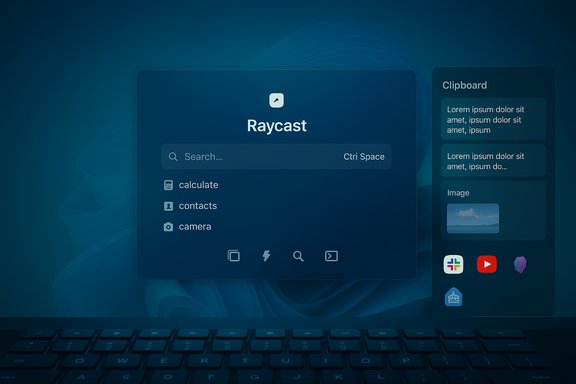
- Instant launcher and fuzzy search. Invoke Raycast with a hotkey and type to find applications, files and commands. It’s designed for millisecond-level responsiveness and fuzzy matching for imperfect queries.
- Clipboard history (with images). Raycast’s clipboard manager stores text, images and other clipboard formats and exposes them in a searchable history — a productivity boost for people who reuse content across documents and chats. The official feature set and multiple community reports confirm image support in clipboard history.
- Emoji picker and small utilities. Built-in emoji search, quick calculators and snippets reduce the need to open separate windows or use mouse-only panels.
- Extensions and integrations. Raycast’s store hosts many extensions — official and community-made — that surface functionality for third‑party services directly in the launcher. Users cite extensions for search, notes, YouTube lookups and more as differentiators.
Where Windows parity is still catching up
- Beta caveats and Windows 11 focus. Early Windows preview builds targeted modern Windows APIs and have, at times, required Windows 11 manifest schema features; this has caused install and compatibility issues for some Windows 10 users. Test installs on your configuration and watch for platform-specific notes.
- Extension parity. Many macOS extensions are being ported to Windows; the Windows beta has a growing but not yet complete extension catalog, and some store installs can behave differently on Windows while teams bring parity forward.
- Edge cases in clipboard and focus behavior. Community reports show occasional focus or capture quirks when pasting large or unusual clipboard payloads; try your common clipboard types before committing. Treat the Windows client as actively developed beta software for now.
Extensions: the productivity multiplier
Raycast’s extension model is central to its value proposition. Extensions let the launcher become a single productivity hub that can:- Search and control web services (YouTube, Slack, GitHub)
- Integrate note systems (OneNote, Obsidian)
- Trigger home automation (Home Assistant)
- Convert and download files (file converters and downloaders)
- Extend with custom commands and keyboard shortcuts
Replacing the Start menu: practical methods and limits
Raycast can be summoned with any hotkey you choose, but the Windows key is a special case because it is natively reserved for the Start menu. Users have adopted three practical approaches to make Raycast behave as the primary launcher:- Native hotkey assignment — set Raycast to a convenient shortcut like Alt+Space or Ctrl+Space and avoid the Start key entirely. This is the simplest, lowest‑risk approach.
- Remap the Windows key with AutoHotkey — community users have found success by using AutoHotkey scripts that map a single tap of the Win key to Raycast and retain long-press behavior for modifier combos. One widely shared AutoHotkey V1 script toggles Raycast on single tap and preserves the Win key as a modifier for combos (Win+R, Win+D).
- Disable the Start menu and capture Win — for the cleanest single-key behavior, some users disable or block the Start menu using lightweight utilities and combine that with the remap script. This is more intrusive and should be done with caution (it can break expected OS behaviors and updates may re-enable features). Community threads include practical step‑by‑step AHK examples but also note that the Raycast team is aware of limitations around assigning the Win key natively.
- Install AutoHotkey v1 (the AHK v1 runtime is commonly used for the pattern below).
- Use a script that distinguishes a tap from a hold so the Win key stays a modifier, but a single tap launches Raycast (the community-provided AHK snippet is a known reference). Users pair this with utilities that disable the Start popover or rely on precise timing to avoid triggering the Start menu.
- AHK and Start-menu modifications touch OS-level behavior — expect occasional conflicts, especially across Windows updates.
- Some hotkey approaches require a modifier in Raycast’s hotkey dialog; the Raycast team has acknowledged constraints and is working on improvements, so the cleanest single-tap Win key behavior may improve natively over time.
- For enterprise-managed machines, tampering with the Start menu or installing AHK might violate policy; always check IT policy before applying system-wide remaps.
Cross-platform story: macOS, Windows, Linux
Raycast’s origin on macOS informs its design: macOS users have long benefitted from the app’s extension depth, local AI features and polished integrations. The Windows preview brings many of those capabilities to Microsoft’s desktop but with gradual parity. The Raycast team explicitly markets the product as multi-platform with feature differences by OS. Linux users who want a Raycast-like experience aren’t left out. Open-source projects such as Vicinae aim to provide a native, high-performance launcher inspired by Raycast. Vicinae is built in C++/Qt and supports React/TypeScript extensions with a growing compatibility module to reuse Raycast extensions where possible. While not yet fully feature-identical, Vicinae demonstrates that cross-platform demand for keyboard-first launchers is real and active. If Linux is your primary OS, Vicinae is a promising native option while Raycast focuses on macOS and Windows parity.Security, privacy and enterprise considerations
- Local encryption for sensitive data. Raycast’s clipboard history is stored locally and encrypted; the product pages and community discussion note encryption and selective filtering to avoid storing password manager contents. Nevertheless, users should assume sensitive clipboard content requires strict handling and test retention policies.
- Cloud sync and AI require policy checks. Pro and Teams features add cloud sync and AI integrations. Enterprises should review admin controls, Bring‑Your‑Own‑Key (BYOK) options and allowlists for AI providers before enabling these features broadly. Raycast documents enterprise controls and SOC2 offerings for teams.
- Extension governance. The extension store blends first‑party and community extensions. For teams, whitelisting and allow-listing of extensions is critical — a poorly vetted extension can introduce privacy risks or exfiltrate data. Enterprises should pilot Raycast with governance and an extension whitelist.
Practical checklist: how to test Raycast as a Start replacement
- Install in parallel. Keep your existing launcher/Start workflow while testing Raycast on a secondary machine or as a secondary tool on your main PC.
- Inventory must‑have extensions. Identify integrations you rely on (Obsidian, OneNote, Slack, Home Assistant) and confirm availability on Windows in the Raycast store. Don’t assume parity with macOS.
- Test clipboard behavior. Copy the actual content types you use (long transcripts, formatted text, images, code blocks) and confirm Raycast captures and restores them reliably.
- Validate hotkeys and Windows key behavior. If you want Win-key parity, experiment with AutoHotkey remaps in a test environment; otherwise choose a stable hotkey like Alt+Space or Ctrl+Space.
- Check enterprise policy. For corporate devices, get signoff on installing AHK, remapping keys or enabling cloud sync and AI features.
- Backup and export. If you rely on clipboard history, test export/backup strategies; Raycast’s clipboard may be stored encrypted locally and not trivially exportable. Community scripts exist but have limitations.
Strengths and risks — balanced assessment
Strengths
- Blazing keyboard-first speed. Raycast is consistently reported as faster and more predictable than the default Start search for keyboard users.
- Unified workflow. Extensions and built-in utilities centralize many small but frequent actions that used to require multiple tools.
- Cross-platform continuity. For users who operate across macOS and Windows, the same mental model and many extensions are available, easing transitions.
Risks and trade-offs
- Beta instability on Windows. The Windows client is still maturing; expect edge-case bugs and missing niche extensions compared with macOS.
- Extension and legal exposure. Some downloader or converter extensions can invite legal or ToS risks depending on how they’re used; users must exercise judgment and respect service terms.
- Enterprise governance. Cloud sync, AI and extension installation can raise compliance concerns. Enterprises need policies, allowlists and possibly BYOK configurations before broad rollout.
- Platform-specific quirks. Remapping the Windows key is possible but not trivial; it may require AutoHotkey or disabling the Start popover and that approach carries maintenance overhead across updates.
Real-world tipset: best practice for replacing Start without breaking everything
- Start simple: assign Raycast to Alt+Space and test for two weeks. Learn whether the speed gains justify further changes.
- Keep Everything (Voidtools) installed if you rely on blazing file-name search speed; Raycast’s out‑of‑box search is fast but Everything remains the fastest filename indexer in many scenarios.
- Avoid disabling system features globally on work machines; instead test key remaps and automation on personal or test hardware.
- For Linux users wanting Raycast-like behavior, evaluate Vicinae as a native alternative and participate in its community to help extend compatibility with needed extensions.
Conclusion
The practical upshot is plain: for keyboard-first power users, Raycast is a compelling alternative to the Windows Start menu — it’s faster for launching apps, far stronger as a clipboard and emoji surface, and extensible enough to act as a personal productivity hub. The Windows preview brings that promise to Microsoft’s desktop, but with two important caveats: the Windows client is in active development, and some extension and platform parity gaps remain. For users willing to test and to manage hotkey remaps carefully (or to accept a different hotkey than the Win key), Raycast already delivers meaningful efficiency gains. For enterprises and cautious users, a staged pilot, governance on extensions and careful testing of clipboard and AI features are essential.The XDA field piece that inspired renewed attention to this shift captures what many in the community now feel: the Start menu is no longer sacrosanct — and modern launchers like Raycast make it possible to replace it with a faster, more flexible command surface.
(If choosing to adopt Raycast as your primary launcher, test your workflows, confirm extension parity for your most-used integrations and, when remapping keys, proceed cautiously with backups and IT policy in mind.
Source: XDA I don't use the Windows Start menu anymore, because I have Raycast instead
