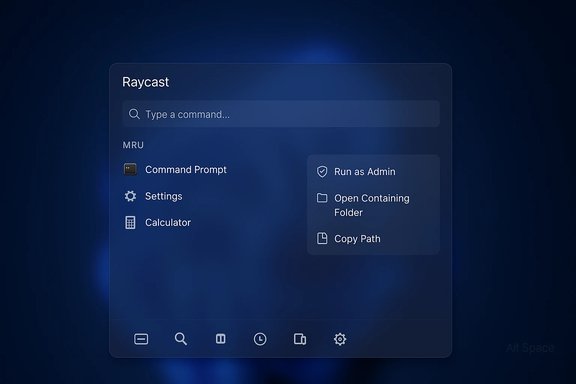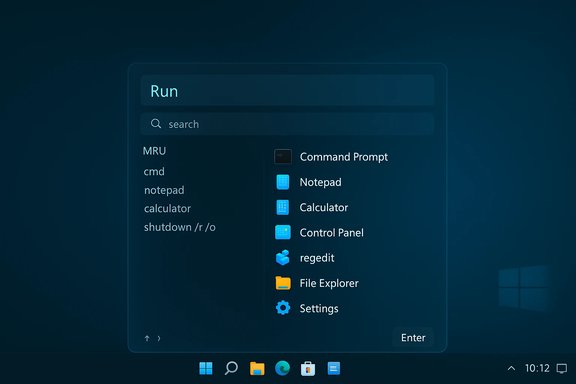
Raycast has landed a properly modern replacement for the old Win+R prompt — a keyboard-first, discoverable Run command added to Raycast for Windows in v0.41 that aims to behave like the classic Run dialog while offering the features and polish users expect from a modern app launcher. The update, published on January 8, 2026, positions Raycast as a full-featured Windows alternative to the decades-old Run box and sits alongside other modern launchers — including Microsoft’s own evolving Run and PowerToys Command Palette — in a crowded but rapidly improving category.
Background
Why Run matters
The original Run dialog (Win+R) is a tiny but crucial tool for power users, admins, and support technicians — a muscle-memory shortcut introduced in Windows 95 that has survived largely unchanged for decades. It’s fast and keyboard-centric: type a command (for example, regedit, msconfig, calc, or a UNC path) and press Enter. That simplicity has been its strength, and any replacement must preserve that speed while improving discoverability and usability. Recent platform-level work — including Microsoft’s preview of a modern Run overlay in Windows 11 and the growth of third-party command palettes — shows that the Run surface is getting attention again.Raycast’s arrival on Windows
Raycast launched a public beta for Windows in late 2025 and has been iterating quickly through frequent releases. The project intends to bring the macOS-era efficiency of Raycast’s command palette to Windows, integrating app launching, file search, clipboard history, snippets, and extensibility into a single keyboard-driven UI. Raycast’s Windows roadmap has been ambitious: shipping a native Windows build, Store/WinGet distribution, and feature parity for core commands. The Run command in v0.41 is the clearest sign yet that the team is working to map the classic Win+R workflows into a modern, discoverable interface.What Raycast’s Run command is — and what it isn’t
The official definition (short)
Raycast’s v0.41 release calls it a “New Run command, a modern replacement for the classic Windows Run dialog.” The product copy highlights that, instead of memorizing commands, you can browse, discover, manage history and run everything your system offers, directly from Raycast. That succinct description captures the two-fold intent: maintain the Run semantics while adding visibility and management features for everyday usage.Core behavior preserved
- Keyboard-first invocation and operation — Raycast remains centered on hotkeys and quick input; Run is integrated into that model rather than being a separate modal.
- Compatibility with the same command types — Executables, shell: URIs, Control Panel and MMC snap-ins, and paths remain the kinds of things you should be able to run. Raycast’s implementation aims to surface these in a friendly, browsable list rather than forcing memorization.
New, modern expectations added
- Discoverability and history: Raycast surfaces recent entries, lets users browse available commands, and exposes context and icons for matches — features missing from the tiny Win+R box.
- Rich UI affordances: Icons, clearer match feedback, and an actions panel for items are all standard Raycast behavior that make launching safer and easier.
- Extensibility and store-driven enhancements: Because Raycast is extensible and includes a store for commands and extensions, Run can be extended in ways the classic Run box never could.
Feature breakdown: the new Run experience in Raycast
What users will actually see and do
- A dedicated Run command in Raycast’s Root Search or as its own command palette shortcut.
- A history / MRU (most-recently-used) list so commonly run items are just a key or two away.
- Inline icons and rich match results to reduce guesswork before executing a command.
- Standard Raycast affordances: keyboard navigation, action panels (for opening as admin, opening containing folder, etc., and extension-driven enhancements that can add new actions to results.
Why those matter
These features make Run friendly to occasional users while retaining the efficiency power users depend on. Instead of blindly typing a command, users can confirm they’re launching the intended executable and quickly pick recent or suggested commands. That reduces the risk of launching the wrong tool (or worse, something harmful) and speeds up repetitive tasks.What’s missing or intentionally different
Raycast’s Run is an integrated part of its broader launcher. That means:- It won’t be a tiny modal floating outside Raycast’s UI model — instead, it uses Raycast’s consistent windowing.
- It’s built to take advantage of Raycast’s permission model and extension ecosystem, which may add complexity for admins in controlled or locked-down environments.
How Raycast’s Run compares to alternatives
Classic Windows Run
- Strengths: blistering speed, near-zero overhead, universal availability (Win+R).
- Weaknesses: limited discoverability, no visual matching or icons, no action panel, no extensibility.
PowerToys Command Palette (and PowerToys Run predecessor)
Microsoft’s PowerToys has evolved its launcher into the Command Palette, a powerful and extensible quick launcher designed for Windows power users. It offers plugin-style extensibility and a modern UI and remains a first-party, open-source option for users who want a Microsoft-backed tool. For users already invested in PowerToys, the Command Palette remains a powerful alternative. Raycast’s differentiators are a richer extension store, cross-platform pedigree, and deeper clipboard/snippets/file-search integration.Flow Launcher, Wox, Alfred-like tools
Open-source launchers such as Flow Launcher offer plugin ecosystems and extreme customizability, and they remain popular with users who prefer granular control or offline-first, community-driven projects. Flow Launcher and similar projects are mature and configurable; Raycast’s advantage is its opinionated UX, integrated feature set (clipboard, snippets, AI in some builds), and curated extension store.Installation, availability and platform support
- Raycast for Windows shipped publicly in late 2025 and moved toward store/WinGet distribution during beta. The Windows product page and changelog confirm Windows 10+ support and provide WinGet install guidance in current beta releases. Raycast’s v0.41 update that added Run is dated January 8, 2026.
- Distribution: Raycast has been offered via Microsoft Store migration plans and WinGet-based installers as the Windows build matured; users can install via WinGet or Store depending on the release cycle. Check the app’s install guidance in the Windows download page or repository for the latest recommended method.
Practical guide: using Raycast Run (quick start)
- Install or update Raycast to the latest Windows build (use WinGet or Store as provided).
- Open Raycast (global hotkey) and type “Run” or invoke the Run command directly if you have an alias.
- Start typing the name of an app, Control Panel item, or path; use arrow keys to navigate suggestions and Enter to execute.
- Use the action panel or context actions (when present) to run elevated, open containing folder, or take other custom actions.
- Explore the history list for repetitive items and pin or favorite items if Raycast offers that affordance for long-term workflows.
Strengths and benefits
- Discoverability without losing speed: surfacing MRU items and icons reduces the cognitive load of remembering exact executable names.
- Unified productivity stack: Run is one feature in Raycast’s larger ecosystem (clipboard history, snippets, file search), which increases the value of adopting the whole launcher versus a single-purpose tool.
- Extensibility: Raycast’s Store and extension model allow third-party developers to add commands and integrations that go beyond the classic Run box’s capabilities.
- Consistent keyboard-first UX: For users who favor keyboard-driven workflows, Raycast keeps the interaction model fluid across commands, file searches, and system actions.
Risks, trade-offs and enterprise considerations
Latency and dependency on a larger app
Raycast is a full application with background processes, indexes, and optional cloud/AI features. That presents two trade-offs versus the original Run dialog:- Potentially slower cold starts on low-resource systems.
- Additional background resource usage and potentially different failure modes (Raycast crash preventing Run functionality), which are rarely an issue for native Win+R but are a consideration for strict uptime or minimal installations. Raycast’s changelog explicitly lists startup crash fixes in recent builds, indicating the team is actively addressing stability.
Permission and security surface
Because Raycast can run programs, execute scripts, and expand into extensions, it inherently has more surface area for misuse if a malicious extension or configuration is introduced. Administrators should:- Vet extensions and control distribution in managed environments.
- Verify policies around installation (MSI/Store vs. winget) and endpoint controls.
- Evaluate whether Raycast’s behavior works with existing automation and elevated-run conventions (for example, scripted elevation or UAC flows used by IT teams).
Privacy and telemetry
Raycast’s product includes settings and documented behavior around data and extensions. Organizations should confirm what data is stored locally, what (if any) telemetry is sent to Raycast, and whether cloud-based features (AI or sync) are active by default. The Raycast manual and Trust Center pages are the authoritative configuration references. For sensitive deployments, default opt-outs and a review of the privacy policy are prudent. Treat any claim about “Raycast sending X data” as conditional until you check current settings and the published privacy text for your version.How this affects Microsoft’s Run redesign and the wider launcher landscape
Microsoft has been modernizing legacy micro-surfaces in Windows — adding dark mode support, revisiting File Explorer prompts, and, in preview builds, shipping a modern Run overlay in Windows 11. There’s a clear line from user expectations (driven in part by third-party launchers) to platform-level updates that aim for visual and functional parity. But the connection between Raycast’s Run command and Microsoft’s Run redesign is correlative, not causal — tools like PowerToys, Flow Launcher, and Raycast all show the demand for discoverable, keyboard-first launchers, and Microsoft is responding to that trend. Treat claims that Raycast alone pushed Microsoft to change Run as speculative; it’s a broader ecosystem dynamic.Community reaction and developer commentary
Early community feedback has been positive about Raycast bringing a modern Run-like experience to Windows users who prefer a single, powerful launcher for everything. Users in Raycast’s community threads and on third-party forums have praised the history and discoverability features, while also calling out stability and startup timing issues that the team continues to address. The Raycast changelog notes both the addition of Run and subsequent small fixes and system crash fixes tied to recent updates — an expected pattern for a rapidly evolving beta product.Recommendations and practical advice
- For individual power users: Try Raycast’s Run if you want a modern, discoverable Run replacement that integrates with clipboard history, snippets, and file search. Install via the recommended channel (WinGet or Store) and test performance on your machine before replacing classic workflows.
- For IT administrators: Evaluate Raycast in a test ring. Verify extension governance, whether default telemetry aligns with company policy, and how Raycast interacts with existing automation, UAC, and Group Policy. Prefer controlled deployments and have rollback plans — the classic Win+R is still available for baseline recovery.
- For organizations sensitive to supply-chain or telemetry concerns: Prefer open-source or internally vetted launchers where extension and update controls are transparent (or negotiate contractual terms with vendors). Products like PowerToys remain a strong Microsoft-first option with clearer update channels for enterprise management.
Verdict: meaningful evolution, sensible caveats
Raycast’s Run command is an important and welcome step for users who want a modern, keyboard-first Run replacement on Windows. It brings discoverability, a polished UI, and extension-driven capabilities that the classic Run box cannot offer. For many users the tradeoffs in resource usage and dependency on a larger app will be more than worth it; for strict minimalists and locked-down enterprise environments, the classic Run or Microsoft’s own Command Palette may remain the right tool.This release also highlights the broader trend: the Run surface is no longer sacrosanct. Microsoft is modernizing the OS’s micro-surfaces while third-party tools continue to push the envelope on what a launcher can and should be. The result is better experiences for end users — provided administrators and users remain mindful of stability, permissions, and privacy trade-offs.
Appendix — quick reference
- Raycast v0.41 added the Run command on January 8, 2026; changelog entry labels it a “modern replacement for the classic Windows Run dialog.”
- Raycast for Windows supports Windows 10+ and offers WinGet/Store install paths depending on release.
- Microsoft’s modern Run overlay has been observed in Windows Insider preview builds and is being staged as an opt-in toggle for Insiders while the classic Run remains the default. This work, visible in December 2025 previews, is part of a broader UI modernization trend.
Source: Neowin https://www.neowin.net/news/raycast-brings-a-properly-modern-run-dialog-to-windows-11-and-10/