

The first wave of Realtek RTL8159 USB 10GbE adapters is turning 10-gigabit networking from a PCIe-only upgrade into something Windows 11 users can carry in a laptop bag. ServeTheHome’s review of the XikeStor SKN-U310GT shows why this class of device matters: near-line-rate 10GbE is now possible over USB, but only when the host port, driver stack, cable, and operating system cooperate. For Windows users, the headline is not simply “USB 10GbE works”; it is that USB 3.2 Gen 2x2 has become the dividing line between a true 10GbE experience and a faster-than-5GbE compromise.
For years, desktop 10GbE meant a PCIe network card, a noisy older enterprise adapter, or a premium motherboard with an integrated controller. Laptop users had fewer clean options, especially if they wanted copper 10Gbase-T instead of a Thunderbolt dock, an SFP+ workflow, or a proprietary workstation accessory. USB Ethernet adapters existed, but they were mostly limited to 1GbE, 2.5GbE, or later 5GbE.
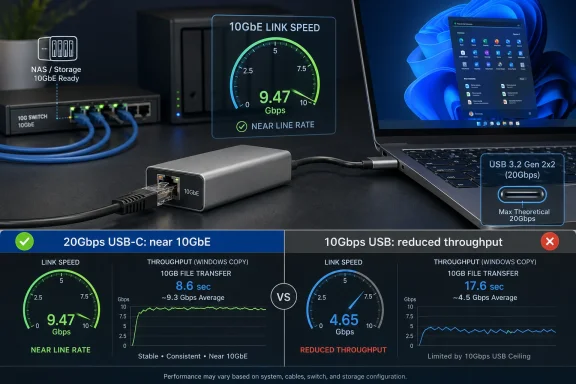
The arrival of the Realtek RTL8159 changes that equation because it puts 10GbE within reach of ordinary USB-C systems. The XikeStor SKN-U310GT is one of the early retail examples: a compact aluminum USB-C adapter with an RJ45 port, aimed at users who want quick access to multi-gigabit wired networking without opening a PC. ServeTheHome measured strong results, including roughly 9.5Gbps in best-case USB 3.2 Gen 2x2 testing, which is close enough to practical 10GbE throughput to matter.
That does not mean the product is magic. The review highlights the central tradeoff of this new category: the adapter is only as fast as the USB link behind it. A Windows 11 laptop with a proper 20Gbps USB 3.2 Gen 2x2 port can see near-10GbE speeds, while a more common 10Gbps USB port will land lower due to protocol overhead and bus limitations.
The larger story is that 10GbE is becoming less exotic at the edge of the network. NAS owners, creators, lab builders, and IT technicians can now think about fast temporary connections in a way that was awkward only a few years ago. The SKN-U310GT is not just another dongle; it is a signal that portable 10GbE is entering the mainstream Windows conversation.
Once the proper driver is installed, the adapter appears under Network adapters in Device Manager and behaves like a conventional NIC. That is exactly what Windows users want: no special connection manager, no odd application layer, and no obvious conflict in the test configuration. Still, the need to fetch drivers from Realtek or the adapter vendor makes this less seamless than a mature 1GbE USB dongle.
There is also a deployment angle. In small offices, repair benches, and homelabs, the adapter might be moved between many systems. If Windows 11 does not already have the driver, admins should keep an offline copy ready before relying on it in the field.
Key Windows setup considerations include:
The review’s most important performance lesson is that 10GbE over USB needs more than a 10Gbps USB link. Ethernet overhead, USB overhead, host controller behavior, and system architecture all reduce usable throughput. A 10Gbps USB connection may sound perfectly matched to 10GbE, but in practice it cannot carry full 10GbE payload at line rate.
The ladder looks like this in practical terms:
The caveat is variability. ServeTheHome noted slightly more performance variation than with a PCIe adapter, which should not surprise anyone who has benchmarked high-speed USB storage or networking. USB adds another scheduling and controller layer, and that layer is not always as deterministic as a PCIe NIC sitting directly on the motherboard fabric.
Users should expect outcomes along these lines:
ServeTheHome measured the SKN-U310GT in the roughly 2.0W to 2.89W range depending on platform. That is higher than the stated 1.95W figure, but still very reasonable for a USB-powered 10Gbase-T adapter. The review also reported no thermal throttling on the tested unit, helped by the aluminum enclosure acting as a passive heatsink.
This is one of the most encouraging parts of the RTL8159 story. If Realtek can deliver low-power 10GbE at scale, then compact adapters, mini-PCs, small NAS devices, and creator workstations all benefit. The market has been waiting for cooler, cheaper 10GbE for a long time.
Practical thermal guidance includes:
USB branding has become confusing enough that even technically capable users can misread what a port supports. USB4 does not automatically mean a USB 3.2 Gen 2x2 peripheral gets a 20Gbps USB data path. Thunderbolt and USB4 may provide enormous bandwidth for some devices while still handling a USB 3.2 Gen 2x2 adapter differently than expected.
That makes this adapter an excellent diagnostic tool as well as a network tool. If a system cannot push expected speeds, users should test port by port and avoid assuming the adapter is at fault. A desktop rear I/O USB-C port may perform differently than a case-front USB-C header connected through an internal cable.
A sensible troubleshooting sequence is:
The Windows 11 driver requirement, however, complicates zero-touch deployment. An enterprise technician cannot assume every locked-down endpoint will allow driver installation, especially in environments governed by endpoint management, driver approval policies, or device control. That means the adapter is best treated as a managed tool, not an anonymous dongle.
Useful enterprise scenarios include:
The SKN-U310GT gives laptop-heavy households and studios a more practical path to 10GbE file transfers. A creator can dock a Windows laptop, attach the adapter, connect to a 10GbE switch, and move large projects without waiting on Wi-Fi or settling for 1GbE. That is a meaningful improvement for video editors, photographers, developers, and homelab users.
That is not a failure of the product; it is how balanced systems work. A fast NIC makes storage, switching, cabling, and host-port details more visible. Users upgrading from 1GbE should think in terms of the whole path rather than the adapter alone.
Good consumer upgrade priorities include:
That matters for competitors. Thunderbolt 10GbE adapters, premium docks, and PCIe solutions still have strong roles, but they may need to justify their higher prices through lower latency, better driver maturity, advanced features, or superior sustained performance. Cheap and competent is a powerful combination.
The market effects could be significant:
Windows 11 buyers should begin with the device they already own. Check the laptop or motherboard manual, identify the exact USB controller and port capability, and confirm whether a 20Gbps USB-C port is available. If not, the adapter may still deliver faster-than-5GbE results, but it should not be purchased solely for full 10GbE saturation.
Best-fit buyers include:
The broader Windows ecosystem should pay attention. Microsoft, Realtek, OEMs, and accessory brands all have a role in making this experience feel less experimental. The hardware appears capable; the remaining work is about consistency, support, and user education.
What to watch next:
Source: ServeTheHome XikeStor SKN-U310GT Realtek RTL8159 USB 10GbE NIC Review
 Overview
For years, desktop 10GbE meant a PCIe network card, a noisy older enterprise adapter, or a premium motherboard with an integrated controller. Laptop users had fewer clean options, especially if they wanted copper 10Gbase-T instead of a Thunderbolt dock, an SFP+ workflow, or a proprietary workstation accessory. USB Ethernet adapters existed, but they were mostly limited to 1GbE, 2.5GbE, or later 5GbE.The arrival of the Realtek RTL8159 changes that equation because it puts 10GbE within reach of ordinary USB-C systems. The XikeStor SKN-U310GT is one of the early retail examples: a compact aluminum USB-C adapter with an RJ45 port, aimed at users who want quick access to multi-gigabit wired networking without opening a PC. ServeTheHome measured strong results, including roughly 9.5Gbps in best-case USB 3.2 Gen 2x2 testing, which is close enough to practical 10GbE throughput to matter.
That does not mean the product is magic. The review highlights the central tradeoff of this new category: the adapter is only as fast as the USB link behind it. A Windows 11 laptop with a proper 20Gbps USB 3.2 Gen 2x2 port can see near-10GbE speeds, while a more common 10Gbps USB port will land lower due to protocol overhead and bus limitations.
The larger story is that 10GbE is becoming less exotic at the edge of the network. NAS owners, creators, lab builders, and IT technicians can now think about fast temporary connections in a way that was awkward only a few years ago. The SKN-U310GT is not just another dongle; it is a signal that portable 10GbE is entering the mainstream Windows conversation.
Windows 11 Setup Is Better, But Still Not Plug-and-Forget
The most important Windows-specific detail is that the Realtek RTL8159 may require a deliberate driver installation. ServeTheHome found that Windows 11 did not necessarily recognize the adapter cleanly out of the box, although Windows Update could help if the system already had another working network connection. That distinction matters for technicians setting up a system where the USB adapter is expected to be the only network path.Once the proper driver is installed, the adapter appears under Network adapters in Device Manager and behaves like a conventional NIC. That is exactly what Windows users want: no special connection manager, no odd application layer, and no obvious conflict in the test configuration. Still, the need to fetch drivers from Realtek or the adapter vendor makes this less seamless than a mature 1GbE USB dongle.
Why Driver Source Matters
For WindowsForum readers, the practical advice is simple: use the newest stable driver from Realtek or the vendor unless Windows Update supplies a newer, known-good package. USB NIC drivers sit in a sensitive path because they bridge power management, USB controller behavior, networking, offload features, and link negotiation. A buggy driver can show up as random disconnects, poor throughput, or strange behavior after sleep.There is also a deployment angle. In small offices, repair benches, and homelabs, the adapter might be moved between many systems. If Windows 11 does not already have the driver, admins should keep an offline copy ready before relying on it in the field.
Key Windows setup considerations include:
- Install the RTL8159 driver before the adapter becomes mission-critical.
- Confirm Device Manager status after installation, not just link lights.
- Test wake-from-sleep behavior on laptops that will dock and undock frequently.
- Check Windows Update only if the system already has another connection.
- Keep a local driver package for clean installs and emergency recovery.
- Avoid assuming USB-C means full-speed USB, because connector shape is not bandwidth.
USB-C Is the Connector; USB 3.2 Gen 2x2 Is the Requirement
The SKN-U310GT uses USB-C, but the connector alone tells users almost nothing about maximum network performance. USB-C can carry USB 2.0, 5Gbps USB, 10Gbps USB, 20Gbps USB 3.2 Gen 2x2, USB4, Thunderbolt, DisplayPort, and charging. That ambiguity is one reason products like this can frustrate buyers who expect every modern-looking port to behave the same.The review’s most important performance lesson is that 10GbE over USB needs more than a 10Gbps USB link. Ethernet overhead, USB overhead, host controller behavior, and system architecture all reduce usable throughput. A 10Gbps USB connection may sound perfectly matched to 10GbE, but in practice it cannot carry full 10GbE payload at line rate.
The Bandwidth Ladder
ServeTheHome’s numbers line up with the expected hierarchy. On USB 3.2 Gen 2x2, the adapter reached about 9.5Gbps. On 10Gbps USB, it dropped into the mid-6Gbps range on x86 and a little lower on an Apple M4 MacBook Pro.The ladder looks like this in practical terms:
- USB 3.2 Gen 2x2, 20Gbps: best fit for near-10GbE throughput.
- USB 3.2 Gen 2, 10Gbps: faster than 5GbE, but not full 10GbE.
- USB 3.2 Gen 1, 5Gbps: useful, but capped below 5GbE after overhead.
- USB4 ports: may not expose 20Gbps USB 3.2 Gen 2x2 behavior for this adapter.
- Thunderbolt docks and hubs: may introduce another layer of bandwidth sharing.
- Front-panel USB-C ports: may be wired differently from rear motherboard ports.
Performance: Impressive Numbers With a Clear Ceiling
The performance story is broadly positive. A measured 9.5Gbps peak on USB 3.2 Gen 2x2 puts the SKN-U310GT in the territory users expect from 10GbE after real-world overhead. For large file transfers, NAS backups, video editing workflows, and lab imaging tasks, that is a substantial upgrade over 1GbE and a noticeable step beyond 2.5GbE.The caveat is variability. ServeTheHome noted slightly more performance variation than with a PCIe adapter, which should not surprise anyone who has benchmarked high-speed USB storage or networking. USB adds another scheduling and controller layer, and that layer is not always as deterministic as a PCIe NIC sitting directly on the motherboard fabric.
Real-World Throughput Expectations
A useful way to frame this product is not “will it always hit 10GbE?” but “what class of network experience does it unlock?” On the right Windows 11 x86 system, it can deliver something close to a native 10Gbase-T adapter. On a 10Gbps USB system, it still performs well enough to beat typical 5GbE adapters, but it will not saturate a 10GbE link.Users should expect outcomes along these lines:
- Best case: roughly 9.5Gbps on a proper 20Gbps USB 3.2 Gen 2x2 host.
- Good case: roughly 6Gbps to 7Gbps on a 10Gbps USB host.
- Fallback case: under 5Gbps on older 5Gbps USB ports.
- Mac case: functional multi-gigabit networking, but not full 10GbE today.
- PCIe comparison: lower consistency than a dedicated internal 10GbE NIC.
- Portable advantage: dramatically easier deployment than opening a desktop.
Thermals and Power Are Better Than Old 10GbE Habits Suggest
Older 10Gbase-T hardware had a reputation for running hot. Many early 10GbE copper adapters used substantial heatsinks, and some enterprise cards were designed for servers with strong front-to-back airflow. That history makes power and thermals especially important for a compact USB adapter.ServeTheHome measured the SKN-U310GT in the roughly 2.0W to 2.89W range depending on platform. That is higher than the stated 1.95W figure, but still very reasonable for a USB-powered 10Gbase-T adapter. The review also reported no thermal throttling on the tested unit, helped by the aluminum enclosure acting as a passive heatsink.
Why Low Power Changes Deployment
Power consumption is not just a battery-life detail. It affects whether the adapter remains stable on marginal ports, whether it heats nearby devices, and whether it can be used comfortably in mobile workflows. A 10GbE dongle that pulls modest power and avoids throttling is far more practical than one that behaves like a tiny space heater.This is one of the most encouraging parts of the RTL8159 story. If Realtek can deliver low-power 10GbE at scale, then compact adapters, mini-PCs, small NAS devices, and creator workstations all benefit. The market has been waiting for cooler, cheaper 10GbE for a long time.
Practical thermal guidance includes:
- Do not bury the adapter under papers or behind a hot dock.
- Use the included short cable or another high-quality certified cable.
- Expect warmth under load, especially during long transfers.
- Avoid unpowered hubs for high-speed networking.
- Watch for throttling symptoms, such as sudden transfer drops after several minutes.
- Prefer direct motherboard ports when testing maximum performance.
The Mac and USB4 Caveat Is a Warning for Everyone
The review notes that macOS currently does not deliver full USB 3.2 Gen 2x2 behavior with this adapter, and Apple systems may report different link speeds. On the tested Apple M4 MacBook Pro, performance exceeded 5GbE but did not reach full 10GbE. For WindowsForum readers, this may sound like an Apple-specific footnote, but it reveals a broader industry problem.USB branding has become confusing enough that even technically capable users can misread what a port supports. USB4 does not automatically mean a USB 3.2 Gen 2x2 peripheral gets a 20Gbps USB data path. Thunderbolt and USB4 may provide enormous bandwidth for some devices while still handling a USB 3.2 Gen 2x2 adapter differently than expected.
Compatibility Is About the Whole Chain
A 10GbE USB adapter depends on several parts working together. The NIC chipset matters, but so do the host controller, firmware, cable, operating system, driver, and any dock or hub in between. One weak link can turn a near-10GbE setup into a 6Gbps setup.That makes this adapter an excellent diagnostic tool as well as a network tool. If a system cannot push expected speeds, users should test port by port and avoid assuming the adapter is at fault. A desktop rear I/O USB-C port may perform differently than a case-front USB-C header connected through an internal cable.
A sensible troubleshooting sequence is:
- Install the latest driver and reboot before benchmarking.
- Connect directly to the fastest known USB-C port on the system.
- Verify link speed in Windows network settings and adapter properties.
- Test against a known-fast 10GbE endpoint, such as a NAS with SSD storage.
- Swap the USB-C cable if performance is unexpectedly low.
- Try another host port or controller before blaming the NIC.
- Compare with a PCIe adapter if absolute performance validation matters.
Enterprise Use: A Field Tool, Not a Server NIC Replacement
In enterprise environments, the SKN-U310GT’s appeal is not that it replaces datacenter NICs. It is that it gives IT staff a fast, portable copper 10GbE connection for temporary tasks. Imaging workstations, moving large datasets, validating switch ports, or connecting a laptop to a storage VLAN are all plausible uses.The Windows 11 driver requirement, however, complicates zero-touch deployment. An enterprise technician cannot assume every locked-down endpoint will allow driver installation, especially in environments governed by endpoint management, driver approval policies, or device control. That means the adapter is best treated as a managed tool, not an anonymous dongle.
Where It Fits in IT Workflows
For IT departments, the adapter’s value is highest where flexibility matters more than permanent uptime. A PCIe NIC remains better for servers, storage nodes, and latency-sensitive workloads. A USB adapter is better when the machine cannot be opened, should not be modified, or only needs 10GbE temporarily.Useful enterprise scenarios include:
- Rapid workstation imaging over a high-speed wired network.
- Temporary NAS access for media, CAD, or engineering teams.
- Switch-port validation during network upgrades.
- Laptop-based troubleshooting on 10Gbase-T segments.
- Small-office migration work where opening PCs is impractical.
- Emergency connectivity when an onboard NIC fails.
Consumer and Creator Impact: NAS Owners Get the Biggest Win
For home users and creators, the biggest beneficiary is the modern NAS workflow. A 1GbE connection tops out quickly when moving 4K footage, large photo libraries, virtual machine images, or full-system backups. Even 2.5GbE can feel limiting once SSD-based storage enters the picture.The SKN-U310GT gives laptop-heavy households and studios a more practical path to 10GbE file transfers. A creator can dock a Windows laptop, attach the adapter, connect to a 10GbE switch, and move large projects without waiting on Wi-Fi or settling for 1GbE. That is a meaningful improvement for video editors, photographers, developers, and homelab users.
The Home Network Bottleneck Shifts
The adapter also exposes the next bottleneck. If the NAS uses hard drives, a single disk may not feed 10GbE. If the switch has only one 10GbE port, the rest of the network may not keep up. If the laptop’s USB-C port is only 10Gbps, the network will top out below full 10GbE.That is not a failure of the product; it is how balanced systems work. A fast NIC makes storage, switching, cabling, and host-port details more visible. Users upgrading from 1GbE should think in terms of the whole path rather than the adapter alone.
Good consumer upgrade priorities include:
- Use a 10GbE-capable switch with enough multi-gig ports for real workloads.
- Upgrade NAS storage to SSD caching or fast arrays where appropriate.
- Verify Cat6 or Cat6a cabling for stable 10Gbase-T links.
- Check laptop USB specifications before buying the adapter.
- Benchmark with realistic files, not only synthetic network tests.
- Keep Wi-Fi for mobility and wired 10GbE for heavy transfers.
Competitive Pressure: Realtek Is Pushing 10GbE Downmarket
Realtek has long been associated with affordable client networking, especially onboard Ethernet and USB adapters. The RTL8159 extends that pattern into 10GbE, a segment historically associated with pricier controllers and enterprise-grade hardware. If this chipset becomes common, the price floor for USB 10GbE adapters could fall quickly.That matters for competitors. Thunderbolt 10GbE adapters, premium docks, and PCIe solutions still have strong roles, but they may need to justify their higher prices through lower latency, better driver maturity, advanced features, or superior sustained performance. Cheap and competent is a powerful combination.
The New 10GbE Price Psychology
At around the high double-digit street-price range described in the review, the SKN-U310GT sits in impulse-upgrade territory for enthusiasts. That is very different from the old 10GbE buying decision, where the NIC, switch, cabling, and thermal concerns made the upgrade feel like a project. The adapter lowers the psychological barrier.The market effects could be significant:
- More laptops will be tested against 10GbE workflows.
- NAS vendors will face more demand for 10GbE standardization.
- Switch makers can sell more affordable multi-gig desktop models.
- Motherboard vendors may need clearer USB port labeling.
- Thunderbolt accessory makers will need stronger differentiation.
- Driver quality will become a competitive feature, not an afterthought.
Buying Advice: Match the Adapter to the Machine, Not the Other Way Around
The SKN-U310GT is a good candidate for users who already have, or plan to buy, systems with proper USB 3.2 Gen 2x2 support. It is less compelling if the host machine is limited to 5Gbps USB or if the user expects Thunderbolt branding alone to guarantee full compatibility. The adapter can still work in those environments, but expectations must be realistic.Windows 11 buyers should begin with the device they already own. Check the laptop or motherboard manual, identify the exact USB controller and port capability, and confirm whether a 20Gbps USB-C port is available. If not, the adapter may still deliver faster-than-5GbE results, but it should not be purchased solely for full 10GbE saturation.
Who Should Buy It
This adapter makes the most sense for users who need speed occasionally or across multiple machines. It is less ideal for permanent server workloads where a PCIe NIC would be more predictable. That distinction keeps expectations grounded.Best-fit buyers include:
- Windows 11 laptop users with USB 3.2 Gen 2x2 ports.
- Homelab builders who need portable 10Gbase-T access.
- Creators moving large files to and from a NAS.
- IT technicians who troubleshoot multi-gig wired networks.
- Desktop users who cannot spare a PCIe slot.
- Mini-PC owners whose systems lack internal expansion.
Strengths and Opportunities
The XikeStor SKN-U310GT shows how far USB networking has come, especially for Windows users who want faster wired connectivity without opening a machine. Its biggest opportunity is not merely performance, but the way it makes 10GbE adoption easier, cheaper, and more portable across laptops, desktops, benches, and small studios.- Near-line-rate 10GbE is possible on USB 3.2 Gen 2x2 Windows systems.
- Driver installation is manageable once users know to plan for it.
- Power consumption is impressively low for a 10Gbase-T USB adapter.
- The aluminum enclosure helps passive cooling without adding fan noise.
- Backward multi-gig support increases flexibility with 1GbE, 2.5GbE, 5GbE, and 10GbE networks.
- Portable deployment is a major advantage over PCIe cards in laptops and sealed mini-PCs.
- Market pressure could accelerate cheaper 10GbE switches and NAS upgrades for enthusiasts.
Risks and Concerns
The same features that make this adapter convenient also introduce friction. USB 10GbE depends on a chain of compatibility details that many buyers will not understand until after purchase, and Windows driver readiness remains a critical part of the experience.- Windows 11 may not recognize the adapter immediately without the correct driver.
- USB-C labeling remains confusing, making port capability hard to verify.
- Full 10GbE requires USB 3.2 Gen 2x2, which is not universal on laptops.
- Performance can vary more than PCIe networking, especially across controllers and docks.
- Mac users should not expect full 10GbE today with this class of adapter.
- Long sustained transfers may expose thermal or power issues on weaker designs.
- Enterprise environments may block driver installation unless the device is pre-approved.
Looking Ahead
The RTL8159 generation is likely to make USB 10GbE a normal part of the enthusiast toolkit. The next step is maturity: better in-box driver support, clearer vendor documentation, improved firmware behavior, and more transparent USB port labeling from PC makers. If those pieces improve, adapters like the SKN-U310GT could become as ordinary for high-end users as USB 2.5GbE dongles are today.The broader Windows ecosystem should pay attention. Microsoft, Realtek, OEMs, and accessory brands all have a role in making this experience feel less experimental. The hardware appears capable; the remaining work is about consistency, support, and user education.
What to watch next:
- Whether Windows Update begins supplying reliable RTL8159 drivers more consistently.
- Whether more laptops include clearly labeled 20Gbps USB 3.2 Gen 2x2 ports.
- Whether competing USB4 or Thunderbolt 10GbE adapters fall in price.
- Whether Realtek improves Linux and macOS behavior over time.
- Whether low-cost 10GbE switches push more homes and studios beyond 2.5GbE.
Source: ServeTheHome XikeStor SKN-U310GT Realtek RTL8159 USB 10GbE NIC Review
