

Microsoft’s brief CVE title and the CVSS vector are answering two different questions: the CVE headline tells you what an off‑host attacker can ultimately accomplish (arbitrary code execution on a target), while the CVSS Attack Vector (AV) reports where the vulnerable code must be executed at the moment the exploit triggers (inside a local process on the victim machine). That is why an Excel vulnerability can be labeled “Remote Code Execution” in the CVE title even though the published CVSS string shows AV:L — the malicious spreadsheet can be delivered from a remote attacker, but the actual vulnerable code path runs locally when Excel parses the file.
Microsoft’s Security Response Center and many vendor advisories routinely use the short phrase Remote Code Execution (RCE) as an operational shorthand: it signals to defenders that an attacker located off‑site can cause arbitrary code to run on a target if the exploitation chain completes. CVSS, by contrast, is a standardized, mechanistic scoring framework whose Attack Vector (AV) metric describes the locality of the triggering operation — Network, Adjacent, Local, or Physical. For document‑parsing vulnerabilities like those in Excel, the triggering operation commonly happens inside the local Excel process when a user opens or previews a crafted workbook; CVSS therefore records AV:L (Local) even when delivery is remote.
This article explains the distinction in plain terms, walks through the technical anatomy of Excel parsing exploits, highlights the important exception cases that change the AV from Local to Network, and provides a prioritized mitigation and triage checklist for administrators and security teams.
CVSS:3.1/AV:L/AC:L/PR:N/UI:R/S:U/C:H/I:H/A:H
Breakdown and operational meaning:
This phrasing explains both the operational reach (remote attacker) and the technical trigger (local parsing), which helps decision makers understand why urgent patching and mail/gateway mitigations are required even when CVSS lists AV:L.
Treat both signals together: label = urgency; CVSS = exploit mechanics. For defenders, that means urgent patching and layered mitigations (mail gateway hardening, Protected View, macro restrictions, EDR hunts), plus a careful inventory of any server‑side parsing services that can change the exposure model from Local to Network. Misreading the AV:L designation as “low risk” is the real danger — document‑parsing RCEs frequently become weaponized in the wild because delivery is trivial and user interaction can be engineered at scale. Prioritize fixes accordingly, and verify the authoritative vendor details for CVE‑2026‑20946 against the MSRC advisory and enterprise patch catalogs before completing remediation.
Source: MSRC Security Update Guide - Microsoft Security Response Center
 Background
Microsoft’s Security Response Center and many vendor advisories routinely use the short phrase Remote Code Execution (RCE) as an operational shorthand: it signals to defenders that an attacker located off‑site can cause arbitrary code to run on a target if the exploitation chain completes. CVSS, by contrast, is a standardized, mechanistic scoring framework whose Attack Vector (AV) metric describes the locality of the triggering operation — Network, Adjacent, Local, or Physical. For document‑parsing vulnerabilities like those in Excel, the triggering operation commonly happens inside the local Excel process when a user opens or previews a crafted workbook; CVSS therefore records AV:L (Local) even when delivery is remote.This article explains the distinction in plain terms, walks through the technical anatomy of Excel parsing exploits, highlights the important exception cases that change the AV from Local to Network, and provides a prioritized mitigation and triage checklist for administrators and security teams.
Why the apparent contradiction exists
Two different questions, two different audiences
- CVE/advisory title answers: What can an attacker achieve and from where can they attempt it?
When vendors say “Remote Code Execution,” they want to quickly communicate the worst‑case impact and emphasize that attackers can launch the attack from off‑host (for example, via an email attachment or cloud link). This is a concise operational alarm. - CVSS Attack Vector answers: Where must the exploit execute at the moment it triggers?
CVSS focuses on the exact execution context of the vulnerable code. If the exploit triggers when a local application (Excel) parses a file on the endpoint, the Attack Vector is Local (AV:L). CVSS intentionally separates the network delivery phase from the local trigger phase to avoid “double‑counting” the network step and preserve consistent scoring across many vulnerability types.
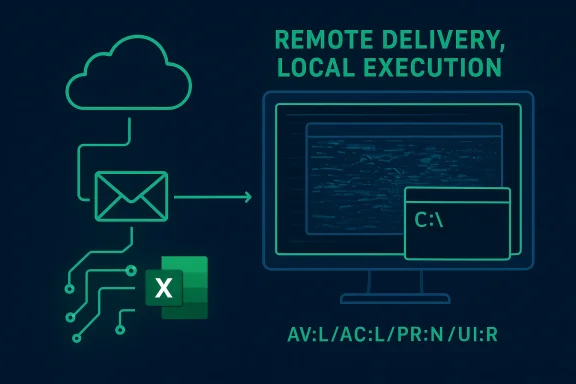
A practical phrasing: “remote delivery, local execution”
Most successful document‑based RCE chains follow this pattern:- Attacker crafts a malicious workbook that targets a memory‑safety or parsing flaw.
- Attacker delivers that file remotely — via email attachment, cloud share, file upload, or web download.
- Victim opens the workbook (or a preview component renders it), invoking Excel’s local parser.
- The parser hits the malformed data, triggers memory corruption, and attacker‑controlled code executes inside the Excel process on the local host.
Technical anatomy: why Excel parsing bugs become RCEs
Excel’s attack surface
Excel is highly featureful — legacy binary BIFF formats, Open XML components, embedded OLE objects, ActiveX, formula engines, rendering subsystems, and many native‑code parsers. Those native components run inside Excel’s process and historically have been fertile ground for memory‑safety defects such as use‑after‑free, heap overflow, and out‑of‑bounds reads/writes. When an attacker can control enough of the file structure, they can manipulate internal state and corrupt memory to hijack control flow. Such data‑only exploits do not require macros or script execution.Why macros aren’t necessary
Macro‑blocking policies target script execution, but data‑driven parsing flaws exploit the native parser itself. A malicious workbook can be crafted so that merely parsing certain binary or XML fields triggers a memory corruption primitive that leads to arbitrary code execution. Because the attack leverages the parser, not scripting, traditional macro defenses provide limited protection against this class of exploit.Typical exploitation primitives
- Untrusted pointer dereference or stale pointer usage (use‑after‑free) that allows overwriting a pointer used in control flow.
- Heap or buffer overflows that overwrite adjacent metadata or function pointers.
- Type confusion and vtable corruption in COM/OLE/ActiveX object parsing.
- Out‑of‑bounds reads that leak memory to build reliable exploitation primitives.
The critical exception: server‑side parsing and preview handlers
There is one operationally important case where the AV should be Network (AV:N) rather than Local: when the vulnerable parser executes on a network‑exposed or network‑facing service. Examples include:- Email gateways or webmail services that generate attachment previews server‑side.
- Document conversion services (e.g., Office Online Server, collaborative platforms) that render or convert uploaded files on servers.
- Any centralized document‑processing or indexing service that opens Office files on behalf of remote users.
How to interpret the CVSS string in operational triage
A typical CVSS v3.1 vector you will see for Excel parsing RCEs is:CVSS:3.1/AV:L/AC:L/PR:N/UI:R/S:U/C:H/I:H/A:H
Breakdown and operational meaning:
- AV:L (Attack Vector: Local) — Exposed parser executes locally when a user opens or previews a file.
- AC:L (Attack Complexity: Low) — No special environment or conditions are required beyond opening the file.
- PR:N (Privileges Required: None) — The attacker needs no prior privileges on the victim host.
- UI:R (User Interaction: Required) — A user must take action (open the file or view the preview).
- S:U (Scope: Unchanged) — The exploit affects resources within the same security scope (often adequate to achieve user‑level compromise).
- C:I:A = H/H/H — High impact across Confidentiality, Integrity, and Availability when successful.
Practical mitigation and response plan
Immediate steps (0–48 hours)
- Apply vendor updates immediately — install the Microsoft security update(s) that address CVE‑2026‑20946 for all affected Office/Excel builds. This is the primary remediation path.
- Block or quarantine suspicious external attachments at the email gateway — enforce attachment‑type policies and quarantine unknown Excel file types from external senders.
- Enforce Protected View for files from the Internet zone; disable automatic enabling of editing for files opened from the web or email.
- Disable preview panes and server‑side previewing where practical until the environment is patched — preview handlers often render content with the same parsers and can increase exposure.
- Restrict macros and ActiveX — block unsigned macros and disable “Enable all macros” policies globally.
Short‑term controls (48 hours–2 weeks)
- Harden mail gateways with sandboxing or detonation chambers for suspicious Office files.
- Update EDR rules and hunting queries to flag anomalous Excel parent/child process relationships, suspicious command‑line invocations spawned by Excel, or unexpected network connections initiated by Excel processes.
- Roll out least‑privilege policies so users do not run with administrative rights by default, reducing post‑exploit impact.
Longer‑term and strategic controls
- Inventory all places where Office parsing runs: desktop clients, mail gateways, cloud and on‑premises preview services, document conversion systems, and content management servers.
- Patch server‑side preview components and document conversion services as a priority (these are high‑impact AV:N risks if they use vulnerable parsers).
- Invest in phishing‑resistant multi‑factor authentication and targeted user training to reduce the success rate of social engineering campaigns.
- Maintain a fast, automated patch management pipeline with telemetry and validation to reduce time‑to‑remediation windows.
Detection, hunting, and post‑exploit indicators
Key behaviors to hunt in telemetry and EDR:- Excel spawning cmd.exe, powershell.exe, wscript.exe, rundll32.exe, or other uncommon child processes.
- Unusual creation of persistence artifacts (scheduled tasks, service creation) originating from Office process trees.
- Large or anomalous network transfers immediately following Excel process activity.
- Indicators inside email gateways: recipients across many accounts receiving the same attachment, or attachments with obfuscated internal structure targeting known insecure parsers.
Communicating the nuance to non‑technical stakeholders
Use plain language: “An attacker can cause a workstation to run malicious code by tricking a user into opening a specially‑crafted Excel file that the application misparses. The attacker can be located anywhere (remote), but the vulnerability only triggers when Excel parses the file on the endpoint (local). We must patch, block suspicious Excel attachments, and enforce Protected View to reduce the risk.”This phrasing explains both the operational reach (remote attacker) and the technical trigger (local parsing), which helps decision makers understand why urgent patching and mail/gateway mitigations are required even when CVSS lists AV:L.
Critical analysis: strengths, tradeoffs, and potential risks
Notable strengths of Microsoft’s phrasing and CVSS practice
- Operational clarity: Labeling high‑impact issues as “Remote Code Execution” ensures rapid attention from defenders and prioritizes fixes that could enable full compromise.
- Standardized scoring: CVSS’s separation of delivery and trigger improves comparability across thousands of vulnerabilities and avoids inflating exploitability by double‑counting network delivery.
- Actionable triage: When read together, the CVE title and CVSS vector supply both urgency and the technical mechanics needed for correct mitigation planning.
Risks and potential for misunderstanding
- Misreading “Local” as low risk: Some teams wrongly deprioritize AV:L issues because they interpret “Local” to mean “hard to exploit.” This is dangerous for document‑parsing RCEs because delivery channels are ubiquitous and user interaction is easily engineered.
- Server‑side blind spots: Organizations often focus only on desktop endpoints; forgetting server‑side preview and conversion services can leave high‑exposure AV:N attack paths unpatched.
- Overreliance on macro controls: Because many Excel attacks historically used macros, some defenses focus narrowly on macros and miss data‑only parsing exploits that bypass those controls entirely.
A caution about specifics: verify the live MSRC entry
The general explanation above applies to Excel document RCE advisories broadly. For CVE‑2026‑20946 specifically, administrators should verify the precise CVSS vector, affected product builds, and KB article numbers on the vendor’s MSRC advisory page or enterprise patch catalog and then map those to their inventory before executing remediation rollouts. Public advisories are the authoritative record for per‑SKU guidance; if any detail cannot be confirmed via the vendor page, treat that item as unverifiable until validated.Practical prioritization checklist (for busy IT teams)
- Inventory: map Excel/Office builds across endpoints and servers; identify mail gateways and preview services that parse Office files.
- Patch: deploy Microsoft updates for the affected builds at highest speed and validate installs.
- Block & quarantine: configure mail gateway rules to quarantine external Excel attachments and disable automatic previewing.
- Protect: enforce Protected View and block macros by default for files from the internet zone.
- Hunt: run EDR hunts for unusual Office process behavior and review gateway logs for suspicious attachments or mass deliveries.
- Harden servers: prioritize patching of Office Online Server, conversion services, and any server that performs document parsing.
- Educate: notify users and communications teams with a concise non‑technical description and instructions for handling suspicious attachments.
- Verify: after patching, validate mitigation effectiveness through telemetry and re‑run hunts for known IoCs.
Conclusion
The apparent mismatch between a CVE title that reads “Remote Code Execution” and a CVSS Attack Vector of AV:L (Local) is intentional and meaningful. The CVE headline communicates operational reach and impact — that an attacker located off‑host can deliver a crafted file and ultimately cause code to run on a target — while CVSS’s AV metric documents the execution context of the vulnerable code at the moment of exploitation — in many Excel RCEs this happens locally inside the Excel process when a user opens or previews a spreadsheet.Treat both signals together: label = urgency; CVSS = exploit mechanics. For defenders, that means urgent patching and layered mitigations (mail gateway hardening, Protected View, macro restrictions, EDR hunts), plus a careful inventory of any server‑side parsing services that can change the exposure model from Local to Network. Misreading the AV:L designation as “low risk” is the real danger — document‑parsing RCEs frequently become weaponized in the wild because delivery is trivial and user interaction can be engineered at scale. Prioritize fixes accordingly, and verify the authoritative vendor details for CVE‑2026‑20946 against the MSRC advisory and enterprise patch catalogs before completing remediation.
Source: MSRC Security Update Guide - Microsoft Security Response Center
