
This renewed Lenovo ThinkCentre M820Z All‑in‑One presents a tidy, space‑saving package for a home office or small business: a 21.5‑inch Full HD borderless display, a 6‑core Intel Core i5‑8400, 16 GB of RAM, and a 256 GB SSD running Windows 11 Pro — bundled with keyboard and mouse and advertised as tested and cleaned to “work like new.” The combination of a true desktop-class 6‑core CPU, generous system memory for an AIO, and an SSD makes this a compelling buy for everyday productivity, light multitasking, and small‑office duties — provided you understand the tradeoffs that come with a renewed unit and the AIO form factor itself.
All‑in‑one (AIO) desktops like the ThinkCentre M820Z have long been targeted at users who value a minimal footprint, a clean desk, and simplified setup: display, system, speakers and some ports all in a single chassis. That trend remains strong as vendors push compact Windows PCs for remote work and classroom deployments, where space and cable clutter are real concerns. Community coverage and vendor briefings in recent years underline how AIOs are a practical middle ground between laptops and full towers for many users.
Lenovo’s ThinkCentre line targets business users first, focusing on durability, manageability and serviceability compared with consumer IdeaCentre and AIO families. The M820Z — a business‑class AIO — typically appears in refurbished and renewed listings because its sensible, modular design has allowed many units to remain useful years after first sale. Expect enterprise‑grade chassis quality and commercial BIOS features, but also a product that is several hardware generations old compared with current PCs.
Practical implications:
Community and reseller discussion around AIO bargains frequently highlights the tradeoff between upfront savings and reduced warranty/service terms — a tradeoff that is especially meaningful in small business procurement.
However, the purchase should be conditional on satisfying several seller and technical checks: clear warranty terms, confirmation on power adapter type, SSD interface and RAM configuration, and return/DOA policies. Buyers who need upgrade headroom, the latest efficiency, or larger displays should evaluate newer AIO models or small form factor towers; those who prioritize low price and immediate productivity will find the M820Z a usable, economical choice — as long as they accept the refurbishment tradeoffs.
For readers considering a renewed M820Z listing, follow the due diligence checklist in this article, run the post‑delivery tests I outline, and weigh the price against local refurbished alternatives and new models in the same budget band. That approach will maximize the value you get from a compact, business‑class AIO while minimizing the common risks associated with renewed hardware.
Source: kliksolonews.com https://kliksolonews.com/M820Z-All-in-One-Desktop-I5-8400-16GB-RAM-256GB-SSD-21-549928/
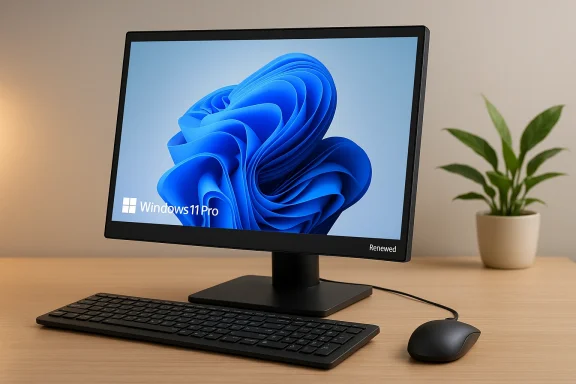 Background / Overview
All‑in‑one (AIO) desktops like the ThinkCentre M820Z have long been targeted at users who value a minimal footprint, a clean desk, and simplified setup: display, system, speakers and some ports all in a single chassis. That trend remains strong as vendors push compact Windows PCs for remote work and classroom deployments, where space and cable clutter are real concerns. Community coverage and vendor briefings in recent years underline how AIOs are a practical middle ground between laptops and full towers for many users.Lenovo’s ThinkCentre line targets business users first, focusing on durability, manageability and serviceability compared with consumer IdeaCentre and AIO families. The M820Z — a business‑class AIO — typically appears in refurbished and renewed listings because its sensible, modular design has allowed many units to remain useful years after first sale. Expect enterprise‑grade chassis quality and commercial BIOS features, but also a product that is several hardware generations old compared with current PCs.
What the listing actually offers — quickly and precisely
- Model: Renewed Lenovo ThinkCentre M820Z All‑in‑One desktop (renewed/refurbished condition)
- Display: 21.5‑inch Full HD (1920 x 1080), near‑edge‑to‑edge / borderless design
- Processor: Intel Core i5‑8400 (6 cores; Intel marketing lists Turbo up to 4.0 GHz)
- Memory: 16 GB (likely DDR4)
- Storage: 256 GB SSD (type unspecified — could be SATA or NVMe depending on internal config)
- Operating System: Windows 11 Pro (preinstalled)
- Accessories: Keyboard and mouse included
- Connectivity: 4 × USB 3.x ports, HDMI output, headphone/mic jack (listing language)
- Packaging / Power: Renewed units may ship in generic packaging and may include a compatible third‑party power supply rather than the original Lenovo adapter
Technical deep dive: what the hardware really means for you
Processor: Intel Core i5‑8400 — still capable, but not cutting‑edge
The Intel Core i5‑8400 is a Coffee Lake desktop CPU (6 physical cores, no Hyper‑Threading) that debuted in the 2017–2018 timeframe. Its multi‑core performance still holds up well for office productivity, web‑heavy workflows, and light content tasks like photo edits or small video transcodes. The i5‑8400’s turbo frequencies (up to about 4.0 GHz on single‑threaded workloads) give snappy response for everyday apps and browser tabs.Practical implications:
- Expect smooth performance for Microsoft 365, browsers with a dozen tabs, video conferencing, and light multitasking.
- Don’t expect modern, power‑efficient laptop CPU levels of battery life or the latest performance per watt; the i5‑8400 is a desktop chip with a higher TDP and older microarchitecture.
- For CPU‑heavy workloads such as large video renders or complex simulations, modern multi‑core CPUs or recent Intel/AMD chips will be faster and more efficient.
Memory and storage: 16 GB and a 256 GB SSD — a pragmatic combo
A 16 GB memory configuration is a strong point for a renewed AIO. It lets users keep many browser tabs, productivity apps, and background services open without aggressive paging. The 256 GB SSD provides the boot‑speed advantage of flash storage; but storage capacity will be the first limitation for users with large media libraries.- If you store many photos, videos, or large datasets, plan on external storage or an upgrade to a larger internal SSD if the unit supports it.
- The listing doesn’t specify SSD interface (SATA vs NVMe). NVMe will deliver noticeably faster sequential and random I/O, but both are adequate for OS and daily apps.
Display and ergonomics: 21.5" FHD — compact and usable, with limits
The 21.5‑inch Full HD panel is a common AIO size that balances legibility at typical desktop distances and the compact footprint many buyers want. Borderless designs look modern and save desk space.- Pros: Small footprint, integrated speakers, tidy install.
- Cons: Limited screen real estate for serious multitasking (split‑screen workflows will feel cramped compared to 24–27‑inch monitors). Check viewing angles and brightness — commercial AIOs can range from mediocre to very good.
Ports and expandability: practical but limited
The listing cites four USB 3.x ports, HDMI output and a headset jack. That’s enough for typical peripherals, a wired network adapter (if needed), and an external display. AIO chassis often limit internal expansion compared to towers.- Check rear/side placement of ports for your desk layout.
- Don’t assume desktop‑tower style upgrades are possible; AIOs may restrict access to the M.2 slot or RAM slots and sometimes carry fewer drive bays.
- If you plan to add a second internal drive, higher RAM, or a discrete GPU, confirm the unit’s internal layout before purchase.
Strengths: where this renewed M820Z shines
- Space savings and clean setup. One cable power and minimal desktop clutter are major advantages for small desks or shared spaces.
- Good everyday performance. The Core i5‑8400 + 16 GB RAM + SSD combination is well‑balanced for office work, remote learning, video meetings and general household use.
- Windows 11 Pro preinstalled. Business‑grade OS features such as BitLocker, group policy, and remote management capabilities can be useful for small businesses.
- Lower cost vs new. Renewed pricing often delivers meaningful savings for functional hardware if you don’t need the latest silicon or higher display sizes.
- Business lineage. ThinkCentre hardware tends to emphasize durability and serviceability compared to many consumer AIOs. That legacy matters for longer life under light commercial use.
Weaknesses and real risks to weigh
- Renewed/refurbished variance. “Renewed” is not a single, standardized quality level. Testing protocols, warranty periods, and cosmetic standards vary between sellers and refurbishers. Expect a range from manufacturer‑certified refurb to seller‑tested used units.
- Aging platform. The i5‑8400 is multiple CPU generations old. That means lower energy efficiency and no support for some newer platform features (e.g., the latest PCIe, DDR5, or integrated AI accelerators).
- Limited upgrade path. AIO chassis frequently restrict upgrades. If you expect to upgrade RAM or swap the SSD, confirm access and compatible connectors before buying.
- Power adapter and packaging concerns. Listings that specify a compatible (non‑original) power supply and generic packaging can be fine, but they add supply‑chain uncertainty. A mismatched adapter or poor packaging could shorten the unit’s usable life.
- Warranty and return policy differences. Renewed units often carry shorter warranties than factory‑new devices. Check the seller’s return window, repair logistics, and whether a replacement unit is offered for DOA (dead on arrival) issues.
Due diligence checklist — what to ask before you buy
- Warranty length and terms. How long is coverage and what does it include (parts, labor, shipping)?
- Refurbishment standard. Is the unit tested and graded by the manufacturer, a certified refurbisher, or an independent reseller?
- Power adapter details. Is the provided adapter original Lenovo or a compatible third‑party model? Request wattage and connector specs.
- Storage interface. Is the SSD NVMe (M.2) or SATA? This affects upgrade choices and performance.
- RAM configuration. Is the 16 GB soldered or in a 2×8 GB DIMM pair? This matters for field upgrades.
- Return and DOA policy. What’s the return window and process if you receive a defective unit?
- Pictures and cosmetic grade. Are there images of the actual device showing scratches, discoloration, or screen defects?
- Serial/FRU check. Ask for the serial number if warranty validation is necessary or to check service history.
Practical testing steps to perform immediately after receiving a renewed M820Z
- Inspect the exterior and screen for scratches, dead pixels, and discoloration under various brightness settings.
- Confirm included accessories (keyboard, mouse) are functional and that drivers are present for Windows 11 Pro.
- Run a system inventory: check BIOS/UEFI version, CPU model string, RAM configuration, SSD model and interface.
- Verify Windows activation and proper licensing for Windows 11 Pro (look in Settings → System → Activation).
- Run basic stress and health checks:
- Disk health and speed (read/write benchmarks and SMART data).
- RAM check using Windows Memory Diagnostic or MemTest86 if possible.
- CPU load test and temperature monitoring to ensure cooling behaves correctly.
- Test ports: USB, HDMI output to external display, audio jack.
- Confirm networking — wired and Wi‑Fi behavior — and update network adapter drivers if necessary.
When the renewed M820Z is a great choice
- You need a compact, ready‑to‑use Windows desktop for web browsing, office apps, video conferencing and administrative tasks.
- Desk space is limited and you prefer an integrated display with minimal cabling.
- Cost sensitivity matters more than having the latest CPU generation or the largest display.
- You are comfortable doing modest upgrades (like an external drive or replacing an SSD) or verifying seller claims before buying.
When to skip it and buy something else
- You rely on a lot of screen real estate (consider a 24–27" AIO or a separate monitor + small form factor PC).
- Your workloads include heavy video editing, 3D rendering, or large dataset processing that benefit from more modern multi‑core CPUs or discrete GPUs.
- You want the longest possible warranty and manufacturer support for mission‑critical business use.
- You need a highly energy‑efficient or fanless system — the i5‑8400 platform is not optimized for those use cases.
Upgrade and longevity considerations
ThinkCentre family designs have often allowed reasonable serviceability, but actual expandability in an AIO depends on the chassis revision. Before assuming upgrades:- Verify whether the unit has 2.5‑inch bays, an accessible M.2 slot, or spare DIMM sockets.
- Confirm BIOS/UEFI firmware update availability from Lenovo if you plan to swap hardware — firmware updates can improve stability with modern SSDs or memory kits.
- If long life and hardware flexibility are priorities, consider a small form factor (SFF) ThinkCentre tower where internal upgrades are easier.
Security and management tips for business buyers
- Reimage or reset the device to your organization’s standard image and policies; don’t rely on the seller’s preinstalled configuration beyond what they promise.
- Enable Windows 11 Pro security features: BitLocker, Windows Defender with up‑to‑date definitions, and register the device with your endpoint management solution if applicable.
- If the device will handle sensitive data, validate TPM presence (for BitLocker) and confirm whether the vendor disabled any enterprise security features during refurbishing.
- Maintain a proactive driver/firmware update process to avoid known vulnerabilities tied to older firmware on refurbished hardware.
Pricing perspective and value analysis
Renewed units succeed when they balance purchase price against expected remaining useful life. If this M820Z is priced substantially below comparable new AIOs with modern low‑power silicon, it may be an excellent short‑to‑medium term play for cost‑sensitive buyers. Conversely, if the price approaches that of new 11th–13th Gen or AMD Ryzen 4000/5000 family AIOs, the newer systems with better energy efficiency and feature sets may be a wiser long‑term investment.Community and reseller discussion around AIO bargains frequently highlights the tradeoff between upfront savings and reduced warranty/service terms — a tradeoff that is especially meaningful in small business procurement.
Final verdict — a balanced recommendation
The renewed Lenovo ThinkCentre M820Z with an Intel Core i5‑8400, 16 GB RAM, 256 GB SSD and a 21.5‑inch FHD borderless display is a solid value proposition for home offices, classrooms, and small businesses that need a compact, reliable Windows desktop for everyday productivity. Its major selling points are a real desktop CPU with good single‑ and mid‑range multi‑thread performance, a generous 16 GB of RAM, and the convenience of an all‑in‑one chassis with Windows 11 Pro.However, the purchase should be conditional on satisfying several seller and technical checks: clear warranty terms, confirmation on power adapter type, SSD interface and RAM configuration, and return/DOA policies. Buyers who need upgrade headroom, the latest efficiency, or larger displays should evaluate newer AIO models or small form factor towers; those who prioritize low price and immediate productivity will find the M820Z a usable, economical choice — as long as they accept the refurbishment tradeoffs.
For readers considering a renewed M820Z listing, follow the due diligence checklist in this article, run the post‑delivery tests I outline, and weigh the price against local refurbished alternatives and new models in the same budget band. That approach will maximize the value you get from a compact, business‑class AIO while minimizing the common risks associated with renewed hardware.
Source: kliksolonews.com https://kliksolonews.com/M820Z-All-in-One-Desktop-I5-8400-16GB-RAM-256GB-SSD-21-549928/
