
Windows 11’s Taskbar has become one of the clearest symbols of the operating system’s broader design trade-offs: cleaner visuals on the surface, less flexibility underneath. For users who miss the old days of Windows 95 through Windows Vista, that frustration has created a real opening for third-party tools that do more than tweak colors and icons. RetroBar is one of the most compelling examples, because it doesn’t merely imitate the classics — it replaces the Windows 11 Taskbar entirely and brings back behaviors Microsoft has chosen not to restore.
That matters more than nostalgia alone. Windows 11 still does not offer a built-in way to move the taskbar to the top of the screen through standard settings, and Microsoft’s own support-style guidance has pointed users toward workarounds rather than native controls. In the meantime, RetroBar has evolved into a surprisingly mature replacement with classic taskbar styles, multi-monitor support, ARM64 builds, and enough compatibility to make modern apps feel at home inside a retro shell.
For a segment of the Windows audience, that combination is irresistible. It is also a useful reminder that in 2026, the Windows customization ecosystem is no longer just about visual polish; it is increasingly about reclaiming lost workflows, especially for power users who never wanted a simplified experience in the first place.
The appeal of RetroBar is easiest to understand if you remember what the Taskbar used to represent. In older Windows eras, it was not just a launcher and status strip; it was a highly visible expression of the desktop’s flexibility. Users could place it where they wanted, use quick launch, and often rely on clear one-button-per-window behavior that made active app management more explicit and less abstract.
Windows 11 took a different path. Microsoft simplified the interface, but that simplification came with real losses, especially for users who depended on layout control or liked the ergonomics of placing the taskbar along the top or side of the display. Microsoft Q&A responses have repeatedly made clear that moving the taskbar to the top is not supported in Windows 11 settings, and that older registry tricks are no longer dependable in current builds.
That gap is exactly where utilities like RetroBar thrive. They are not just cosmetic add-ons; they are attempts to restore a workflow that Microsoft has treated as expendable. The result is a curious kind of software archaeology, where modern hardware — including ARM64 laptops — can run interfaces that look like they were lifted from the late 1990s or early 2000s.
The broader historical context is important too. Windows customization has always cycled between control and constraint, but Windows 11’s taskbar redesign sharpened the conflict by removing longstanding flexibility at the exact moment many users were expecting refinement, not regression. That is why third-party taskbar replacements are not merely novelty projects; they are symptoms of a genuine product design dispute.
That is also why tiny design restrictions can trigger loud backlash. People who spent years building muscle memory around taskbar positioning do not experience the change as an upgrade; they experience it as a workflow break. In that sense, the Taskbar is less about aesthetics than interface sovereignty.
That blend matters because pure nostalgia tools often collapse into gimmicks. RetroBar avoids that by treating the classic look as a side effect of a deeper promise: restoring control. In practice, that means users are not just looking at a retro skin; they are regaining placement and task switching behaviors they actually miss.
The project’s GitHub page spells out several practical features beyond the visual theme. It supports a native notification area, quick launch toolbar, draggable app ordering, auto-hide, locking and unlocking, and display on any side of the screen, even on Windows 11. It also supports resizable taskbars with multiple rows, multi-monitor placement, and Vista-style window thumbnails.
That breadth is what turns RetroBar into more than a joke app. The inclusion of UWP support and modern notification handling shows that it is designed to coexist with current Windows architecture rather than merely imitate the old desktop at a surface level. In other words, it is retro in appearance but contemporary in intent.
The app’s documentation also suggests it is lightweight and relatively easy to reverse. According to its GitHub listing, it can be unzipped and run, or installed with an installer that chooses the correct architecture, installs.NET if needed, and can enable auto-start. That makes it approachable for enthusiasts while still giving power users a relatively low-risk way to experiment.
It also creates a more honest value proposition. If you are going to abandon a native interface component, you need to offer something better than wallpaper-level customization. RetroBar’s claim is that it restores lost affordances, and that is a much stronger pitch.
The most interesting detail, though, is ARM64 support. That means users running Snapdragon-based Windows laptops can participate in the nostalgia loop without emulation gymnastics. In the current Windows landscape, that is not a trivial feature; it is a signal that the retro ecosystem understands where the hardware market is going.
That complaint is especially potent among productivity users and ergonomic holdouts. For someone who prefers the taskbar at the top of the screen because of neck strain, window flow, or long-established habits, the missing top-edge option is not an aesthetic nitpick. It is a day-to-day usability issue, and Microsoft’s own Q&A responses have effectively acknowledged that there is no native fix.
This is also why third-party utilities persist even when they seem redundant to outsiders. Windows enthusiasts are not merely trying to relive the past; they are trying to recover control that the platform removed. That distinction explains the staying power of projects like RetroBar, ExplorerPatcher, Start11, and similar tools in the modern Windows ecosystem.
For that reason, the nostalgia pitch can obscure a more practical truth: many users want the old behavior because it was better for their workflow. RetroBar succeeds because it recognizes that the emotional and functional arguments often overlap.
That is why nostalgia utilities often feel more popular than they technically “should” be. They are repairing a visible absence, and visible absences are powerful motivators.
One of the most intriguing options is the ability to show Vista-style window thumbnails. That matters because it underscores the project’s attention to period-accurate detail. Users are not just getting a blue bar; they are getting the visual feedback that made the Windows Vista and XP eras feel distinct from one another.
RetroBar also supports custom themes, which broadens it beyond official nostalgia packages. That flexibility is important because the audience for retro desktop customization is unusually engaged; many users are not looking for one canonical design but for a sandbox they can fine-tune. In that sense, the project is both a museum and a modding platform.
It also helps that the app supports drag reordering and UWP task support. Those are the sorts of modern compatibility features users need in order to keep the rest of their Windows 11 experience intact.
That also gives RetroBar a kind of future-proofing. Retro aesthetics may be about the past, but the platforms running them are not. Supporting ARM64 is a sign that the community is taking Windows’ hardware transition seriously.
The refusal to support top- or side-docking inside standard Windows 11 settings has become especially symbolic. That was once a basic part of Windows flexibility, and its absence now feels oddly out of character for a platform that has historically prided itself on adaptability. Microsoft’s own responses effectively point users toward feedback channels or third-party tools, which is not exactly a vote of confidence in native taskbar control.
This tension may explain why the nostalgia crowd is louder than it used to be. The more Microsoft tries to simplify the desktop, the more noticeable the missing edges become. For some users, a retro replacement is no longer about time travel; it is about winning back desktop agency.
In other words, Microsoft has optimized for appearance and coherence, while enthusiasts have optimized for control and habit. RetroBar thrives in that gap.
That is especially true when the missing feature is highly visible. A toolbar tucked into a menu is one thing; a permanently fixed taskbar location is another.
That difference also changes the user experience. If you want a Windows 10-like taskbar implementation or additional shell patches, tools like ExplorerPatcher have a different value proposition. RetroBar, by contrast, is about abandoning the modern taskbar entirely and moving into a deliberately older interface language.
From a usability standpoint, that clarity is a strength. Users who want classic app grouping, old-school visual density, and retro styling know what they are signing up for. There is less ambiguity than there is with general-purpose shell tweaking tools that change many things at once.
That distinction is important because it helps explain why RetroBar can feel more satisfying than a bundle of smaller tweaks. The old interface is not being simulated around the edges — it is becoming the actual shell surface you interact with.
Still, fragmentation has a cost. Users must manage compatibility, updates, and the occasional interaction between tools, especially when Windows itself changes under them.
Another concern is that nostalgia can mask trade-offs. A retro taskbar may look charming, but not every user will want to give up the exact behavior they have grown used to in Windows 11. Some people may enjoy the visual theme but find that the workflow feels foreign after a day or two of use. That makes RetroBar powerful for a specific audience, but not universally practical.
Security and trust are also part of the picture. The project is open on GitHub, which is reassuring in one sense, but it is also unsigned and requires users to proceed past Windows Defender prompts during installation. For enthusiasts that may be a minor inconvenience; for less technical users, it is a meaningful barrier.
If Microsoft does bring back more taskbar control, that would not make RetroBar irrelevant overnight. In fact, it might strengthen the broader case that users want choice, not just restoration. A native top-docked taskbar would address one problem, but RetroBar would still offer classic visual language, notification behavior, and old-school task switching that Microsoft is unlikely to fully recreate.
For now, the project stands as both a nostalgia piece and a critique. It says that there is still demand for a Windows desktop that is more openly configurable, more visually expressive, and less constrained by a single design doctrine. That message will likely keep resonating as long as Windows 11 remains the default platform for millions of users who still remember what the Taskbar used to be.
And that may be the real lesson of this little retro revival. The past is not just something people miss; sometimes, it is something they use because it still does a better job than the present.
Source: Windows Central https://www.windowscentral.com/soft...lassic-look-from-windows-95-to-windows-vista/
That matters more than nostalgia alone. Windows 11 still does not offer a built-in way to move the taskbar to the top of the screen through standard settings, and Microsoft’s own support-style guidance has pointed users toward workarounds rather than native controls. In the meantime, RetroBar has evolved into a surprisingly mature replacement with classic taskbar styles, multi-monitor support, ARM64 builds, and enough compatibility to make modern apps feel at home inside a retro shell.
For a segment of the Windows audience, that combination is irresistible. It is also a useful reminder that in 2026, the Windows customization ecosystem is no longer just about visual polish; it is increasingly about reclaiming lost workflows, especially for power users who never wanted a simplified experience in the first place.
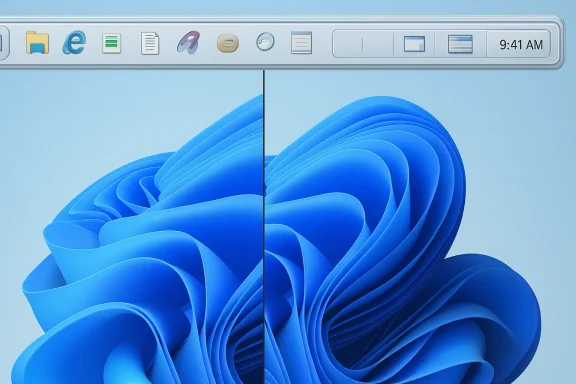 Overview
The appeal of RetroBar is easiest to understand if you remember what the Taskbar used to represent. In older Windows eras, it was not just a launcher and status strip; it was a highly visible expression of the desktop’s flexibility. Users could place it where they wanted, use quick launch, and often rely on clear one-button-per-window behavior that made active app management more explicit and less abstract.Windows 11 took a different path. Microsoft simplified the interface, but that simplification came with real losses, especially for users who depended on layout control or liked the ergonomics of placing the taskbar along the top or side of the display. Microsoft Q&A responses have repeatedly made clear that moving the taskbar to the top is not supported in Windows 11 settings, and that older registry tricks are no longer dependable in current builds.
That gap is exactly where utilities like RetroBar thrive. They are not just cosmetic add-ons; they are attempts to restore a workflow that Microsoft has treated as expendable. The result is a curious kind of software archaeology, where modern hardware — including ARM64 laptops — can run interfaces that look like they were lifted from the late 1990s or early 2000s.
The broader historical context is important too. Windows customization has always cycled between control and constraint, but Windows 11’s taskbar redesign sharpened the conflict by removing longstanding flexibility at the exact moment many users were expecting refinement, not regression. That is why third-party taskbar replacements are not merely novelty projects; they are symptoms of a genuine product design dispute.
Why the Taskbar became a flashpoint
The Taskbar is not a minor UI element. It is one of the most constantly visible parts of the desktop, so even modest changes have outsized emotional and practical impact. When users lose control over placement, grouping, or density, they feel it every minute they are on the machine.That is also why tiny design restrictions can trigger loud backlash. People who spent years building muscle memory around taskbar positioning do not experience the change as an upgrade; they experience it as a workflow break. In that sense, the Taskbar is less about aesthetics than interface sovereignty.
- Placement affects ergonomics.
- Layout affects speed.
- Visibility affects cognitive load.
- Familiarity affects adoption.
RetroBar’s role in the nostalgia ecosystem
RetroBar sits at a particularly interesting point in the customization landscape because it aims at both nostalgia and function. It can deliver a Windows 95, 98, Me, 2000, XP, Longhorn, or Vista style, but it also supports modern requirements like UWP app compatibility and multi-monitor behavior.That blend matters because pure nostalgia tools often collapse into gimmicks. RetroBar avoids that by treating the classic look as a side effect of a deeper promise: restoring control. In practice, that means users are not just looking at a retro skin; they are regaining placement and task switching behaviors they actually miss.
What RetroBar Actually Does
RetroBar’s core proposition is straightforward: it replaces the default Windows taskbar with a classic implementation rather than overlaying a theme on top of the existing one. That distinction is critical, because a skin can make the interface look retro while leaving the behavior untouched, but a replacement can change how the desktop feels in daily use.The project’s GitHub page spells out several practical features beyond the visual theme. It supports a native notification area, quick launch toolbar, draggable app ordering, auto-hide, locking and unlocking, and display on any side of the screen, even on Windows 11. It also supports resizable taskbars with multiple rows, multi-monitor placement, and Vista-style window thumbnails.
That breadth is what turns RetroBar into more than a joke app. The inclusion of UWP support and modern notification handling shows that it is designed to coexist with current Windows architecture rather than merely imitate the old desktop at a surface level. In other words, it is retro in appearance but contemporary in intent.
The app’s documentation also suggests it is lightweight and relatively easy to reverse. According to its GitHub listing, it can be unzipped and run, or installed with an installer that chooses the correct architecture, installs.NET if needed, and can enable auto-start. That makes it approachable for enthusiasts while still giving power users a relatively low-risk way to experiment.
The difference between a skin and a replacement
This is where many retro Windows projects fail: they alter the appearance without changing the workflow. RetroBar is different because it replaces the actual shell component users interact with, which means the nostalgia is functional rather than decorative. That makes the project more persuasive to longtime Windows users who want their desktop to behave differently, not merely look different.It also creates a more honest value proposition. If you are going to abandon a native interface component, you need to offer something better than wallpaper-level customization. RetroBar’s claim is that it restores lost affordances, and that is a much stronger pitch.
Themes and classic eras
RetroBar’s theme list is unusually broad. It covers Windows 95-98, Windows Me, Windows 2000, multiple Windows XP variants including Royale and Zune Style, Longhorn Aero, and Windows Vista in Aero, Basic, and Classic forms. The breadth matters because nostalgia is not one single aesthetic; different users attach meaning to different eras.- Windows 95/98 for the stripped-down pioneer era.
- Windows 2000 for the professional gray-box aesthetic.
- Windows XP for mainstream nostalgia.
- Longhorn and Vista for the glossy transitional years.
Modern compatibility under the hood
The project also references a managed shell foundation and modern runtime requirements, which suggests it is not just a nostalgic façade built on fragile hacks. It requires Windows 7 SP1 or later, and the installer can handle.NET 6 deployment automatically. That gives it a much broader support matrix than many hobbyist shell replacements.The most interesting detail, though, is ARM64 support. That means users running Snapdragon-based Windows laptops can participate in the nostalgia loop without emulation gymnastics. In the current Windows landscape, that is not a trivial feature; it is a signal that the retro ecosystem understands where the hardware market is going.
Why Windows 11 Users Keep Looking for Alternatives
The reason tools like RetroBar continue to gain attention is not hard to understand: Windows 11 still frustrates users who expected a more configurable desktop. Microsoft has been willing to simplify and standardize the taskbar in the name of consistency, but that has left a subset of users feeling that the operating system has become less personal over time.That complaint is especially potent among productivity users and ergonomic holdouts. For someone who prefers the taskbar at the top of the screen because of neck strain, window flow, or long-established habits, the missing top-edge option is not an aesthetic nitpick. It is a day-to-day usability issue, and Microsoft’s own Q&A responses have effectively acknowledged that there is no native fix.
This is also why third-party utilities persist even when they seem redundant to outsiders. Windows enthusiasts are not merely trying to relive the past; they are trying to recover control that the platform removed. That distinction explains the staying power of projects like RetroBar, ExplorerPatcher, Start11, and similar tools in the modern Windows ecosystem.
Ergonomics are not nostalgia
People often dismiss taskbar debates as aesthetic debates, but the evidence points to something deeper. Taskbar placement changes how far your cursor travels, how much of the screen remains visually clear, and how quickly you can scan active apps. That makes placement a productivity feature, not just a preference.For that reason, the nostalgia pitch can obscure a more practical truth: many users want the old behavior because it was better for their workflow. RetroBar succeeds because it recognizes that the emotional and functional arguments often overlap.
The rise of third-party restoration tools
The Windows customization scene has become increasingly modular. Instead of relying on Microsoft to re-add removed features, users assemble their own desktop experience from small tools that each fix one annoyance. RetroBar fits neatly into that trend because it tackles a specific pain point with relatively little overhead.- Restore taskbar positioning.
- Recover classic grouping behavior.
- Recreate old visual cues.
- Add flexibility without rebuilding the whole shell.
The psychology of visible loss
When Microsoft removes an option that users have seen for years, the loss feels bigger than the feature itself. A missing top-docked taskbar is remembered every time the user looks at the screen, and that constant reminder reinforces frustration. It is not the same as a buried setting that few people ever used.That is why nostalgia utilities often feel more popular than they technically “should” be. They are repairing a visible absence, and visible absences are powerful motivators.
RetroBar’s Feature Set in Practice
RetroBar’s feature list is more ambitious than a casual observer might expect from a nostalgia app. It includes classic taskbar layouts, a modern start menu button, balloon notifications, quick launch support, lock/unlock behavior, and taskbar placement on any screen edge. Those are not decorative flourishes; they are the mechanics that make the experience feel like a genuine desktop shell rather than a novelty overlay.One of the most intriguing options is the ability to show Vista-style window thumbnails. That matters because it underscores the project’s attention to period-accurate detail. Users are not just getting a blue bar; they are getting the visual feedback that made the Windows Vista and XP eras feel distinct from one another.
RetroBar also supports custom themes, which broadens it beyond official nostalgia packages. That flexibility is important because the audience for retro desktop customization is unusually engaged; many users are not looking for one canonical design but for a sandbox they can fine-tune. In that sense, the project is both a museum and a modding platform.
The little details that matter
The small touches are what separate a credible shell replacement from a gimmick. RetroBar’s support for a hidden or visible clock, multi-monitor taskbars, and classic notification area behavior all contribute to a sense that the desktop is operating under a coherent older philosophy. Those details are what make the nostalgia feel usable, not just decorative.It also helps that the app supports drag reordering and UWP task support. Those are the sorts of modern compatibility features users need in order to keep the rest of their Windows 11 experience intact.
Why ARM64 support is more important than it sounds
ARM64 support may look like a footnote, but it is strategically important. Windows on ARM has matured far enough that a tool like RetroBar cannot assume x86/x64 desktops are the only target. By shipping ARM64, the project acknowledges that retro UI demand now spans the new generation of thin-and-light PCs.That also gives RetroBar a kind of future-proofing. Retro aesthetics may be about the past, but the platforms running them are not. Supporting ARM64 is a sign that the community is taking Windows’ hardware transition seriously.
Compatibility caveats
There is one important caution: the GitHub release notes note that recent Windows 11 updates have affected RetroBar’s ability to hide the default taskbar, and recommend turning on the native auto-hide setting before launching the app. That is a reminder that third-party shell tools operate in a moving target environment, especially when Microsoft keeps adjusting desktop internals.- Native taskbar behavior can still interfere.
- Windows updates may alter hiding behavior.
- Auto-start and auto-hide options help reduce friction.
- Compatibility is good, but never fully static.
The Microsoft Problem Behind the Nostalgia
RetroBar is fun, but it is also an indictment. If users are looking for a replacement taskbar that looks like Windows XP, that means the stock Windows 11 Taskbar is failing a meaningful slice of the user base. Microsoft has aimed for a more unified, modern experience, but in the process it has left some of the platform’s most valued customization ideas behind.The refusal to support top- or side-docking inside standard Windows 11 settings has become especially symbolic. That was once a basic part of Windows flexibility, and its absence now feels oddly out of character for a platform that has historically prided itself on adaptability. Microsoft’s own responses effectively point users toward feedback channels or third-party tools, which is not exactly a vote of confidence in native taskbar control.
This tension may explain why the nostalgia crowd is louder than it used to be. The more Microsoft tries to simplify the desktop, the more noticeable the missing edges become. For some users, a retro replacement is no longer about time travel; it is about winning back desktop agency.
The irony of modern Windows design
Windows 11 is visually cleaner than many predecessors, and that is the source of its appeal. But the cleaner design can also feel more prescriptive, especially when established layout choices are removed without parallel advanced controls. That gives the operating system a paradoxical reputation: polished, but less accommodating.In other words, Microsoft has optimized for appearance and coherence, while enthusiasts have optimized for control and habit. RetroBar thrives in that gap.
Why “consistency” can feel like limitation
Microsoft’s justification for taskbar simplification often centers on consistency and ease of use. Those are legitimate goals, but they can also become a euphemism for reduced flexibility when the system no longer accommodates different workflows. Users with accessibility needs, multi-monitor preferences, or desktop-density habits may interpret “consistency” as forced uniformity.That is especially true when the missing feature is highly visible. A toolbar tucked into a menu is one thing; a permanently fixed taskbar location is another.
The market opportunity for restoration tools
Every removed feature creates a market for restoration. That market may be small compared with the total Windows user base, but it is loyal, vocal, and influential. RetroBar is part of a broader aftermarket economy of desktop fixes, where the most valuable software is often the software that quietly puts back what was taken away.How RetroBar Compares to Other Customization Approaches
RetroBar is not the only way to make Windows 11 more flexible, but it occupies a specific niche. Other tools often focus on repurposing the existing shell or layering on extra functionality, whereas RetroBar is closer to a wholesale replacement for the taskbar itself. That gives it a clearer identity, even if it means users must accept a more dramatic visual change.That difference also changes the user experience. If you want a Windows 10-like taskbar implementation or additional shell patches, tools like ExplorerPatcher have a different value proposition. RetroBar, by contrast, is about abandoning the modern taskbar entirely and moving into a deliberately older interface language.
From a usability standpoint, that clarity is a strength. Users who want classic app grouping, old-school visual density, and retro styling know what they are signing up for. There is less ambiguity than there is with general-purpose shell tweaking tools that change many things at once.
Restoration versus augmentation
Some tools try to augment Windows 11 while preserving the default taskbar; others replace the workflow outright. RetroBar belongs firmly in the second camp. That makes it especially attractive to users who do not merely want more options, but want a different desktop philosophy.That distinction is important because it helps explain why RetroBar can feel more satisfying than a bundle of smaller tweaks. The old interface is not being simulated around the edges — it is becoming the actual shell surface you interact with.
The role of OpenShell and launchers
A lot of users pair taskbar replacements with separate Start menu tools or launcher utilities. That is because the Windows desktop is now often assembled from multiple specialized components rather than one monolithic shell. RetroBar fits neatly into that modular model because it handles the taskbar side of the equation cleanly.- Taskbar replacement for layout.
- Start menu tools for launch behavior.
- Theme tools for visual polish.
- System patchers for deeper shell changes.
The downside of a fragmented approach
The more pieces you add, the more potential friction you create. That is why an app like RetroBar can be appealing even to users who would otherwise avoid shell replacements. It offers a focused intervention rather than a sprawling customization stack.Still, fragmentation has a cost. Users must manage compatibility, updates, and the occasional interaction between tools, especially when Windows itself changes under them.
Strengths and Opportunities
RetroBar’s biggest strength is that it solves a real problem while also satisfying a genuine emotional desire for classic Windows aesthetics. It is free, lightweight, open for inspection on GitHub, and broad enough in theme support to appeal to different generations of Windows users. The project’s modern compatibility features, including ARM64 support and multi-monitor behavior, make it more than a novelty for hobbyists.- Restores a classic taskbar with real behavioral changes.
- Supports Windows 95 through Vista styling.
- Offers placement on any screen edge, including the top.
- Includes multi-monitor support and UWP app compatibility.
- Ships with ARM64, 32-bit, and 64-bit support via installer.
- Uses a relatively lightweight footprint.
- Enables deeper custom themes for advanced users.
Why the opportunity is durable
The demand is not just nostalgic; it is structural. People working across multiple monitors, desktop setups, and accessibility constraints often need behaviors Microsoft has not prioritized. RetroBar is well positioned because it answers those needs with a familiar interface pattern rather than a radical new one.A platform for the modding community
The ability to load custom themes means RetroBar can keep evolving with community contributions. That is crucial in the Windows enthusiast world, where long-term interest often depends on modding ecosystems rather than official vendor roadmaps. The more customization freedom the app exposes, the longer it can remain relevant.Risks and Concerns
RetroBar is compelling, but shell-replacement software always carries some risk. The biggest issue is that it depends on Windows internals remaining compatible enough for the app to operate cleanly, and Microsoft updates can alter behavior in ways that the project must adapt to. The release notes already show that Windows 11 updates have impacted hiding the stock taskbar, which is a good example of how fragile this category can be.Another concern is that nostalgia can mask trade-offs. A retro taskbar may look charming, but not every user will want to give up the exact behavior they have grown used to in Windows 11. Some people may enjoy the visual theme but find that the workflow feels foreign after a day or two of use. That makes RetroBar powerful for a specific audience, but not universally practical.
Security and trust are also part of the picture. The project is open on GitHub, which is reassuring in one sense, but it is also unsigned and requires users to proceed past Windows Defender prompts during installation. For enthusiasts that may be a minor inconvenience; for less technical users, it is a meaningful barrier.
- Windows update sensitivity can break or alter behavior.
- Unsigned installation creates trust friction for some users.
- Workflow mismatch may deter users who only want visual nostalgia.
- Layering with other shell tools can introduce conflicts.
- Learning curve still exists despite the app’s simplicity.
- Support expectations may be limited for a community tool.
The compatibility trap
The more successful RetroBar becomes, the more it must keep up with Windows changes. That is a classic compatibility trap for any utility that lives close to the shell. Users want stability, but the app’s very value depends on the system around it staying close enough to the old model to let it function.Nostalgia can overpromise
There is always a danger that users install a retro interface expecting the feel of an old Windows era, only to discover they mainly like the memory of it. In practice, older desktop behaviors can be slower or more idiosyncratic than people remember. RetroBar works best when users appreciate classic UI principles, not just old branding.Looking Ahead
The most interesting question is not whether RetroBar works — it clearly does for many users — but whether Microsoft will eventually decide that taskbar flexibility is worth restoring natively. Recent reporting about potential returns of movable and resizable taskbar features suggests that the company knows the issue remains sensitive, even if the timeline is uncertain.If Microsoft does bring back more taskbar control, that would not make RetroBar irrelevant overnight. In fact, it might strengthen the broader case that users want choice, not just restoration. A native top-docked taskbar would address one problem, but RetroBar would still offer classic visual language, notification behavior, and old-school task switching that Microsoft is unlikely to fully recreate.
For now, the project stands as both a nostalgia piece and a critique. It says that there is still demand for a Windows desktop that is more openly configurable, more visually expressive, and less constrained by a single design doctrine. That message will likely keep resonating as long as Windows 11 remains the default platform for millions of users who still remember what the Taskbar used to be.
What to watch next
- Whether Microsoft restores taskbar repositioning in a native update.
- Whether RetroBar improves resilience against future Windows 11 changes.
- Whether more users on ARM64 laptops adopt classic taskbar replacements.
- Whether the community expands custom theme support further.
- Whether shell-replacement tools become more mainstream in Windows customization.
And that may be the real lesson of this little retro revival. The past is not just something people miss; sometimes, it is something they use because it still does a better job than the present.
Source: Windows Central https://www.windowscentral.com/soft...lassic-look-from-windows-95-to-windows-vista/
