

Microsoft has marked Roadmap ID 499428 as launched: Copilot’s Agent Mode for document editing in Word is listed for Word and Microsoft Copilot for Microsoft 365 on desktop, Mac, and the web, for the Worldwide standard multi-tenant cloud, with general availability in November 2025. The verified feature pattern is narrow but practical: users can ask Copilot to edit a Word document through chat-based instructions, provide clarifying directions, and review a summary of changes inside the document.
For WindowsForum readers, the operational takeaway is straightforward. This is not just a writing prompt that produces text somewhere else. It is a Word editing workflow. Users should expect Copilot to help revise an open document from within Word, and admins should prepare guidance for when AI-assisted edits are acceptable, how users should review change summaries, and which document types require stricter human review before sending, publishing, or filing.
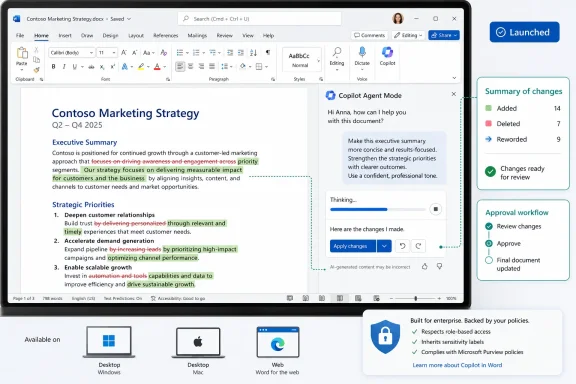
Roadmap ID 499428 describes a specific change to Word: Copilot supports document editing through chat-based interactions with Agent Mode. Users can initiate edits, give clarifying directions, and review a summary of changes within the document.
That is the practical distinction. The feature is not only about asking for a paragraph, a draft, or a rewrite. It is about using a conversational workflow to change the document the user is already working on. In everyday use, that means a user may open a Word document, ask Copilot to revise part of it, clarify the instruction if needed, and then inspect a summary of what changed before deciding whether the result is acceptable.
The roadmap facts do not support claims about every possible interface label, licensing nuance, review mechanism, or shared-document behavior. The safe reading is simpler: Microsoft is bringing an Agent Mode editing workflow to Word across desktop, Mac, and web for Microsoft 365 Copilot customers in the worldwide standard multi-tenant environment, and the roadmap now shows it as launched.
For users, this changes the editing loop. Instead of manually selecting text, rewriting it sentence by sentence, and then checking the result, users can describe the edit they want. That does not remove responsibility from the user. It changes the user’s job from performing every edit manually to directing the edit, reviewing the output, and deciding whether the document still says what it must say.
That review step is where organizations should focus. A summary of changes can help the user understand what Copilot reports it changed, but it should not be treated as a substitute for reading the edited document. If a document affects customers, contracts, policy, compliance, finance, HR, security, or public communications, the edited text still needs the same level of review the organization would require for a human-made edit.
The platform list matters because it means the feature is not confined to a single Word surface. Admins should expect questions from users on Windows desktop, Mac, and Word for the web. The experience may not be identical across all clients at all times, so internal guidance should focus on the durable workflow rather than one screenshot: ask Copilot for a document edit, clarify the request if needed, and review the summary of changes and the edited content.
Users should also understand what the summary-of-changes workflow means in practice. The summary is a review aid. It can help the user find the broad categories of edits Copilot made. It should not be the only thing the user reads before sending the document. The final responsibility remains with the person using Word, especially when the document leaves the team or becomes part of a formal record.
The first job is to test the actual Word experience your users will see. Because the roadmap lists desktop, Mac, and web, testing should include each Word client your organization supports. A policy written only for Word on the web will not help a Windows desktop user who sees the feature in a different place or describes it using different words.
The second job is to define document categories. Not every Word file carries the same risk. An internal meeting recap, a training outline, and a draft team newsletter are different from a customer proposal, an employment document, a legal agreement, or a regulatory response. The organization should state which documents are safe for routine Copilot editing and which require extra review.
The third job is to update change-management language. Existing policies may already cover acceptable use of AI, Microsoft 365 Copilot, confidential information, records retention, and document approval. This feature adds a specific scenario: Copilot may be used to edit the body of a Word document through chat-based instructions. Policies should say when that is allowed, who is accountable for the final content, and what review is required before distribution.
A simple internal rule works better than a long abstract policy: if a document would normally require careful human review before a manual edit is accepted, it still requires careful human review after a Copilot-assisted edit. The tool changes the editing method, not the accountability standard.
2025-11 — Microsoft lists general availability for the feature, covering Word and Microsoft Copilot for Microsoft 365 across desktop, Mac, and web.
2026-07-08 — Microsoft last updated the roadmap item and shows the status as Launched.
Good early examples include:
Admins should use that distinction in training. The message should not be “never use Copilot to edit serious documents.” That may be too broad and may not match how teams work. A better message is: the more consequential the document, the more explicit the prompt and the more careful the review must be.
A change summary is useful because it gives the user a way to understand the edit at a higher level. It can help answer questions such as:
A practical workflow for users is:
A useful pilot should include:
A vague prompt delegates too much judgment to the tool. A precise prompt narrows the task and makes the result easier to review. Users should be trained to include constraints when the document matters.
Instead of:
At minimum, the policy should answer five questions:
Other answers must come from the organization, not the roadmap. Microsoft’s roadmap does not decide which customer documents your company allows users to edit with Copilot. It does not decide whether a legal document needs attorney review. It does not decide whether a finance memo can be sent after a summary-of-changes review. Those are local policy decisions.
A good help-desk script should therefore separate Microsoft availability from organizational permission:
That is where the feature can save time without creating unnecessary drama. It can reduce the manual burden of routine editing, especially for users who already know what they want the document to say but need help making it clearer.
The risk appears when users stop reading. If a user asks for an edit, glances at the summary, and sends the document without checking the changed text, the workflow has failed. That failure is not unique to Copilot; it is a general review problem made faster by automation. The practical mitigation is training, policy, and good examples.
The summary-of-changes step should become a habit, but it should not become the final approval. The edited document is the artifact that matters. Users should check the actual language, not only the summary of what changed.
A concise internal message could say:
The practical implication is equally specific. Copilot can now be treated as part of the Word editing workflow, not only a place to generate draft text. Users can ask for edits, clarify the request, and review a summary of changes inside the document.
That makes training and policy more urgent, not less. Admins should test the feature across the Word clients their users actually use, prepare help-desk guidance, and update change-management rules for AI-assisted document edits. Users should be taught to give bounded instructions, read the summary of changes, and then review the edited text itself.
The forward-looking point is simple: as Word becomes a place where natural-language instructions can directly alter business documents, organizations need document-review habits that match the new workflow. Copilot may make editing faster. It does not make the final document less accountable.
For WindowsForum readers, the operational takeaway is straightforward. This is not just a writing prompt that produces text somewhere else. It is a Word editing workflow. Users should expect Copilot to help revise an open document from within Word, and admins should prepare guidance for when AI-assisted edits are acceptable, how users should review change summaries, and which document types require stricter human review before sending, publishing, or filing.
 Word’s Copilot Pane Is Becoming an Editing Surface, Not a Suggestion Box
Roadmap ID 499428 describes a specific change to Word: Copilot supports document editing through chat-based interactions with Agent Mode. Users can initiate edits, give clarifying directions, and review a summary of changes within the document.That is the practical distinction. The feature is not only about asking for a paragraph, a draft, or a rewrite. It is about using a conversational workflow to change the document the user is already working on. In everyday use, that means a user may open a Word document, ask Copilot to revise part of it, clarify the instruction if needed, and then inspect a summary of what changed before deciding whether the result is acceptable.
The roadmap facts do not support claims about every possible interface label, licensing nuance, review mechanism, or shared-document behavior. The safe reading is simpler: Microsoft is bringing an Agent Mode editing workflow to Word across desktop, Mac, and web for Microsoft 365 Copilot customers in the worldwide standard multi-tenant environment, and the roadmap now shows it as launched.
For users, this changes the editing loop. Instead of manually selecting text, rewriting it sentence by sentence, and then checking the result, users can describe the edit they want. That does not remove responsibility from the user. It changes the user’s job from performing every edit manually to directing the edit, reviewing the output, and deciding whether the document still says what it must say.
That review step is where organizations should focus. A summary of changes can help the user understand what Copilot reports it changed, but it should not be treated as a substitute for reading the edited document. If a document affects customers, contracts, policy, compliance, finance, HR, security, or public communications, the edited text still needs the same level of review the organization would require for a human-made edit.
Verified Roadmap Facts
One concise table is enough for the core rollout facts.| Scope item | Roadmap value | Practical meaning |
|---|---|---|
| Roadmap ID | 499428 | The item can be tracked as a specific Microsoft 365 Roadmap entry |
| Feature | Agent Mode in Word for enhanced document editing | Copilot can support document edits through a chat-based workflow |
| Products | Word; Microsoft Copilot for Microsoft 365 | The feature belongs to the Word and Microsoft 365 Copilot workflow |
| Platforms | Desktop, Mac, Web | Users may encounter the capability in Word across these client surfaces |
| Cloud instance | Worldwide standard multi-tenant | The roadmap targets mainstream commercial Microsoft 365 cloud tenants |
| Release phase | General Availability | Microsoft lists the feature as generally available |
| General availability | November 2025 | Organizations should treat it as a current deployed capability, not only a future plan |
| Status | Launched | The roadmap item is no longer merely planned |
| Last updated | July 8, 2026 | The roadmap record reflects an update on that date |
What Users Should Expect in Word
Users should expect a guided editing workflow rather than a magic “make it perfect” button. The roadmap describes three practical actions:- Initiate edits through chat-based interactions.
A user gives Copilot an instruction about how the Word document should be changed. - Provide clarifying directions.
If the first instruction is too broad, incomplete, or not aligned with the user’s intent, the user can add more detail. - Review a summary of changes within the document.
After Copilot edits, the user can inspect a summary that describes the changes.
- Open the Word document.
- Decide what section or outcome needs editing.
- Give Copilot a bounded instruction.
- Add clarifying directions if the result is not specific enough.
- Read the summary of changes.
- Re-read the affected document sections.
- Keep, revise, or reject the result according to the organization’s normal document-review expectations.
Users should also understand what the summary-of-changes workflow means in practice. The summary is a review aid. It can help the user find the broad categories of edits Copilot made. It should not be the only thing the user reads before sending the document. The final responsibility remains with the person using Word, especially when the document leaves the team or becomes part of a formal record.
The WindowsForum Angle: Treat This as an Operational Rollout
For WindowsForum readers, the useful angle is not speculation about Microsoft’s broader AI strategy. It is what administrators, support teams, and document owners should do now that the roadmap item is launched.The first job is to test the actual Word experience your users will see. Because the roadmap lists desktop, Mac, and web, testing should include each Word client your organization supports. A policy written only for Word on the web will not help a Windows desktop user who sees the feature in a different place or describes it using different words.
The second job is to define document categories. Not every Word file carries the same risk. An internal meeting recap, a training outline, and a draft team newsletter are different from a customer proposal, an employment document, a legal agreement, or a regulatory response. The organization should state which documents are safe for routine Copilot editing and which require extra review.
The third job is to update change-management language. Existing policies may already cover acceptable use of AI, Microsoft 365 Copilot, confidential information, records retention, and document approval. This feature adds a specific scenario: Copilot may be used to edit the body of a Word document through chat-based instructions. Policies should say when that is allowed, who is accountable for the final content, and what review is required before distribution.
A simple internal rule works better than a long abstract policy: if a document would normally require careful human review before a manual edit is accepted, it still requires careful human review after a Copilot-assisted edit. The tool changes the editing method, not the accountability standard.
Timeline
2025-08-01 — Microsoft created Roadmap ID 499428 for Agent Mode in Word for enhanced document editing.2025-11 — Microsoft lists general availability for the feature, covering Word and Microsoft Copilot for Microsoft 365 across desktop, Mac, and web.
2026-07-08 — Microsoft last updated the roadmap item and shows the status as Launched.
The Best Early Use Cases Are Bounded Edits
The most practical early use cases are not the broadest ones. They are edits where the user knows what should happen and can verify whether Copilot did it.Good early examples include:
- Shortening a section while preserving all facts.
- Rewriting an internal update for clarity.
- Turning rough notes into a cleaner draft.
- Making headings more consistent.
- Improving the flow of a non-final document.
- Asking for a summary of what changed after an edit.
- Reworking tone for a known audience, such as internal leadership or a project team.
- Converting a rough outline into readable prose without adding new claims.
- Editing contractual language.
- Rewording HR or performance-management documents.
- Changing compliance statements.
- Revising customer commitments.
- Altering financial, legal, security, or medical language.
- Rewriting public statements without communications approval.
- Updating policy documents without a named owner reviewing the result.
Admins should use that distinction in training. The message should not be “never use Copilot to edit serious documents.” That may be too broad and may not match how teams work. A better message is: the more consequential the document, the more explicit the prompt and the more careful the review must be.
The Summary of Changes Is a Review Starting Point
The roadmap says users can review a summary of changes within the document. That is a concrete user-facing feature and should be central to training.A change summary is useful because it gives the user a way to understand the edit at a higher level. It can help answer questions such as:
- Did Copilot shorten, expand, restructure, or rewrite the section?
- Did it change tone?
- Did it remove material?
- Did it reorganize headings or paragraphs?
- Did it claim to preserve the original meaning?
A practical workflow for users is:
- Read the original section before asking for the edit, if time allows.
- Give Copilot a precise instruction.
- Review the summary of changes.
- Read the changed section in full.
- Check names, numbers, dates, obligations, product references, and factual claims.
- Ask for a narrower revision if needed.
- Save, share, or escalate only after the document meets the normal review standard.
Admins Should Test the Workflow, Not Just the Button
The common rollout mistake will be testing only whether the feature appears. That is not enough. Admins should test the full workflow a real user will follow in Word.A useful pilot should include:
- Word on Windows desktop.
- Word on Mac, if the organization supports Mac users.
- Word for the web.
- Short internal documents.
- Longer structured documents with headings and sections.
- Documents with tables or repeated terminology.
- Documents that require a reviewer to confirm whether the meaning changed.
- Users with different levels of Word skill.
- Where do users see the entry point in each Word client?
- Can users understand how to start an edit?
- Do users know how to give clarifying directions?
- Is the summary of changes visible and understandable?
- Do users read the edited content or only the summary?
- Which prompts produce useful, bounded edits?
- Which prompts produce changes that are too broad?
- What help-desk questions appear during the pilot?
- What internal policy language needs to be updated before broader deployment?
Prompt Quality Is a Control Mechanism
The feature rewards clear instructions. That is not just a productivity tip; it is a control mechanism.A vague prompt delegates too much judgment to the tool. A precise prompt narrows the task and makes the result easier to review. Users should be trained to include constraints when the document matters.
Instead of:
Use:Make this better.
Instead of:Rewrite this section for clarity, keep the same meaning, do not add new facts, preserve all dates and names, and summarize what you changed.
Use:Make this more persuasive.
Instead of:Improve the flow for an internal leadership audience, but do not add claims, commitments, statistics, or promises that are not already in the text.
Use:Clean up this proposal.
Instead of:Shorten the executive summary to no more than four paragraphs, preserve the pricing and delivery commitments exactly, and list any removed points in the change summary.
Use:Fix the policy.
These examples are not claims about hidden product behavior. They are practical guidance based on the roadmap’s verified workflow: users initiate edits, clarify directions, and review a summary of changes. The clearer the instruction, the easier it is for the user to decide whether the resulting edit is acceptable.Identify unclear wording and suggest a clearer version, but do not change requirements, approval steps, deadlines, or ownership language.
Change-Management Policy Should Be Updated
Organizations that already have Microsoft 365 Copilot guidance should add a Word-specific section. Organizations that do not have guidance should start with a short policy that users can actually understand.At minimum, the policy should answer five questions:
- Who may use Copilot to edit Word documents?
Define the intended audience or pilot group if the rollout is phased. - Which documents are appropriate for routine Copilot editing?
Give examples such as internal drafts, non-final summaries, and low-risk formatting or clarity edits. - Which documents require additional review?
Name categories such as legal, HR, finance, regulatory, customer-facing, executive, security, and public communications documents if those categories apply. - What must users review before sharing the document?
State that users must review both the summary of changes and the edited content. - Who is accountable for the final document?
Make clear that the user or document owner remains responsible for accuracy, appropriateness, and approval.
Action Checklist for Admins
- Confirm which supported Word clients are in use across the organization: desktop, Mac, web, or a mix.
- Test Roadmap ID 499428 behavior in each supported client before broad internal messaging.
- Build a small pilot with users who regularly edit real Word documents.
- Create examples of approved prompts for low-risk editing tasks.
- Create examples of prompts that are too vague or risky.
- Tell users to review the summary of changes and the edited text before sharing.
- Define document categories where Copilot-assisted edits require additional review.
- Update acceptable-use, document-review, or AI-use policies to cover direct Word editing through Copilot.
- Prepare help-desk language for users who ask when they will see the feature or how to use it.
- Remind document owners that Copilot-assisted edits do not remove human accountability.
What Help Desks Should Be Ready to Answer
The first wave of support questions will probably be simple:- “When will I see this in Word?”
- “Does it work on desktop?”
- “Does it work on Mac?”
- “Does it work in Word for the web?”
- “What should I ask it to do?”
- “Can I use it on customer documents?”
- “Do I still need to review the document?”
- “What does the summary of changes mean?”
- “Who approves the final version?”
Other answers must come from the organization, not the roadmap. Microsoft’s roadmap does not decide which customer documents your company allows users to edit with Copilot. It does not decide whether a legal document needs attorney review. It does not decide whether a finance memo can be sent after a summary-of-changes review. Those are local policy decisions.
A good help-desk script should therefore separate Microsoft availability from organizational permission:
- Microsoft lists the feature as launched for the stated Word and Microsoft 365 Copilot scope.
- The user may see it in Word on desktop, Mac, or web depending on the organization’s environment.
- The feature allows chat-based document editing and a summary of changes.
- Users must follow internal document-review rules before sharing edited content.
- High-risk documents require the same or higher level of review as manually edited documents.
Where Users Will Feel the Change First
Most users will feel the change in ordinary editing tasks. A weekly report can be tightened. A rough meeting recap can be cleaned up. A draft announcement can be made more readable. A long section can be shortened. A user who struggles with structure can ask for a clearer organization and then review the result.That is where the feature can save time without creating unnecessary drama. It can reduce the manual burden of routine editing, especially for users who already know what they want the document to say but need help making it clearer.
The risk appears when users stop reading. If a user asks for an edit, glances at the summary, and sends the document without checking the changed text, the workflow has failed. That failure is not unique to Copilot; it is a general review problem made faster by automation. The practical mitigation is training, policy, and good examples.
The summary-of-changes step should become a habit, but it should not become the final approval. The edited document is the artifact that matters. Users should check the actual language, not only the summary of what changed.
Keep the Rollout Message Simple
Internal communications should avoid overexplaining the feature. Users do not need a long essay about AI agents. They need to know what changed, when it is available, and how to use it responsibly.A concise internal message could say:
That is enough for most users. More detailed training can follow with examples of good prompts, risky prompts, and document categories that require additional review.Microsoft lists Agent Mode document editing in Word as launched under Roadmap ID 499428, with general availability in November 2025 for Word and Microsoft Copilot for Microsoft 365 on desktop, Mac, and web. The feature lets users ask Copilot to edit Word documents through chat-based instructions, provide clarifying directions, and review a summary of changes inside the document. Users must review both the change summary and the edited text before sharing or approving a document. Sensitive, customer-facing, legal, HR, financial, regulatory, or policy documents must follow existing review requirements.
Bottom Line
Roadmap ID 499428 is a launched Microsoft 365 Roadmap item for Agent Mode document editing in Word. The supported fact pattern is specific: Word and Microsoft Copilot for Microsoft 365; desktop, Mac, and web; Worldwide standard multi-tenant; General Availability; November 2025; launched status; last updated July 8, 2026.The practical implication is equally specific. Copilot can now be treated as part of the Word editing workflow, not only a place to generate draft text. Users can ask for edits, clarify the request, and review a summary of changes inside the document.
That makes training and policy more urgent, not less. Admins should test the feature across the Word clients their users actually use, prepare help-desk guidance, and update change-management rules for AI-assisted document edits. Users should be taught to give bounded instructions, read the summary of changes, and then review the edited text itself.
The forward-looking point is simple: as Word becomes a place where natural-language instructions can directly alter business documents, organizations need document-review habits that match the new workflow. Copilot may make editing faster. It does not make the final document less accountable.
References
- Primary source: Microsoft 365 Roadmap
Published: 2026-07-08T23:11:07.7961302Z
Microsoft 365 Roadmap | Microsoft 365
The Microsoft 365 Roadmap lists updates that are currently planned for applicable subscribers. Check here for more information on the status of new features and updates.www.microsoft.com
- Official source: support.microsoft.com
Edit with Copilot in Word | Microsoft Support
Learn how to use Agent Mode in Word for an even more interactive Copilot experience. Share your ideas and let Copilot draft, refine, and format for you.support.microsoft.com - Related coverage: techspot.com
Microsoft rolls out Copilot "vibe working" mode for Word, Excel, and PowerPoint | TechSpot
Microsoft introduced Copilot's agent mode in 2025, promising customers new "intelligent" ways to streamline document creation while large language models handle much of the work. The feature...www.techspot.com - Official source: techcommunity.microsoft.com
- Related coverage: windowscentral.com
Microsoft doubles down on agentic AI — Agent 365 prepares for a future with over 1 billion agents | Windows Central
Microsoft kicked off Ignite with a major push into agentic AI, unveiling Agent 365 as its newest tool for automating workflows.www.windowscentral.com - Related coverage: techriver.com