

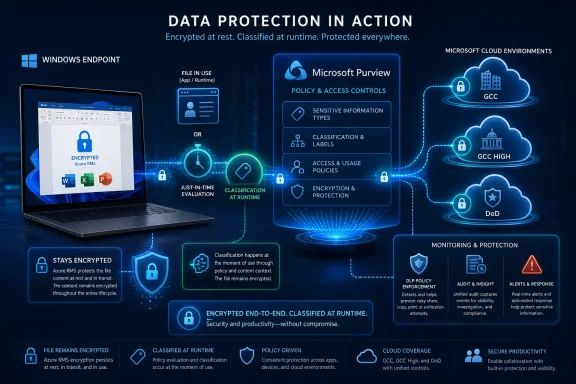
Microsoft is rolling out Roadmap ID 503780 for Microsoft Purview in General Availability, adding Endpoint Data Loss Prevention classification for Azure RMS-protected Office files stored on Windows devices across GCC, GCC High, and DoD cloud instances after a June 2026 availability target. The practical change is narrow but important: Endpoint DLP can now inspect a class of documents that many regulated organizations deliberately encrypt because they are sensitive. Microsoft’s wording also makes clear that classification is not described as a one-time bulk sweep; it is triggered when the file is used in applications or when just-in-time classification is enabled. For government and defense-adjacent tenants, that moves Endpoint DLP closer to the reality of how confidential Office files actually live on endpoints: encrypted, local, mobile, and frequently outside the clean boundaries of cloud storage.
The story here is not that Microsoft Purview has suddenly discovered encrypted Office documents. Azure Rights Management exists precisely because organizations need documents to remain protected when they leave a controlled repository, move across devices, or pass through collaboration workflows. Microsoft’s own documentation frames Azure RMS as persistent protection: encryption and usage rights stay with the file, rather than depending only on where the file happens to be stored.
That persistence has always carried a management tradeoff. The more effectively a document protects itself, the harder it can become for downstream security controls to evaluate it at the endpoint without privileged integration into the protection stack. DLP is most useful when it can classify content at the point where users do risky things: copying to removable media, uploading to cloud services, printing, moving through remote access paths, or opening files in applications that should not touch regulated material. If the file is protected in a way the endpoint control cannot classify at the right time, the policy engine is forced into a weaker posture: depend on labels already present, block too broadly, allow too much, or wait for another system to do the inspection elsewhere.
Roadmap ID 503780 is Microsoft’s answer to that tension for a specific but consequential case. Endpoint DLP can now classify Office files stored on Windows devices when those files have Azure RMS protection applied. That matters because the customers named in the roadmap entry are not commercial tenants broadly but government cloud instances: GCC, GCC High, and DoD. In those environments, encryption is not a nice-to-have compliance flourish. It is often part of the baseline design for handling sensitive documents, partner data, export-controlled material, procurement data, personnel information, law-enforcement records, or defense-adjacent work products.
The feature therefore lands in a place where the absence of support would be more than an inconvenience. A government endpoint may have local protected Word, Excel, or PowerPoint files because users work offline, download files from controlled repositories, exchange encrypted attachments, or handle legacy document stores that have not been fully moved into a cloud-native governance model. If Endpoint DLP cannot classify those files when users interact with them, the organization’s endpoint policy is weakest at the exact moment the file is most likely to move.
Microsoft’s roadmap entry is brief, but it is dense. It says Endpoint DLP can now classify Azure RMS-protected Office files stored in Windows devices. It says classification is triggered when the file is used in applications or when just-in-time classification is enabled. It says the status is Rolling out, the release ring is General Availability, and the cloud instances are GCC, GCC High, and DoD. That is not a flashy consumer feature. It is plumbing — but security programs are mostly plumbing, and the pipes matter most when the content inside them is supposed to be protected.
Microsoft’s Endpoint DLP documentation describes the product as extending DLP monitoring and protection to endpoint devices once those devices are onboarded into Microsoft Purview solutions. The purpose is to make user activity on sensitive items visible and enforce protective actions through DLP policies. In practice, that means the endpoint agent and cloud policy service need to know enough about the item to decide whether a rule applies. A financial spreadsheet, a contract, a labeled engineering plan, and a harmless vacation itinerary may all be Office files, but DLP only becomes useful when it can distinguish them.
That is why the new support for Azure RMS-protected Office files is best read as a classification capability first and an enforcement improvement second. Microsoft is not announcing a new DLP policy action in the roadmap text. It is saying that a category of protected Office files can now be classified by Endpoint DLP on Windows devices. Once classification works, the existing policy machinery has a better chance of doing what administrators intended.
The trigger language is equally important. Classification happens “when file is used in applications” or when just-in-time classification is enabled. That phrasing suggests a runtime model rather than a promise that every protected Office document sitting untouched on every Windows endpoint will immediately be scanned and classified in the background. For IT teams, the distinction is operationally significant. A dormant archive of protected documents may not become fully visible simply because the roadmap item is rolling out. The moment of user interaction — or the presence of just-in-time classification — is where Microsoft says the classification event is triggered.
Just-in-time classification is the bridge between usability and caution. Microsoft’s Endpoint DLP just-in-time protection documentation describes it as a way to detect and block egress activities on monitored files while policy evaluation completes. In plain terms, if a file has not yet been evaluated or needs reevaluation, the system can hold the risky action long enough for classification and policy evaluation to catch up. That approach is less elegant than perfect preclassification, but it matches endpoint reality better. Files arrive from email, sync clients, removable media, local copies, and old shares. Users act before background systems finish.
The new Azure RMS support therefore improves the fidelity of that just-in-time moment. If an encrypted Office file is used in an application or hits a JIT evaluation path, Endpoint DLP has a better opportunity to classify it rather than treating the protection wrapper as a dead end. In regulated environments, that can be the difference between enforcing a specific DLP rule and merely hoping that upstream labeling was already sufficient.
The Web platform label in the Microsoft 365 Roadmap can be easy to misread. The files in question are stored on Windows devices, and the capability concerns Endpoint DLP behavior. But the administrative surface and roadmap classification sit under Microsoft Purview on the web. For administrators, the meaningful operational boundary is not “web versus Windows” as a user experience category; it is the policy plane in Purview reaching into endpoint behavior on Windows devices.
The government-cloud focus also explains why Azure RMS support matters more than it may at first appear. In a commercial tenant with a young Microsoft 365 deployment, an organization may push users toward SharePoint, OneDrive, Teams, sensitivity labels, and cloud-native DLP workflows. That does not eliminate endpoint risk, but it gives administrators more service-side inspection points. In government and defense contexts, the document estate is often messier: older Office files, stricter encryption habits, controlled desktops, offline workflows, and more conservative migration patterns.
Endpoint DLP exists because sensitive data does not politely remain in cloud services. Microsoft’s documentation lists the kinds of endpoint activities that DLP can audit or restrict, including copying to USB removable devices, copying to network shares, printing, clipboard activity, remote desktop movement, restricted app access, and uploads to restricted cloud service domains. Those are not exotic attack paths. They are ordinary work actions that become risky when the file contains regulated data.
When the file is protected by Azure RMS, the organization is saying the content is important enough to carry persistent protection. But persistent encryption alone is not a complete endpoint governance strategy. A user with permission to open a protected document may still try to copy content, print it, upload it, or move it into a less controlled path. DLP is the system that tries to govern those actions. Roadmap ID 503780 reduces the mismatch between “this document is important enough to encrypt” and “this endpoint policy can classify it when the user acts.”
June 2026 — Microsoft listed General Availability for the feature in GCC, GCC High, and DoD cloud instances.
July 8, 2026 — Microsoft last updated the roadmap entry, with the feature still marked as Rolling out.
The gap between General Availability and Rolling out is normal in Microsoft 365, but admins should not treat it as semantic noise. In Microsoft roadmap language, General Availability describes the release ring; Rolling out describes deployment status. The result is a familiar cloud-service ambiguity: the feature is in the GA channel, but not every eligible tenant necessarily sees identical behavior at the same moment.
That ambiguity matters most for compliance teams that write controls before they validate them. A policy document that says “Endpoint DLP classifies Azure RMS-protected Office files” is only useful after the tenant and device population prove it. Until then, the right posture is pilot, measure, and then update operating procedures. Microsoft has provided the capability name, scope, and triggers. It has not provided a tenant-by-tenant activation receipt in the roadmap text.
The July 8 update is also important because it places the feature in the current operational calendar. This is not an old preview note being rediscovered. It is a live rollout item for government cloud customers. For Windows admins who manage Purview controls, that means it belongs in the near-term change review queue, not the “interesting future roadmap” folder.
If the system has already classified a file and knows the applicable policies, enforcement can be quick. If the file is new, stale, encrypted, downloaded, renamed, copied locally, or created while offline, policy evaluation may need time. The user, meanwhile, is not waiting for a governance pipeline. They are printing, copying, uploading, attaching, or pasting.
Microsoft’s JIT model is designed to close that timing gap. Its documentation says just-in-time protection can block egress activities on monitored files while policy evaluation completes. It also notes that files that have never been evaluated, or whose evaluation has gone stale, are part of the JIT problem space. That is exactly the class of scenario where protected Office files can frustrate simplistic DLP assumptions: the file is valuable, but the endpoint may not yet have the classification state it needs.
With Azure RMS-protected Office classification support, JIT becomes more useful in a high-value subset of files. Instead of only pausing an action and then failing to classify the protected document meaningfully, Endpoint DLP can classify the Office file when the trigger occurs. That does not mean every user action will be blocked. It means the policy engine has a better basis for deciding whether the action should be audited, warned, blocked, or allowed.
There is an administrator’s temptation to see JIT as a magic safety net. It is not. JIT depends on configuration, device readiness, policy scope, and the organization’s tolerance for temporarily blocking user actions while evaluation completes. Microsoft’s own guidance for JIT emphasizes preparation and staged deployment. If an organization turns on aggressive blocking without having its policies and endpoint health in order, it can create a productivity tax that users will experience as arbitrary failure.
The smarter reading is that JIT is a control for uncertainty. Roadmap ID 503780 reduces uncertainty for protected Office files, but it does not eliminate the need to decide what the fallback behavior should be when classification fails or takes too long. A defense agency, a contractor handling controlled data, and a municipal department with moderate confidentiality needs may make different choices. The feature gives them a stronger technical option; it does not write their risk policy for them.
The new roadmap item is one more step toward making that single moment coherent. If a protected Office document is opened or otherwise used in an application, Endpoint DLP can classify it despite Azure RMS protection. If JIT is enabled, classification can occur as part of the just-in-time evaluation path. That makes the encrypted file less opaque to the endpoint governance layer.
This is particularly important because encryption and DLP serve different purposes. Azure RMS is about persistent access control: who can open the file, what rights they have, and how protection follows the document. DLP is about risky activity: where the file or its contents are going, what the user is trying to do, and whether that action violates policy. A user may be authorized to open a confidential document but not authorized to upload it to an unapproved cloud service or copy it to removable media. The distinction is obvious to security architects and maddeningly easy to lose in product marketing.
Microsoft’s announcement does not say Endpoint DLP is decrypting every protected document at rest or indexing every byte of every RMS-protected file sitting on disk. The careful language points to classification when the file is used in applications or when JIT classification is enabled. That is both narrower and more believable. It aligns classification with the moments where user action makes DLP relevant.
The deeper architectural point is that endpoint security is becoming more context-dependent. A file’s local path is not enough. Its extension is not enough. Its label may not be enough if the policy needs content evaluation. Its encryption status is not enough because encryption can indicate sensitivity but does not describe every DLP rule. The endpoint needs to understand the document as a governed object, not just as bytes on disk.
Start with a small population of Windows devices in an eligible government-cloud tenant. Use Office files that have Azure RMS protection applied and represent the real document patterns your organization cares about: files opened locally, files copied from controlled repositories, files attached from email, and files used in the applications your users actually run. Test the two trigger paths Microsoft names: use in applications and just-in-time classification. If one path works and the other is not configured, your control story is incomplete.
Administrators should also pay attention to the policy action being tested. A successful classification event that only audits may be invisible to a user but visible in reporting. A block or warning action affects the workday immediately. If JIT is configured to block egress while evaluation completes, help desks should know what the user sees and how long normal evaluation takes. Otherwise, a security improvement will arrive as a mysterious productivity problem.
The most important test is not whether a single demo file can be blocked. It is whether the organization can explain the behavior consistently. Which protected Office files are classified? Which applications trigger classification? Which DLP rules apply after classification? What happens when the device is offline? What happens when the file has never been evaluated? What user message appears when an action is blocked or warned? If the security team cannot answer those questions, the deployment is still a pilot.
Before this change, a government tenant could plausibly have a strong policy story for unprotected Office files, cloud-stored documents, and labeled content, while still having awkward gaps around Azure RMS-protected Office files on Windows endpoints. That is exactly the kind of exception that auditors, incident responders, and red teams eventually find. If the most sensitive files are encrypted, and encrypted local files are harder for endpoint controls to classify, then the organization has inverted its visibility model: the files most deserving of context are the ones least available to endpoint classification.
Roadmap ID 503780 does not erase every exception. It is about Office files, Windows devices, Azure RMS protection, and the named government cloud instances. It does not claim universal file-type support. It does not say macOS in the roadmap entry. It does not promise retroactive bulk classification of every protected file at rest. The discipline for admins is to celebrate the gap that closed without pretending other gaps vanished.
That restraint matters because DLP has a long history of overpromising. Legacy DLP programs were notorious for brittle rules, false positives, user workarounds, and complex exceptions. Modern Purview-based DLP is more integrated, but the underlying challenge is unchanged: the organization is trying to infer intent and risk from content, context, identity, location, application, and action. Every new classification capability helps, but every one also needs careful scoping.
The most useful way to frame this rollout is as a better inspection point for protected Office content at the endpoint. It strengthens the chain between rights-managed documents and endpoint policy enforcement. It gives JIT classification a more meaningful role in encrypted Office workflows. It gives government tenants one fewer reason to choose between persistent encryption and endpoint visibility.
The first question is performance. Classifying protected Office files at the moment of application use or JIT evaluation introduces a timing dependency. If classification is fast, users may barely notice. If classification is slow, JIT-controlled actions may feel like friction. Microsoft’s public wording does not quantify latency, so tenants should measure it themselves before broad block-mode enforcement.
The second question is application behavior. Microsoft says classification is triggered when the file is used in applications. The roadmap entry does not enumerate every application path, Office client state, add-in interaction, or third-party workflow. Admins should test the applications their users actually use rather than assuming a generic “Office file” result covers every business process.
The third question is reporting clarity. Endpoint DLP is valuable not only because it blocks actions but because it produces activity data that security and compliance teams can interpret. If a protected file is classified at use time, teams need to understand how that event appears in their operational views, how it correlates with enforcement, and how to distinguish classification failure from policy non-match. A control that cannot be explained after the fact is difficult to defend after an incident.
The fourth question is rollout completeness. The roadmap status is Rolling out, and the last update is July 8, 2026. That means eligible tenants should treat the capability as arriving, not necessarily as uniformly present in every workflow at the same minute. Cloud rollouts are staged for good reasons, but staged rollouts complicate compliance assertions. If the policy matters, verify it in the tenant.
These open questions do not weaken the feature. They define the work required to make it real. Microsoft has closed a product gap; customers still have to close the operational gap.
For security teams, the change improves confidence in a sensitive class of endpoint files. It means an Azure RMS-protected Office document on a Windows device is not automatically outside the classification path merely because it is protected. That is a meaningful improvement for investigations, audits, and policy design.
For compliance officers, the feature narrows the gap between policy language and technical enforcement. If a control says confidential Office documents must remain protected against unauthorized transfer from endpoints, it is no longer enough to point to encryption alone. The better question is whether the endpoint can classify and govern the file when the user acts. Roadmap ID 503780 gives government tenants a stronger answer, assuming the rollout is present and configured.
For IT operations, the main risk is user friction from JIT and enforcement policies. A good DLP control can look like a broken desktop if the organization has not tuned messages, fallback behavior, help-desk scripts, and exception processes. This is especially true in environments where users handle mission-critical documents under time pressure. Blocking the wrong transfer may be safer than allowing a leak, but it is still an operational event.
The subtle win is that the feature may allow more precise policies. If Endpoint DLP can classify protected Office files more accurately, admins may be less dependent on broad blocks around protected content as a category. Precision matters because the stricter the environment, the more users will encounter edge cases. Better classification gives administrators room to distinguish genuinely risky actions from routine work.
The strongest security controls are boring when they work. A protected document opens for the right user, refuses the wrong transfer, logs the meaningful event, and lets the administrator explain why. The user sees a policy, not a product boundary. The auditor sees a control, not a caveat. The incident responder sees activity, not a blind spot.
That is the standard this rollout should be judged against. Not whether the roadmap item sounds important, and not whether the feature can pass a canned demo, but whether it reduces the number of real-world exceptions around encrypted Office files on Windows endpoints. In government environments, exceptions are expensive. They become compensating controls, manual reviews, special procedures, and uncomfortable audit footnotes.
 Microsoft Closes a Visibility Gap It Helped Create
The story here is not that Microsoft Purview has suddenly discovered encrypted Office documents. Azure Rights Management exists precisely because organizations need documents to remain protected when they leave a controlled repository, move across devices, or pass through collaboration workflows. Microsoft’s own documentation frames Azure RMS as persistent protection: encryption and usage rights stay with the file, rather than depending only on where the file happens to be stored.That persistence has always carried a management tradeoff. The more effectively a document protects itself, the harder it can become for downstream security controls to evaluate it at the endpoint without privileged integration into the protection stack. DLP is most useful when it can classify content at the point where users do risky things: copying to removable media, uploading to cloud services, printing, moving through remote access paths, or opening files in applications that should not touch regulated material. If the file is protected in a way the endpoint control cannot classify at the right time, the policy engine is forced into a weaker posture: depend on labels already present, block too broadly, allow too much, or wait for another system to do the inspection elsewhere.
Roadmap ID 503780 is Microsoft’s answer to that tension for a specific but consequential case. Endpoint DLP can now classify Office files stored on Windows devices when those files have Azure RMS protection applied. That matters because the customers named in the roadmap entry are not commercial tenants broadly but government cloud instances: GCC, GCC High, and DoD. In those environments, encryption is not a nice-to-have compliance flourish. It is often part of the baseline design for handling sensitive documents, partner data, export-controlled material, procurement data, personnel information, law-enforcement records, or defense-adjacent work products.
The feature therefore lands in a place where the absence of support would be more than an inconvenience. A government endpoint may have local protected Word, Excel, or PowerPoint files because users work offline, download files from controlled repositories, exchange encrypted attachments, or handle legacy document stores that have not been fully moved into a cloud-native governance model. If Endpoint DLP cannot classify those files when users interact with them, the organization’s endpoint policy is weakest at the exact moment the file is most likely to move.
Microsoft’s roadmap entry is brief, but it is dense. It says Endpoint DLP can now classify Azure RMS-protected Office files stored in Windows devices. It says classification is triggered when the file is used in applications or when just-in-time classification is enabled. It says the status is Rolling out, the release ring is General Availability, and the cloud instances are GCC, GCC High, and DoD. That is not a flashy consumer feature. It is plumbing — but security programs are mostly plumbing, and the pipes matter most when the content inside them is supposed to be protected.
The Important Word Is “Classify,” Not “Block”
Endpoint DLP is often discussed as if the central event is enforcement: block the upload, warn the user, audit the copy, stop the print job. That is the visible part. The more important part is classification, because enforcement without classification is either blind or crude.Microsoft’s Endpoint DLP documentation describes the product as extending DLP monitoring and protection to endpoint devices once those devices are onboarded into Microsoft Purview solutions. The purpose is to make user activity on sensitive items visible and enforce protective actions through DLP policies. In practice, that means the endpoint agent and cloud policy service need to know enough about the item to decide whether a rule applies. A financial spreadsheet, a contract, a labeled engineering plan, and a harmless vacation itinerary may all be Office files, but DLP only becomes useful when it can distinguish them.
That is why the new support for Azure RMS-protected Office files is best read as a classification capability first and an enforcement improvement second. Microsoft is not announcing a new DLP policy action in the roadmap text. It is saying that a category of protected Office files can now be classified by Endpoint DLP on Windows devices. Once classification works, the existing policy machinery has a better chance of doing what administrators intended.
The trigger language is equally important. Classification happens “when file is used in applications” or when just-in-time classification is enabled. That phrasing suggests a runtime model rather than a promise that every protected Office document sitting untouched on every Windows endpoint will immediately be scanned and classified in the background. For IT teams, the distinction is operationally significant. A dormant archive of protected documents may not become fully visible simply because the roadmap item is rolling out. The moment of user interaction — or the presence of just-in-time classification — is where Microsoft says the classification event is triggered.
Just-in-time classification is the bridge between usability and caution. Microsoft’s Endpoint DLP just-in-time protection documentation describes it as a way to detect and block egress activities on monitored files while policy evaluation completes. In plain terms, if a file has not yet been evaluated or needs reevaluation, the system can hold the risky action long enough for classification and policy evaluation to catch up. That approach is less elegant than perfect preclassification, but it matches endpoint reality better. Files arrive from email, sync clients, removable media, local copies, and old shares. Users act before background systems finish.
The new Azure RMS support therefore improves the fidelity of that just-in-time moment. If an encrypted Office file is used in an application or hits a JIT evaluation path, Endpoint DLP has a better opportunity to classify it rather than treating the protection wrapper as a dead end. In regulated environments, that can be the difference between enforcing a specific DLP rule and merely hoping that upstream labeling was already sufficient.
Government Tenants Get the Feature First Where the Risk Is Least Theoretical
The roadmap entry identifies GCC, GCC High, and DoD as the cloud instances for this rollout. That detail should shape how the feature is interpreted. This is not Microsoft selling a convenience upgrade to casual Office users. It is a compliance control being delivered into tenants where document protection, auditability, and endpoint governance are often procurement requirements rather than security-team preferences.| Cloud instance | Roadmap status | Release ring | Platform | General availability |
|---|---|---|---|---|
| GCC | Rolling out | General Availability | Web | 2026-06 |
| GCC High | Rolling out | General Availability | Web | 2026-06 |
| DoD | Rolling out | General Availability | Web | 2026-06 |
The government-cloud focus also explains why Azure RMS support matters more than it may at first appear. In a commercial tenant with a young Microsoft 365 deployment, an organization may push users toward SharePoint, OneDrive, Teams, sensitivity labels, and cloud-native DLP workflows. That does not eliminate endpoint risk, but it gives administrators more service-side inspection points. In government and defense contexts, the document estate is often messier: older Office files, stricter encryption habits, controlled desktops, offline workflows, and more conservative migration patterns.
Endpoint DLP exists because sensitive data does not politely remain in cloud services. Microsoft’s documentation lists the kinds of endpoint activities that DLP can audit or restrict, including copying to USB removable devices, copying to network shares, printing, clipboard activity, remote desktop movement, restricted app access, and uploads to restricted cloud service domains. Those are not exotic attack paths. They are ordinary work actions that become risky when the file contains regulated data.
When the file is protected by Azure RMS, the organization is saying the content is important enough to carry persistent protection. But persistent encryption alone is not a complete endpoint governance strategy. A user with permission to open a protected document may still try to copy content, print it, upload it, or move it into a less controlled path. DLP is the system that tries to govern those actions. Roadmap ID 503780 reduces the mismatch between “this document is important enough to encrypt” and “this endpoint policy can classify it when the user acts.”
The Rollout Timeline Shows a Small Feature With a Long Tail
Microsoft created the roadmap item on September 22, 2025, set General Availability for June 2026, and last updated the entry on July 8, 2026. That is a long enough runway to suggest the feature was not merely a UI toggle. Classification of protected Office files touches the intersection of rights management, Office file handling, endpoint telemetry, DLP policy evaluation, and government-cloud deployment controls.Timeline
September 22, 2025 — Microsoft created Roadmap ID 503780 for Endpoint DLP support classification of Azure RMS-protected Office documents.June 2026 — Microsoft listed General Availability for the feature in GCC, GCC High, and DoD cloud instances.
July 8, 2026 — Microsoft last updated the roadmap entry, with the feature still marked as Rolling out.
The gap between General Availability and Rolling out is normal in Microsoft 365, but admins should not treat it as semantic noise. In Microsoft roadmap language, General Availability describes the release ring; Rolling out describes deployment status. The result is a familiar cloud-service ambiguity: the feature is in the GA channel, but not every eligible tenant necessarily sees identical behavior at the same moment.
That ambiguity matters most for compliance teams that write controls before they validate them. A policy document that says “Endpoint DLP classifies Azure RMS-protected Office files” is only useful after the tenant and device population prove it. Until then, the right posture is pilot, measure, and then update operating procedures. Microsoft has provided the capability name, scope, and triggers. It has not provided a tenant-by-tenant activation receipt in the roadmap text.
The July 8 update is also important because it places the feature in the current operational calendar. This is not an old preview note being rediscovered. It is a live rollout item for government cloud customers. For Windows admins who manage Purview controls, that means it belongs in the near-term change review queue, not the “interesting future roadmap” folder.
JIT Turns Endpoint DLP Into a Race It Can Actually Win
The most consequential sentence in Microsoft’s source material is the one that names the triggers: classification is triggered when the file is used in applications or when just-in-time classification is enabled. That sentence exposes the central problem of endpoint DLP. The endpoint is a race between user action and policy knowledge.If the system has already classified a file and knows the applicable policies, enforcement can be quick. If the file is new, stale, encrypted, downloaded, renamed, copied locally, or created while offline, policy evaluation may need time. The user, meanwhile, is not waiting for a governance pipeline. They are printing, copying, uploading, attaching, or pasting.
Microsoft’s JIT model is designed to close that timing gap. Its documentation says just-in-time protection can block egress activities on monitored files while policy evaluation completes. It also notes that files that have never been evaluated, or whose evaluation has gone stale, are part of the JIT problem space. That is exactly the class of scenario where protected Office files can frustrate simplistic DLP assumptions: the file is valuable, but the endpoint may not yet have the classification state it needs.
With Azure RMS-protected Office classification support, JIT becomes more useful in a high-value subset of files. Instead of only pausing an action and then failing to classify the protected document meaningfully, Endpoint DLP can classify the Office file when the trigger occurs. That does not mean every user action will be blocked. It means the policy engine has a better basis for deciding whether the action should be audited, warned, blocked, or allowed.
There is an administrator’s temptation to see JIT as a magic safety net. It is not. JIT depends on configuration, device readiness, policy scope, and the organization’s tolerance for temporarily blocking user actions while evaluation completes. Microsoft’s own guidance for JIT emphasizes preparation and staged deployment. If an organization turns on aggressive blocking without having its policies and endpoint health in order, it can create a productivity tax that users will experience as arbitrary failure.
The smarter reading is that JIT is a control for uncertainty. Roadmap ID 503780 reduces uncertainty for protected Office files, but it does not eliminate the need to decide what the fallback behavior should be when classification fails or takes too long. A defense agency, a contractor handling controlled data, and a municipal department with moderate confidentiality needs may make different choices. The feature gives them a stronger technical option; it does not write their risk policy for them.
The Old Boundary Between Encryption and DLP Is Breaking Down
For years, information protection programs have been organized around separate verbs: classify, label, encrypt, monitor, prevent, audit. Microsoft Purview has been trying to collapse those verbs into a single policy architecture, but real-world deployments still expose the seams. Azure RMS protects the file. Endpoint DLP watches the endpoint. Sensitivity labels express policy intent. Office applications enforce rights. Purview surfaces activity. Defender-adjacent endpoint components participate in enforcement. Users experience all of that as a single moment: “Can I do this with this file?”The new roadmap item is one more step toward making that single moment coherent. If a protected Office document is opened or otherwise used in an application, Endpoint DLP can classify it despite Azure RMS protection. If JIT is enabled, classification can occur as part of the just-in-time evaluation path. That makes the encrypted file less opaque to the endpoint governance layer.
This is particularly important because encryption and DLP serve different purposes. Azure RMS is about persistent access control: who can open the file, what rights they have, and how protection follows the document. DLP is about risky activity: where the file or its contents are going, what the user is trying to do, and whether that action violates policy. A user may be authorized to open a confidential document but not authorized to upload it to an unapproved cloud service or copy it to removable media. The distinction is obvious to security architects and maddeningly easy to lose in product marketing.
Microsoft’s announcement does not say Endpoint DLP is decrypting every protected document at rest or indexing every byte of every RMS-protected file sitting on disk. The careful language points to classification when the file is used in applications or when JIT classification is enabled. That is both narrower and more believable. It aligns classification with the moments where user action makes DLP relevant.
The deeper architectural point is that endpoint security is becoming more context-dependent. A file’s local path is not enough. Its extension is not enough. Its label may not be enough if the policy needs content evaluation. Its encryption status is not enough because encryption can indicate sensitivity but does not describe every DLP rule. The endpoint needs to understand the document as a governed object, not just as bytes on disk.
What Admins Should Test Before They Trust It
The worst way to consume this rollout is to assume that “Rolling out” means “solved.” Endpoint DLP deployments are only as reliable as the devices, policies, classification conditions, and user workflows they actually cover. The feature deserves a test plan because its value appears precisely in edge cases that are easy to miss in a lab.Start with a small population of Windows devices in an eligible government-cloud tenant. Use Office files that have Azure RMS protection applied and represent the real document patterns your organization cares about: files opened locally, files copied from controlled repositories, files attached from email, and files used in the applications your users actually run. Test the two trigger paths Microsoft names: use in applications and just-in-time classification. If one path works and the other is not configured, your control story is incomplete.
Administrators should also pay attention to the policy action being tested. A successful classification event that only audits may be invisible to a user but visible in reporting. A block or warning action affects the workday immediately. If JIT is configured to block egress while evaluation completes, help desks should know what the user sees and how long normal evaluation takes. Otherwise, a security improvement will arrive as a mysterious productivity problem.
The most important test is not whether a single demo file can be blocked. It is whether the organization can explain the behavior consistently. Which protected Office files are classified? Which applications trigger classification? Which DLP rules apply after classification? What happens when the device is offline? What happens when the file has never been evaluated? What user message appears when an action is blocked or warned? If the security team cannot answer those questions, the deployment is still a pilot.
Action checklist for admins
- Confirm that the tenant is in one of the listed cloud instances: GCC, GCC High, or DoD.
- Verify that Roadmap ID 503780 is available in the Microsoft 365 Roadmap and remains applicable to your environment.
- Build a pilot set of Azure RMS-protected Office files stored on Windows devices.
- Test classification when those files are used in applications, not only when they sit idle on disk.
- Enable just-in-time classification in a controlled scope before expanding enforcement.
- Review Endpoint DLP activity and user-facing outcomes for audit, warning, and block scenarios before updating compliance procedures.
The Feature Is Small Because the Governance Problem Is Huge
Microsoft’s source text is only a few lines long, which makes it easy to underrate the release. But small DLP capabilities often have outsize effects because they remove exceptions. Security programs do not fail only because they lack grand strategy. They fail because too many “except when” clauses accumulate until policy no longer matches reality.Before this change, a government tenant could plausibly have a strong policy story for unprotected Office files, cloud-stored documents, and labeled content, while still having awkward gaps around Azure RMS-protected Office files on Windows endpoints. That is exactly the kind of exception that auditors, incident responders, and red teams eventually find. If the most sensitive files are encrypted, and encrypted local files are harder for endpoint controls to classify, then the organization has inverted its visibility model: the files most deserving of context are the ones least available to endpoint classification.
Roadmap ID 503780 does not erase every exception. It is about Office files, Windows devices, Azure RMS protection, and the named government cloud instances. It does not claim universal file-type support. It does not say macOS in the roadmap entry. It does not promise retroactive bulk classification of every protected file at rest. The discipline for admins is to celebrate the gap that closed without pretending other gaps vanished.
That restraint matters because DLP has a long history of overpromising. Legacy DLP programs were notorious for brittle rules, false positives, user workarounds, and complex exceptions. Modern Purview-based DLP is more integrated, but the underlying challenge is unchanged: the organization is trying to infer intent and risk from content, context, identity, location, application, and action. Every new classification capability helps, but every one also needs careful scoping.
The most useful way to frame this rollout is as a better inspection point for protected Office content at the endpoint. It strengthens the chain between rights-managed documents and endpoint policy enforcement. It gives JIT classification a more meaningful role in encrypted Office workflows. It gives government tenants one fewer reason to choose between persistent encryption and endpoint visibility.
Microsoft’s Roadmap Language Leaves Real Questions for the Field
The roadmap entry answers the essential “what,” but it leaves several “how well” questions to deployment experience. That is normal for a Microsoft 365 roadmap item, but it is exactly where IT professionals need to be cautious.The first question is performance. Classifying protected Office files at the moment of application use or JIT evaluation introduces a timing dependency. If classification is fast, users may barely notice. If classification is slow, JIT-controlled actions may feel like friction. Microsoft’s public wording does not quantify latency, so tenants should measure it themselves before broad block-mode enforcement.
The second question is application behavior. Microsoft says classification is triggered when the file is used in applications. The roadmap entry does not enumerate every application path, Office client state, add-in interaction, or third-party workflow. Admins should test the applications their users actually use rather than assuming a generic “Office file” result covers every business process.
The third question is reporting clarity. Endpoint DLP is valuable not only because it blocks actions but because it produces activity data that security and compliance teams can interpret. If a protected file is classified at use time, teams need to understand how that event appears in their operational views, how it correlates with enforcement, and how to distinguish classification failure from policy non-match. A control that cannot be explained after the fact is difficult to defend after an incident.
The fourth question is rollout completeness. The roadmap status is Rolling out, and the last update is July 8, 2026. That means eligible tenants should treat the capability as arriving, not necessarily as uniformly present in every workflow at the same minute. Cloud rollouts are staged for good reasons, but staged rollouts complicate compliance assertions. If the policy matters, verify it in the tenant.
These open questions do not weaken the feature. They define the work required to make it real. Microsoft has closed a product gap; customers still have to close the operational gap.
Where This Changes the Risk Conversation
For Windows users, the visible change may be minimal until a policy triggers. A user opening an Azure RMS-protected Office document may simply continue working. The difference emerges when that user tries to move the file or its contents into a risky channel. At that point, Endpoint DLP has a better chance of classifying the protected document and applying the organization’s rule.For security teams, the change improves confidence in a sensitive class of endpoint files. It means an Azure RMS-protected Office document on a Windows device is not automatically outside the classification path merely because it is protected. That is a meaningful improvement for investigations, audits, and policy design.
For compliance officers, the feature narrows the gap between policy language and technical enforcement. If a control says confidential Office documents must remain protected against unauthorized transfer from endpoints, it is no longer enough to point to encryption alone. The better question is whether the endpoint can classify and govern the file when the user acts. Roadmap ID 503780 gives government tenants a stronger answer, assuming the rollout is present and configured.
For IT operations, the main risk is user friction from JIT and enforcement policies. A good DLP control can look like a broken desktop if the organization has not tuned messages, fallback behavior, help-desk scripts, and exception processes. This is especially true in environments where users handle mission-critical documents under time pressure. Blocking the wrong transfer may be safer than allowing a leak, but it is still an operational event.
The subtle win is that the feature may allow more precise policies. If Endpoint DLP can classify protected Office files more accurately, admins may be less dependent on broad blocks around protected content as a category. Precision matters because the stricter the environment, the more users will encounter edge cases. Better classification gives administrators room to distinguish genuinely risky actions from routine work.
The Real Test Is Whether Exceptions Shrink
Microsoft’s Purview strategy is built on the idea that sensitive data should be governed across clouds, apps, and devices. Roadmap ID 503780 advances that strategy in a specific place: Azure RMS-protected Office files stored on Windows devices in government cloud instances. It is not a general-purpose revolution, and Microsoft is not presenting it as one. But it is exactly the kind of feature that determines whether a compliance architecture feels cohesive or patched together.The strongest security controls are boring when they work. A protected document opens for the right user, refuses the wrong transfer, logs the meaningful event, and lets the administrator explain why. The user sees a policy, not a product boundary. The auditor sees a control, not a caveat. The incident responder sees activity, not a blind spot.
That is the standard this rollout should be judged against. Not whether the roadmap item sounds important, and not whether the feature can pass a canned demo, but whether it reduces the number of real-world exceptions around encrypted Office files on Windows endpoints. In government environments, exceptions are expensive. They become compensating controls, manual reviews, special procedures, and uncomfortable audit footnotes.
What Security Teams Should Carry Into the Rollout
The practical message is simple: treat this as a high-value DLP improvement, not a reason to stop testing. The capability strengthens Microsoft Purview’s endpoint story for protected Office documents, but its real value depends on configuration, rollout state, and the workflows your users actually perform.- Endpoint DLP can now classify Azure RMS-protected Office files stored on Windows devices in the listed government cloud instances.
- Classification is triggered when files are used in applications or when just-in-time classification is enabled.
- The feature is Roadmap ID 503780, marked Rolling out, in General Availability, with a June 2026 availability target.
- The named cloud instances are GCC, GCC High, and DoD.
- The most important validation work is endpoint testing with real protected Office files and real DLP actions.
- Do not update compliance claims until the behavior is verified in your tenant.
References
- Primary source: Microsoft 365 Roadmap
Published: 2026-07-08T23:11:07.7961302Z
Loading…
www.microsoft.com - Official source: learn.microsoft.com
Loading…
learn.microsoft.com - Official source: azure.microsoft.com
Loading…
azure.microsoft.com - Official source: techcommunity.microsoft.com
Loading…
techcommunity.microsoft.com - Related coverage: epcgroup.net
Loading…
www.epcgroup.net - Official source: download.microsoft.com
Loading…
download.microsoft.com
- Official source: cdn-dynmedia-1.microsoft.com