

Microsoft added roadmap item 567311 on July 8, 2026, for a new Purview Data Loss Prevention capability that will evaluate clipboard sharing inside Intune Mobile Application Management-protected mobile apps before sensitive data is allowed to leave managed workflows on users’ devices across enterprise tenants. The short version is simple: Microsoft is moving mobile copy-and-paste control from a coarse app-boundary problem toward a content-aware data-security decision. The bigger story is that Purview and Intune are being fused more tightly at precisely the point where enterprise data most often escapes policy: the user’s thumb, the clipboard, and a personal mobile workflow that looks harmless until it is not. For admins, this is less a new checkbox than a warning that mobile DLP is becoming part of the same policy conversation as endpoint, browser, cloud app, and insider-risk controls.
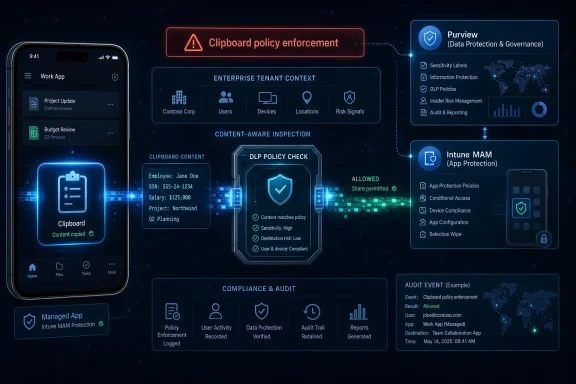
Microsoft’s roadmap entry describes a new integrated Microsoft Purview Data Loss Prevention capability for Intune Mobile Application Management-protected mobile apps. In plain English, that means the company wants clipboard activity in managed mobile apps to be checked against Purview DLP policy before sharing is allowed. The clipboard stops being treated merely as a local convenience and starts becoming a decision point in the enterprise data path.
That is a subtle but important shift. Intune Mobile Application Management already exists to protect corporate data at the app level, including on devices that may not be fully enrolled or owned by the organization. Purview DLP, meanwhile, is Microsoft’s policy engine for detecting and controlling sensitive information across Microsoft 365 and related enforcement surfaces. Roadmap item 567311 signals that Microsoft wants the two stacks to meet inside mobile app workflows, not just at the edge of the tenant, the endpoint, or the browser.
The feature is still listed as In development, so this is not a final implementation guide. The roadmap says the product is Microsoft Purview, the platform is Web, the cloud instance is Worldwide Standard Multi-Tenant, and the release rings are General Availability and Preview. That mix already tells admins something useful: Microsoft is presenting this as a Purview governance and compliance feature, not merely an Intune setting with a new coat of paint.
The practical effect, if the feature lands as described, is that a user copying content inside a managed mobile app would not simply be governed by whether the destination app is managed or unmanaged. The content itself becomes part of the decision. A low-risk snippet might move; sensitive data matching a DLP policy might be blocked, audited, or otherwise governed according to the rules Microsoft exposes when the feature ships.
That matters because clipboard controls have historically been both necessary and irritating. Security teams like them because copy and paste is one of the simplest exfiltration channels. Users hate them because the controls often feel indiscriminate: this app can paste there, that app cannot, and the policy does not always seem to understand what is being moved. Microsoft’s bet is that Purview can make the enforcement more intelligent, even if it also makes the policy stack more complex.
Roadmap pages often compress multiple release concepts into terse fields. Sometimes “Preview” reflects a ring, a tenant experience, a documentation state, or a later capability subset rather than a simple “preview first, GA later” sequence. Still, the published details matter because enterprises build change calendars around them, and the fact table gives only these dates: General Availability in September 2026 and Preview availability in November 2026.
The date inversion is more than trivia. If an IT leader reads “GA in September” and assumes the feature will be broadly usable before a November preview, they may over-promise to compliance teams. If a security architect reads “Preview in November” and ignores the September GA field, they may miss a production rollout window. The safest interpretation is that Microsoft has committed to the existence and intent of the capability, while the details of rings, tenant exposure, and administrative controls still need confirmation as the roadmap item matures.
2026-07-08T23:10:57.8991775Z — Microsoft last updated the roadmap entry at the same timestamp, leaving the initial description and rollout fields as the current public planning source.
2026-09 — General availability is scheduled for the Worldwide Standard Multi-Tenant cloud instance.
2026-11 — Preview availability is scheduled, an unusual ordering that admins should monitor for clarification.
The only responsible way to read this is with discipline. The roadmap entry is authoritative for the dates and fields it publishes, but not a substitute for documentation that explains policy configuration, licensing, tenant prerequisites, supported apps, telemetry, exceptions, or user prompts. Those details are where mobile DLP projects succeed or fail.
That model is powerful because it does not require every device to be fully managed. In bring-your-own-device environments, app-level policy is often the compromise that keeps personal phones usable while still giving the business a defensible control over corporate data. The device can remain personal; the work identity and work app context become the managed boundary.
But app-boundary enforcement has always had a blind spot: it can know where data is moving more easily than it knows whether the data is sensitive. A copy operation from a managed email app into a managed document app may be acceptable most of the time. A copy operation containing customer records, credentials, regulated health information, merger details, or legal strategy may deserve a different decision. That is the gap Purview is meant to close.
Microsoft’s source description says the new integration will enable organizations to apply content-aware protection policies to sensitive data on mobile devices. That phrase is doing real work. “Content-aware” means the control is not just “managed app to managed app” or “managed app to unmanaged app.” It implies inspection or classification against policy, so the decision can depend on what the clipboard contains.
This is where Purview’s role becomes central. Purview DLP policies are designed around identifying sensitive information and taking policy actions. On the desktop and browser side, Microsoft already documents clipboard-related DLP concepts such as copy-to-clipboard and paste-related detection in supported contexts. Roadmap item 567311 appears to extend that policy logic into the mobile MAM world, where the user experience is smaller, faster, and more personal.
For compliance teams, this is appealing because it lets them express rules in terms of protected data rather than merely protected apps. For Intune admins, it may be challenging because app protection policies and DLP policies are often owned by different teams. The endpoint management team understands app assignment, device state, user groups, and app configuration. The compliance team understands sensitive information types, policy scope, incident review, and exceptions. A mobile clipboard event now sits between them.
That is why this feature should not be treated as a minor mobile enhancement. It is a governance integration. It forces organizations to decide whether their mobile app protection model is only about container boundaries or whether it is part of a broader data-security policy system.
Mobile makes the problem worse. A phone compresses work and personal life into the same device, often with the same keyboard, notification shade, browser, sharing sheet, and muscle memory. A user may move from Outlook to Teams to a notes app to a browser tab to a consumer messaging app in seconds. On a desktop, policy failure may be visible in a file transfer. On a phone, it can be a paste action into the wrong place.
Intune MAM was designed for that reality. It can protect managed apps without requiring the organization to own the device, and it can selectively wipe corporate data without deleting the user’s personal life. That bargain is one of Microsoft’s strongest enterprise mobility stories. The user keeps the phone; the organization protects the work context.
But BYOD also creates a policy paradox. The organization wants strong controls without looking like it is spying on or commandeering the user’s personal device. Content-aware clipboard DLP, if implemented cleanly, can help by focusing enforcement on sensitive work data inside managed workflows rather than attempting broad device control. If implemented clumsily, it can increase user frustration and support tickets by making routine paste operations feel unpredictable.
The difference will come down to transparency and tuning. A policy that blocks every copy operation from a managed app may be secure but unusable. A policy that allows everything between managed apps may be usable but blind. A content-aware policy can be better than both, but only if the organization’s DLP definitions are mature enough to distinguish genuine risk from ordinary work.
That maturity is not automatic. Many enterprises have DLP policies that are either too noisy or too timid. They may detect common regulated data but miss business-specific secrets. They may fire on false positives because of weak thresholds or poorly scoped rules. They may be deployed in audit mode on one workload and block mode on another without a coherent user story. Extending those policies to mobile clipboard actions will expose those weaknesses quickly.
The mobile clipboard is unforgiving because it sits in the flow of work. A bad email DLP policy may delay a message. A bad endpoint rule may generate an alert. A bad mobile clipboard policy interrupts the user at the exact second they are trying to complete a task, often on a small screen, often under time pressure. That is where security controls either earn trust or get routed around.
Collection policies, in this context, point toward governance over how sensitive data is handled inside the mobile app workflow. The source material does not provide detailed configuration behavior, so admins should not infer more than Microsoft has said. Still, the inclusion of collection policies suggests this is not merely a one-off clipboard block. Microsoft is positioning the capability as part of a broader Purview-managed data handling model.
That framing aligns with the direction of Microsoft’s security stack. Purview is not just a DLP product name; it is Microsoft’s umbrella for data security, compliance, governance, and risk-oriented controls. Intune is not just a device-management product; it is increasingly the policy distribution and enforcement companion for identity-aware, app-aware, and endpoint-aware security decisions. The integration point is the data itself.
That is the strategic significance of roadmap item 567311. Microsoft is trying to reduce the number of places where admins must define “sensitive” separately. If a DLP policy already defines what data should not leave a trusted boundary, Microsoft wants that logic to apply wherever the user works: in cloud services, browsers, endpoints, and now MAM-protected mobile apps.
This is also where enterprises should be cautious. Unified policy sounds elegant in vendor diagrams, but real tenants are messy. A global DLP policy may make sense for email and documents but be too strict for field workers using mobile apps. A mobile workflow may require short-lived sharing patterns that desktop users do not need. A VIP group may need stronger protections than a general workforce group. A support team may need override workflows that are inappropriate for finance or legal.
The roadmap does not specify supported actions, exception handling, policy tip behavior, logging destinations, app coverage, latency, offline behavior, or conflict resolution between Intune app protection settings and Purview DLP decisions. Those are not minor footnotes. They determine whether the feature can be deployed broadly or only piloted in carefully controlled groups.
This is why the “In development” status matters. Microsoft has published the direction, not the full contract. Security architects should prepare their policy model now, but they should avoid writing internal standards that assume controls Microsoft has not yet documented.
Clipboard governance touches all three. A salesperson pasting customer data into a personal note app may be leakage. An employee copying confidential planning material into a private channel may be insider risk. A compromised account using mobile access to harvest sensitive snippets may be part of a broader threat campaign. The clipboard is not the whole attack path, but it is a convenient bridge between protected and unprotected contexts.
The larger enterprise risk, however, is policy fragmentation. Many organizations already have separate controls for email DLP, endpoint DLP, mobile app protection, browser controls, cloud app governance, sensitivity labels, insider risk alerts, and conditional access. Each control may be rational on its own. Together, they can become an incoherent maze.
A user can be blocked from pasting in one app, warned in another, audited silently in a third, and allowed in a fourth. An admin may not know whether a block came from Intune, Purview, Edge, a device compliance condition, an app configuration setting, or a third-party mobile threat defense integration. Help desks then translate policy ambiguity into folklore: “try reinstalling the app,” “use the web version,” “send it to yourself,” or “that’s just how managed apps work.”
A Purview-Intune clipboard integration can reduce fragmentation if it centralizes sensitive-data decisions. It can increase fragmentation if it adds another overlapping enforcement layer without clear precedence and telemetry. The difference will depend on Microsoft’s implementation and the customer’s governance discipline.
Admins should therefore treat this roadmap item as a trigger to review ownership. Who owns mobile app protection policies? Who owns Purview DLP policy definitions? Who approves exceptions? Who reviews incidents? Who writes user-facing explanations? Who tests app behavior before production rollout? If the answer is “different teams, informally,” the feature will find the seams.
This is especially important because mobile workflows often involve executive users, frontline workers, contractors, and personal devices. These are politically sensitive populations. A heavy-handed clipboard rollout can become a user-relations problem. A weak rollout can become a compliance failure. A well-governed rollout requires coordination before the first tenant toggle appears.
The roadmap entry is enough to justify preparation. It is not enough to justify production design. Organizations that already use Intune MAM and Purview DLP should begin by comparing their mobile data-transfer assumptions against their sensitive-data policies. If those policies are weak, noisy, or inconsistently scoped, mobile clipboard enforcement will not magically fix them.
The first readiness question is whether the organization actually knows which mobile apps are MAM-protected. Many tenants accumulate app protection policies over years. Some target broad user groups; others target specific apps; some are exceptions created during an urgent rollout and never revisited. Before content-aware DLP enters the picture, the app boundary itself has to be understood.
The second question is whether Purview DLP policies are ready for real-time user interruption. A policy that works in audit mode for reporting may not be ready to block clipboard actions. False positives that are tolerable in a dashboard become expensive when they stop a user from completing a task. Before enforcing sensitive mobile clipboard decisions, admins should test the underlying detection logic with realistic content.
The third question is whether user communication is honest. “Your organization’s data cannot be pasted here” is clear but not educational. Users need to know which data is protected, why the rule exists, and what approved workflow they should use instead. Otherwise, they will search for workarounds, and some of those workarounds will be worse than the original risk.
Intune MAM fits that world because it protects the app and identity context. Purview DLP fits that world because it classifies and governs the data. Combining them is Microsoft’s attempt to make policy follow the thing that matters most: sensitive business information in motion.
That is strategically coherent. It also raises the expectations on Microsoft. If Purview policy can affect mobile clipboard behavior, admins will expect high-quality telemetry. They will want to know what was attempted, which policy matched, what action was taken, whether the user was notified, and how the event fits into insider-risk or security operations workflows. They will expect consistency with other Purview DLP enforcement points, even when mobile operating systems and app SDK realities make perfect consistency difficult.
They will also expect clarity about limitations. Mobile platforms impose constraints. Apps vary in how deeply they integrate with management frameworks. Clipboard behavior can differ by app, identity context, operating system behavior, and user action. The roadmap’s description is promising, but administrators should wait for Microsoft’s detailed documentation before assuming universal coverage across every managed mobile app scenario.
The wording “MAM-protected mobile apps” is important. It does not say every mobile app. It does not say every device. It does not say every clipboard operation in the operating system. It says managed mobile apps protected through Intune Mobile Application Management. That boundary should shape expectations.
This is not a criticism; it is the architecture. Microsoft is not trying to own the user’s entire personal phone. It is trying to govern corporate data inside managed app workflows. That is the right enterprise mobility bargain, but it depends on precise scoping and clear admin communication.
For immature tenants, it may be uncomfortable news. If Purview DLP policies are a tangle of old tests, broad templates, and unreviewed exceptions, extending them to mobile clipboard workflows could turn hidden policy debt into visible user pain. If Intune MAM policies are inconsistently targeted, content-aware enforcement may appear arbitrary. If support teams cannot identify which policy caused a block, users will lose confidence quickly.
The right move is to start with mapping, not enforcement. Map sensitive data classes to mobile workflows. Map mobile apps to managed identities and user groups. Map DLP policy intent to actual business outcomes. Decide which actions should be audited first and which risks justify blocking. Then wait for Microsoft’s implementation details and validate them against the tenant’s reality.
This is also a moment for security leaders to revisit the language they use with the business. “DLP” often sounds like a back-office compliance acronym. “Clipboard protection” sounds like a petty restriction. The real story is data handling: whether sensitive business information can move safely through the tools employees actually use. That framing makes it easier to have adult conversations about tradeoffs.
The feature’s value will not be measured by how many paste actions it blocks. It will be measured by whether it reduces risky movement without teaching users to evade controls. The best DLP outcome is not a wall of alerts. It is fewer dangerous paths, better user choices, and cleaner evidence when something does go wrong.
Microsoft has not published enough detail yet for admins to design the final deployment, but it has published enough to make the direction unmistakable: Purview is becoming the data-policy brain, and Intune MAM is becoming one of its mobile enforcement hands. Between now and the scheduled 2026 rollout windows, the smartest organizations will not wait for the toggle; they will clean up the policies, app scopes, and ownership models that determine whether content-aware mobile DLP becomes a quiet safety net or the next source of help-desk noise.
 Microsoft Is Turning the Mobile Clipboard Into a Policy Enforcement Point
Microsoft’s roadmap entry describes a new integrated Microsoft Purview Data Loss Prevention capability for Intune Mobile Application Management-protected mobile apps. In plain English, that means the company wants clipboard activity in managed mobile apps to be checked against Purview DLP policy before sharing is allowed. The clipboard stops being treated merely as a local convenience and starts becoming a decision point in the enterprise data path.That is a subtle but important shift. Intune Mobile Application Management already exists to protect corporate data at the app level, including on devices that may not be fully enrolled or owned by the organization. Purview DLP, meanwhile, is Microsoft’s policy engine for detecting and controlling sensitive information across Microsoft 365 and related enforcement surfaces. Roadmap item 567311 signals that Microsoft wants the two stacks to meet inside mobile app workflows, not just at the edge of the tenant, the endpoint, or the browser.
The feature is still listed as In development, so this is not a final implementation guide. The roadmap says the product is Microsoft Purview, the platform is Web, the cloud instance is Worldwide Standard Multi-Tenant, and the release rings are General Availability and Preview. That mix already tells admins something useful: Microsoft is presenting this as a Purview governance and compliance feature, not merely an Intune setting with a new coat of paint.
The practical effect, if the feature lands as described, is that a user copying content inside a managed mobile app would not simply be governed by whether the destination app is managed or unmanaged. The content itself becomes part of the decision. A low-risk snippet might move; sensitive data matching a DLP policy might be blocked, audited, or otherwise governed according to the rules Microsoft exposes when the feature ships.
That matters because clipboard controls have historically been both necessary and irritating. Security teams like them because copy and paste is one of the simplest exfiltration channels. Users hate them because the controls often feel indiscriminate: this app can paste there, that app cannot, and the policy does not always seem to understand what is being moved. Microsoft’s bet is that Purview can make the enforcement more intelligent, even if it also makes the policy stack more complex.
The Roadmap Dates Create an Awkward Signal, Not a Deployment Plan
The roadmap entry was created and last updated at the same timestamp: 2026-07-08T23:10:57.8991775Z. Microsoft lists General Availability for 2026-09 and Preview for 2026-11. That ordering is unusual enough that administrators should treat the roadmap as a planning signal, not as a final rollout calendar carved into stone.Roadmap pages often compress multiple release concepts into terse fields. Sometimes “Preview” reflects a ring, a tenant experience, a documentation state, or a later capability subset rather than a simple “preview first, GA later” sequence. Still, the published details matter because enterprises build change calendars around them, and the fact table gives only these dates: General Availability in September 2026 and Preview availability in November 2026.
| Roadmap field | Published value | Planning implication |
|---|---|---|
| Roadmap ID | 567311 | Track this item directly for schedule and wording changes. |
| Status | In development | Do not treat behavior or admin UX as final. |
| Product | Microsoft Purview | Expect policy design to live in the data-security/compliance model. |
| Platform | Web | The management surface is presented as web-based, despite the mobile workflow impact. |
| General availability | 2026-09 | Begin tenant readiness before September 2026 if mobile DLP matters. |
| Preview availability | 2026-11 | Watch for Microsoft clarifying how preview relates to GA. |
Timeline
2026-07-08T23:10:57.8991775Z — Microsoft created roadmap item 567311 for Purview Data Loss Prevention collection and DLP policies for Intune-policy managed apps.2026-07-08T23:10:57.8991775Z — Microsoft last updated the roadmap entry at the same timestamp, leaving the initial description and rollout fields as the current public planning source.
2026-09 — General availability is scheduled for the Worldwide Standard Multi-Tenant cloud instance.
2026-11 — Preview availability is scheduled, an unusual ordering that admins should monitor for clarification.
The only responsible way to read this is with discipline. The roadmap entry is authoritative for the dates and fields it publishes, but not a substitute for documentation that explains policy configuration, licensing, tenant prerequisites, supported apps, telemetry, exceptions, or user prompts. Those details are where mobile DLP projects succeed or fail.
Purview Gives Intune MAM the Missing Question: What Is the User Copying?
The existing Intune MAM model is app-centric. It protects company data inside apps that are managed by policy, and it can restrict data movement between protected and unprotected contexts. Microsoft’s own Intune documentation frames app protection policies as a way to protect company data at the app level, including by controlling sharing between apps, blocking saves to personal locations, and applying clipboard-related restrictions in work contexts.That model is powerful because it does not require every device to be fully managed. In bring-your-own-device environments, app-level policy is often the compromise that keeps personal phones usable while still giving the business a defensible control over corporate data. The device can remain personal; the work identity and work app context become the managed boundary.
But app-boundary enforcement has always had a blind spot: it can know where data is moving more easily than it knows whether the data is sensitive. A copy operation from a managed email app into a managed document app may be acceptable most of the time. A copy operation containing customer records, credentials, regulated health information, merger details, or legal strategy may deserve a different decision. That is the gap Purview is meant to close.
Microsoft’s source description says the new integration will enable organizations to apply content-aware protection policies to sensitive data on mobile devices. That phrase is doing real work. “Content-aware” means the control is not just “managed app to managed app” or “managed app to unmanaged app.” It implies inspection or classification against policy, so the decision can depend on what the clipboard contains.
This is where Purview’s role becomes central. Purview DLP policies are designed around identifying sensitive information and taking policy actions. On the desktop and browser side, Microsoft already documents clipboard-related DLP concepts such as copy-to-clipboard and paste-related detection in supported contexts. Roadmap item 567311 appears to extend that policy logic into the mobile MAM world, where the user experience is smaller, faster, and more personal.
For compliance teams, this is appealing because it lets them express rules in terms of protected data rather than merely protected apps. For Intune admins, it may be challenging because app protection policies and DLP policies are often owned by different teams. The endpoint management team understands app assignment, device state, user groups, and app configuration. The compliance team understands sensitive information types, policy scope, incident review, and exceptions. A mobile clipboard event now sits between them.
That is why this feature should not be treated as a minor mobile enhancement. It is a governance integration. It forces organizations to decide whether their mobile app protection model is only about container boundaries or whether it is part of a broader data-security policy system.
The Clipboard Is a Small Feature With an Outsized Leak Surface
The clipboard is one of the oldest productivity features in computing, which is precisely why it remains so dangerous. Users do not think of copying a paragraph, account number, ticket note, or customer detail as “data transfer.” They think of it as work. Security tools, however, have to treat the clipboard as a data egress channel because that is exactly what it is.Mobile makes the problem worse. A phone compresses work and personal life into the same device, often with the same keyboard, notification shade, browser, sharing sheet, and muscle memory. A user may move from Outlook to Teams to a notes app to a browser tab to a consumer messaging app in seconds. On a desktop, policy failure may be visible in a file transfer. On a phone, it can be a paste action into the wrong place.
Intune MAM was designed for that reality. It can protect managed apps without requiring the organization to own the device, and it can selectively wipe corporate data without deleting the user’s personal life. That bargain is one of Microsoft’s strongest enterprise mobility stories. The user keeps the phone; the organization protects the work context.
But BYOD also creates a policy paradox. The organization wants strong controls without looking like it is spying on or commandeering the user’s personal device. Content-aware clipboard DLP, if implemented cleanly, can help by focusing enforcement on sensitive work data inside managed workflows rather than attempting broad device control. If implemented clumsily, it can increase user frustration and support tickets by making routine paste operations feel unpredictable.
The difference will come down to transparency and tuning. A policy that blocks every copy operation from a managed app may be secure but unusable. A policy that allows everything between managed apps may be usable but blind. A content-aware policy can be better than both, but only if the organization’s DLP definitions are mature enough to distinguish genuine risk from ordinary work.
That maturity is not automatic. Many enterprises have DLP policies that are either too noisy or too timid. They may detect common regulated data but miss business-specific secrets. They may fire on false positives because of weak thresholds or poorly scoped rules. They may be deployed in audit mode on one workload and block mode on another without a coherent user story. Extending those policies to mobile clipboard actions will expose those weaknesses quickly.
The mobile clipboard is unforgiving because it sits in the flow of work. A bad email DLP policy may delay a message. A bad endpoint rule may generate an alert. A bad mobile clipboard policy interrupts the user at the exact second they are trying to complete a task, often on a small screen, often under time pressure. That is where security controls either earn trust or get routed around.
Collection Policies Hint at a Broader Governance Layer
The roadmap description includes a second clause that should not be overlooked: Microsoft Purview Collection policies can be used to govern how sensitive data is being handled in mobile apps. That is less immediately intuitive than “clipboard actions are evaluated,” but it may be just as important.Collection policies, in this context, point toward governance over how sensitive data is handled inside the mobile app workflow. The source material does not provide detailed configuration behavior, so admins should not infer more than Microsoft has said. Still, the inclusion of collection policies suggests this is not merely a one-off clipboard block. Microsoft is positioning the capability as part of a broader Purview-managed data handling model.
That framing aligns with the direction of Microsoft’s security stack. Purview is not just a DLP product name; it is Microsoft’s umbrella for data security, compliance, governance, and risk-oriented controls. Intune is not just a device-management product; it is increasingly the policy distribution and enforcement companion for identity-aware, app-aware, and endpoint-aware security decisions. The integration point is the data itself.
That is the strategic significance of roadmap item 567311. Microsoft is trying to reduce the number of places where admins must define “sensitive” separately. If a DLP policy already defines what data should not leave a trusted boundary, Microsoft wants that logic to apply wherever the user works: in cloud services, browsers, endpoints, and now MAM-protected mobile apps.
This is also where enterprises should be cautious. Unified policy sounds elegant in vendor diagrams, but real tenants are messy. A global DLP policy may make sense for email and documents but be too strict for field workers using mobile apps. A mobile workflow may require short-lived sharing patterns that desktop users do not need. A VIP group may need stronger protections than a general workforce group. A support team may need override workflows that are inappropriate for finance or legal.
The roadmap does not specify supported actions, exception handling, policy tip behavior, logging destinations, app coverage, latency, offline behavior, or conflict resolution between Intune app protection settings and Purview DLP decisions. Those are not minor footnotes. They determine whether the feature can be deployed broadly or only piloted in carefully controlled groups.
This is why the “In development” status matters. Microsoft has published the direction, not the full contract. Security architects should prepare their policy model now, but they should avoid writing internal standards that assume controls Microsoft has not yet documented.
The Enterprise Risk Is Not Just Leakage; It Is Policy Fragmentation
Microsoft’s stated aim is to help reduce data leakage, insider risk, and exposure to advanced threats across mobile workflows. Those three categories are related but not identical. Data leakage is the accidental or careless movement of sensitive content. Insider risk includes malicious, negligent, or policy-violating behavior by people with legitimate access. Advanced threats may use compromised accounts, unmanaged destinations, or user workflows to move data without tripping traditional perimeter controls.Clipboard governance touches all three. A salesperson pasting customer data into a personal note app may be leakage. An employee copying confidential planning material into a private channel may be insider risk. A compromised account using mobile access to harvest sensitive snippets may be part of a broader threat campaign. The clipboard is not the whole attack path, but it is a convenient bridge between protected and unprotected contexts.
The larger enterprise risk, however, is policy fragmentation. Many organizations already have separate controls for email DLP, endpoint DLP, mobile app protection, browser controls, cloud app governance, sensitivity labels, insider risk alerts, and conditional access. Each control may be rational on its own. Together, they can become an incoherent maze.
A user can be blocked from pasting in one app, warned in another, audited silently in a third, and allowed in a fourth. An admin may not know whether a block came from Intune, Purview, Edge, a device compliance condition, an app configuration setting, or a third-party mobile threat defense integration. Help desks then translate policy ambiguity into folklore: “try reinstalling the app,” “use the web version,” “send it to yourself,” or “that’s just how managed apps work.”
A Purview-Intune clipboard integration can reduce fragmentation if it centralizes sensitive-data decisions. It can increase fragmentation if it adds another overlapping enforcement layer without clear precedence and telemetry. The difference will depend on Microsoft’s implementation and the customer’s governance discipline.
Admins should therefore treat this roadmap item as a trigger to review ownership. Who owns mobile app protection policies? Who owns Purview DLP policy definitions? Who approves exceptions? Who reviews incidents? Who writes user-facing explanations? Who tests app behavior before production rollout? If the answer is “different teams, informally,” the feature will find the seams.
This is especially important because mobile workflows often involve executive users, frontline workers, contractors, and personal devices. These are politically sensitive populations. A heavy-handed clipboard rollout can become a user-relations problem. A weak rollout can become a compliance failure. A well-governed rollout requires coordination before the first tenant toggle appears.
The Odd Release Ring Order Should Push Admins Toward Readiness, Not Panic
The most tempting reaction to a September 2026 General Availability field and a November 2026 Preview field is to speculate about Microsoft’s internal rollout mechanics. That is not useful. The more practical reaction is to build a readiness plan that does not depend on the exact order being resolved today.The roadmap entry is enough to justify preparation. It is not enough to justify production design. Organizations that already use Intune MAM and Purview DLP should begin by comparing their mobile data-transfer assumptions against their sensitive-data policies. If those policies are weak, noisy, or inconsistently scoped, mobile clipboard enforcement will not magically fix them.
The first readiness question is whether the organization actually knows which mobile apps are MAM-protected. Many tenants accumulate app protection policies over years. Some target broad user groups; others target specific apps; some are exceptions created during an urgent rollout and never revisited. Before content-aware DLP enters the picture, the app boundary itself has to be understood.
The second question is whether Purview DLP policies are ready for real-time user interruption. A policy that works in audit mode for reporting may not be ready to block clipboard actions. False positives that are tolerable in a dashboard become expensive when they stop a user from completing a task. Before enforcing sensitive mobile clipboard decisions, admins should test the underlying detection logic with realistic content.
The third question is whether user communication is honest. “Your organization’s data cannot be pasted here” is clear but not educational. Users need to know which data is protected, why the rule exists, and what approved workflow they should use instead. Otherwise, they will search for workarounds, and some of those workarounds will be worse than the original risk.
Action checklist for admins
- Inventory current Intune MAM-protected mobile apps and the user groups targeted by app protection policies.
- Review Purview DLP policies that could apply to sensitive data in mobile workflows, especially policies likely to affect clipboard actions.
- Identify high-risk mobile workflows where users commonly copy customer, financial, legal, security, or regulated data.
- Pilot policy behavior with realistic test content before moving any clipboard-related control into broad enforcement.
- Define exception ownership between Intune admins, Purview/compliance admins, security operations, and business data owners.
- Prepare user-facing guidance that explains approved alternatives when a paste action is blocked.
Microsoft’s Bigger Bet Is That Data Security Must Follow the Work Identity
There is a product strategy hiding inside this roadmap item. Microsoft increasingly wants the work identity to carry data-security policy across contexts. The same user may be on a managed laptop in the morning, a personal phone at lunch, a browser session on an unmanaged device in the afternoon, and a mobile app at night. The old assumption that security could be anchored primarily to the corporate network or corporate device is long dead.Intune MAM fits that world because it protects the app and identity context. Purview DLP fits that world because it classifies and governs the data. Combining them is Microsoft’s attempt to make policy follow the thing that matters most: sensitive business information in motion.
That is strategically coherent. It also raises the expectations on Microsoft. If Purview policy can affect mobile clipboard behavior, admins will expect high-quality telemetry. They will want to know what was attempted, which policy matched, what action was taken, whether the user was notified, and how the event fits into insider-risk or security operations workflows. They will expect consistency with other Purview DLP enforcement points, even when mobile operating systems and app SDK realities make perfect consistency difficult.
They will also expect clarity about limitations. Mobile platforms impose constraints. Apps vary in how deeply they integrate with management frameworks. Clipboard behavior can differ by app, identity context, operating system behavior, and user action. The roadmap’s description is promising, but administrators should wait for Microsoft’s detailed documentation before assuming universal coverage across every managed mobile app scenario.
The wording “MAM-protected mobile apps” is important. It does not say every mobile app. It does not say every device. It does not say every clipboard operation in the operating system. It says managed mobile apps protected through Intune Mobile Application Management. That boundary should shape expectations.
This is not a criticism; it is the architecture. Microsoft is not trying to own the user’s entire personal phone. It is trying to govern corporate data inside managed app workflows. That is the right enterprise mobility bargain, but it depends on precise scoping and clear admin communication.
The Mobile DLP Era Will Reward Tenants That Already Cleaned Up Their Policies
For mature Microsoft 365 tenants, roadmap item 567311 is good news. It promises a more coherent way to bring mobile app behavior under the same data-security logic already used elsewhere. It gives compliance teams a stronger answer when auditors ask how sensitive data is protected on mobile devices. It gives security teams another control against casual leakage and intentional misuse.For immature tenants, it may be uncomfortable news. If Purview DLP policies are a tangle of old tests, broad templates, and unreviewed exceptions, extending them to mobile clipboard workflows could turn hidden policy debt into visible user pain. If Intune MAM policies are inconsistently targeted, content-aware enforcement may appear arbitrary. If support teams cannot identify which policy caused a block, users will lose confidence quickly.
The right move is to start with mapping, not enforcement. Map sensitive data classes to mobile workflows. Map mobile apps to managed identities and user groups. Map DLP policy intent to actual business outcomes. Decide which actions should be audited first and which risks justify blocking. Then wait for Microsoft’s implementation details and validate them against the tenant’s reality.
This is also a moment for security leaders to revisit the language they use with the business. “DLP” often sounds like a back-office compliance acronym. “Clipboard protection” sounds like a petty restriction. The real story is data handling: whether sensitive business information can move safely through the tools employees actually use. That framing makes it easier to have adult conversations about tradeoffs.
The feature’s value will not be measured by how many paste actions it blocks. It will be measured by whether it reduces risky movement without teaching users to evade controls. The best DLP outcome is not a wall of alerts. It is fewer dangerous paths, better user choices, and cleaner evidence when something does go wrong.
What This Roadmap Item Really Changes for WindowsForum Readers
Roadmap item 567311 is small enough to be missed in a weekly Microsoft 365 admin digest, but it belongs in the same conversation as browser DLP, endpoint DLP, and app protection policy modernization. Microsoft is closing the gap between “this app is managed” and “this data is sensitive.” That is the difference between container-era mobility and data-aware mobility.- Microsoft Purview DLP is being introduced for Intune MAM-protected mobile apps under roadmap ID 567311.
- The feature is designed to evaluate clipboard actions in managed mobile apps against Purview DLP policies before sharing is allowed.
- Microsoft says Purview Collection policies can govern how sensitive data is handled in mobile apps.
- The roadmap status is In development, with Worldwide Standard Multi-Tenant listed as the cloud instance.
- General availability is scheduled for 2026-09, while Preview availability is scheduled for 2026-11, an ordering admins should monitor.
- The most important preparation is policy hygiene: clean DLP definitions, clear MAM targeting, realistic pilots, and documented exception ownership.
Microsoft has not published enough detail yet for admins to design the final deployment, but it has published enough to make the direction unmistakable: Purview is becoming the data-policy brain, and Intune MAM is becoming one of its mobile enforcement hands. Between now and the scheduled 2026 rollout windows, the smartest organizations will not wait for the toggle; they will clean up the policies, app scopes, and ownership models that determine whether content-aware mobile DLP becomes a quiet safety net or the next source of help-desk noise.
References
- Primary source: Microsoft 365 Roadmap
Published: 2026-07-08T23:10:57.8991775Z
Loading…
www.microsoft.com - Official source: learn.microsoft.com
Loading…
learn.microsoft.com - Related coverage: video2.skills-academy.com
Loading…
video2.skills-academy.com - Official source: techcommunity.microsoft.com
Prevent data loss across your ever-expanding data estate with Microsoft Purview Data Loss Prevention | Microsoft Community Hub
Organizations today grapple with securing data across the various devices, platforms, and data sources that comprise their modern ecosystem. This challenge... techcommunity.microsoft.com
- Official source: download.microsoft.com
Loading…
download.microsoft.com - Related coverage: publications.lexmark.com
Loading…
publications.lexmark.com
- Official source: learn-attachment.microsoft.com
Loading…
learn-attachment.microsoft.com - Official source: cdn-dynmedia-1.microsoft.com
- Related coverage: epcgroup.net
Loading…
www.epcgroup.net - Related coverage: miniorange.com
Loading…
www.miniorange.com - Related coverage: explainx.ai
Loading…
explainx.ai - Related coverage: jonathanblaue.com
Loading…
jonathanblaue.com