

Choosing between Microsoft’s Media Creation Tool and Rufus is less about which utility is “better” than what kind of Windows installation you need to perform. For supported Windows 11 hardware, Microsoft’s tool remains the lowest-risk route; Rufus becomes more valuable when administrators need hardware-check workarounds, local-account options, deployment controls, or support for operating systems beyond Windows.
That distinction is central to a comparison published by H2S Media on July 13. The practical recommendation is sound, but several technical nuances matter: the Media Creation Tool can create media for another computer without pre-validating that target, Windows Setup ultimately performs the compatibility checks, and no USB-writing utility can turn unsupported hardware into a Microsoft-supported configuration.
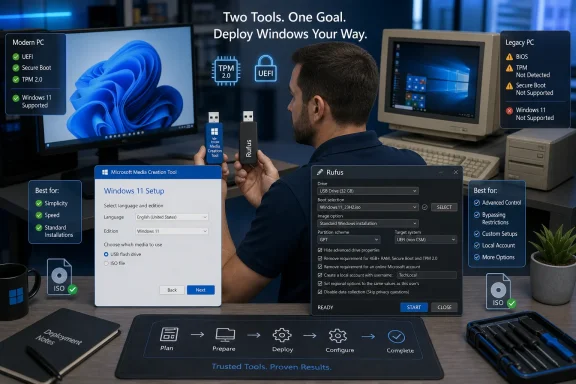
The Media Creation Tool downloads Windows directly from Microsoft and creates a bootable USB drive or ISO. Its tightly controlled wizard removes choices such as GPT versus MBR, filesystem selection, image mode, and automated setup parameters, making it difficult for an inexperienced user to produce media with the wrong configuration.
That simplicity is useful on modern PCs built for Windows 11. Microsoft specifies a compatible 64-bit processor, at least 4GB of memory, 64GB of storage, UEFI firmware with Secure Boot capability, and TPM 2.0 among the operating system’s baseline requirements. A supported machine generally needs no special treatment beyond a blank USB drive of at least 8GB and a reliable internet connection.
The tool’s direct Microsoft download path is also attractive in managed or security-conscious environments. Administrators do not have to trust a third-party ISO mirror, although that does not remove the need to control who created the drive, where it has been stored, or whether it has subsequently been modified.
Microsoft continues to provide both Windows 11 and Windows 10 media-creation paths, despite free Windows 10 support having ended on October 14, 2025. That continued availability can help with recovery and legacy workloads, but creating fresh Windows 10 media does not restore free security support to an ordinary, non-ESU installation.
There is an important distinction between creating installation media and upgrading the computer currently in use. Windows 11’s download page positions the Media Creation Tool primarily as a way to create x64 installation media, while Microsoft separately offers its installation-assistant and Windows Update paths for eligible upgrades. Setup launched from mounted or removable Microsoft media may still support an in-place installation, but administrators should not treat every Media Creation Tool workflow as interchangeable with Microsoft’s upgrade assistant.
For Windows 11 media, its defining feature is the Windows User Experience dialog displayed when writing a suitable ISO. Depending on the image and Rufus version, that dialog can offer to remove checks for TPM 2.0, Secure Boot, and minimum memory, as well as adjust out-of-box setup behavior.
Rufus does not patch Microsoft’s signed Windows binaries to produce a modified operating system. Developer Pete Batard explains in the project’s documentation that Rufus applies installation mechanisms already present in Windows Setup. Microsoft could change or remove those mechanisms in a later Windows release, so technicians should not assume today’s bypass will remain permanent.
The bypass also does not disable hardware that is present. If a computer has a working TPM and sufficient memory, selecting the compatibility option does not prevent Windows from using that TPM or restrict the machine to 4GB of RAM. It changes the installation checks rather than imposing a reduced hardware profile on the finished system.
That makes Rufus useful for an older PC blocked by a processor-list or TPM requirement, but unsupported remains unsupported. Microsoft warns that systems below the Windows 11 requirements may encounter compatibility problems, are not entitled to support, and are not guaranteed to receive updates. Unsupported installations often continue receiving monthly patches in practice, but that observed behavior is not a service commitment administrators should build into a business deployment.
The option is not quite equivalent to removing every Microsoft account check under every circumstance. Rufus documentation notes that network connectivity must still be unavailable at the relevant account-creation stage for the offline choice to appear. An Ethernet cable, automatically joined Wi-Fi network, or otherwise reachable connection can change the resulting setup flow.
Nor should technicians expect Rufus media to carry every bypass into an upgrade launched from an existing Windows desktop. The project’s documentation says its TPM and Secure Boot workarounds apply to installation checks performed after booting from the prepared media, not necessarily to checks performed by launching
This is the dividing line many quick comparisons miss. Rufus is strongest for a clean installation booted from USB. Organizations planning an in-place migration that preserves applications, profiles, and management state should use Microsoft-supported deployment methods and test the actual upgrade path rather than assuming a boot-media customization will transfer to it.
Rufus 4.14, released April 30, expanded its setup controls with a “Quality of Life” option intended to disable components including Teams, Outlook, and Copilot. It also introduced a silent Windows installation mode that could automatically install to the first detected disk without prompting—a powerful feature whose potential to erase the wrong disk warrants considerably more caution than an ordinary unattended setup checkbox.
The subsequent Rufus 4.15 release arrived on June 30. According to the project’s GitHub release notes, it fixed silent installations that could fail at roughly 75%, corrected the first Windows User Experience option being selected unexpectedly, addressed an XML parser security issue, and added other installation and UEFI fixes. Anyone using the newer automation features should therefore replace version 4.14 rather than continuing to deploy it from an old technician toolkit.
The June 2026 security update for Windows 11 versions 24H2 and 25H2 is KB5094126, producing builds 26100.8655 and 26200.8655 respectively. However, administrators should not assume that every Media Creation Tool download always contains the latest monthly cumulative update merely because that update is current on Windows Update.
Microsoft documents Dynamic Update as the process through which Windows Setup contacts Microsoft during installation and retrieves newer setup files, Safe OS components, drivers, servicing components, and cumulative updates. Consequently, a connected installation can finish much closer to the current patch level than the base image alone would suggest.
Rufus neither ages nor refreshes the ISO supplied to it. A current Rufus executable writing a six-month-old ISO still creates media containing that six-month-old base image, even if Windows Setup later retrieves some updates online. For repeatable or disconnected deployments, administrators should record the ISO edition, language, architecture, release, hash, and patch level instead of identifying media only by the Rufus version used to write it.
Rufus is the more capable option for cross-platform recovery media, custom partition schemes, offline-account preparation, repeated bench work, and Windows 11 installations on hardware Microsoft excludes. That power introduces additional responsibility: the operator must select the correct disk, understand each setup modification, and accept the servicing and compatibility uncertainty of an unsupported configuration.
Repair shops and administrators do not need to choose one utility exclusively. A practical workflow is to obtain a known Microsoft ISO, verify and archive it, and then use Rufus 4.15 or later when the deployment requires controls Microsoft’s wizard does not expose.
The decision therefore starts with the target PC, not the popularity of the tool. Use Microsoft’s path for routine supported installations; use Rufus when there is a specific technical requirement that justifies departing from it—and document that departure before the USB drive reaches another machine.
That distinction is central to a comparison published by H2S Media on July 13. The practical recommendation is sound, but several technical nuances matter: the Media Creation Tool can create media for another computer without pre-validating that target, Windows Setup ultimately performs the compatibility checks, and no USB-writing utility can turn unsupported hardware into a Microsoft-supported configuration.
 Microsoft’s Tool Minimizes the Number of Decisions
The Media Creation Tool downloads Windows directly from Microsoft and creates a bootable USB drive or ISO. Its tightly controlled wizard removes choices such as GPT versus MBR, filesystem selection, image mode, and automated setup parameters, making it difficult for an inexperienced user to produce media with the wrong configuration.That simplicity is useful on modern PCs built for Windows 11. Microsoft specifies a compatible 64-bit processor, at least 4GB of memory, 64GB of storage, UEFI firmware with Secure Boot capability, and TPM 2.0 among the operating system’s baseline requirements. A supported machine generally needs no special treatment beyond a blank USB drive of at least 8GB and a reliable internet connection.
The tool’s direct Microsoft download path is also attractive in managed or security-conscious environments. Administrators do not have to trust a third-party ISO mirror, although that does not remove the need to control who created the drive, where it has been stored, or whether it has subsequently been modified.
Microsoft continues to provide both Windows 11 and Windows 10 media-creation paths, despite free Windows 10 support having ended on October 14, 2025. That continued availability can help with recovery and legacy workloads, but creating fresh Windows 10 media does not restore free security support to an ordinary, non-ESU installation.
There is an important distinction between creating installation media and upgrading the computer currently in use. Windows 11’s download page positions the Media Creation Tool primarily as a way to create x64 installation media, while Microsoft separately offers its installation-assistant and Windows Update paths for eligible upgrades. Setup launched from mounted or removable Microsoft media may still support an in-place installation, but administrators should not treat every Media Creation Tool workflow as interchangeable with Microsoft’s upgrade assistant.
Rufus Controls What Happens After the USB Boots
Rufus starts from a different premise. It is a portable, open-source image-writing utility that supports Windows, Linux, firmware utilities, and numerous other bootable images while exposing the partitioning and boot options that Microsoft deliberately hides.For Windows 11 media, its defining feature is the Windows User Experience dialog displayed when writing a suitable ISO. Depending on the image and Rufus version, that dialog can offer to remove checks for TPM 2.0, Secure Boot, and minimum memory, as well as adjust out-of-box setup behavior.
Rufus does not patch Microsoft’s signed Windows binaries to produce a modified operating system. Developer Pete Batard explains in the project’s documentation that Rufus applies installation mechanisms already present in Windows Setup. Microsoft could change or remove those mechanisms in a later Windows release, so technicians should not assume today’s bypass will remain permanent.
The bypass also does not disable hardware that is present. If a computer has a working TPM and sufficient memory, selecting the compatibility option does not prevent Windows from using that TPM or restrict the machine to 4GB of RAM. It changes the installation checks rather than imposing a reduced hardware profile on the finished system.
That makes Rufus useful for an older PC blocked by a processor-list or TPM requirement, but unsupported remains unsupported. Microsoft warns that systems below the Windows 11 requirements may encounter compatibility problems, are not entitled to support, and are not guaranteed to receive updates. Unsupported installations often continue receiving monthly patches in practice, but that observed behavior is not a service commitment administrators should build into a business deployment.
Local Accounts Come With Conditions
Rufus can also prepare Windows media to restore an offline account path during initial setup. That capability has become increasingly relevant as Microsoft has tightened Windows 11’s network and Microsoft-account requirements.The option is not quite equivalent to removing every Microsoft account check under every circumstance. Rufus documentation notes that network connectivity must still be unavailable at the relevant account-creation stage for the offline choice to appear. An Ethernet cable, automatically joined Wi-Fi network, or otherwise reachable connection can change the resulting setup flow.
Nor should technicians expect Rufus media to carry every bypass into an upgrade launched from an existing Windows desktop. The project’s documentation says its TPM and Secure Boot workarounds apply to installation checks performed after booting from the prepared media, not necessarily to checks performed by launching
setup.exe from inside Windows.This is the dividing line many quick comparisons miss. Rufus is strongest for a clean installation booted from USB. Organizations planning an in-place migration that preserves applications, profiles, and management state should use Microsoft-supported deployment methods and test the actual upgrade path rather than assuming a boot-media customization will transfer to it.
Rufus 4.14, released April 30, expanded its setup controls with a “Quality of Life” option intended to disable components including Teams, Outlook, and Copilot. It also introduced a silent Windows installation mode that could automatically install to the first detected disk without prompting—a powerful feature whose potential to erase the wrong disk warrants considerably more caution than an ordinary unattended setup checkbox.
The subsequent Rufus 4.15 release arrived on June 30. According to the project’s GitHub release notes, it fixed silent installations that could fail at roughly 75%, corrected the first Windows User Experience option being selected unexpectedly, addressed an XML parser security issue, and added other installation and UEFI fixes. Anyone using the newer automation features should therefore replace version 4.14 rather than continuing to deploy it from an old technician toolkit.
Fresh Media Does Not Eliminate Servicing
One claimed advantage of the Media Creation Tool is that its server-side download can change even when the executable appears unchanged. That means the version shown in the tool’s file properties is not a reliable statement of the Windows image it will retrieve.The June 2026 security update for Windows 11 versions 24H2 and 25H2 is KB5094126, producing builds 26100.8655 and 26200.8655 respectively. However, administrators should not assume that every Media Creation Tool download always contains the latest monthly cumulative update merely because that update is current on Windows Update.
Microsoft documents Dynamic Update as the process through which Windows Setup contacts Microsoft during installation and retrieves newer setup files, Safe OS components, drivers, servicing components, and cumulative updates. Consequently, a connected installation can finish much closer to the current patch level than the base image alone would suggest.
Rufus neither ages nor refreshes the ISO supplied to it. A current Rufus executable writing a six-month-old ISO still creates media containing that six-month-old base image, even if Windows Setup later retrieves some updates online. For repeatable or disconnected deployments, administrators should record the ISO edition, language, architecture, release, hash, and patch level instead of identifying media only by the Rufus version used to write it.
The Best Technician Kit Uses Both
For a single supported home PC, Microsoft’s Media Creation Tool is normally the sensible default. It obtains the Windows image from Microsoft, presents few opportunities for configuration errors, and stays inside the intended hardware and support boundaries.Rufus is the more capable option for cross-platform recovery media, custom partition schemes, offline-account preparation, repeated bench work, and Windows 11 installations on hardware Microsoft excludes. That power introduces additional responsibility: the operator must select the correct disk, understand each setup modification, and accept the servicing and compatibility uncertainty of an unsupported configuration.
Repair shops and administrators do not need to choose one utility exclusively. A practical workflow is to obtain a known Microsoft ISO, verify and archive it, and then use Rufus 4.15 or later when the deployment requires controls Microsoft’s wizard does not expose.
The decision therefore starts with the target PC, not the popularity of the tool. Use Microsoft’s path for routine supported installations; use Rufus when there is a specific technical requirement that justifies departing from it—and document that departure before the USB drive reaches another machine.
References
- Primary source: H2S Media
Published: 2026-07-13T09:18:32+00:00
Loading…
www.how2shout.com